NVIDIA’s Video Search and Summarization (VSS) Blueprint delivers a production-grade reference architecture for building GPU-accelerated video search and summarization pipelines that transform how organizations process, analyze, and retrieve insights from video data. With 822+ stars and growing at 28 stars per day, this open-source blueprint combines real-time video intelligence, downstream analytics, and agentic AI workflows into a single deployable system powered by NVIDIA NIM microservices and cutting-edge vision language models.
What is NVIDIA VSS?
The NVIDIA AI Blueprint for Video Search and Summarization addresses a fundamental challenge: deploying visual agents capable of interacting with large volumes of video data, both stored and streamed. Whether you are monitoring smart spaces, automating warehouse operations, or validating standard operating procedures, VSS provides the building blocks to create vision AI agents that can search, summarize, and answer questions about video content using natural language.
The blueprint is organized into three distinct layers of processing and analysis:
- Real-time Video Intelligence – Extracts rich visual features, semantic embeddings, and contextual understanding from video streams in real-time, publishing results to a message broker for downstream consumption
- Downstream Analytics – Enriches raw metadata from the real-time layer into trajectories, incidents, and verified alerts
- Agentic and Offline Processing – Orchestrates tools for search, Q&A, summarization, and clip retrieval through the Model Context Protocol (MCP)
Key Insight: VSS is not just a video processing tool – it is a complete agent framework. The top-level agent uses LangGraph state machines to route queries across specialized sub-agents (search, report, summarization), each backed by GPU-accelerated NIM microservices. This multi-agent architecture enables complex reasoning over video content that single-model approaches cannot achieve.
Architecture Overview
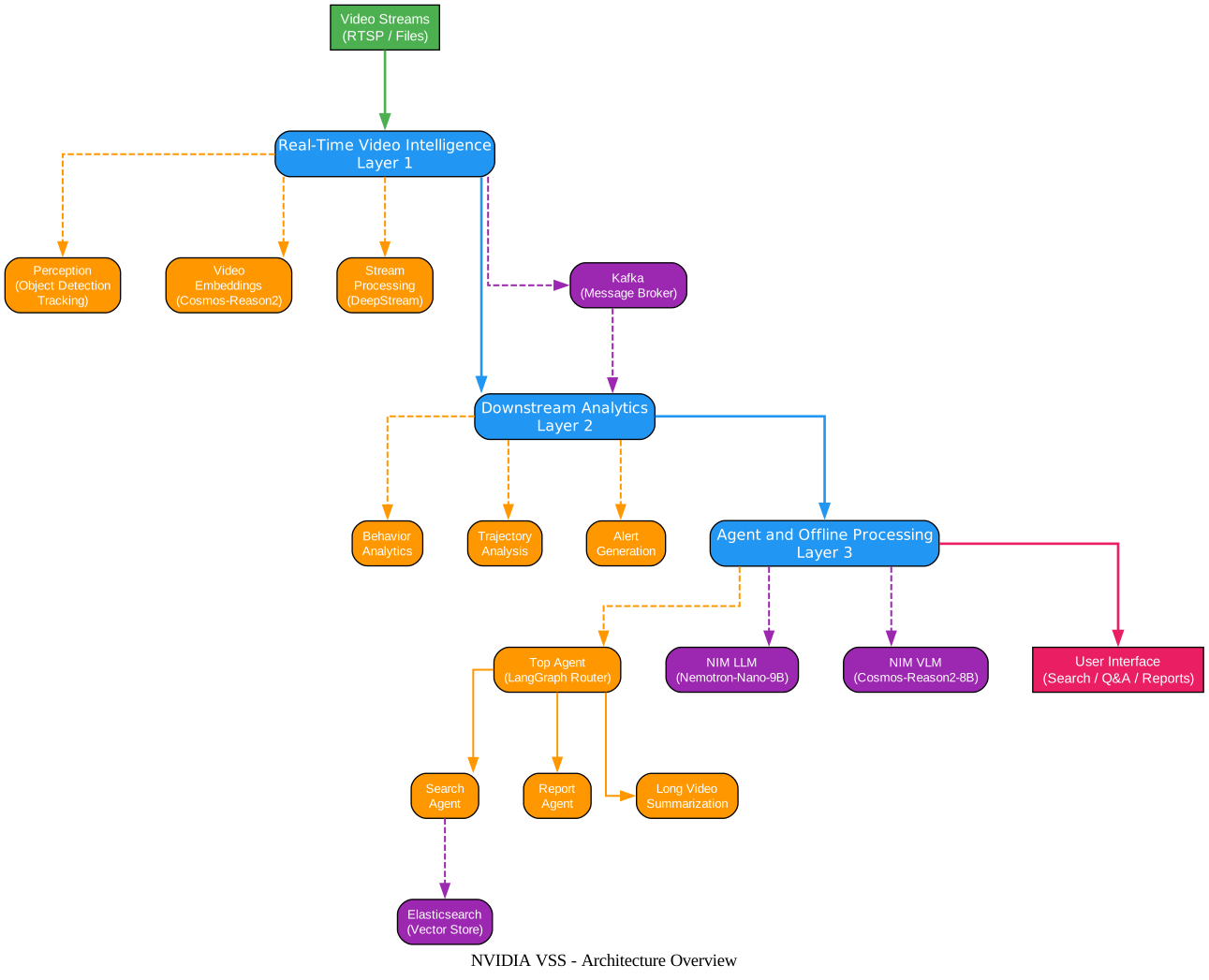
The architecture diagram above illustrates the three-layer processing model that forms the backbone of the VSS blueprint. At the top, video streams enter the system through RTSP feeds or uploaded files, flowing into the Real-Time Video Intelligence layer. This first layer is powered by NVIDIA DeepStream for perception tasks like object detection and tracking, alongside the Cosmos-Reason2-8B vision language model for semantic understanding and embedding generation.
The middle layer handles Downstream Analytics, where raw detections from the real-time layer are transformed into actionable intelligence. Behavior analytics modules identify patterns, trajectory analysis tracks object movement across frames, and alert generation creates notifications when specific conditions are met. Kafka serves as the message broker connecting these layers, ensuring reliable data flow between microservices.
The bottom layer contains the Agent and Offline Processing components, where the Top Agent – a LangGraph-based router – orchestrates specialized sub-agents for search, report generation, and long video summarization. These agents leverage NIM microservices running Nemotron-Nano-9B-v2 as the primary LLM and Cosmos-Reason2-8B as the VLM. Elasticsearch provides vector storage for semantic search, while Redis handles caching for real-time operations. The entire stack is containerized with Docker Compose for one-command deployment.
Agent Workflows
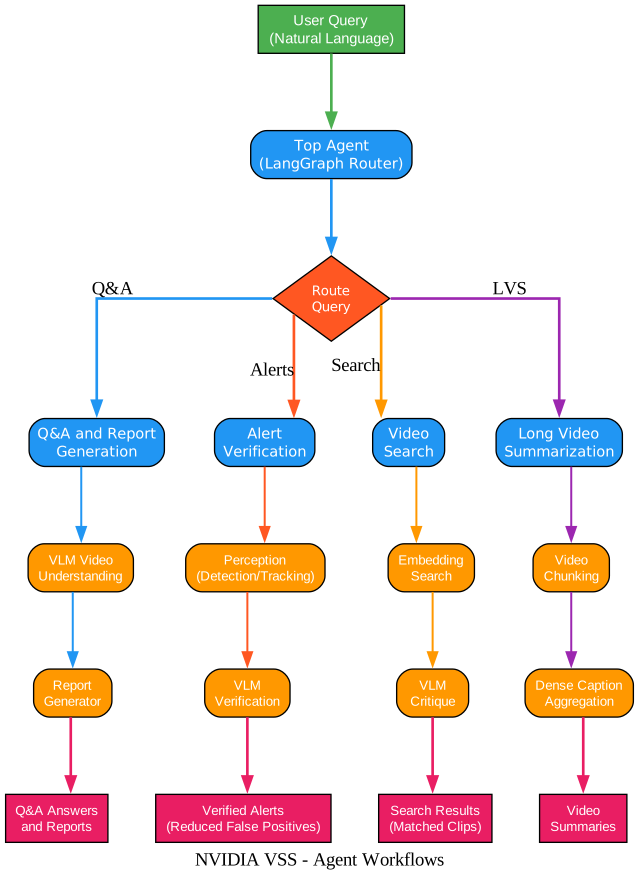
The workflows diagram above shows how the Top Agent routes natural language queries to specialized sub-agents based on the user’s intent. When a user submits a query, the Top Agent first determines whether the request requires Q&A, alert verification, video search, or long video summarization.
Q&A and Report Generation is the quickstart workflow that combines video retrieval with VLM-based question answering and structured report generation on short video clips. The VLM processes the video content directly, extracting visual information to answer user questions, while the report generator formats findings into structured documents.
Alert Verification processes real-time video streams through perception modules (object detection, tracking) and behavior analytics to generate initial alerts. These alerts are then verified by the VLM to reduce false positives – a critical capability for security and monitoring applications where accuracy matters more than raw detection volume.
Video Search enables natural language queries across video archives using multi-embedding fusion and VLM critique. Users can search for specific scenes, objects, or events using plain English, and the system returns relevant video clips ranked by semantic similarity.
Long Video Summarization handles extended video recordings through intelligent chunking and dense caption aggregation. Rather than processing an entire video at once, the system divides it into manageable segments, generates detailed captions for each, and then aggregates them into a coherent summary.
Amazing: The Top Agent supports an optional plan-then-execute mode where it first drafts a step-by-step execution plan, then follows that plan precisely. This planning capability, combined with postprocessing validators that check responses for quality, makes VSS one of the most sophisticated open-source video agent frameworks available.
Video Processing Pipeline
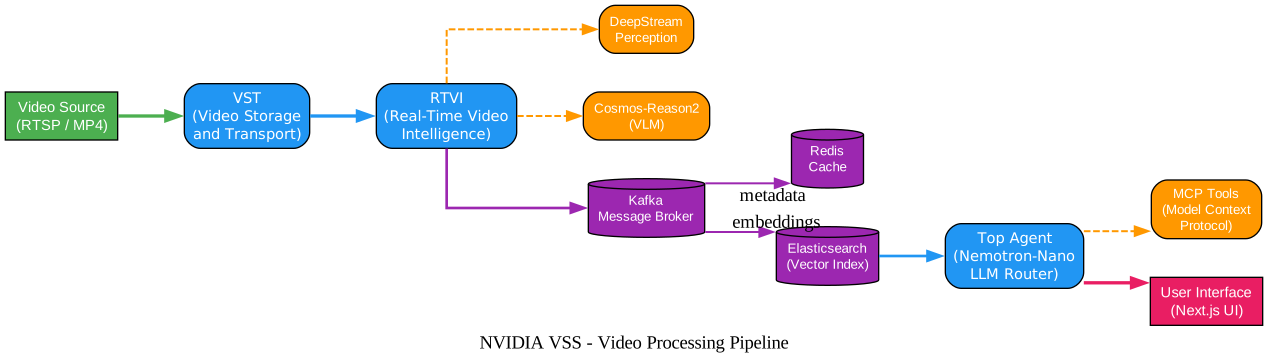
The pipeline diagram above illustrates the end-to-end data flow from video ingestion to user-facing results. The pipeline operates left-to-right, starting with video sources (RTSP streams or MP4 files) entering through the Video Storage and Transport (VST) microservice, which handles ingestion, storage, and clip extraction.
From VST, video data flows into the Real-Time Video Intelligence (RTVI) microservice, which runs two parallel processing paths. The DeepStream Perception path handles traditional computer vision tasks – object detection, classification, and tracking using GPU-accelerated inference. The Cosmos-Reason2 VLM path provides semantic understanding, generating embeddings and captions that enable natural language search.
Processed data then enters the Kafka message broker, which distributes metadata to two downstream stores. Elasticsearch receives video embeddings for vector-based semantic search, while Redis caches frequently accessed metadata for low-latency retrieval. This dual-store architecture enables both fast approximate nearest neighbor search and quick metadata lookups.
The Top Agent, powered by Nemotron-Nano-9B-v2, receives user queries and routes them through MCP tools that access both the vector store and the VLM. The agent can invoke specialized tools for video understanding, search, summarization, and clip retrieval, returning results through a Next.js-based user interface.
Key Features
| Feature | Description |
|---|---|
| Real-Time Video Intelligence | GPU-accelerated perception, tracking, and VLM-based understanding on live video streams |
| Multi-Agent Architecture | LangGraph-based Top Agent routes queries to specialized sub-agents for search, reports, and summarization |
| Natural Language Search | Search video archives using plain English queries with multi-embedding fusion and VLM critique |
| Long Video Summarization | Chunk-based dense captioning and aggregation for extended video recordings |
| Alert Verification | VLM-based false positive reduction for real-time alerts from perception modules |
| NIM Microservices | Production-grade model serving with Cosmos-Reason2-8B (VLM) and Nemotron-Nano-9B-v2 (LLM) |
| MCP Integration | Model Context Protocol tools for unified agent access to video analytics, search, and retrieval |
| Docker Compose Deployment | One-command deployment with pre-configured profiles for different GPU topologies |
| Skills Framework | agentskills.io-compatible skills for deploy, search, summarization, alerts, and more |
| Next.js UI | Modern web interface for video management, search, and agent interaction |
Installation and Setup
Prerequisites
Before deploying VSS, ensure you have the following:
- NVIDIA AI Enterprise License – Required for hosting NIM microservices locally
- NVIDIA Driver – Version 580.105.08 (Ubuntu 24.04) or 580.65.06 (Ubuntu 22.04)
- NVIDIA Container Toolkit – Version 1.17.8+
- Docker – Version 27.2.0+
- Docker Compose – Version v2.29.0+
- NGC CLI – Version 4.10.0+
Obtain API Key
You need an NVIDIA API catalog key to pull model containers. Generate one from the NVIDIA API catalog or NGC.
Quickstart: Docker Compose Deployment
# Clone the repository
git clone https://github.com/NVIDIA-AI-Blueprints/video-search-and-summarization.git
cd video-search-and-summarization

# Set your NGC API key
export NGC_API_KEY="your_ngc_api_key_here"

# Deploy the base profile (Q&A and Report Generation)
cd deployments
docker compose --profile dev-profile-base up -d
Deployment Profiles
VSS offers multiple deployment profiles tailored to different use cases and GPU configurations:
# Q&A and Report Generation (base profile)
docker compose --profile dev-profile-base up -d

# Video Search (includes embedding search)
docker compose --profile dev-profile-search up -d

# Alert Verification (includes perception and VLM verification)
docker compose --profile dev-profile-alerts up -d

# Long Video Summarization
docker compose --profile dev-profile-lvs up -d
Launchable Deployment (AWS)
For users who want to skip hardware setup, VSS provides a Brev Launchable notebook:
# Use the provided notebook for AWS deployment
jupyter nbconvert --to notebook scripts/deploy_vss_launchable.ipynb
This deploys to a 2x RTX PRO 6000 SE AWS instance with all dependencies pre-configured.
Important: Each deployment profile has specific GPU requirements. The base profile requires at minimum a single L40S GPU, while the full stack with all profiles benefits from H100 or RTX PRO 6000 SE GPUs. Check the GPU requirements documentation for your specific configuration.
Repository Structure
The VSS repository is organized into clearly separated components:
| Directory | Description |
|---|---|
agent/ | Python agent with tools, sub-agents, APIs, embeddings, evaluators, and video analytics |
deployments/ | Docker Compose configs for all profiles (base, search, alerts, LVS) and NIM model configs |
scripts/ | Deployment and patch scripts, including the Brev Launchable notebook |
skills/ | agentskills.io-compatible skills for VSS workflows |
ui/ | Next.js frontend monorepo with video management and agent toolkit UI |
The agent code in agent/src/vss_agents/ follows a modular architecture:
agents/– Top Agent (LangGraph router), Search Agent, Report Agent, Multi-Report Agent, Critic Agent, and postprocessing validatorstools/– Video understanding, search, summarization, embedding search, chart generation, geolocation, incidents, and VST toolsvideo_analytics/– Elasticsearch client, embedding generation, query builders, and MCP serverapi/– FastAPI endpoints for health checks, RTSP streams, video upload, and search ingestionevaluators/– Custom QA, trajectory, and LLM judge evaluators for quality assessment
How the Top Agent Works
The Top Agent is the central orchestrator in VSS. Built on LangGraph, it implements a state machine with the following flow:
- Input Processing – Receives the user’s natural language query and conversation history
- Planning (optional) – When planning mode is enabled, the agent first drafts a step-by-step execution plan, then follows it precisely
- Tool Calling – The LLM decides which tools or sub-agents to invoke based on the query
- Execution – Tools and sub-agents execute in parallel when possible, streaming results back
- Postprocessing – Optional validators check responses for quality, format compliance, and URL validity
- Final Response – The agent assembles and returns the final answer
The agent supports conversation history with automatic summarization, so follow-up questions maintain context from previous turns. It also supports LLM reasoning mode for complex queries that benefit from chain-of-thought processing.
Skills Framework
VSS includes a comprehensive skills framework following the agentskills.io specification. Each skill is self-contained with its own SKILL.md frontmatter:
| Skill | Description |
|---|---|
alerts | Add, manage, and monitor alerts on streamed video |
deploy | Deploy, debug, or tear down VSS profiles using Docker Compose |
report | Produce video analysis reports via the /generate endpoint |
rt-vlm | Use real-time VLM microservice for captions, alerts, and completions |
video-analytics | Query video analytics data from Elasticsearch via VA-MCP server |
video-search | Search video archives using natural language and multi-embedding fusion |
video-summarization | Summarize video through chunking, dense captioning, and aggregation |
video-understanding | Answer text questions about video content using VLM |
vios | Video and stream management, recording timelines, clip extraction, snapshots |
vss-frag | Deploy the video_search_frag extension and generate summary reports |
To install skills, open the repository in your coding agent and follow the instructions in skills/README.md.
Troubleshooting
Common Issues and Solutions
| Issue | Solution |
|---|---|
| Docker Compose fails to start | Ensure NVIDIA Container Toolkit is installed (nvidia-ctk --version). Verify GPU driver version matches requirements. |
| NIM model containers fail to pull | Check your NGC API key is set correctly: echo $NGC_API_KEY. Ensure you have NVIDIA AI Enterprise license access. |
| Elasticsearch fails to start | Increase vm.max_map_count: sudo sysctl -w vm.max_map_count=262144. Add to /etc/sysctl.conf for persistence. |
| Out of GPU memory | Use a smaller model profile (e.g., nemotron-3-nano instead of nvidia-nemotron-nano-9b-v2). Check GPU memory with nvidia-smi. |
| Video upload fails | Verify VST microservice is running: docker compose ps vst. Check storage configuration in vst_config.json. |
| Agent returns empty responses | Check agent logs: docker compose logs vss-agent. Verify LLM and VLM NIM services are healthy. |
| Search returns no results | Ensure video embeddings have been generated. Check Elasticsearch index status via the Kibana dashboard. |
| RTSP stream not connecting | Verify the RTSP URL is accessible from the Docker network. Test with ffplay rtsp://your-stream-url. |
Checking Service Health
# Check all services are running
docker compose ps

# Check agent health endpoint
curl http://localhost:8080/health

# Check VST service
curl http://localhost:8200/api/v1/stream-list

# View agent logs
docker compose logs -f vss-agent
Takeaway: The VSS blueprint is designed for production deployment from the ground up. Every microservice has health endpoints, the Docker Compose configuration includes proper dependency ordering, and the agent includes built-in retry logic and error handling. This makes it straightforward to integrate into existing video analytics infrastructure.
Use Cases
Smart Space Monitoring
Deploy VSS to monitor office buildings, retail stores, or public spaces. The real-time perception pipeline detects people and objects, while behavior analytics identifies unusual patterns. Alert verification reduces false positives by having the VLM confirm whether detected events are genuine.
Warehouse Automation
Use VSS to track inventory movement, verify pick-and-place operations, and generate compliance reports. The long video summarization workflow can process hours of warehouse footage into concise operational summaries.
SOP Validation
Verify that standard operating procedures are being followed by comparing real-time video observations against expected behaviors. The Q&A workflow allows managers to ask natural language questions like “Was safety equipment worn in zone 3 between 9 AM and 11 AM?”
Video Archive Search
Enable journalists, researchers, or content creators to search large video archives using natural language queries. The multi-embedding fusion search combines visual, text, and metadata embeddings for highly relevant results.
Getting Started Resources
- Official Documentation: docs.nvidia.com/vss
- NVIDIA Build Experience: build.nvidia.com/nvidia/video-search-and-summarization
- GitHub Repository: NVIDIA-AI-Blueprints/video-search-and-summarization
- NIM Microservices: build.nvidia.com
- Cosmos-Reason2-8B Model: build.nvidia.com/nvidia/cosmos-reason2-8b
- Nemotron-Nano-9B-v2 Model: build.nvidia.com/nvidia/nvidia-nemotron-nano-9b-v2
Conclusion
NVIDIA’s Video Search and Summarization Blueprint represents a significant step forward in making GPU-accelerated video analytics accessible to developers and organizations. By combining real-time video intelligence, downstream analytics, and agentic AI workflows into a single deployable system, VSS eliminates the need to stitch together disparate tools and services. The multi-agent architecture with LangGraph orchestration, NIM microservices for model serving, and the comprehensive skills framework make it both powerful and extensible. Whether you are building smart space monitoring, warehouse automation, or video archive search, VSS provides the production-grade foundation to get started quickly and scale confidently. Enjoyed this post? Never miss out on future posts by following us 


