Introduction
Ollama is an open-source framework that makes running large language models locally as simple as a single command. With over 169K GitHub stars, it has become the de facto standard for local LLM inference across macOS, Linux, and Windows. Built primarily in Go with critical inference paths handled by C/C++ through llama.cpp, Ollama abstracts away the complexity of model quantization, GPU memory management, and hardware acceleration – tasks that traditionally required deep expertise in ML systems engineering.
The core problem Ollama solves is straightforward: downloading, configuring, and running an LLM on consumer hardware involves navigating quantization formats, GPU driver compatibility, memory mapping, and inference engine compilation. Ollama packages all of this into a single binary that auto-detects available GPUs, manages model lifecycle, and exposes a clean REST API on port 11434. The result is that running a model like Llama 3, Gemma 2, or DeepSeek-R1 locally requires just two commands: ollama pull llama3 and ollama run llama3.
Beyond the CLI, Ollama provides an OpenAI-compatible API layer, making it a drop-in replacement for cloud-based inference services. This compatibility has fueled adoption across the developer ecosystem – tools like Claude Code, OpenAI Codex CLI, and GitHub Copilot CLI can all route requests through Ollama for fully local workflows. The project supports 30+ model architectures and ships with GPU acceleration for NVIDIA CUDA, AMD ROCm, and Apple Metal out of the box.
Architecture Overview
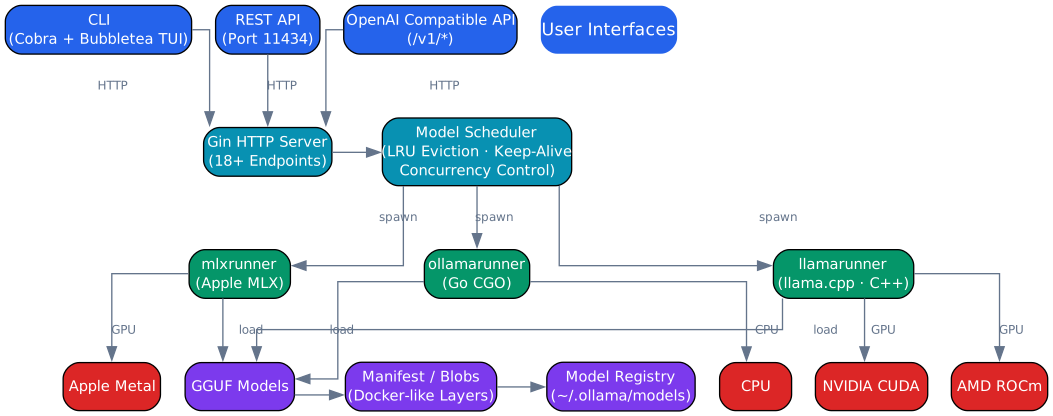
The architecture of Ollama follows a layered design that cleanly separates user-facing interfaces from inference execution and hardware management. At the top, three primary interfaces provide access to the system: the CLI (used for interactive chat and model management), the REST API (serving programmatic access on port 11434), and the OpenAI-compatible endpoint layer (enabling drop-in replacement for cloud APIs at /v1/chat/completions, /v1/completions, /v1/embeddings, and /v1/models).
The middle layer houses the Gin HTTP server and the model scheduler – two components that form the operational core of Ollama. The Gin server handles all incoming HTTP requests, routing them to the appropriate handlers for model operations, chat completions, and embedding generation. When the CLI is invoked, it first checks whether the server is already running; if not, it automatically starts the server process in the background. This auto-start behavior means users never need to manually manage the server lifecycle.
The model scheduler is responsible for deciding which models are loaded into GPU memory, when to evict models, and how to allocate VRAM across concurrent requests. It maintains a queue of loaded models and tracks their usage timestamps for LRU (Least Recently Used) eviction. When a new model is requested and there is insufficient VRAM, the scheduler evicts the least recently used model to free space. By default, Ollama allows up to 3 models to be loaded simultaneously per GPU, though this is configurable.
Below the scheduler, runner subprocesses handle the actual inference work. Ollama uses two runner backends: llamarunner (a C-based wrapper around llama.cpp) and ollamarunner (a Go-based runner using CGO to interface with llama.cpp). Each loaded model gets its own runner process, providing isolation and enabling the scheduler to manage them independently. The runners communicate with the server via IPC (inter-process communication), sending back generated tokens as they are produced for streaming responses.
At the bottom of the stack, the GGUF storage layer and hardware abstraction handle persistence and acceleration. Models are stored on disk in GGUF format under ~/.ollama/models/blobs/, using a content-addressable blob storage system. The hardware abstraction layer detects available GPUs at startup and selects the appropriate backend – CUDA for NVIDIA, ROCm for AMD, or Metal for Apple Silicon. CPU fallback is always available if no compatible GPU is detected.
Model Loading Pipeline
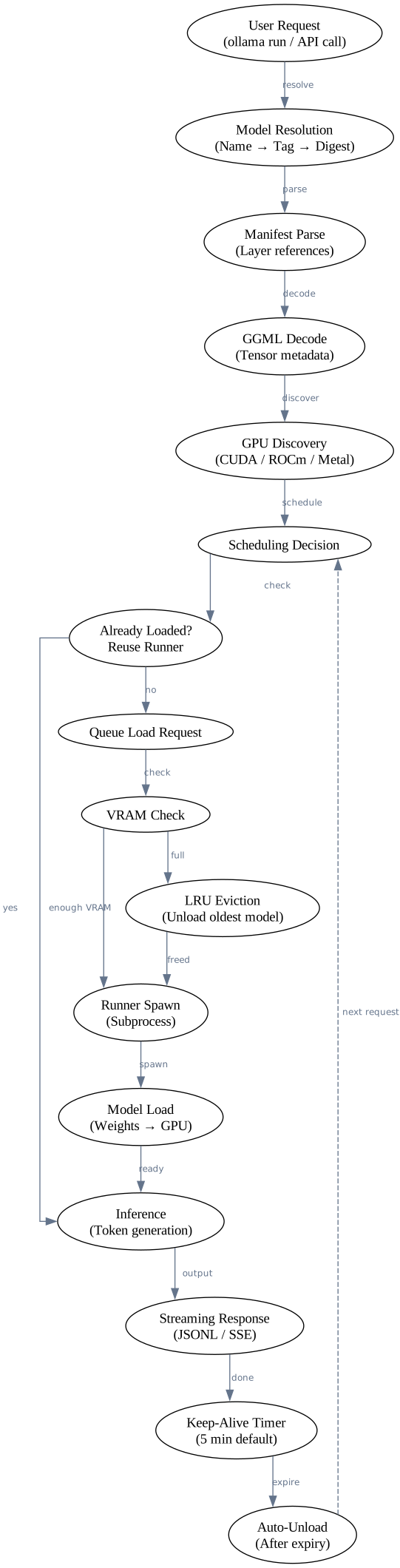
The model loading pipeline in Ollama is a carefully orchestrated sequence that handles everything from initial request to inference and eventual unload. When a user issues a command like ollama run llama3, the request first passes through model resolution – Ollama checks whether the model exists locally, and if not, pulls it from the model registry. The registry stores models as manifests that reference multiple layers (model weights, projector weights for vision models, adapter weights for fine-tuned models, template definitions, parameter overrides, system prompts, and license information).
Once the model is resolved locally, the manifest is parsed to identify the required layers and their corresponding blob files. The GGML decoder then reads the GGUF container format, which organizes model data into two sections: a key-value metadata store (containing architecture type, vocabulary size, context length, and other hyperparameters) and a series of tensor data blocks (the actual weight matrices). This separation allows Ollama to quickly inspect model metadata without loading the full weights into memory.
GPU discovery runs at server startup and is refreshed periodically. Ollama queries the system for available GPUs using platform-specific APIs – NVML for CUDA, amdgpu driver interfaces for ROCm, and Metal framework calls for Apple Silicon. The discovered GPU capabilities (total VRAM, compute units, memory bandwidth) are stored and used by the scheduler to make loading decisions.
When the scheduler receives a load request, it first checks whether the requested model is already loaded. If it is, the request is routed directly to the existing runner. If not, the scheduler performs a VRAM check: it estimates the memory required for the model (based on GGUF metadata) and compares it against available VRAM. If there is insufficient memory, the scheduler triggers LRU eviction – the least recently used model’s runner process is terminated, freeing its GPU memory allocation. Multiple models may be evicted until enough space is available.
After space is secured, the scheduler spawns a new runner subprocess. The runner loads the GGUF file, maps tensors to GPU memory using the appropriate backend (CUDA, ROCm, or Metal), and initializes the inference context. Once loading is complete, the runner signals readiness back to the server, and inference begins. Generated tokens are streamed back to the client via server-sent events (SSE), enabling real-time token-by-token output in the CLI and API responses.
After inference completes, the model is not immediately unloaded. Ollama implements a keep-alive mechanism: models remain loaded for a configurable duration (default: 5 minutes) after their last request. If another request arrives for the same model within this window, the keep-alive timer is reset, avoiding the cost of reloading. When the timer expires, the runner process is terminated and GPU memory is released. This design balances responsiveness with resource efficiency – frequently used models stay warm, while idle models are automatically cleaned up.
API and Integration Ecosystem
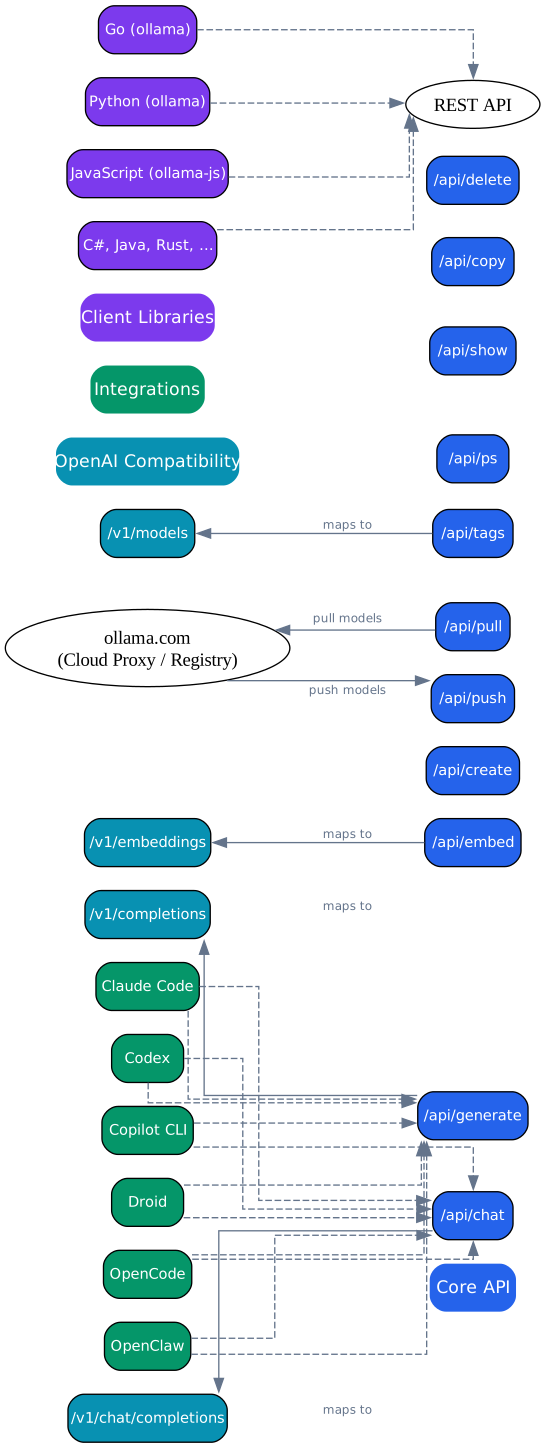
Ollama’s API layer is designed for maximum compatibility and ease of integration. The native REST API runs on port 11434 and exposes endpoints for every operation the CLI supports: /api/generate for text generation, /api/chat for conversational completions, /api/embeddings for vector embeddings, /api/pull for model downloads, /api/push for model uploads, and /api/tags for listing available models. All endpoints accept and return JSON, making them straightforward to consume from any programming language.
The OpenAI compatibility layer maps Ollama’s capabilities to the standard OpenAI API format. The key endpoints are /v1/chat/completions (for chat models), /v1/completions (for text completion), /v1/embeddings (for embedding generation), and /v1/models (for model listing). This compatibility means any application already configured to use OpenAI’s API can switch to Ollama by simply changing the base URL – no code changes required. The base_url parameter in most OpenAI client libraries makes this a one-line configuration change.
The integration ecosystem around Ollama has grown rapidly. Developer tools like Claude Code, OpenAI Codex CLI, and GitHub Copilot CLI can all route their LLM requests through Ollama for fully local, privacy-preserving workflows. Web applications connect through the REST API or OpenAI-compatible endpoints. Client libraries are available for Python (ollama package on PyPI), JavaScript/TypeScript (ollama and ollama-js on npm), and other languages. For teams that need cloud fallback, Ollama can proxy requests to remote inference providers when a model is not available locally.
Here is an example of using the Ollama API with curl:
# Generate a response using the native API
curl http://localhost:11434/api/generate -d '{
  "model": "llama3",
  "prompt": "Explain quantum computing in one paragraph"
}'

# Chat completion using the OpenAI-compatible endpoint
curl http://localhost:11434/v1/chat/completions -H "Content-Type: application/json" -d '{
  "model": "llama3",
  "messages": [
    {"role": "system", "content": "You are a helpful assistant."},
    {"role": "user", "content": "What is GGUF format?"}
  ]
}'
Using the Python client library:
from ollama import Client

client = Client(host="http://localhost:11434")

# Chat completion
response = client.chat(
    model="llama3",
    messages=[
        {"role": "system", "content": "You are a technical writer."},
        {"role": "user", "content": "Explain Ollama's model scheduler."},
    ],
)

print(response["message"]["content"])

# Generate embeddings
embedding = client.embeddings(
    model="nomic-embed-text",
    prompt="What is Ollama?",
)

print(embedding["embedding"][:10])  # First 10 dimensions
Using the JavaScript client library:
import { Ollama } from "ollama";

const ollama = new Ollama({ host: "http://localhost:11434" });

// Streaming chat completion
const response = await ollama.chat({
  model: "llama3",
  messages: [{ role: "user", content: "Write a haiku about Go." }],
  stream: true,
});

for await (const chunk of response) {
  process.stdout.write(chunk.message.content);
}
The OpenAI compatibility also works seamlessly with the official OpenAI SDK:
from openai import OpenAI

# Point the OpenAI client at Ollama's compatible endpoint
client = OpenAI(
    base_url="http://localhost:11434/v1",
    api_key="ollama",  # API key is not checked by Ollama
)

response = client.chat.completions.create(
    model="llama3",
    messages=[
        {"role": "user", "content": "Explain GPU memory management in Ollama."}
    ],
)

print(response.choices[0].message.content)
Model Conversion Pipeline
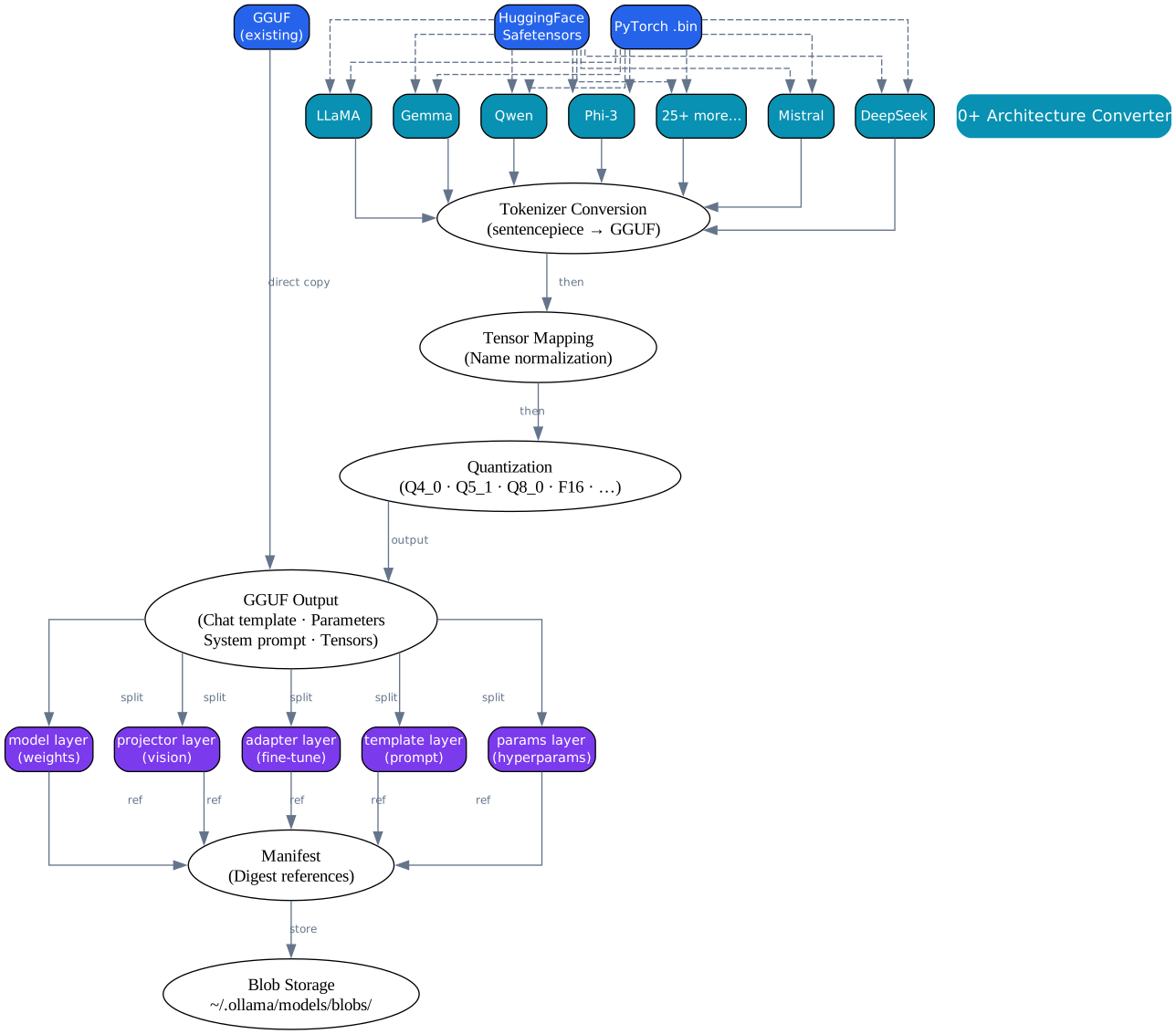
Ollama’s model conversion pipeline transforms models from their original training formats into the optimized GGUF format used for inference. This pipeline is critical because most open-source models are published in PyTorch or Safetensors format, which are designed for training flexibility rather than inference efficiency. The conversion process handles weight format translation, quantization, and packaging into Ollama’s layer-based manifest system.
The pipeline begins with one of 30+ architecture-specific converters. Ollama supports a wide range of model families including LLaMA (all versions), Gemma, Qwen, DeepSeek, Mistral, Mixtral, Phi-3, Command-R, DBRX, and many others. Each architecture has unique weight naming conventions, attention mechanisms, and positional encoding schemes that require dedicated conversion logic. The converters read the source model files, normalize the tensor names to a consistent internal format, and prepare them for GGUF encoding.
Quantization is applied during the conversion process. Ollama supports multiple quantization levels, each trading model quality for reduced memory footprint and faster inference. The most commonly used quantization is Q4_K_M, which uses 4-bit quantization with mixed precision for critical tensors – this provides a good balance between quality and size, typically reducing model size by approximately 70% compared to FP16 while retaining most of the model’s capability. For higher quality, Q8_0 uses 8-bit quantization with roughly 50% size reduction. Other options include Q2_K, Q3_K_S, Q5_K_M, Q5_K_S, and Q6_K, offering fine-grained control over the quality-size tradeoff.
The output of conversion is a GGUF file, which contains two sections: a key-value metadata section and a tensor data section. The metadata section stores architecture type (general.architecture), vocabulary definitions (tokenizer.ggml.tokens, tokenizer.ggml.scores), context length, embedding dimensions, and other hyperparameters needed to initialize inference. The tensor data section stores the quantized weight matrices, each tagged with their tensor name, data type, and dimensions.
Ollama organizes models using a manifest and layer system similar to container images. A model manifest references multiple layers, each stored as a separate blob in ~/.ollama/models/blobs/. The layer types include: model (the base model weights), projector (vision encoder weights for multimodal models), adapter (LoRA adapter weights for fine-tuned models), template (the prompt template definition), params (generation parameter overrides like temperature and top_p), system (the default system prompt), and license (the model’s license information). This layered design enables efficient storage – multiple fine-tuned variants can share the same base model blob, and template changes do not require re-encoding the weights.
Here is an example of a Modelfile, Ollama’s equivalent of a Dockerfile for models:
# Create a custom model from a base model
# Save this as Modelfile
FROM llama3

# Set the system prompt
SYSTEM """
You are a senior Go developer who specializes in concurrent systems.
Provide concise, idiomatic Go code examples.
"""

# Set generation parameters
PARAMETER temperature 0.7
PARAMETER top_p 0.9
PARAMETER num_ctx 4096

# Set a prompt template
TEMPLATE """
{{- if .System }}{{ .System }}
{{- end }}
{{- range .Messages }}
{{- if eq .Role "user" }}User: {{ .Content }}
{{- else if eq .Role "assistant" }}Assistant: {{ .Content }}
{{- end }}
{{- end }}
Assistant:
"""
Commands for model conversion and creation:
# Create a model from a Modelfile
ollama create my-go-expert -f Modelfile

# Convert a PyTorch/Safetensors model to GGUF
# (using the conversion tools in Ollama's source tree)
python convert_hf_to_gguf.py /path/to/model --outfile model.gguf --outtype f16

# Quantize a GGUF model
ollama quantize model.gguf Q4_K_M

# Push a model to the Ollama registry
ollama push my-go-expert

# List all local models
ollama list
Getting Started
Installing Ollama is straightforward on all major platforms. On macOS and Windows, download the installer from ollama.com. On Linux, use the one-line install script:
# Linux install
curl -fsSL https://ollama.com/install.sh | sh

# macOS (via Homebrew)
brew install ollama

# Windows -- download from https://ollama.com
# Then run the installer and follow the prompts
Once installed, basic usage requires just a few commands:
# Pull a model from the registry
ollama pull llama3

# Run a model interactively
ollama run llama3

# Run a model with a single prompt (non-interactive)
ollama run llama3 "Explain the Go scheduler in 3 sentences"

# List downloaded models
ollama list

# Remove a model
ollama rm llama3

# Create a custom model from a Modelfile
ollama create my-model -f Modelfile

# Serve the API on a custom host/port
OLLAMA_HOST=0.0.0.0:8080 ollama serve
For programmatic access, the API is available at http://localhost:11434 by default. The OpenAI-compatible endpoints at /v1/* make it trivial to integrate with existing applications – simply change the base URL and set the API key to any value (Ollama does not enforce authentication by default).
Conclusion
Ollama has fundamentally changed how developers interact with large language models on local hardware. By packaging the complexity of model quantization, GPU memory management, and inference engine configuration into a single binary with a clean API, it has lowered the barrier to local LLM inference from a specialized ML engineering task to a two-command workflow. The project’s 169K+ stars reflect not just technical quality but genuine demand for local, private, and cost-free LLM access.
The architecture’s layered design – separating interfaces from scheduling, scheduling from execution, and execution from hardware – provides the flexibility needed to support 30+ model architectures across three GPU platforms while maintaining a simple user experience. The OpenAI-compatible API layer has been particularly impactful, enabling an entire ecosystem of tools and applications to adopt local inference without code changes. As the project continues to evolve with experimental features like agent loops, image generation, and the MLX runner for Apple Silicon, Ollama is positioned to remain the standard for local LLM inference for the foreseeable future. Enjoyed this post? Never miss out on future posts by following us