OpenAI’s Codex CLI has rapidly become a go-to tool for developers who want AI-powered workflow automation directly from the terminal. The awesome-codex-skills repository by ComposioHQ delivers a curated collection of Codex skills that transform Codex from a code generator into a full-fledged automation engine – capable of sending emails, triaging issues, deploying pipelines, and connecting to over 1000 applications. With 3.3K stars and growing, this collection represents the most practical and battle-tested Codex skills available for developers who want to ship faster and automate repetitive tasks without leaving the command line.
What Are Codex Skills?
Codex skills are modular instruction bundles that tell Codex how to execute a task the way you want it done. Each skill lives in its own folder with a SKILL.md file that includes YAML frontmatter metadata (name and description) and step-by-step guidance. Codex reads the metadata to decide when to trigger a skill and loads the body only after it fires, keeping context lean and efficient.
This progressive disclosure design is what sets Codex skills apart from simple prompt templates. The metadata stays lightweight in context (~100 words), the SKILL.md body loads only when the skill triggers (under 5k words), and bundled resources like scripts, references, and assets load on demand. This three-level loading system ensures that Codex never wastes context window space on irrelevant information.
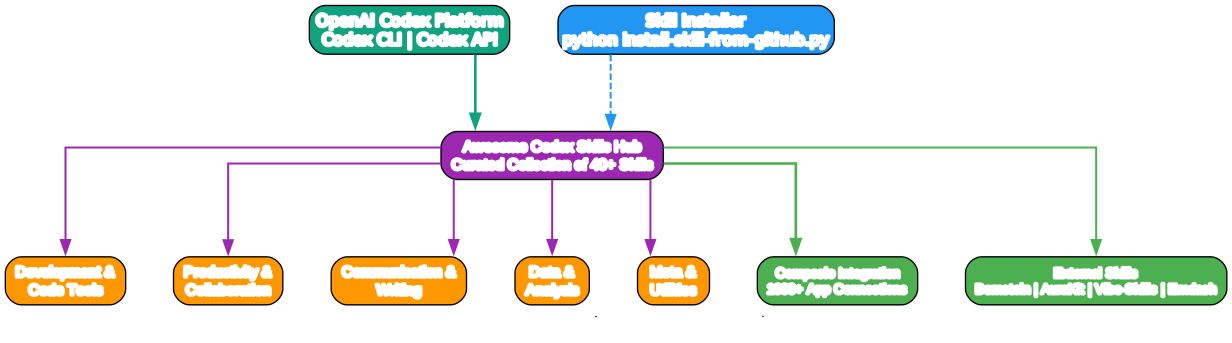
The diagram above illustrates the full Codex skills ecosystem. At the top sits the OpenAI Codex Platform, which encompasses both the Codex CLI and the Codex API. The Awesome Codex Skills Hub sits at the center, organizing 40+ curated skills across five major categories: Development and Code Tools, Productivity and Collaboration, Communication and Writing, Data and Analysis, and Meta and Utilities. The Skill Installer provides a streamlined path for adding skills from GitHub repositories directly into the local Codex skills directory. On the right side, the Composio Integration layer extends Codex’s reach to over 1000 real-world applications – from Slack and GitHub to Notion and Gmail – enabling Codex to take actual actions rather than just generating text about them. External skills like Bernstein, AuraKit, Vibe-Skills, and Emdash further expand the ecosystem with specialized capabilities such as multi-agent orchestration, security frameworks, and governed skill harnesses.
Skill Categories
The repository organizes skills into five distinct categories, each targeting a different aspect of developer workflow automation.

This diagram breaks down the five skill categories and their constituent skills. The Development and Code Tools category is the largest, with 11 skills covering code reviews, migrations, CI fixes, MCP server building, and deployment pipelines. Productivity and Collaboration follows with 14 skills focused on meeting intelligence, Notion integration, issue triage, and document generation. Communication and Writing provides 6 skills for email drafting, changelog generation, content research, and resume tailoring. Data and Analysis offers 9 skills for spreadsheet formulas, competitive analysis, log filtering, and market data. Meta and Utilities rounds out the collection with 10 skills for brand guidelines, design generation, image enhancement, and skill creation tooling.
Development and Code Tools
| Skill | Description |
|---|---|
| brooks-lint | AI code reviews grounded in six classic engineering books with decay risk diagnostics and severity labels |
| codebase-migrate | Run large codebase migrations and multi-file refactors in reviewable batches with CI verification |
| codebase-recon | Analyze git history to surface hotspots, bug magnets, bus factor, and high-risk files |
| create-plan | Quickly draft concise execution plans for coding tasks |
| deploy-pipeline | End-to-end Stripe to Supabase to Vercel release pipelines with verify and rollback |
| gh-address-comments | Address review or issue comments on the open GitHub PR for the current branch |
| gh-fix-ci | Inspect failing GitHub Actions checks, summarize failures, and propose fixes |
| mcp-builder | Build and evaluate MCP servers with best practices and an evaluation harness |
| pr-review-ci-fix | Automated GitHub/GitLab PR review plus CI auto-fix loop via the Composio CLI |
| sentry-triage | Diagnose Sentry issues by mapping stack frames to local source |
| webapp-testing | Run targeted web app tests and summarize results |
Productivity and Collaboration
| Skill | Description |
|---|---|
| connect | Connect Codex to 1000+ apps via the Composio CLI for real actions |
| connect-apps | Wire up Composio CLI connections and kick off app workflows from the shell |
| issue-triage | Triage Linear or Jira backlogs and run bug sweeps from the terminal |
| linear | Manage issues, projects, and team workflows in Linear |
| meeting-insights-analyzer | Analyze meeting transcripts for themes, risks, and follow-ups |
| meeting-notes-and-actions | Turn meeting transcripts into summaries with decisions and owner-tagged action items |
| notion-knowledge-capture | Convert chats or notes into structured Notion pages with proper linking |
| notion-meeting-intelligence | Prepare meeting materials with Notion context plus Codex research |
| notion-research-documentation | Synthesize multiple Notion sources into briefs, comparisons, or reports |
| notion-spec-to-implementation | Turn Notion specs into implementation plans, tasks, and progress tracking |
| support-ticket-triage | Triage customer support tickets with categories, priority, and draft replies |
| file-organizer | Organize, rename, and tidy files to keep workspaces clean |
| paperjsx | Generate PPTX, DOCX, XLSX, and PDF documents from structured JSON locally |
| skill-share | Share skills and reusable instructions across teammates |
Communication and Writing
| Skill | Description |
|---|---|
| email-draft-polish | Draft, rewrite, or condense emails for the right tone and audience |
| changelog-generator | Create clear changelogs from commits or summaries |
| content-research-writer | Research and draft content with sourced citations |
| tailored-resume-generator | Tailor resumes to job descriptions with quantified impact |
| codex-sms-verification | Real-SIM SMS verification for AI agents via VirtualSMS MCP |
| unslop | Remove AI writing patterns from text with five intensity levels |
Data and Analysis
| Skill | Description |
|---|---|
| spreadsheet-formula-helper | Write and debug spreadsheet formulas, pivots, and array formulas |
| competitive-ads-extractor | Analyze competitor ads and extract structured insights |
| datadog-logs | Filter Datadog logs from the shell via the Composio CLI |
| developer-growth-analysis | Analyze Codex chat history for coding patterns and learning gaps |
| lead-research-assistant | Research leads and enrich records with firmographic data |
| domain-name-brainstormer | Brainstorm available domain names with criteria and checks |
| raffle-winner-picker | Randomly select winners with audit-friendly logs |
| langsmith-fetch | Pull LangSmith project/test data for analysis |
| helium-mcp | Search real-time news with bias scoring and live market data via MCP |
Meta and Utilities
| Skill | Description |
|---|---|
| brand-guidelines | Apply OpenAI/Codex brand colors and typography to artifacts |
| agent-deep-links | Build and validate deep links for Codex, Cursor, and VS Code |
| canvas-design | Generate structured canvas layouts and design artifacts |
| image-enhancer | Upscale and refine images with configurable presets |
| slack-gif-creator | Generate GIFs for Slack with captions and styling |
| theme-factory | Create reusable theme tokens and palettes |
| video-downloader | Download and prepare videos for offline review |
| template-skill | Starter template for building new skills |
| skill-installer | Helper scripts to install skills from curated lists or GitHub paths |
| skill-creator | Guidance for building effective Codex skills with progressive disclosure |
How Codex Skills Work
Understanding the internal architecture of Codex skills is essential for both using and creating them effectively.

The workflow diagram above shows the complete lifecycle of a Codex skill invocation. It starts when a user issues a natural language request to the Codex CLI. Codex reads the metadata (name and description fields) from all installed skills in the ~/.codex/skills/ directory. When a skill’s description matches the user’s request, Codex loads the SKILL.md body using progressive disclosure – meaning the full instructions only enter context after the trigger fires. Codex then executes the skill workflow, which may involve running bundled scripts from the scripts/ directory, loading reference documentation from references/, or using assets from assets/. For skills that need to interact with external services, the Composio CLI provides authenticated access to over 1000 applications. If no skill matches the request, Codex falls back to its default behavior. The result or completed action is then returned to the user.
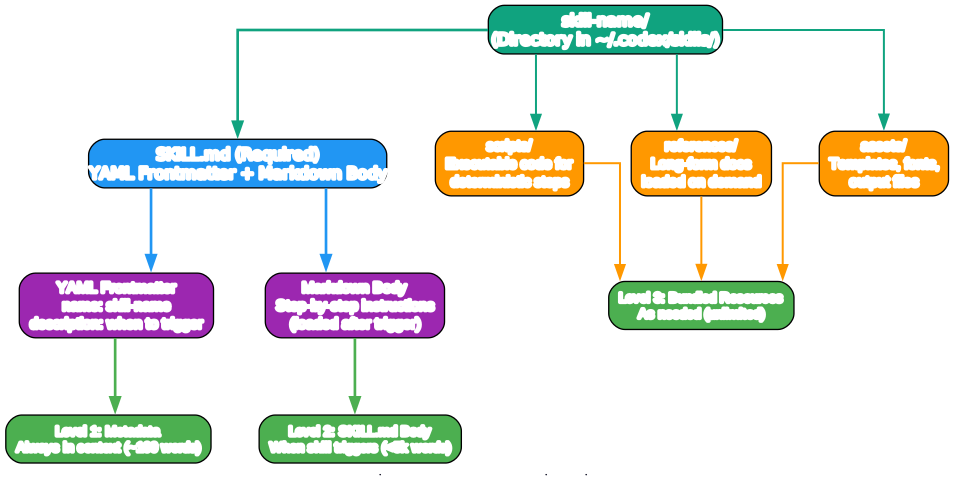
This anatomy diagram details the internal structure of a Codex skill and its three-level progressive disclosure system. At the top sits the skill directory, which lives inside ~/.codex/skills/. The required SKILL.md file contains two parts: the YAML frontmatter (with name and description fields that serve as the triggering mechanism) and the Markdown body (with step-by-step instructions loaded only after triggering). Optional bundled resources include scripts/ for executable code that provides deterministic reliability, references/ for long-form documentation loaded on demand, and assets/ for templates and output files. The three disclosure levels are shown on the right: Level 1 (metadata) is always in context at approximately 100 words; Level 2 (SKILL.md body) loads when the skill triggers, keeping under 5k words; Level 3 (bundled resources) loads as needed with no practical limit since scripts can execute without entering the context window. This architecture ensures that Codex’s context window is never wasted on irrelevant information, making skills both efficient and scalable.
Installation
Method 1: Skill Installer (Recommended)
The repository includes a dedicated installer script that fetches skills from GitHub and places them in the correct directory:
git clone https://github.com/ComposioHQ/awesome-codex-skills.git
cd awesome-codex-skills
# Install a specific skill into ~/.codex/skills/
python skill-installer/scripts/install-skill-from-github.py --repo ComposioHQ/awesome-codex-skills --path meeting-notes-and-actions
The installer fetches the skill and places it in $CODEX_HOME/skills/<skill-name> (defaults to ~/.codex/skills/). Restart Codex after installation to pick up the new skill.
Method 2: Manual Installation
For manual installation, copy the desired skill folder directly:
# Copy a skill folder into the Codex skills directory
cp -r ./spreadsheet-formula-helper ~/.codex/skills/

# Restart Codex so it loads the new metadata
# In your next session, describe the task naturally
# Codex will auto-trigger matching skills
Method 3: Install External Skills
Some skills live in external repositories. Use the installer with the external repo URL:
# Install brooks-lint from its own repository
python3 ~/.codex/skills/.system/skill-installer/scripts/install-skill-from-github.py \
  --repo hyhmrright/brooks-lint \
  --path skills/brooks-lint \
  --name brooks-lint

# Install codebase-recon from its repository
python3 ~/.codex/skills/.system/skill-installer/scripts/install-skill-from-github.py \
  --repo yujiachen-y/codebase-recon-skill \
  --path skills/codebase-recon \
  --name codebase-recon
Verify Installation
After installing skills, verify they are recognized:
# List installed skills
ls ~/.codex/skills

# Inspect a specific skill's metadata
head ~/.codex/skills/meeting-notes-and-actions/SKILL.md
Usage Examples
Connecting Codex to Real Applications
The connect skill is the gateway to real-world automation. Instead of generating text about what you could do, Codex actually does it:
# Install the Composio CLI first
curl -fsSL https://composio.dev/install | bash

# Log in and link your apps
composio login
composio link github
composio link gmail
composio link slack
Once connected, Codex can execute real actions:
# Send an email
composio execute GMAIL_SEND_EMAIL -d '{
  "recipient_email": "team@company.com",
  "subject": "Sprint Review Complete",
  "body": "All items shipped. See the board for details."
}'

# Create a GitHub issue
composio execute GITHUB_CREATE_ISSUE -d '{
  "owner": "my-org",
  "repo": "backend-api",
  "title": "Timeout on mobile endpoints",
  "labels": ["bug"]
}'

# Post to Slack
composio execute SLACK_SEND_MESSAGE -d '{
  "channel": "engineering",
  "text": "Deploy complete - v2.4.0 is live"
}'
Creating Execution Plans
The create-plan skill helps draft concise, actionable plans for coding tasks:
# In a Codex session, simply describe your task:
# "Create a plan for migrating the auth module from JWT to session-based tokens"
Codex will scan the codebase context, identify constraints, and produce a structured plan with scope, action items, and open questions – all in read-only mode without modifying any files.
Fixing CI Failures
The gh-fix-ci skill inspects failing GitHub Actions checks and proposes fixes:
# In a Codex session:
# "Fix the failing CI checks on my current PR"
Codex runs the bundled inspect_pr_checks.py script, summarizes the failures, and proposes targeted fixes.
Building MCP Servers
The mcp-builder skill provides a complete framework for building and evaluating MCP (Model Context Protocol) servers:
# In a Codex session:
# "Build an MCP server for my weather API"
The skill includes best practices documentation, evaluation harness scripts, and reference implementations for both Node.js and Python MCP servers.
Creating Your Own Skills
The repository includes a skill-creator skill that guides you through building effective Codex skills. Here is the recommended process:
Step 1: Initialize the Skill
# Use the bundled init script
scripts/init_skill.py my-skill --path skills/public
scripts/init_skill.py my-skill --path skills/public --resources scripts,references
Step 2: Write the SKILL.md
---
name: my-skill-name
description: What the skill does and when Codex should use it. Include both
  functionality and trigger contexts so Codex knows when to activate this skill.
---

# My Skill Name

Clear instructions and steps for Codex to execute the task.
Step 3: Add Bundled Resources
Organize supporting files into the standard directories:
my-skill-name/
+-- SKILL.md          # Required: instructions + YAML frontmatter
+-- scripts/          # Optional: helper scripts for deterministic steps
+-- references/       # Optional: long-form docs loaded only when needed
+-- assets/           # Optional: templates or files used in outputs
Step 4: Package and Validate
# Package the skill into a distributable .skill file
scripts/package_skill.py path/to/my-skill-name

# The script validates frontmatter, naming, and structure automatically
Best Practices for Skill Creation
- Keep descriptions exhaustive about when to trigger; keep the body focused on execution steps
- Use progressive disclosure: put detailed references in
references/and call them out from SKILL.md only when needed - Include scripts for repeatable or deterministic operations
- Avoid extra docs (README, changelog) inside the skill folder to keep context lean
- Match freedom to fragility: use specific scripts for fragile operations, text instructions for flexible ones
Notable External Skills
Beyond the curated in-repo skills, several powerful external skills extend Codex’s capabilities:
| Skill | Description |
|---|---|
| Bernstein | Multi-agent orchestrator with Codex CLI adapter. Runs parallel Codex agents in isolated git worktrees with quality gates |
| AuraKit | All-in-one skill framework: 46 modes, 23 sub-agents, 6-layer OWASP security, 10 lifecycle hooks, ~55% token savings |
| Vibe-Skills | Governed Codex skill harness for staged, test-driven work: routes 340+ skills through requirement freeze, plan approval, execution, and verification |
| Emdash Skills | 14-category autonomous product-building OS with CF Workers, Hono, Angular, D1, and Stripe. One-line prompts to deployed SaaS |
Troubleshooting
| Problem | Solution |
|---|---|
| Skills not loading after install | Restart Codex so it reloads metadata from ~/.codex/skills/ |
| Skill not triggering | Check that the description frontmatter covers your use case. Codex matches based on description text |
Not logged in error with Composio | Run composio login to authenticate |
Connection required for <toolkit> | Run composio link <toolkit> to connect the app |
| Unknown tool slug | Use composio search "<what you want>" or composio tools list <toolkit> |
| Bad inputs on Composio execute | Run composio execute <SLUG> --get-schema then --dry-run to test |
| Composio action failed | Check permissions in the target app; ensure OAuth scopes are sufficient |
| Skill context too large | Keep SKILL.md under 500 lines; move details to references/ directory |
| Installer script fails | Ensure Python 3 is available and the repo path is correct |
Conclusion
The awesome-codex-skills repository represents a significant step forward in making AI-powered workflow automation practical and accessible. By providing a curated, modular collection of skills with a clean progressive disclosure architecture, it enables developers to transform Codex from a code suggestion tool into a full automation engine. The Composio integration layer – connecting Codex to over 1000 real-world applications – bridges the gap between AI-generated text and real actions. Whether you are triaging issues, deploying pipelines, analyzing meeting transcripts, or building MCP servers, these Codex skills provide the structured workflows and bundled resources needed to get the job done reliably from the terminal.
Links:
- Repository: https://github.com/ComposioHQ/awesome-codex-skills
- Composio CLI Documentation: https://docs.composio.dev/docs/cli
- Composio Discord: https://discord.com/invite/composio
- Skill Creator Guide: https://github.com/ComposioHQ/awesome-codex-skills/tree/main/skill-creator

Enjoyed this post? Never miss out on future posts by following us


