Table of Contents
- Table of Contents
- What is CubeSandbox?
- Why AI Agents Need Sandboxes
- Architecture Deep Dive
- Security Model: Kernel-Level Isolation
- Performance That Matters
- Getting Started
- Code Examples
- E2B Drop-In Compatibility
- CubeVS: eBPF Network Security
- Template Lifecycle
- When to Use CubeSandbox
- Conclusion
What is CubeSandbox?
CubeSandbox is a high-performance, secure sandbox service built by Tencent Cloud that provides hardware-level isolation for AI agent code execution. Written in Rust and built on KVM (Kernel-based Virtual Machine) and eBPF (extended Berkeley Packet Filter), it delivers sandbox environments that boot in under 60 milliseconds with less than 5MB of memory overhead per instance.
At its core, CubeSandbox solves a critical problem: when AI agents generate and execute code, that code needs to run in isolation. Docker containers share a kernel, which means a container escape vulnerability can compromise the entire host. CubeSandbox gives each agent its own dedicated Guest OS kernel, eliminating this risk entirely.
Why AI Agents Need Sandboxes
AI agents that write and execute code – whether for data analysis, web scraping, or automated debugging – need a safe execution environment. The traditional approaches each have significant trade-offs:
| Approach | Isolation | Boot Speed | Memory | Density |
|---|---|---|---|---|
| Docker Containers | Low (shared kernel) | ~200ms | Low | High |
| Traditional VMs | High (dedicated kernel) | Seconds | High | Low |
| CubeSandbox | Extreme (dedicated kernel + eBPF) | < 60ms | < 5MB | Extreme |
Docker containers are fast but share the host kernel, making them vulnerable to container escape attacks. Traditional VMs provide strong isolation but are too slow and resource-heavy for the rapid spin-up/spin-down patterns that AI agents require. CubeSandbox bridges this gap by using KVM MicroVMs with snapshot-based booting and aggressive memory optimization, achieving container-like speed with VM-level security.
Architecture Deep Dive
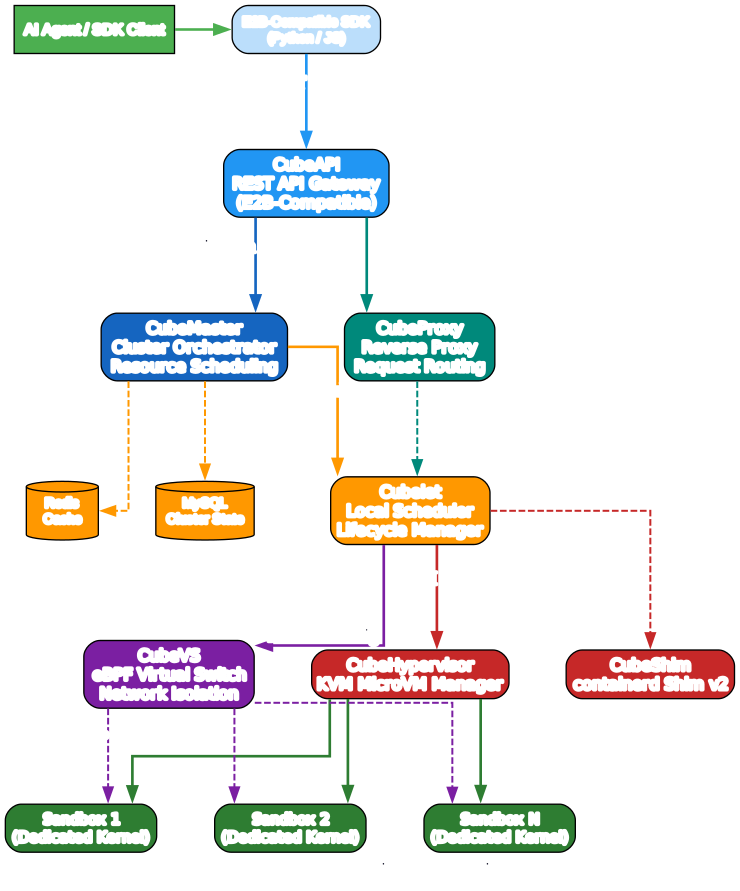
CubeSandbox follows a layered architecture with six core components, each built in Rust for maximum performance and memory safety:
CubeAPI is the E2B-compatible REST API gateway. It receives SDK requests and routes them through the orchestration layer. Because it implements the E2B protocol, you can swap from E2B Cloud to CubeSandbox by changing a single environment variable.
CubeMaster is the cluster orchestrator. It receives API requests from CubeAPI, dispatches them to the appropriate Cubelet on the correct compute node, and manages cluster-wide state including resource scheduling. CubeMaster persists state in MySQL and uses Redis for caching.
CubeProxy is a reverse proxy compatible with the E2B protocol. It parses the <port>-<sandbox_id>.<domain> format in the Host header to route SDK client requests directly to the target sandbox instance, enabling efficient request routing without going through the orchestration layer for every operation.
Cubelet is the node-local scheduling component. Running on each compute node, it manages the complete lifecycle of all sandbox instances – from creation through snapshot booting to teardown. Cubelet coordinates with CubeHypervisor for VM management and CubeVS for network configuration.
CubeVS is the eBPF-based virtual switch providing kernel-level network isolation. It enforces per-sandbox security policies, handles SNAT/DNAT for network connectivity, and ensures that sandboxes cannot probe the host’s internal network or communicate with each other.
CubeHypervisor and CubeShim form the virtualization layer. CubeHypervisor manages KVM MicroVMs, while CubeShim implements the containerd Shim v2 API to integrate sandboxes into the container runtime, making CubeSandbox compatible with existing container orchestration tooling.
Security Model: Kernel-Level Isolation
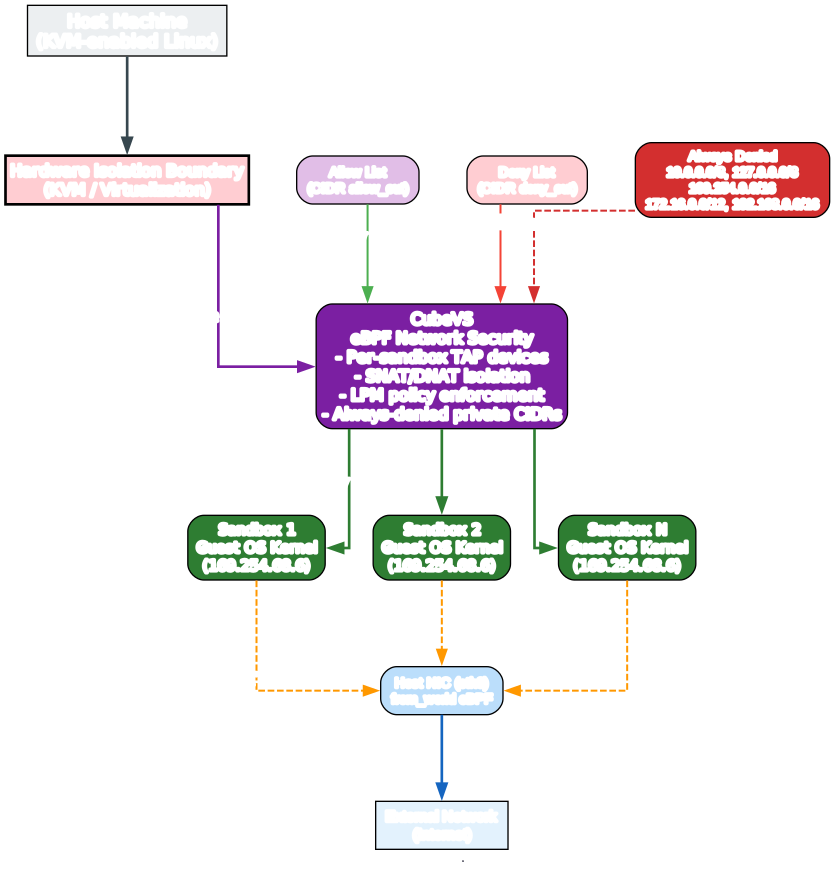
The security model is what truly sets CubeSandbox apart. There are two layers of isolation working together:
Hardware-Level Isolation
Each sandbox runs inside its own KVM MicroVM with a dedicated Guest OS kernel. This means:
- No shared kernel attack surface – unlike Docker, where all containers share the host kernel
- No container escape risk – even if a sandbox is compromised, the attacker cannot escape to the host
- Safe execution of any LLM-generated code – no matter what the code tries to do, it stays within its VM boundary
Network-Level Isolation with CubeVS
CubeVS provides network security through eBPF programs attached at three network boundaries:
- from_cube (TC ingress on each TAP device) – handles outbound traffic from sandboxes, performing SNAT, policy checks, session creation, and ARP proxy
- from_world (TC ingress on host NIC) – handles inbound reply traffic, performing reverse NAT and port-mapped proxy
- from_envoy (TC egress on cube-dev) – handles overlay traffic, DNATing to sandbox IPs
The policy evaluation follows a strict priority: allow > deny > default-allow. This means you can set a broad deny rule (like 0.0.0.0/0 to block all internet access) and then punch specific holes with allow rules.
Critically, CubeVS always denies private and link-local CIDRs regardless of policy configuration:
10.0.0.0/8127.0.0.0/8169.254.0.0/16172.16.0.0/12192.168.0.0/16
This ensures that a sandbox can never probe the host’s internal network or reach other sandboxes’ link-local addresses.
Performance That Matters
CubeSandbox achieves its impressive performance through several key techniques:
Resource Pool Pre-Provisioning: Instead of creating a new VM from scratch for each request, CubeSandbox maintains a pool of pre-provisioned MicroVMs. When a sandbox is requested, it clones from a snapshot, skipping time-consuming initialization entirely.
Copy-on-Write (CoW) Memory: All sandbox instances created from the same template share the same physical memory pages. Only modified pages are copied, which is why per-instance memory overhead stays below 5MB regardless of the base image size.
Rust-Built Runtime: The entire control plane is written in Rust, providing memory safety guarantees without garbage collection pauses. The runtime is aggressively trimmed to minimize overhead.
eBPF Data Path: All network processing happens in kernel space via eBPF programs. There are no context switches to userspace for packet processing, policy evaluation, or NAT operations.
Benchmark results on bare metal show:
- Single-concurrency cold start: < 60ms
- 50 concurrent creations: average 67ms, P95 90ms, P99 137ms
- Memory overhead: < 5MB per instance (for sandbox specs up to 32GB)
Getting Started
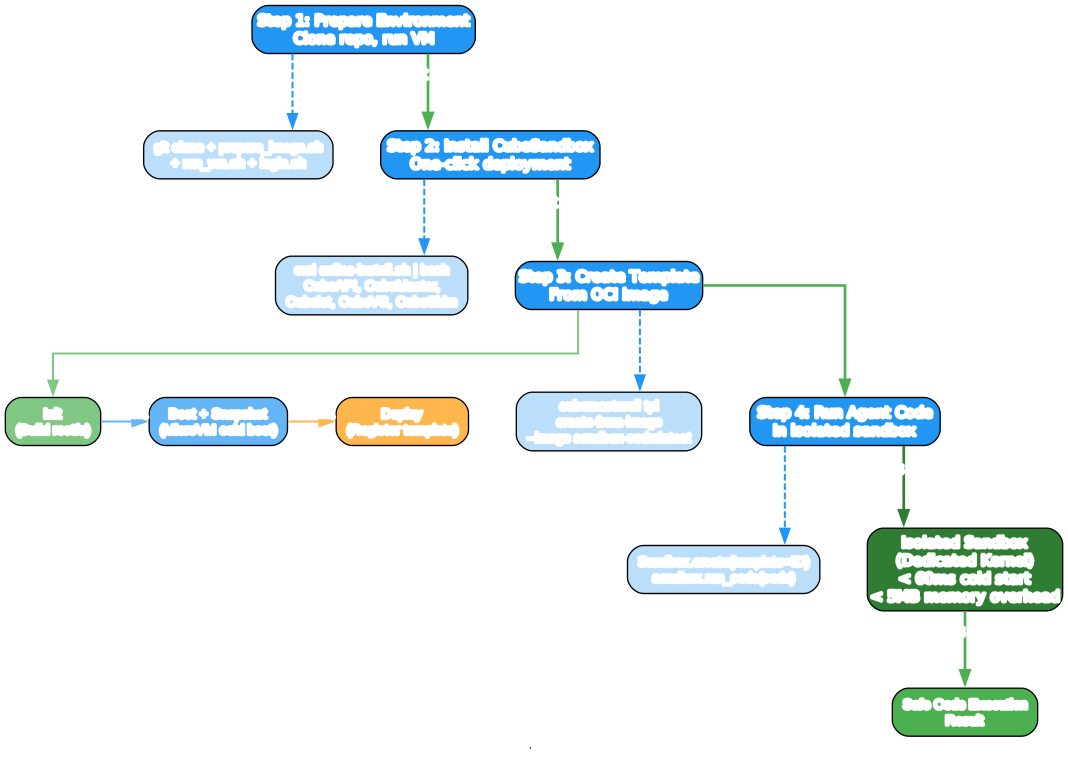
Step 1: Prepare the Environment
CubeSandbox requires a KVM-enabled x86_64 Linux environment. You can use WSL 2 on Windows, a Linux physical machine, or a cloud bare-metal server.
git clone https://github.com/tencentcloud/CubeSandbox.git
cd CubeSandbox/dev-env
./prepare_image.sh   # one-off: download and initialize the runtime image
./run_vm.sh          # boot the environment; keep this terminal open
In a second terminal:
cd CubeSandbox/dev-env
./login.sh           # SSH into the VM as root
Step 2: Install CubeSandbox
Inside the dev VM (or directly on your bare-metal server), run the one-click installer:
curl -sL https://github.com/tencentcloud/CubeSandbox/raw/master/deploy/one-click/online-install.sh | bash
This installs CubeAPI, CubeMaster, Cubelet, CubeVS, CubeShim, MySQL, Redis, CubeProxy with TLS, and CoreDNS.
Step 3: Create a Template
Create a code interpreter template from the prebuilt image:
cubemastercli tpl create-from-image \
  --image ccr.ccs.tencentyun.com/ags-image/sandbox-code:latest \
  --writable-layer-size 1G \
  --expose-port 49999 \
  --expose-port 49983 \
  --probe 49999
Monitor the build progress:
cubemastercli tpl watch --job-id <job_id>
Wait for the template status to reach READY and note the template ID.
Step 4: Run Your First Agent Code
Install the Python SDK and set environment variables:
yum install -y python3 python3-pip
pip install e2b-code-interpreter
export E2B_API_URL="http://127.0.0.1:3000"
export E2B_API_KEY="dummy"
export CUBE_TEMPLATE_ID="<your-template-id>"
export SSL_CERT_FILE="$(mkcert -CAROOT)/rootCA.pem"
Code Examples
Basic Code Execution
import os
from e2b_code_interpreter import Sandbox

# CubeSandbox transparently intercepts all E2B SDK requests
with Sandbox.create(template=os.environ["CUBE_TEMPLATE_ID"]) as sandbox:
    result = sandbox.run_code("print('Hello from CubeSandbox!')")
    print(result)
Data Analysis with Matplotlib
import os
from e2b_code_interpreter import Sandbox

with Sandbox.create(template=os.environ["CUBE_TEMPLATE_ID"]) as sandbox:
    # Generate a plot inside the isolated sandbox
    result = sandbox.run_code("""
import matplotlib.pyplot as plt
import numpy as np

x = np.linspace(0, 2 * np.pi, 100)
y = np.sin(x)

plt.figure(figsize=(8, 4))
plt.plot(x, y, label='sin(x)')
plt.title('Sine Wave')
plt.xlabel('x')
plt.ylabel('y')
plt.legend()
plt.grid(True)
plt.savefig('/tmp/sine.png')
print('Plot saved!')
""")
    print(result)
Shell Command Execution
import os
from e2b_code_interpreter import Sandbox

with Sandbox.create(template=os.environ["CUBE_TEMPLATE_ID"]) as sandbox:
    # Run shell commands safely inside the sandbox
    result = sandbox.run_code("""
import subprocess
output = subprocess.check_output(['uname', '-a'])
print(f'Kernel: {output.decode()}')

output = subprocess.check_output(['free', '-h'])
print(f'Memory: {output.decode()}')
""")
    print(result)
Network Policy Configuration
import os
from e2b_code_interpreter import Sandbox

# Create a sandbox with restricted network access
# Only allow HTTPS traffic to specific domains
with Sandbox.create(template=os.environ["CUBE_TEMPLATE_ID"]) as sandbox:
    # The sandbox's network is isolated by CubeVS
    # Only permitted CIDRs are accessible
    result = sandbox.run_code("""
import urllib.request
try:
    response = urllib.request.urlopen('https://api.github.com')
    print(f'Allowed: Status {response.status}')
except Exception as e:
    print(f'Blocked: {e}')
""")
    print(result)
E2B Drop-In Compatibility
One of CubeSandbox’s most compelling features is its native E2B SDK compatibility. If you are already using E2B for sandbox execution, migrating to CubeSandbox requires changing exactly one environment variable:
# Before: Using E2B Cloud
export E2B_API_URL="https://api.e2b.dev"
export E2B_API_KEY="your-e2b-api-key"

# After: Using CubeSandbox (self-hosted)
export E2B_API_URL="http://your-cubesandbox-host:3000"
export E2B_API_KEY="dummy"  # Any non-empty string works
export CUBE_TEMPLATE_ID="your-template-id"
No code changes required. Your existing E2B SDK calls work exactly as before, but now they run on your own infrastructure with better performance and no per-execution costs.
CubeVS: eBPF Network Security
The CubeVS subsystem deserves special attention for its sophisticated network isolation design. It uses three eBPF programs attached at strategic points in the kernel data path:
Traffic Flow
Egress (Sandbox to Internet): When a sandbox sends a packet, it enters the TAP device and hits the from_cube TC ingress filter. This filter evaluates network policy, creates or updates a NAT session, performs SNAT (replacing the sandbox source IP with a routable address), and redirects the packet to the host NIC.
Ingress (Internet to Sandbox): Reply packets arrive at the host NIC and hit the from_world TC ingress filter. This filter looks up the packet in the session table, performs reverse NAT, and redirects the packet to the correct TAP device.
Overlay (Envoy to Sandbox): Traffic from the overlay network enters through cube-dev and hits the from_envoy TC egress filter, which DNATs the destination to the sandbox’s internal IP and redirects to the TAP device.
Session Tracking
CubeVS implements a full TCP state machine with 11 states (matching Linux kernel’s nf_conntrack), enabling accurate timeouts and proper connection cleanup. UDP and ICMP use simpler two-state models. A background goroutine reaps expired sessions every 5 seconds.
SNAT Port Allocation
Each sandbox gets a deterministic SNAT IP via jhash(sandbox_ip) % 4, ensuring all connections from the same sandbox use the same external IP. Port allocation uses a monotonically increasing waterline starting at port 30000, with collision avoidance through up to 10 retry attempts.
Template Lifecycle
Templates in CubeSandbox follow a three-step lifecycle:
-
Init (Build): Based on a base OCI image (like Ubuntu) and optional Dockerfile, Buildkit packages a rootfs filesystem that meets the sandbox runtime requirements.
-
Boot and Snapshot: The initialized rootfs is cold-booted inside a MicroVM. Once the system and language environment (Python, Node.js, etc.) are fully loaded, a snapshot of memory and state is taken. This snapshot enables the sub-60ms hot start.
-
Deploy (Register): The packaged rootfs and snapshot files are registered as an available template. From this point, new sandboxes can be created from the template in milliseconds by cloning the snapshot.
This three-step process is what enables CubeSandbox to achieve its blazing-fast cold start times. The expensive initialization (OS boot, runtime loading) happens once during template creation, and every subsequent sandbox creation simply clones the snapshot.
When to Use CubeSandbox
CubeSandbox is ideal for:
-
AI Agent Code Execution – When LLMs generate and run code, it needs to be isolated from the host. CubeSandbox provides hardware-level isolation with container-like speed.
-
Reinforcement Learning Training – The SWE-Bench demo shows CubeSandbox being used for RL training where agents need to safely explore code environments. The fast spin-up/spin-down cycle is critical for training efficiency.
-
Multi-Tenant Code Execution – When multiple users or agents run code on the same infrastructure, CubeSandbox ensures complete isolation between tenants.
-
Browser Automation – Sandboxes can run headless browsers for web scraping and automation tasks, with network policies controlling what the sandbox can access.
-
E2B Migration – If you are currently paying for E2B Cloud and want to self-host for cost savings, better performance, or data sovereignty, CubeSandbox provides a zero-cost migration path.
Conclusion
CubeSandbox represents a significant advancement in secure code execution for AI agents. By combining KVM MicroVMs for hardware-level isolation with eBPF for kernel-space network security, it achieves the holy grail of sandboxing: container-like performance with VM-level security.
The key takeaways:
- Sub-60ms cold start with snapshot-based booting, consistently under 150ms even at P99 under 50 concurrent creations
- Under 5MB memory overhead per instance through CoW memory sharing and Rust-built runtime
- True kernel-level isolation – each sandbox has its own Guest OS kernel, eliminating container escape risks
- E2B drop-in replacement – migrate by changing one environment variable
- eBPF network security – per-sandbox TAP devices, SNAT/DNAT, and LPM policy enforcement all in kernel space
- Production-proven – validated at scale in Tencent Cloud production environments
With 3.9K stars on GitHub and an Apache 2.0 license, CubeSandbox is ready for production use. Whether you are building AI agent platforms, code execution services, or multi-tenant development environments, CubeSandbox provides the security and performance foundation you need.
Check out the CubeSandbox GitHub repository to get started, and join their Discord community for questions and discussions. Enjoyed this post? Never miss out on future posts by following us