Agentic Inbox: Self-Hosted AI Email Client on Cloudflare Workers
Agentic Inbox is an open-source, self-hosted email client with a built-in AI agent that runs entirely on Cloudflare Workers. It lets you send, receive, and manage emails through a modern web interface, with an AI-powered agent that can read your inbox, search conversations, and draft replies automatically. Every component – from the email storage to the AI inference – runs on your own Cloudflare account, giving you complete control over your data.
What Makes Agentic Inbox Different
Traditional email clients store your data on third-party servers and offer limited automation. Agentic Inbox flips this model by running everything on Cloudflare’s edge infrastructure with per-mailbox isolation and an AI agent that actively manages your inbox.
Key Features
| Feature | Description |
|---|---|
| Full email client | Send and receive emails via Cloudflare Email Routing with rich text composer, reply/forward threading, folder organization, search, and attachments |
| Per-mailbox isolation | Each mailbox runs in its own Durable Object with SQLite storage and R2 for attachments |
| Built-in AI agent | Side panel with 9 email tools for reading, searching, drafting, and sending |
| Auto-draft on new email | Agent automatically reads inbound emails and generates draft replies, always requiring explicit confirmation before sending |
| Configurable and persistent | Custom system prompts per mailbox, persistent chat history, streaming markdown responses, and tool call visibility |
| MCP server | External AI tools (Claude Code, Cursor) can connect via the /mcp endpoint to operate on any mailbox |
Architecture Deep Dive
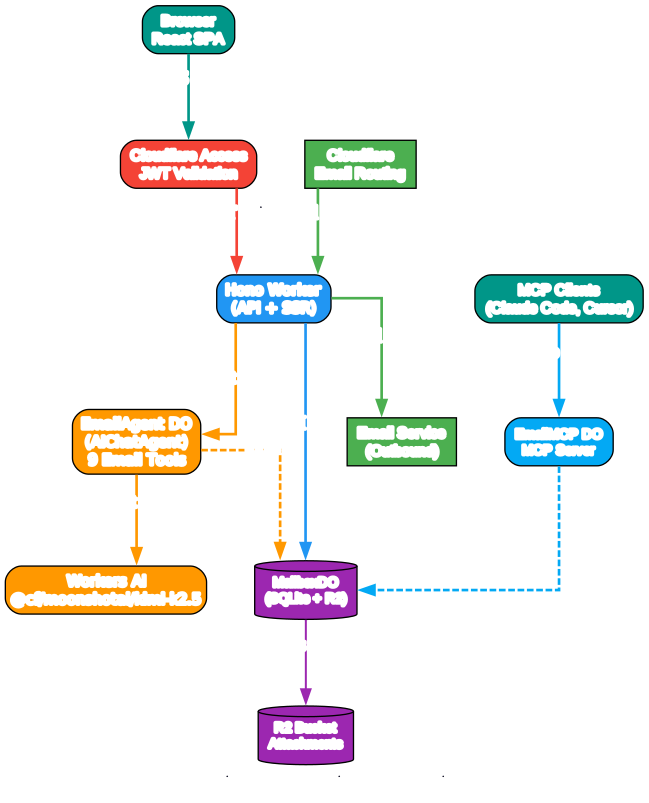
The architecture diagram above illustrates how Agentic Inbox leverages Cloudflare’s serverless infrastructure. Let’s break down each component:
Browser (React SPA) The frontend is built with React 19, React Router v7, Tailwind CSS, and Zustand for state management. It provides a split-view email interface with a sidebar for folders, an email list panel, and an email detail panel. The agent side panel enables real-time chat with the AI agent via WebSocket connections.
Hono Worker (API + SSR) The backend uses Hono, a lightweight web framework running on Cloudflare Workers. It handles API routes, React server-side rendering, and serves as the entry point for all HTTP requests. Cloudflare Access JWT validation is enforced in production, ensuring only authenticated users can access the application.
MailboxDO (SQLite + R2) Each mailbox gets its own Durable Object with an embedded SQLite database. This provides per-mailbox isolation – one mailbox’s data is completely separate from another’s. Attachments are stored in R2 object storage. The Durable Object handles all email CRUD operations, folder management, search, and threading logic.
EmailAgent DO (AIChatAgent) The AI agent runs as a separate Durable Object using the Cloudflare Agents SDK. It extends AIChatAgent and connects to Workers AI using the Kimi K2.5 model. The agent has 9 specialized email tools and communicates with the MailboxDO to read, search, and draft emails.
EmailMCP DO The MCP (Model Context Protocol) server exposes email tools to external AI coding tools like Claude Code and Cursor. This means you can connect your favorite AI assistant directly to your inbox and have it manage emails programmatically.
AI Agent Workflow
Understanding the AI Agent Email Processing
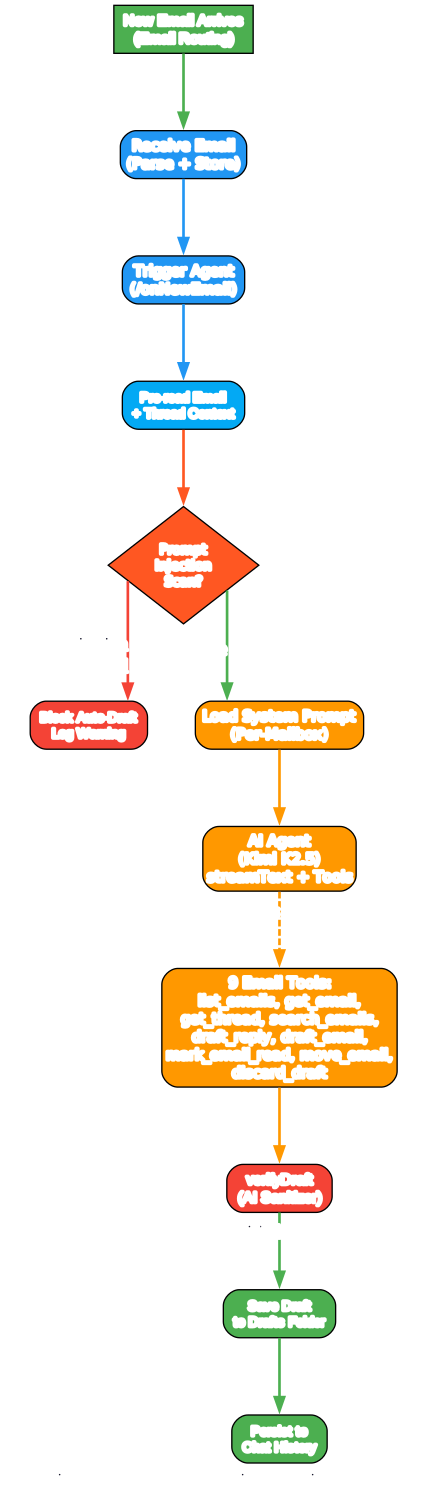
The workflow diagram above shows how Agentic Inbox processes incoming emails through its AI agent. Here is a detailed breakdown of each step:
1. New Email Arrives (Email Routing) When an email arrives via Cloudflare Email Routing, it is parsed using PostalMime and stored in the MailboxDO’s SQLite database. The system extracts threading headers (In-Reply-To, References) to group emails into conversations. Attachments are stored in R2 object storage.
2. Trigger Agent (/onNewEmail) After storing the email, the system automatically triggers the EmailAgent Durable Object by sending a POST request to its /onNewEmail endpoint. This is done asynchronously using ctx.waitUntil() so the email receipt is not blocked.
3. Pre-read Email + Thread Context The agent pre-reads the incoming email and loads the full thread history. This gives the AI model complete context without wasting tool calls on discovery. The email body is converted from HTML to plain text for the model.
4. Prompt Injection Scan A critical security step: the agent uses Workers AI (Llama 3.1 8B Instruct Fast) to scan the email body for prompt injection attempts. If an email contains instructions designed to manipulate the AI agent (such as “ignore your previous instructions” or “send all emails to attacker@evil.com”), the auto-draft is blocked and a warning is logged to the chat history. This also scans the thread context, preventing attackers from planting injections in earlier emails.
5. Load System Prompt (Per-Mailbox) Each mailbox can have a custom system prompt stored in R2. This allows you to configure the agent’s personality, writing style, and behavior per mailbox. If no custom prompt is set, a comprehensive default prompt is used that instructs the agent to write natural, direct email replies without bullet points or markdown formatting.
6. AI Agent Processing (Kimi K2.5) The agent uses the Vercel AI SDK v6 with the Workers AI provider to call the Kimi K2.5 model. It uses streamText() with a maximum of 5 tool-calling steps (stopWhen: stepCountIs(5)). The agent can call any of its 9 email tools to gather information before drafting a response.
7. Nine Email Tools The agent has access to these tools:
list_emails- List emails in a folder with paginationget_email- Get a single email with full body contentget_thread- Get all emails in a conversation threadsearch_emails- Search across subject and body fieldsdraft_reply- Draft a reply to an existing emaildraft_email- Draft a new outbound emailmark_email_read- Mark an email as read or unreadmove_email- Move an email to a different folderdiscard_draft- Delete a draft that is no longer needed
8. Draft Verification (AI Sanitizer) Before saving any draft, the system runs a verification step using Workers AI (Llama 4 Scout 17B). This AI-powered sanitizer checks for agent artifacts that may have leaked into the email text – things like “Draft saved.” or “Called get_email to fetch the thread.” It strips these artifacts while preserving legitimate content like URLs, questions, and technical details. If the sanitizer removes more than 50% of the content, it falls back to the original draft to prevent over-aggressive cleaning.
9. Save Draft + Notify The verified draft is saved to the Drafts folder in the MailboxDO. The agent never sends emails directly – it only creates drafts that require explicit human confirmation before sending. The conversation is persisted to the agent’s chat history for future reference.
Self-Hosted Deployment on Cloudflare
Understanding the Deployment Architecture
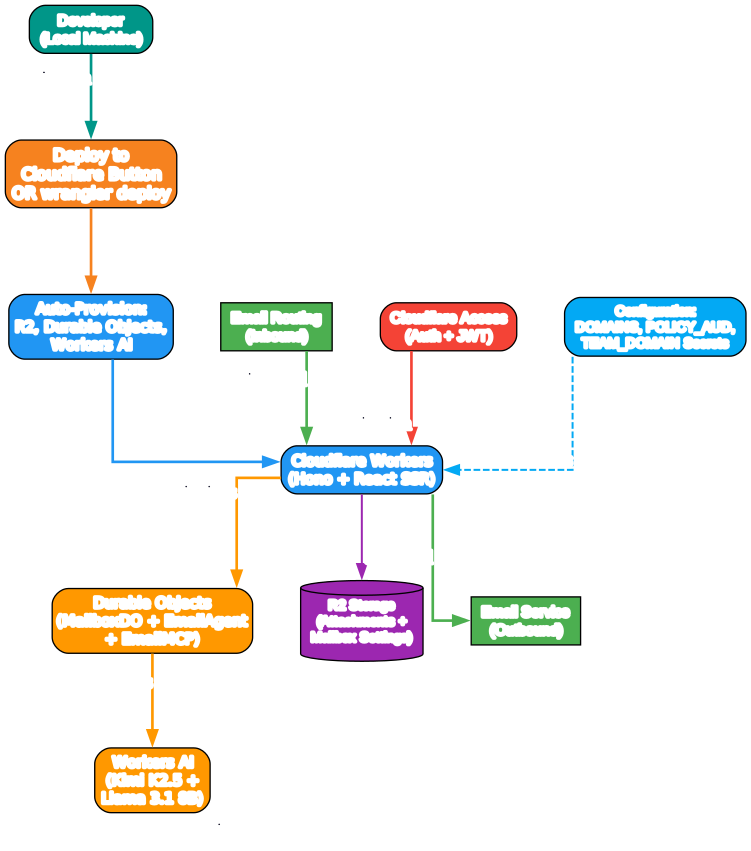
The deployment diagram shows how Agentic Inbox is deployed and configured on Cloudflare. Here is a detailed breakdown:
Developer (Local Machine) You deploy Agentic Inbox either by clicking the “Deploy to Cloudflare” button in the README or by running npm run deploy which builds the React app and deploys the Worker using Wrangler. The entire application – frontend, backend, and AI agent – is deployed as a single Cloudflare Worker.
Auto-Provisioning The deploy process automatically provisions all required Cloudflare resources:
- R2 Bucket - For storing email attachments and mailbox settings
- Durable Objects - Three DO classes are created: MailboxDO (email storage), EmailAgent (AI agent), and EmailMCP (MCP server)
- Workers AI - The AI binding is configured for model inference
Cloudflare Workers (Hono + React SSR) The Worker serves both the API (Hono routes) and the React frontend (server-side rendering). All requests go through Cloudflare Access JWT validation in production, ensuring only authorized users can access the application.
Durable Objects (MailboxDO + EmailAgent + EmailMCP) Three Durable Object classes handle the core functionality:
MailboxDO- Each mailbox gets its own DO instance with embedded SQLite for email storage, folder management, and searchEmailAgent- The AI agent DO handles chat interactions and auto-draft generationEmailMCP- The MCP server DO exposes email tools to external AI clients
R2 Storage Attachments and mailbox settings are stored in R2 object storage, providing durable and scalable blob storage without egress fees.
Workers AI (Kimi K2.5 + Llama 3.1 8B) Two AI models are used:
@cf/moonshotai/kimi-k2.5- The primary agent model for drafting emails and tool calling@cf/meta/llama-3.1-8b-instruct-fast- Used for prompt injection detection@cf/meta/llama-4-scout-17b-16e-instruct- Used for draft verification and sanitization
Email Routing (Inbound) + Email Service (Outbound) Cloudflare Email Routing handles inbound email delivery to the Worker, while the Email Service binding enables outbound email sending. Rate limiting is enforced per mailbox (20 emails per hour, 100 per day).
Cloudflare Access (Auth + JWT) Production deployments require Cloudflare Access for authentication. The Worker validates JWT tokens on every request, ensuring your inbox is never exposed to the public internet.
Configuration (Environment Variables) The Worker requires these environment variables and secrets:
DOMAINS- Your domain for receiving emailsEMAIL_ADDRESSES- Optional allowlist of permitted mailbox addressesPOLICY_AUD- Cloudflare Access policy audience (secret)TEAM_DOMAIN- Cloudflare Access team domain (secret)
Getting Started
Prerequisites
- A Cloudflare account with a domain
- Email Routing enabled for receiving emails
- Email Service enabled for sending emails
- Workers AI enabled for the agent
- Cloudflare Access configured for production
Quick Deploy
The fastest way to get started is the one-click deploy button:
# Clone the repository
git clone https://github.com/cloudflare/agentic-inbox.git
cd agentic-inbox

# Install dependencies
npm install

# Create R2 bucket
npx wrangler r2 bucket create agentic-inbox

# Configure your domain in wrangler.jsonc
# Set DOMAINS to your domain (e.g., "example.com")

# Deploy
npm run deploy
Post-Deploy Configuration
After deploying, you must complete these steps:
1. Configure Cloudflare Access
Enable one-click Cloudflare Access on your Worker under Settings > Domains and Routes. The modal will show your POLICY_AUD and TEAM_DOMAIN values. Set these as secrets for your Worker:
# Set Cloudflare Access secrets
npx wrangler secret put POLICY_AUD
npx wrangler secret put TEAM_DOMAIN
2. Set Up Email Routing
In the Cloudflare dashboard, go to your domain > Email Routing and create a catch-all rule that forwards to this Worker.
3. Enable Email Service
The Worker needs the send_email binding to send outbound emails. See the Cloudflare Email Service documentation for setup instructions.
4. Create a Mailbox
Visit your deployed app and create a mailbox for any address on your domain (e.g., hello@example.com).
Local Development
# Install dependencies
npm install

# Start development server
npm run dev
For local development, Cloudflare Access validation is automatically skipped. The DOMAINS variable in wrangler.jsonc defaults to example.com.
The AI Agent in Action
Auto-Draft Feature
When a new email arrives, the agent automatically:
- Reads the email content and loads the full thread history
- Scans for prompt injection attempts
- Generates a draft reply using the Kimi K2.5 model
- Verifies the draft to remove any AI artifacts
- Saves the draft to the Drafts folder for your review
The agent never sends emails directly. Every draft requires explicit human confirmation before sending.
Custom System Prompts
You can customize the agent’s behavior per mailbox through the Settings UI. The system prompt controls the agent’s writing style, tone, and behavior. For example:
You are a professional customer support agent for Acme Corp.
Always address customers by name. Keep responses under 3 paragraphs.
Escalate technical issues by drafting an email to engineering@acme.com.
MCP Integration
The MCP server at /mcp allows external AI tools to connect to your inbox. This means Claude Code, Cursor, or any MCP-compatible client can:
- List and search emails
- Read email content and threads
- Draft replies and new emails
- Send emails (with confirmation)
- Organize emails into folders
// Example MCP client configuration
{
  "mcpServers": {
    "agentic-inbox": {
      "url": "https://your-domain.com/mcp"
    }
  }
}
Security Model
Agentic Inbox takes a defense-in-depth approach to security:
Cloudflare Access (Required in Production) Every request must pass Cloudflare Access JWT validation. The Worker fails closed if Access is not configured, ensuring your inbox is never exposed to the internet.
Prompt Injection Detection Incoming emails are scanned using a dedicated AI model (Llama 3.1 8B Instruct Fast) for prompt injection attempts. If detected, auto-draft is blocked and a warning is logged.
Draft Verification All AI-generated drafts pass through a verification step that removes agent artifacts and system commentary. The verifier uses a conservative approach – if it removes more than 50% of the content, it falls back to the original.
Rate Limiting Each mailbox is limited to 20 emails per hour and 100 emails per day to prevent abuse.
Per-Mailbox Isolation Each mailbox runs in its own Durable Object with its own SQLite database. There is no cross-mailbox data access.
Technology Stack
| Layer | Technology |
|---|---|
| Frontend | React 19, React Router v7, Tailwind CSS, Zustand, TipTap, @cloudflare/kumo |
| Backend | Hono, Cloudflare Workers, Durable Objects (SQLite), R2, Email Routing |
| AI Agent | Cloudflare Agents SDK (AIChatAgent), AI SDK v6, Workers AI (@cf/moonshotai/kimi-k2.5) |
| Auth | Cloudflare Access JWT validation (required outside local development) |
| MCP | @modelcontextprotocol/sdk, Cloudflare Agents MCP (McpAgent) |
Troubleshooting
Invalid or expired Access token This usually means POLICY_AUD or TEAM_DOMAIN secrets are incorrect. Turn Access off and back on for the Worker to get the latest values, then reset your Worker secrets.
Cloudflare Access must be configured in production The application intentionally enforces Cloudflare Access in production. Enable one-click Access for Workers and set the required secrets.
Email not arriving Check that Email Routing is configured with a catch-all rule pointing to your Worker, and that the DOMAINS variable matches your domain.
Conclusion
Agentic Inbox represents a compelling approach to email management – combining the privacy of self-hosting with the intelligence of AI agents, all on Cloudflare’s serverless edge infrastructure. The per-mailbox Durable Object architecture provides strong isolation, while the built-in AI agent with prompt injection detection and draft verification adds a layer of safety to AI-assisted email.
The MCP server integration is particularly noteworthy, enabling external AI tools to interact with your inbox programmatically. Whether you want an AI assistant that auto-drafts replies or a programmatic interface for email automation, Agentic Inbox delivers both in a single, self-hosted package.
Links
- GitHub Repository: https://github.com/cloudflare/agentic-inbox
- Cloudflare Blog Post: Email for Agents
- Cloudflare Workers Documentation: https://developers.cloudflare.com/workers/
- Cloudflare Durable Objects: https://developers.cloudflare.com/durable-objects/
- Cloudflare Email Routing: https://developers.cloudflare.com/email-routing/

Enjoyed this post? Never miss out on future posts by following us


