The Problem: Terminals Weren’t Built for AI Agents
As AI coding agents multiply – Claude Code, Codex, Pi, Amp, Droid, Hermes, OpenCode, Grok – developers face a new kind of workspace chaos. Each agent needs its own terminal. Each terminal needs monitoring. And when you detach, agents lose context or crash.
Traditional terminal multiplexers like tmux solve the terminal problem but know nothing about agents. They can’t tell you if Claude Code is blocked waiting for input, if Codex finished its task, or if Pi is still working. You’re left manually switching between panes, guessing at agent states, and praying nothing breaks when you detach.
herdr changes this. It’s a terminal workspace manager built specifically for AI coding agents – combining the multiplexing power of tmux with deep agent awareness, session persistence, and a programmatic API for agent orchestration.
herdr is to AI coding agents what tmux is to terminal sessions – but it actually understands what’s running inside them.
What is herdr?
herdr (pronounced “herder”) is a Rust-based terminal workspace manager that multiplexes AI coding agent sessions with full awareness of what each agent is doing. Built with ratatui 0.30 and crossterm 0.29 for the TUI, and tokio 1 for async runtime, it provides:
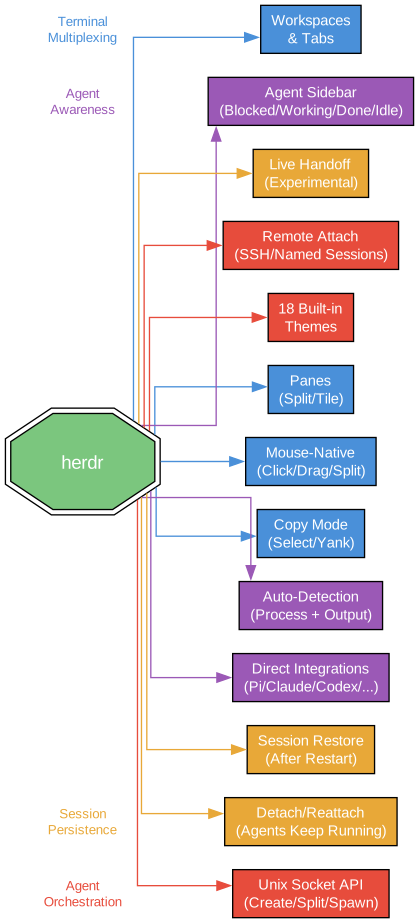
- Terminal Multiplexing: Workspaces, tabs, and panes – just like tmux, but designed for agent workflows
- Agent Awareness: A sidebar showing real-time agent states (🔴 blocked, 🟡 working, 🔵 done, 🟢 idle)
- 14+ Supported Agents: Direct integrations with Claude Code, Codex, Pi, Amp, Droid, Hermes, OpenCode, Grok, and more
- Session Persistence: Detach and reattach – agents keep running in the background
- Agent Orchestration: Unix socket API lets agents programmatically create workspaces, split panes, and manage sessions
- 18 Built-in Themes: Customize your workspace appearance
# Install herdr
curl -fsSL https://herdr.dev/install.sh | sh

# Or via Homebrew
brew install herdr
Architecture: Client-Server with Agent Intelligence
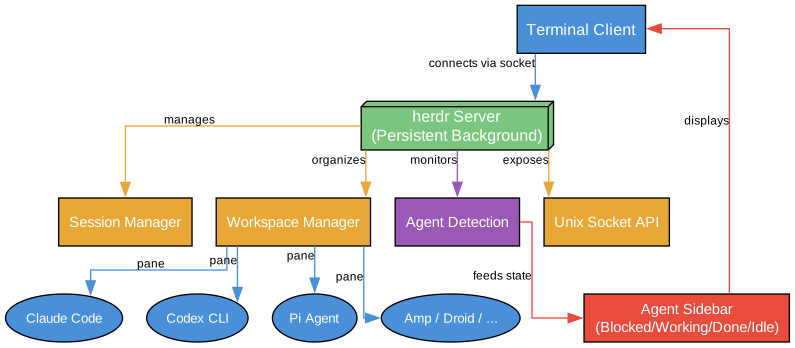
herdr uses a client-server architecture where a persistent background server manages all sessions, and a lightweight client connects to it. This is the same model tmux uses, but herdr adds an Agent Detection layer and a Unix Socket API on top.
Core Components
| Component | Purpose |
|---|---|
| herdr Server | Persistent background process managing all sessions, workspaces, and PTY processes |
| herdr Client | Lightweight TUI client that connects to the server for rendering and input |
| Session Manager | Tracks active sessions, handles detach/reattach lifecycle |
| Workspace Manager | Organizes workspaces with tabs and panes |
| Agent Detection | Monitors agent processes, detects type and state in real-time |
| Unix Socket API | Programmatic interface for agents to orchestrate workspaces |
| Agent Sidebar | Visual panel showing all detected agents with their current states |
Agent State Detection
herdr automatically detects which AI agent is running in each pane and shows its current state:
| State | Indicator | Meaning |
|---|---|---|
| 🔴 Blocked | Red | Agent is waiting for user input or stuck |
| 🟡 Working | Yellow | Agent is actively processing |
| 🔵 Done | Blue | Agent has completed its task |
| 🟢 Idle | Green | Agent is ready for new instructions |
This eliminates the need to constantly switch between panes to check on your agents. The sidebar gives you a single glance overview of everything happening in your workspace.
Supported Agents
herdr provides direct integrations with 14+ AI coding agents:
| Agent | Integration Type | Detection |
|---|---|---|
| Claude Code | Direct | Full state detection |
| Codex | Direct | Full state detection |
| Pi | Direct | Full state detection |
| Amp | Direct | Full state detection |
| Droid | Direct | Full state detection |
| Hermes | Direct | Full state detection |
| OpenCode | Direct | Full state detection |
| Grok | Direct | Full state detection |
| QoderCLI | Direct | Full state detection |
| OMP | Direct | Full state detection |
| Other agents | Generic | Basic process detection |
Workflow: From Start to Orchestration
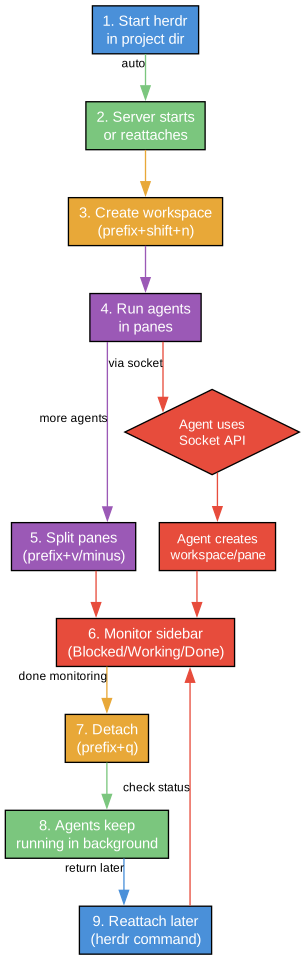
Step 1: Start herdr
herdr
The server starts (or reattaches to an existing one), and you’re dropped into your workspace.
Step 2: Create Workspaces and Run Agents
# Create a new workspace
# Prefix key: Ctrl+b (default)

Ctrl+b, n    # New tab
Ctrl+b, v    # Split pane vertically
Ctrl+b, h    # Split pane horizontally
Launch your agents in each pane:
# Pane 1: Claude Code for main feature
claude

# Pane 2: Codex for test generation
codex

# Pane 3: Pi for code review
pi
Step 3: Monitor via Agent Sidebar
The agent sidebar shows real-time states for all running agents. No more guessing – you can see at a glance which agents need attention and which are still working.
Step 4: Detach and Reattach
# Detach from session (agents keep running!)
Ctrl+b, q

# Reattach later
herdr attach

# Or attach via SSH from another machine
ssh -t your-server 'herdr attach'
This is the key advantage over running agents in bare terminals. When you detach, the herdr server keeps all PTY processes alive. Your agents continue working even when you close your terminal window.
Step 5: Agent Orchestration via Socket API
The Unix socket API enables agents to programmatically control herdr:
# Agents can create new workspaces
herdr socket create-workspace "feature-branch"

# Split panes programmatically
herdr socket split-pane --workspace "feature-branch" --direction vertical

# Check agent states
herdr socket list-agents
This opens the door to autonomous agent orchestration – an agent can spawn sub-agents in new panes, monitor their progress, and coordinate work across multiple workspaces.
Keybindings Reference
herdr uses a prefix key system (default: Ctrl+b), similar to tmux:
| Keybinding | Action |
|---|---|
Ctrl+b, n | New tab |
Ctrl+b, v | Split pane vertically |
Ctrl+b, h | Split pane horizontally |
Ctrl+b, q | Detach from session |
Ctrl+b, c | Close current pane |
Ctrl+b, Tab | Switch between panes |
Ctrl+b, [ | Enter copy mode |
Ctrl+b, ? | Show help |
Mouse support is enabled by default for pane selection and scrolling.
herdr vs tmux vs GUI Managers
| Feature | herdr | tmux | GUI Managers |
|---|---|---|---|
| Terminal multiplexing | ✅ | ✅ | ❌ |
| Agent state detection | ✅ | ❌ | Partial |
| Agent sidebar | ✅ | ❌ | ❌ |
| Session persistence | ✅ | ✅ | ❌ |
| Socket API for agents | ✅ | ❌ | ❌ |
| Copy mode | ✅ | ✅ | ✅ |
| Mouse support | ✅ | ✅ | ✅ |
| SSH remote attach | ✅ | ✅ | ❌ |
| Built-in themes | 18 | Limited | ✅ |
| Live handoff | Experimental | ❌ | ❌ |
Technical Stack
herdr is built with a carefully chosen Rust stack optimized for terminal UI and async I/O:
| Dependency | Version | Purpose |
|---|---|---|
| ratatui | 0.30 | Terminal UI framework |
| crossterm | 0.29 | Cross-platform terminal manipulation |
| tokio | 1 | Async runtime for concurrent PTY management |
| portable-pty | 0.9 | PTY process management |
| serde + toml | - | Configuration serialization |
| clap | - | CLI argument parsing |
The use of portable-pty for PTY management is what enables herdr to keep agent processes alive across detach/reattach cycles. The tokio async runtime handles concurrent I/O from multiple agent panes without blocking.
Configuration
herdr uses a TOML configuration file at ~/.config/herdr/config.toml:
# Keybindings
[prefix]
key = "ctrl+b"

# Theme (18 built-in options)
[theme]
name = "dracula"

# Agent detection
[agents]
auto_detect = true
sidebar_width = 30

# Session
[session]
persist = true
handoff = "experimental"
Installation
# Quick install (Linux/macOS)
curl -fsSL https://herdr.dev/install.sh | sh

# Homebrew
brew install herdr

# From source
git clone https://github.com/ogulcancelik/herdr.git
cd herdr
cargo install --path .
Note: herdr currently supports Linux and macOS. Windows support is not yet available.
License
herdr is dual-licensed under AGPL-3.0-or-later with a commercial licensing option. The AGPL license requires that any modifications to herdr itself must be made available under the same license. For commercial use that doesn’t require AGPL compliance, a commercial license is available from the author.
Why herdr Matters
The AI coding agent ecosystem is exploding. Developers routinely run 3-5 agents simultaneously – one for features, one for tests, one for review, one for documentation. Without a tool like herdr, managing this chaos means:
- Multiple terminal windows scattered across your screen
- No visibility into what each agent is doing
- Lost work when you accidentally close a terminal
- No coordination between agents
herdr solves all four problems. It’s the first terminal multiplexer designed from the ground up for the age of AI coding agents. The agent sidebar alone saves hours of context-switching, and the socket API enables a future where agents can autonomously coordinate their work.
If you’re running more than one AI coding agent, you need herdr. It’s that simple.
Links
- GitHub: https://github.com/ogulcancelik/herdr
- Website: https://herdr.dev
- Install:
curl -fsSL https://herdr.dev/install.sh | sh - License: AGPL-3.0-or-later (dual-licensed with commercial option)
- Stars: 3,450+
Related guides
herdr is the terminal orchestration layer for AI agents — these guides cover the rest of the open-source agent stack:
- Obscura: Rust Headless Browser & Browser Harness for AI Agents — a secure, anti-detect headless browser for agentic web automation.
- jcode: Next-Generation Coding Agent Harness — a Rust coding agent harness with semantic memory and multi-agent swarms.
- Open CoDesign: Open-Source Claude Design Alternative — turn prompts into polished HTML prototypes and dashboards locally with BYOK multi-model support.
- Free Claude Code: Use Claude Code CLI for Free — route Claude Code’s API calls to free or local model providers.

Enjoyed this post? Never miss out on future posts by following us


