Introduction
The open source Need for Speed II SE reimplementation known as NFSIISE solves a problem that has plagued retro gaming enthusiasts for decades: the classic 1997 racing game was locked to Windows and required 3dfx Voodoo graphics hardware. Written in C by Blazej Szczygiel and released under the MIT license, NFSIISE is a compatibility wrapper that translates Windows API calls and 3dfx Glide rendering calls to cross-platform equivalents using SDL2 and OpenGL – enabling the game to run natively on Linux, macOS, Windows, and Android with 3D acceleration and TCP multiplayer networking.
At version 1.4.0, NFSIISE consists of just 10 C source files and 6 header files, yet it replaces 6 complete Windows and 3dfx API subsystems. The project supports 5 platforms, 3 OpenGL renderer variants, TCP/UDP/IPX multiplayer networking, Force Feedback game controllers, and 6 languages. It is not an emulator – the original game binary code in x86 assembly still executes directly on the CPU, while the wrapper modules translate API calls at runtime.
How It Works
NFSIISE operates as a compatibility wrapper, also known as a shim layer, that sits between the original game binary and modern platform APIs. When the game makes a Windows API call or a 3dfx Glide rendering call, the corresponding wrapper module intercepts that call and translates it to a cross-platform equivalent. This approach differs fundamentally from emulation: the original x86 assembly code still runs natively on the CPU at full speed, with only the operating system and graphics API boundaries being replaced.
The architecture consists of 6 wrapper modules, each responsible for translating a specific Windows or 3dfx API subsystem:
- Glide2x.c translates 3dfx Glide API calls such as
grDrawTriangle,grBufferSwap, andgrLfbWriteRegionto OpenGL 1.x, 2.x, or ES 2.0 equivalents. Three renderer variants are available: OpenGL 1.x for legacy systems, OpenGL 2.x as the default with shader support, and OpenGL ES 2.0 for Android and embedded devices. - DInput.c translates DirectInput joystick and force feedback calls to SDL2 joystick and haptic APIs. It supports up to 6 axes, DPad buttons, configurable Esc and Reset buttons, and Force Feedback effects tested on Linux.
- Kernel32.c translates Windows kernel functions including
CreateThread,CreateFile,VirtualAlloc,GetTickCount, and file I/O operations to POSIX and SDL thread equivalents. - User32.c translates Windows user interface functions such as window creation, message handling, and dialog boxes to SDL window events and cross-platform UI equivalents.
- Wsock32.c translates Winsock networking functions including
socket,bind,connect,send, andrecvto POSIX socket calls, supporting TCP, UDP, serial port, and IPX protocol connections. - EAcsnd.c translates the EA proprietary sound system to SDL audio with optional linear interpolation from 22050Hz to 44100Hz for improved audio quality.
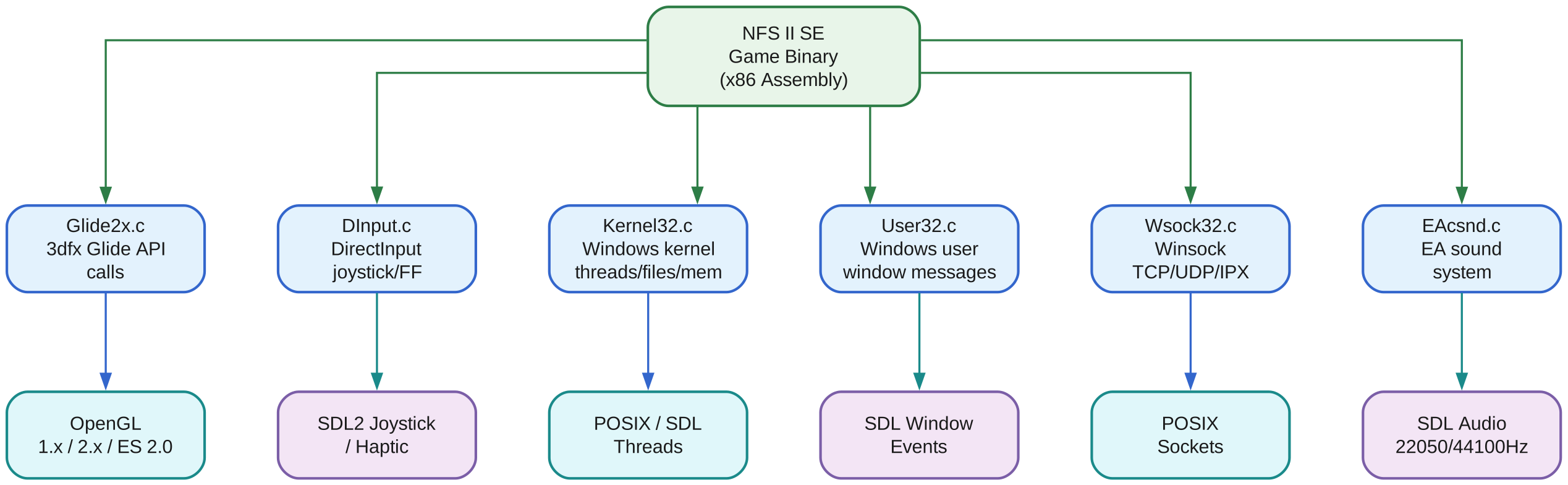
The architecture diagram above illustrates the three-tier design of NFSIISE. At the top, the NFS II SE Game Binary represents the original 1997 game code compiled in x86 assembly – this code executes directly on the CPU without modification. The middle row shows the 6 wrapper modules, each implemented as a C source file that intercepts and translates API calls from a specific Windows or 3dfx subsystem. The bottom row shows the 6 platform targets: OpenGL for 3D rendering, SDL2 Joystick/Haptic for input, POSIX/SDL Threads for kernel operations, SDL Window for window management, POSIX Sockets for networking, and SDL Audio for sound output.
Each wrapper module has a one-to-one mapping to its platform target. Glide2x.c maps to OpenGL, DInput.c maps to SDL2 Joystick/Haptic, Kernel32.c maps to POSIX/SDL Threads, User32.c maps to SDL Window, Wsock32.c maps to POSIX Sockets, and EAcsnd.c maps to SDL Audio. This clean separation means each module can be understood, debugged, and modified independently. The wrapper pattern was chosen over full emulation because it preserves the original game performance – the assembly code runs at native CPU speed, and only the API boundary calls incur translation overhead.
Compared to other game compatibility approaches, NFSIISE occupies a unique niche. DOSBox provides full hardware emulation but at a significant performance cost. Wine implements the Windows API at a higher level but adds complexity and dependency overhead. NFSIISE takes a targeted approach: it replaces only the specific API calls that the game actually uses, resulting in a minimal, fast, and maintainable compatibility layer.
Key Insight: NFSIISE is not an emulator – it is a compatibility wrapper that replaces 6 Windows and 3dfx API modules with cross-platform equivalents. The original game binary code in x86 assembly still executes directly on the CPU, while Glide2x, Kernel32, User32, DInput, Wsock32, and EAcsnd are each translated to SDL2, OpenGL, and POSIX calls at runtime.
Key Features
NFSIISE provides a comprehensive set of features that make the classic Need For Speed II SE experience available on modern platforms with enhanced capabilities:
| Feature | Description |
|---|---|
| Cross-Platform | Linux, macOS (up to Mojave), Windows (cross-compile), Android (armeabi-v7a), Batocera Linux |
| OpenGL Rendering | 3 renderer variants: OpenGL 1.x, OpenGL 2.x (default), OpenGL ES 2.0 (Android) |
| Multiplayer Networking | TCP, UDP, serial port, and IPX protocol support with configurable ports |
| Game Controllers | SDL2 joystick with up to 6 axes, DPad, Force Feedback via SDL haptic |
| Audio System | SDL audio at 22050Hz with optional linear interpolation to 44100Hz |
| 6 Languages | English, French, German, Italian, Spanish, Swedish |
| Configurable | VSync, MSAA, window size, aspect ratio, CPU affinity, joystick deadzone |
| 12 Function Keys | F1-F12 in-game controls for rain, detail, HUD, mirror, music, sound, brightness, car reset |
| Arch Linux AUR | Package available as nfs2se-git for easy installation |
| Docker Build Env | Isolated build environment available via Docker/Podman |
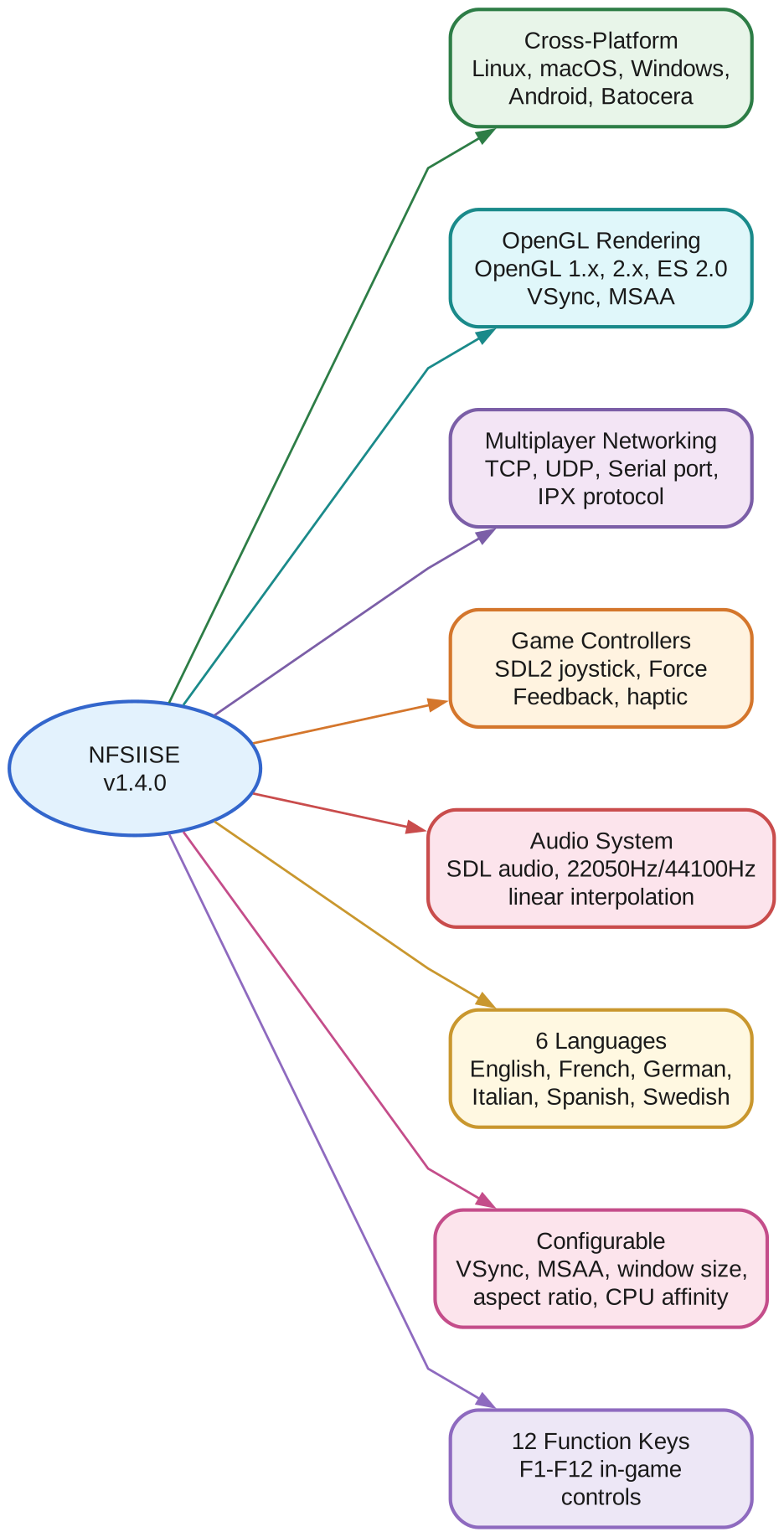
The features diagram shows NFSIISE v1.4.0 at the center with 8 feature branches radiating outward. The Cross-Platform branch highlights support for 5 platforms: Linux with native x86 builds, macOS up to Mojave using clang and yasm macho, Windows via cross-compilation from Linux or WSL, Android for armeabi-v7a devices using the NDK, and Batocera Linux running the Windows build through Wine.
The OpenGL Rendering branch shows the 3 renderer variants. OpenGL 2.x is the default and provides the best visual quality with shader-based rendering. OpenGL 1.x serves as a fallback for legacy graphics hardware. OpenGL ES 2.0 enables rendering on Android devices and other embedded platforms that only support the GLES2 subset. All 3 variants support VSync for tear-free rendering and MSAA for anti-aliased output.
The Multiplayer Networking branch covers the 4 connection types. TCP is the primary multiplayer protocol with configurable ports (default 1030/1029). UDP provides an alternative with lower latency. Serial port connection supports direct cable connections for authentic retro multiplayer. IPX protocol support via the Wsock32 wrapper enables LAN play compatible with the original game.
The Game Controllers branch details SDL2 joystick support with up to 6 axes for steering and pedals, DPad buttons for menu navigation, configurable Esc and Reset buttons, and Force Feedback effects tested on Linux hardware. The Audio System branch shows SDL audio output at the original 22050Hz sample rate with optional linear interpolation to 44100Hz for smoother sound reproduction.
The 6 Languages branch lists English, French, German, Italian, Spanish, and Swedish – selectable via the install.win configuration file. The Configurable branch covers VSync, MSAA, window size, aspect ratio, CPU affinity, and joystick deadzone settings. The 12 Function Keys branch maps F1-F12 to in-game controls including rain toggle, detail level, HUD display, mirror view, music volume, sound volume, brightness adjustment, and car reset.
Amazing: With just 10 C source files and 6 header files, NFSIISE translates 6 complete Windows API subsystems and brings a classic 1997 racing game to 5 platforms – Linux, macOS, Windows, Android, and Batocera Linux. The entire wrapper is under 2,000 lines of C code, yet it supports OpenGL 1.x/2.x/ES2 rendering, TCP/UDP/IPX networking, Force Feedback, and 6 languages.
Installation
Prerequisites
Before building NFSIISE, you need the following dependencies installed:
- GCC or Clang with 32-bit support
- SDL2 32-bit development libraries
- OpenGL 32-bit development libraries
- Yasm assembler
Debian/Ubuntu
# Enable 32-bit architecture
sudo dpkg --add-architecture i386
sudo apt update

# Install 32-bit development libraries
sudo apt install gcc-multilib g++-multilib libsdl2-dev:i386 libgl1-mesa-dev:i386 yasm
Arch Linux
# Install dependencies
sudo pacman -S gcc-multilib lib32-sdl2 lib32-mesa yasm

# Or use the AUR package directly
yay -S nfs2se-git
Building from Source
# Clone the repository with submodules
git clone https://github.com/zaps166/NFSIISE.git
cd NFSIISE
git submodule update --init --recursive

# Compile for Linux/macOS (default)
./compile_nfs

# Compile for Windows (cross-compile from Linux/WSL)
./compile_nfs win32

# Compile for Android
./compile_nfs android

# Compile for non-x86 ARM (C++ translation mode)
./compile_nfs cpp
Docker Build Environment
For an isolated build environment that avoids polluting your system with development dependencies:
# Clone the Docker build environment
git clone https://github.com/thomas-mc-work/nfsiise-build-env.git
cd nfsiise-build-env

# Build using Docker or Podman
docker build -t nfsiise-build .
docker run -v /path/to/NFSIISE:/build nfsiise-build
Configuration and Running
Copying Game Data
NFSIISE requires the original Need For Speed II SE Special Edition game data. Copy the fedata and gamedata directories from your original CD-ROM into the game directory:
# Copy game data from CD-ROM mount point
cp -r /media/cdrom/fedata ./Need\ For\ Speed\ II\ SE/
cp -r /media/cdrom/gamedata ./Need\ For\ Speed\ II\ SE/

# On Unix-like systems, convert filenames to lowercase
cd "Need For Speed II SE"
./convert_to_lowercase
Configuration File
The configuration file is auto-generated on first run at ~/.nfs2se/nfs2se.conf on Linux or %AppData%\.nfs2se\nfs2se.conf on Windows. Key configuration options include:
| Option | Description | Default |
|---|---|---|
| VSync | Enable vertical synchronization | Off |
| MSAA | Multi-sample anti-aliasing level | 0 |
| WindowSize | Window dimensions (e.g., 1920x1080) | Game default |
| AspectRatio | Display aspect ratio | Auto |
| Joystick | Enable joystick input | On |
| NetworkPort | TCP/UDP port for multiplayer | 1030/1029 |
| CPUAffinity | CPU core affinity mask | 0 (all cores) |
Language Selection
Select your preferred language by editing the install.win file in the game directory. Available languages are English, French, German, Italian, Spanish, and Swedish.
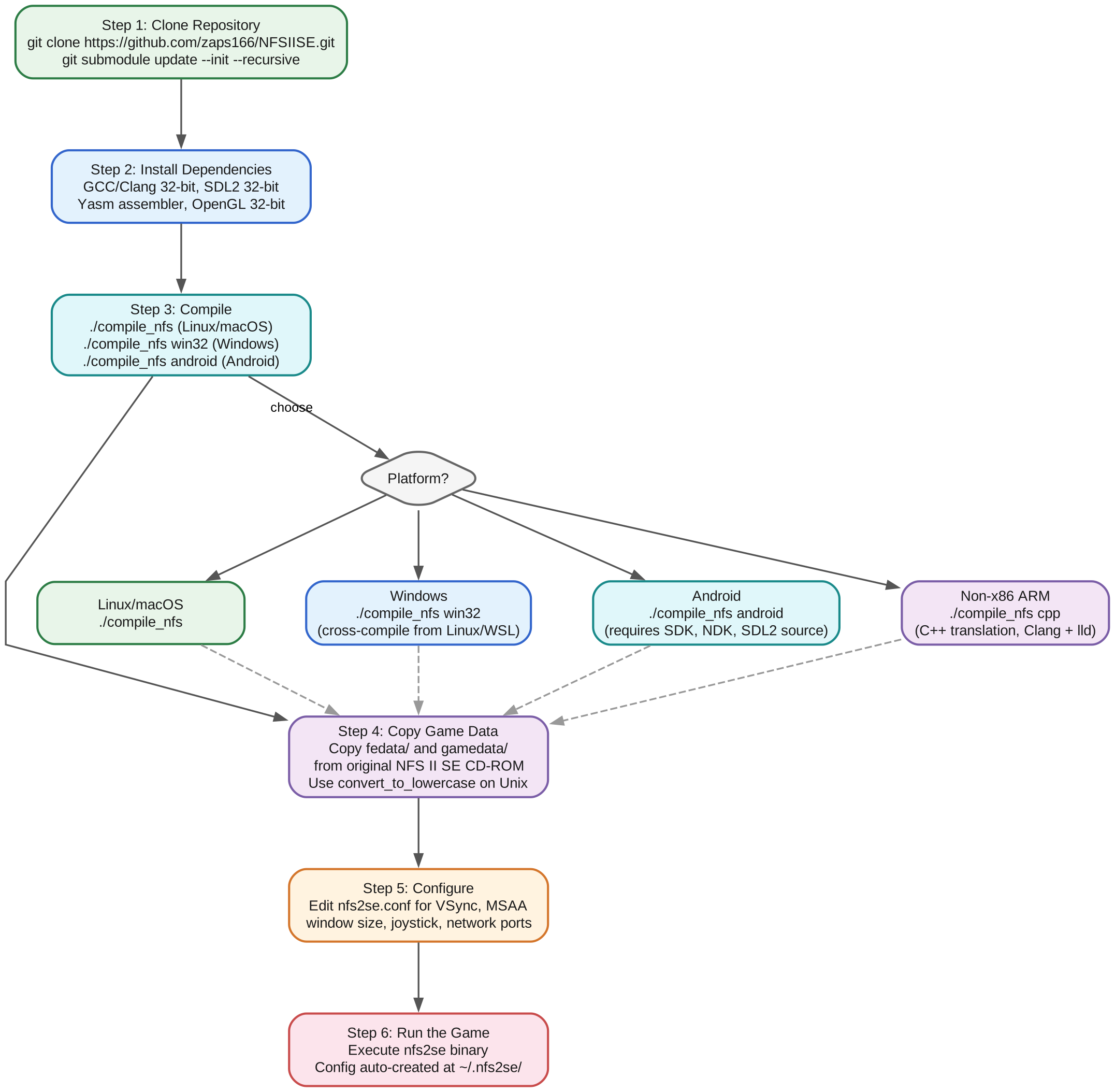
The workflow diagram above shows the 6-step process for getting NFSIISE running. Step 1 clones the repository with git clone and initializes the git submodules (Asm and Cpp references). Step 2 installs the required 32-bit development dependencies including GCC/Clang, SDL2, OpenGL, and Yasm. On Debian-based systems, this requires enabling the i386 architecture with dpkg --add-architecture i386.
Step 3 is the compilation step, which branches based on your target platform. For Linux and macOS, run ./compile_nfs with no arguments. For Windows, use ./compile_nfs win32 to cross-compile from Linux or WSL. For Android, use ./compile_nfs android which requires the Android SDK, NDK, and SDL2 source code. For non-x86 ARM devices, use ./compile_nfs cpp which activates the C++ translation mode using Clang and the lld linker.
Step 4 copies the game data from your original NFS II SE CD-ROM. The fedata and gamedata directories must be placed inside the game directory. On Unix-like systems, all filenames must be lowercase – use the included convert_to_lowercase script to fix any uppercase names from the CD-ROM.
Step 5 configures the game settings via nfs2se.conf. The configuration file supports VSync for tear-free rendering, MSAA for anti-aliasing, custom window sizes, joystick mapping and deadzone settings, and network port configuration for multiplayer games.
Step 6 runs the game by executing the nfs2se binary. On first run, the configuration file is automatically created at ~/.nfs2se/nfs2se.conf on Linux or %AppData%\.nfs2se\nfs2se.conf on Windows. The game supports 12 function keys (F1-F12) for in-game controls like rain toggle, detail level, HUD display, mirror view, music and sound volume, brightness, and car reset.
Takeaway: To get NFSIISE running, you need only three things: the compiled wrapper binary, the original Need For Speed II SE game data from your CD-ROM, and a valid
nfs2se.confconfiguration file. The config is auto-generated on first run at~/.nfs2se/nfs2se.confon Linux or%AppData%\.nfs2se\nfs2se.confon Windows, and supports VSync, MSAA, joystick mapping, and network port configuration.
Conclusion
NFSIISE demonstrates that preserving classic gaming experiences does not require heavy emulation or complex compatibility layers. With a focused, minimal approach – 10 C source files translating 6 Windows and 3dfx API subsystems – the project brings Need For Speed II SE to 5 modern platforms with full 3D acceleration, multiplayer networking, Force Feedback, and multi-language support.
The wrapper pattern chosen by NFSIISE offers distinct advantages over alternatives. Unlike DOSBox, which emulates an entire hardware environment at significant performance cost, NFSIISE lets the original game code run natively on the CPU. Unlike Wine, which implements the entire Windows API at a high level, NFSIISE replaces only the specific API calls that the game uses. This targeted approach results in a codebase that is small, fast, maintainable, and easy to understand.
For retro gaming enthusiasts, NFSIISE provides a practical way to experience a classic 1997 racing game on modern hardware and operating systems. The availability of an Arch Linux AUR package, a Docker build environment, and comprehensive configuration options makes it accessible to both casual players and technical users. The project also has a companion repository, NFSIISEN, which adds cockpit view and night driving features for the non-Glide version of the game.
Important: NFSIISE requires the original Need For Speed II SE Special Edition game data – it is a wrapper, not a standalone game. You must copy the
fedataandgamedatadirectories from your original CD-ROM into the game directory. On Unix-like systems, all filenames must be lowercase; use the includedconvert_to_lowercasescript to fix uppercase names.
Links:
- GitHub: https://github.com/zaps166/NFSIISE
- NFSIISEN (cockpit view): https://github.com/zaps166/NFSIISEN
- Docker build env: https://github.com/thomas-mc-work/nfsiise-build-env
- Arch Linux AUR: https://aur.archlinux.org/packages/nfs2se-git

Enjoyed this post? Never miss out on future posts by following us


