Awesome Claude Design: 68 Ready-to-Use Design System Inspirations for AI Coding
Building consistent, beautiful user interfaces with AI coding agents has always faced a fundamental challenge: how do you communicate the feel of a design to an AI? Brand guidelines PDFs talk to humans but are too loose for agents. Figma exports tell you what to use but skip why. The DESIGN.md format from VoltAgent’s awesome-claude-design collection bridges this gap by providing 68 ready-to-use design system inspirations that Claude Design can transform into complete, production-ready UI kits in a single shot.
What is Awesome Claude Design?
Awesome Claude Design is a curated collection of 68 DESIGN.md files, each capturing the visual DNA of a well-known brand or product. These are not loose color palettes or vague mood boards. Each DESIGN.md is a structured, plain-text markdown file that describes a brand’s visual language in a format that AI agents can actually act on.
The collection spans nine categories covering AI platforms, developer tools, backend services, productivity apps, design tools, fintech, e-commerce, media, and automotive brands. Whether you want the minimalist precision of Vercel, the cinematic darkness of RunwayML, or the premium whitespace of Apple, there is a DESIGN.md that captures that aesthetic.
Understanding the Design System Ecosystem
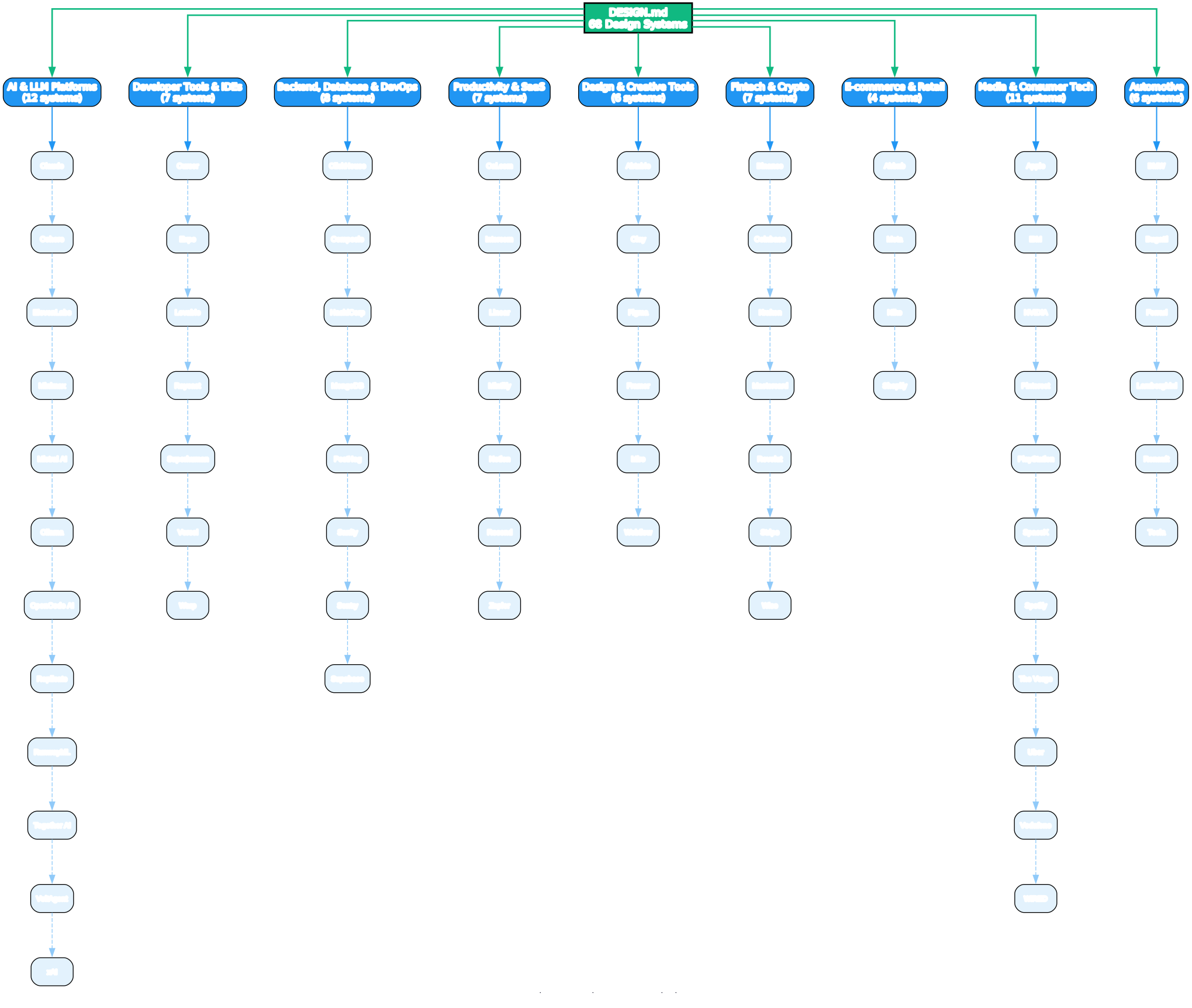
The diagram above illustrates how the 68 design system inspirations are organized across nine distinct categories. Each category represents a different industry vertical, ensuring that developers can find inspiration that matches their project’s domain:
AI & LLM Platforms (12 systems) - From Anthropic’s warm terracotta accent to xAI’s stark monochrome, these systems capture the visual language of modern AI products. They tend toward dark interfaces with vibrant accent colors that signal intelligence and capability.
Developer Tools & IDEs (7 systems) - Cursor, Vercel, Warp, and others in this category share a developer-centric dark aesthetic with gradient accents. These systems prioritize code readability and information density.
Backend, Database & DevOps (8 systems) - ClickHouse, Supabase, Sentry, and similar tools use technical documentation styles with data-dense dashboards. Yellow and green accents dominate, signaling reliability and performance.
Productivity & SaaS (7 systems) - Linear, Notion, and Mintlify exemplify the clean, minimal aesthetic of modern productivity tools. These systems emphasize readability and focus.
Design & Creative Tools (6 systems) - Figma, Framer, and Miro use vibrant, playful palettes that reflect creative energy while maintaining professional polish.
Fintech & Crypto (7 systems) - Stripe’s signature purple gradients, Coinbase’s institutional blue, and Binance’s urgent yellow all capture the trust and precision required in financial interfaces.
E-commerce & Retail (4 systems) - Airbnb’s warm photography-driven approach and Nike’s bold monochrome demonstrate how retail design systems balance brand expression with conversion.
Media & Consumer Tech (11 systems) - The largest category spans from Apple’s premium minimalism to WIRED’s editorial density, covering the full spectrum of consumer-facing design.
Automotive (6 systems) - From Tesla’s radical subtraction to Lamborghini’s cathedral-black luxury, automotive systems push premium aesthetics to their limits.
What is DESIGN.md?
DESIGN.md is a single plain-text markdown file that describes a brand’s visual language in a format AI agents can actually act on. The concept was first introduced by Google Stitch and built into a real, comparable collection by getdesign.md.
The core idea: keep token, rule, and rationale in the same file. A Figma export tells you what to use but skips why. A brand guideline PDF talks to humans (“approachable yet premium”) but is too loose for an agent. DESIGN.md sits in the middle – specific enough for the agent to make its next decision, and carrying the why so it can stay on-system when it hits a case the file never covered.
| File | Who reads it | What it defines |
|---|---|---|
AGENTS.md | Coding agents | How to build the project |
DESIGN.md | Design agents (Claude Design, Stitch) | How the project should look and feel |
Understanding the DESIGN.md Format
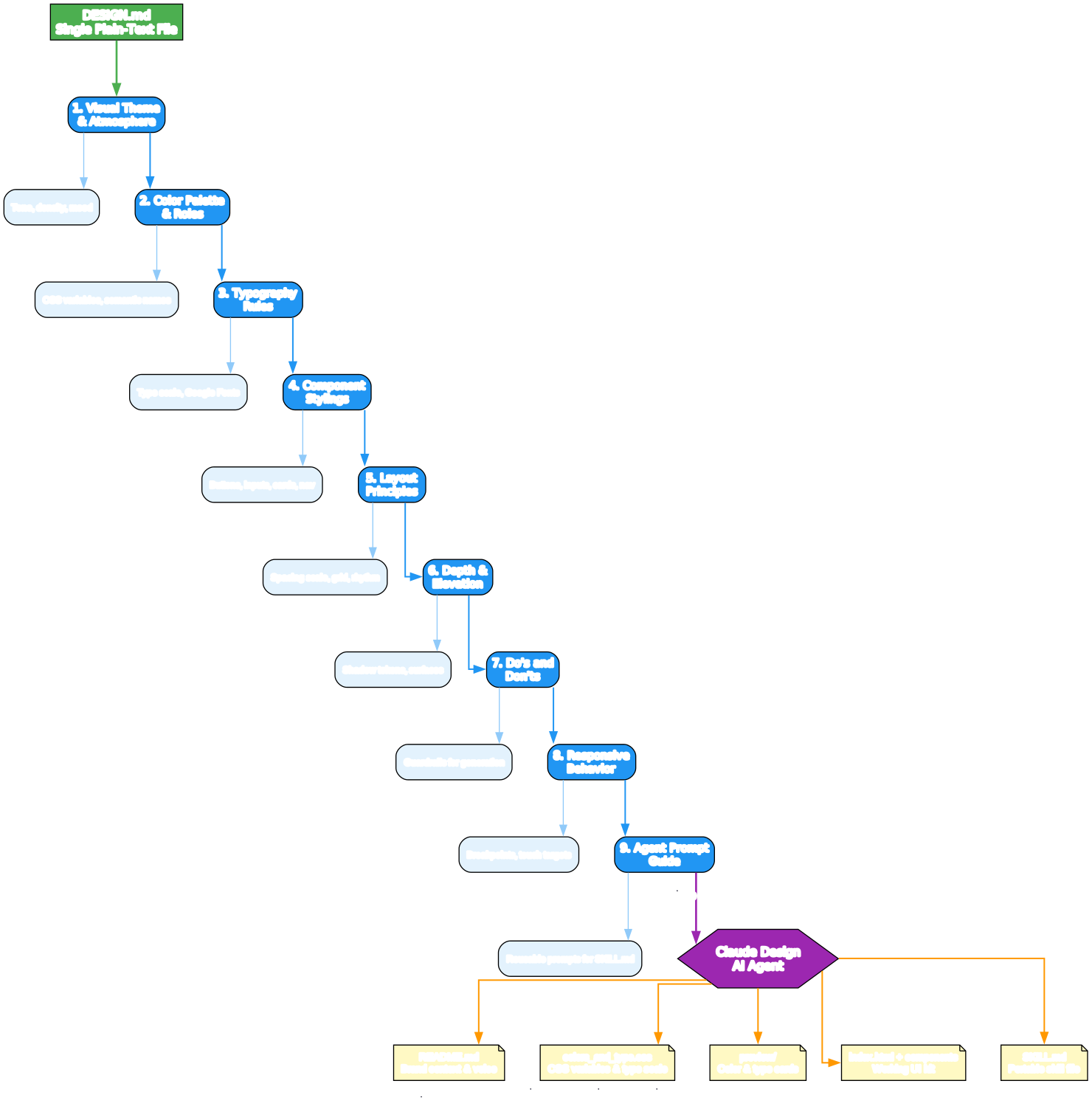
The diagram above shows the 9 sections that every DESIGN.md file follows, and how they flow into Claude Design to produce a complete starter package. Let’s break down each section:
1. Visual Theme & Atmosphere - Sets the overall tone, density, and mood of the design. This is the “north star” that guides every subsequent decision. For example, Stripe’s DESIGN.md might specify “weight-300 elegance with signature purple gradients” while Nike’s would declare “radical subtraction, massive uppercase, full-bleed photography.”
2. Color Palette & Roles - Defines CSS variables with semantic names and hex values. Instead of just listing colors, this section assigns roles: --color-primary, --color-surface, --color-accent, etc. Claude uses these semantic tokens to generate consistent color applications across all components.
3. Typography Rules - Establishes the type scale and selects Google Fonts fallbacks when the brand font is proprietary. This ensures that even without licensing the exact typeface, the generated UI maintains the brand’s typographic character.
4. Component Stylings - Defines how buttons, inputs, cards, and navigation should look, including states (hover, active, disabled, focus). This is where the design system becomes actionable – Claude generates real components from these specifications.
5. Layout Principles - Specifies spacing scale, grid system, and whitespace rhythm. These rules ensure that the generated layouts have consistent breathing room and visual hierarchy.
6. Depth & Elevation - Defines shadow tokens and surface hierarchy. This section tells Claude how to layer content visually, from flat surfaces to elevated cards and modals.
7. Do’s and Don’ts - Provides guardrails that Claude respects when generating new screens. These constraints prevent common design mistakes and keep the output on-brand even when the agent encounters edge cases.
8. Responsive Behavior - Specifies breakpoints, touch targets, and collapse behavior. This ensures the generated UI works across devices without manual adjustment.
9. Agent Prompt Guide - Contains reusable prompts that Claude embeds into the generated SKILL.md. This section is meta – it teaches the AI how to teach itself about the design system for future projects.
How to Use Awesome Claude Design
Using the collection is straightforward. The workflow involves three steps: browse, download, and generate.
Understanding the Usage Workflow
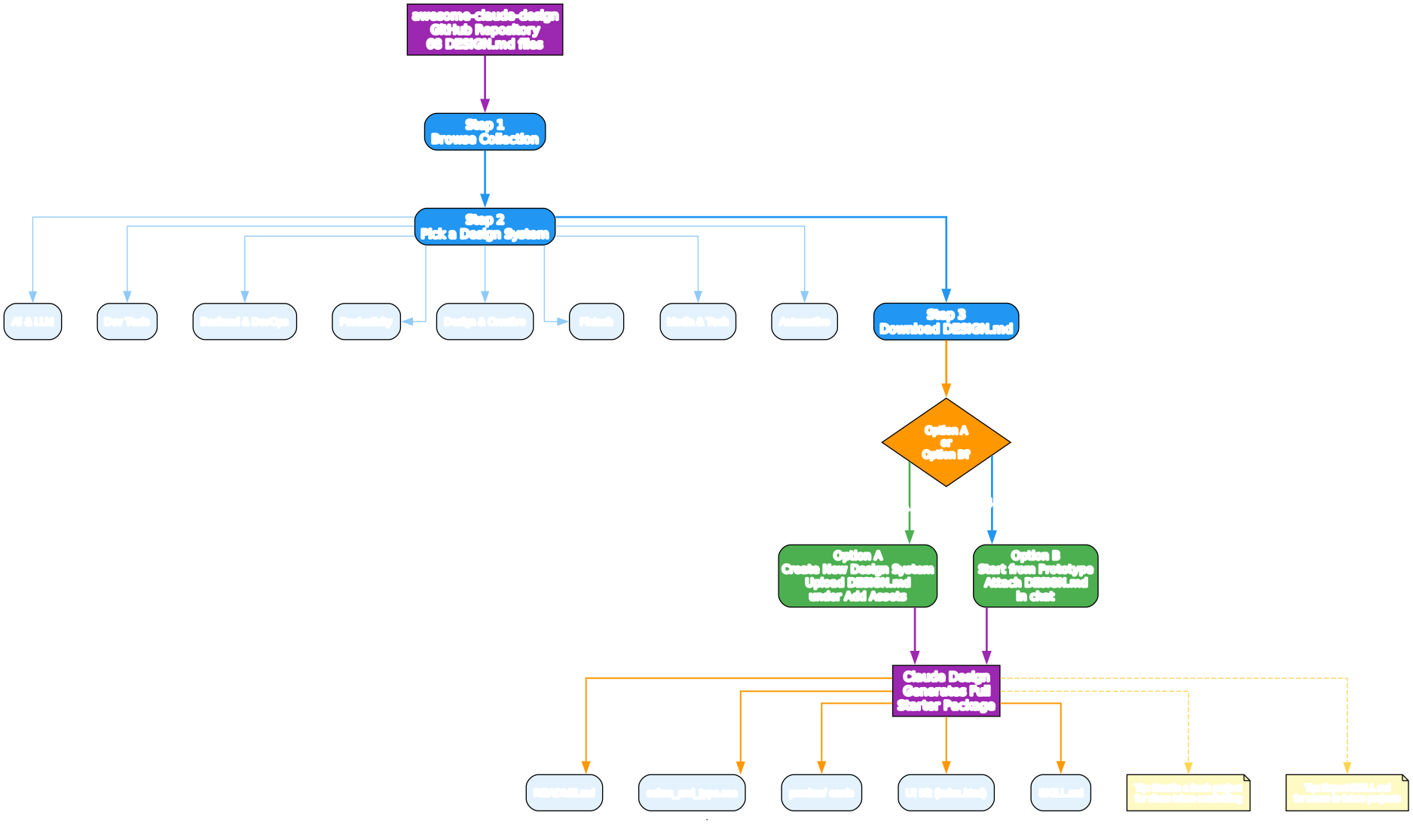
The diagram above illustrates the complete workflow from browsing the collection to generating a full design system. Here is a detailed walkthrough:
Step 1: Browse the Collection
Visit the awesome-claude-design repository on GitHub. The README organizes all 68 design system inspirations into nine categories. Click through to the preview page for any system that catches your eye to inspect its colors, typography, and overall feel in detail.
Step 2: Pick a Design System
Choose the design system that matches the aesthetic you want for your project. Each system is inspired by a real brand’s publicly observable design patterns. For example:
- Building a developer tool? Consider Cursor (sleek dark interface with gradient accents) or Vercel (black and white precision with Geist font)
- Creating a fintech dashboard? Look at Stripe (signature purple gradients, weight-300 elegance) or Coinbase (clean blue identity, institutional trust)
- Designing a media platform? Explore Spotify (vibrant green on dark, bold type) or The Verge (acid-mint and ultraviolet accents)
Step 3: Download the DESIGN.md
Download the DESIGN.md file for your chosen system. Each file is a self-contained markdown document that captures the complete visual DNA of that brand’s design language.
Option A: Start from a Design System
Go to claude.ai/design/#org, click Create new design system, and on the Set up your design system screen, upload the DESIGN.md under Add Assets. This approach is best when you want to establish the design system first and then build screens on top of it.
Option B: Start from a Prototype
Go to the Claude Design dashboard, create a new prototype, attach the DESIGN.md in the chat, and type: “Create a design system from this DESIGN.md”. This approach is best when you want to jump straight into building a specific screen or feature.
What Claude Produces
Either way, Claude Design generates a complete starter package in minutes:
README.mdwith brand context, voice, and visual foundationscolors_and_type.csswith CSS variables, type scale, and utility classes- Google Fonts substitutes when the brand font is proprietary
preview/cards for colors, type, spacing, components, and brand- A working UI kit (
index.html+ components) applying the system to a real marketing page SKILL.md, a portable skill file for future projects
One markdown file becomes a production-ready design package. No boilerplate, no manual setup.
The 9 Categories in Detail
AI & LLM Platforms (12 Systems)
This is the largest single category, reflecting the explosion of AI products and their distinctive visual languages. Key highlights:
- Claude - Warm terracotta accent with clean editorial layout. The design conveys approachability and intelligence.
- Ollama - Terminal-first, monochrome simplicity. Perfect for projects that want to signal “we run locally.”
- VoltAgent - Void-black canvas with emerald accent, terminal-native. The design speaks to developers building agent frameworks.
- RunwayML - Cinematic dark UI with media-rich layout. Ideal for creative AI applications.
# Example: Using the Claude DESIGN.md
# Download from https://getdesign.md/claude/design-md
# Then upload to Claude Design as a design system asset
Developer Tools & IDEs (7 Systems)
Developer tools share a common dark aesthetic but differentiate through accent colors and information density:
- Vercel - Black and white precision with Geist font. The design system for developers who value clarity above all.
- Cursor - Sleek dark interface with gradient accents. Shows how AI-native tools can feel premium.
- Warp - Dark IDE-like interface with block-based command UI. Redefines terminal aesthetics.
Backend, Database & DevOps (8 Systems)
These systems balance technical precision with approachability:
- Supabase - Dark emerald theme, code-first. The open-source Firebase alternative’s design language.
- PostHog - Playful hedgehog branding with developer-friendly dark UI. Proves that backend tools can have personality.
- Sentry - Dark dashboard with data-dense layouts and pink-purple accent. Built for monitoring at scale.
Productivity & SaaS (7 Systems)
The productivity category emphasizes clean, focused interfaces:
- Linear - Ultra-minimal with precise purple accent. The gold standard for engineering-focused project management.
- Notion - Warm minimalism with serif headings and soft surfaces. Shows how productivity tools can feel human.
- Zapier - Warm orange with friendly illustration-driven design. Automation made approachable.
Design & Creative Tools (6 Systems)
Creative tools need to showcase their own capabilities through their design:
- Figma - Vibrant multi-color palette that is playful yet professional. The design tool’s design system.
- Framer - Bold black and blue, motion-first, design-forward. Websites that move.
- Miro - Bright yellow accent with infinite canvas aesthetic. Collaboration without boundaries.
Fintech & Crypto (7 Systems)
Financial interfaces must convey trust and precision:
- Stripe - Signature purple gradients with weight-300 elegance. The benchmark for fintech design.
- Coinbase - Clean blue identity with institutional feel. Trust through simplicity.
- Wise - Bright green accent, friendly and clear. International money transfer made transparent.
E-commerce & Retail (4 Systems)
Retail design systems balance brand expression with conversion:
- Airbnb - Warm coral accent with photography-driven, rounded UI. Hospitality in every pixel.
- Nike - Monochrome UI with massive uppercase Futura and full-bleed photography. Athletic retail at its peak.
- Shopify - Dark-first cinematic with neon green accent and ultra-light display type. E-commerce reimagined.
Media & Consumer Tech (11 Systems)
The broadest category, spanning from premium minimalism to editorial density:
- Apple - Premium white space with SF Pro and cinematic imagery. The standard for consumer electronics.
- SpaceX - Stark black and white with full-bleed imagery. Futuristic without trying.
- The Verge - Acid-mint and ultraviolet accents with Manuka display type. Tech editorial at its boldest.
Automotive (6 Systems)
Automotive brands push premium aesthetics to their limits:
- Tesla - Radical subtraction with cinematic full-viewport photography. Less is more, taken to the extreme.
- Lamborghini - True black cathedral with gold accent and LamboType custom Neo-Grotesk. Maximum impact.
- Bugatti - Cinema-black canvas with monochrome austerity and monumental display type. Luxury defined.
Tips for Getting Better Output
The awesome-claude-design README includes several practical tips for maximizing the quality of your generated design systems:
Start in a fresh project. Claude Design anchors the system to the project it was scaffolded in. Mixing brands mid-project muddles the tokens. Create a new project for each design system.
Keep asking for screens. Once the system is scaffolded, prompts like “now build a pricing page” or “add an empty state” stay on-brand automatically. The design system acts as a constraint that keeps all subsequent generations consistent.
Request variants. Ask for light/dark, compact/comfortable, or marketing/app variants. Claude branches cleanly from the base tokens, giving you multiple expressions of the same design DNA.
Export the SKILL.md. Save it to your own skills folder and you can re-summon the same aesthetic in any future Claude project without re-uploading the original DESIGN.md. This is the key to building a personal library of design system inspirations.
DESIGN.md vs Traditional Design Systems
| Aspect | DESIGN.md | Figma Export | Brand PDF |
|---|---|---|---|
| Format | Plain text markdown | Binary design file | PDF document |
| AI-readable | Yes | No | Partially |
| Contains rationale | Yes | No | Sometimes |
| Contains tokens | Yes | Yes | Sometimes |
| Version-controllable | Yes | No | No |
| Portable across tools | Yes | Figma only | N/A |
| Generates full UI kit | Yes (via Claude) | Manual export | Manual implementation |
The DESIGN.md format is specifically designed to be the bridge between human design intent and AI execution. It carries enough structure for an agent to make consistent decisions, and enough rationale to handle edge cases that the file never explicitly covered.
Getting Started
To start using awesome-claude-design:
# Clone the repository
git clone https://github.com/VoltAgent/awesome-claude-design.git

# Browse the collection
cd awesome-claude-design

# Pick a DESIGN.md file that matches your project's aesthetic
# For example, if you want a Vercel-like aesthetic:
cat design-systems/vercel/DESIGN.md
Then head to Claude Design and upload your chosen DESIGN.md file. Within minutes, you will have a complete design system with colors, typography, components, and a working UI kit.
Conclusion
VoltAgent’s awesome-claude-design collection represents a significant step forward in how developers interact with AI design tools. By providing 68 structured DESIGN.md files that capture the visual DNA of well-known brands, it eliminates the blank-page problem that has plagued AI-assisted design. Instead of starting from scratch or pasting vague mood board descriptions, you can now drop in a curated design system inspiration and let Claude Design scaffold a complete, production-ready UI kit.
The DESIGN.md format itself is an important innovation. By keeping token, rule, and rationale in the same plain-text file, it creates a format that is simultaneously readable by humans and actionable by AI agents. This is the kind of infrastructure that makes AI coding tools more effective and more predictable.
Whether you are building a developer tool, a fintech dashboard, or a media platform, the awesome-claude-design collection has a starting point that matches your vision. Pick one, upload it, and let Claude Design do the scaffolding.
Links

Enjoyed this post? Never miss out on future posts by following us


