SwarmForge: Disciplined AI Agent Orchestration with tmux
Tmux-based AI agent orchestration has emerged as a practical solution for coordinating multiple AI coding agents without the chaos of unmanaged concurrent workflows. SwarmForge, created by Robert C. Martin (Uncle Bob) and Justin Martin, provides a disciplined orchestration platform that uses tmux sessions, git worktrees, and layered constitutions to turn swarms of AI agents into reliable, professional software engineers. Built as a pure shell project with no runtime dependencies beyond tmux and git, SwarmForge enforces Clean Code principles through its constitution system – requiring TDD, mutation testing, CRAP analysis, and Gherkin acceptance testing from every agent in the swarm.
How It Works
SwarmForge orchestrates AI agents through a carefully designed pipeline that starts with a simple configuration file and ends with isolated, observable agent sessions. The execution flow begins when you run the swarm command, which delegates to swarmforge.sh – a 550-line zsh script that parses swarmforge.conf, creates git worktrees under .worktrees/, launches tmux sessions, opens Terminal windows via osascript, and generates swarmtools/notify-agent.sh for inter-agent communication.
Each component in the architecture serves a specific purpose. The swarmforge.conf file defines the swarm topology with window <role> <agent> <worktree> lines, giving you full control over which roles exist, which AI backend each role uses, and whether each role works in the main branch or an isolated worktree. The swarmforge.sh orchestrator reads this configuration and creates the entire runtime environment – one tmux session per role, one Terminal window per session, and one git worktree per role that needs isolation.
Understanding the Architecture
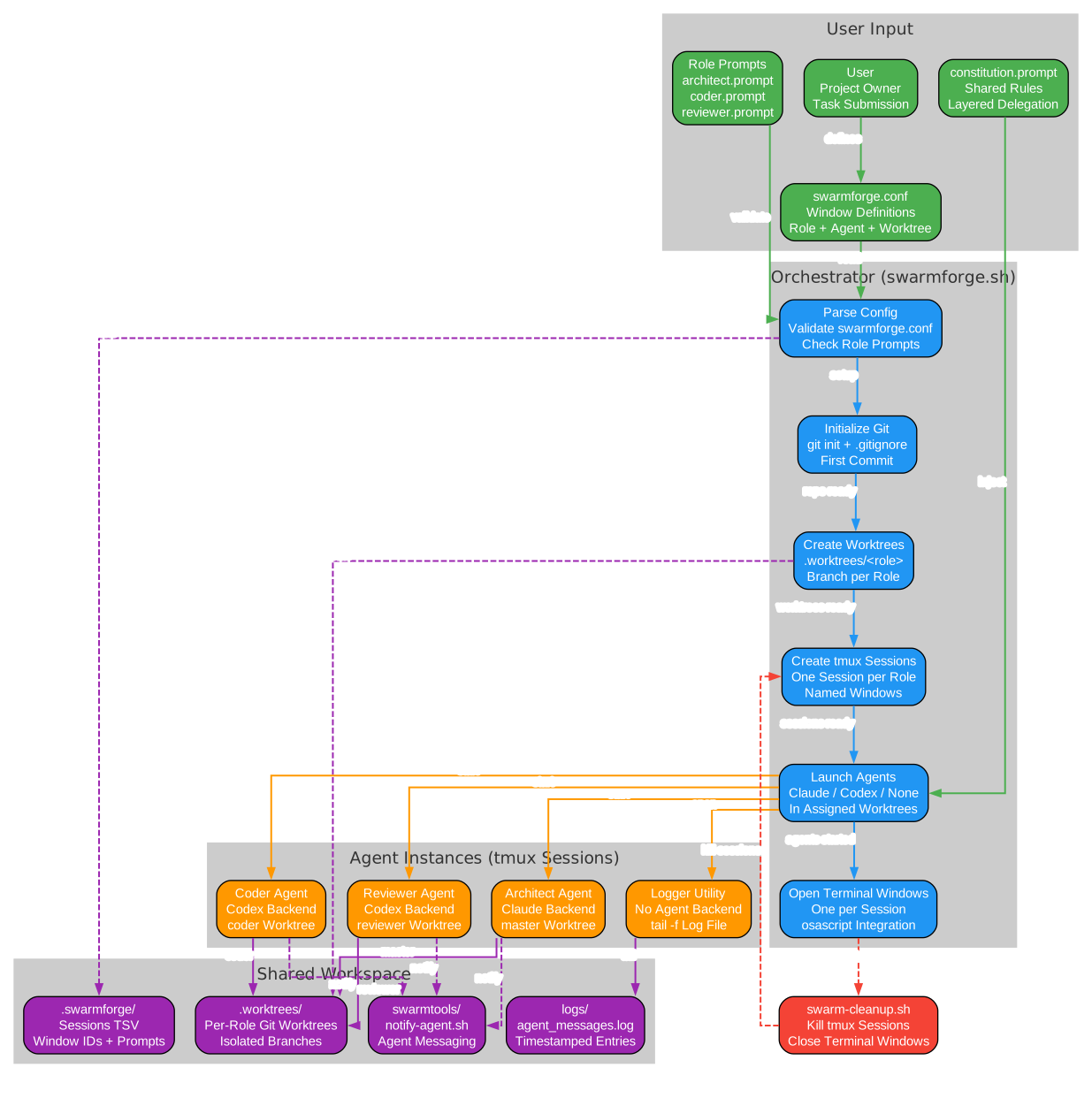
The architecture diagram above illustrates the complete orchestration flow from configuration to cleanup. Here is a breakdown of each component:
swarmforge.conf – The input node that defines the swarm topology. Each line specifies a window with the format window <role> <agent> <worktree>, where role maps to a prompt file, agent selects the AI backend (claude, codex, copilot, or grok), and worktree determines whether the role works in the main branch or an isolated git worktree.
swarmforge.sh – The orchestrator, a 550-line zsh script that parses the configuration, creates git worktrees under .worktrees/, launches tmux sessions with project-specific sockets, opens Terminal windows via osascript, and generates the swarmtools/notify-agent.sh helper for inter-agent messaging.
tmux Sessions – One session per role, providing isolated terminal environments. Each session uses a project-specific tmux socket stored in .swarmforge/tmux-socket, ensuring project swarms are isolated from other tmux sessions on the same machine.
Terminal + osascript – The window manager that opens macOS Terminal windows (or Ghostty tabs, or Windows Terminal windows) for real-time observation. Each role gets its own visible window, making the entire swarm observable at a glance.
AI Backends (claude/codex/copilot/grok) – Per-role backend selection from the configuration file. Each agent runs in its own tmux session within its assigned worktree, receiving instructions from role-specific prompt files and the layered constitution.
.worktrees/<role> – Git worktree isolation per role. Each role that specifies a worktree name (other than master or none) gets its own isolated working directory, preventing file conflicts between agents working on the same project simultaneously.
notify-agent.sh – The communication layer that sends keystrokes to tmux sessions for inter-agent message passing. Agents use ./swarmtools/notify-agent.sh <role> --file <message-file> to send structured handoffs to other agents.
pending-messages/ – The message queue for busy agents. When an agent receives a message while busy, it saves the message as a file with the naming format PP-YYYYMMDD-HHMMSS-source.txt, where PP is a two-digit priority (00 for architect handoffs, 50 for normal messages).
swarm-window-watchdog.sh – The monitor that watches Terminal windows, reopens closed ones, and triggers cleanup when the cleanup window closes. It maintains a missing threshold of 3 consecutive misses before reopening a window.
swarm-cleanup.sh – The terminator that kills all tmux sessions and closes Terminal windows on shutdown. It is attached to the first window in the configuration (the cleanup owner), so closing that window triggers a graceful shutdown of the entire swarm.
Key Insight: SwarmForge solves the fundamental coordination problem in multi-agent AI workflows by giving each agent its own git worktree and a structured communication protocol. Without worktree isolation, agents would overwrite each other’s changes; without file-based handoffs, agents would have no disciplined way to delegate work. The constitution layer ensures every agent follows the same engineering standards – TDD, mutation testing, and CRAP analysis are not optional.
Key Features
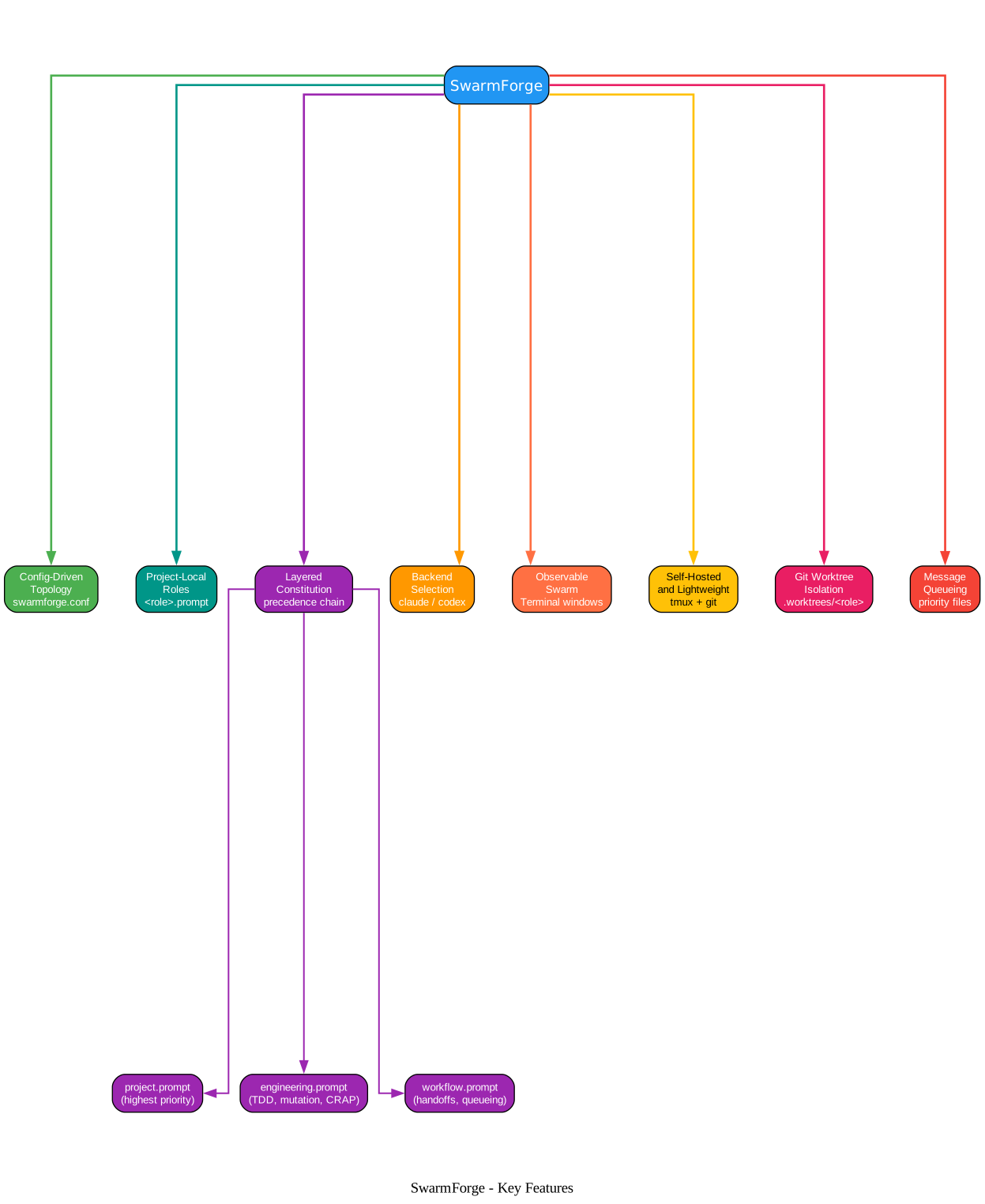
SwarmForge provides a cohesive set of features that work together as a discipline system for AI agent orchestration. Each feature addresses a specific challenge in multi-agent coordination.
Understanding the Features
Config-Driven Topology – The swarm shape comes from swarmforge/swarmforge.conf, not hardcoded shell variables. You define each window as window <role> <agent> <worktree>, giving you full control over the number of roles, their AI backends, and their worktree assignments. This means you can add a research role or a release role without modifying any shell scripts.
Project-Local Roles – Each role is defined by swarmforge/<role>.prompt in the working tree being orchestrated. The specifier, coder, refactorer, and architect roles each have their own prompt file that defines their responsibilities, constraints, and handoff protocols. Because these files live in the project directory, different projects can have entirely different role configurations.
Layered Constitution – The constitution.prompt file serves as the entry point and delegates to subordinate files with explicit precedence: project.prompt has the highest priority, followed by engineering.prompt, then workflow.prompt. This separation lets you define project-specific rules (like “this is a Go project”) independently from engineering rules (like “run mutation testing”) and workflow rules (like “use file-based handoffs”).
Backend Selection Per Role – Each role can launch claude, codex, copilot, or grok as its AI backend. The configuration file specifies which backend each role uses, so you can have a specifier running on codex while the architect runs on claude, taking advantage of each backend’s strengths.
Observable Swarm – One Terminal window opens per role, letting you watch every agent think and work in real time. The tmux-based architecture means you can attach to any session manually with tmux -S <socket> attach-session -t <session-name> if you need direct interaction.
Self-Hosted and Lightweight – SwarmForge runs locally in tmux and Terminal with minimal machinery. There are no cloud dependencies, no Docker containers, no npm packages, and no pip installs. The entire platform is a collection of zsh scripts that require only tmux and git.
Git Worktree Isolation – Each role works in its own git worktree under .worktrees/<role>, preventing merge conflicts between agents. The first window in the configuration runs on the master branch, while other roles get isolated branches like swarmforge-coder or swarmforge-architect.
Message Queueing – Priority-prefixed message files ensure no handoff is lost. When an agent is busy, incoming messages are saved as PP-YYYYMMDD-HHMMSS-source.txt files in a local pending-messages/ directory, with priority 00 for architect handoffs and priority 50 for normal messages. Agents process queued messages in sorted filename order after completing their current task.
Amazing: The entire SwarmForge platform is a 550-line zsh script with zero runtime dependencies. No npm install, no pip install, no Docker containers – just tmux, git, and your chosen AI backend. The swarm topology is defined in a simple four-column config file, and the constitution system enforces Clean Code principles that Uncle Bob has advocated for decades, now applied to AI agents instead of human developers.
| Feature | Description |
|---|---|
| Config-Driven Topology | Swarm shape defined in swarmforge.conf, not hardcoded |
| Project-Local Roles | Each role defined by swarmforge/<role>.prompt in the working tree |
| Layered Constitution | constitution.prompt delegates to project, engineering, and workflow files |
| Backend Selection Per Role | Per-role choice of claude, codex, copilot, or grok |
| Observable Swarm | One Terminal window per role for real-time observation |
| Self-Hosted and Lightweight | Runs locally in tmux and Terminal, no cloud dependencies |
| Git Worktree Isolation | Each role in its own worktree, preventing merge conflicts |
| Message Queueing | Priority-prefixed files for busy agents, ensuring no handoff is lost |
Installation
SwarmForge requires macOS (Terminal + osascript), tmux, git, and your chosen AI backend (claude, codex, copilot, or grok). Installation is a single command:
curl -L https://github.com/unclebob/swarm-forge/archive/refs/heads/main.tar.gz | tar -xz --strip-components=1
This pulls the SwarmForge files into your current directory without creating a git remote. After extraction, you will have the swarm entry point, swarmforge.sh, and all supporting scripts in your project directory.
Prerequisites:
- macOS with Terminal.app and osascript (or Ghostty, or Windows Terminal via WSL)
- tmux – install with
brew install tmuxon macOS - git – pre-installed on macOS or install with
brew install git - AI backend – at least one of:
claude(Claude Code),codex(OpenAI Codex),copilot(GitHub Copilot), orgrok(xAI Grok)
Usage
Configuring the Swarm
Create a swarmforge/ directory in your project:
swarmforge/
  swarmforge.conf
  constitution.prompt
  constitution/
    project.prompt
    engineering.prompt
    workflow.prompt
  specifier.prompt
  coder.prompt
  refactorer.prompt
  architect.prompt
Define your swarm topology in swarmforge/swarmforge.conf:
window specifier codex master
window coder codex coder
window refactorer codex refactorer
window architect codex architect
Each line specifies window <role> <agent> <worktree>. The first window is the cleanup owner. Roles with master as their worktree run in the main working directory; other roles get isolated worktrees under .worktrees/<name>.
The Constitution System
The constitution.prompt file is the entry point for agent behavior. It delegates to subordinate files with explicit precedence:
1. swarmforge/constitution/project.prompt    (highest priority)
2. swarmforge/constitution/engineering.prompt
3. swarmforge/constitution/workflow.prompt     (lowest priority)
If two subordinate files conflict, the earlier file wins. This layered approach separates project-specific rules from engineering standards and workflow protocols.
Running the Swarm
Just type:
./swarm
The windows should all pop up. Each Terminal window shows a tmux session running the assigned AI backend in its designated worktree. You can observe every agent in real time.
Inter-Agent Communication
Agents communicate through file-based handoffs:
./swarmtools/notify-agent.sh <role> --file <message-file>
When an agent is busy, incoming messages are queued in pending-messages/ with priority prefixes:
pending-messages/00-20260527-143000-architect.txt   (priority 00 - architect)
pending-messages/50-20260527-143100-coder.txt        (priority 50 - normal)
Understanding the Workflow
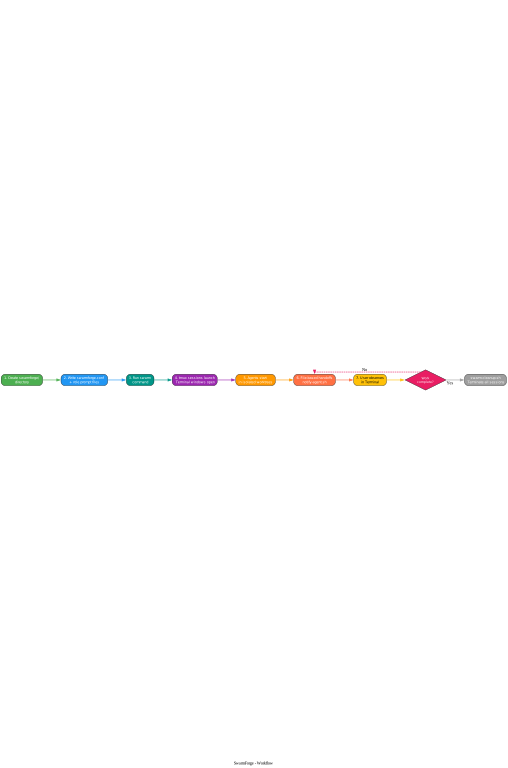
The workflow diagram above shows the step-by-step process from configuration to completion:
Step 1: Create swarmforge/ directory – This is the project-local configuration setup. All swarm configuration, role prompts, and constitution files live in this directory, keeping everything project-specific and version-controllable.
Step 2: Write swarmforge.conf + role prompts – Define the topology in swarmforge.conf with window <role> <agent> <worktree> lines, and write agent instructions in <role>.prompt files. Each role prompt defines responsibilities, constraints, and handoff protocols.
Step 3: Run swarm command – Launch the orchestration. The swarm entry point delegates to swarmforge.sh, which parses the configuration, creates worktrees, launches tmux sessions, and opens Terminal windows.
Step 4: tmux sessions launch – One session per role, with Terminal windows opening via osascript. The first window in the configuration becomes the cleanup owner, and a window watchdog monitors all Terminal surfaces.
Step 5: Agents start in worktrees – Each role begins work in its isolated git worktree under .worktrees/<role>. The AI backend receives instructions from the constitution and role prompt files, then starts implementing according to its defined responsibilities.
Step 6: File-based handoffs – Agents use notify-agent.sh to send messages between agents via tmux keystroke injection. Busy agents queue incoming messages in pending-messages/ with priority prefixes, processing them in order after completing their current task.
Step 7: User observes in Terminal – Real-time visibility into all agent activity. You can watch every agent think, code, and communicate, intervening in any tmux session when needed.
Decision point: “Work complete?” – If the task is not complete, agents continue the handoff cycle. The specifier defines specifications, the coder implements, the refactorer cleans up, and the architect verifies. When all agents have completed their work, the cleanup window closes and swarm-cleanup.sh terminates all sessions.
Takeaway: With a single
swarmcommand, an entire multi-agent orchestration environment springs to life – Terminal windows open for each role, tmux sessions launch in isolated git worktrees, and agents begin communicating through a file-based handoff system with priority queueing. The observable nature of tmux means you can watch every agent think and work in real time.
Terminal Backend Support
SwarmForge supports multiple terminal backends through an adapter system:
- macOS Terminal.app – Default when AppleScript is available, opens Terminal windows via osascript
- Ghostty – Set
SWARMFORGE_TERMINAL=ghosttyfor Ghostty tab support - Windows Terminal – Set
SWARMFORGE_TERMINAL=windows-terminalfor WSL environments - None – Set
SWARMFORGE_TERMINAL=noneto skip terminal automation and attach in the current shell
Adding a new terminal backend requires creating a single file in terminal-adapters/ that implements the terminal_open_session, terminal_window_exists, and terminal_close_window functions.
Conclusion
SwarmForge brings Clean Code discipline to multi-agent AI workflows through a remarkably simple architecture. By combining tmux sessions for isolation, git worktrees for conflict prevention, file-based handoffs for structured communication, and a layered constitution for behavioral enforcement, it transforms raw AI coding speed into reliable, maintainable engineering output. The platform’s self-dogfooding requirement – that SwarmForge should use itself to build its own features – demonstrates confidence in the discipline-first approach.
The constitution system is what sets SwarmForge apart from simple tmux-based agent wrappers. It is not just about running multiple agents in separate windows; it is about enforcing TDD, mutation testing, CRAP analysis, and Gherkin acceptance testing at the prompt level, ensuring that every agent in the swarm follows the same engineering standards regardless of which AI backend it uses.
Important: SwarmForge’s self-dogfooding requirement – that SwarmForge should use itself to build its own features – is more than a clever meta-exercise. It is a statement of confidence in the discipline-first approach: if the orchestration platform is not reliable enough to build itself, it is not reliable enough for your project. The constitution layer ensures that this reliability is enforced at the prompt level, not just the process level.
Links:

Enjoyed this post? Never miss out on future posts by following us


