Creating professional ad videos from raw footage has traditionally required skilled editors, expensive software, and hours of manual work. The Agentic Video Editor changes this equation entirely. It is an open-source, multi-agent pipeline that takes raw video footage and a creative brief as input, then autonomously produces polished ad videos through a coordinated sequence of AI-driven agents. Built on top of Google Gemini for intelligent decision-making and FFmpeg for reliable video processing, the system orchestrates scene detection, shot selection, trimming, compositing, and quality review without human intervention. The key innovation is its feedback loop: a Reviewer Agent scores each output, and if the quality falls below a threshold, specific feedback is routed back to the Director Agent for a revised edit plan. This iterative refinement cycle continues until the output meets quality standards or the maximum retry count is reached. The result is a system that can transform unstructured footage into compelling, short-form ad content with minimal human oversight.
Pipeline Architecture
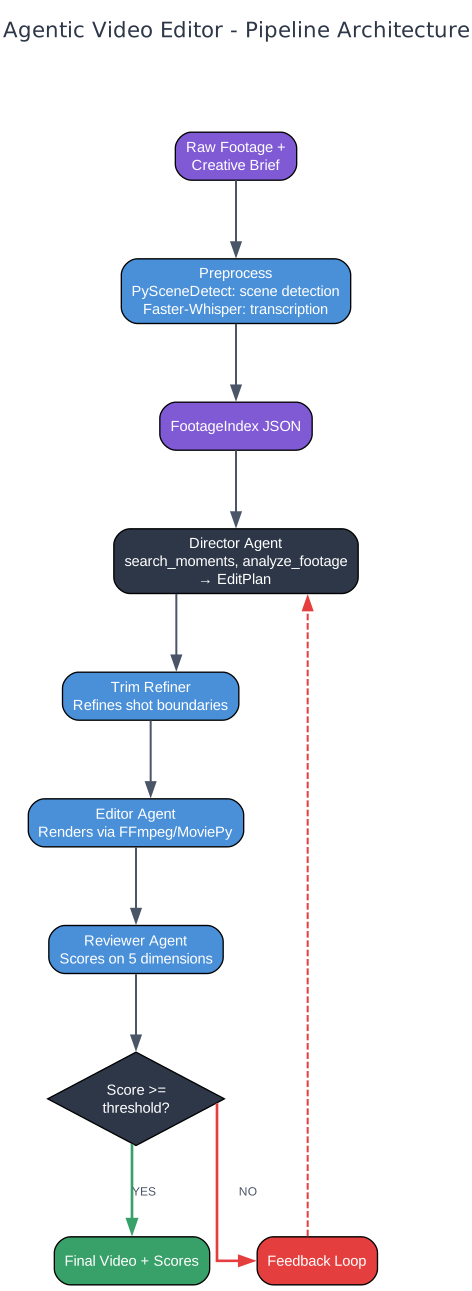
The pipeline architecture of the Agentic Video Editor follows a linear but iterative flow designed to transform raw, unstructured video into a polished ad. The process begins with two inputs: raw footage files (video clips of any length) and a creative brief that describes the desired output style, target audience, and messaging goals. These inputs feed into the Preprocessing stage, which runs two critical analyses in parallel. PySceneDetect scans the footage for scene boundaries, identifying where visual transitions occur, while Faster-Whisper generates word-level transcriptions with timestamps. The output of preprocessing is a FootageIndex JSON file, a structured data object that catalogs every detected scene, its start and end timestamps, the spoken text within each scene, and metadata such as visual quality scores.
The FootageIndex then becomes the primary reference for the Director Agent. The Director searches through the indexed moments using a local lexical ranker, analyzes promising clips with Gemini’s video understanding capabilities, and produces an EditPlan. This EditPlan specifies which scenes to include, their order, any B-Roll overlays, subtitle styling, and music choices. Before rendering, the Trim Refiner Agent takes the EditPlan and sharpens each shot boundary. It extracts short probe clips around the proposed cut points and asks Gemini to evaluate the exact frame where a cut should occur, ensuring clean transitions that preserve speech and visual coherence.
The Editor Agent then renders the refined EditPlan into a final video. It uses FFmpeg and MoviePy to cut clips, generate ASS-format subtitles with word-by-word highlighting, composite A-Roll and B-Roll tracks, add background music, and produce the output file. Once rendering completes, the Reviewer Agent evaluates the result across five dimensions: adherence to the creative brief, pacing, visual quality, watchability, and overall quality. If the overall score meets or exceeds the threshold (default 0.65), the video is accepted. If not, the Reviewer generates specific, timestamped feedback and the pipeline loops back to the Director for a revised EditPlan. Each retry produces a versioned output file, allowing comparison across iterations.
Agent Tools and Responsibilities

Each agent in the pipeline operates with a clearly defined set of tools and responsibilities, ensuring separation of concerns and enabling independent iteration on each stage. The Director Agent is the creative decision-maker. Its primary tool is search_moments, a local lexical ranker that matches the creative brief against the FootageIndex to find relevant scenes. When visual analysis is needed, it uses analyze_footage, which sends video segments to Gemini for multimodal understanding. The Director synthesizes these results into an EditPlan, a structured YAML/JSON document that specifies the complete video composition: clip selections, ordering, B-Roll assignments, subtitle configuration, and music tracks.
The Trim Refiner Agent has a narrower but critical responsibility: ensuring that every cut point in the EditPlan is frame-accurate. It works by extracting 6-second probe clips around each proposed boundary and sending them to Gemini with a prompt asking for the optimal cut frame. This prevents issues like mid-word cuts, awkward visual transitions, or truncated gestures. The refined EditPlan that emerges has tighter, more natural boundaries than what the Director could determine from metadata alone.
The Editor Agent is the production workhorse, equipped with six specialized tools. cut_clip extracts a segment from the source footage between specified timestamps. generate_ass_captions creates ASS-format subtitle files with word-by-word highlighting in TikTok style. burn_ass_subtitles renders the subtitles onto the video track. sequence_clips concatenates multiple clips into a continuous A-Roll track. add_music overlays a background music track at a specified volume. Finally, render_final composites all layers, including B-Roll overlays, and produces the output MP4 file.
The Reviewer Agent operates with a single but sophisticated tool: review_output. This tool evaluates the rendered video across five dimensions, each scored on a 0-to-1 scale. Adherence measures how well the output matches the creative brief. Pacing assesses the rhythm and flow of the edit. Visual quality checks for technical issues like blurriness or poor framing. Watchability evaluates the overall viewer experience. Overall provides a composite score. The Reviewer does not just produce numbers; it generates specific, actionable feedback tied to timestamps and clips, enabling the Director to make targeted improvements on the next iteration.
A-Roll/B-Roll Compositing
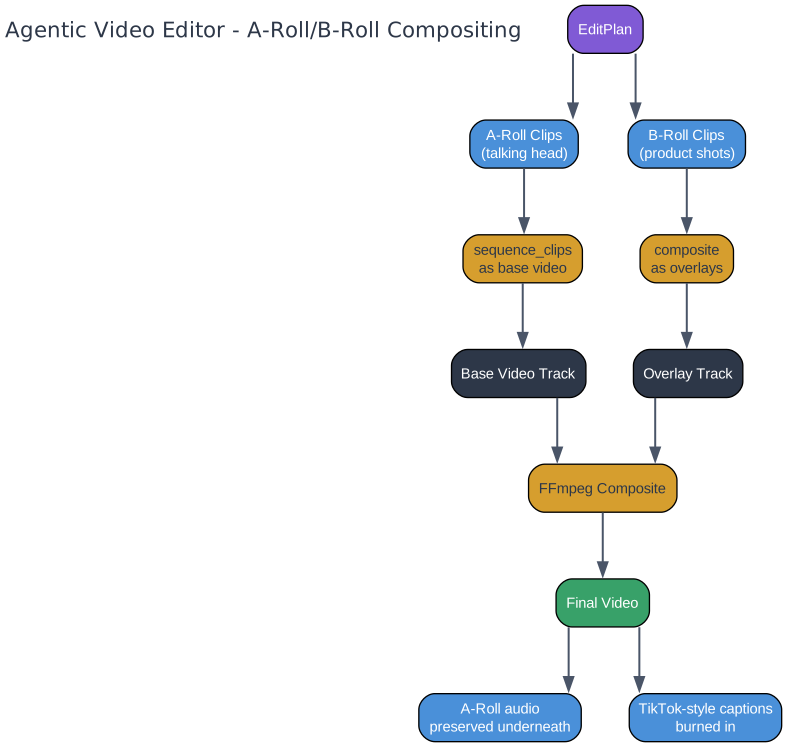
The compositing architecture distinguishes between two types of video content: A-Roll and B-Roll. A-Roll is the primary footage, typically a talking head delivering a testimonial, demonstration, or narrative. B-Roll consists of supplementary visuals such as product close-ups, screen recordings, or contextual b-roll that overlays the A-Roll at specific moments. This separation is fundamental to producing professional-looking ad content, where the viewer needs both a human connection (A-Roll) and visual evidence (B-Roll).
The compositing process begins with the A-Roll sequence. The Editor Agent takes all selected A-Roll clips from the EditPlan and concatenates them into a single continuous video track using sequence_clips. This forms the base layer of the final composition. The audio from these A-Roll clips is preserved as the primary audio track, ensuring that spoken words remain clear and audible even when B-Roll overlays are applied on top.
B-Roll clips are then composited as visual overlays on top of the A-Roll at the timestamps specified in the EditPlan. When a B-Roll overlay is active, the viewer sees the B-Roll footage while still hearing the A-Roll audio underneath. This creates the classic ad video effect where a narrator speaks over product shots or demonstration footage. The FFmpeg composite command handles the layering, timing, and transitions between A-Roll and B-Roll segments.
On top of both video layers, TikTok-style ASS subtitles are burned in. These subtitles use word-by-word highlighting, where each spoken word is emphasized in turn with a contrasting color while the remaining words appear in a muted tone. This style has become standard in short-form video content because it maintains viewer attention and improves comprehension, especially on mobile devices where audio may be muted. The EditPlan drives the entire compositing process, specifying exactly which clips are A-Roll, which are B-Roll, when each overlay starts and ends, and how subtitles should be styled.
Review and Feedback Loop
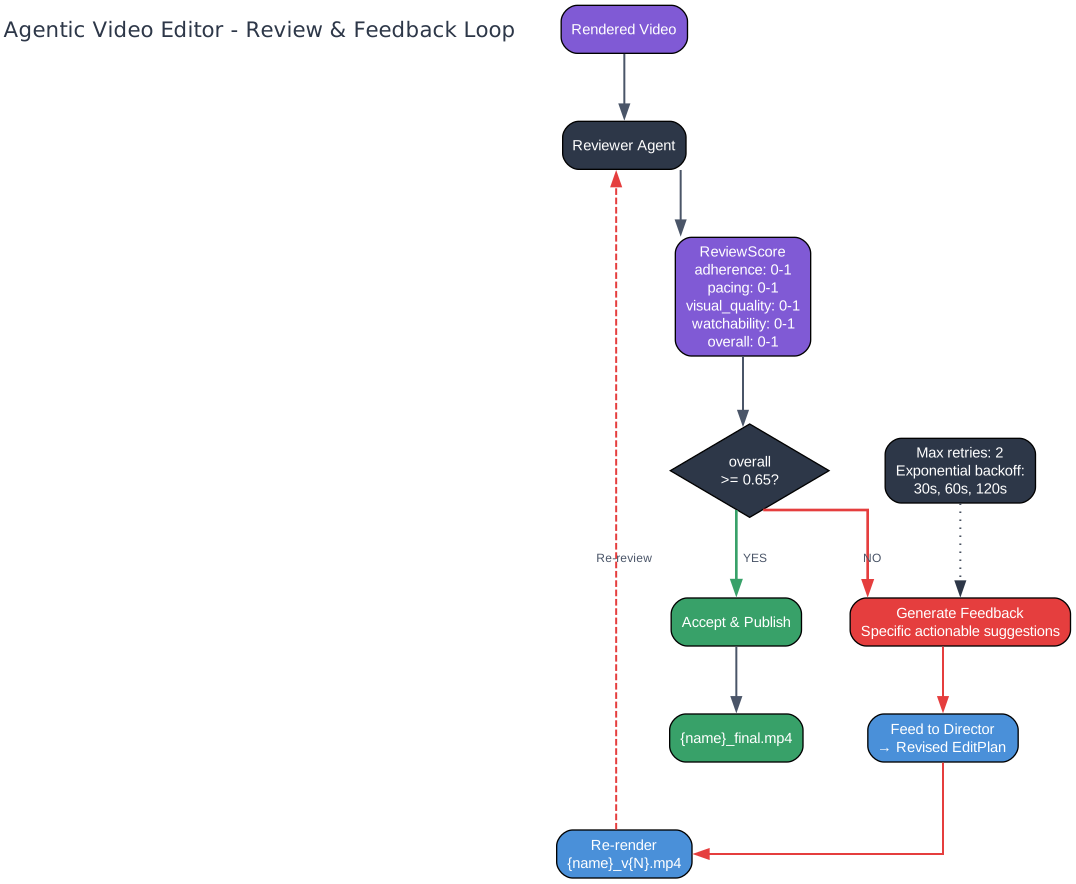
The review and feedback loop is what separates the Agentic Video Editor from a simple linear pipeline. After the Editor Agent renders a video, the Reviewer Agent evaluates it using a ReviewScore data structure with five dimensions, each scored on a 0-to-1 scale. Adherence checks whether the output matches the creative brief’s goals and style. Pacing evaluates the rhythm, ensuring cuts feel natural and the video maintains energy. Visual quality looks for technical issues like blurry frames, poor lighting, or encoding artifacts. Watchability assesses the overall viewing experience as a human would perceive it. Overall provides a weighted composite of all dimensions.
The default threshold for acceptance is 0.65 on the overall score. If the video meets or exceeds this threshold, it is accepted as the final output. If the score falls below 0.65, the Reviewer does not simply reject the video. Instead, it generates specific, actionable feedback tied to exact timestamps and clips. For example, it might note that “the transition at 0:08 feels abrupt, consider extending the previous clip by 0.5 seconds” or “the B-Roll overlay at 0:15 obscures the speaker’s hand gesture, try a different product angle.” This feedback is injected directly into the Director Agent’s prompt for the next iteration.
The Director then produces a revised EditPlan that addresses the Reviewer’s concerns, and the pipeline re-runs from the Director stage through Trim Refiner, Editor, and back to Reviewer. Each retry produces a versioned output file following the naming convention {name}_v{N}.mp4, where N is the retry iteration number. This versioning allows direct comparison between iterations to verify that changes are improving the output. The system allows a maximum of 2 retries by default, configurable via the max_retries parameter in the pipeline YAML.
The pipeline also implements resilience through exponential backoff for transient errors. If a Gemini API call fails due to rate limiting or network issues, the system waits 30 seconds before the first retry, 60 seconds before the second, and 120 seconds before the third. This prevents cascading failures and respects API rate limits. On the security side, the system uses ContextVar-based path binding to prevent prompt-injection file exfiltration. All file paths referenced in agent prompts are validated against an allowlist, ensuring that malicious inputs cannot trick the agents into reading or exposing sensitive files on the host system.
Getting Started
Setting up the Agentic Video Editor requires Python 3.11 or later, FFmpeg installed on your system PATH, and a Google Gemini API key. Clone the repository, install dependencies, and configure your environment:
# Clone the repository
git clone https://github.com/nicholasgriffintn/agentic-video-editor.git
cd agentic-video-editor

# Install dependencies
pip install -r requirements.txt

# Set your Gemini API key
export GEMINI_API_KEY="your-api-key-here"
The pipeline is configured through YAML files that define the sequence of agents, review thresholds, and style templates. Here is an example pipeline configuration:
# Example pipeline configuration (pipelines/ugc-ad.yaml)
name: ugc-ad
steps:
  - name: preprocess
    agent: preprocess
  - name: director
    agent: director
    gate: human_approval
  - name: trim_refiner
    agent: trim_refiner
  - name: editor
    agent: editor
  - name: reviewer
    agent: reviewer
max_retries: 2
review_threshold: 0.65
The gate: human_approval step pauses the pipeline after the Director produces an EditPlan, allowing a human to review and approve the plan before rendering begins. This is optional and can be removed for fully automated runs. Style templates define the creative structure of the output video:
# Style template (styles/dtc-testimonial.yaml)
segments:
  - name: hook
    duration: 3
    energy: high
  - name: problem
    duration: 5
    energy: medium
  - name: solution
    duration: 10
    energy: medium
  - name: social_proof
    duration: 7
    energy: medium
  - name: cta
    duration: 5
    energy: high
total_duration: 30
Run the pipeline with a single command, pointing it at your footage directory and creative brief:
python -m agentic_video_editor run --pipeline pipelines/ugc-ad.yaml --footage ./raw_footage/ --brief briefs/my_ad_brief.md
Conclusion
The Agentic Video Editor demonstrates the power of multi-agent pipelines for creative tasks that have traditionally resisted automation. By decomposing video editing into discrete agent responsibilities – preprocessing, directing, trimming, editing, and reviewing – the system achieves a level of quality that no single prompt could produce. The feedback loop between the Reviewer and Director is the key innovation: it transforms a one-shot generation process into an iterative refinement cycle that converges on high-quality output. Each agent operates within clear boundaries, using specialized tools that are well-suited to their task, from Gemini’s multimodal understanding to FFmpeg’s reliable video processing. The project is actively developed with plans for AVE Studio, a web-based UI that will make the pipeline accessible to non-technical users. The source code, documentation, and example configurations are available on GitHub. Enjoyed this post? Never miss out on future posts by following us 


