n8n: Secure Workflow Automation for Technical Teams
n8n (pronounced “n-eight-n,” short for “nodemation”) is an open-source workflow automation platform that gives technical teams the flexibility of code with the speed of no-code. With over 184,000 stars on GitHub, 400+ integrations, native AI capabilities built on LangChain, and a fair-code license, n8n has become the go-to choice for teams who want powerful automation without sacrificing control over their data and deployments.
Unlike purely visual automation tools that hit a ceiling when you need custom logic, n8n lets you write JavaScript or Python directly inside workflows, add npm packages, and drop into code whenever the visual interface is not enough. This hybrid approach means you can start with drag-and-drop simplicity and graduate to full programming power without switching tools.
Understanding the Architecture
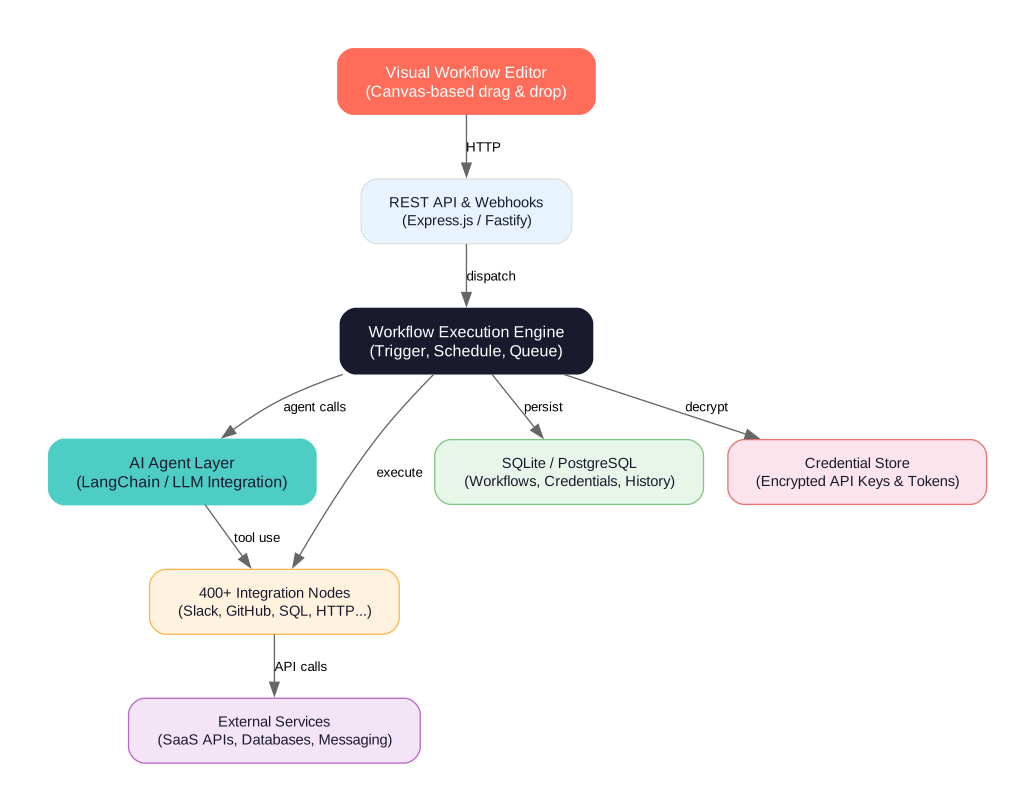
n8n is built as a monorepo with clearly separated packages, each responsible for a distinct layer of the system:
Visual Workflow Editor The canvas-based drag-and-drop editor is where you design your automations. Nodes represent steps in a workflow, and connections between them define the data flow. The editor provides real-time execution feedback, inline error handling, and a built-in expression editor for dynamic data transformation.
REST API and Webhooks The API layer, built on Express.js and Fastify, exposes n8n’s capabilities programmatically. Every workflow can be triggered via webhooks, scheduled with cron expressions, or activated by events from external services. This makes n8n both a visual tool and a programmable automation backend.
Workflow Execution Engine The core engine handles workflow execution, active webhooks, and workflow scheduling. It manages the lifecycle of each execution, including error handling, retry logic, and data passing between nodes. The engine supports both sequential and parallel execution paths.
AI Agent Layer n8n’s native AI integration, built on LangChain, enables you to create AI agent workflows that combine LLMs with your own data and tools. The @n8n/nodes-langchain package provides nodes for chat models, text splitters, vector stores, retrievers, and agent executors, making it possible to build sophisticated AI pipelines without leaving the workflow editor.
400+ Integration Nodes The nodes-base package contains n8n’s extensive library of pre-built nodes covering communication (Slack, Discord, Telegram, Email), DevOps (GitHub, GitLab, Docker, Jenkins), data stores (PostgreSQL, MongoDB, Redis, S3), business tools (Salesforce, HubSpot, Notion, Airtable), and infrastructure (AWS, GCP, Kubernetes, SSH).
Data Layer n8n persists workflows, execution history, and credentials in SQLite (for development) or PostgreSQL (for production). The credential store encrypts all API keys and tokens, ensuring sensitive data is never stored in plaintext.
400+ Integrations and Counting
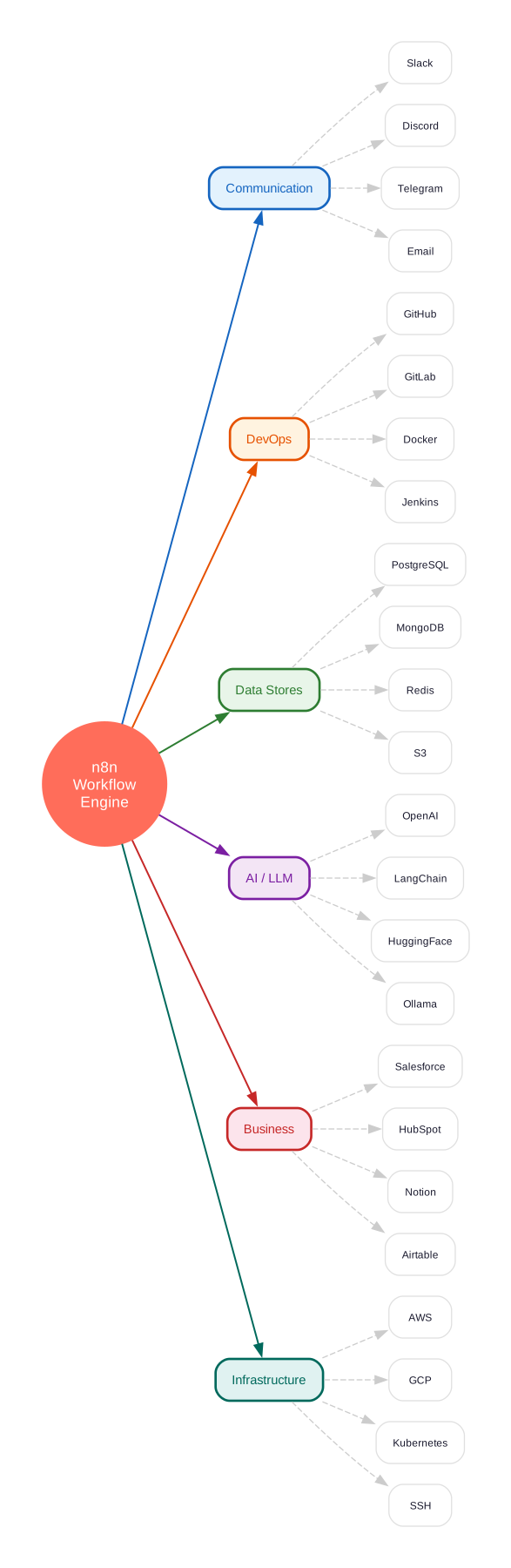
n8n’s integration library is one of its strongest assets. With 400+ nodes and 900+ ready-to-use templates, you can connect to virtually any service your team uses. The integration categories include:
- Communication: Slack, Discord, Telegram, Microsoft Teams, Email (IMAP/SMTP)
- DevOps: GitHub, GitLab, Docker, Jenkins, Jira
- Data Stores: PostgreSQL, MySQL, MongoDB, Redis, S3, Google Sheets
- AI / LLM: OpenAI, LangChain, HuggingFace, Ollama, Anthropic
- Business: Salesforce, HubSpot, Notion, Airtable, Stripe
- Infrastructure: AWS, Google Cloud, Kubernetes, SSH, HTTP Request
Each node handles authentication, data transformation, and error handling automatically. If a built-in node does not exist for your service, you can use the HTTP Request node to call any API, or create a custom node using the @n8n/create-node CLI tool.
AI-Native Workflow Building
n8n’s AI capabilities go beyond simple API calls to LLMs. The platform provides a complete LangChain integration that lets you build AI agent workflows with your own data and models:
Chat Models and LLMs Connect to OpenAI, Anthropic, Google, Mistral, Ollama, or any OpenAI-compatible endpoint. Switch between models without changing your workflow logic.
Vector Stores and Retrievers Use Pinecone, Qdrant, Weaviate, Chroma, or PostgreSQL (pgvector) as vector stores for RAG (Retrieval-Augmented Generation) workflows. The AI nodes handle embedding, indexing, and retrieval automatically.
Text Splitters and Transformers Chunk documents, extract metadata, and transform text before feeding it to LLMs. n8n provides built-in splitters for recursive character, token, and markdown-based chunking.
Agent Executors Build autonomous agents that can reason, plan, and use tools. The AI Agent node supports ReAct, Plan-and-Execute, and conversational agent patterns, with access to all n8n nodes as tools.
Computer Use The @n8n/computer-use package enables agents to interact with web browsers and desktop applications, extending automation beyond API calls to full UI interaction.
Workflow Execution Model
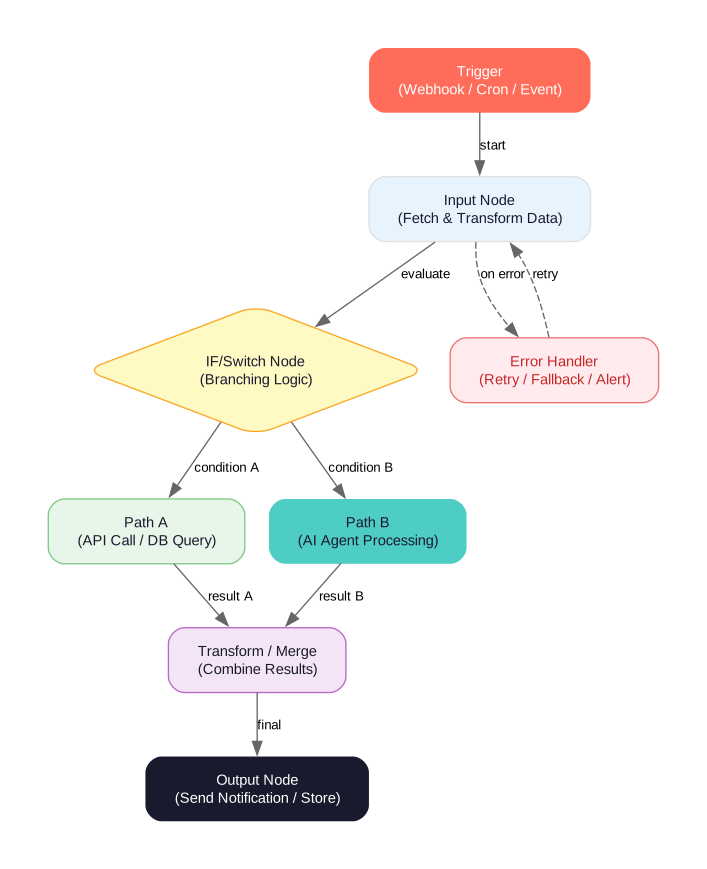
n8n workflows follow a trigger-based execution model. Every workflow starts with a trigger node that defines when the workflow should run:
Webhook Triggers Receive HTTP requests and process them in real-time. Perfect for building API endpoints, handling form submissions, or receiving event notifications from external services.
Cron Triggers Schedule workflows to run at regular intervals. Use standard cron expressions for fine-grained control over timing, from every minute to specific days of the month.
Event Triggers React to events from connected services. When a new email arrives, a GitHub issue is created, or a Slack message is posted, n8n can automatically start a workflow.
Manual Triggers Run workflows on-demand from the editor or via the API. Useful for testing, one-off operations, and workflows that need human initiation.
Once triggered, data flows through connected nodes, with each node processing the input and producing output for the next node. The IF/Switch node enables conditional branching, the Merge node combines data from multiple paths, and the Error Trigger node provides global error handling with retry and fallback logic.
Getting Started
Quick Start with npx
The fastest way to try n8n is with npx (requires Node.js):
npx n8n
This starts n8n on http://localhost:5678 with a local SQLite database. No configuration required.
Docker Deployment
For production deployments, use Docker:
# Create a persistent volume
docker volume create n8n_data

# Run n8n
docker run -it --rm --name n8n -p 5678:5678 -v n8n_data:/home/node/.n8n docker.n8n.io/n8nio/n8n
Access the editor at http://localhost:5678
Development Setup
To contribute or customize n8n, clone the repository and set up the development environment:
# Clone the repository
git clone https://github.com/n8n-io/n8n.git
cd n8n

# Install dependencies (requires pnpm)
pnpm install

# Build all packages
pnpm build

# Start development server
pnpm dev
Requirements:
- Node.js 22.16 or newer
- pnpm 10.22.0 or newer
- Build tools for native modules
Monorepo Structure
n8n is organized as a pnpm monorepo with the following key packages:
| Package | Purpose |
|---|---|
packages/cli | CLI code to run front- and backend; contains n8n’s APIs |
packages/core | Core workflow execution engine, active webhooks, and workflow scheduling |
packages/workflow | Workflow interfaces shared between front- and backend |
packages/nodes-base | 400+ built-in integration nodes |
packages/node-dev | CLI to create new custom n8n nodes |
packages/frontend/editor-ui | Vue.js workflow editor (the visual canvas) |
packages/frontend/@n8n/design-system | Vue frontend component library |
packages/@n8n/nodes-langchain | LangChain AI integration nodes |
packages/@n8n/agents | AI agent framework |
packages/@n8n/ai-node-sdk | SDK for building AI nodes |
packages/@n8n/task-runner | Task execution runtime |
packages/@n8n/mcp-browser | Model Context Protocol browser integration |
packages/@n8n/permissions | Role-based access control |
packages/@n8n/config | Configuration management |
Self-Hosted and Enterprise-Ready
n8n’s fair-code license means you can self-host it anywhere: on-premises servers, cloud VMs, or even air-gapped environments. For teams that need enterprise features, n8n offers:
- Advanced Permissions: Role-based access control with fine-grained permissions for workflows, credentials, and executions
- SSO Integration: SAML, OIDC, and LDAP support for enterprise identity providers
- Air-Gapped Deployment: Run n8n in environments with no internet access
- Audit Logging: Track all user actions for compliance and security
- High Availability: Multi-instance deployment with shared database and queue mode
Creating Custom Nodes
If the 400+ built-in nodes do not cover your use case, n8n provides a CLI tool for scaffolding custom nodes:
# Create a new node project
npx @n8n/create-node

# Develop with hot reload
cd my-node
npm run dev
Custom nodes can be published to the n8n community registry or kept private for internal use. The @n8n/extension-sdk provides types, utilities, and testing helpers for node development.
Key Takeaways
n8n stands out in the workflow automation space because it refuses to compromise. It gives you the visual simplicity of no-code tools when you want it, and the full power of JavaScript and Python when you need it. The native AI integration via LangChain makes it possible to build sophisticated agent workflows without leaving the platform, and the fair-code license ensures you always have control over your data and deployments.
With 184,000+ stars, 400+ integrations, 900+ templates, and an active community of contributors, n8n has proven itself as a production-ready platform for technical teams who take automation seriously. Whether you are automating DevOps pipelines, building AI-powered customer support, or connecting disparate SaaS tools, n8n provides the flexibility and reliability to get it done.
Repository: github.com/n8n-io/n8n
Resources:

Enjoyed this post? Never miss out on future posts by following us


