Anything Analyzer: Universal Network Protocol Analysis with AI-Powered MITM and Browser Capture
Network protocol analysis has long suffered from a fragmentation problem. Browser DevTools only captures traffic from within the browser itself. Proxy tools like Fiddler and Charles can intercept HTTPS but require manual certificate installation and offer no understanding of what the traffic means. Wireshark captures everything at the packet level but cannot decrypt TLS, making it blind to HTTPS content. And none of these tools can tell you why a request was made, what an encrypted payload contains, or how a signature was computed. After capturing hundreds of requests, you are still left sifting through them manually, trying to reverse-engineer API flows by hand.
Anything Analyzer takes a fundamentally different approach. Built as an Electron 35 desktop application with React 19 and TypeScript 5, it combines two complementary capture channels – an embedded browser using Chrome DevTools Protocol (CDP) and a built-in MITM HTTPS proxy on port 8888 – into a single unified session. Every request, regardless of its source, flows into the same analysis pipeline. A two-phase AI analysis engine then automatically identifies business scenarios, filters noise, and produces detailed reverse-engineering reports. With JS hook injection that intercepts cryptographic operations at the browser level and an MCP dual-role architecture that lets AI agents control the entire capture and analysis workflow, Anything Analyzer transforms protocol analysis from a manual, tedious process into an automated, intelligent one.
Overall Architecture
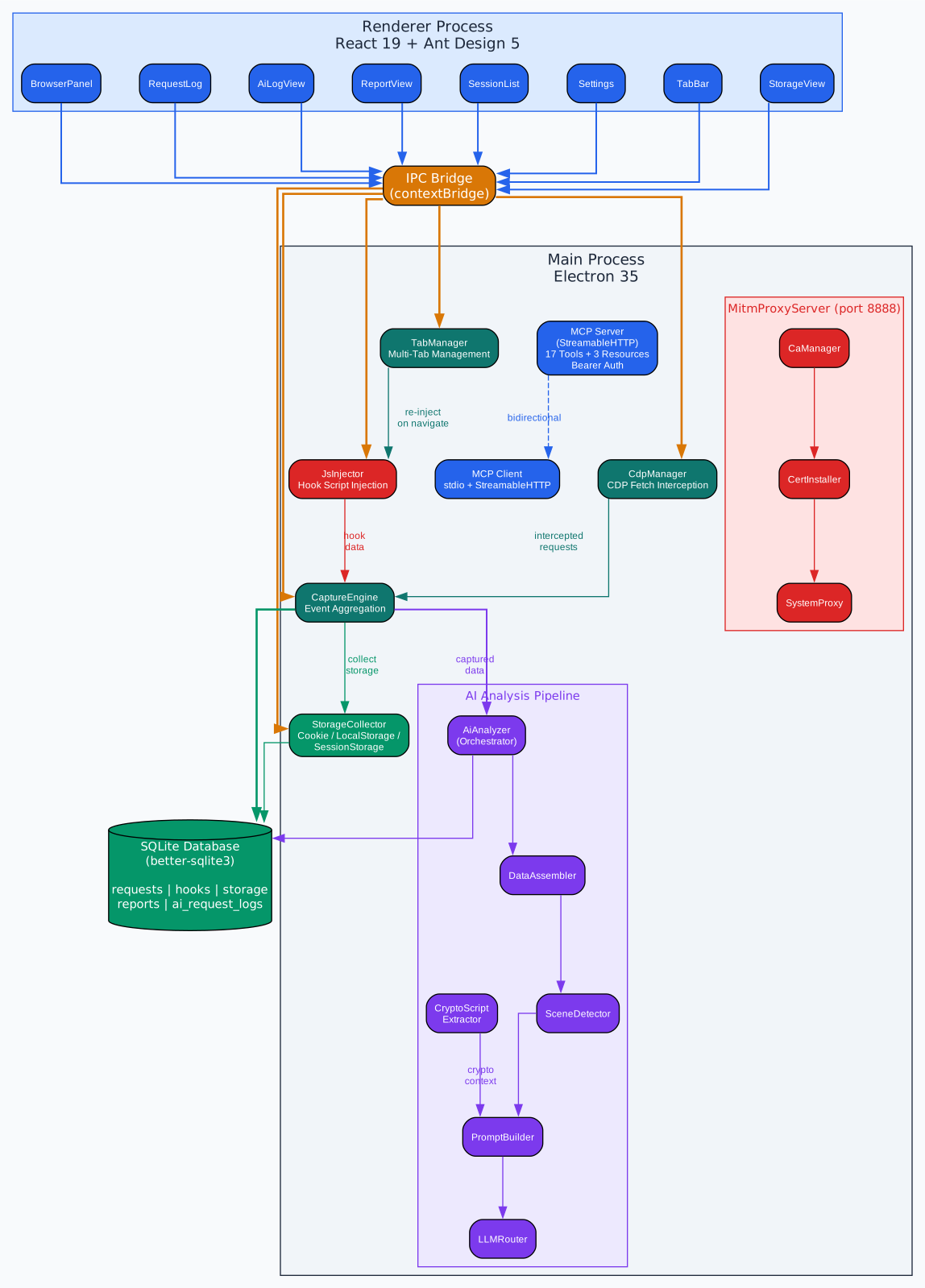
Anything Analyzer is built on an Electron 35 + electron-vite + React 19 + Ant Design 5 + TypeScript 5 stack, organized into a clear multi-process architecture. The main process houses the core subsystems: the capture engine orchestrates dual-channel interception, the CDP manager drives the embedded Chromium browser via Chrome DevTools Protocol, the MITM proxy server handles HTTPS interception with on-the-fly certificate generation, and the AI analyzer orchestrates the two-phase analysis pipeline. The renderer process runs the React 19 UI with Ant Design 5 components, communicating with the main process through Electron’s IPC bridge. A preload script provides the context bridge and injects the JS hook script into target pages. All captured data – requests, JS hook logs, storage snapshots, and analysis reports – is persisted in a local SQLite database via better-sqlite3 running in WAL mode for concurrent read/write performance. The session manager ties everything together, ensuring that requests from both the CDP channel and the MITM proxy channel are unified under a single session identifier, so AI analysis can correlate browser-initiated requests with proxied traffic from external applications, mobile devices, or IoT hardware. The MCP subsystem operates in a dual-role capacity: as a client connecting to external MCP servers via stdio or StreamableHTTP transports, and as a built-in MCP server exposing 17 tools and 3 resources for AI agent integration.
AI Two-Phase Analysis Pipeline
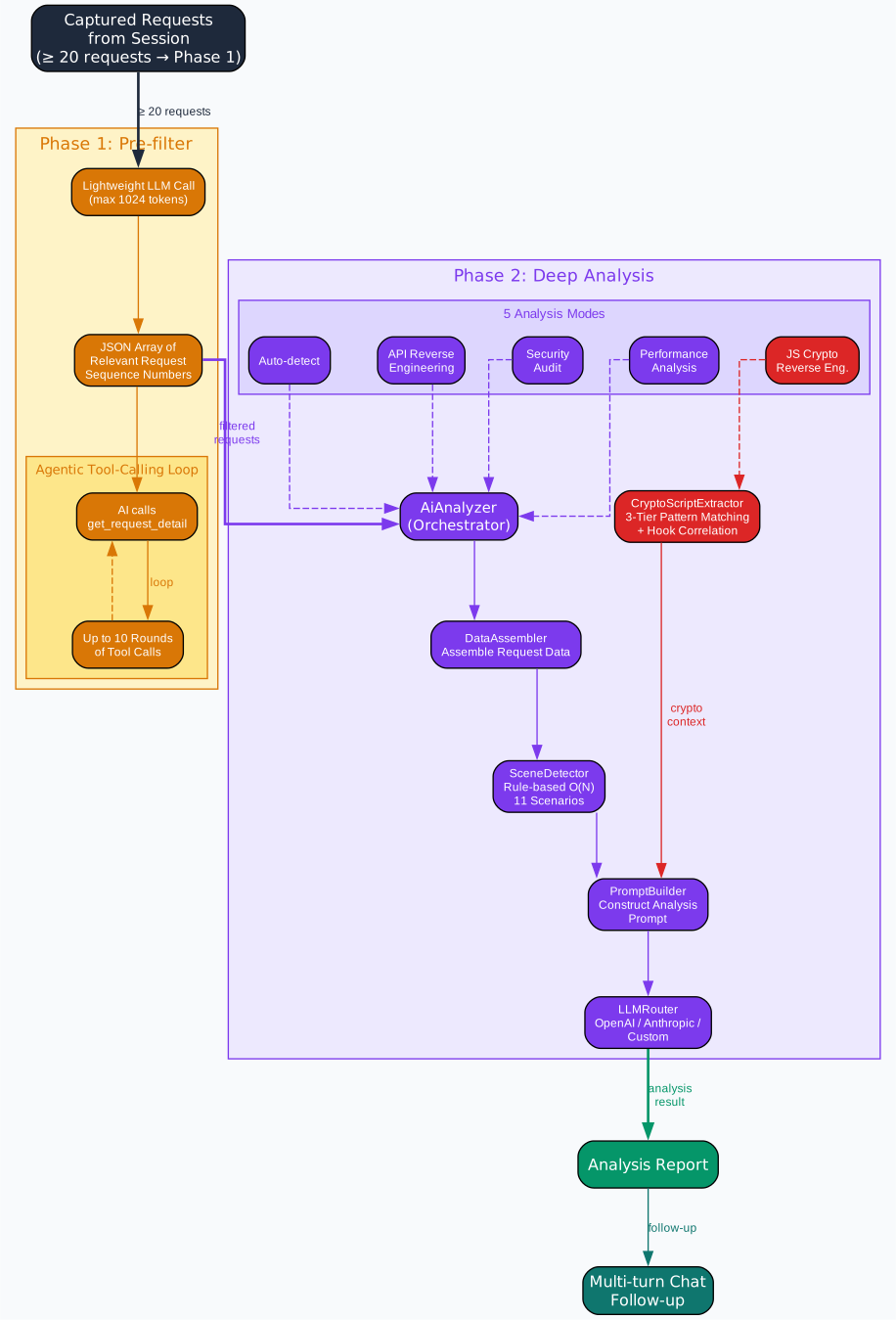
The AI analysis pipeline in Anything Analyzer operates in two distinct phases designed to handle the common problem of noise in captured traffic. When you capture a browsing session, you might collect hundreds of requests – analytics beacons, static asset loads, third-party trackers – but only a handful are relevant to understanding the core API protocol. Phase 1 addresses this with a pre-filtering step that uses a constrained LLM call capped at 1024 tokens. The SceneDetector first runs a rule-based O(N) single-pass scan across all captured requests, detecting 11 business scenarios: AI chat (SSE responses and API path patterns), OAuth flows, token-based authentication, session-based authentication, registration, login, WebSocket upgrades, SSE streams, general JSON APIs, cryptographic operations, and signature headers. These scene hints are passed to the PromptBuilder, which constructs a concise prompt asking the LLM to select only the requests relevant to the user’s chosen analysis purpose. If fewer than 20 requests exist, Phase 1 is skipped entirely and all requests proceed to Phase 2. If the pre-filter selects fewer than 3 requests, it falls back to the full set. Performance analysis mode also bypasses filtering since it needs the complete request timeline.
Phase 2 is where deep analysis happens, supporting 5 distinct modes: Auto-detect (lets the SceneDetector choose), API Reverse Engineering (documents endpoints, parameters, authentication flows, and generates reproduction code), Security Audit (identifies token leaks, CSRF vulnerabilities, XSS vectors, and sensitive data exposure), Performance Analysis (examines load times, bottlenecks, and caching behavior across the full request timeline), and JS Crypto Reverse Engineering (identifies encryption algorithms, reconstructs signing flows, and produces Python implementations). The analysis uses an agentic tool-calling loop: the LLM is given a get_request_detail tool and can request the full details of any captured request, up to 10 rounds of tool calls. This means the AI is not limited to the summary data provided in the initial prompt – it can drill into specific requests to examine headers, bodies, and hook logs on demand. The LLMRouter supports three provider backends: OpenAI Chat Completions API, OpenAI Responses API, and Anthropic Messages API, with streaming output for real-time report display and multi-round follow-up chat for deeper investigation.
JS Hook Injection System
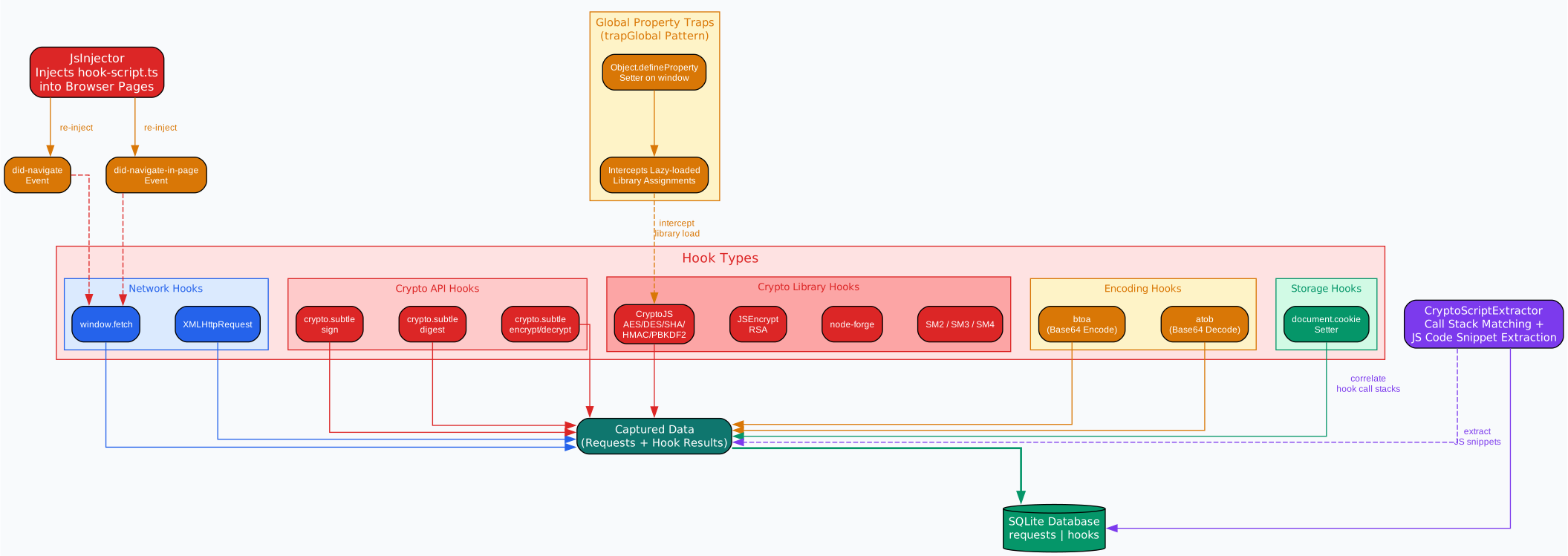
The JS hook injection system is what sets Anything Analyzer apart from every other network capture tool. Traditional proxies and DevTools can show you that a request was made, but they cannot tell you how the request payload was constructed – specifically, which cryptographic operations transformed the original data into the signed or encrypted payload you see on the wire. The hook script is injected into the browser page context via the preload bridge and operates at the JavaScript runtime level, intercepting calls before they produce network traffic.
The system hooks 9 categories of browser APIs. The window.fetch hook intercepts all Fetch API calls, capturing the URL, method, headers, and body before the request is sent, plus the response status after it returns. The XMLHttpRequest hook wraps open, setRequestHeader, and send, capturing the full request lifecycle including all headers set via setRequestHeader. The crypto.subtle hook intercepts the Web Crypto API methods sign, digest, encrypt, and decrypt, serializing ArrayBuffer arguments to hex strings and capturing both the input parameters and the output results. For third-party crypto libraries, the system uses a trapGlobal mechanism that sets Object.defineProperty setters on the window object for CryptoJS, JSEncrypt, forge (node-forge), sm2, sm3, and sm4. When any of these libraries are loaded – even lazily after page initialization – the setter fires and wraps every relevant method: CryptoJS encrypt/decrypt for AES, DES, TripleDES, Rabbit, and RC4; hash functions MD5, SHA1, SHA256, SHA512, SHA3, and RIPEMD160; HMAC variants; PBKDF2 key derivation; JSEncrypt RSA encrypt/decrypt/sign/verify; node-forge cipher, PKI, message digest, and HMAC operations; and SM2/SM3/SM4 Chinese national standard crypto operations. The native btoa and atob functions are also hooked to track Base64 encoding/decoding. Finally, the document.cookie setter is intercepted via Object.getOwnPropertyDescriptor to capture every cookie write with its call stack.
Every hook captures a call stack trace, which is critical for correlating runtime hook data with static source code analysis. The hooks are re-injected on did-navigate and did-navigate-in-page events, ensuring coverage across single-page application navigation. The CryptoScriptExtractor complements the runtime hooks with static analysis of JavaScript response bodies using a 3-tier pattern matching system. Tier 1 patterns match direct crypto API calls (crypto.subtle, CryptoJS, JSEncrypt, forge.cipher, sm2.doEncrypt, etc.). Tier 2 matches algorithm names and operations (encrypt, decrypt, sign, verify, digest, AES, RSA, SHA256, publicKey, privateKey, etc.). Tier 3 matches encoding helpers (btoa, atob, Base64, charCodeAt, TextEncoder, encodeURIComponent). Each match is extracted with a 30-line context window, overlapping ranges are merged, and snippets are sorted by tier (lower is more relevant) and hook correlation score (snippets from scripts that triggered runtime crypto hooks are prioritized). The total output is capped at a 20,000 character budget to stay within LLM context limits.
// Example: trapGlobal hooks lazy-loaded crypto libraries
function trapGlobal(name: string, hookFn: (lib: any) => void): void {
  if ((window as any)[name]) {
    try { hookFn((window as any)[name]) } catch { /* ignore */ }
    return
  }
  let _val: any = undefined
  try {
    Object.defineProperty(window, name, {
      get() { return _val },
      set(v) {
        _val = v
        if (v) { try { hookFn(v) } catch { /* ignore */ } }
      },
      configurable: true,
      enumerable: true,
    })
  } catch { /* CSP or frozen global */ }
}

trapGlobal('CryptoJS', hookCryptoJS)
trapGlobal('JSEncrypt', hookJSEncrypt)
trapGlobal('forge', hookForge)
trapGlobal('sm2', (obj) => hookSmCrypto('sm2', obj))
trapGlobal('sm3', (obj) => hookSmCrypto('sm3', obj))
trapGlobal('sm4', (obj) => hookSmCrypto('sm4', obj))
MCP Dual-Role Architecture
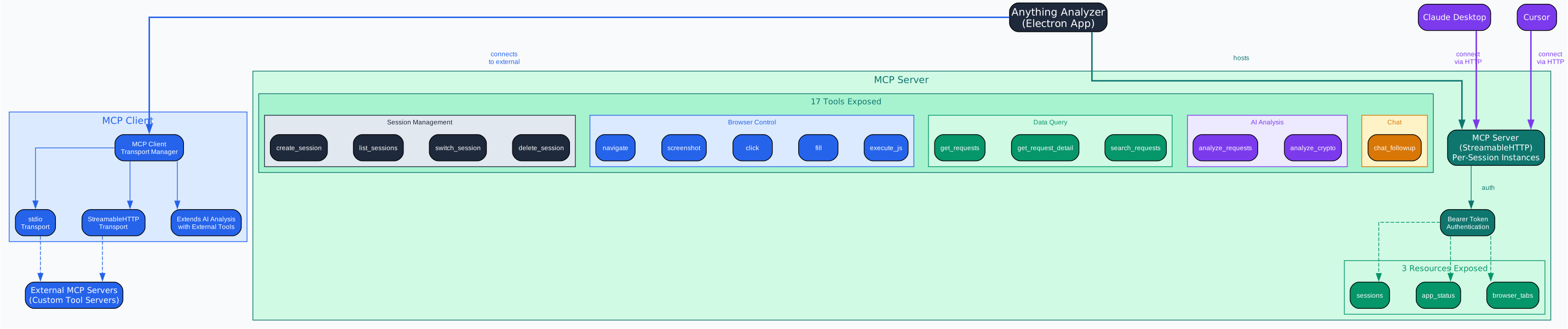
The Model Context Protocol (MCP) integration in Anything Analyzer operates in a dual-role architecture, functioning both as a client that connects to external MCP servers and as a server that exposes its own capabilities to AI agents. As a client, Anything Analyzer can connect to external MCP servers via stdio or StreamableHTTP transports, extending the AI analysis pipeline with additional tools and context. When the AI analyzer runs in Phase 2, it can invoke tools from connected MCP servers alongside the built-in get_request_detail tool, giving the LLM access to external data sources, computation services, or specialized analysis capabilities.
As a server, Anything Analyzer implements the StreamableHTTP MCP transport on a configurable port, with Bearer token authentication for security. Each client connection creates a per-session McpServer instance, ensuring isolation between concurrent users. The server exposes 17 tools organized into 4 categories. Session management tools include create_session, list_sessions, start_capture, pause_capture, resume_capture, stop_capture, switch_session, and delete_session – giving AI agents full control over the capture lifecycle. Browser control tools include navigate, browser_back, browser_forward, browser_reload, create_tab, close_tab, list_tabs, clear_browser_env, screenshot, click_element, fill_input, and execute_js – enabling agents to drive the embedded browser programmatically. Data query tools include get_requests, get_request_detail, and search for retrieving captured traffic. AI analysis tools include analyze_requests, analyze_crypto, and chat_followup for triggering analysis and continuing conversations. Three resources are also exposed: sessions (listing all sessions), app_status (current application state), and browser_tabs (open browser tabs).
This dual-role architecture means that tools like Claude Desktop or Cursor can connect to Anything Analyzer’s MCP server and use it as a capture and analysis tool within their own workflows. An AI agent can create a session, navigate to a target URL, start capture, interact with the page, stop capture, run analysis, and retrieve the results – all through MCP tool calls, without any human intervention.
{
  "tools": [
    { "name": "create_session", "description": "Create a new analysis session" },
    { "name": "list_sessions", "description": "List all analysis sessions" },
    { "name": "start_capture", "description": "Start capturing HTTP requests for a session" },
    { "name": "stop_capture", "description": "Stop capturing and finalize a session" },
    { "name": "navigate", "description": "Navigate the active browser tab to a URL" },
    { "name": "screenshot", "description": "Take a screenshot of the active browser tab" },
    { "name": "click_element", "description": "Click an element matching a CSS selector" },
    { "name": "fill_input", "description": "Fill an input element matching a CSS selector" },
    { "name": "execute_js", "description": "Execute JavaScript in the active browser tab" },
    { "name": "get_requests", "description": "Get all captured HTTP requests for a session" },
    { "name": "get_request_detail", "description": "Get full details of a specific request by sequence number" },
    { "name": "analyze_requests", "description": "Run AI analysis on captured requests" },
    { "name": "analyze_crypto", "description": "Run crypto-specific analysis on captured requests" },
    { "name": "chat_followup", "description": "Continue a conversation about analysis results" }
  ],
  "resources": [
    { "name": "sessions", "description": "List all analysis sessions" },
    { "name": "app_status", "description": "Current application status" },
    { "name": "browser_tabs", "description": "List open browser tabs" }
  ]
}
Additional Features
Browser Fingerprint Spoofing
Anything Analyzer includes a comprehensive browser fingerprint spoofing system that generates logically consistent profiles. Each profile includes a user agent string, platform, screen resolution, device pixel ratio, hardware concurrency, device memory, WebGL vendor and renderer, canvas and audio noise seeds, timezone, and language settings. The key design principle is cross-field consistency: device memory is always greater than or equal to hardware concurrency (since a device with 8 cores should not report only 2GB of RAM), screen resolutions match the platform (macOS devices get Retina-appropriate resolutions), and timezone and language settings are paired according to regional conventions. The system also supports WebRTC policy control to prevent IP leaks and provides preset profiles for common device configurations.
CA Certificate Management
The MITM proxy requires a root CA certificate to issue per-hostname leaf certificates for TLS interception. The CaManager generates a 2048-bit RSA root CA with 10-year validity, stored on disk as PEM files. When a TLS connection arrives for a new hostname, a leaf certificate is issued with Subject Alternative Names (SAN) matching the hostname, valid for 825 days to comply with Apple’s certificate lifetime requirements. Issued certificates are cached as tls.SecureContext objects in an LRU cache with a maximum of 500 entries, ensuring that frequently-visited sites do not incur repeated certificate generation overhead. The root CA certificate can be installed into the system trust store with one click, and the settings panel provides options to uninstall, regenerate, or export the certificate.
Multi-Provider LLM Router
The LLMRouter provides a unified interface for calling different LLM providers, supporting three backend types: OpenAI Chat Completions API (the standard /v1/chat/completions endpoint), OpenAI Responses API (the newer /v1/responses endpoint with native tool calling), and Anthropic Messages API (with Anthropic’s tool use format). Each provider configuration includes the API endpoint URL, model name, API key, and optional parameters like temperature and max tokens. The router handles the differences between these APIs internally, including converting between OpenAI and Anthropic tool call formats, managing streaming responses, and implementing a 10-minute timeout for slow relay servers. Sensitive headers like Authorization and API keys are masked in logs for security.
Getting Started
Installation
Download the latest release for your platform from the GitHub Releases page:
| Platform | File |
|---|---|
| Windows | Anything-Analyzer-Setup-x.x.x.exe |
| macOS (Apple Silicon) | Anything-Analyzer-x.x.x-arm64.dmg |
| macOS (Intel) | Anything-Analyzer-x.x.x-x64.dmg |
| Linux | Anything-Analyzer-x.x.x.AppImage |
Build from Source
git clone https://github.com/Mouseww/anything-analyzer.git
cd anything-analyzer
pnpm install
pnpm dev        # Development mode
pnpm test       # Run tests
pnpm build && npx electron-builder --win  # Build Windows installer
Requirements: Node.js >= 18, pnpm, Visual Studio Build Tools (Windows).
Capture Web Traffic via Embedded Browser
- Configure your LLM provider in Settings –> LLM (OpenAI, Anthropic, or any compatible API)
- Create a new session with a name and target URL
- Interact with the embedded browser while capture is running
- Stop capture and click Analyze to run AI analysis
Capture External Traffic via MITM Proxy
# Terminal commands
curl -x http://127.0.0.1:8888 https://api.example.com/data

# Python script
import requests
proxies = {"http": "http://127.0.0.1:8888", "https": "http://127.0.0.1:8888"}
requests.get("https://api.example.com/data", proxies=proxies)

# Node.js
# HTTP_PROXY=http://127.0.0.1:8888 HTTPS_PROXY=http://127.0.0.1:8888 node app.js

# Mobile devices: Wi-Fi Settings -> HTTP Proxy -> Manual -> enter computer IP + port 8888
First, install the CA certificate via Settings –> MITM Proxy, then enable the proxy. External traffic from desktop apps, terminal commands, scripts, mobile devices, and IoT hardware will flow through the proxy and into the unified session.
Running AI Analysis
After capturing traffic, select an analysis mode:
| Mode | Purpose |
|---|---|
| Auto-detect | Let SceneDetector choose the best analysis approach |
| API Reverse Engineering | Document endpoints, parameters, auth flows, generate reproduction code |
| Security Audit | Find token leaks, CSRF/XSS vulnerabilities, sensitive data exposure |
| Performance Analysis | Examine load times, bottlenecks, caching behavior |
| JS Crypto Reverse Engineering | Identify encryption algorithms, reconstruct signing flows, produce Python implementations |
The analysis streams results in real time. After the initial report, you can continue with follow-up questions in a multi-round chat.
Conclusion
Anything Analyzer represents a significant leap forward in network protocol analysis tools. By unifying CDP-based browser capture and MITM proxy interception into a single session, it eliminates the fragmentation that has plagued security researchers and reverse engineers for years. The two-phase AI analysis pipeline with its agentic tool-calling loop transforms raw captured traffic into actionable intelligence – from API documentation to security vulnerability reports to cryptographic flow reconstruction. The JS hook injection system, with its trapGlobal mechanism for lazy-loaded libraries and 3-tier CryptoScriptExtractor, provides visibility into cryptographic operations that no other tool offers. And the MCP dual-role architecture opens the door to fully automated reverse engineering workflows where AI agents can drive the entire capture and analysis process without human intervention.
For security researchers, API reverse engineers, and anyone who needs to understand what their applications are actually doing on the network, Anything Analyzer is a powerful open-source tool that combines capture, analysis, and automation in a single desktop application. Licensed under MIT, it is free to use, modify, and extend.
| Feature | Detail |
|---|---|
| Framework | Electron 35 + electron-vite + React 19 + Ant Design 5 + TypeScript 5 |
| Capture Channels | CDP (embedded browser) + MITM HTTPS Proxy (port 8888) |
| Database | better-sqlite3 with WAL mode |
| AI Analysis | Two-phase pipeline, 5 modes, agentic tool-calling (up to 10 rounds) |
| JS Hooks | fetch, XHR, crypto.subtle, CryptoJS, JSEncrypt, node-forge, SM2/3/4, btoa/atob, cookie |
| MCP | Client (stdio + StreamableHTTP) + Server (17 tools, 3 resources, Bearer auth) |
| Fingerprint | Cross-field consistent profiles with canvas/audio noise |
| CA Management | 2048-bit RSA root CA, 825-day leaf certs, 500-entry LRU cache |
| License | MIT |

Enjoyed this post? Never miss out on future posts by following us


