Android Reverse Engineering Skill: Decompile APKs and Extract APIs with Claude Code
Reverse engineering Android applications has traditionally required deep expertise across multiple tools – jadx for decompilation, dex2jar for format conversion, and manual grep searches through thousands of decompiled files to find API endpoints. The Android Reverse Engineering Skill for Claude Code, created by Simone Avogadro, automates this entire workflow. It decompiles APK, XAPK, JAR, and AAR files, then systematically extracts HTTP APIs used by the app – Retrofit endpoints, OkHttp calls, hardcoded URLs, and authentication patterns – enabling developers and security researchers to document and reproduce APIs without access to the original source code.
Introduction
Understanding how a mobile application communicates with its backend is critical for several scenarios: security auditing to identify exposed endpoints, API documentation when the original team has moved on, competitive analysis to understand market offerings, and integration work when no public API documentation exists. Until now, this process required chaining together multiple command-line tools, remembering obscure flags, and manually correlating decompiled code across hundreds of files.
The Android Reverse Engineering Skill addresses these challenges by packaging a complete 5-phase workflow into a Claude Code plugin. Instead of running separate commands and manually piecing together results, you can invoke a single slash command or even use natural language to trigger the full pipeline. The skill verifies dependencies, decompiles the target file, analyzes the app structure, traces call flows from UI entry points down to HTTP network calls, and extracts API endpoints with library-specific detection patterns.
The skill supports multiple Android package formats including standard APK files, XAPK bundles (which contain split APKs), JAR archives, and AAR libraries. It leverages two decompilation engines – jadx and Fernflower/Vineflower – and can run them side-by-side for output quality comparison. For obfuscated code produced by ProGuard or R8, the skill employs strategies that leverage unobfuscated string literals and annotations to reconstruct meaningful API signatures.
Skill Architecture
Understanding the Skill Architecture
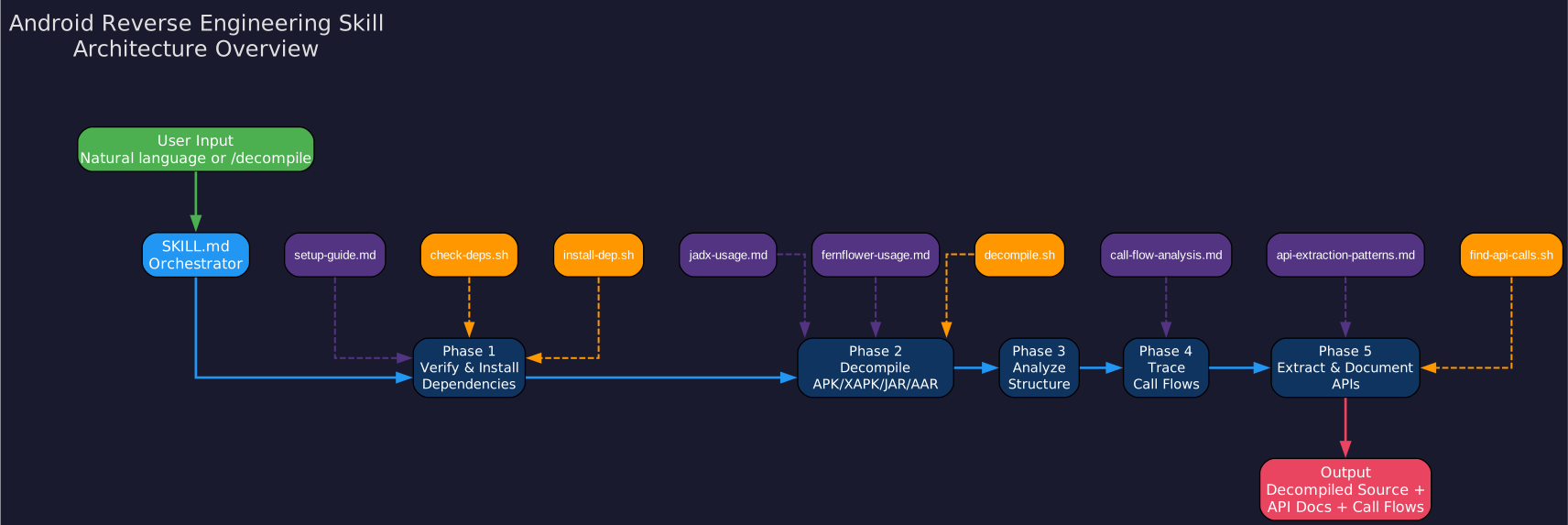
The architecture diagram above illustrates the complete structure of the Android Reverse Engineering Skill, showing how its components interact to deliver a seamless decompilation and API extraction experience within Claude Code.
SKILL.md Orchestrator
At the center of the architecture sits the SKILL.md file, which serves as the primary orchestrator for the entire workflow. This file defines the 5-phase workflow that the skill follows when activated, specifies the trigger phrases that activate the skill (such as “decompile this APK” or “extract API endpoints”), and provides the instructions that Claude Code uses to coordinate the other components. The SKILL.md acts as the single source of truth for how the skill operates, ensuring consistent behavior regardless of whether the user invokes it via slash command or natural language.
5-Phase Workflow Pipeline
The workflow progresses through five distinct phases, each building on the results of the previous one. Phase 1 (Verify and Install Dependencies) ensures that Java 17+, jadx, and optional tools are available on the system. Phase 2 (Decompile) runs the decompilation engine against the target file. Phase 3 (Analyze Structure) reads AndroidManifest.xml and surveys the package structure to identify the app’s architecture pattern. Phase 4 (Trace Call Flows) maps execution paths from Activity entry points through ViewModels and repositories down to HTTP network calls. Phase 5 (Extract and Document APIs) uses library-specific patterns to discover Retrofit interfaces, OkHttp calls, Volley requests, hardcoded URLs, and authentication patterns.
Reference Documentation Layer
The skill includes a set of reference documents that provide detailed guidance for each aspect of the workflow. The setup-guide.md covers installation instructions for all required tools. The jadx-usage.md and fernflower-usage.md files provide comprehensive CLI references for each decompilation engine. The api-extraction-patterns.md document contains library-specific grep patterns for detecting API calls from Retrofit, OkHttp, Volley, and other HTTP libraries. The call-flow-analysis.md reference describes techniques for tracing execution paths through decompiled code, including strategies for handling dependency injection and obfuscation.
Script Layer
The executable components of the skill are organized as shell scripts that handle the actual processing. The check-deps.sh script verifies that all required dependencies are installed and reports any missing tools. The install-dep.sh script automatically detects the operating system and package manager, then installs missing dependencies. The decompile.sh script is the main decompilation wrapper that handles APK, XAPK, JAR, and AAR files with configurable engine selection. The find-api-calls.sh script performs targeted searches for API endpoints using flags for different HTTP libraries and patterns.
Slash Command Integration
The decompile.md file defines the /decompile slash command that provides a convenient entry point for users. This command accepts a file path as an argument and runs the full 5-phase workflow, making it possible to decompile and analyze an Android package with a single command from within Claude Code.
Decompilation Pipeline
Understanding the Decompilation Pipeline
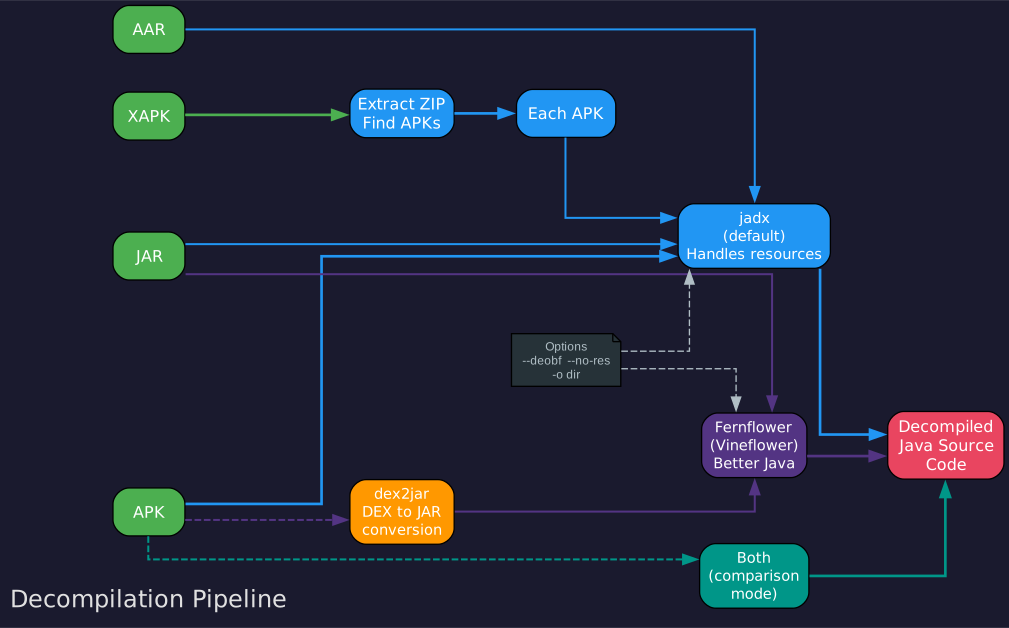
The decompilation pipeline diagram above shows the complete data flow from input file through format detection, engine selection, and decompilation to the final output that feeds into the analysis phases.
Input File Types
The pipeline accepts four distinct Android package formats. Standard APK files are the most common input, containing compiled Dalvik bytecode (DEX files), resources, and the AndroidManifest.xml. XAPK files are Android app bundles that package multiple split APKs together, typically including a base APK and architecture-specific splits. JAR files contain Java bytecode and may represent Android library dependencies. AAR files are Android Archive libraries that combine a JAR with Android-specific resources and a manifest.
Format Detection and Routing
When a file is provided, the pipeline first detects its format based on the file extension and internal structure. This detection determines the processing path. XAPK files require an additional extraction step where the bundle is unpacked and each contained APK is processed individually. JAR and AAR files may require conversion through dex2jar before decompilation, depending on their internal format.
Engine Selection
The skill supports two decompilation engines that can be used independently or together. The jadx engine is the primary decompiler, producing Java source code directly from DEX files with good handling of Android-specific constructs. The Fernflower engine (specifically the Vineflower fork) provides an alternative decompilation path that chains through dex2jar to convert DEX bytecode to JAR format first, then decompiles the resulting Java bytecode. When the “both” option is selected, both engines run side-by-side, allowing comparison of their output quality on a per-class basis.
XAPK Bundle Handling
XAPK files present a unique challenge because they contain multiple APKs. The pipeline handles this by first extracting all APKs from the XAPK bundle, then decompiling each one individually. The results are organized by split name (base, arm64-v8a, armeabi-v7a, etc.), making it easy to correlate decompiled code with the original bundle structure.
dex2jar Chaining
For the Fernflower path, the pipeline uses dex2jar as an intermediate step. This tool converts Android DEX bytecode into standard Java JAR format, which Fernflower can then decompile. This chaining approach provides access to an alternative decompilation perspective that sometimes produces more readable output than jadx, particularly for complex control flow structures or heavily obfuscated code.
Output Organization
The decompilation output is organized into a structured directory tree. For each input file, the pipeline creates separate output directories for each engine, making it straightforward to compare results. The output includes decompiled Java source files, resource files, and the processed AndroidManifest.xml – all ready for the subsequent analysis phases.
API Extraction Flow
Understanding the API Extraction Flow
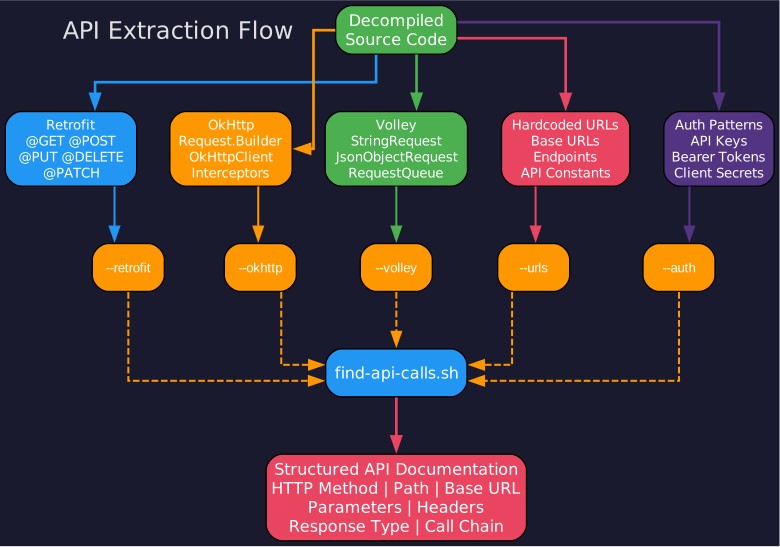
The API extraction flow diagram above details how the skill discovers and categorizes HTTP API endpoints from decompiled Android applications using library-specific detection patterns.
Retrofit Interface Detection
Retrofit is the most popular HTTP client library for Android, and the skill has dedicated patterns for extracting its API definitions. The find-api-calls.sh script with the --retrofit flag searches for Retrofit interface annotations including @GET, @POST, @PUT, @DELETE, @PATCH, @HEAD, and @HTTP. It also detects @Headers, @Header, @Query, @Path, @Body, and @Field annotations that define request parameters. By parsing these annotations, the skill can reconstruct complete API endpoint definitions including HTTP methods, URL paths, query parameters, and request body structures.
OkHttp Call Detection
OkHttp is the underlying HTTP engine for Retrofit but is also used directly by many applications. The --okhttp flag triggers searches for OkHttp-specific patterns including Request.Builder construction, HttpUrl.Builder usage, OkHttpClient instantiation, Interceptor implementations, and Call object creation. These patterns reveal API calls that may not be defined through Retrofit interfaces, providing coverage of direct HTTP client usage.
Volley Request Detection
Volley is Google’s HTTP library commonly used in older Android applications. The --volley flag searches for StringRequest, JsonObjectRequest, JsonArrayRequest, and custom Request subclass implementations. It also detects RequestQueue setup and Volley.newRequestQueue calls, which reveal the base URL configuration and request handling patterns.
Hardcoded URL Discovery
Many applications contain hardcoded URLs that are not part of any HTTP library abstraction. The --urls flag performs a broad search for URL patterns in string literals, including http:// and https:// prefixes, *.api.* domain patterns, /api/v* path patterns, and URL-encoded strings. This catches API endpoints embedded in configuration files, string resources, and directly in code.
Authentication Pattern Extraction
The --auth flag specifically targets authentication-related patterns. It searches for Authorization header construction, Bearer token handling, Basic authentication encoding, API key parameters and headers, OAuth token management, and Cookie-based session handling. Understanding authentication patterns is essential for reproducing API calls outside the original application.
find-api-calls.sh Flags
The script supports granular control through its command-line flags. Each flag (--retrofit, --okhttp, --volley, --urls, --auth) can be used independently or combined for comprehensive extraction. When all flags are used together, the script produces a complete API surface map of the application, documenting every HTTP endpoint the app communicates with.
Call Flow Tracing
Understanding Call Flow Tracing
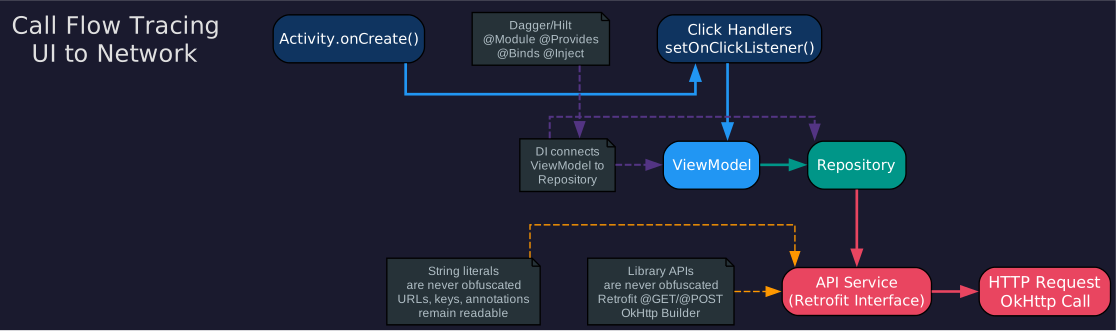
The call flow tracing diagram above illustrates how the skill maps execution paths from user-facing UI entry points through the application architecture down to individual HTTP network calls.
Activity Entry Points
The tracing process begins at Activity lifecycle methods, primarily onCreate(). This is where the Android framework hands control to the application after the user navigates to a screen. The skill identifies all Activity classes declared in the AndroidManifest.xml and traces their initialization paths. From onCreate(), the trace follows calls to setContentView() for layout inflation, findViewById() for view binding, and listener registration for user interaction handlers.
ViewModel Layer
Modern Android applications typically use the MVVM architecture pattern, where Activities delegate business logic to ViewModel classes. The skill traces the connection from Activity to ViewModel through dependency injection frameworks like Dagger, Hilt, or Koin. It identifies ViewModelProvider usage, by viewModels() delegates, and constructor injection patterns. The ViewModel layer contains the business logic and coordinates data flow between the UI and data sources.
Repository Pattern
The Repository pattern serves as the data abstraction layer, providing a clean API for the ViewModel to access data regardless of the source. The skill traces calls from ViewModel to Repository classes, identifying methods that fetch data from network, database, or cache sources. Repository classes are particularly valuable because they reveal the full data access surface of the application and often contain the logic for deciding between online and offline data sources.
API Service Layer
At the network boundary, the skill identifies API Service interfaces and implementations. For Retrofit-based apps, these are the interface definitions annotated with HTTP method annotations. For OkHttp-based apps, these are the classes that construct and execute HTTP requests. The skill maps the complete chain from Repository method calls to specific API Service methods, revealing the exact HTTP endpoints, request parameters, and response types.
HTTP Network Calls
The final layer of the trace reveals the actual HTTP network calls. The skill documents the HTTP method (GET, POST, etc.), the URL path, query parameters, request headers, request body format, and expected response type. This information is sufficient to reproduce the API call using any HTTP client, effectively creating API documentation from a compiled application.
Dependency Injection Handling
Dependency injection frameworks like Dagger, Hilt, and Koin complicate call flow tracing because object creation and wiring happen through generated code rather than explicit constructors. The skill handles this by identifying @Inject annotations, @Module and @Component definitions, and @Provides methods. It traces the DI graph to connect abstract type references to their concrete implementations, enabling accurate flow tracing even when the connection is not explicit in the source code.
Obfuscation Strategies
ProGuard and R8 obfuscation rename classes, methods, and fields to short, meaningless identifiers, making decompiled code difficult to read. The skill employs several strategies to navigate obfuscated code. First, it leverages unobfuscated string literals – URLs, format strings, and error messages remain readable and provide anchors for understanding nearby code. Second, it uses annotation metadata – Retrofit annotations are preserved by default ProGuard rules, so @GET("/api/users") remains even when the method name is obfuscated. Third, it identifies patterns in the call graph – even with renamed methods, the structure of how classes interact reveals the architectural pattern.
Installation and Setup
Prerequisites
The Android Reverse Engineering Skill requires the following tools to be installed on your system:
- Java 17 or later – Required by both jadx and Fernflower decompilers
- jadx – The primary DEX to Java decompiler
- Fernflower/Vineflower (optional) – Alternative decompilation engine for comparison
- dex2jar (optional) – Required when using the Fernflower engine path
Installing the Skill
Install the skill into Claude Code using the plugin marketplace:
# Add the skill from the marketplace
/plugin marketplace add SimoneAvogadro/android-reverse-engineering-skill

# Install the skill
/plugin install android-reverse-engineering@android-reverse-engineering-skill
Dependency Verification
The skill includes automated dependency management. When you run the decompilation workflow, it first checks for required tools:
# The check-deps.sh script verifies all dependencies
# It reports missing tools and provides installation instructions

# If dependencies are missing, install-dep.sh can auto-install them
# It detects your OS and package manager automatically
The check-deps.sh script checks for Java 17+, jadx, and optional tools like Fernflower and dex2jar. If any dependency is missing, the install-dep.sh script detects whether you are on macOS (Homebrew), Linux (apt/yum), or another platform and installs the required tools automatically.
Manual Dependency Installation
If you prefer to install dependencies manually:
# macOS with Homebrew
brew install jadx
brew install dex2jar

# Ubuntu/Debian
sudo apt install jadx

# Or download jadx directly from GitHub releases
wget https://github.com/skylot/jadx/releases/download/v1.5.0/jadx-1.5.0.zip
unzip jadx-1.5.0.zip -d jadx
export PATH=$PATH:$(pwd)/jadx/bin
Usage Examples
Slash Command Activation
The simplest way to use the skill is through the /decompile slash command:
# Decompile an APK file
/decompile path/to/app.apk

# The command runs the full 5-phase workflow:
# 1. Verify dependencies
# 2. Decompile the file
# 3. Analyze the app structure
# 4. Trace call flows
# 5. Extract and document APIs
Natural Language Activation
The skill also activates when you use natural language phrases in Claude Code:
"Decompile this APK and show me the API endpoints"
"Extract the Retrofit interfaces from app.apk"
"What HTTP calls does this Android app make?"
"Find all hardcoded URLs in the decompiled code"
"Trace the call flow from LoginActivity to the API"
Manual Script Usage
For more granular control, you can run the individual scripts directly:
# Step 1: Check dependencies
./check-deps.sh

# Step 2: Decompile with a specific engine
./decompile.sh --input app.apk --engine jadx
./decompile.sh --input app.apk --engine fernflower
./decompile.sh --input app.apk --engine both

# Step 3: Find API calls with specific flags
./find-api-calls.sh --input decompiled/ --retrofit
./find-api-calls.sh --input decompiled/ --okhttp
./find-api-calls.sh --input decompiled/ --urls --auth
./find-api-calls.sh --input decompiled/ --retrofit --okhttp --volley --urls --auth
XAPK Bundle Processing
When working with XAPK bundles, the skill automatically handles the extraction and per-APK decompilation:
# Decompile an XAPK bundle
/decompile path/to/app.xapk

# The pipeline will:
# 1. Extract all APKs from the XAPK bundle
# 2. Decompile each APK individually
# 3. Organize results by split name (base, arm64-v8a, etc.)
# 4. Merge API findings across all splits
Advanced Features
Dual-Engine Comparison
One of the most powerful features of the skill is the ability to run both jadx and Fernflower side-by-side and compare their output. Different decompilers handle complex bytecode patterns differently, and having two perspectives on the same code can significantly improve understanding:
# Run both engines for comparison
./decompile.sh --input app.apk --engine both

# Output structure:
# decompiled/
#   jadx/          -- jadx decompilation results
#   fernflower/    -- Fernflower decompilation results
The jadx engine typically produces more readable output for standard Android code, while Fernflower sometimes handles complex control flow or heavily obfuscated code better. By comparing both outputs, you can resolve ambiguities in decompiled code and gain higher confidence in your understanding of the original application logic.
XAPK Bundle Support
XAPK files are increasingly common as Android app distribution moves toward app bundles with split APKs. The skill handles XAPK files by:
- Extracting the base APK and all split APKs (architecture-specific, density-specific, language-specific)
- Decompiling each APK individually
- Organizing the results by split name
- Cross-referencing API endpoints found across different splits
This ensures complete coverage even when API calls are distributed across multiple APKs within a bundle.
Obfuscation Handling
ProGuard and R8 obfuscation present significant challenges for reverse engineering. The skill employs several strategies to work through obfuscated code:
String Literal Anchoring: URLs, error messages, and format strings are typically not obfuscated. The skill uses these as anchor points to understand surrounding code context.
Annotation Preservation: Retrofit annotations are preserved by default ProGuard rules because they are needed at runtime. This means @GET("/api/users") remains readable even when the method name becomes a.
Pattern Recognition: Even with renamed identifiers, the structural patterns of common architectures (MVVM, MVP, MVC) are recognizable. The skill identifies these patterns to reconstruct the application’s architecture.
Call Graph Analysis: By tracing the call graph from known entry points (Activities declared in the manifest), the skill can follow execution paths through obfuscated code to reach the network layer, where API endpoints are typically preserved.
Conclusion
The Android Reverse Engineering Skill for Claude Code transforms the complex, multi-tool process of decompiling Android applications and extracting their API endpoints into a streamlined, automated workflow. By packaging jadx and Fernflower decompilation, library-specific API detection, call flow tracing, and obfuscation handling into a single skill, it eliminates the need to manually chain commands and correlate results across different tools.
Whether you are conducting a security audit, documenting an undocumented API, analyzing a competitor’s mobile app, or integrating with a service that lacks public API documentation, this skill provides the systematic approach needed to extract meaningful information from compiled Android packages. The dual-engine comparison, XAPK bundle support, and obfuscation handling strategies make it suitable for real-world applications that use modern Android development practices.
The skill is open source under the Apache 2.0 license and available on GitHub at SimoneAvogadro/android-reverse-engineering-skill.
Related Posts
- Claude Code Skills: Building Custom AI Workflows
- Open Source Security Tools for Mobile Applications

Enjoyed this post? Never miss out on future posts by following us


