Introduction
What if you could type a single sentence into your terminal and receive a production-quality design deliverable – a clickable iOS prototype, an editable PowerPoint deck, a 60fps product launch animation, or a print-grade infographic? That is the promise of HuaShu Design (also written “Huashu-Design”), an open-source HTML-native design skill built for Claude Code and other AI coding agents.
Created by Huasheng (known online as “Huashu” or “Hua Shu”), an AI-native coder and independent developer with 300k+ followers across Chinese social platforms, HuaShu Design has rapidly gained over 4,400 GitHub stars. The skill takes a fundamentally different approach from graphical design tools like Figma or Adobe After Effects: instead of clicking and dragging in a GUI, you describe what you want in natural language, and the AI agent produces the design as a single-file HTML document that can be opened, verified, and exported to professional formats.
The core insight is simple but powerful: HTML is the tool, not the medium. When building a slide deck, the output should look like a presentation, not a web page. When creating an animation, it should feel like a motion graphics piece, not a dashboard. HuaShu Design teaches the agent to embody the right domain expert – UX designer, animator, slide designer, or prototyper – depending on the task at hand.
How It Works
HuaShu Design is installed as a skill – a structured markdown document (SKILL.md) that gets loaded into the AI agent’s context when activated. The skill contains comprehensive instructions covering design philosophies, workflow rules, anti-patterns, component references, and export procedures. When you type a design request, the agent reads the skill, activates the appropriate workflow, and produces HTML-based deliverables.
The skill is agent-agnostic: it works with Claude Code, Cursor, Codex, OpenClaw, Hermes, or any markdown-skill-capable agent. Installation is a single command:
npx skills add alchaincyf/huashu-design
After installation, you simply talk to your agent in natural language:
"Make a keynote for AI psychology. Give me 3 style directions to pick from."
"Build an iOS prototype for a Pomodoro app -- 4 screens, actually clickable."
"Turn this logic into a 60-second animation. Export MP4 and GIF."
"Run a 5-dimension expert review on this design."
No buttons, no panels, no Figma plugin. The entire interaction happens through conversation.
Architecture
The architecture of HuaShu Design follows a layered pipeline that transforms natural language requests into polished design deliverables. At the top, multiple AI agents (Claude Code, Cursor, Codex, and others) can activate the skill. The skill loading layer reads SKILL.md and its 16 reference sub-documents, which together form the complete knowledge base. The Design Philosophy Engine sits at the center, orchestrating five core mechanisms: the Core Asset Protocol for brand fidelity, the Junior Designer Workflow for iterative delivery, the Design Direction Advisor for vague briefs, Anti AI-Slop Rules for quality assurance, and Fact Verification as the highest-priority principle. Output channels span HTML prototypes, slide decks (with PPTX export), animations (MP4/GIF with BGM), infographics (PDF/SVG), and optional 5-dimension expert critiques.
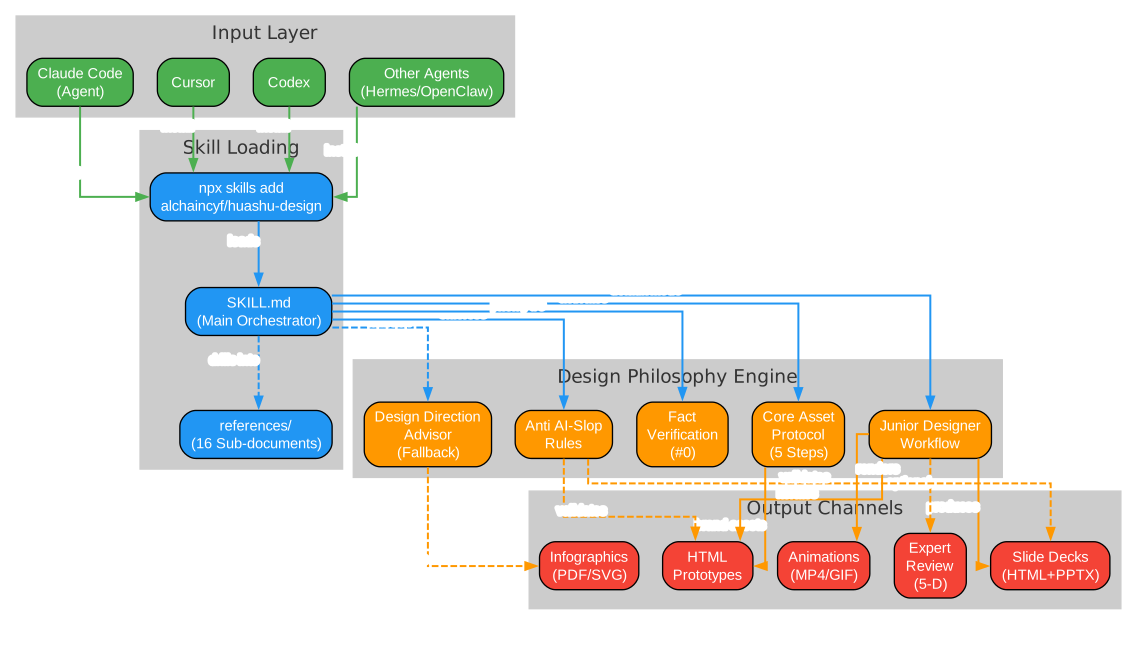
The architecture diagram above illustrates the flow from agent input through skill loading, into the Design Philosophy Engine, and out to the five output channels. Each component in the engine layer serves a distinct purpose: the Core Asset Protocol ensures brand consistency when working with specific brands, the Junior Designer Workflow provides the default iterative working mode, the Design Direction Advisor kicks in when user requirements are too vague to execute directly, Anti AI-Slop Rules prevent the agent from producing generic AI-looking output, and Fact Verification (Principle #0) mandates web searches before making any factual claims about products or technologies. The output channels are not mutually exclusive – a single task might produce an HTML prototype that gets verified with Playwright, then exported to both PPTX and PDF formats.
Design Philosophies
One of HuaShu Design’s most distinctive features is its library of 20 design philosophies organized into 5 schools. When a user’s brief is vague (“make something nice”, “design a page”), the Design Direction Advisor selects 3 philosophies from different schools and generates parallel visual demos for the user to choose from. This ensures genuine visual differentiation rather than three variations of the same aesthetic.
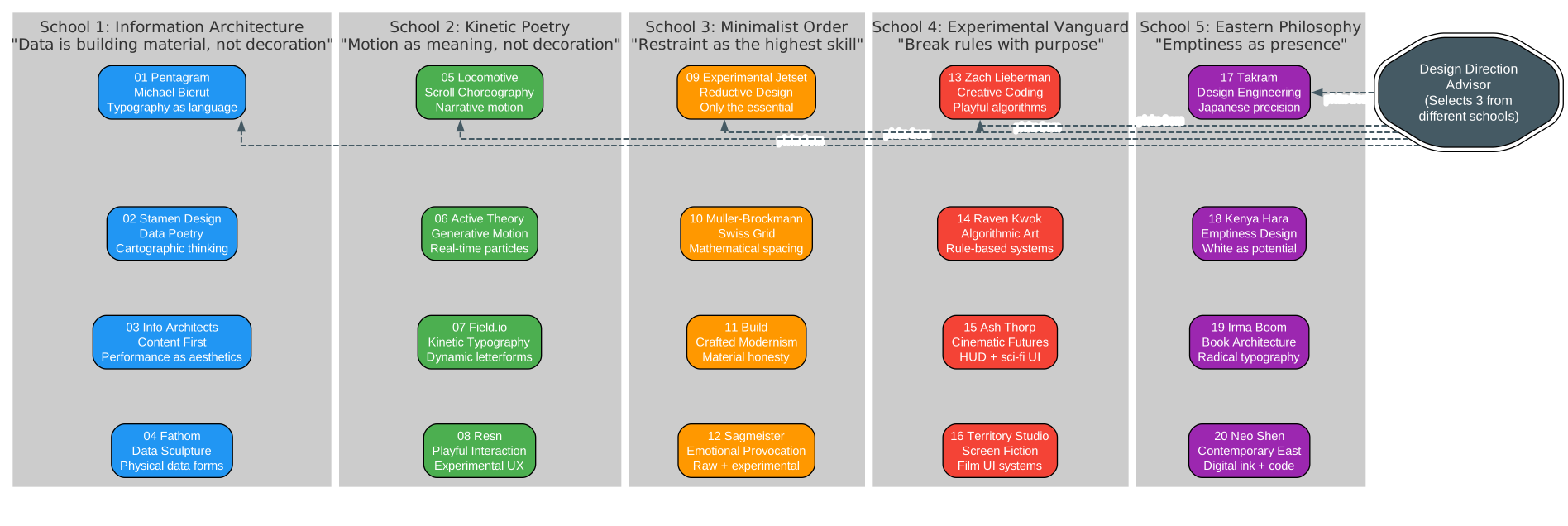
The philosophies diagram above shows all 20 design systems organized by their school. Each school represents a fundamentally different approach to visual design:
School 1: Information Architecture (01-04) operates on the principle that “data is building material, not decoration.” This school includes Pentagram/Michael Bierut’s typographic hierarchy, Stamen Design’s cartographic data visualization, Information Architects’ content-first philosophy, and Fathom’s data sculpture approach. These philosophies excel at data-heavy deliverables like infographics, dashboards, and analytical presentations. The best execution path for this school is HTML rendering, which provides precise control over typography and grid systems.
School 2: Kinetic Poetry (05-08) treats “motion as meaning, not decoration.” Locomotive’s scroll choreography, Active Theory’s generative motion, Field.io’s kinetic typography, and Resn’s playful interaction design all belong here. These philosophies are ideal for product launch animations, interactive demos, and any project where movement tells a story. The best execution path varies: some styles work well with HTML animation engines, while others benefit from AI-generated visual assets.
School 3: Minimalist Order (09-12) believes “restraint is the highest skill.” Experimental Jetset’s reductive design, Muller-Brockmann’s Swiss grid system, Build’s crafted modernism, and Sagmeister’s emotional provocation form this school. These are the go-to choices for high-end brand presentations, editorial design, and any context where white space speaks louder than content. HTML rendering provides the precise control needed for these exacting styles.
School 4: Experimental Vanguard (13-16) follows the principle of “breaking rules with purpose.” Zach Lieberman’s creative coding, Raven Kwok’s algorithmic art, Ash Thorp’s cinematic futures, and Territory Studio’s screen fiction design push boundaries. These philosophies suit bold, attention-grabbing projects like event promotions, creative portfolios, and experimental brand campaigns. AI generation is often the best execution path for these visually complex styles.
School 5: Eastern Philosophy (17-20) embraces “emptiness as presence.” Takram’s design engineering, Kenya Hara’s emptiness design, Irma Boom’s radical book architecture, and Neo Shen’s contemporary Eastern aesthetics offer a distinctive alternative to Western design conventions. These philosophies are particularly effective for luxury brands, cultural projects, and any context where subtlety and restraint convey sophistication. HTML rendering provides the precision needed for these carefully composed layouts.
Installation
Installing HuaShu Design requires only Node.js and an AI agent that supports markdown-based skills:
npx skills add alchaincyf/huashu-design
This command downloads the skill from GitHub and installs it into your agent’s skill directory. The skill is self-contained: SKILL.md serves as the main orchestrator, the references/ directory contains 16 sub-documents for task-specific deep dives, the assets/ directory provides starter components (JSX device frames, animation engines, deck engines, SFX library), and the scripts/ directory contains the export toolchain.
The repository structure is organized as follows:
huashu-design/
  SKILL.md                 # Main doc (read by agent)
  README.md                # Chinese README
  README.en.md             # English README
  assets/                  # Starter Components
    animations.jsx         # Stage + Sprite + Easing + interpolate
    ios_frame.jsx          # iPhone 15 Pro bezel
    android_frame.jsx      # Android device bezel
    macos_window.jsx       # Desktop app window
    browser_window.jsx     # Web browser preview
    deck_stage.js          # HTML slide engine
    deck_index.html        # Multi-file deck assembler
    design_canvas.jsx      # Side-by-side variation display
    showcases/             # 24 prebuilt samples (8 scenes x 3 styles)
    sfx/                   # 37 sound effects in 8 categories
    bgm-*.mp3              # 6 scene-specific background tracks
  references/              # Drill-down docs by task
    design-styles.md       # 20 design philosophies in detail
    animation-pitfalls.md  # 14 rules from real failures
    slide-decks.md         # HTML-first slide architecture
    editable-pptx.md       # 4 hard constraints for PPTX export
    critique-guide.md      # 5-dimension scoring system
    video-export.md        # MP4/GIF/BGM pipeline
    sfx-library.md         # Sound effect catalog
    audio-design-rules.md  # SFX+BGM dual-track system
    content-guidelines.md  # Anti AI-slop content rules
    workflow.md            # Question templates and checklists
    verification.md        # Playwright testing procedures
    react-setup.md         # React+Babel technical constraints
    tweaks-system.md       # Live parameter switching
    design-context.md      # Fallback when no brand context
    scene-templates.md     # Output-type templates
    apple-gallery-showcase.md  # 3D card showcase style
    hero-animation-case-study.md  # Gallery ripple patterns
  scripts/                 # Export toolchain
    render-video.js        # HTML -> MP4
    convert-formats.sh     # MP4 -> 60fps + GIF
    add-music.sh           # MP4 + BGM
    export_deck_pdf.mjs    # HTML -> PDF
    export_deck_pptx.mjs   # HTML -> editable PPTX
    html2pptx.js           # DOM -> PowerPoint objects
    verify.py              # Playwright screenshot verification
  demos/                   # 9 capability demonstrations
Usage
HuaShu Design supports seven primary capabilities, each with typical delivery times ranging from 3 to 25 minutes:
| Capability | Deliverable | Typical Time |
|---|---|---|
| Interactive prototype (App/Web) | Single-file HTML with real device bezel, clickable, Playwright-verified | 10-15 min |
| Slide decks | HTML deck (browser presentation) + editable PPTX (text frames preserved) | 15-25 min |
| Motion design | MP4 (25fps / 60fps interpolation) + GIF (palette-optimized) + BGM | 8-12 min |
| Design variations | 3+ side-by-side comparisons with live Tweaks parameter switching | 10 min |
| Infographic / data viz | Print-quality typography, exports to PDF/PNG/SVG | 10 min |
| Design direction advisor | 5 schools x 20 philosophies, 3 directions recommended, parallel demos | 5 min |
| 5-dimension expert critique | Radar chart + Keep/Fix/Quick Wins actionable punch list | 3 min |
Interactive Prototypes
For iOS app prototypes, HuaShu Design provides pixel-accurate iPhone 15 Pro device frames with Dynamic Island, status bar, and Home Indicator. The ios_frame.jsx component handles all the precise measurements so the agent never has to manually position these elements. Prototypes default to single-file inline React architecture, meaning the HTML file can be opened by double-clicking – no HTTP server required. Real images are pulled from Wikimedia Commons, Met Museum Open Access, and Unsplash rather than using placeholder cards. Before delivery, Playwright runs automated click tests to verify navigation and interaction.
Slide Decks
The slide system follows an HTML-first architecture: every deck starts as an HTML aggregation that can be presented in a browser with keyboard navigation and fullscreen mode. From there, optional export to PDF (via export_deck_pdf.mjs) or editable PPTX (via export_deck_pptx.mjs) is available. The PPTX export is particularly notable – html2pptx.js reads DOM computed styles and translates each element into real PowerPoint text frames, not image-bed fakes. This means the exported PPTX can be edited in PowerPoint or Keynote with text that remains selectable and modifiable.
Motion Design
The animation engine uses a Stage + Sprite time-slice model with four core APIs: useTime for accessing the global timeline, useSprite for defining time-bounded animation segments, interpolate for value transitions, and Easing for motion curves. The export pipeline renders HTML to 25fps MP4, optionally interpolates to 60fps, generates palette-optimized GIFs, and adds background music from 6 scene-specific tracks. Sound effects from the 37-item SFX library are layered on top following the dual-track system described in audio-design-rules.md.
Workflow
The workflow pipeline ensures quality at every stage, with mandatory checkpoints where the agent must stop and wait for user confirmation before proceeding.
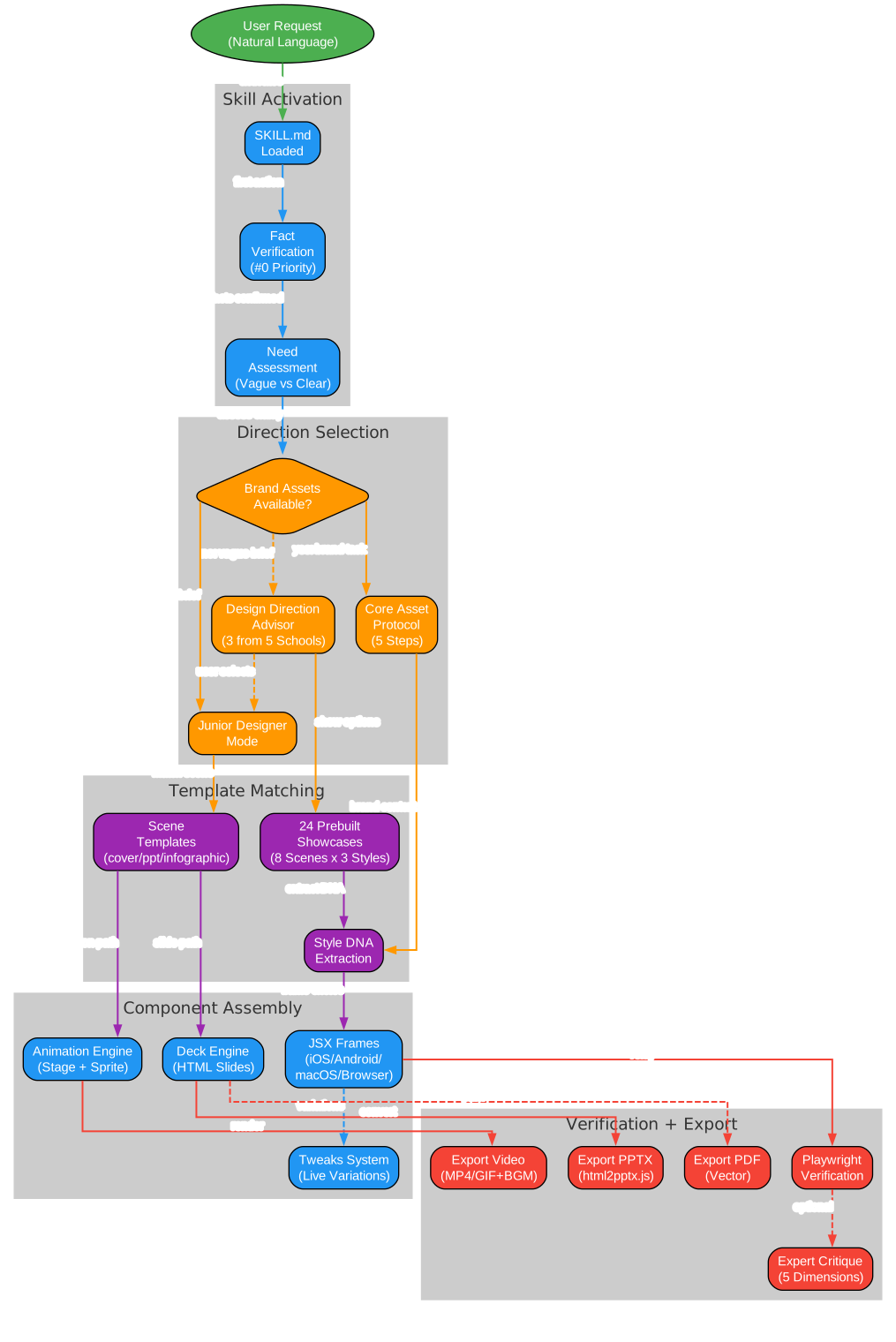
The workflow diagram above shows the complete pipeline from user request to final export. The process begins with skill activation and fact verification (Principle #0), which mandates web searches for any factual claims about products or technologies. Need assessment then determines whether the brief is clear enough to proceed directly or whether the Design Direction Advisor should be invoked. When brand assets are available, the Core Asset Protocol enforces a 5-step process: ask the user for existing assets, search official brand channels, download assets with three fallback paths per type, verify and extract color values from real files (never from memory), and freeze everything into a brand-spec.md that all subsequent HTML must reference. When the brief is vague, the Design Direction Advisor selects 3 philosophies from different schools, shows 24 prebuilt showcase samples, generates 3 parallel visual demos, and lets the user choose. Template matching then selects the appropriate scene template and extracts the style DNA. Component assembly uses the JSX device frames, animation engine, deck engine, and Tweaks system. Finally, Playwright verification confirms the output works correctly before export to the requested format.
The Junior Designer Workflow is the default working mode across all tasks. Its core principle is that “fixing a misunderstanding early is 100x cheaper than fixing it late.” The agent writes assumptions, placeholders, and reasoning comments directly into the HTML, shows the work to the user at the earliest possible moment (even if it is just gray blocks with text labels), and iterates based on feedback. There are four mandatory checkpoints where the agent must pause and wait for user confirmation.
The Core Asset Protocol is the hardest rule in the skill. When a task involves a specific brand (Stripe, Linear, Anthropic, DJI, or any other), five steps are enforced: ask the user for existing brand guidelines, search official brand channels for logos and assets, download assets with three fallback paths per type, verify and extract color values from real files, and freeze everything into a brand-spec.md. A/B testing showed that this protocol reduced stability variance by 5x compared to the previous version. The protocol was upgraded after a real failure case: when creating a DJI Pocket 4 launch animation, the old version only extracted color values but did not download the DJI logo or find the product image, resulting in a generic tech animation with no brand recognition.
Features
Anti AI-Slop Rules
One of the most thoughtful aspects of HuaShu Design is its systematic approach to avoiding “AI slop” – the visual common denominator of AI-generated design. The skill identifies specific patterns to avoid and explains why each is problematic:
| Pattern | Why It Is Slop | When It Is Acceptable |
|---|---|---|
| Aggressive purple gradients | AI training data’s universal formula for “tech feel” | Brand itself uses purple gradients (e.g., Linear) |
| Emoji as icons | Training data puts emoji on every bullet point | Brand itself uses emoji (e.g., Notion) |
| Rounded cards + left border accent | Overused Material/Tailwind pattern from 2020-2024 | Brand spec explicitly includes this pattern |
| SVG-drawn imagery (people/objects) | AI SVG humans always have distorted proportions | Almost never – use real photos or honest placeholders |
| CSS silhouettes instead of product photos | Produces generic tech animation with zero brand recognition | Almost never – use Core Asset Protocol to find real images |
| Inter/Roboto as display fonts | Too common to convey intentional design choices | Brand spec explicitly uses these fonts |
Instead of these patterns, the skill recommends using text-wrap: pretty with CSS Grid for typographic precision, oklch() color definitions for harmonious palettes, serif display faces for distinctive character, and the principle of “one detail at 120%, everything else at 80%” – which means choosing one element to perfect and keeping the rest at a solid baseline rather than applying uniform mediocrity.
Fact Verification (Principle #0)
The highest-priority rule in the entire skill is fact verification. When a task mentions a specific product, technology, or event, the agent must perform a web search to confirm existence, release status, current version, and specifications before making any assumptions. This rule was added after a real failure: when asked to create a DJI Pocket 4 launch animation, the agent assumed from memory that Pocket 4 had not been released yet, when in fact it had launched 4 days earlier. The cost of a web search is approximately 10 seconds; the cost of reworking based on a wrong assumption is 1-2 hours.
5-Dimension Expert Critique
After any design deliverable, an optional expert critique evaluates five dimensions on a 0-10 scale: philosophical coherence (does the design follow its chosen philosophy consistently?), visual hierarchy (can the viewer’s eye navigate the content naturally?), execution craft (are the details polished – typography, spacing, alignment?), functionality (does it work as intended – clickable, navigable, responsive?), and innovation (does it offer something beyond the expected?). The critique outputs a radar chart visualization and a structured punch list with Keep (what works well), Fix (categorized as fatal, important, or optimization), and Quick Wins (the top 3 things that can be fixed in 5 minutes each).
Component Library
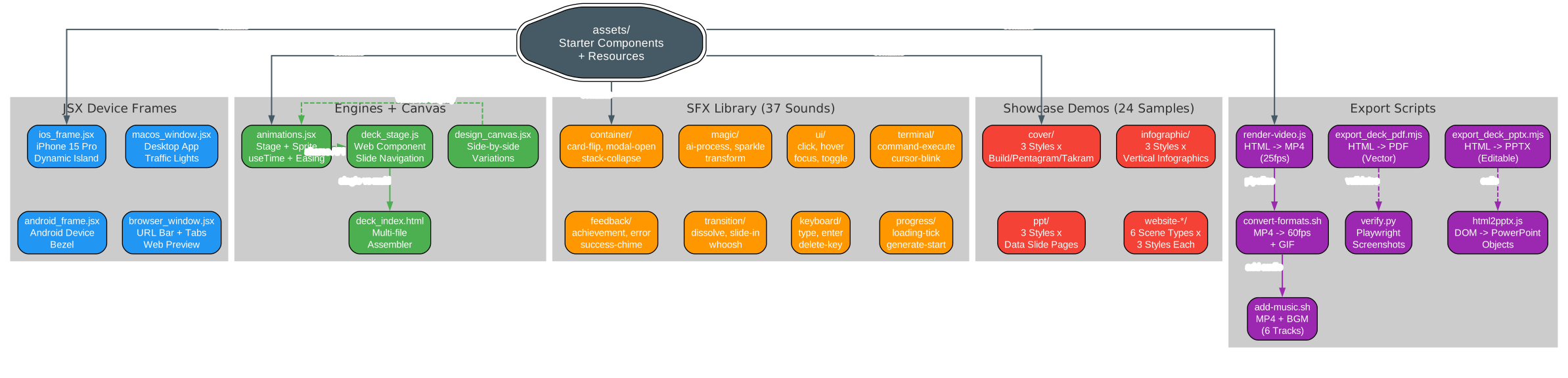
The component library diagram above shows the four major categories of starter components provided by HuaShu Design. The JSX Device Frames cluster includes pixel-accurate bezels for iPhone 15 Pro (with Dynamic Island, status bar, and Home Indicator), Android devices, macOS windows (with traffic light buttons), and browser windows (with URL bar and tabs). The Engines + Canvas cluster provides the animation engine (Stage + Sprite with useTime, useSprite, interpolate, and Easing APIs), the deck engine (both single-file web component and multi-file assembler architectures), and the design canvas for side-by-side variation display. The SFX Library contains 37 sound effects organized into 8 categories: container sounds (card flips, modal opens), feedback sounds (achievements, errors), magic sounds (AI processing, sparkles), transition sounds (dissolves, whooshes), UI sounds (clicks, hovers), keyboard sounds (typing, enter), terminal sounds (command execution, cursor blink), and progress sounds (loading ticks, generation starts). The Export Scripts cluster provides the complete pipeline from HTML to MP4 (with 60fps interpolation and BGM), PDF (vector output), and editable PPTX (with real text frames via DOM-to-PowerPoint translation).
Export Capabilities
The export toolchain supports multiple output formats:
# Render HTML animation to 25fps MP4
node scripts/render-video.js animation.html

# Convert to 60fps MP4 + palette-optimized GIF
bash scripts/convert-formats.sh output.mp4

# Add background music (6 scene-specific tracks available)
bash scripts/add-music.sh output.mp4 bgm-tech.mp3

# Export HTML deck to PDF (vector, searchable text)
node scripts/export_deck_pdf.mjs deck/

# Export HTML deck to editable PPTX (real text frames)
node scripts/export_deck_pptx.mjs deck/
Each export script is designed to work as part of a pipeline. The video export follows a three-stage process: first render the HTML to raw MP4 at 25fps, then optionally interpolate to 60fps and generate a GIF, and finally add background music and sound effects. The PPTX export reads DOM computed styles and translates each element into native PowerPoint objects, preserving text editability.
Comparison with Claude Design
HuaShu Design’s creator openly acknowledges that the Core Asset Protocol’s philosophy was inspired by Claude Design’s system prompts. However, the positioning is fundamentally different:
| Dimension | Claude Design | HuaShu Design |
|---|---|---|
| Form | Web product (used in browser) | Skill (used in terminal) |
| Quota | Subscription quota | API consumption, parallel agents unblocked |
| Output | Canvas + Figma export | HTML / MP4 / GIF / editable PPTX / PDF |
| Interaction | GUI (click, drag, edit) | Conversation (tell agent, wait) |
| Complex animation | Limited | Stage + Sprite timeline, 60fps export |
| Agent compatibility | Claude.ai only | Claude Code / Cursor / Trae / Hermes / OpenClaw |
As the creator puts it: “Claude Design is a better graphics tool. HuaShu Design makes the graphics-tool layer disappear. Two paths, different audiences.”
Limitations
HuaShu Design is honest about its boundaries:
- No layer-editable PPTX-to-Figma round-trip. The output is HTML – screenshottable, recordable, and image-exportable, but not draggable into Keynote for text-position tweaks.
- Framer-Motion-tier complex animations are out of scope. 3D rendering, physics simulation, and particle systems exceed the skill’s boundaries.
- Brand-from-zero design quality drops to 60-65 points. Drawing high-fidelity designs from nothing is always a last resort. The Core Asset Protocol exists precisely to avoid this scenario.
The creator frames this honestly: “This is an 80-point skill, not a 100-point product. For people unwilling to open a graphical UI, an 80-point skill beats a 100-point product.”
Conclusion
HuaShu Design represents a compelling vision for the future of AI-assisted design: one where the primary interface is natural language, the output format is web-native HTML, and the quality bar is set by structured design philosophies rather than by the lowest common denominator of AI training data. Its 20-philosophy library provides genuine aesthetic diversity, the Core Asset Protocol ensures brand fidelity through systematic asset acquisition, and the Junior Designer Workflow prevents the costly rework that comes from unverified assumptions.
For developers and creators who prefer the terminal over graphical interfaces, HuaShu Design offers a practical path to professional-quality design deliverables without leaving the command line. The skill’s agent-agnostic architecture means it works with whatever AI coding assistant you already use, and its comprehensive reference documentation (16 sub-documents covering everything from animation pitfalls to audio design rules) means the agent always has detailed guidance for the task at hand.
Whether you need a quick iOS prototype for a design review, a polished slide deck for a presentation, a product launch animation with sound effects, or an expert critique of an existing design, HuaShu Design provides a structured, repeatable workflow that consistently produces output well above the “decent for AI” baseline.
Repository: github.com/alchaincyf/huashu-design
Stars: 4,410+
License: Personal use free; enterprise/commercial use requires authorization Enjoyed this post? Never miss out on future posts by following us 
