GStack: 23 Opinionated Claude Code Tools for AI-Powered Development
GStack is a collection of 23 opinionated Claude Code tools that transform a single developer into a virtual engineering team, created by Garry Tan, President and CEO of Y Combinator. Built in TypeScript and running on Bun, GStack provides structured slash commands for every phase of the software development lifecycle – from product ideation through production deployment. With 96,321 GitHub stars and growing at over 1,083 stars per day, GStack has rapidly become one of the most popular open source projects for AI-assisted coding, offering a complete sprint workflow under the MIT license at zero cost.
What is GStack?
GStack is not just another AI coding assistant. It is a process – a structured set of workflow skills that run in the order a sprint runs: Think, Plan, Build, Review, Test, Ship, Reflect. Each skill feeds into the next. /office-hours writes a design doc that /plan-ceo-review reads. /plan-eng-review writes a test plan that /qa picks up. /review catches bugs that /ship verifies are fixed. Nothing falls through the cracks because every step knows what came before it.
The project was created by Garry Tan, who built products for twenty years – from cofounding Posterous (sold to Twitter) to being one of the first engineers at Palantir, and now running Y Combinator. His claim: using GStack, his 2026 run rate is approximately 810x his 2013 pace on logical code changes, measured across 40 public and private repositories.
Key Insight: GStack’s 810x productivity claim is measured on logical code changes, not raw lines of code. The methodology normalizes for AI-inflated LOC counts, comparing 11,417 logical lines per day in 2026 versus 14 per day in 2013.

Understanding the Architecture
The architecture diagram above illustrates how GStack’s 23 skills integrate with Claude Code and the browser daemon system. Let us break down each component:
Developer (Slash Commands): The entry point is the developer issuing slash commands like /office-hours, /review, or /ship. These commands are plain Markdown files that Claude Code reads as skill definitions, requiring no special runtime beyond Claude Code itself.
Claude Code (AI Agent): Claude Code serves as the orchestration layer. When a slash command is invoked, Claude Code reads the corresponding SKILL.md file, which contains the full instructions for that specialist role. The skill defines what the agent should do, what questions to ask, and what outputs to produce.
Planning Skills Cluster: Six planning skills – from /office-hours through /autoplan – form the ideation and planning phase. Each skill produces structured output (design docs, test plans, architecture diagrams) that downstream skills consume automatically.
Build and Review Skills Cluster: Six build and review skills handle implementation and quality assurance. The /design-shotgun skill generates 4-6 AI mockup variants, while /design-html converts approved mockups into production HTML with zero dependencies and 30KB overhead.
Ship and QA Skills Cluster: Six shipping skills cover testing, deployment, and monitoring. The /qa skill opens a real browser, clicks through flows, finds bugs, and fixes them with atomic commits – then generates regression tests for every fix.
GStack Browser Daemon: The browser daemon is the hard part. It runs a long-lived Chromium instance that persists across commands. First call starts everything in approximately 3 seconds. Every call after that takes approximately 100-200 milliseconds. Cookies, tabs, and login sessions persist between commands.
Chromium Browser: The daemon communicates with Chromium via the Chrome DevTools Protocol (CDP). Playwright Locators are used instead of DOM mutation, which avoids CSP issues, React hydration conflicts, and Shadow DOM problems.
GBrain (Persistent Memory): GBrain provides persistent knowledge storage across sessions. It uses Supabase or PGLite as a backend and integrates via MCP (Model Context Protocol) so the agent can search, store, and retrieve project-specific patterns, pitfalls, and preferences.
The Sprint Workflow
GStack is a process, not a collection of tools. The skills run in the order a sprint runs:
Think –> Plan –> Build –> Review –> Test –> Ship –> Reflect

Understanding the Sprint Workflow
The sprint workflow diagram shows the seven phases of a GStack sprint and how they connect. Each phase produces specific artifacts that feed into the next phase, creating a chain of accountability.
THINK Phase: The sprint begins with /office-hours, which asks six forcing questions that reframe your product before you write code. It pushes back on your framing, challenges premises, and generates implementation alternatives. The output is a structured design doc. /learn manages what GStack learned across sessions – reviewing, searching, pruning, and exporting project-specific patterns so the system gets smarter on your codebase over time.
PLAN Phase: The design doc from THINK feeds into five planning skills. /plan-ceo-review rethinks the problem from a CEO perspective with four scope modes (Expansion, Selective Expansion, Hold Scope, Reduction). /plan-eng-review locks in architecture with ASCII diagrams for data flow, state machines, and error paths. /plan-design-review rates each design dimension 0-10 and explains what a 10 looks like. /plan-devex-review explores developer personas and traces friction points step by step. /autoplan runs CEO, design, eng, and DX reviews automatically, surfacing only taste decisions for your approval.
BUILD Phase: Implementation skills turn plans into code. /design-shotgun generates 4-6 AI mockup variants using GPT Image, opens a comparison board in your browser, and iterates based on your feedback. /design-html converts approved mockups into production HTML with Pretext computed layout – text reflows on resize, heights adjust to content, and layouts are dynamic. /browse gives the agent eyes with a real Chromium browser at approximately 100 milliseconds per command.
REVIEW Phase: Quality gates catch what CI misses. /review finds production bugs and auto-fixes the obvious ones. /cso runs OWASP Top 10 plus STRIDE threat modeling with 17 false positive exclusions and 8/10+ confidence gating. /codex gets an independent second opinion from OpenAI’s Codex CLI – a completely different AI looking at the same diff.
TEST Phase: /qa opens a real browser, clicks through flows, finds bugs, fixes them with atomic commits, and generates regression tests. /qa-only reports bugs without making changes. /benchmark baselines page load times, Core Web Vitals, and resource sizes.
SHIP Phase: /ship syncs main, runs tests, audits coverage, pushes, and opens a PR. It bootstraps test frameworks from scratch if your project does not have one. /land-and-deploy merges the PR, waits for CI, deploys, and verifies production health. /canary monitors for console errors, performance regressions, and page failures after deployment. /document-release updates all project docs to match what you just shipped, building a Diataxis coverage map so gaps are visible in the PR body.
REFLECT Phase: /retro runs team-aware weekly retrospectives with per-person breakdowns, shipping streaks, and test health trends. /investigate provides systematic root-cause debugging with an Iron Law: no fixes without investigation.
The dashed red arrows show feedback loops. When /review finds bugs, it feeds back to BUILD. When /qa discovers regressions, it also feeds back. And /retro connects back to THINK for the next sprint, completing the cycle.
The 23+ Skills Categorized
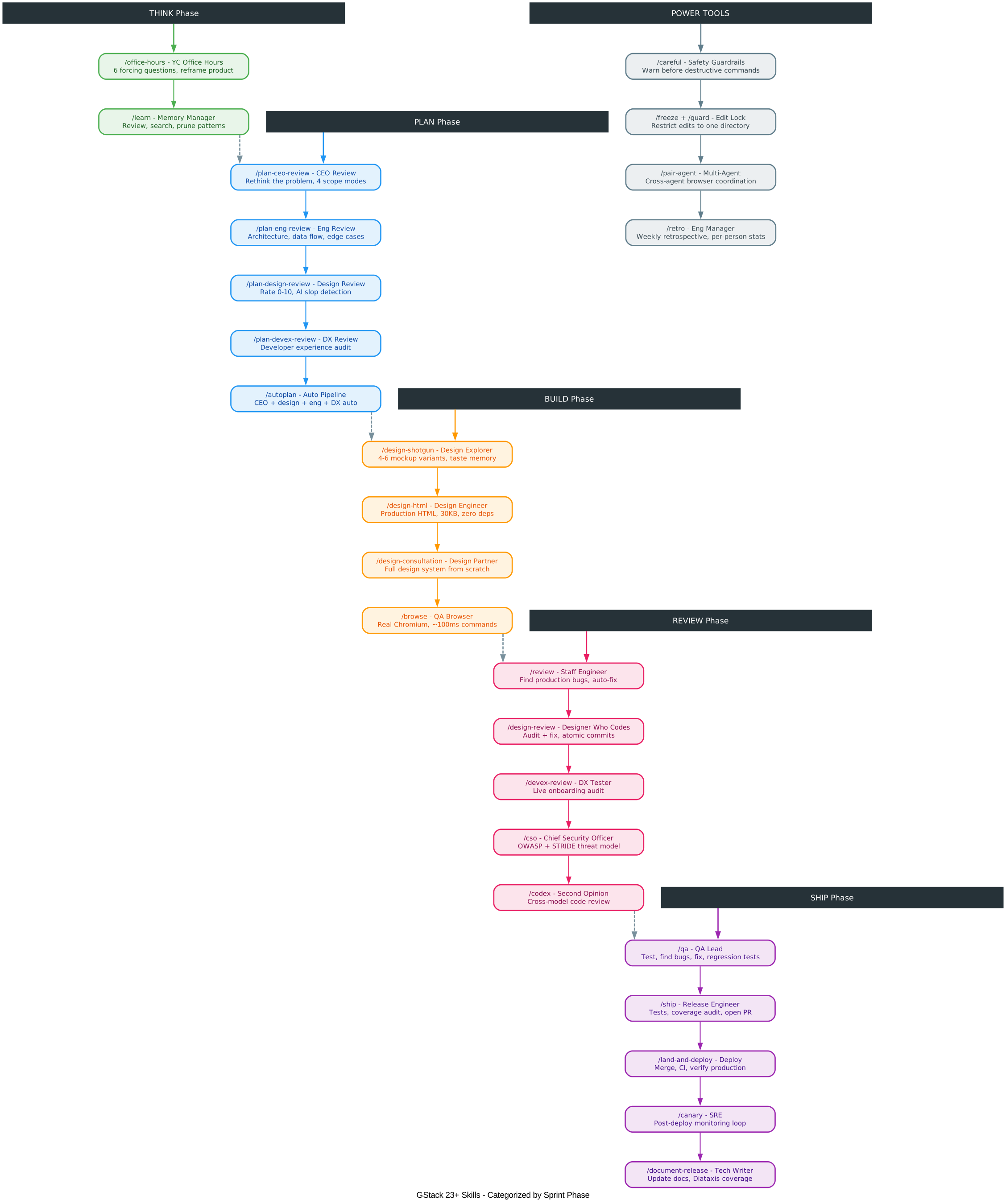
Understanding the Tools Breakdown
The tools breakdown diagram organizes GStack’s 23+ skills into six categories matching the sprint phases, plus a Power Tools category for cross-cutting concerns.
THINK Phase Skills: /office-hours is the starting point for every sprint. It asks six forcing questions that reframe your product idea. Instead of accepting “I want to build a daily briefing app,” it might push back and say “what you actually described is a personal chief of staff AI.” /learn manages persistent memory across sessions, so GStack gets smarter about your codebase over time.
PLAN Phase Skills: Five planning skills provide different perspectives. /plan-ceo-review thinks like a founder rethinking the problem. /plan-eng-review thinks like an engineering manager locking architecture. /plan-design-review thinks like a senior designer catching AI slop. /plan-devex-review thinks like a DX lead tracing friction points. /autoplan runs all appropriate reviews automatically, surfacing only the taste decisions that require human judgment.
BUILD Phase Skills: Four building skills handle implementation. /design-shotgun generates visual mockup variants and iterates based on feedback, with taste memory that learns what you actually pick. /design-html converts mockups to production HTML with Pretext computed layout. /design-consultation builds a complete design system from scratch. /browse provides real browser automation at approximately 100 milliseconds per command.
REVIEW Phase Skills: Five review skills provide different audit perspectives. /review catches production bugs that pass CI. /design-review audits and fixes design issues with atomic commits. /devex-review performs live developer experience audits. /cso runs security audits with OWASP Top 10 and STRIDE threat modeling. /codex provides cross-model second opinions from OpenAI.
SHIP Phase Skills: Five shipping skills cover the path from code to production. /qa tests, finds bugs, fixes them, and generates regression tests. /ship runs tests, audits coverage, and opens PRs. /land-and-deploy merges, deploys, and verifies. /canary monitors post-deployment. /document-release keeps documentation current with Diataxis coverage maps.
Power Tools: /careful warns before destructive commands. /freeze locks edits to one directory. /guard combines both. /pair-agent enables cross-agent browser coordination. /retro runs weekly retrospectives.
The Browser Daemon Architecture
The browser daemon is what makes GStack’s QA and design skills possible. It runs a long-lived Chromium instance that persists across commands, solving the fundamental problem of browser automation: cold-start latency and state loss.
When you invoke /browse or /qa, the CLI reads a state file at .gstack/browse.json to find the running server. If the file is missing or the server fails a health check, the CLI spawns a new one. The server binds to 127.0.0.1 on a random port between 10000-60000, which means 10 Conductor workspaces can each run their own browse daemon with zero configuration and zero port conflicts.
Every HTTP request that mutates browser state must include a Bearer token – a random UUID generated per session and written to the state file with mode 0o600 (owner-only read). This prevents other processes on the same machine from talking to your browse server.
The ref system (@e1, @e2, @c1) is how the agent addresses page elements without writing CSS selectors or XPath. When you run $B snapshot -i, the server calls Playwright’s page.accessibility.snapshot(), walks the ARIA tree, assigns sequential refs, and builds Playwright Locators for each one. Later, $B click @e3 resolves the ref to a Locator and clicks it. This approach avoids DOM mutation (which breaks CSP and React hydration) and works with Shadow DOM.
Multi-Agent Ecosystem
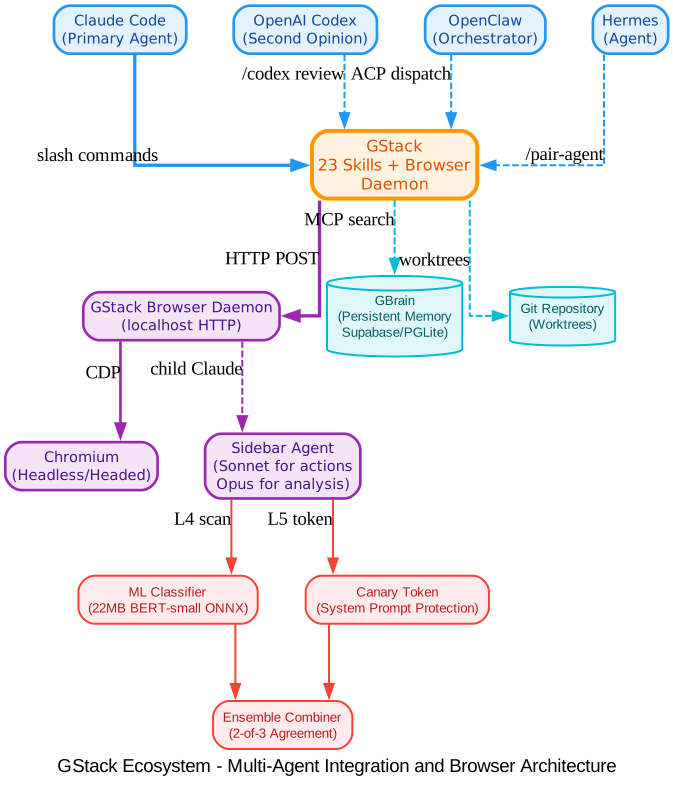
Understanding the Ecosystem
The ecosystem diagram shows how GStack integrates with multiple AI agents and the security layers that protect the browser automation system.
AI Agents: GStack works with four AI agent platforms. Claude Code is the primary agent, connecting via slash commands. OpenAI Codex provides independent second opinions through /codex review. OpenClaw orchestrates multiple Claude Code sessions via ACP (Agent Communication Protocol). Hermes and other agents connect through /pair-agent for cross-agent browser coordination. This multi-agent approach means you can get code reviews from two different AI models, or have multiple agents working on different tasks simultaneously through a shared browser.
GStack Hub: At the center, GStack’s 23 skills and browser daemon serve as the coordination layer. Skills are plain Markdown files (SKILL.md) that Claude Code reads as instructions. The browser daemon provides persistent Chromium automation via HTTP on localhost.
Browser System: The GStack Browser Daemon manages a long-lived Chromium instance. The sidebar agent runs a child Claude instance that auto-routes to the right model: Sonnet for fast actions (click, navigate, screenshot) and Opus for reading and analysis. Each task gets up to 5 minutes, and the sidebar agent runs in an isolated session that will not interfere with your main Claude Code window.
Security Layers: The sidebar agent has layered prompt injection defense. L1-L3 content security runs on every page-content command and tool output. L4 is a 22MB BERT-small ONNX model that scans locally with no network. L5 uses canary tokens injected into the system prompt. L6 is an ensemble combiner that requires two classifiers to agree before blocking. This defense-in-depth approach prevents hostile web pages from hijacking your AI agent.
Infrastructure: GBrain provides persistent memory via Supabase or PGLite, with per-repo trust tiers (read-write, read-only, deny). Git worktrees enable parallel sprints where each agent works in its own isolated workspace.
Installation and Setup
Prerequisites
- Claude Code installed and configured
- Git installed
- Bun v1.0+ installed
- Node.js (Windows only, for Playwright pipe transport)
Step 1: Install GStack
Open Claude Code and paste this command:
git clone --single-branch --depth 1 https://github.com/garrytan/gstack.git ~/.claude/skills/gstack && cd ~/.claude/skills/gstack && ./setup
Then add a “gstack” section to your project’s CLAUDE.md file:
## gstack
Use /browse from gstack for all web browsing. Never use mcp__claude-in-chrome__* tools.
Available skills: /office-hours, /plan-ceo-review, /plan-eng-review, /plan-design-review,
/design-consultation, /design-shotgun, /design-html, /review, /ship, /land-and-deploy,
/canary, /benchmark, /browse, /open-gstack-browser, /qa, /qa-only, /design-review,
/setup-browser-cookies, /setup-deploy, /setup-gbrain, /sync-gbrain, /retro, /investigate,
/document-release, /document-generate, /codex, /cso, /autoplan, /plan-devex-review,
/devex-review, /careful, /freeze, /guard, /unfreeze, /gstack-upgrade, /learn.
Step 2: Team Mode (Recommended)
For shared repositories, set up team mode so teammates get GStack automatically:
(cd ~/.claude/skills/gstack && ./setup --team) && ~/.claude/skills/gstack/bin/gstack-team-init required && git add .claude/ CLAUDE.md && git commit -m "require gstack for AI-assisted work"
This bootstraps the repo so every Claude Code session starts with a fast auto-update check (throttled to once per hour, network-failure-safe, completely silent). No vendored files, no version drift, no manual upgrades.
Step 3: Multi-Agent Support
GStack works on 10 AI coding agents, not just Claude. Setup auto-detects which agents you have installed:
git clone --single-branch --depth 1 https://github.com/garrytan/gstack.git ~/gstack
cd ~/gstack && ./setup
Or target a specific agent with ./setup --host <name>:
| Agent | Flag | Skills install to |
|---|---|---|
| OpenAI Codex CLI | --host codex | ~/.codex/skills/gstack-*/ |
| OpenCode | --host opencode | ~/.config/opencode/skills/gstack-*/ |
| Cursor | --host cursor | ~/.cursor/skills/gstack-*/ |
| Factory Droid | --host factory | ~/.factory/skills/gstack-*/ |
Quick Start: Your First Sprint
Here is a complete sprint from idea to shipped PR:
You:    I want to build a daily briefing app for my calendar.
You:    /office-hours
Claude: [asks about the pain -- specific examples, not hypotheticals]

You:    Multiple Google calendars, events with stale info, wrong locations.
        Prep takes forever and the results aren't good enough...

Claude: I'm going to push back on the framing. You said "daily briefing
        app." But what you actually described is a personal chief of
        staff AI.
        [extracts 5 capabilities you didn't realize you were describing]
        [challenges 4 premises -- you agree, disagree, or adjust]
        [generates 3 implementation approaches with effort estimates]
        RECOMMENDATION: Ship the narrowest wedge tomorrow.

You:    /plan-ceo-review
        [reads the design doc, challenges scope, runs 10-section review]

You:    /plan-eng-review
        [ASCII diagrams for data flow, state machines, error paths]
        [test matrix, failure modes, security concerns]

You:    Approve plan. Exit plan mode.
        [writes 2,400 lines across 11 files. ~8 minutes.]

You:    /review
        [AUTO-FIXED] 2 issues. [ASK] Race condition -- you approve fix.

You:    /qa https://staging.myapp.com
        [opens real browser, clicks through flows, finds and fixes a bug]

You:    /ship
        Tests: 42 -> 51 (+9 new). PR: github.com/you/app/pull/42
Takeaway: You said “daily briefing app.” The agent said “you are building a chief of staff AI” – because it listened to your pain, not your feature request. Eight commands, end to end. That is not a copilot. That is a team.
Key Features in Depth
Browser Automation with Persistent State
The /browse skill gives Claude Code eyes. It runs a real Chromium browser with approximately 100 milliseconds per command. The browser daemon persists across commands, so cookies, tabs, and login sessions survive between invocations. The /open-gstack-browser command launches a headed browser with anti-bot stealth, custom branding, and a sidebar extension for natural language browser control.
The sidebar agent auto-routes to the right model: Sonnet for fast actions (click, navigate, screenshot) and Opus for reading and analysis. Each task gets up to 5 minutes. One-click cookie import from your real browser lets you test authenticated pages.
Prompt Injection Defense
The sidebar agent has layered defense against hostile web pages:
- L1-L3 Content Security: Datamarking, hidden-element strip, ARIA regex, URL blocklist, and trust-boundary envelope wrapper
- L4 ML Classifier: A 22MB BERT-small ONNX model bundled with the browser, running locally with no network. Scans every user message and tool output before Claude sees it
- L4b Transcript Classifier: A Claude Haiku pass that looks at the full conversation shape
- L5 Canary Token: A random token injected into the system prompt, with rolling-buffer detection across streams
- L6 Ensemble Combiner: BLOCK requires agreement from two ML classifiers at >= 0.75 confidence
Amazing: The prompt injection defense system uses a 22MB BERT-small ONNX model that runs locally with no network calls, scanning every page and tool output before Claude sees it. An optional 721MB DeBERTa-v3 ensemble provides 2-of-3 agreement for even stronger protection.
Multi-AI Second Opinion
The /codex skill gets an independent code review from OpenAI’s Codex CLI – a completely different AI looking at the same diff. Three modes are available: code review with a pass/fail gate, adversarial challenge that actively tries to break your code, and open consultation with session continuity. When both /review (Claude) and /codex (OpenAI) have reviewed the same branch, you get a cross-model analysis showing which findings overlap and which are unique to each model.
Safety Guardrails
Say “be careful” and /careful warns before any destructive command – rm -rf, DROP TABLE, force-push, git reset --hard. /freeze locks edits to one directory while debugging so Claude cannot accidentally “fix” unrelated code. /guard activates both. /investigate auto-freezes to the module being investigated.
GBrain: Persistent Knowledge
GBrain provides persistent knowledge storage for your AI agent. Think of it as the memory your agent actually keeps between sessions. Three setup paths are available: Supabase with an existing URL, Supabase with auto-provisioning (approximately 90 seconds end-to-end), or PGLite local (zero accounts, zero network, approximately 30 seconds).
After init, GBrain registers as an MCP server for Claude Code so gbrain search, gbrain put_page, and other commands show up as first-class typed tools. The /sync-gbrain command re-indexes your repo’s code into GBrain, and a ## GBrain Search Guidance block in your project’s CLAUDE.md ensures the agent prefers GBrain search over Grep.
Continuous Checkpoint Mode
Set gstack-config set checkpoint_mode continuous and skills auto-commit your work as you go with a WIP: prefix plus a structured [gstack-context] body containing decisions, remaining work, and failed approaches. This survives crashes and context switches. /context-restore reads those commits to reconstruct session state. /ship filter-squashes WIP commits before the PR, preserving non-WIP commits so bisect stays clean.
Parallel Sprints
GStack works well with one sprint. It gets interesting with ten running at once. Using Conductor, you can run multiple Claude Code sessions in parallel – each in its own isolated workspace. One session running /office-hours on a new idea, another doing /review on a PR, a third implementing a feature, a fourth running /qa on staging, and six more on other branches. All at the same time.
The sprint structure is what makes parallelism work. Without a process, ten agents is ten sources of chaos. With a process – think, plan, build, review, test, ship – each agent knows exactly what to do and when to stop. You manage them the way a CEO manages a team: check in on the decisions that matter, let the rest run.
Important: GStack’s
/qaskill was the unlock that enabled going from 6 to 12 parallel workers. When Claude Code can say “I SEE THE ISSUE” and then actually fix it, generate a regression test, and verify the fix – that changes how you work. The agent has eyes now.
Karpathy’s Four Failure Modes
Andrej Karpathy’s AI coding rules (17K stars) identify four failure modes: wrong assumptions, overcomplexity, orthogonal edits, and imperative over declarative. GStack’s workflow skills enforce all four:
/office-hoursforces assumptions into the open before code is written- The Confusion Protocol stops Claude from guessing on architectural decisions
/reviewcatches unnecessary complexity and drive-by edits/shiptransforms tasks into verifiable goals with test-first execution
If you already use Karpathy-style CLAUDE.md rules, GStack is the workflow enforcement layer that makes them stick across entire sprints, not just single prompts.
Troubleshooting
| Issue | Solution |
|---|---|
| Skill not showing up | Run cd ~/.claude/skills/gstack && ./setup |
/browse fails | Run cd ~/.claude/skills/gstack && bun install && bun run build |
| Stale install | Run /gstack-upgrade or set auto_upgrade: true in ~/.gstack/config.yaml |
| Want shorter commands | Run cd ~/.claude/skills/gstack && ./setup --no-prefix |
| Windows issues | Use Git Bash or WSL. Node.js is required alongside Bun for Playwright |
| Claude cannot see skills | Ensure your project’s CLAUDE.md has a gstack section listing available skills |
Uninstall
If GStack is installed on your machine:
~/.claude/skills/gstack/bin/gstack-uninstall
This handles skills, symlinks, global state (~/.gstack/), project-local state, browse daemons, and temp files. Use --keep-state to preserve config and analytics, or --force to skip confirmation.
Conclusion
GStack represents a fundamental shift in how developers work with AI. Rather than treating AI as a copilot that suggests code completions, GStack treats AI as a full engineering team – with specialists for product thinking, architecture, design, code review, QA, security, and deployment. The sprint workflow (Think, Plan, Build, Review, Test, Ship, Reflect) ensures nothing falls through the cracks because every step knows what came before it.
The browser daemon architecture solves the fundamental problem of AI agent browser automation: cold-start latency and state loss. With approximately 100 milliseconds per command after the first call, persistent cookies and tabs, and layered prompt injection defense, GStack makes it practical for AI agents to interact with real web applications at production speed.
For founders, tech leads, and first-time Claude Code users, GStack provides structured roles instead of a blank prompt. The 23 slash commands are all Markdown, all free, and all MIT licensed. Fork it, improve it, make it yours.
Links
- GitHub Repository: https://github.com/garrytan/gstack
- Architecture Documentation: ARCHITECTURE.md
- Skill Deep Dives: docs/skills.md
- Builder Ethos: ETHOS.md
- Changelog: CHANGELOG.md
- Contributing: CONTRIBUTING.md

Enjoyed this post? Never miss out on future posts by following us


