Introduction
Building a game solo with AI assistance is powerful, but a single chat session lacks the structure that professional game studios rely on. There is no one to stop you from hardcoding magic numbers, skipping design documents, or writing spaghetti code. There is no QA pass, no design review, and no one asking whether your implementation actually fits the game’s vision.
Claude Code Game Studios solves this fundamental problem by giving your AI session the structure of a real game development studio. Instead of one general-purpose assistant, you get 49 specialized AI agents organized into a studio hierarchy with directors who guard the vision, department leads who own their domains, and specialists who do the hands-on work. Each agent has defined responsibilities, escalation paths, and quality gates.
The result is remarkable: you still make every decision, but now you have a team that asks the right questions, catches mistakes early, and keeps your project organized from the first brainstorm session to launch day.
The 49 AI Agents: A Complete Studio Hierarchy
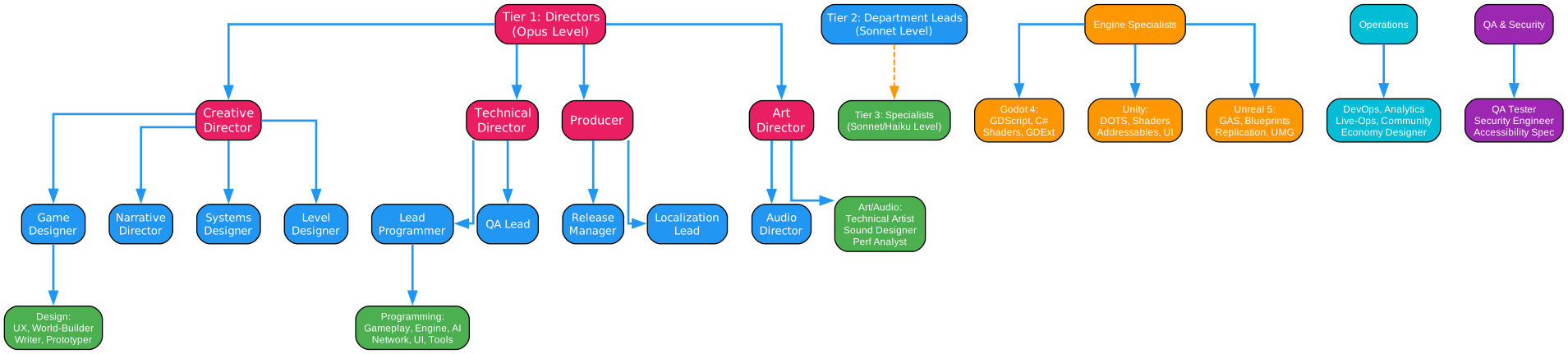
The agent system is organized into three tiers, matching how real game studios operate. This hierarchical structure ensures that decisions flow through appropriate channels and that specialists receive guidance from experienced leads.
Tier 1: Directors (Opus Level)
The director tier consists of four high-level agents that provide strategic oversight and make binding decisions for the entire project:
-
Creative Director: Guards the game’s vision and ensures all design decisions align with the core pillars. This agent resolves design conflicts and maintains creative consistency across all departments.
-
Technical Director: Owns the architecture and makes binding technical decisions. This agent ensures code quality, system integration, and long-term maintainability of the codebase.
-
Producer: Manages scope, schedule, and cross-department coordination. This agent tracks progress, identifies blockers, and ensures the project stays on track.
-
Art Director: Defines and maintains the visual style, ensuring consistency across all art assets and UI elements.
Tier 2: Department Leads (Sonnet Level)
Nine department leads own specific domains and coordinate work within their areas:
- Game Designer: Owns gameplay mechanics, progression systems, and player experience
- Lead Programmer: Coordinates all programming efforts and code architecture
- Narrative Director: Manages story, lore, and character development
- Audio Director: Defines audio style and coordinates sound design
- QA Lead: Plans testing strategy and ensures quality standards
- Release Manager: Coordinates launch preparation and deployment
- Localization Lead: Manages translation and regional adaptation
- Systems Designer: Designs mathematical systems and game balance
- Level Designer: Creates level layouts and encounter design
Tier 3: Specialists (Sonnet/Haiku Level)
The specialist tier contains 36 agents who perform hands-on work in specific domains:
Programming Specialists: Gameplay Programmer, Engine Programmer, AI Programmer, Network Programmer, UI Programmer, Tools Programmer
Design Specialists: UX Designer, World-Builder, Writer, Prototyper, Performance Analyst
Art and Audio Specialists: Technical Artist, Sound Designer
Engine Specialists: The template includes complete agent sets for all three major engines. Godot 4 specialists cover GDScript, C#, Shaders, and GDExtension. Unity specialists handle DOTS/ECS, Shaders/VFX, Addressables, and UI Toolkit. Unreal Engine 5 specialists specialize in GAS, Blueprints, Replication, and UMG/CommonUI.
Operations Specialists: DevOps Engineer, Analytics Engineer, Live-Ops Designer, Community Manager, Economy Designer
QA Specialists: QA Tester, Security Engineer, Accessibility Specialist
72 Workflow Skills: Slash Commands for Every Phase
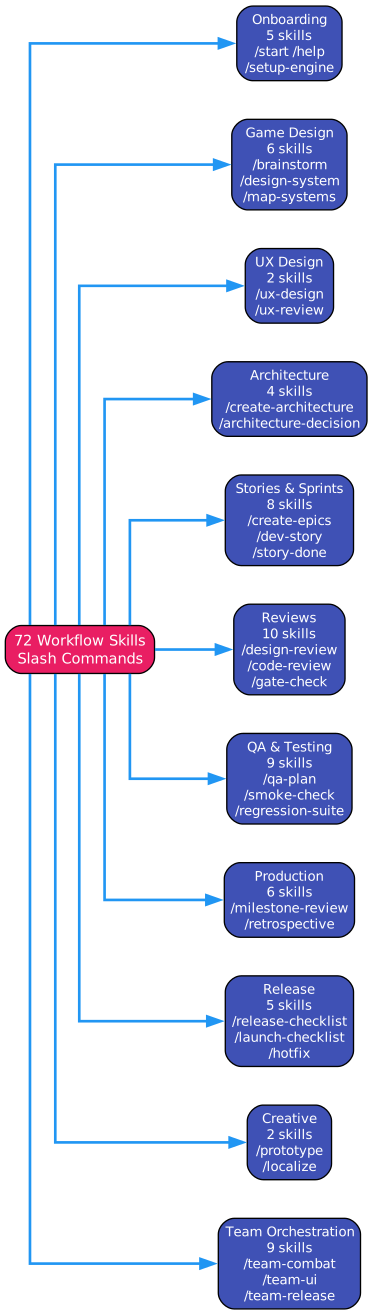
The system provides 72 slash commands organized into 11 categories, covering every aspect of game development from initial concept to post-launch support.
Onboarding and Navigation (5 skills)
/start: Guided onboarding that asks where you are and routes to the right workflow/help: Context-aware assistance that reads your current phase and tells you what to do next/project-stage-detect: Full project audit to determine current development phase/setup-engine: Configure your engine, pin version, and set preferences/adopt: Brownfield project audit and migration plan for existing projects
Game Design (6 skills)
/brainstorm: Collaborative ideation with MDA (Mechanics, Dynamics, Aesthetics) analysis/map-systems: Decompose your concept into a systems index with dependencies/design-system: Guided section-by-section GDD authoring/quick-design: Lightweight spec for small changes and tuning/review-all-gdds: Cross-GDD consistency and design theory review/propagate-design-change: Find affected ADRs and stories when GDDs change
Architecture (4 skills)
/create-architecture: Master architecture document creation/architecture-decision: Create or retrofit Architecture Decision Records/architecture-review: Validate all ADRs and dependency ordering/create-control-manifest: Generate flat programmer rules from accepted ADRs
Stories and Sprints (8 skills)
/create-epics: Translate GDDs and ADRs into epics (one per module)/create-stories: Break a single epic into implementable story files/dev-story: Implement a story with automatic routing to the correct programmer agent/sprint-plan: Create or manage sprint plans/sprint-status: Quick 30-line sprint snapshot/story-readiness: Validate story is implementation-ready/story-done: 8-phase story completion review/estimate: Effort estimation with risk assessment
Reviews and Analysis (10 skills)
/design-review: Validate GDD against the 8-section standard/code-review: Architectural code review/balance-check: Game balance formula analysis/asset-audit: Asset naming, format, and size verification/content-audit: Compare GDD-specified content against implementation/scope-check: Scope creep detection/perf-profile: Performance profiling workflow/tech-debt: Technical debt scanning and prioritization/gate-check: Formal phase gate with PASS/CONCERNS/FAIL verdict/reverse-document: Generate design docs from existing code
QA and Testing (9 skills)
/qa-plan: Generate QA test plan for a sprint or feature/smoke-check: Critical path smoke test gate before QA hand-off/soak-test: Soak test protocol for extended play sessions/regression-suite: Map test coverage and identify missing regression tests/test-setup: Scaffold test framework and CI/CD pipeline/test-helpers: Generate engine-specific test helper libraries/test-evidence-review: Quality review of test files and manual evidence/test-flakiness: Detect non-deterministic tests from CI logs/skill-test: Validate skill files for structural and behavioral correctness
Team Orchestration (9 skills)
Team skills coordinate multiple agents on cross-cutting features:
/team-combat: Combat feature from design through implementation/team-narrative: Narrative content from structure through dialogue/team-ui: UI feature from UX spec through polished implementation/team-level: Level from layout through dressed encounters/team-audio: Audio from direction through implemented events/team-polish: Coordinated polish pass covering performance, art, audio, and QA/team-release: Release coordination covering build, QA, and deployment/team-live-ops: Live-ops planning for seasonal events and retention/team-qa: Full QA cycle from strategy through sign-off
Production Management (6 skills)
/milestone-review: Milestone progress and go/no-go recommendation/retrospective: Sprint retrospective analysis/bug-report: Structured bug report creation/bug-triage: Re-evaluate open bugs for priority and severity/playtest-report: Structured playtest session report/onboard: Onboard a new team member
Release (5 skills)
/release-checklist: Pre-release validation/launch-checklist: Full cross-department launch readiness/changelog: Auto-generate internal changelog/patch-notes: Player-facing patch notes/hotfix: Emergency fix workflow with full audit trail
Creative (2 skills)
/prototype: Throwaway prototype in isolated worktree/localize: String extraction and validation
The Coordination System: How Agents Work Together
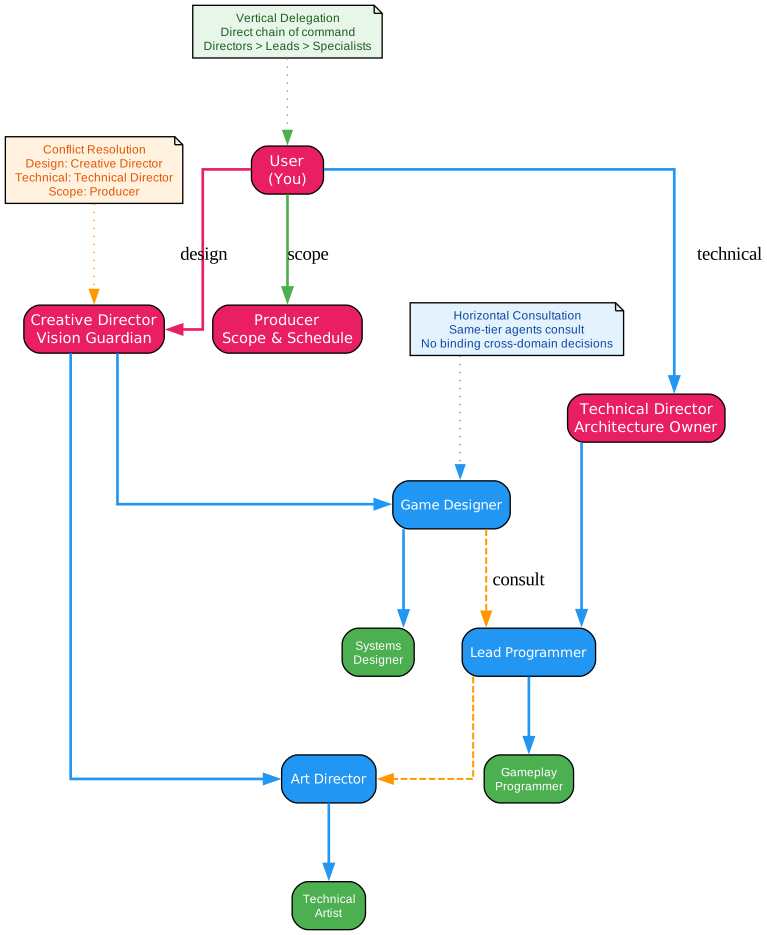
The agent coordination follows a structured delegation model that mirrors professional studio practices. This ensures that decisions are made at the appropriate level and that work flows efficiently through the organization.
Vertical Delegation
Directors delegate to leads, and leads delegate to specialists. This chain of command ensures that complex decisions receive appropriate oversight while routine work flows efficiently to specialists. No tier is ever skipped for complex decisions, maintaining accountability and expertise at each level.
Horizontal Consultation
Agents at the same tier can consult each other for cross-domain input, but they cannot make binding decisions outside their domain. For example, the Game Designer can consult with the Lead Programmer about feasibility, but cannot commit to technical implementation details without the Technical Director’s approval.
Conflict Resolution
When agents disagree, the system provides clear escalation paths. Design conflicts go to the Creative Director. Technical conflicts go to the Technical Director. Scope conflicts go to the Producer. This prevents deadlock and ensures that disagreements are resolved efficiently.
Domain Boundaries
Agents do not modify files outside their domain without explicit delegation. This prevents scope creep and ensures that changes are reviewed by the appropriate specialists. The rules system enforces these boundaries automatically based on file paths.
The 7-Phase Development Pipeline
The system defines a comprehensive 7-phase development pipeline with formal gates between each phase. Each gate must pass before you can advance, ensuring that foundational work is complete before moving forward.

Phase 1: Concept
You go from “no idea” or “vague idea” to a structured game concept document with defined pillars and a player journey. The /brainstorm skill guides you through collaborative ideation using MDA analysis, player motivation mapping, and audience targeting. The output is a formal concept document that serves as the foundation for all subsequent work.
Phase 2: Systems Design
You create all the design documents that define how your game works. Each system identified in the systems index gets its own Game Design Document (GDD), authored section by section with 8 required sections: Overview, Player Fantasy, Detailed Rules, Formulas, Edge Cases, Dependencies, Tuning Knobs, and Acceptance Criteria. The /review-all-gdds skill performs cross-GDD consistency checking.
Phase 3: Technical Setup
You make key technical decisions and document them as Architecture Decision Records (ADRs). The /create-architecture skill creates the master architecture document, and /architecture-decision guides you through creating individual ADRs. The /create-control-manifest skill produces flat programmer rules that stories reference.
Phase 4: Pre-Production
You create UX specs for key screens, prototype risky mechanics, and turn design documents into implementable stories. The /create-epics and /create-stories skills translate GDDs into story files. A Vertical Slice must be built and playtested before advancing, proving that the core loop is fun.
Phase 5: Production
This is the core production loop. You work in sprints, implementing features story by story. The story lifecycle follows: /story-readiness validates the story, implementation happens with the appropriate programmer agent, and /story-done runs an 8-phase completion review. Team skills coordinate multiple agents on cross-cutting features.
Phase 6: Polish
Your game is feature-complete. Now you make it good. Performance profiling, balance analysis, asset audits, and coordinated polish passes ensure the game meets quality standards. At least 3 playtest sessions are required covering new player experience, mid-game systems, and difficulty curve.
Phase 7: Release
Your game is polished and ready. The /release-checklist and /launch-checklist skills ensure complete cross-department validation. The /team-release skill coordinates the release process, and /hotfix provides an emergency workflow for critical production bugs.
Installation and Setup
Prerequisites
- Git installed and working
- Claude Code installed (
npm install -g @anthropic-ai/claude-code) - jq recommended for hook validation (hooks fall back to grep if missing)
- Python 3 optional for JSON validation hooks
Quick Start
Clone the repository and open Claude Code:
git clone https://github.com/Donchitos/Claude-Code-Game-Studios.git my-game
cd my-game
claude
Run the /start command for guided onboarding. The system asks where you are (no idea, vague concept, clear design, existing work) and routes you to the right workflow.
Project Structure
The template creates a comprehensive directory structure:
CLAUDE.md                           # Master configuration
.claude/
  settings.json                     # Hooks, permissions, safety rules
  agents/                           # 49 agent definitions
  skills/                           # 72 slash commands
  hooks/                            # 12 hook scripts
  rules/                            # 11 path-scoped coding standards
src/                                # Game source code
assets/                             # Art, audio, VFX, shaders, data
design/                             # GDDs, narrative docs, level designs
docs/                               # Technical documentation and ADRs
tests/                              # Test suites
prototypes/                         # Throwaway prototypes
production/                         # Sprint plans, milestones, releases
Automated Safety: Hooks and Rules
The system includes 12 automated hooks that run on specific triggers, providing a safety net that catches common mistakes:
| Hook | Trigger | Purpose |
|---|---|---|
validate-commit.sh | PreToolUse (Bash) | Checks for hardcoded values, TODO format, JSON validity |
validate-push.sh | PreToolUse (Bash) | Warns on pushes to protected branches |
validate-assets.sh | PostToolUse (Write/Edit) | Validates naming conventions and JSON structure |
session-start.sh | Session open | Shows current branch and recent commits |
detect-gaps.sh | Session open | Detects fresh projects and missing design docs |
pre-compact.sh | Before compaction | Preserves session progress notes |
post-compact.sh | After compaction | Reminds Claude to restore session state |
log-agent.sh | Agent spawned | Audit trail start |
log-agent-stop.sh | Agent stops | Audit trail stop |
Path-Scoped Rules
Coding standards are automatically enforced based on file location:
| Path | Enforces |
|---|---|
src/gameplay/** | Data-driven values, delta time usage, no UI references |
src/core/** | Zero allocations in hot paths, thread safety, API stability |
src/ai/** | Performance budgets, debuggability, data-driven parameters |
src/networking/** | Server-authoritative, versioned messages, security |
src/ui/** | No game state ownership, localization-ready, accessibility |
design/gdd/** | Required 8 sections, formula format, edge cases |
tests/** | Test naming, coverage requirements, fixture patterns |
Design Philosophy
The template is grounded in professional game development practices:
- MDA Framework: Mechanics, Dynamics, Aesthetics analysis for game design
- Self-Determination Theory: Autonomy, Competence, Relatedness for player motivation
- Flow State Design: Challenge-skill balance for player engagement
- Bartle Player Types: Audience targeting and validation
- Verification-Driven Development: Tests first, then implementation
Customization
This is a template, not a locked framework. Everything is meant to be customized:
- Add or remove agents based on your project needs
- Edit agent prompts to add project-specific knowledge
- Modify skills to match your team’s process
- Create new path-scoped rules for your directory structure
- Tune hooks to adjust validation strictness
- Choose your engine: Godot, Unity, or Unreal agent sets
- Set review intensity: full (all gates), lean (phase gates only), or solo (none)
Conclusion
Claude Code Game Studios transforms a single AI chat session into a structured game development environment with the rigor of a professional studio. The 49 specialized agents ensure that every aspect of game development receives expert attention, while the 72 workflow skills provide structured processes for every phase from concept to release.
The coordination system prevents common indie game development pitfalls: missing design documents, inconsistent code quality, scope creep, and inadequate testing. By enforcing a hierarchical delegation model with clear escalation paths, the system ensures that decisions are made at the appropriate level and that work flows efficiently through the organization.
Whether you are building your first game or your fiftieth, Claude Code Game Studios provides the structure and expertise to help you ship a polished, well-designed game. The collaborative protocol keeps you in control while the agents provide the specialized knowledge and quality gates that professional studios rely on.
Links

Enjoyed this post? Never miss out on future posts by following us


