Skills Manage: The Desktop App That Unifies AI Coding Agent Skills Across 27+ Platforms
Managing AI coding agent skills across multiple platforms is a growing challenge for developers. Each AI coding tool – Claude Code, Cursor, Windsurf, Copilot, Aider – stores its skills in a different directory, making it tedious to install, update, and organize skills consistently. Skills Manage is an open-source Tauri v2 desktop application that solves this problem by providing a single interface to manage skills across 27+ AI coding platforms, using symlinks to maintain one source of truth while deploying to every platform you use.
What is Skills Manage?
Skills Manage (iamzhihuix/skills-manage) is a desktop application built with Tauri v2, React 19, and Rust that follows the Agent Skills open pattern. It uses ~/.agents/skills/ as the canonical central directory for all skills, then creates symlinks from that central location to each platform’s individual skills directory. This means you install a skill once, and it automatically becomes available across every supported platform.
The app provides a rich graphical interface for browsing, installing, organizing, and discovering skills – eliminating the need to manually copy SKILL.md files between directories or manage symlinks by hand.
Architecture Overview
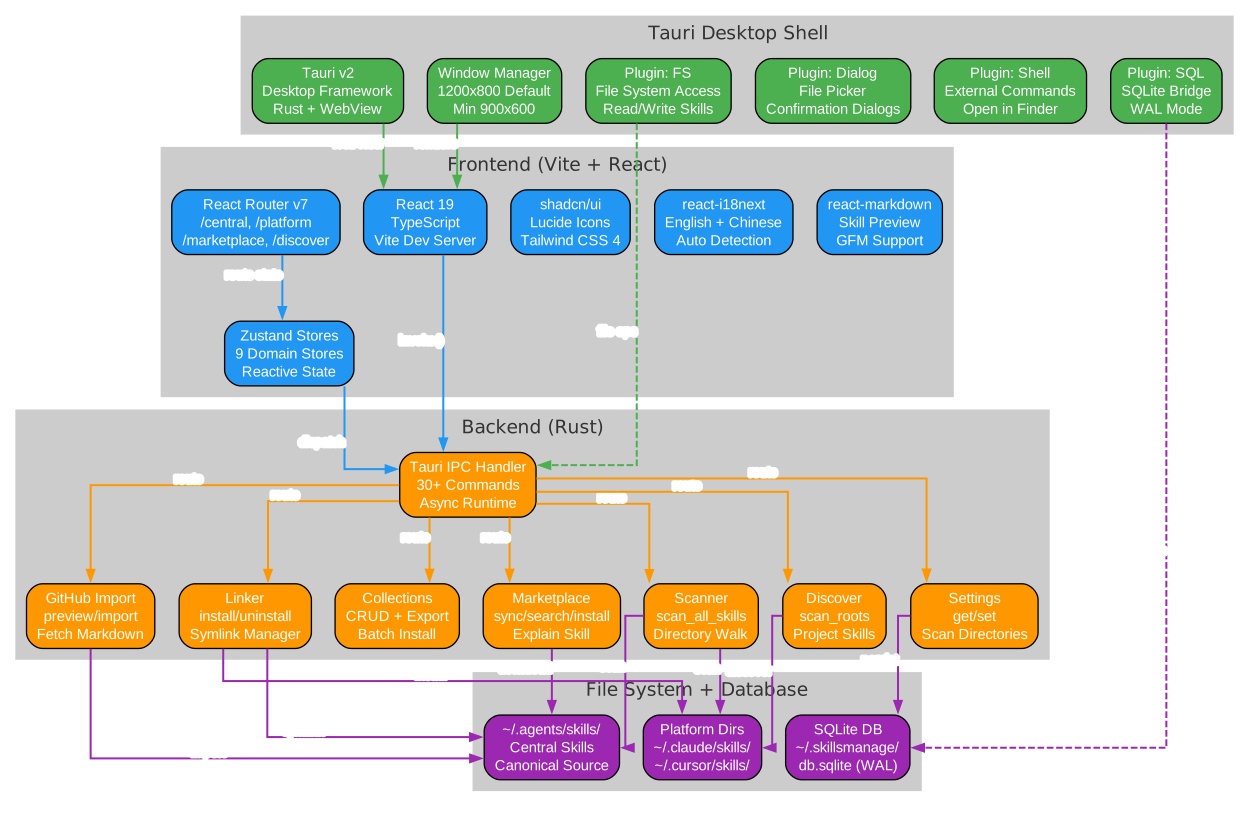
The architecture diagram above illustrates the three-layer design of Skills Manage. Let’s break down each component:
User Interface Layer (React 19)
The frontend is built with React 19 and TypeScript, using shadcn/ui components for a polished, responsive interface. Key UI technologies include:
- shadcn/ui provides consistent, accessible component patterns including dialogs, drawers, cards, and virtualized lists for handling large skill libraries efficiently
- Zustand manages application state with lightweight, performant stores for skills, platforms, collections, marketplace data, and settings
- react-i18next enables bilingual support (English and Chinese) with automatic language detection
- react-router-dom v7 handles client-side routing across the six main views: Central Skills, Platform, Discover, Marketplace, Collections, and Settings
- react-markdown renders SKILL.md content with full GFM (GitHub Flavored Markdown) support for rich skill previews
Tauri v2 IPC Bridge
The Tauri v2 runtime serves as the bridge between the React frontend and the Rust backend. It provides:
- Secure IPC (Inter-Process Communication) for all skill operations
- Native file system access for reading, writing, and creating symlinks
- Platform-specific dialog APIs for file selection and confirmation
- Shell access for executing system commands when needed
Rust Backend Layer
The Rust backend handles all heavy lifting, organized into six command modules:
- Scanner discovers skills by walking platform directories and parsing SKILL.md frontmatter
- Linker manages symlink creation and removal between the central directory and platform directories
- Marketplace syncs skill metadata from official publishers (Microsoft, Anthropic, GitHub, etc.) with authenticated requests and retry fallback
- Collections provides CRUD operations for organizing skills into named groups
- Discover scans local project directories for project-level skill libraries
- Settings manages configuration including AI provider keys, GitHub PAT, and custom platform directories
Storage Layer
All data is stored locally in SQLite (~/.skillsmanage/db.sqlite) using WAL mode for concurrent read/write performance. The database tracks skills, installations, collections, marketplace caches, and AI-generated explanations. No data is sent to external servers unless you explicitly use marketplace sync, GitHub import, or AI explanation features.
Supported Platforms

Understanding the Platform Ecosystem
The platform ecosystem diagram shows how Skills Manage connects a single central skills directory to 27+ individual AI coding platforms. The central hub at the top (~/.agents/skills/) is the single source of truth, and symlinks fan out to each platform’s directory.
Coding Platforms (21 platforms)
Skills Manage supports the following AI coding platforms, each with its own dedicated skills directory:
| Platform | Skills Directory | Category |
|---|---|---|
| Claude Code | ~/.claude/skills/ | Coding |
| Codex CLI | ~/.agents/skills/ | Coding |
| Cursor | ~/.cursor/skills/ | Coding |
| Gemini CLI | ~/.gemini/skills/ | Coding |
| Trae | ~/.trae/skills/ | Coding |
| Factory Droid | ~/.factory/skills/ | Coding |
| Junie | ~/.junie/skills/ | Coding |
| Qwen | ~/.qwen/skills/ | Coding |
| Trae CN | ~/.trae-cn/skills/ | Coding |
| Windsurf | ~/.windsurf/skills/ | Coding |
| Qoder | ~/.qoder/skills/ | Coding |
| Augment | ~/.augment/skills/ | Coding |
| OpenCode | ~/.opencode/skills/ | Coding |
| KiloCode | ~/.kilocode/skills/ | Coding |
| OB1 | ~/.ob1/skills/ | Coding |
| Amp | ~/.amp/skills/ | Coding |
| Kiro | ~/.kiro/skills/ | Coding |
| CodeBuddy | ~/.codebuddy/skills/ | Coding |
| Hermes | ~/.hermes/skills/ | Coding |
| Copilot | ~/.copilot/skills/ | Coding |
| Aider | ~/.aider/skills/ | Coding |
Lobster Platforms (5 platforms)
The Lobster ecosystem platforms are also supported:
| Platform | Skills Directory |
|---|---|
| OpenClaw | ~/.openclaw/skills/ |
| QClaw | ~/.qclaw/skills/ |
| EasyClaw | ~/.easyclaw/skills/ |
| AutoClaw | ~/.openclaw-autoclaw/skills/ |
| WorkBuddy | ~/.workbuddy/skills-marketplace/skills/ |
Central Skills
The central directory (~/.agents/skills/) serves as the canonical location shared with Codex CLI, ensuring one source of truth for all skill content.
Marketplace Sources
The app connects to official skill publishers with over 2,500 skills available:
- Microsoft (404 skills) - Azure skills
- GitHub (331 skills) - Copilot skills
- Anthropic (289 skills) - Claude Code skills across 9 repos
- Sentry (244 skills) - Monitoring skills
- Vercel Labs (214 skills) - Agent skills
- Firecrawl (168 skills) - CLI skills
- Plus 50+ more publishers including PostHog, Cloudflare, HashiCorp, Firebase, and more
Custom platforms can also be added through the Settings view, making Skills Manage extensible for any future AI coding tool.
Key Features
Central Skill Library
The Central Skills view shows all skills installed in ~/.agents/skills/. This is your single source of truth – every skill here can be symlinked to any supported platform with one click. The view supports:
- Fast search with deferred queries and lazy indexing
- Virtualized lists for smooth scrolling through large skill libraries
- Markdown preview with syntax highlighting
- Raw source view for inspecting SKILL.md content
- AI-powered explanation generation using Claude, GLM, MiniMax, Kimi, DeepSeek, or OpenRouter
Per-Platform Install and Uninstall
Each platform has its own view showing which skills are currently installed. Skills Manage handles three types of installations:
- Symlink (default) – creates a symbolic link from the platform directory to the central skill, so updates to the central copy are immediately reflected everywhere
- Copy – duplicates the skill file into the platform directory for isolated use
- Native – skills that already exist in the platform directory without any linking
Claude Code has special handling: it also surfaces marketplace plugin directories under ~/.claude/plugins/marketplaces/* as read-only entries, giving you visibility into plugin skills alongside native ones.
Collections
Collections let you organize skills into named groups for batch operations. For example, you could create a “Frontend Development” collection containing skills for React, Tailwind CSS, and TypeScript, then install the entire collection to multiple platforms at once.
Discover
The Discover feature scans your local disk for project-level skill libraries. If you have skills embedded in project directories (e.g., .claude/skills/ inside a project), Discover finds them and lets you install them centrally.
Marketplace Browsing and GitHub Import
The Marketplace view lets you browse skills from official publishers with authenticated GitHub requests and retry fallback. You can:
- Browse by publisher (Microsoft, Anthropic, GitHub, etc.)
- Preview skill content before installing
- Download and install skills directly from the marketplace
- Import skills from any GitHub repository using the Import Wizard
The GitHub Import Wizard supports authenticated requests, so you can import from private repositories using a GitHub Personal Access Token stored securely in the local SQLite database.
AI Explanation Generation
Skills Manage can generate AI-powered explanations of any skill using multiple providers:
| Provider | Model | Regions |
|---|---|---|
| Claude | claude-sonnet-4-20250514 | International |
| Zhipu GLM | glm-5 | China, International |
| MiniMax | MiniMax-M2.7 | China, International |
| Kimi | kimi-k2.5 | China |
| DeepSeek | DeepSeek-V3.2 | China |
| OpenRouter | anthropic/claude-sonnet-4.6 | International |
| Custom | User-configured | All |
Explanations are cached locally in the database, so you only pay for generation once per skill per language.
Skill Management Workflow
Understanding the Skill Lifecycle
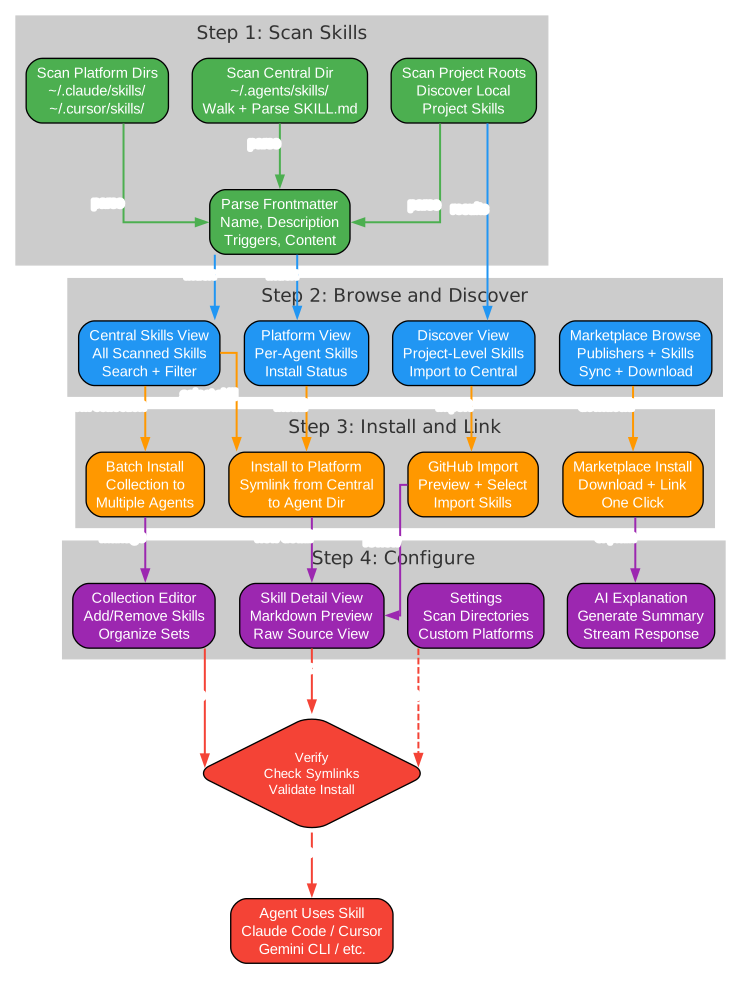
The workflow diagram above illustrates the complete lifecycle of a skill from discovery to activation across platforms. Let’s walk through each phase:
Phase 1: Discovery
Skills can enter your library through three channels:
- Local Scan – The Scanner module walks all configured skill directories and parses SKILL.md frontmatter to discover existing skills on your machine
- Marketplace Browse – Browse the official marketplace with 2,500+ skills from 50+ publishers, preview content, and download directly
- GitHub Import – Use the Import Wizard to pull skills from any GitHub repository, with authenticated access for private repos
Phase 2: Selection and Preview
Once you’ve found a skill, you can:
- Preview the full SKILL.md content with Markdown rendering
- Optionally generate an AI explanation to understand what the skill does before installing
- Select individual skills or multiple skills for batch installation
Phase 3: Installation
The installation process follows the symlink pattern:
- The skill content is stored in the central directory (
~/.agents/skills/skill-name/SKILL.md) - Symlinks are created from each target platform’s directory pointing back to the central copy
- This ensures one source of truth – update the central copy, and all platforms see the change immediately
Phase 4: Organization
After installation, you can optionally organize skills into collections:
- Create named collections like “DevOps”, “Frontend”, “Security”
- Add skills to collections for logical grouping
- Batch-install entire collections to new platforms with one action
Phase 5: Active Use
Once installed, skills are immediately active across all linked platforms. The next time you use Claude Code, Cursor, Windsurf, or any other supported tool, the skills are automatically available.
Installation
Prerequisites
- Node.js (LTS version)
- pnpm package manager
- Rust toolchain (stable channel)
- Tauri v2 system dependencies (see Tauri prerequisites)
Download Prebuilt
The easiest way to get started is to download the latest release:
# Download from GitHub Releases
# https://github.com/iamzhihuix/skills-manage/releases/latest
Currently, prebuilt packages are available for Apple Silicon macOS (.dmg and .app.zip). Other platforms can run from source.
Run from Source
# Clone the repository
git clone https://github.com/iamzhihuix/skills-manage.git
cd skills-manage

# Install frontend dependencies
pnpm install

# Run in development mode
pnpm tauri dev
The Vite dev server runs on port 24200.
macOS Unsigned Build
If macOS shows a warning about the app being damaged, run:
xattr -dr com.apple.quarantine "/Applications/skills-manage.app"
Then launch the app again from Finder.
Validation
# Run frontend tests
pnpm test

# Type checking
pnpm typecheck

# Linting
pnpm lint

# Rust backend tests
cd src-tauri && cargo test

# Rust linting
cd src-tauri && cargo clippy -- -D warnings
Usage Examples
Installing a Skill to Multiple Platforms
# Skills are stored centrally in ~/.agents/skills/
# When you install a skill through the UI, symlinks are created:
#
# ~/.agents/skills/frontend-design/SKILL.md  (central copy)
# ~/.claude/skills/frontend-design/SKILL.md  -> symlink to central
# ~/.cursor/skills/frontend-design/SKILL.md  -> symlink to central
# ~/.windsurf/skills/frontend-design/SKILL.md -> symlink to central
Browsing the Marketplace
The Marketplace view shows skills organized by publisher. You can filter by category tags:
| Tag | Description |
|---|---|
| Frontend | React, Tailwind, UI development |
| Backend | Server-side, APIs, databases |
| E-commerce | Shopify, Stripe, payment integration |
| App Dev | Flutter, Expo, mobile development |
| DevOps | Terraform, Pulumi, infrastructure |
| AI/ML | LangChain, Hugging Face, model integration |
| Database | Prisma, Redis, data management |
| Security | Auth0, Clerk, authentication |
| Testing | Sentry, Datadog, monitoring |
| Docs/Design | Notion, Figma, documentation |
Creating a Collection
Collections help you organize skills for batch operations:
- Navigate to the Collections view
- Click “New Collection” and give it a name and description
- Use the Skill Picker to add skills from your library
- Install the entire collection to one or more platforms
Using AI Explanations
To generate an AI explanation for any skill:
- Open a skill’s detail view
- Click the “Explain” button
- Choose your preferred AI provider (Claude, GLM, MiniMax, etc.)
- The explanation is generated and cached locally for future reference
Tech Stack
| Layer | Technology |
|---|---|
| Desktop framework | Tauri v2 |
| Frontend | React 19, TypeScript, Tailwind CSS 4 |
| UI components | shadcn/ui, Lucide icons |
| State management | Zustand |
| Markdown | react-markdown with remark-gfm |
| i18n | react-i18next, i18next-browser-languagedetector |
| Theming | Catppuccin 4-flavor palette |
| Backend | Rust (serde, sqlx, chrono, uuid) |
| Database | SQLite via sqlx (WAL mode) |
| Routing | react-router-dom v7 |
Privacy and Security
Skills Manage is designed with privacy as a core principle:
- Local-first storage – All metadata, collections, scan results, settings, and cached AI explanations stay in
~/.skillsmanage/db.sqliteor local skill directories - No telemetry – The app does not include analytics, crash reporting, or usage tracking
- Feature-driven network access – Outbound requests only happen when you explicitly use marketplace sync, GitHub import, or AI explanation generation
- Local credentials – GitHub PAT and AI API keys are stored in the local SQLite settings table (not encrypted at rest by the app)
Comparison: Skills Manage vs Manual Skill Management
| Aspect | Manual Management | Skills Manage |
|---|---|---|
| Installation | Copy SKILL.md to each directory | One-click install with symlinks |
| Updates | Manually update each copy | Update central copy, all platforms sync |
| Discovery | Browse GitHub repos manually | Marketplace with 2,500+ skills |
| Organization | No grouping system | Named collections with batch install |
| Multi-platform | Copy to 27+ directories | Symlink to all platforms at once |
| Preview | Open file in editor | Markdown preview with AI explanation |
| Search | Manual file system search | Fast indexed search with virtualization |
| Project skills | Unknown | Discover scan finds project-level skills |
Project Structure
skills-manage/
+-- src/                        # React frontend
|   +-- components/             # UI components
|   +-- i18n/                   # Locale files and i18n setup
|   +-- lib/                    # Frontend helpers
|   +-- pages/                  # Route views
|   +-- stores/                 # Zustand stores
|   +-- test/                   # Vitest + RTL tests
|   +-- data/                   # Official sources and AI providers
+-- src-tauri/                  # Rust backend
|   +-- src/
|       +-- commands/           # Tauri IPC handlers
|       +-- db.rs              # SQLite schema, migrations, queries
|       +-- lib.rs             # Tauri app setup
|       +-- main.rs            # Desktop entry point
+-- public/                     # Static assets
+-- CHANGELOG.md                # English changelog
+-- CHANGELOG.zh.md             # Chinese changelog
+-- release-notes/              # GitHub release notes
Conclusion
Skills Manage addresses a real and growing pain point in the AI coding ecosystem: as the number of AI coding agents multiplies, managing skills across all of them becomes increasingly complex. By centralizing skill storage with ~/.agents/skills/ and using symlinks to deploy to each platform, Skills Manage provides a clean, efficient solution that scales with the ecosystem.
The combination of a Tauri v2 desktop app, React 19 frontend, and Rust backend delivers native performance with a modern UI. Features like marketplace browsing, GitHub import, collections, discover scanning, and AI-powered explanations make it more than just a symlink manager – it is a comprehensive skill management platform.
With support for 27+ platforms, 2,500+ marketplace skills from 50+ publishers, and a privacy-first local storage approach, Skills Manage is an essential tool for any developer working with multiple AI coding agents.
Links
- GitHub Repository: https://github.com/iamzhihuix/skills-manage
- Latest Release: https://github.com/iamzhihuix/skills-manage/releases/latest
- Agent Skills Pattern: https://github.com/anthropics/agent-skills
- Tauri v2 Documentation: https://v2.tauri.app/

Enjoyed this post? Never miss out on future posts by following us


