Claude Code Templates: The Ultimate CLI for Configuring and Monitoring Claude Code
Claude Code Templates is a comprehensive CLI tool that provides ready-to-use configurations for Anthropic’s Claude Code. With over 25,000 GitHub stars and 100+ components spanning agents, commands, settings, hooks, external integrations (MCPs), and skills, it has become the go-to toolkit for developers looking to supercharge their AI-powered development workflow.
What Is Claude Code Templates?
Claude Code Templates is an open-source project that provides a curated collection of AI agents, custom slash commands, settings, hooks, external service integrations (MCPs), and project templates designed specifically for Anthropic’s Claude Code editor. It ships as an npm package that you can run with npx or install globally as the cct command.
The project addresses a critical gap in the Claude Code ecosystem: while Claude Code itself is powerful, configuring it optimally requires deep knowledge of its configuration system. Claude Code Templates eliminates this barrier by providing battle-tested, community-vetted configurations that you can install with a single command.
Understanding the Architecture
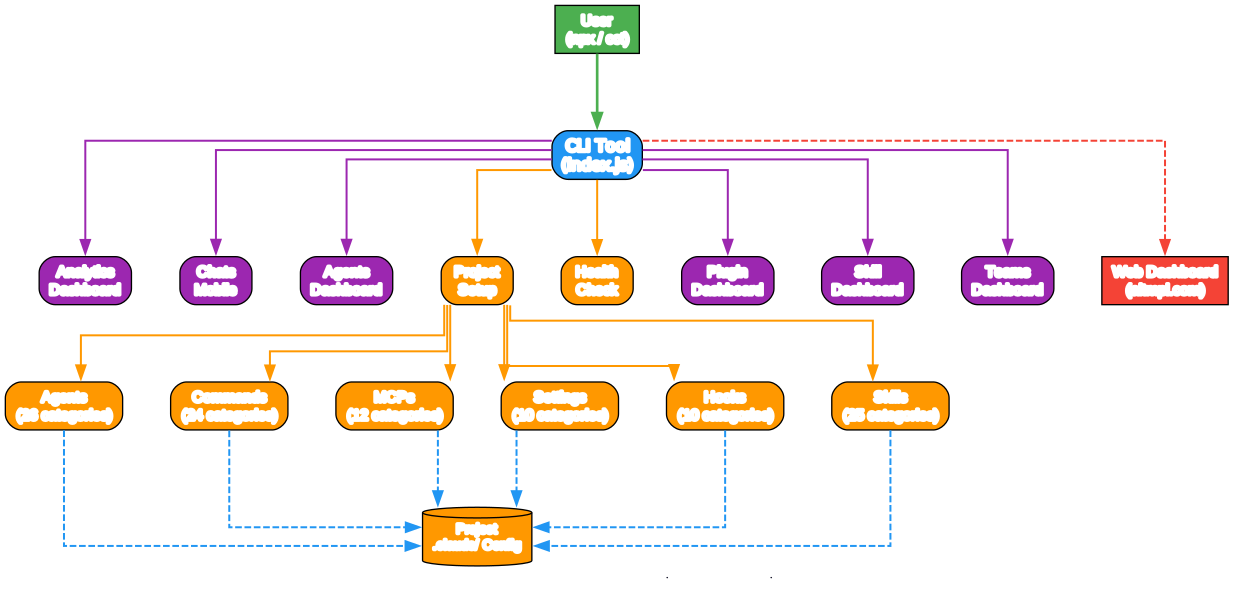
The architecture diagram above illustrates how Claude Code Templates works as a unified platform. At the top, users interact with the CLI tool through npx or the cct shortcut. The CLI then branches into several key features:
Dashboards (Purple Nodes): The Analytics Dashboard monitors your Claude Code usage and sessions in real-time. The Chats Mobile feature provides a mobile-optimized interface for viewing Claude responses. The Agents Dashboard lets you view and analyze conversations with agent tools. The Plugin Dashboard shows marketplaces and installed plugins. The Skill Dashboard manages reusable capabilities. The Teams Dashboard handles team collaboration.
Configuration (Orange Nodes): Project Setup configures Claude Code for your project by installing components. Health Check verifies your Claude Code setup and configuration.
Components (Orange Nodes): Six component types - Agents, Commands, MCPs, Settings, Hooks, and Skills - each with multiple categories. These install into your project’s .claude/ directory.
Web Dashboard (Red Node): The aitmpl.com web interface provides an interactive way to browse and explore all available components.
Component Ecosystem

Understanding the Component Ecosystem
The component ecosystem diagram shows the six major component types and their category breakdowns. Each type serves a distinct purpose in the Claude Code configuration stack:
Agents (26 categories): AI specialists for specific domains. Categories include AI Specialists, Development Team, Security, Database, DevOps, and Finance. Each agent is a markdown file that defines a specialized AI persona with domain expertise. For example, the development-team/frontend-developer agent provides a frontend development specialist, while security/security-auditor delivers security-focused code review.
Commands (24 categories): Custom slash commands that extend Claude Code’s command palette. Categories span Testing, Git Workflow, Performance, Security, Deployment, and Documentation. Commands like /generate-tests and /optimize-bundle give you quick access to common development tasks.
MCPs (12 categories): Model Context Protocol integrations that connect Claude Code to external services. Categories include Database, Web Data, DevTools, Research, Productivity, and Integration. MCPs like database/postgresql-integration and development/github-integration enable Claude Code to interact with databases and GitHub directly.
Settings (10 categories): Configuration files that control Claude Code’s behavior. Categories cover API Config, Authentication, MCP Timeouts, Model Selection, Permissions, and Status Line. Settings let you fine-tune timeouts, memory limits, and output styles.
Hooks (10 categories): Automation triggers that run at specific points in the Claude Code lifecycle. Categories include Git Pre-commit, Post-tool, Quality Gates, Security, Monitoring, and Testing. Hooks enable automated validation, security checks, and post-completion actions.
Skills (25 categories): Reusable capabilities with progressive disclosure. Categories range from AI Research and Design-to-Code to Document Processing, Web Development, Marketing, and Enterprise. Skills provide structured knowledge that Claude Code can leverage during conversations.
Installation and Quick Start
Getting started with Claude Code Templates is straightforward. The tool is distributed as an npm package, so you can use it immediately without a global install:
# Run interactively - browse and select components
npx claude-code-templates@latest

# Install a complete development stack
npx claude-code-templates@latest --agent development-team/frontend-developer --command testing/generate-tests --mcp development/github-integration --yes

# Install specific component types
npx claude-code-templates@latest --agent development-tools/code-reviewer --yes
npx claude-code-templates@latest --command performance/optimize-bundle --yes
npx claude-code-templates@latest --setting performance/mcp-timeouts --yes
npx claude-code-templates@latest --hook git/pre-commit-validation --yes
npx claude-code-templates@latest --mcp database/postgresql-integration --yes
For global access, you can install it as a command:
npm install -g claude-code-templates
cct  # Short alias for claude-code-templates
Understanding the CLI Workflow
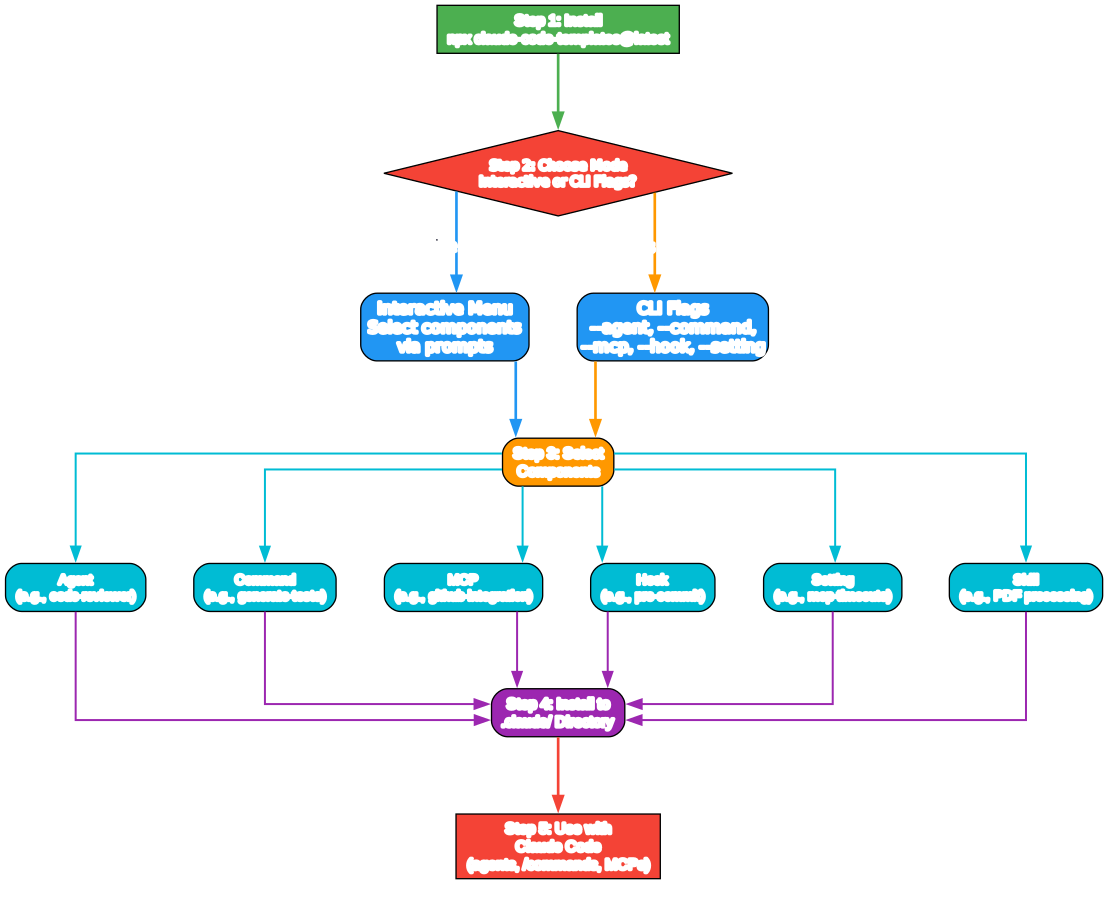
The workflow diagram above shows the five-step journey from installation to usage:
Step 1 - Install: Run npx claude-code-templates@latest to launch the CLI tool. No permanent installation required.
Step 2 - Choose Mode: Decide between the interactive menu (where you browse and select components via prompts) or CLI flags (where you specify exactly what you want with command-line arguments).
Step 3 - Select Components: Choose from six component types - Agents, Commands, MCPs, Hooks, Settings, and Skills. Each type has multiple categories with specific implementations.
Step 4 - Install to .claude/ Directory: Selected components are installed into your project’s .claude/ directory, making them immediately available to Claude Code.
Step 5 - Use with Claude Code: Components become active in your Claude Code sessions. Agents appear as specialized personas, commands show up in the slash command palette, MCPs connect to external services, and hooks run automatically.
Key Features in Detail
Analytics Dashboard
The Analytics Dashboard provides real-time monitoring of your Claude Code sessions. It tracks conversations, token usage, active projects, and performance metrics. The dashboard runs locally on port 3333 and uses WebSocket connections for live updates.
# Launch the analytics dashboard
npx claude-code-templates@latest --analytics
Key analytics features include:
- Live State Detection: Monitors whether Claude Code is actively processing, idle, or waiting for input
- Session Analysis: Tracks conversation history, token consumption, and project activity
- Performance Monitoring: Measures response times, memory usage, and resource consumption
- Year in Review: Generates annual summaries of your development patterns
Conversation Monitor (Chats Mobile)
The Chats Mobile feature provides a mobile-optimized interface for viewing Claude responses in real-time. This is particularly useful when you want to monitor long-running Claude Code sessions from your phone or tablet.
# Local access
npx claude-code-templates@latest --chats

# Secure remote access via Cloudflare Tunnel
npx claude-code-templates@latest --chats --tunnel
The --tunnel flag creates a secure Cloudflare Tunnel, allowing you to access your Claude Code conversations from anywhere without exposing your local machine directly to the internet.
Health Check
The Health Check feature runs comprehensive diagnostics on your Claude Code installation:
npx claude-code-templates@latest --health-check
It verifies configuration files, checks for common issues, validates MCP connections, and provides recommendations for optimizing your setup.
Plugin Dashboard
The Plugin Dashboard provides a unified interface for viewing marketplaces, installed plugins, and managing permissions:
npx claude-code-templates@latest --plugins
Component Categories Deep Dive
Agents
Agents are specialized AI personas that bring domain expertise to your Claude Code sessions. The project includes 26 agent categories:
| Category | Examples |
|---|---|
| AI Specialists | Code reviewers, performance optimizers |
| Development Team | Frontend, backend, full-stack developers |
| Security | Security auditors, vulnerability scanners |
| Database | Database architects, query optimizers |
| DevOps | Infrastructure specialists, deployment experts |
| Finance | Financial modelers, risk analyzers |
Each agent is a markdown file that defines the agent’s role, expertise, and behavioral guidelines. When installed, Claude Code uses these definitions to adopt the specified persona during conversations.
Commands
Custom slash commands extend Claude Code’s command palette with project-specific operations. The 24 command categories include:
| Category | Examples |
|---|---|
| Testing | /generate-tests, /run-test-suite |
| Git Workflow | /worktree-init, /worktree-deliver |
| Performance | /optimize-bundle, /check-performance |
| Security | /check-security, /audit-dependencies |
| Deployment | /deploy-staging, /deploy-production |
| Documentation | /create-blog-article, /generate-docs |
MCPs (Model Context Protocol)
MCPs connect Claude Code to external services and data sources. The 12 MCP categories include:
| Category | Examples |
|---|---|
| Database | PostgreSQL, MySQL integrations |
| Web Data | Web scraping, API integrations |
| DevTools | GitHub, CI/CD integrations |
| Research | Academic search, documentation lookup |
| Productivity | Calendar, task management |
| Integration | Stripe, AWS, OpenAI connections |
Skills
Skills represent the newest component type, providing reusable capabilities with progressive disclosure. The project aggregates skills from multiple sources:
- Anthropic Official: 21 skills from the official Anthropic repository
- Community Skills: Including contributions from obra/superpowers, alirezarezvani/claude-skills, and others
- Scientific Skills: 139 scientific skills from K-Dense-AI covering biology, chemistry, medicine, and computational research
- Enterprise Skills: Specialized skills for business and marketing use cases
Web Dashboard
The project includes a web dashboard at aitmpl.com (currently in beta) that provides an interactive interface for browsing and installing components. The dashboard features:
- Component Browser: Search and filter through 100+ components
- Collection Management: Organize components into custom collections
- Installation Tracking: Monitor which components are installed across projects
- Community Ratings: See which components are most popular
Project Structure
The repository is organized into several key directories:
claude-code-templates/
  cli-tool/           # Main CLI application
    src/              # Source code (index.js, analytics.js, etc.)
    components/       # All component templates
      agents/         # 26 agent categories
      commands/       # 24 command categories
      hooks/          # 10 hook categories
      mcps/           # 12 MCP categories
      settings/       # 10 settings categories
      skills/         # 25 skill categories
    templates/        # Language-specific templates (Go, Python, Ruby, Rust, JS/TS)
    bin/              # CLI entry point
  dashboard/          # Web dashboard (Astro + Tailwind)
  api/                # API endpoints
  database/           # Database schemas
  docs/               # Documentation
  scripts/            # Deployment and utility scripts
Attribution and Community
Claude Code Templates aggregates components from multiple sources, each retaining its original license and attribution:
- K-Dense-AI/claude-scientific-skills - 139 scientific skills (MIT License)
- anthropics/skills - Official Anthropic skills (21 skills)
- anthropics/claude-code - Development guides and examples (10 skills)
- obra/superpowers - Workflow skills (14 skills, MIT License)
- alirezarezvani/claude-skills - Professional role skills (36 skills, MIT License)
- wshobson/agents - Agent definitions (48 agents, MIT License)
The project is sponsored by Z.AI and is part of the Claude for Open Source program and the Neon Open Source Program.
Troubleshooting
| Issue | Solution |
|---|---|
npx command not found | Install Node.js 18+ from nodejs.org |
| Components not appearing in Claude Code | Check that files are in .claude/ directory |
| Analytics dashboard not loading | Verify port 3333 is available |
| MCP connections failing | Run --health-check to diagnose |
| Permission errors on install | Use --yes flag to skip prompts |
Conclusion
Claude Code Templates has established itself as the essential companion tool for Claude Code users. With its comprehensive collection of 100+ components, powerful analytics dashboard, mobile conversation monitor, and health check diagnostics, it transforms Claude Code from a powerful AI coding assistant into a fully configurable development platform. Whether you need specialized AI agents, custom commands, external service integrations, or automated hooks, Claude Code Templates provides battle-tested configurations that you can install with a single command.
Links
- GitHub Repository: https://github.com/davila7/claude-code-templates
- Browse Templates: https://aitmpl.com
- Documentation: https://docs.aitmpl.com
- npm Package: https://www.npmjs.com/package/claude-code-templates
- Community: GitHub Discussions

Enjoyed this post? Never miss out on future posts by following us


