Claude Cookbooks: Effective Claude Usage Patterns
The Claude Cookbooks repository by Anthropic is an invaluable resource for developers looking to master Claude API integration. This comprehensive collection of code examples, guides, and best practices provides production-ready patterns that can be directly integrated into your applications.
Introduction
Claude Cookbooks serves as the official repository from Anthropic containing practical code examples designed to help developers build effectively with Claude. Whether you are building a simple chatbot, a complex multi-agent system, or integrating Claude with external tools and databases, this repository provides the foundational patterns you need.
The repository is organized into distinct categories, each focusing on specific aspects of Claude’s capabilities. From retrieval-augmented generation (RAG) to multimodal processing, from tool use to agent patterns, the cookbooks cover the entire spectrum of what Claude can accomplish.
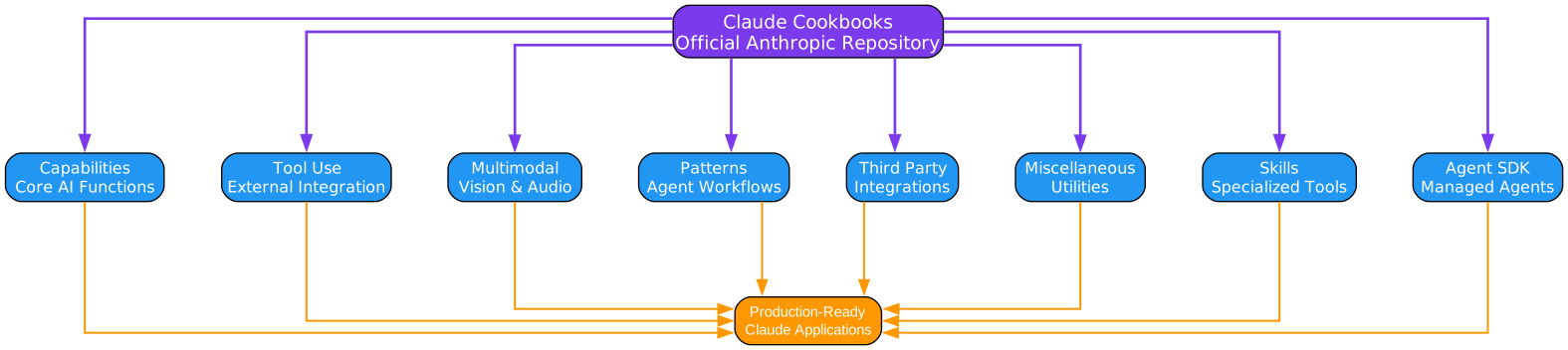
Understanding the Claude Cookbooks Architecture
The architecture diagram above illustrates the comprehensive structure of the Claude Cookbooks repository. At its core, the repository is organized into eight major categories, each designed to address specific development needs when working with Claude.
Capabilities Category
The Capabilities section forms the foundation of Claude’s core AI functions. This includes:
-
Retrieval Augmented Generation (RAG): Techniques for enhancing Claude’s responses with external knowledge sources, enabling the model to access and reference information beyond its training data.
-
Classification: Comprehensive guides for building text and data classification systems using Claude’s understanding capabilities, including insurance ticket classification and sentiment analysis.
-
Summarization: Advanced techniques for document summarization, particularly useful for processing legal documents, research papers, and lengthy reports.
-
Text to SQL: Converting natural language queries into SQL statements, enabling non-technical users to interact with databases using conversational language.
-
Knowledge Graphs: Building structured knowledge representations from unstructured text, enabling complex entity relationship extraction and multi-hop querying.
-
Contextual Embeddings: Advanced RAG techniques that add contextual information to document chunks before embedding, significantly improving retrieval accuracy.
Tool Use Category
The Tool Use section demonstrates how to extend Claude’s capabilities by connecting it to external tools and functions. This is essential for building agents that can take real-world actions:
-
Calculator Integration: Basic arithmetic operations and mathematical problem solving through tool definitions.
-
Customer Service Agents: Complete implementations for building customer support bots with order lookup, account management, and issue resolution capabilities.
-
JSON Extraction: Structured data extraction from various inputs using Claude’s tool use features for reliable, typed outputs.
-
Memory and Context Management: Patterns for maintaining state and context across long-running conversations and agent workflows.
-
Tool Search with Embeddings: Scaling applications to thousands of tools using semantic search for dynamic tool discovery.
-
Programmatic Tool Calling (PTC): Advanced patterns for reducing latency by allowing Claude to write code that calls tools programmatically.
Multimodal Category
The Multimodal section covers Claude’s vision and audio processing capabilities:
-
Getting Started with Vision: Tutorial on passing images to Claude for analysis, including base64 encoding and URL-based image handling.
-
Best Practices for Vision: Optimization techniques for image processing, including resolution considerations, format selection, and performance tuning.
-
Charts and Graphs Interpretation: Extracting insights from visual data representations, including PowerPoint presentations and financial reports.
-
Document Transcription: Converting images of documents into structured text, useful for form processing and OCR applications.
-
Crop Tool: Giving Claude the ability to zoom into specific image regions for detailed analysis.
Agent Patterns Category
The Agent Patterns section provides workflow templates for building sophisticated AI agents:
-
Basic Workflows: Three fundamental patterns trading cost or latency for improved performance, including parallelization, routing, and cascading.
-
Evaluator Optimizer: A feedback loop pattern where one LLM generates content and another evaluates it, iteratively improving quality.
-
Orchestrator Workers: A central coordinator LLM that dynamically delegates tasks to specialized worker LLMs and synthesizes results.
-
Sub-Agents: Hierarchical agent architectures using Haiku for fast processing and Opus for complex reasoning.
Third-Party Integrations Category
The Third-Party section demonstrates integration with popular tools and platforms:
-
Pinecone: Vector database integration for semantic search and RAG applications.
-
MongoDB: Document store integration for building chatbots with persistent knowledge bases.
-
LlamaIndex: Complete RAG framework integration including multi-document agents and query engines.
-
ElevenLabs: Voice AI integration for building low-latency voice assistants.
-
Deepgram: Speech-to-text processing for audio transcription workflows.
-
Wolfram Alpha: Computational knowledge engine integration for mathematical and scientific queries.
Miscellaneous Category
The Miscellaneous section contains essential utilities and techniques:
-
Batch Processing: Asynchronous processing of large request volumes with 50% cost reduction.
-
Building Evals: Creating robust evaluation systems to measure Claude’s performance.
-
Prompt Caching: Techniques for caching prompt context to reduce costs and latency.
-
JSON Mode: Ensuring reliable JSON output from Claude for structured data applications.
-
PDF Processing: Extracting and summarizing content from PDF documents.
Skills Category
The Skills section covers Claude’s specialized tool capabilities:
-
Excel Skills: Working with spreadsheets for data analysis and reporting.
-
PowerPoint Skills: Creating and modifying presentations programmatically.
-
PDF Skills: Document processing and generation capabilities.
-
Custom Skills: Building and deploying organization-specific skills.
Agent SDK Category
The Agent SDK section provides tutorials for the Claude Agent SDK:
-
Research Agent: Building autonomous research agents with web search capabilities.
-
Chief of Staff Agent: Multi-agent systems with subagents and hooks.
-
Observability Agent: Connecting agents to external systems via MCP servers.
-
Site Reliability Agent: Incident response and remediation automation.
Key Cookbook Categories

Understanding the Capabilities Cookbooks
The capabilities cookbooks represent the foundational building blocks for any Claude-powered application. Each capability addresses a specific challenge in AI application development.
Retrieval Augmented Generation (RAG)
RAG is perhaps the most important pattern for building knowledge-aware AI applications. The cookbook demonstrates:
-
Summary Indexing: Creating searchable summaries of documents for efficient retrieval.
-
Reranking Techniques: Improving retrieval quality by reordering results based on relevance.
-
Context Window Management: Optimizing how retrieved content fits within Claude’s context limits.
The RAG pattern works by first retrieving relevant documents from a knowledge base, then providing those documents as context to Claude along with the user’s query. This enables Claude to generate responses grounded in specific, up-to-date information.
Classification Systems
The classification cookbook shows how to build robust categorization systems. Key techniques include:
-
Chain-of-Thought Prompting: Asking Claude to reason through classifications step by step.
-
Few-Shot Examples: Providing example classifications to improve accuracy.
-
Confidence Scoring: Having Claude express uncertainty when appropriate.
Summarization Techniques
Document summarization is a core capability with applications across industries. The cookbook covers:
-
Multi-Document Summarization: Combining information from multiple sources.
-
Hierarchical Summarization: Creating summaries at different levels of detail.
-
Evaluation Metrics: Using BLEU, ROUGE, and LLM-based evaluation.
Text to SQL
Converting natural language to SQL queries enables non-technical users to interact with databases. The cookbook demonstrates:
-
Schema Context: Providing database schema information to Claude.
-
Self-Improvement: Techniques for Claude to refine its own SQL queries.
-
Vector Database Integration: Storing and retrieving similar queries for improved accuracy.

Understanding the Tool Use Cookbooks
Tool use transforms Claude from a conversational AI into an agent capable of taking real-world actions. The tool use cookbooks provide comprehensive patterns for this critical capability.
Calculator Tool
The calculator tool cookbook demonstrates the fundamentals of tool integration:
-
Tool Definition: How to define tools using JSON Schema for type safety.
-
Tool Execution: Patterns for executing tool calls and returning results.
-
Error Handling: Graceful degradation when tool calls fail.
This simple example serves as the foundation for understanding more complex tool integrations.
Customer Service Agent
The customer service agent cookbook shows a complete implementation:
-
Customer Lookup: Tools for retrieving customer information from databases.
-
Order Management: Tools for checking order status, processing returns, and updating records.
-
Conversation Flow: Managing multi-turn conversations with context.
-
Escalation Patterns: When and how to escalate to human agents.
Memory and Context Management
Long-running agents need persistent memory. This cookbook covers:
-
Memory Tools: Storing and retrieving information across sessions.
-
Context Compaction: Compressing conversation history to fit context limits.
-
Automatic Compaction: Background processes for managing context automatically.
Tool Search with Embeddings
As applications grow to include hundreds or thousands of tools, finding the right tool becomes a challenge. This cookbook demonstrates:
-
Semantic Tool Discovery: Using embeddings to find relevant tools.
-
Dynamic Tool Loading: Loading only relevant tools for each request.
-
Tool Versioning: Managing multiple versions of similar tools.
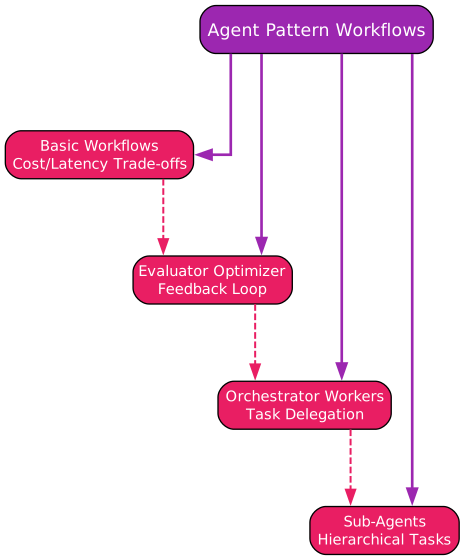
Understanding Agent Pattern Workflows
Agent patterns represent sophisticated workflows for building multi-step, multi-agent systems. These patterns are essential for complex applications.
Basic Workflows
The basic workflows cookbook introduces three fundamental patterns:
-
Parallelization: Running multiple LLM calls simultaneously to reduce latency.
-
Routing: Using one LLM to route requests to specialized LLMs.
-
Cascading: Trying cheaper models first, escalating to more capable models if needed.
These patterns form the building blocks for more complex agent architectures.
Evaluator Optimizer Pattern
This pattern creates a quality improvement loop:
-
Generator LLM: Creates initial content or solutions.
-
Evaluator LLM: Reviews and provides feedback on the output.
-
Iteration Loop: Generator refines based on feedback until quality threshold is met.
This pattern is particularly useful for content generation, code review, and complex reasoning tasks.
Orchestrator Workers Pattern
The orchestrator pattern enables dynamic task delegation:
-
Orchestrator LLM: Analyzes tasks and delegates to specialized workers.
-
Worker LLMs: Process specific subtasks in parallel.
-
Result Synthesis: Orchestrator combines worker outputs into final result.
This pattern excels for tasks that can be decomposed into independent subtasks.
Sub-Agents Pattern
Hierarchical agent architectures use different models for different purposes:
-
Haiku Sub-Agents: Fast, cost-effective for extraction and simple tasks.
-
Opus Coordinator: Complex reasoning and synthesis.
-
Handoff Protocols: Structured communication between agents.
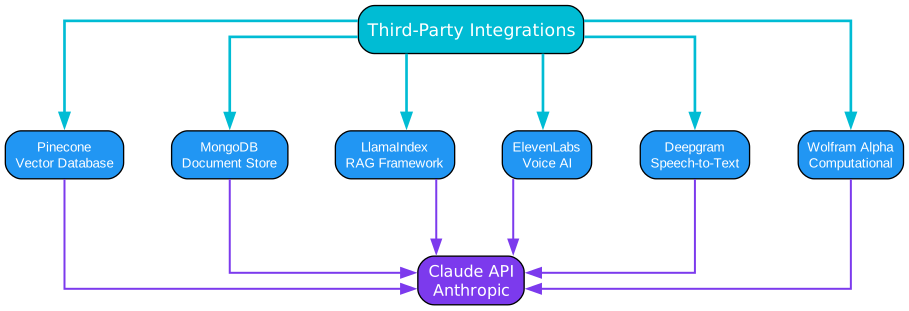
Understanding Third-Party Integrations
Claude becomes even more powerful when integrated with external services. The third-party cookbooks demonstrate production-ready integration patterns.
Pinecone Integration
Vector databases enable semantic search at scale:
-
Index Creation: Setting up Pinecone indexes for document embeddings.
-
Embedding Generation: Creating vector representations of documents.
-
Similarity Search: Finding relevant documents for user queries.
-
RAG Pipeline: Complete pipeline from query to response.
MongoDB Integration
Document stores provide persistent storage for chatbot knowledge:
-
Document Storage: Storing conversation history and knowledge bases.
-
Query Processing: Retrieving relevant documents for context.
-
Chatbot Implementation: Complete chatbot with MongoDB backend.
LlamaIndex Integration
LlamaIndex provides a complete RAG framework:
-
Basic RAG: Simple document retrieval and question answering.
-
Multi-Document Agents: Handling large document collections.
-
Router Query Engine: Routing queries to appropriate indices.
-
SubQuestion Engine: Decomposing complex queries.
ElevenLabs Integration
Voice AI enables conversational interfaces:
-
Speech-to-Text: Converting user speech to text for Claude.
-
Text-to-Speech: Converting Claude’s responses to audio.
-
Low-Latency Pipeline: Minimizing response time for natural conversation.
-
WebSocket Streaming: Real-time bidirectional communication.
Installation
To use the Claude Cookbooks, you need to set up your development environment:
# Clone the repository
git clone https://github.com/anthropics/claude-cookbooks.git
cd claude-cookbooks

# Create a virtual environment
python -m venv venv
source venv/bin/activate  # On Windows: venv\Scripts\activate

# Install dependencies
pip install -r requirements-dev.txt

# Set your API key
export ANTHROPIC_API_KEY='your-api-key-here'
Prerequisites
Before diving into the cookbooks, ensure you have:
-
Claude API Key: Sign up at Anthropic to get your API key.
-
Python 3.8+: The code examples are primarily in Python.
-
Jupyter Notebook: Most cookbooks are provided as interactive notebooks.
-
Basic API Knowledge: Familiarity with REST APIs and JSON is helpful.
For beginners, Anthropic recommends starting with the Claude API Fundamentals course.
Usage Examples
Basic API Call
import anthropic

client = anthropic.Anthropic()

message = client.messages.create(
    model="claude-sonnet-4-20250514",
    max_tokens=1024,
    messages=[
        {"role": "user", "content": "Hello, Claude!"}
    ]
)

print(message.content)
Tool Use Example
import anthropic

client = anthropic.Anthropic()

# Define a calculator tool
tools = [
    {
        "name": "calculator",
        "description": "Perform arithmetic operations",
        "input_schema": {
            "type": "object",
            "properties": {
                "expression": {
                    "type": "string",
                    "description": "Mathematical expression to evaluate"
                }
            },
            "required": ["expression"]
        }
    }
]

response = client.messages.create(
    model="claude-sonnet-4-20250514",
    max_tokens=1024,
    tools=tools,
    messages=[
        {"role": "user", "content": "What is 25 * 4 + 10?"}
    ]
)

# Handle tool use
for block in response.content:
    if block.type == "tool_use":
        # Execute the tool
        result = eval(block.input["expression"])
        print(f"Result: {result}")
RAG Example
import anthropic

client = anthropic.Anthropic()

# Context from retrieved documents
context = """
Document 1: Claude is an AI assistant created by Anthropic.
Document 2: Claude can process text, images, and code.
Document 3: Claude excels at thoughtful, nuanced responses.
"""

query = "What can Claude do?"

response = client.messages.create(
    model="claude-sonnet-4-20250514",
    max_tokens=1024,
    system=f"Answer questions based on this context:\n{context}",
    messages=[
        {"role": "user", "content": query}
    ]
)

print(response.content)
Best Practices
Prompt Engineering
-
Be Specific: Clear, detailed prompts yield better results.
-
Use Examples: Few-shot examples improve output quality.
-
Set Context: Provide relevant background information.
-
Define Output Format: Specify the desired response structure.
Cost Optimization
-
Use Prompt Caching: Cache repeated context to reduce costs.
-
Choose Right Model: Use Haiku for simple tasks, Opus for complex ones.
-
Batch Processing: Use the Messages Batches API for bulk operations.
-
Limit Max Tokens: Set appropriate token limits for your use case.
Error Handling
-
Retry Logic: Implement exponential backoff for rate limits.
-
Validation: Validate inputs before sending to API.
-
Graceful Degradation: Handle API failures elegantly.
-
Logging: Maintain detailed logs for debugging.
Troubleshooting
Common Issues
| Issue | Solution |
|---|---|
| Rate limit errors | Implement exponential backoff retry |
| Context too long | Use context compaction or RAG |
| JSON parsing errors | Use structured output with tool use |
| Tool call failures | Validate tool schemas and inputs |
| High latency | Use prompt caching and parallel calls |
Debugging Tips
-
Enable Debug Logging: Set
ANTHROPIC_LOG=debugfor verbose output. -
Check Token Usage: Monitor input and output token counts.
-
Validate Responses: Check stop_reason and content blocks.
-
Test Incrementally: Build complex workflows step by step.
Conclusion
The Claude Cookbooks repository is an essential resource for any developer working with Claude. By providing production-ready code examples across capabilities, tool use, multimodal processing, and agent patterns, it enables rapid development of sophisticated AI applications.
Key takeaways:
-
Comprehensive Coverage: From basic API calls to complex multi-agent systems.
-
Production Ready: Code can be directly integrated into applications.
-
Best Practices: Learn optimal patterns from Anthropic’s experts.
-
Continuous Updates: New cookbooks added regularly.
Whether you are building your first Claude integration or scaling to production, the cookbooks provide the guidance you need to succeed.
Resources
- Claude Cookbooks Repository
- Anthropic Documentation
- Anthropic Discord Community
- Claude API Fundamentals Course

Enjoyed this post? Never miss out on future posts by following us


