Camofox Browser: Anti-Detection Browser Server for AI Agents
Camofox Browser is a powerful headless browser automation server designed specifically for AI agents. Built on top of Camoufox, a Firefox fork with fingerprint spoofing at the C++ level, it provides undetected browsing capabilities that bypass Google, Cloudflare, and most bot detection systems. With over 2,300 stars on GitHub, it has become an essential tool for AI agents that need to interact with the real web.
Overview
AI agents need to browse the real web, but traditional browser automation tools like Playwright and Puppeteer are easily detected and blocked. Camofox Browser solves this problem by wrapping Camoufox, which patches Firefox at the C++ implementation level to spoof fingerprints before JavaScript ever sees them.
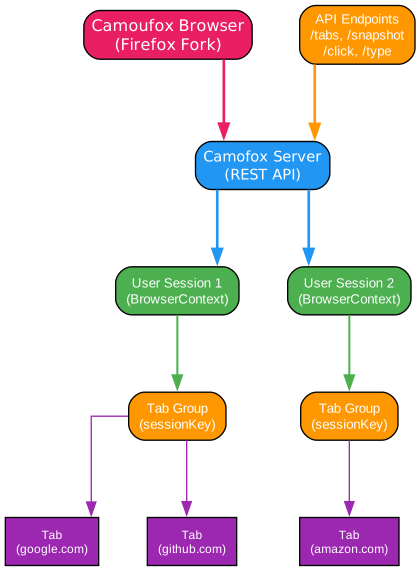
Understanding the Architecture
The architecture diagram above illustrates how Camofox Browser organizes browser instances, sessions, and tabs to provide isolated, multi-user browsing capabilities.
Browser Instance (Camoufox)
At the foundation is the Camoufox browser, a Firefox fork with anti-detection capabilities built directly into the C++ code. Unlike stealth plugins that add JavaScript wrappers (which themselves become fingerprints), Camoufox modifies the browser at the source:
- navigator.hardwareConcurrency: Spoofed to match the proxy’s expected hardware
- WebGL renderers: Customized to appear as legitimate graphics hardware
- AudioContext: Fingerprint masked to prevent audio-based detection
- Screen geometry: Consistent with the proxy’s geographic location
- WebRTC: Leaks prevented to avoid IP exposure
Server Layer (REST API)
The Camofox server provides a REST API that AI agents can interact with:
- POST /tabs: Create new browser tabs with initial URLs
- GET /tabs/:id/snapshot: Get accessibility snapshots with element references
- POST /tabs/:id/click: Click elements by stable reference
- POST /tabs/:id/type: Type text into form fields
- GET /tabs/:id/screenshot: Capture screenshots for visual verification
User Sessions (BrowserContext)
Each user gets an isolated browser context with separate cookies and storage. This enables:
- Multi-tenant support: Multiple AI agents can use the same server
- Session isolation: Each user’s data is completely separate
- Cookie persistence: Sessions can maintain login states
Tab Groups (sessionKey)
Tabs are organized by session keys, allowing agents to group related tabs together. This is useful for:
- Conversation tracking: Each conversation gets its own tab group
- Task isolation: Different tasks don’t interfere with each other
- Resource management: Old tabs are automatically recycled when limits are reached
Anti-Detection Mechanisms
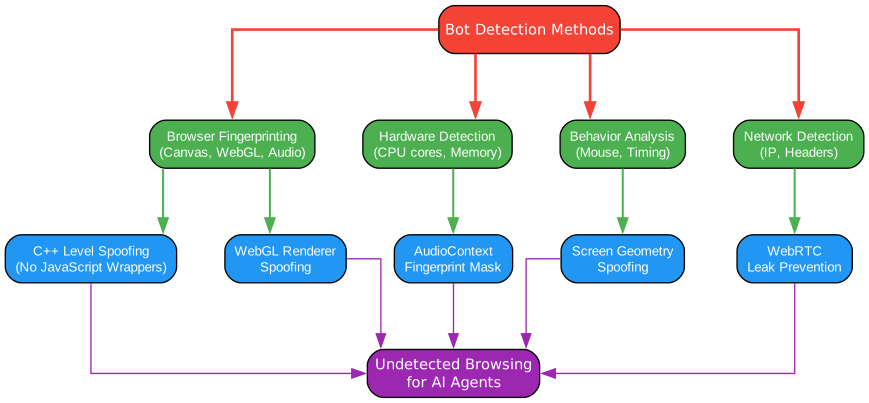
Understanding Anti-Detection
The anti-detection diagram shows how Camofox Browser bypasses various bot detection methods used by websites.
Bot Detection Methods
Modern websites use multiple techniques to detect automated browsing:
- Browser Fingerprinting: Canvas, WebGL, and AudioContext fingerprints that uniquely identify browsers
- Hardware Detection: CPU cores, memory, and device characteristics that reveal automation
- Behavior Analysis: Mouse movements, timing patterns, and interaction sequences
- Network Detection: IP addresses, headers, and connection patterns
Camoufox Countermeasures
Camoufox addresses each detection method at the C++ level:
- C++ Level Spoofing: Modifications happen before JavaScript can detect them, eliminating the “wrapper” fingerprint that stealth plugins leave behind
- WebGL Renderer Spoofing: Graphics hardware appears as legitimate consumer devices
- AudioContext Fingerprint Mask: Audio processing characteristics are randomized
- Screen Geometry Spoofing: Display properties match the proxy’s expected location
- WebRTC Leak Prevention: Real IP addresses are never exposed through WebRTC
Result: Undetected Browsing
The combination of these techniques allows AI agents to browse websites that would normally block automated access, including:
- Google search results
- Cloudflare-protected sites
- Social media platforms
- E-commerce sites with anti-bot measures
API Flow

Understanding the API Flow
The API flow diagram illustrates how AI agents interact with Camofox Browser to perform web automation tasks.
Step 1: Create Tab
The agent sends a POST request to /tabs with the target URL. The server creates a new browser tab and returns a tab ID for subsequent operations.
curl -X POST http://localhost:9377/tabs \
  -H 'Content-Type: application/json' \
  -d '{"userId": "agent1", "sessionKey": "task1", "url": "https://example.com"}'
Step 2: Browser Navigation
The Camoufox browser navigates to the URL, handling any redirects, JavaScript execution, and dynamic content loading. Anti-detection measures are applied automatically.
Step 3: Get Snapshot
The agent requests an accessibility snapshot, which returns a token-efficient representation of the page:
curl "http://localhost:9377/tabs/TAB_ID/snapshot?userId=agent1"
# Returns: { "snapshot": "[button e1] Submit [link e2] Learn more", ... }
Step 4: Token-Efficient Response
The accessibility snapshot is approximately 90% smaller than raw HTML, making it ideal for LLM-based agents that need to minimize token usage. Element references (e1, e2, etc.) provide stable identifiers for interaction.
Step 5: Interact with Elements
Using the element references from the snapshot, the agent can click, type, or scroll:
curl -X POST http://localhost:9377/tabs/TAB_ID/click \
  -H 'Content-Type: application/json' \
  -d '{"userId": "agent1", "ref": "e1"}'
Features Overview
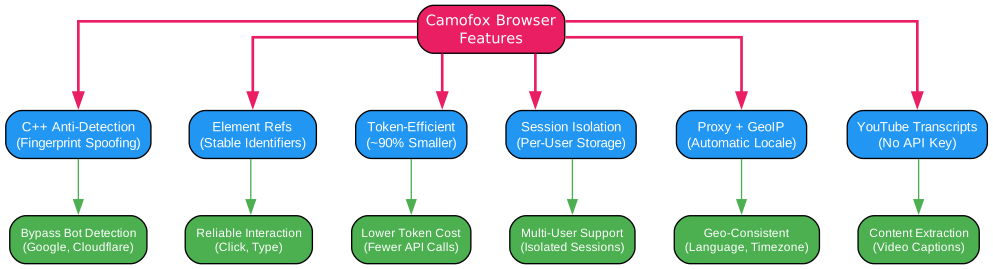
Understanding the Features
The features diagram shows the key capabilities of Camofox Browser and their benefits for AI agent applications.
Core Features
-
C++ Anti-Detection: Bypasses Google, Cloudflare, and most bot detection by spoofing fingerprints at the browser engine level. No JavaScript wrappers means no telltale signs of automation.
-
Element Refs: Stable
e1,e2,e3identifiers for reliable interaction. Unlike CSS selectors that can change with page updates, element refs are generated from the accessibility tree and remain consistent. -
Token-Efficient: Accessibility snapshots are approximately 90% smaller than raw HTML. This dramatically reduces token costs for LLM-based agents and improves response times.
-
Session Isolation: Separate cookies and storage per user. Multiple AI agents can use the same server without interfering with each other’s sessions.
-
Proxy + GeoIP: Route traffic through residential proxies with automatic locale, timezone, and geolocation settings. The browser fingerprint is consistent with the proxy location.
-
YouTube Transcripts: Extract captions from any YouTube video via yt-dlp, no API key needed. This enables content analysis without YouTube’s API quotas.
Benefits
- Bypass Bot Detection: Access Google, Cloudflare-protected sites, and other challenging targets
- Reliable Interaction: Click and type with confidence using stable element references
- Lower Token Cost: Smaller snapshots mean fewer tokens consumed per request
- Multi-User Support: Isolated sessions for multiple agents or conversations
- Geo-Consistent: Browser fingerprint matches proxy location for consistency
- Content Extraction: Get video transcripts without API keys or quotas
Deployment Options
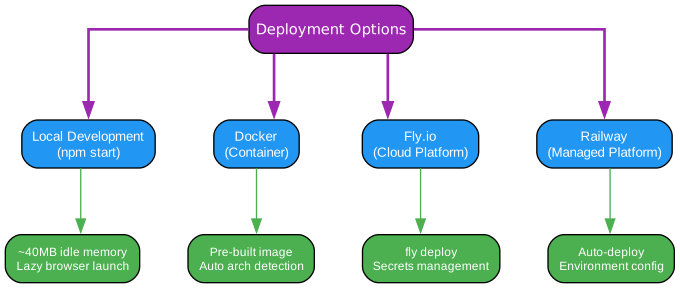
Understanding Deployment Options
Camofox Browser supports multiple deployment options to fit different infrastructure needs.
Local Development
The simplest deployment is running locally with npm:
git clone https://github.com/jo-inc/camofox-browser
cd camofox-browser
npm install
npm start  # Downloads Camoufox on first run (~300MB)
Key characteristics:
- ~40MB idle memory: Efficient resource usage when no sessions are active
- Lazy browser launch: Browser only starts when needed
- Auto shutdown: Browser shuts down after 5 minutes of inactivity
Docker
For containerized deployments, the included Makefile handles everything:
make up # Auto-detects architecture and builds
The Docker image includes:
- Pre-downloaded Camoufox binaries
- yt-dlp for YouTube transcript extraction
- All dependencies pre-installed
Fly.io
Deploy to Fly.io for cloud hosting:
fly deploy
fly secrets set CAMOFOX_API_KEY="your-generated-key"
Benefits:
- Global edge locations
- Automatic scaling
- Secrets management
- Persistent volumes for cookie storage
Railway
Connect the repository to Railway for managed hosting:
# Connect repo to Railway
# Set environment variables
# Deploy automatically
Benefits:
- Auto-deploy on push
- Environment variable management
- Built-in monitoring
- Easy rollback
Key Features
| Feature | Description |
|---|---|
| C++ Anti-Detection | Bypasses bot detection at the browser engine level |
| Element Refs | Stable identifiers for reliable element interaction |
| Token-Efficient | ~90% smaller snapshots than raw HTML |
| Session Isolation | Separate cookies/storage per user |
| Cookie Import | Inject Netscape-format cookies for authenticated browsing |
| Proxy + GeoIP | Automatic locale/timezone from proxy IP |
| Structured Logging | JSON log lines for production observability |
| YouTube Transcripts | Extract captions without API key |
| Search Macros | Pre-built macros for Google, YouTube, Amazon, Reddit |
| Screenshot Support | Base64 PNG screenshots alongside snapshots |
| Large Page Handling | Automatic truncation with pagination |
| Download Capture | Capture and retrieve browser downloads |
Installation
Quick Start
# Clone and install
git clone https://github.com/jo-inc/camofox-browser
cd camofox-browser
npm install && npm start
# Server runs at http://localhost:9377
Docker
# Build and start
make up

# Stop
make down

# Clean rebuild
make reset
Environment Variables
| Variable | Description | Default |
|---|---|---|
CAMOFOX_PORT | Server port | 9377 |
CAMOFOX_API_KEY | Enable cookie import | - |
CAMOFOX_COOKIES_DIR | Cookie files directory | ~/.camofox/cookies |
MAX_SESSIONS | Max concurrent sessions | 50 |
MAX_TABS_PER_SESSION | Max tabs per session | 10 |
SESSION_TIMEOUT_MS | Session inactivity timeout | 1800000 (30min) |
BROWSER_IDLE_TIMEOUT_MS | Browser idle shutdown | 300000 (5min) |
PROXY_HOST | Proxy hostname | - |
PROXY_PORT | Proxy port | - |
PROXY_USERNAME | Proxy auth username | - |
PROXY_PASSWORD | Proxy auth password | - |
Usage Examples
Basic Browsing
# Create a tab
curl -X POST http://localhost:9377/tabs \
  -H 'Content-Type: application/json' \
  -d '{"userId": "agent1", "url": "https://example.com"}'

# Get accessibility snapshot
curl "http://localhost:9377/tabs/TAB_ID/snapshot?userId=agent1"

# Click by element ref
curl -X POST http://localhost:9377/tabs/TAB_ID/click \
  -H 'Content-Type: application/json' \
  -d '{"userId": "agent1", "ref": "e1"}'

# Type into element
curl -X POST http://localhost:9377/tabs/TAB_ID/type \
  -H 'Content-Type: application/json' \
  -d '{"userId": "agent1", "ref": "e2", "text": "hello"}'
Search Macros
# Google search
curl -X POST http://localhost:9377/tabs/TAB_ID/navigate \
  -H 'Content-Type: application/json' \
  -d '{"userId": "agent1", "macro": "@google_search", "query": "best coffee beans"}'

# YouTube search
curl -X POST http://localhost:9377/tabs/TAB_ID/navigate \
  -H 'Content-Type: application/json' \
  -d '{"userId": "agent1", "macro": "@youtube_search", "query": "python tutorial"}'
YouTube Transcripts
curl -X POST http://localhost:9377/youtube/transcript \
  -H 'Content-Type: application/json' \
  -d '{"url": "https://www.youtube.com/watch?v=dQw4w9WgXcQ", "languages": ["en"]}'
OpenClaw Plugin
Camofox Browser is available as an OpenClaw plugin for seamless integration with AI agents:
openclaw plugins install @askjo/camofox-browser
Available Tools:
camofox_create_tab- Create a new browser tabcamofox_snapshot- Get accessibility snapshotcamofox_click- Click element by refcamofox_type- Type text into elementcamofox_navigate- Navigate to URL or search macrocamofox_scroll- Scroll pagecamofox_screenshot- Take screenshotcamofox_close_tab- Close tabcamofox_list_tabs- List open tabscamofox_import_cookies- Import cookies from file
Conclusion
Camofox Browser represents a significant advancement in browser automation for AI agents. By leveraging Camoufox’s C++ level anti-detection capabilities, it provides reliable access to websites that would otherwise block automated browsing. The token-efficient accessibility snapshots make it ideal for LLM-based agents, while the REST API design allows easy integration with any agent framework.
Whether you’re building web-scraping agents, automated testing tools, or AI assistants that need to interact with the real web, Camofox Browser provides the foundation for undetected, reliable browser automation. The multiple deployment options and comprehensive API make it suitable for everything from local development to production cloud deployments.
Links

Enjoyed this post? Never miss out on future posts by following us


