DS2API: Deepseek-to-API Middleware with Multi-Account Rotation
DS2API is a powerful open-source middleware that converts DeepSeek Web chat capabilities into fully compatible OpenAI, Claude, and Gemini APIs. Built as a pure Go implementation with a React WebUI admin panel, DS2API provides enterprise-grade features including multi-account rotation, automatic token refresh, Proof-of-Work solving, and intelligent concurrency control - all through a single unified service.
Whether you need to integrate DeepSeek models into existing OpenAI SDK workflows, connect Claude Code to DeepSeek’s reasoning capabilities, or use the Gemini SDK with DeepSeek as a backend, DS2API handles the protocol translation seamlessly while managing account pools and request queuing behind the scenes.
How DS2API Works
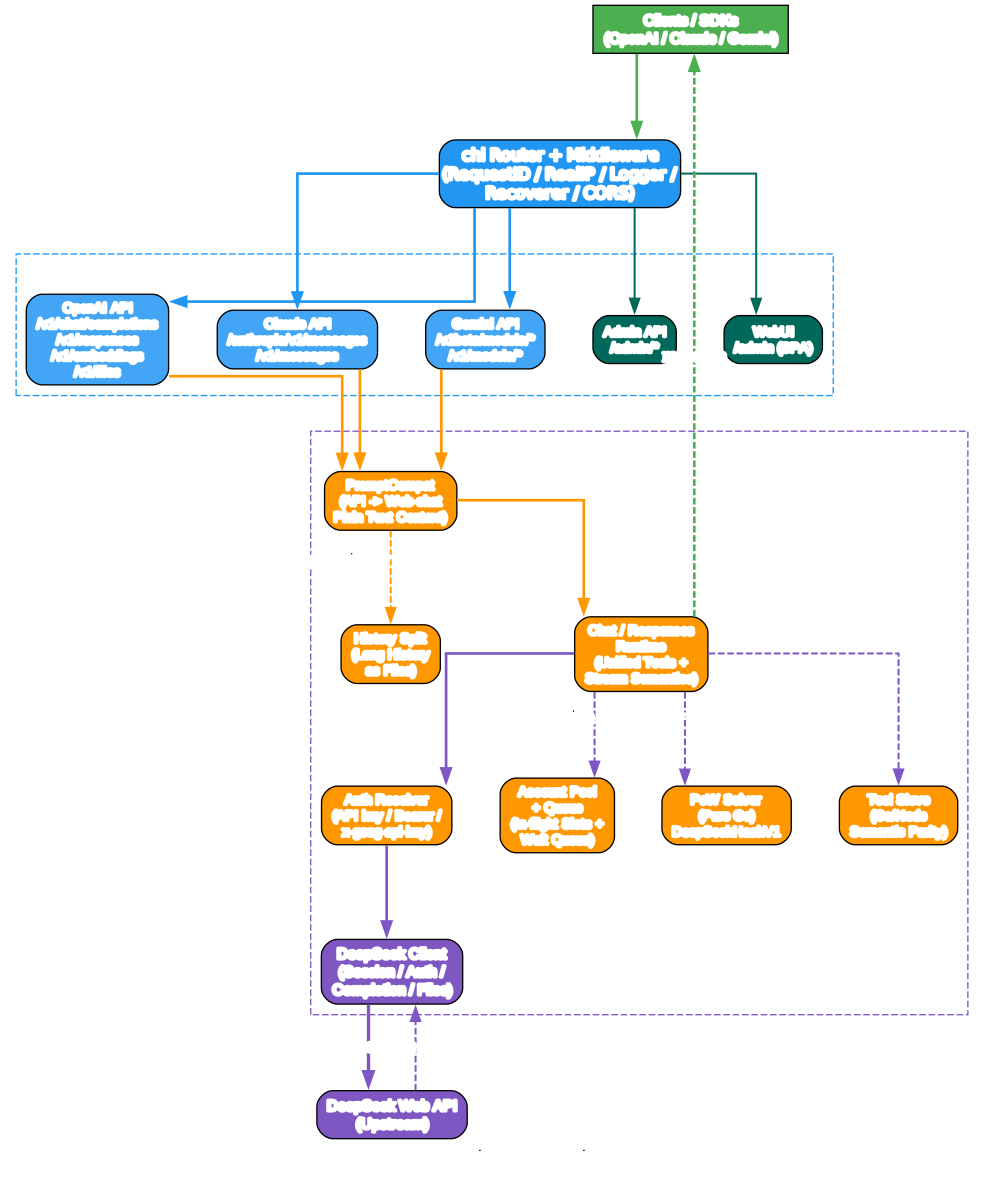
The architecture diagram above illustrates the complete request flow through DS2API. When a client sends a request - whether using OpenAI, Claude, or Gemini SDK - it enters through the chi router with full middleware support including request ID tracking, real IP detection, logging, recovery, and CORS handling.
Understanding the Architecture
HTTP API Surface Layer
The HTTP API surface is where protocol-specific handling occurs. DS2API exposes five distinct API surfaces:
-
OpenAI API: Handles
/v1/chat/completions,/v1/responses,/v1/embeddings,/v1/files, and/v1/modelsendpoints. This is the most feature-complete surface, supporting both chat completions and the newer Responses API with streaming. -
Claude API: Provides
/anthropic/v1/messagesand/anthropic/v1/messages/count_tokensendpoints, plus shortcut paths/v1/messagesand/messages. This enables direct compatibility with the Anthropic SDK. -
Gemini API: Supports
/v1beta/models/{model}:generateContentand/v1beta/models/{model}:streamGenerateContent, plus/v1/models/{model}:*paths. Full Tool Calling support is included withfunctionDeclarationstofunctionCalltranslation. -
Admin API: Manages configuration, runtime settings hot-reload, proxy management, account testing, session cleanup, import/export, and Vercel sync.
-
WebUI: A single-page application at
/adminwith bilingual Chinese/English support and dark mode.
Runtime Core
The runtime core is where the real processing happens:
-
PromptCompat: The compatibility kernel that translates API requests from any protocol into DeepSeek web-chat plain text context. This is the critical translation layer that makes multi-protocol support possible.
-
Chat/Responses Runtime: Provides unified tool calling and streaming semantics across all protocols.
-
Auth Resolver: Handles multiple authentication formats - Bearer tokens, x-api-key headers, and x-goog-api-key for Gemini compatibility.
-
Account Pool + Queue: Manages multi-account rotation with in-flight slot limits and waiting queues to prevent 429 errors.
-
DeepSeek Client: Handles session management, authentication, completion requests, and file operations with the upstream DeepSeek API.
-
PoW Solver: A pure Go implementation of DeepSeekHashV1 that solves Proof-of-Work challenges in milliseconds.
-
Tool Sieve: Provides Go/Node semantic parity for tool call anti-leak handling and structured incremental output.
-
History Split: Automatically converts long conversation histories into file attachments to avoid prompt length limits.
Multi-Account Rotation and Concurrency
Understanding Account Rotation
The multi-account rotation system is one of DS2API’s most powerful features. When you have multiple DeepSeek accounts configured, DS2API automatically distributes requests across them to maximize throughput and avoid rate limiting.
Authentication Flow
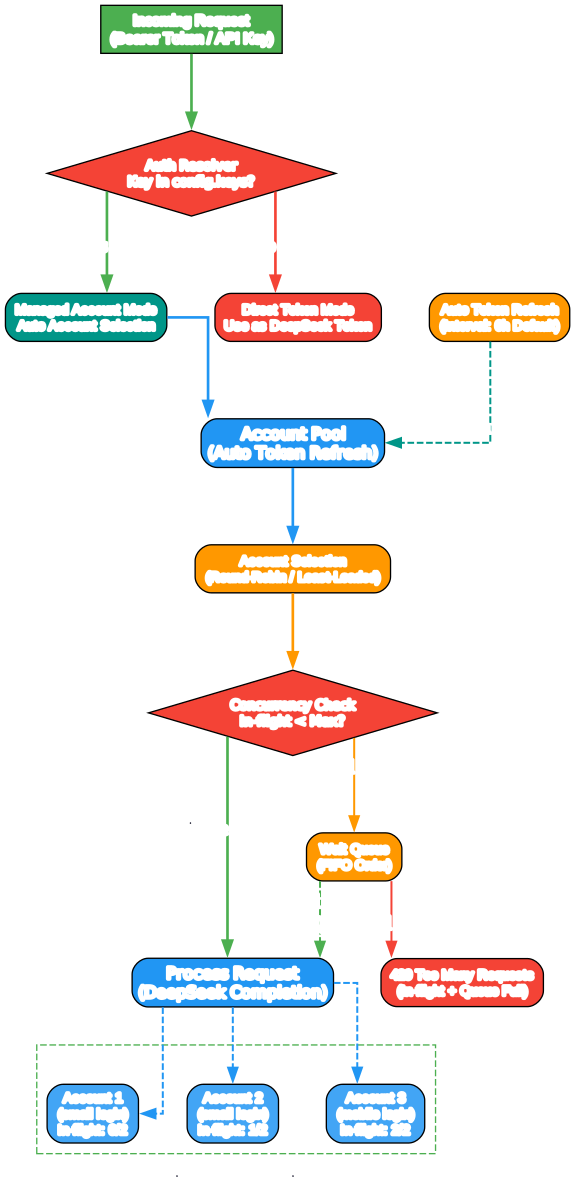
Every incoming request goes through the Auth Resolver first. If the provided API key matches one in config.keys, DS2API enters Managed Account Mode where it automatically selects an available account from the pool. If the key does not match, it is treated as a direct DeepSeek token and passed through without rotation.
Account Selection Strategy
DS2API uses a round-robin / least-loaded strategy to select accounts. Each account has a configurable in-flight limit (default: 2 concurrent requests per account). When a request arrives:
- The system checks if any account has available in-flight slots
- If slots are available, the request is assigned to that account
- If all slots are full, the request enters a FIFO waiting queue
- Only when the total capacity (in-flight + queue) is exceeded does DS2API return a 429 error
This means you can scale linearly: with 5 accounts and 2 in-flight slots each, you get a recommended concurrency of 10 simultaneous requests, with a queue capacity of 10 more before any 429 errors.
Auto Token Refresh
Each managed account automatically refreshes its authentication token on a configurable interval (default: 6 hours). This ensures uninterrupted service without manual intervention. Both email and mobile phone login methods are supported.
Concurrency Model
Per-account inflight = DS2API_ACCOUNT_MAX_INFLIGHT (default 2)
Recommended concurrency = account_count x per_account_inflight
Queue limit = DS2API_ACCOUNT_MAX_QUEUE (default = recommended concurrency)
429 threshold = inflight + queue = account_count x 4
The GET /admin/queue/status endpoint provides real-time visibility into current concurrency state, making it easy to monitor and tune your deployment.
API Compatibility Matrix
Understanding API Compatibility
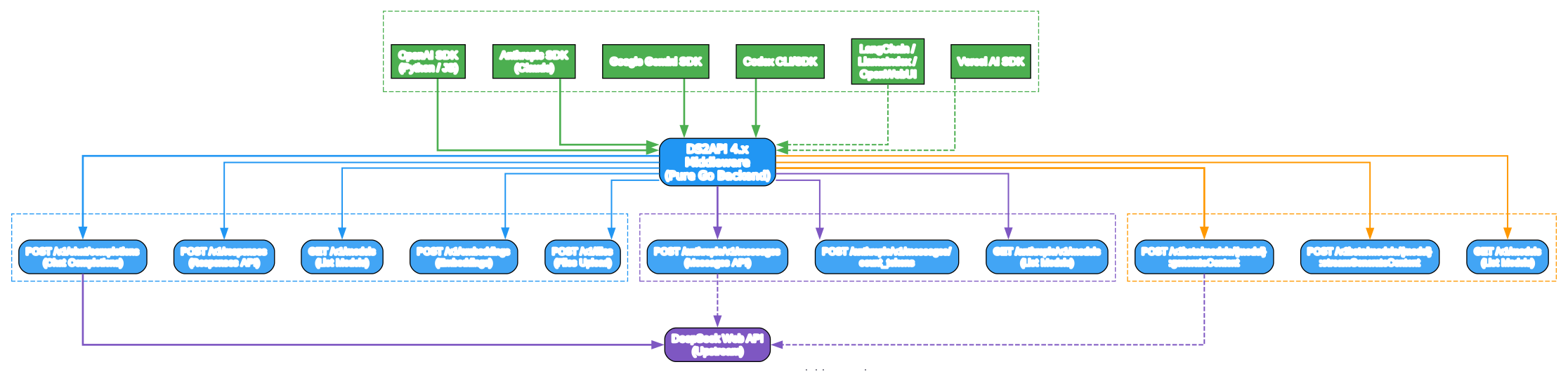
DS2API provides three complete API compatibility layers, each translating protocol-specific requests into DeepSeek web chat interactions and then translating responses back into the client’s expected format.
OpenAI-Compatible Endpoints
The OpenAI surface is the most comprehensive, supporting:
| Endpoint | Method | Description |
|---|---|---|
/v1/chat/completions | POST | Chat completions with streaming support |
/v1/responses | POST | Responses API (newer OpenAI format) |
/v1/responses/{response_id} | GET | Retrieve stored responses |
/v1/models | GET | List available models |
/v1/models/{id} | GET | Get model details |
/v1/embeddings | POST | Generate embeddings |
/v1/files | POST | File upload for context |
Claude-Compatible Endpoints
| Endpoint | Method | Description |
|---|---|---|
/anthropic/v1/messages | POST | Send messages (Anthropic SDK compatible) |
/anthropic/v1/messages/count_tokens | POST | Count tokens for a message |
/anthropic/v1/models | GET | List available Claude-compatible models |
/v1/messages | POST | Shortcut path for messages |
/messages | POST | Shortcut path for messages |
Gemini-Compatible Endpoints
| Endpoint | Method | Description |
|---|---|---|
/v1beta/models/{model}:generateContent | POST | Generate content (Gemini SDK compatible) |
/v1beta/models/{model}:streamGenerateContent | POST | Stream content generation |
/v1/models/{model}:* | Various | Model operations |
Platform Compatibility
| Tier | Platform | Status |
|---|---|---|
| P0 | Codex CLI/SDK | Supported |
| P0 | OpenAI SDK (JS/Python) | Supported |
| P0 | Vercel AI SDK | Supported |
| P0 | Anthropic SDK | Supported |
| P0 | Google Gemini SDK | Supported |
| P1 | LangChain / LlamaIndex / OpenWebUI | Supported |
Model Support
DeepSeek Native Models
| Family | Model ID | Thinking | Search |
|---|---|---|---|
| default | deepseek-v4-flash | Enabled by default | No |
| expert | deepseek-v4-pro | Enabled by default | No |
| default | deepseek-v4-flash-search | Enabled by default | Yes |
| expert | deepseek-v4-pro-search | Enabled by default | Yes |
| vision | deepseek-v4-vision | Enabled by default | No |
| vision | deepseek-v4-vision-search | Enabled by default | Yes |
Model Aliases
DS2API also accepts common aliases as input. For example, gpt-4o maps to deepseek-v4-flash, o3 maps to deepseek-v4-pro, and Claude model names map to their DeepSeek equivalents. The /v1/models endpoint always returns normalized DeepSeek native model IDs.
For Claude compatibility, the default mappings are:
| Claude Model | DeepSeek Mapping |
|---|---|
claude-sonnet-4-6 | deepseek-v4-flash |
claude-haiku-4-5 | deepseek-v4-flash |
claude-opus-4-6 | deepseek-v4-pro |
Installation and Setup
Option 1: Download Release Binaries (Recommended)
The easiest way to get started is downloading pre-built binaries:
# Download the archive for your platform from GitHub Releases
tar -xzf ds2api_<tag>_linux_amd64.tar.gz
cd ds2api_<tag>_linux_amd64

# Create configuration
cp config.example.json config.json
# Edit config.json with your DeepSeek accounts and API keys

# Start the server
./ds2api
The server starts at http://127.0.0.1:5001 by default.
Option 2: Docker Deployment
# Clone and configure
git clone https://github.com/CJackHwang/ds2api.git
cd ds2api
cp .env.example .env
cp config.example.json config.json

# Edit .env - at minimum set DS2API_ADMIN_KEY
# DS2API_ADMIN_KEY=your-strong-password

# Start with Docker Compose
docker-compose up -d

# View logs
docker-compose logs -f
The default docker-compose.yml maps host port 6011 to container port 5001. To expose 5001 directly, set DS2API_HOST_PORT=5001.
Option 3: Vercel Serverless
# Fork the repository to your GitHub account
# Import the project on Vercel
# Set environment variables:
#   DS2API_ADMIN_KEY=your-admin-key
#   DS2API_CONFIG_JSON=<base64 encoded config.json>

# Generate Base64 config:
base64 < config.json | tr -d '\n'
Note: On Vercel, /v1/chat/completions uses a Node.js runtime for real-time SSE streaming, while all other routes use the Go runtime.
Option 4: Local Source Build
# Prerequisites: Go 1.26+, Node.js 20.19+ or 22.12+ (for WebUI)

git clone https://github.com/CJackHwang/ds2api.git
cd ds2api
cp config.example.json config.json
# Edit config.json

go run ./cmd/ds2api
Configuration
DS2API uses a single config.json file as the source of truth. Here is a minimal configuration:
{
  "keys": [
    "your-api-key-1",
    "your-api-key-2"
  ],
  "accounts": [
    {
      "name": "primary-account",
      "email": "your-email@example.com",
      "password": "your-password"
    },
    {
      "name": "secondary-account",
      "email": "another@example.com",
      "password": "another-password"
    }
  ],
  "model_aliases": {
    "gpt-4o": "deepseek-v4-flash",
    "o3": "deepseek-v4-pro"
  },
  "runtime": {
    "account_max_inflight": 2,
    "account_max_queue": 0,
    "token_refresh_interval_hours": 6
  },
  "auto_delete": {
    "mode": "none"
  }
}
Key Configuration Fields
| Field | Description |
|---|---|
keys / api_keys | Client API keys for authentication. api_keys adds name and remark metadata. |
accounts | DeepSeek managed accounts with email or mobile login, proxy, name, and remark. |
model_aliases | Shared alias map for OpenAI, Claude, and Gemini model name translation. |
runtime | Account concurrency, queue, and token refresh settings. Hot-reloadable via Admin Settings. |
auto_delete.mode | Remote session cleanup after requests: none, single, or all. |
history_split | Multi-turn history split policy. Tunable trigger threshold. |
Authentication Modes
DS2API supports two authentication modes for business endpoints:
| Mode | Description |
|---|---|
| Managed Account | Use a key from config.keys via Authorization: Bearer ... or x-api-key. DS2API auto-selects an account from the pool. |
| Direct Token | If the token is not in config.keys, it is treated as a DeepSeek token directly. |
You can also pin a specific managed account using the X-Ds2-Target-Account header with an email or mobile number.
Tool Calling Support
When tools is present in a request, DS2API performs sophisticated anti-leak handling:
-
Context-aware detection: Tool call recognition is only enabled in non-code-block contexts, preventing false positives from code examples.
-
Canonical XML parsing: Only the canonical XML format
<tool_calls><invoke name="..."><parameter name="...">is treated as executable tool calls. Legacy formats are handled as plain text. -
Protocol-native output: The output follows the client’s request protocol - OpenAI, Claude, or Gemini native structures are generated appropriately.
-
Streaming support: The
responsesstreaming mode uses official item lifecycle events (response.output_item.*,response.content_part.*,response.function_call_arguments.*). -
Tool choice enforcement: Supports
auto,none,required, and forced function modes. Violations return422for non-streaming andresponse.failedfor streaming.
Usage Examples
OpenAI SDK (Python)
from openai import OpenAI

client = OpenAI(
    base_url="http://127.0.0.1:5001/v1",
    api_key="your-api-key-1"
)

response = client.chat.completions.create(
    model="deepseek-v4-flash",
    messages=[
        {"role": "user", "content": "Explain quantum computing in simple terms"}
    ],
    stream=True
)

for chunk in response:
    if chunk.choices[0].delta.content:
        print(chunk.choices[0].delta.content, end="")
Anthropic SDK (Python)
import anthropic

client = anthropic.Anthropic(
    base_url="http://127.0.0.1:5001",
    api_key="your-api-key-1"
)

message = client.messages.create(
    model="claude-sonnet-4-6",
    max_tokens=1024,
    messages=[
        {"role": "user", "content": "Write a haiku about programming"}
    ]
)

print(message.content[0].text)
Google Gemini SDK (Python)
import google.generativeai as genai

genai.configure(
    api_key="your-api-key-1",
    transport="rest",
    client_options={"api_endpoint": "http://127.0.0.1:5001"}
)

model = genai.GenerativeModel("deepseek-v4-flash")
response = model.generate_content("What is machine learning?")
print(response.text)
cURL Test
curl http://127.0.0.1:5001/v1/chat/completions \
  -H "Authorization: Bearer your-api-key-1" \
  -H "Content-Type: application/json" \
  -d '{
    "model": "deepseek-v4-flash",
    "messages": [{"role": "user", "content": "Hello!"}],
    "stream": false
  }'
Admin and Monitoring
DS2API includes a comprehensive admin interface:
- WebUI: Accessible at
/adminwith bilingual support and dark mode - Health Probes:
GET /healthz(liveness) andGET /readyz(readiness) - Queue Status:
GET /admin/queue/statusfor real-time concurrency monitoring - Config Hot-Reload: Runtime settings can be updated without restart via Admin API
- Account Testing: Individual and batch account testing endpoints
- Session Cleanup: Automatic or manual remote session management
- Import/Export: Full configuration backup and restore
Key Features Summary
| Feature | Description |
|---|---|
| Triple Protocol Support | OpenAI, Claude, and Gemini API compatibility from a single service |
| Multi-Account Rotation | Automatic load distribution across DeepSeek accounts |
| Concurrency Control | Per-account in-flight limits with FIFO waiting queue |
| Auto Token Refresh | Configurable interval (default 6 hours) for uninterrupted service |
| PoW Solving | Pure Go DeepSeekHashV1 implementation with millisecond response |
| Tool Calling | Anti-leak handling with canonical XML parsing and protocol-native output |
| History Split | Automatic long-history file attachment to avoid prompt limits |
| Admin WebUI | Bilingual SPA with real-time monitoring and configuration |
| Multiple Deployment | Local binary, Docker, Vercel serverless, or systemd |
| Health Probes | Kubernetes-ready liveness and readiness endpoints |
Conclusion
DS2API stands out as a comprehensive DeepSeek-to-API middleware that solves the practical challenges of using DeepSeek models through standard API interfaces. Its triple-protocol support (OpenAI, Claude, and Gemini) means you can integrate DeepSeek into virtually any existing AI application without code changes. The multi-account rotation system with intelligent concurrency control ensures reliable, high-throughput operation, while the pure Go backend delivers excellent performance with minimal resource usage.
Whether you are running a single account for personal use or managing a pool of accounts for production workloads, DS2API provides the tools you need - from automatic token refresh and PoW solving to real-time monitoring and hot-reloadable configuration.
Links
- GitHub Repository: https://github.com/CJackHwang/ds2api
- Docker Image:
ghcr.io/cjackhwang/ds2api:latest - Deploy on Zeabur: One-click deployment available via the Zeabur template

Enjoyed this post? Never miss out on future posts by following us


