Introduction
Eclipse SUMO (Simulation of Urban MObility) is a leading open-source platform for microscopic traffic simulation, enabling researchers, engineers, and urban planners to model complex transportation networks with unprecedented fidelity. Developed by the German Aerospace Center (DLR), Institute of Transportation Systems, SUMO has been under active development since 2001 – over 25 years of continuous improvement that has produced one of the most capable and widely adopted traffic simulation frameworks in the world. With nearly 4,000 GitHub stars and governance under the Eclipse Foundation, SUMO serves as a critical tool for academic research, municipal traffic planning, and autonomous vehicle development.
At its core, SUMO performs space-continuous, time-discrete microscopic simulation, meaning each vehicle, pedestrian, and cyclist is modeled as an individual agent with its own position, speed, acceleration, and routing decisions. The platform handles networks with 10,000 or more edges and processes up to 100,000 vehicle updates per second on a single core. It is deterministic by default, ensuring reproducible experiments, while offering configuration options for stochastic elements when needed. Licensed under EPL-2.0 and GPL-2.0-or-later, SUMO is written primarily in C++ for performance, with official bindings for Python, Java, and C#. The current release, version 1.26.0 (released 2026-01-29), continues the tradition of regular updates that expand capabilities and improve simulation accuracy.
What distinguishes SUMO from commercial alternatives like VISSIM or Aimsun is not just its open-source license but the breadth of its ecosystem. From network import via OpenStreetMap to real-time control through the TraCI protocol, from emissions modeling using HBEFA standards to co-simulation via FMI 2.0, SUMO provides an end-to-end pipeline that covers every stage of traffic simulation research. This article provides a comprehensive technical analysis of SUMO’s architecture, tool suite, control interfaces, and integration capabilities.
Architecture Overview
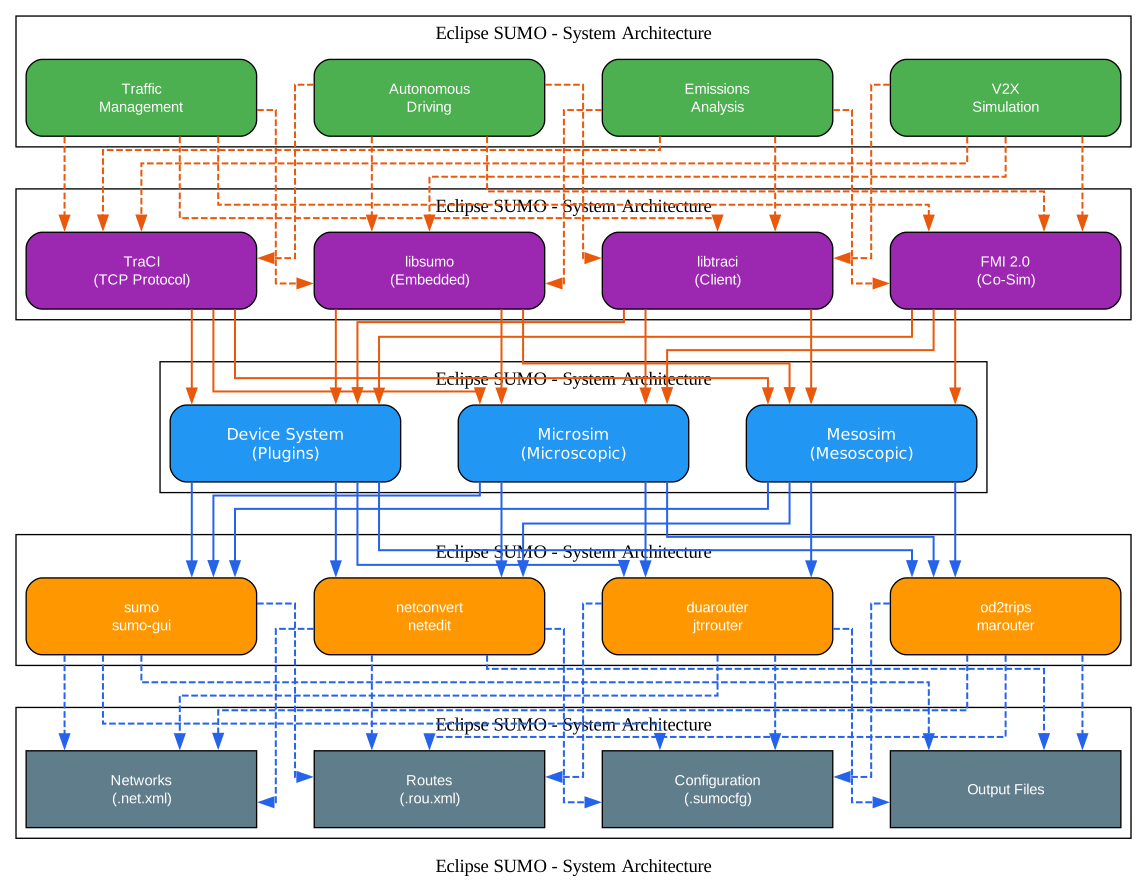
The architecture of Eclipse SUMO follows a five-layer design that cleanly separates concerns from high-level applications down to persistent data storage. At the top, the Applications layer represents the real-world use cases that SUMO serves: Traffic Management systems for municipal planning, Autonomous Driving simulation for self-driving vehicle development, Emissions Analysis for environmental impact studies, and V2X (Vehicle-to-Everything) Simulation for connected vehicle research. These applications do not interact with the simulation engine directly; instead, they communicate through well-defined API boundaries.
The API layer provides four distinct interfaces, each optimized for different integration patterns. TraCI is the original TCP-based client/server protocol that allows external programs to connect to a running simulation over a network socket, retrieve simulation state, and manipulate objects in real time. libsumo takes a different approach by embedding the entire simulation engine directly into the calling process, eliminating socket overhead and enabling tighter integration. libtraci provides a client library that uses the same API as TraCI but can connect to either a remote process or an embedded simulation. Finally, FMI 2.0 (Functional Mock-up Interface) enables co-simulation with tools like Simulink and Modelica, allowing SUMO to exchange state variables with other simulators at synchronized time steps.
The Core Engine layer contains the simulation kernels. The microscopic simulation kernel (Microsim) models every vehicle as an individual agent with car-following and lane-change behavior. The mesoscopic simulation kernel (Mesosim) provides faster but less detailed simulation by grouping vehicles into queues on edges, suitable for large-scale network analysis. The Device System acts as a plugin architecture where capabilities like battery tracking, emissions calculation, Bluetooth simulation, and driver state modeling can be attached to individual vehicles as needed.
The Suite Tools layer encompasses the command-line utilities that form the SUMO workflow: sumo and sumo-gui for running simulations, netconvert and netedit for network processing, duarouter and jtrrouter for route computation, and specialized tools like od2trips and marouter for demand modeling. Each tool is a standalone executable that reads and writes XML files, enabling flexible pipeline composition.
At the bottom, the Data layer defines the file formats that persist simulation state: .net.xml for road networks, .rou.xml for vehicle routes, .sumocfg for simulation configuration, and various output file formats for results. This XML-based data model ensures interoperability and makes it straightforward to inspect, transform, and version-control simulation inputs.
Key Insight: SUMO processes up to 100,000 vehicle updates per second on a single core, making it one of the fastest open-source microscopic traffic simulators capable of handling city-scale networks with 10,000+ edges.
Suite of Tools
SUMO is not a single monolithic program but a collection of specialized tools, each designed for a specific stage of the simulation workflow. Understanding these tools is essential for productive use of the platform.
| Tool | Purpose |
|---|---|
sumo | Microscopic simulation engine (command-line, no GUI) |
sumo-gui | Microscopic simulation with OpenGL visualization |
netconvert | Network importer/converter from multiple formats |
netedit | Graphical network editor for creating and modifying networks |
netgenerate | Generates abstract networks (grid, spider, random) |
duarouter | Computes fastest/shortest routes; Dynamic User Assignment |
jtrrouter | Computes routes using junction turning percentages |
dfrouter | Computes routes from induction loop measurements |
marouter | Macroscopic traffic assignment |
od2trips | Decomposes O/D matrices into single vehicle trips |
polyconvert | Imports POIs and polygons from various formats |
activitygen | Generates demand from population mobility wishes |
emissionsMap | Generates emission maps for visualization |
emissionsDrivingCycle | Calculates emissions from driving cycles |
netconvert is arguably the most critical tool in the suite because it bridges the gap between real-world map data and SUMO’s internal network format. It can import from OpenStreetMap (OSM), PTV VISUM, PTV Vissim, OpenDRIVE, MATsim, ESRI Shapefiles, DLR Navteq format, and SUMO’s native XML. During import, netconvert applies heuristics to clean geometry, infer lane counts, set speed limits, and generate traffic light logic. The resulting .net.xml file contains the complete topological and geometric description of the road network.
netedit provides a graphical interface for network editing, allowing users to modify lane counts, speed limits, turn connections, and traffic light phases without editing XML directly. It supports both creating networks from scratch and refining networks imported from external sources.
duarouter computes routes through the network using Dijkstra’s algorithm or the A* algorithm. It supports Dynamic User Assignment (DUA), which iteratively assigns traffic to routes until a user equilibrium is reached – drivers cannot reduce their travel time by switching routes. This is essential for realistic traffic distribution.
jtrrouter takes a different approach to route generation by using turning percentages at junctions rather than origin-destination pairs. This is useful when only intersection-level traffic counts are available.
activitygen generates traffic demand from a description of the population in the simulated area, including home locations, work locations, and mobility preferences. It produces a complete set of trips that reflect daily activity patterns.
Simulation Workflow

The SUMO simulation workflow follows a structured pipeline that transforms raw geographic and demand data into simulation results. The diagram above illustrates the eight major stages, and understanding each stage is critical for building valid simulations.
Step 1: Network Import. The workflow begins with importing a road network from an external source. The most common source is OpenStreetMap, where netconvert reads OSM XML files and converts them into SUMO’s .net.xml format. During this conversion, netconvert maps OSM tags to SUMO lane types, applies type maps that define lane counts and speed limits for different road classes, and generates intersection geometry including traffic light phases. Alternative sources include PTV VISUM for professional transport models, PTV Vissim for microsimulation networks, and OpenDRIVE for automotive test tracks. Each source requires specific import options and may need manual cleanup via netedit.
Step 2: Network File Generation. The output of netconvert is a .net.xml file that contains the complete road network: nodes (intersections), edges (road segments), lanes, connections (turning movements), traffic light definitions, and right-of-way rules. This file is self-contained and can be validated against SUMO’s XML schema.
Step 3: Demand Generation. Traffic demand can be generated through multiple pathways. The od2trips tool decomposes origin-destination matrices into individual vehicle trips. The duarouter tool computes routes from trip definitions. The activitygen tool generates demand from population data. For simple scenarios, routes can also be defined manually in XML.
Step 4: Route File Generation. The demand generation tools produce .rou.xml files that define vehicle types, vehicle departures, and their routes through the network. Routes can be specified as complete edge sequences or as origin-destination pairs that duarouter resolves.
Step 5: Configuration. The .sumocfg file ties all inputs together, specifying the network file, route files, simulation time range, time step size, and output options. It acts as the single entry point for running a simulation.
Step 6: Simulation Execution. The sumo command-line tool or sumo-gui reads the configuration file and executes the simulation. At each time step (default 1 second), the simulation updates vehicle positions using car-following models, resolves lane changes, processes traffic light states, and collects detector data.
Step 7: TraCI Control (Optional). Running parallel to the simulation, TraCI allows an external program to connect via TCP and exert real-time control. This enables adaptive traffic light control, dynamic rerouting, and custom driver behavior models implemented in Python or other languages.
Step 8: Output Analysis. SUMO produces a rich set of output files: trip information (travel times, route lengths), emissions data (CO2, NOx, PMx per vehicle), floating car data (FCD) for trajectory analysis, and aggregate summary statistics. These outputs feed into post-processing tools for visualization and statistical analysis.
TraCI: Real-Time Traffic Control
The Traffic Control Interface (TraCI) is SUMO’s most powerful feature for researchers who need to go beyond static simulation scenarios. TraCI is a TCP-based client/server protocol that allows external programs to connect to a running SUMO simulation, query the state of any simulated object, and modify behavior in real time.
TraCI supports multiple simultaneous clients, enabling complex control architectures where one client manages traffic lights while another controls vehicle routing. The protocol organizes its API into domains that mirror the simulation objects:
| Domain | Key Operations |
|---|---|
| Vehicle | Get/set speed, route, position, lane; change lane; set color |
| Person | Get walking stage, position, remaining stages |
| VehicleType | Get/set max speed, length, acceleration, emission class |
| Route | Find, add, or replace routes |
| Edge | Get edge occupancy, travel time, CO2 emissions |
| Lane | Get lane position, length, allowed vehicle classes |
| Junction | Get junction shape, traffic light control |
| TrafficLight | Get/set phases, program, controlled links |
| InductionLoop | Get vehicle count, occupancy, speed |
| Simulation | Get current time step, loaded vehicles, collisions |
| GUI | Screenshot, track vehicle, set viewport |
The typical TraCI workflow involves starting SUMO as a subprocess, connecting via TCP, and then executing a control loop that alternates between calling simulationStep() to advance the simulation and querying or modifying objects. Here is a complete Python example:
import os
import sys

# Set SUMO_HOME if not already set
if 'SUMO_HOME' not in os.environ:
    os.environ['SUMO_HOME'] = '/usr/share/sumo'

# Add tools to path
tools = os.path.join(os.environ['SUMO_HOME'], 'tools')
sys.path.append(tools)

import traci

# Start SUMO with TraCI
sumo_binary = os.path.join(os.environ['SUMO_HOME'], 'bin', 'sumo')
sumo_cmd = [sumo_binary, '-c', 'simulation.sumocfg']

traci.start(sumo_cmd)

# Simulation loop
step = 0
while traci.simulation.getMinExpectedNumber() > 0:
    traci.simulationStep()
    # Get vehicle IDs
    vehicle_ids = traci.vehicle.getIDList()
    for veh_id in vehicle_ids:
        speed = traci.vehicle.getSpeed(veh_id)
        position = traci.vehicle.getPosition(veh_id)
    step += 1

traci.close()
For performance-critical applications, TraCI supports subscriptions that batch multiple queries into a single message. Instead of querying each vehicle individually, you subscribe to a set of variables and receive all updates in one response at each time step. This reduces the number of TCP round trips from O(n) to O(1) per step, dramatically improving throughput.
The libsumo library takes performance even further by embedding the SUMO engine directly into the Python process. There is no TCP connection, no separate process, and no serialization overhead. libsumo uses the same Python API as TraCI, so switching between them requires only changing the import statement:
# Instead of: import traci
import libsumo

libsumo.start(['sumo', '-c', 'simulation.sumocfg'])

# Same API as traci
while libsumo.simulation.getMinExpectedNumber() > 0:
    libsumo.simulationStep()
    vehicles = libsumo.vehicle.getIDList()

libsumo.close()
Amazing: TraCI supports up to 50,000 vehicles per second with subscription-based queries, and libsumo eliminates socket overhead entirely by embedding the simulation directly into the calling process - no separate process needed.
Multi-Modal Transport

One of SUMO’s defining capabilities is its support for multi-modal transport simulation. The diagram above illustrates how SUMO models the major transport modes that coexist in urban environments and how they interact at shared infrastructure.
Cars, Buses, and Trucks are simulated as vehicles with full car-following and lane-change models. Each vehicle type has configurable parameters for length, maximum speed, acceleration, deceleration, and emission class. Buses follow defined public transport lines with stops at designated bus stops, where boarding and alighting times affect dwell duration. Trucks have different performance characteristics and may be restricted to specific lanes.
Pedestrians are modeled using one of three walking models. The Striping model is a simple but efficient approach where pedestrians walk in lanes, similar to road traffic. The Interacting model provides more realistic behavior with collision avoidance between pedestrians. For the highest fidelity, SUMO integrates with JuPedSim (Jülich Pedestrian Simulator), an external pedestrian simulation tool that models complex crowd dynamics including bottleneck flow and bidirectional movement.
Bicycles are modeled as a vehicle type with specific speed and size parameters. They share road space with motor vehicles and follow the same car-following and lane-change logic, but with parameters tuned for cycling behavior. Dedicated bicycle lanes can be defined in the network.
Rail and Trains are supported through specialized components. The MSTrainHelper manages train movement along rail edges, MSRailSignal implements railway signaling with block sections, and rail crossing signals manage the interaction between trains and road traffic at grade crossings. This enables simulation of light rail, commuter rail, and freight rail within the same network as road traffic.
Intermodal Trips represent the most sophisticated aspect of SUMO’s multi-modal support. A single person can define a trip chain that combines walking, riding public transit, and driving. For example, a commuter might walk from home to a bus stop, ride the bus to a transit center, then walk to their office. The simulation tracks the person through each stage, managing transfers and waiting times. This person-centric modeling is critical for realistic urban mobility analysis, where most journeys involve multiple transport modes.
The multi-modal simulation also handles infrastructure interactions: pedestrians at crosswalks affect vehicle flow, buses pulling into stops create gaps in traffic, and trains at grade crossings halt road traffic entirely. These interactions emerge naturally from the microscopic simulation approach, producing realistic congestion patterns that aggregate models cannot capture.
Important: SUMO’s intermodal trip system allows a single person to combine walking, riding public transit, and driving in one seamless trip chain - critical for realistic urban mobility modeling where most journeys involve multiple transport modes.
Car-Following Models
SUMO implements a rich set of car-following models, each capturing different aspects of driver behavior. The choice of model significantly affects simulation realism and should be matched to the research question.
| Model | Description | Use Case |
|---|---|---|
| Krauss (default) | Original SUMO model, gap-based with stochastic noise | General traffic simulation |
| KraussOrig1 | Original Krauss model without modifications | Reproducing original research |
| KraussPS | Krauss with improved speed adaptation | Smoother acceleration profiles |
| KraussX | Extended Krauss with additional parameters | Fine-tuned calibration |
| IDM | Intelligent Driver Model, smooth acceleration/deceleration | Theoretical traffic flow research |
| ACC | Adaptive Cruise Control | Advanced driver-assistance systems |
| CACC | Cooperative Adaptive Cruise Control | Connected and automated vehicles |
| CC | Cruise Control | Highway simulation with constant speed |
| EIDM | Extended IDM with additional anticipation | Complex traffic phenomena |
| Kerner | Kerner’s three-phase traffic theory | Traffic breakdown and hysteresis |
| W99 | Wiedemann 99 psycho-physical model | Calibration with VISSIM data |
| Daniel1 | Modified Wiedemann for specific scenarios | Specialized calibration |
| PWag2009 | PTV Vissim Wagner model | VISSIM compatibility |
| SmartSK | Smart/Smooth Krauss variant | Improved lane-change integration |
| Rail | Train-specific following model | Railway simulation |
The Krauss model, SUMO’s default, uses a gap-based approach where a vehicle adjusts its speed to maintain a safe distance from the leader. The safe speed is computed from the current gap, the leader’s speed, and the vehicle’s maximum deceleration. A stochastic noise term introduces natural variation in driver behavior, which can be disabled for deterministic simulations.
The IDM (Intelligent Driver Model) is popular in academic research because it produces smooth, realistic acceleration and deceleration profiles with a closed-form equation. IDM vehicles accelerate toward a desired speed and decelerate when approaching a slower leader, with the transition governed by the desired time headway and maximum deceleration parameters.
The ACC and CACC models are particularly relevant for autonomous driving research. ACC models a single vehicle maintaining a target gap from its leader using radar or lidar. CACC extends this with vehicle-to-vehicle communication, allowing platoon members to share acceleration intentions and maintain tighter following gaps. These models enable research into the traffic flow effects of mixed human-driven and automated vehicle fleets.
Device System and Emissions
SUMO’s device system implements a plugin architecture where capabilities can be attached to individual vehicles on demand. Each device is a module that tracks specific aspects of vehicle behavior and produces output data. Devices are activated through configuration options and can be selectively enabled for specific vehicle types or individual vehicles.
The emissions modeling system is one of the most comprehensive among open-source traffic simulators. SUMO implements multiple emission models:
- HBEFA v2.1, v3.1, and v4.2 (Handbook Emission Factors for Road Transport) provide emission factors based on vehicle class, road type, and traffic situation. HBEFA covers CO2, CO, HC, NOx, PMx, and fuel consumption. The model uses a lookup table approach where each vehicle’s current speed and acceleration map to an emission factor.
- PHEMlight and PHEMlight5 provide more detailed emission modeling based on the Passenger Car and Heavy Duty Emission Model, using engine power demand to compute instantaneous emissions.
- Electric Vehicle Model tracks electricity consumption for battery electric vehicles, accounting for regenerative braking energy recovery.
- MMP Electric Vehicle Model from RWTH Aachen provides a detailed EV model with battery state of charge tracking.
- Zero model assigns no emissions, useful for establishing baselines or modeling hypothetical zero-emission fleets.
Beyond emissions, the device system includes:
- Battery/Electric Vehicle devices (MSDevice_Battery, MSDevice_ElecHybrid) that track state of charge, energy consumption, and charging behavior at charging stations.
- Bluetooth devices (MSDevice_BTsender, MSDevice_BTreceiver) that simulate Bluetooth communication between vehicles for floating car data collection.
- Driver State device (MSDevice_DriverState) that models driver distraction and impairment, affecting reaction times and following behavior.
- GLOSA device (MSDevice_GLOSA) that implements Green Light Optimal Speed Advisory, where vehicles receive signal phase information and adjust speed to arrive at green lights.
- SSM device (MSDevice_SSM) that computes Surrogate Safety Measures like time-to-collision and post-encroachment time for conflict analysis.
- Routing device (MSDevice_Routing) that enables dynamic rerouting based on current traffic conditions.
- Taxi/Dispatch devices (MSDevice_Taxi) with multiple dispatch algorithms including Greedy, GreedyShared, RouteExtension, and TraCI-based custom dispatch.
- ToC device (MSDevice_ToC) that models Take Over Control scenarios for autonomous vehicles, simulating the transition from automated to manual driving.
- FCD devices (MSDevice_FCD, MSDevice_FCDReplay) for floating car data output and replay of recorded trajectories.
- Friction device (MSDevice_Friction) that varies road surface friction based on weather conditions.
- Station Finder device (MSDevice_StationFinder) that guides vehicles to nearby charging or fuel stations.
- Calibrator device (MSDevice_Calibrator) that adjusts traffic flow to match observed detector data.
Takeaway: With built-in HBEFA emission models and electric vehicle battery simulation, SUMO enables researchers to evaluate the environmental impact of traffic policies and EV adoption scenarios without any external tools.
Integration Ecosystem
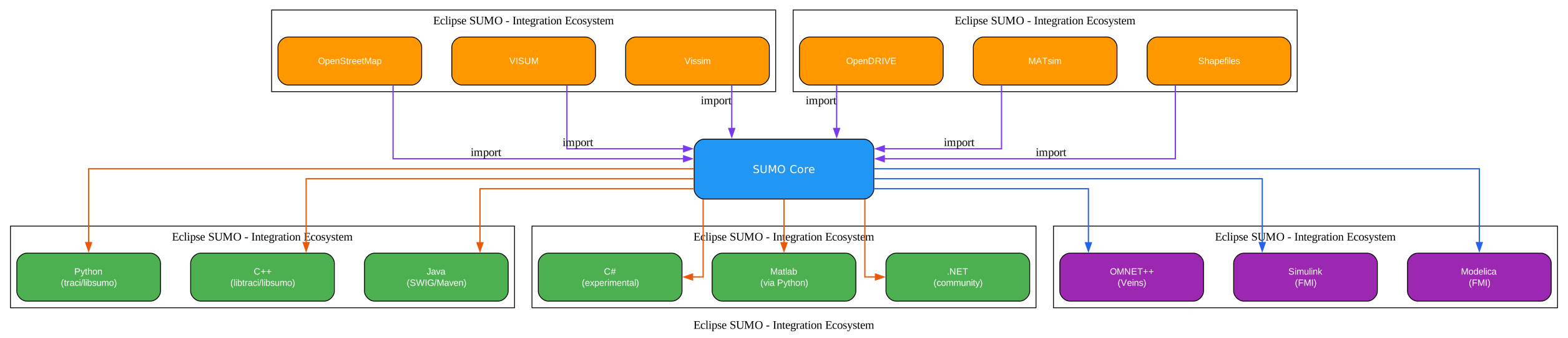
The SUMO ecosystem extends far beyond the core simulation engine, providing integration pathways for programming languages, network data sources, co-simulation frameworks, and domain-specific tools. The diagram above maps these connections and shows how SUMO serves as a central hub in the traffic simulation landscape.
Python Integration is the most mature and widely used. The traci and libsumo packages are available on PyPI and are tested daily against the SUMO development branch. Installing is as simple as pip install eclipse-sumo or pip install traci. The Python API covers every TraCI domain and provides convenient Pythonic wrappers. Python is the recommended language for TraCI-based control programs, and the vast majority of SUMO research publications use Python for their control logic.
C++ Integration is available through two libraries. libtraci is a C++ client library that communicates with SUMO via the TraCI protocol, suitable for high-performance control applications. libsumo is a C++ embedded library that links the SUMO engine directly into the application, providing the same performance benefits as the Python libsumo but for native C++ code.
Java Integration uses SWIG-generated bindings that wrap the C++ libraries into JAR files. A Maven package is available for easy dependency management. Java is commonly used in enterprise traffic management systems that need to integrate SUMO into larger software platforms.
C# Integration provides experimental SWIG bindings for .NET applications. The TraCI.NET community library offers an alternative implementation with a .NET-native API.
Matlab Integration works through a Python bridge (py.traci), allowing Matlab scripts to call the Python TraCI API and process simulation results using Matlab’s numerical computing capabilities.
Veins is a C++ middleware framework that couples SUMO with OMNET++, a discrete event network simulator. Veins enables V2X (Vehicle-to-Everything) simulation where vehicles communicate via IEEE 802.11p or C-V2X, and the network simulator handles message propagation while SUMO handles vehicle movement. This is the standard toolset for connected and automated vehicle research.
Network Data Sources provide the road infrastructure that SUMO simulates. OpenStreetMap is the most accessible source, providing worldwide coverage that netconvert can import directly. PTV VISUM and Vissim are commercial transport planning tools whose networks can be imported for users transitioning from those platforms. OpenDRIVE is the automotive industry standard for road network description, commonly used in driving simulator applications. MATsim is another open-source transport simulation framework whose networks can be converted. ESRI Shapefiles and ArcView formats provide GIS data that can be imported for areas where OSM coverage is incomplete.
FMI 2.0 (Functional Mock-up Interface) enables co-simulation with tools like MATLAB/Simulink and Modelica-based simulators. SUMO acts as an FMU (Functional Mock-up Unit) that exchanges inputs and outputs with other FMUs at synchronized time steps. This allows, for example, a Simulink vehicle dynamics model to control vehicles in the SUMO simulation while SUMO provides the traffic environment.
Installation and Getting Started
Getting SUMO running is straightforward, with multiple installation options depending on your platform and needs.
# Install via pip (recommended for Python users)
pip install eclipse-sumo

# Or install individual packages
pip install traci
pip install libsumo

# Set SUMO_HOME environment variable (Windows)
set SUMO_HOME=C:\Program Files\Eclipse\Sumo

# Set SUMO_HOME environment variable (Linux/macOS)
export SUMO_HOME=/usr/share/sumo

# Verify installation
sumo --version
On Ubuntu and Debian, SUMO is also available through the system package manager:
# Add the SUMO repository
sudo add-apt-repository ppa:sumo/stable
sudo apt-get update

# Install SUMO
sudo apt-get install sumo sumo-tools sumo-doc
Once installed, the typical workflow starts with importing a network from OpenStreetMap:
# Download OSM data for your area of interest
# (use https://www.openstreetmap.org/export or overpass-api)

# Import from OpenStreetMap
netconvert --osm-files map.osm.xml -o network.net.xml

# Import from VISUM
netconvert --visum visum.net -o network.net.xml

# Import from OpenDRIVE
netconvert --opendrive opendrive.xodr -o network.net.xml

# Generate routes from trip definitions
duarouter --net-file network.net.xml --route-files trips.trips.xml -o routes.rou.xml

# Create a configuration file
sumo -c simulation.sumocfg
For a minimal simulation, create three files. First, the network file network.net.xml (generated by netconvert or netgenerate). Second, the route file routes.rou.xml:
<routes>
    <vType id="car" accel="2.6" decel="4.5" sigma="0.5" length="5.0" maxSpeed="55.0"/>
    <trip id="trip0" depart="0" from="edge1" to="edge3"/>
    <trip id="trip1" depart="10" from="edge2" to="edge4"/>
</routes>
Third, the configuration file simulation.sumocfg:
<configuration>
    <input>
        <net-file value="network.net.xml"/>
        <route-files value="routes.rou.xml"/>
    </input>
    <time>
        <begin value="0"/>
        <end value="3600"/>
    </time>
</configuration>
Run the simulation with sumo -c simulation.sumocfg or visualize it with sumo-gui -c simulation.sumocfg.
Traffic Light Control
SUMO provides a comprehensive set of traffic light control options that range from simple fixed-time plans to adaptive and self-organizing systems.
Fixed-time controllers define a static phase plan that cycles through green, yellow, and red intervals for each signal group. These are the simplest controllers and are suitable for isolated intersections with predictable demand patterns.
Actuated controllers extend fixed-time plans with detector-based phase extension. When a green phase is about to end, detectors in the associated lane group can extend the green time if vehicles are still arriving, up to a maximum duration. This reduces wasted green time on lightly trafficked approaches.
Delay-based controllers use a more sophisticated algorithm that estimates the cumulative delay for each approach and selects the phase that minimizes total delay. This produces better performance than simple actuation, especially under unbalanced demand.
NEMA controllers implement the National Electrical Manufacturers Association standard used in North America. NEMA defines a dual-ring, eight-phase controller structure that is the de facto standard for traffic signal control in the United States.
SOTL (Self-Organizing Traffic Light) controllers implement multiple policies where traffic lights adapt their timing based on local traffic conditions without central coordination. The SOTL approach has been shown to produce efficient traffic flow in grid networks, with different policies trading off between throughput, fairness, and simplicity.
Swarm traffic light logic uses swarm intelligence principles where each intersection acts as an autonomous agent that communicates with neighboring intersections to coordinate green waves.
Rail signals and crossings are modeled with dedicated logic that implements block signaling, interlocking, and grade crossing protection. This ensures safe operation of trains within the road network.
Push buttons and drive ways model pedestrian-actuated signals and driveway exits, where a vehicle waiting to enter the road from a private driveway can trigger a green phase.
Conclusion
Eclipse SUMO stands as the most comprehensive open-source platform for microscopic traffic simulation, offering a depth of capability that rivals commercial alternatives while maintaining the transparency and flexibility that only open source can provide. Its 25-year development history has produced a mature, well-documented system that handles everything from simple intersection studies to city-scale multi-modal simulations with emissions modeling and real-time control.
The combination of microscopic and mesoscopic simulation kernels, the extensible device system, the powerful TraCI control interface, and the rich ecosystem of import tools and language bindings makes SUMO uniquely suited for the diverse needs of traffic researchers, urban planners, and autonomous vehicle developers. Whether you are evaluating the traffic impact of a new development, optimizing traffic light timing for an entire city, or testing an autonomous driving algorithm in a realistic traffic environment, SUMO provides the tools and performance to support your work.
The active community, regular releases, and Eclipse Foundation governance ensure that SUMO will continue to evolve and improve. For anyone working in transportation research or urban mobility, SUMO is an essential tool that should be in your toolkit.
Resources:
- GitHub Repository: https://github.com/eclipse-sumo/sumo
- Documentation: https://sumo.dlr.de/docs/
- Eclipse Foundation: https://eclipse.dev/sumo/
- PyPI Package: https://pypi.org/project/eclipse-sumo/

Enjoyed this post? Never miss out on future posts by following us


