Introduction
Local deep research has emerged as one of the most significant breakthroughs in open-source AI tooling, and the Local Deep Research project by LearningCircuit is leading the charge. With 7,243+ GitHub stars and growing at over 2,400 stars per week, this AI-powered research assistant performs deep, agentic research using multiple LLMs and search engines with proper citations – and it is the first open-source project to achieve approximately 95% SimpleQA accuracy fully locally on a single RTX 3090 GPU.
Unlike cloud-dependent alternatives like Perplexity Pro or OpenAI Deep Research, Local Deep Research (LDR) keeps your data entirely under your control. Every query, every document, every research session stays on your machine. There is zero telemetry, zero analytics, and zero tracking. The only network calls LDR makes are the ones you explicitly initiate – search queries to engines you configure and LLM API calls to your chosen provider.
Key Insight: Local Deep Research achieved 95.7% SimpleQA accuracy (287/300) using Qwen3.6-27B on a single RTX 3090, and 77% xbench-DeepSearch (77/100) – the first open-source project to report these benchmarks running fully local on consumer hardware.
The project supports 10 LLM providers (3 local, 5+ cloud), 25+ search engines spanning academic databases, general web, premium APIs, and technical sources, 25+ research strategies, per-user SQLCipher AES-256 encrypted databases, an MCP server with 8 tools for Claude integration, and a journal quality system indexing 212K+ sources with predatory detection. Let us explore how it all works.
How It Works – Architecture Overview
At the heart of Local Deep Research is the AdvancedSearchSystem class, which orchestrates the entire research pipeline. When a user submits a query through any of the four input channels – the Web UI, REST API, MCP Server, or Python API – the system routes it through a strategy factory that selects the appropriate research approach, connects to the configured LLM provider, and dispatches queries across multiple search engines simultaneously.
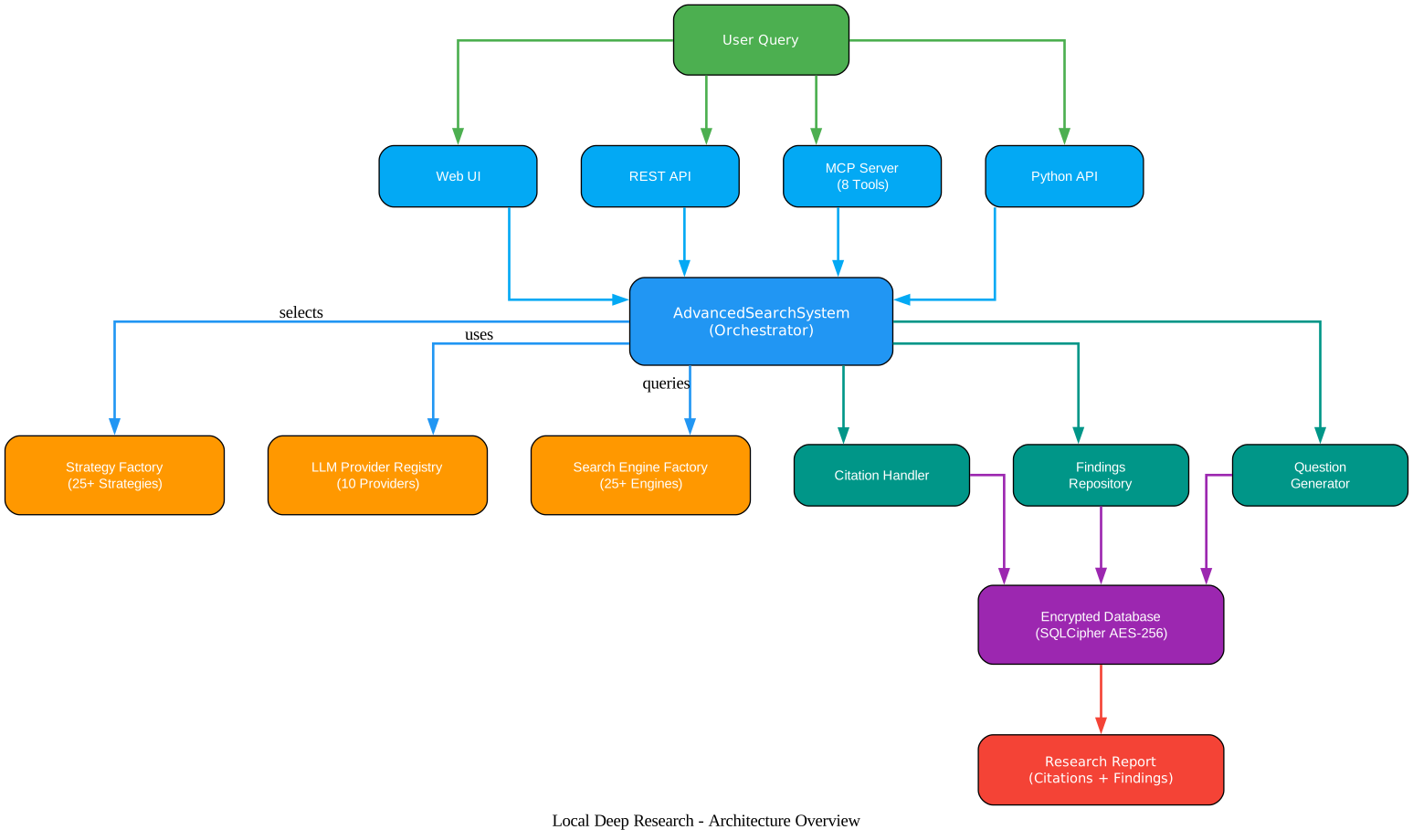
The architecture diagram above illustrates the complete data flow. User queries enter through four channels (Web UI, REST API, MCP Server, Python API) shown in green and blue, all converging on the AdvancedSearchSystem orchestrator. From there, the system dispatches to three core subsystems: the Strategy Factory with 25+ research strategies, the LLM Provider Registry supporting 10 providers, and the Search Engine Factory connecting to 25+ engines. The results flow through the Citation Handler, Findings Repository, and Question Generator before being persisted in the per-user encrypted SQLCipher database (AES-256, shown in purple). The final output is a structured Research Report with citations and findings.
The key architectural insight is that LDR separates the research strategy from the LLM and search engine layers. This means you can swap your LLM provider from Ollama to OpenAI without changing your research strategy, or switch from DuckDuckGo to arXiv without modifying the orchestration logic. Each layer is independently configurable through a settings system that supports environment variables, configuration files, and runtime overrides.
The AdvancedSearchSystem constructor accepts parameters for the LLM, search engine, strategy name, iteration limits, and more. The strategy name determines which of the 25+ research approaches to use – from the headline langgraph-agent strategy (the one behind the 95% SimpleQA result) to simpler strategies like rapid for quick fact-checks or source-based for comprehensive source extraction.
Research Workflow
The research workflow in LDR follows an iterative, agentic pattern. Rather than a single search-and-summarize approach, the system decomposes complex questions, searches multiple sources, evaluates evidence quality, and loops back when the evidence is insufficient.
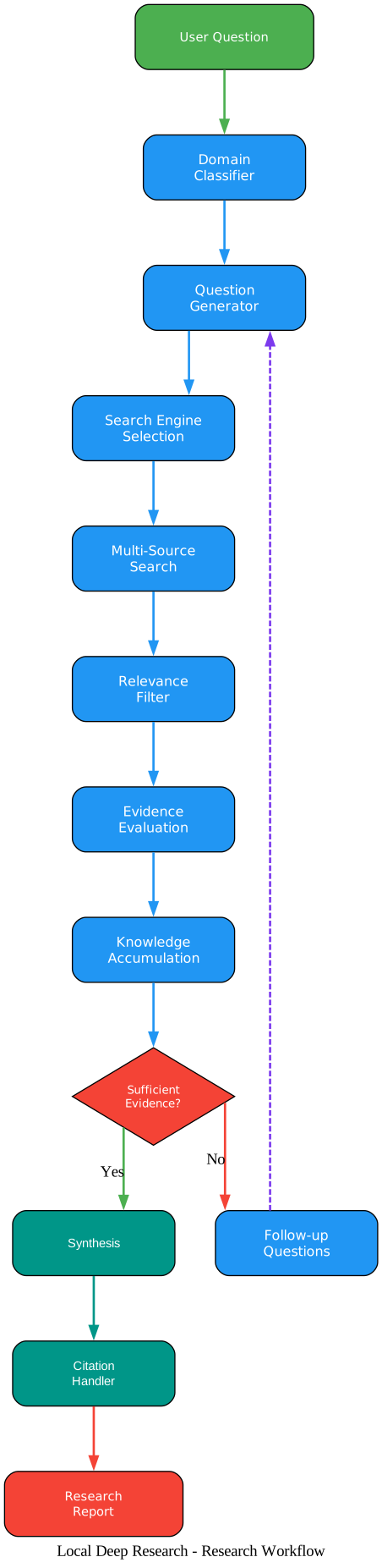
The workflow diagram shows the complete research pipeline. A User Question enters the Domain Classifier, which determines the subject area and selects appropriate search engines. The Question Generator then decomposes the query into targeted sub-questions. The Search Engine Selection step picks the best engines for each sub-question (arXiv for physics, PubMed for medicine, etc.). Multi-Source Search executes queries across multiple engines in parallel. The Relevance Filter discards low-quality results, and Evidence Evaluation assesses the strength and credibility of the remaining evidence.
The critical decision point is the “Sufficient Evidence?” diamond. If the answer is No, the system generates Follow-up Questions and loops back to the Question Generator, refining its approach based on what it has already learned. This iterative loop is what enables LDR to achieve high accuracy on complex queries – it does not stop at the first pass. When sufficient evidence is gathered, the system proceeds to Synthesis, where the LLM combines all findings into a coherent narrative. The Citation Handler then maps every claim to its source, and the final Research Report is produced.
Takeaway: The iterative research loop is the key differentiator. While simple RAG systems do a single retrieval pass, LDR’s agentic loop can make multiple search iterations, each informed by the previous results, until the evidence threshold is met. This is how it achieves 95.7% on SimpleQA.
LLM and Search Ecosystem
One of LDR’s strongest features is its breadth of LLM and search engine support. The system is designed to be provider-agnostic – you can run it entirely locally with Ollama, or connect to cloud providers for more powerful models.
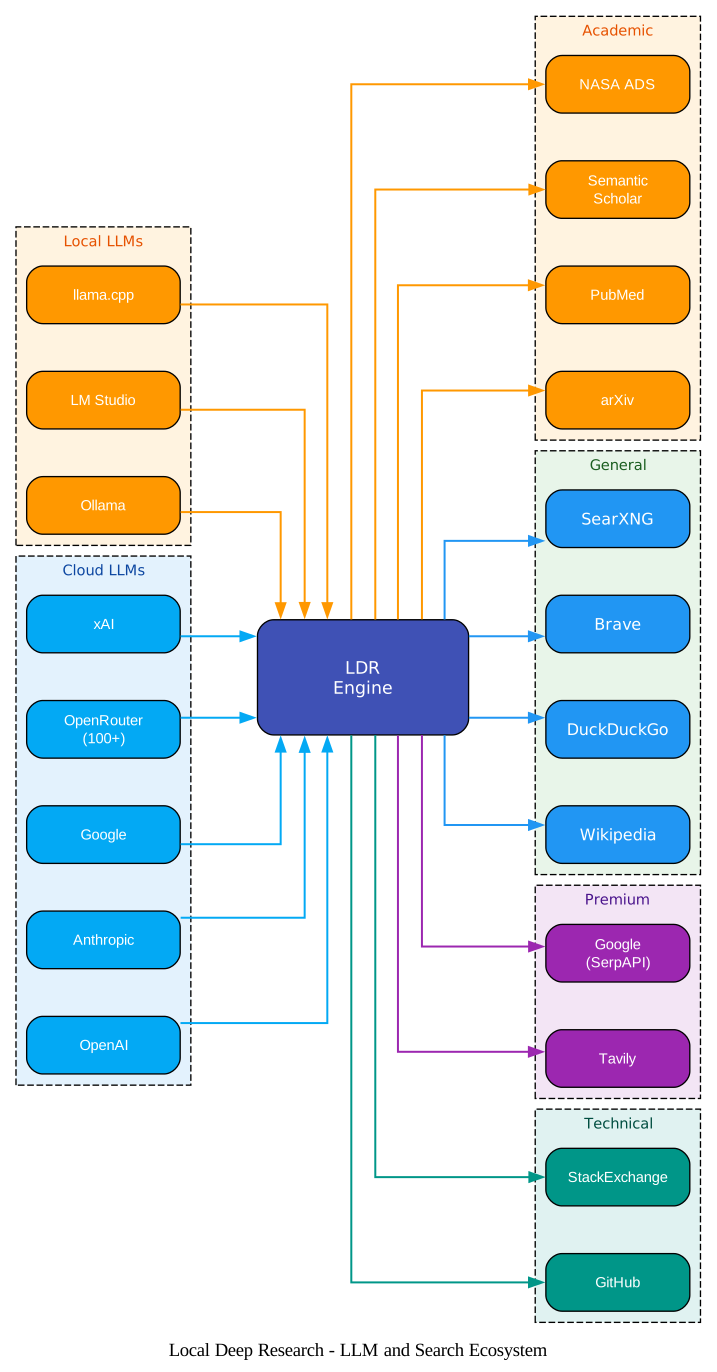
The ecosystem diagram shows the LDR Engine at the center, receiving LLM connections from the left and dispatching search queries to the right. On the LLM side, three local providers (Ollama, LM Studio, llama.cpp) allow fully offline operation with zero API costs. Five cloud providers (OpenAI, Anthropic, Google, OpenRouter with 100+ models, and xAI) offer access to more powerful models when needed. The LLM Provider Registry handles authentication, rate limiting, and model selection transparently.
On the search side, four categories of engines are available. Academic engines (arXiv, PubMed, Semantic Scholar, NASA ADS) provide peer-reviewed research papers. General engines (Wikipedia, DuckDuckGo, Brave, SearXNG) cover broad web searches. Premium engines (Tavily, Google via SerpAPI) offer AI-enhanced and high-volume search. Technical engines (GitHub, StackExchange) target developer and technical content. Additionally, LDR supports local document search through LangChain retrievers, meaning you can search your own PDFs, markdown files, and embedded documents alongside web sources.
The langgraph-agent strategy is particularly noteworthy because it autonomously decides which search engines to use based on the query domain. A question about quantum physics will automatically route to arXiv and Semantic Scholar, while a question about a Python library will route to GitHub and StackExchange. This adaptive engine selection is a major factor in the high benchmark scores.
Amazing: With 25+ search engines and 10 LLM providers, LDR gives you more flexibility than any commercial research tool. You can mix local LLMs with premium search APIs, or run everything locally with SearXNG and Ollama – the choice is yours.
Knowledge Compounding
Perhaps the most powerful feature of LDR is its knowledge compounding loop. Every research session finds valuable sources. Instead of discarding them after the report is generated, LDR lets you download those sources directly into your encrypted library. The system then indexes and embeds them, making them searchable in future research sessions. Over time, your personal knowledge base grows, and each subsequent research query benefits from the accumulated knowledge.
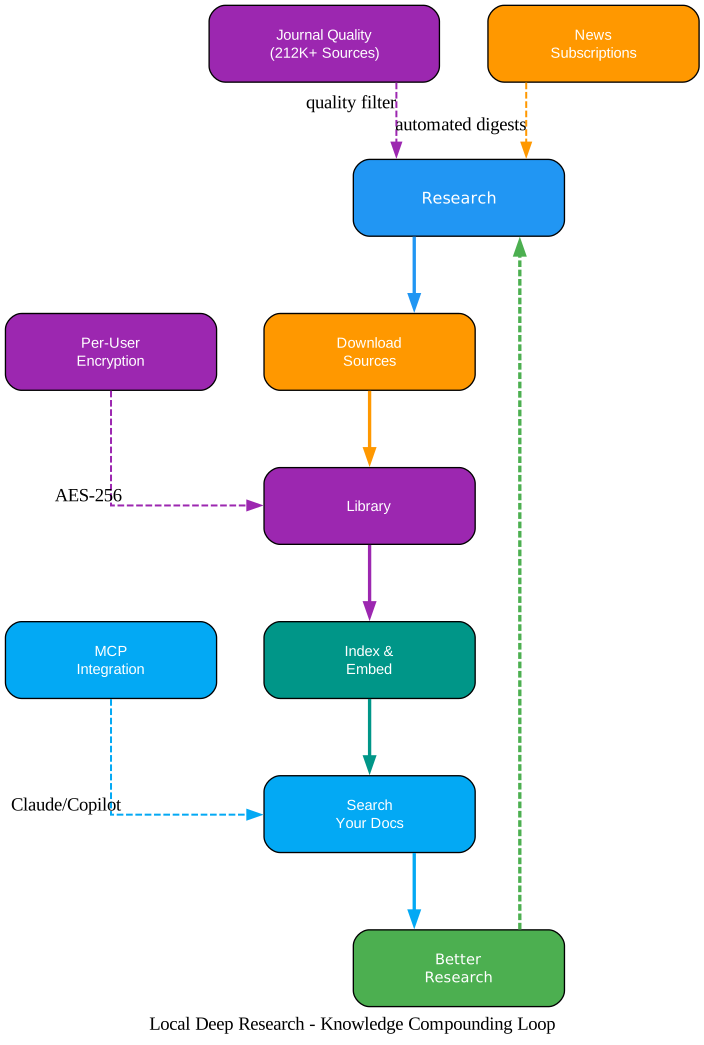
The knowledge compounding diagram shows the cyclical flow: Research leads to Download Sources, which feeds into your Library. From there, Index and Embed makes the documents searchable via Search Your Docs, which enables Better Research – and the cycle continues. The side elements show supporting systems: Journal Quality (212K+ indexed sources with predatory detection) filters research quality, News Subscriptions provide automated research digests, MCP Integration connects to Claude Desktop and Claude Code, and Per-User Encryption (AES-256) ensures each user’s data is isolated and secure.
This compounding effect means that LDR gets better over time. The first time you research a topic, you get results from the web. The second time, you also get results from your own previously downloaded sources. The third time, your accumulated knowledge base provides even richer context. This is a fundamental advantage over one-shot research tools.
The Journal Quality System deserves special mention. It indexes over 212,000 sources from OpenAlex (CC0), DOAJ (CC0), and the Stop Predatory Journals database (MIT license). When LDR encounters a source, it automatically checks whether the journal is legitimate or predatory, giving you confidence in the quality of your research citations.
Important: The knowledge compounding loop means LDR improves with use. Each research session adds to your encrypted library, which gets indexed and embedded for future searches. This creates a flywheel effect where your personal knowledge base grows richer over time, making each subsequent research query more informed and comprehensive.
Installation
LDR offers three installation methods to suit different needs.
Option 1: pip Install
The simplest way to get started:
pip install local-deep-research
python -m local_deep_research.web.app
This starts the web UI on http://localhost:5000. You will also need Ollama (or any OpenAI-compatible LLM endpoint) and SearXNG running. See the pip install guide for the full setup.
SQLCipher encryption is included via pre-built wheels – no compilation needed. On Windows, PDF export requires Pango. If you encounter encryption issues, set export LDR_BOOTSTRAP_ALLOW_UNENCRYPTED=true to use standard SQLite instead.
Option 2: Docker Run (Linux)
For a quick Docker setup on native Linux:
# Step 1: Pull and run Ollama
docker run -d -p 11434:11434 --name ollama ollama/ollama
docker exec ollama ollama pull gpt-oss:20b

# Step 2: Pull and run SearXNG
docker run -d -p 8080:8080 --name searxng searxng/searxng

# Step 3: Pull and run Local Deep Research
docker run -d -p 5000:5000 --network host \
  --name local-deep-research \
  --volume "deep-research:/data" \
  -e LDR_DATA_DIR=/data \
  localdeepresearch/local-deep-research
Note: --network host only works on native Linux. Mac and Windows users should use Docker Compose instead.
Option 3: Docker Compose (All Platforms)
CPU-only (works on all platforms including Mac and Windows):
curl -O https://raw.githubusercontent.com/LearningCircuit/local-deep-research/main/docker-compose.yml
docker compose up -d
With NVIDIA GPU (Linux):
curl -O https://raw.githubusercontent.com/LearningCircuit/local-deep-research/main/docker-compose.yml
curl -O https://raw.githubusercontent.com/LearningCircuit/local-deep-research/main/docker-compose.gpu.override.yml
docker compose -f docker-compose.yml -f docker-compose.gpu.override.yml up -d
Open http://localhost:5000 after approximately 30 seconds.
Usage Examples
Python API
The simplest way to use LDR programmatically:
from local_deep_research.api import LDRClient, quick_query

# Option 1: One-line research
summary = quick_query("username", "password", "What is quantum computing?")
print(summary)

# Option 2: Client for multiple operations
client = LDRClient()
client.login("username", "password")
result = client.quick_research("What are the latest advances in quantum computing?")
print(result["summary"])
MCP Server (Claude Integration)
Install with MCP extras and configure Claude Desktop:
pip install "local-deep-research[mcp]"
Add to your claude_desktop_config.json:
{
  "mcpServers": {
    "local-deep-research": {
      "command": "ldr-mcp",
      "env": {
        "LDR_LLM_PROVIDER": "openai",
        "LDR_LLM_OPENAI_API_KEY": "sk-..."
      }
    }
  }
}
The MCP server provides 8 tools: search (raw engine queries, no LLM cost), quick_research (1-5 min), detailed_research (5-15 min), generate_report (10-30 min), analyze_documents (local collections), list_search_engines, list_strategies, and get_configuration.
Command Line
# Run benchmarks
python -m local_deep_research.benchmarks --dataset simpleqa --examples 50

# Manage rate limiting
python -m local_deep_research.web_search_engines.rate_limiting status
python -m local_deep_research.web_search_engines.rate_limiting reset
Enterprise Integration
Connect LDR to your existing knowledge base using LangChain retrievers:
from local_deep_research.api import quick_summary

# Use your existing LangChain retriever
result = quick_summary(
    query="What are our deployment procedures?",
    retrievers={"company_kb": your_retriever},
    search_tool="company_kb"
)
Works with FAISS, Chroma, Pinecone, Weaviate, Elasticsearch, and any LangChain-compatible retriever.
Key Features
| Feature | Description |
|---|---|
| 25+ Research Strategies | Including langgraph-agent (headline), source-based, iterative, parallel, rapid, recursive, adaptive, smart, browsecomp, evidence, constrained, dual-confidence, and more |
| 25+ Search Engines | arXiv, PubMed, Semantic Scholar, Wikipedia, DuckDuckGo, Brave, SearXNG, Tavily, Google (SerpAPI), GitHub, StackExchange, Wayback Machine, Guardian, local documents, LangChain retrievers |
| 10 LLM Providers | Local: Ollama, LM Studio, llama.cpp; Cloud: OpenAI, Anthropic, Google, OpenRouter (100+ models), xAI; Custom endpoints with auto-discovery |
| SQLCipher AES-256 | Per-user encrypted databases with Signal-level security. No password recovery means true zero-knowledge |
| MCP Server | 8 tools for Claude Desktop/Code integration via STDIO transport |
| Journal Quality System | 212K+ indexed sources with predatory detection, powered by OpenAlex, DOAJ, and Stop Predatory Journals |
| Knowledge Compounding | Research -> Download -> Library -> Index and Embed -> Search Your Docs -> Better Research |
| 28 UI Themes | Core, dev, nature, and research theme categories |
| News Subscriptions | Automated research digests with daily, weekly, or custom schedules |
| Zero Telemetry | No analytics, no tracking, no phone-home calls. Usage metrics stay in your local encrypted database |
| Docker Supply Chain Security | Images signed with Cosign, SLSA provenance, SBOMs attached |
| Real-time Updates | WebSocket support for live research progress |
| Export Options | PDF and Markdown export with proper citations |
Security and Privacy
LDR takes security seriously at every level:
- Per-User Encryption: Each user gets an isolated SQLCipher database encrypted with AES-256. No password recovery means true zero-knowledge – even server administrators cannot read your data.
- Zero Telemetry: No analytics SDKs, no phone-home calls, no crash reporting, no external scripts. The only network calls are ones you initiate.
- Supply Chain Security: Docker images are signed with Cosign, include SLSA provenance attestations, and attach SBOMs. Verify with
cosign verify localdeepresearch/local-deep-research:latest. - Security Scanning: The project uses CodeQL, Semgrep, Bearer, OSV-Scanner, Dockle, Hadolint, Checkov, Zizmor, and OWASP ZAP for continuous security auditing.
- MCP Security Note: The MCP server is designed for local use only via STDIO transport. It has no built-in authentication or rate limiting. Do not expose it over a network without implementing proper security controls.
Benchmarks
Headline results from the community benchmarks using the langgraph-agent strategy with Serper search, fully local via Ollama:
| Model | SimpleQA | xbench-DeepSearch |
|---|---|---|
| Qwen3.6-27B | 95.7% (287/300) | 77.0% (77/100) |
| Qwen3.5-9B | 91.2% (182/200) | 59.0% (59/100) |
| gpt-oss-20B | 85.4% (295/346) | – |
Caveats: small samples, LLM-grader noise, and SimpleQA contamination risk on newer base models. See the HF dataset card for the full leaderboard.
Troubleshooting
| Issue | Solution |
|---|---|
| Port 5000 not accessible on Windows | --network host does not work on Docker Desktop. Use Docker Compose instead. See the Windows/WSL2 FAQ |
| SQLCipher encryption errors | Set export LDR_BOOTSTRAP_ALLOW_UNENCRYPTED=true to fall back to standard SQLite |
| PDF export fails on Windows | Install Pango. See the WeasyPrint setup guide |
| No model configured error | Since v1.7, llm.model has no default. Pick a model in Settings > LLM, or set LDR_LLM_MODEL environment variable |
| llama.cpp provider not working | The llamacpp provider now uses HTTP instead of in-process loading. Run llama-server -m <model.gguf> and set LDR_LLM_LLMACPP_URL=http://localhost:8080/v1 |
| SearXNG connection refused | Ensure SearXNG is running on the configured port. Docker Compose handles this automatically |
| Rate limiting errors | Use python -m local_deep_research.web_search_engines.rate_limiting reset to reset rate limits |
| Ollama model not found | Pull the model first: ollama pull <model-name>. Check the LDR Benchmarks for recommended models |
Conclusion
Local Deep Research represents a paradigm shift in AI-powered research tools. By achieving 95.7% SimpleQA accuracy on consumer hardware with zero cloud dependency, it proves that powerful research AI does not require sending your queries to a remote server. The combination of 25+ search engines, 10 LLM providers, per-user encrypted databases, and a knowledge compounding loop creates a research tool that gets better the more you use it.
Whether you are a journalist investigating sensitive topics, a researcher working with proprietary data, or simply someone who values privacy, LDR gives you the tools to conduct deep, agentic research without compromising your data. The MCP server integration means you can even use it directly from Claude Desktop or Claude Code, making it a seamless part of your existing AI workflow.
- GitHub Repository: https://github.com/LearningCircuit/local-deep-research
- Documentation: Installation Guide, Configuration, API Quickstart
- Benchmarks: LDR Benchmarks on Hugging Face
- Community: Discord, Reddit, YouTube

Enjoyed this post? Never miss out on future posts by following us


