Quarkdown: Markdown With Superpowers for Papers, Presentations, and More
If you have ever wrestled with LaTeX to produce a research paper, or fought with slide decks that refuse to render correctly, Quarkdown is the project you have been waiting for. Quarkdown is a modern Markdown-based typesetting system that brings Markdown with superpowers to the table – a Turing-complete extension of CommonMark and GFM that lets you write papers, presentations, websites, books, and knowledge bases from a single source file. With over 11,000 stars on GitHub, this Kotlin-powered tool is rapidly becoming the go-to choice for developers and researchers who want the readability of Markdown without sacrificing the power of a full typesetting system.
In this post, we will explore what makes Quarkdown special, walk through installation and setup, examine its architecture, and show you how to start creating professional documents today.
What Is Quarkdown?
Quarkdown is an open-source typesetting system built on top of Markdown. Unlike traditional Markdown processors that produce only HTML, Quarkdown extends Markdown with a function call syntax that makes the language Turing-complete. This means you can define variables, write conditional logic, create loops, and even build your own reusable functions – all within your Markdown source files.
The project is written in Kotlin and compiles to JVM bytecode, requiring Java 17 or higher. It ships with a comprehensive standard library that includes layout builders, I/O operations, math expressions, bibliography management, and much more. The result is a single .qd source file that can compile into:
- Plain HTML – continuous-flow documents like Notion or Obsidian pages, perfect for static websites and knowledge management
- Paged HTML – print-ready papers, articles, and books via paged.js
- Slides – interactive presentations powered by reveal.js
- Docs – wikis, technical documentation, and large knowledge bases
- PDF – all document types and features supported in HTML are also available in PDF export
- Plain text – for terminal output and simple text processing
You select the output format directly in your source file with a single function call:
.doctype {paged}
Architecture Overview
Quarkdown processes your .qd source files through a multi-stage compilation pipeline. Each stage transforms the input progressively, from raw text to the final output artifact. The following diagram illustrates the complete architecture:
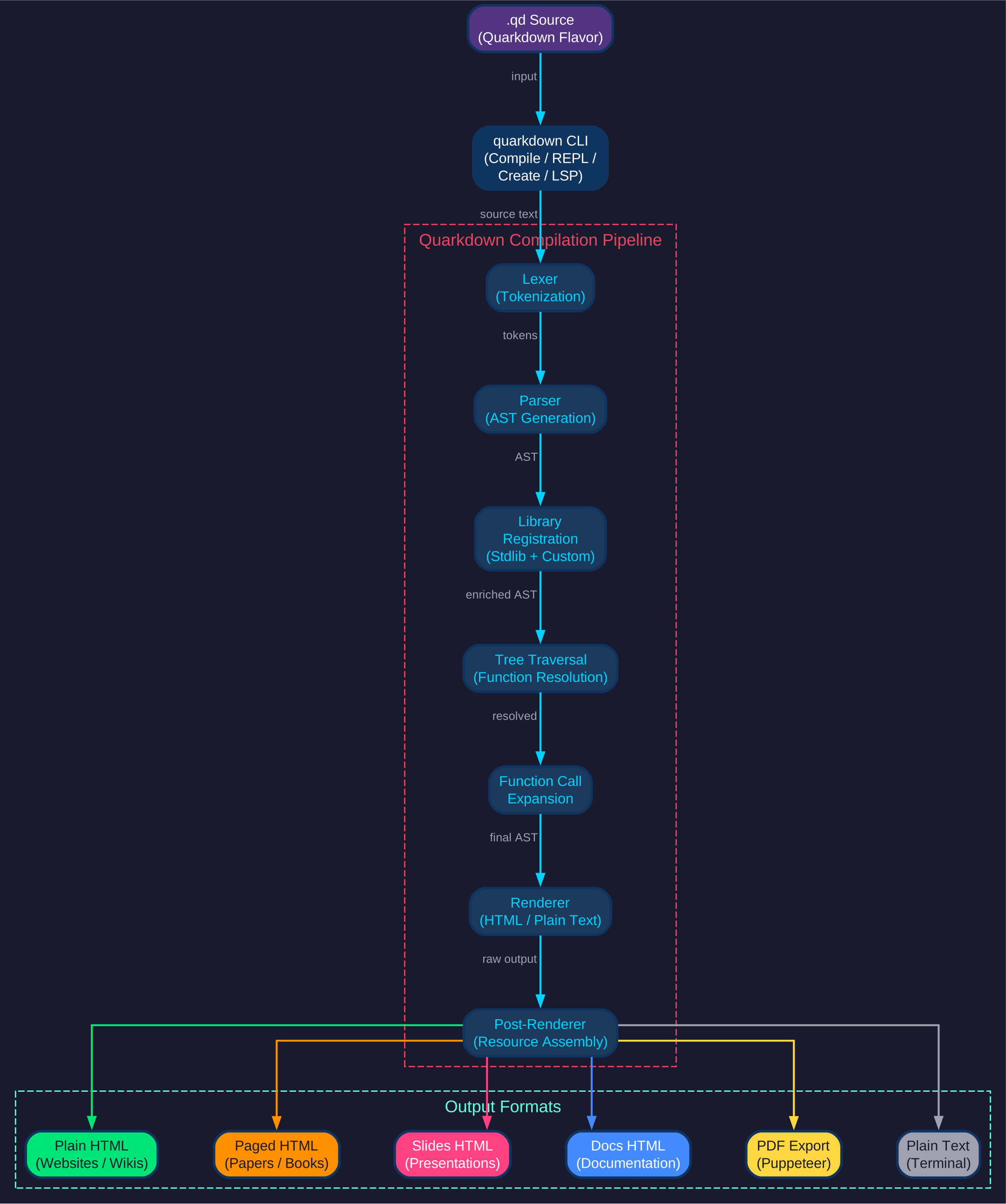
The architecture follows a clean pipeline pattern. Source files written in the Quarkdown Flavor (the extended Markdown syntax) enter through the CLI, which initializes the compilation pipeline. The pipeline consists of seven distinct stages: Lexing, Parsing, Library Registration, Tree Traversal, Function Call Expansion, Rendering, and Post-Rendering. Each stage produces output that feeds into the next, with a shared mutable context that accumulates state throughout the process. The final Post-Rendering stage assembles all resources and produces one of six output formats: Plain HTML for websites, Paged HTML for papers and books, Slides HTML for presentations, Docs HTML for wikis, PDF via Puppeteer, or plain text for terminal output.
The modular design means that adding a new output format or extending the language is straightforward – you implement a new renderer or register additional library functions without touching the core pipeline. This extensibility is one of Quarkdown’s greatest strengths.
The Compilation Pipeline in Detail
Understanding the compilation pipeline is key to appreciating how Quarkdown transforms simple Markdown into rich, dynamic documents. Each stage has a specific responsibility:

Stage 1 – Lexing: The lexer tokenizes the raw .qd source text into a stream of Quarkdown tokens. These tokens represent the extended syntax elements that go beyond standard Markdown, including function calls, block arguments, and inline expressions.
Stage 2 – Parsing: The parser consumes the token stream and builds an Abstract Syntax Tree (AST). The AST captures the hierarchical structure of the document, including nested function calls, block-level elements, and inline content.
Stage 3 – Library Registration: The standard library (stdlib) and any user-defined libraries are loaded into the mutable context. This makes all built-in and custom functions available for resolution in later stages.
Stage 4 – Tree Traversal: The pipeline walks the AST, resolving function calls and collecting attributes. This is where the context is populated with document metadata, variable assignments, and other state information.
Stage 5 – Function Call Expansion: Each function call node in the AST is evaluated, producing new nodes that replace the original call. This is the Turing-complete heart of Quarkdown – functions can call other functions, produce conditional output, and even define new functions on the fly.
Stage 6 – Rendering: The fully expanded AST is converted to the target output format (HTML or plain text) by the renderer. The renderer is selected based on the document type specified in the source.
Stage 7 – Post-Rendering: The raw output is assembled into the final artifact. Resources such as stylesheets, scripts, and images are bundled, and the output is wrapped into the appropriate structure (a complete HTML document, a PDF, etc.).
A mutable context object threads through the entire pipeline, accumulating state and enabling later stages to access information gathered by earlier ones. This design avoids redundant tree traversals and keeps the pipeline efficient.
Key Features

Function Calls in Markdown
The defining feature of Quarkdown is its function call syntax. A function call looks like this:
.somefunction {arg1} {arg2}
    Body argument
The leading dot (.) signals a function call, curly braces enclose arguments, and indented content serves as the body argument. This syntax integrates seamlessly with standard Markdown, so you can mix function calls with headings, lists, code blocks, and all the Markdown constructs you already know.
Custom Function Definitions
You can define your own functions directly in Markdown:
.function {greet}
    to from:
    **Hello, .to** from .from!

.greet {world} from:{iamgio}
This produces: Hello, world from iamgio!
Function definitions support named parameters (like from: above), default values, and body arguments. This makes Quarkdown genuinely Turing-complete – you can write loops, conditionals, and recursive functions, all within your document source.
Standard Library
Quarkdown ships with an extensive standard library organized into modules:
| Module | Description |
|---|---|
| Layout | Row, column, grid, and alignment builders |
| Slides | Slide-specific functions for presentations |
| Document | Document metadata, page setup, and configuration |
| Text | Text formatting, transformation, and decoration |
| Math | Mathematical expressions and computations |
| Logical | Conditionals (if/else), loops (for/while) |
| Collection | List and dictionary operations |
| Dictionary | Key-value data structures |
| Data | Data manipulation and transformation |
| Reference | Cross-references, footnotes, and citations |
| Bibliography | Bibliography management and formatting |
| Localization | Multi-language document support |
| Html | Raw HTML injection for advanced customization |
| Mermaid | Mermaid diagram rendering |
| Emoji | Emoji insertion and rendering |
| Icon | Icon library integration |
| Ecosystem | Library loading and external package management |
Multi-Format Output
A single Quarkdown project can compile into any of the supported output formats. You control the output type with the .doctype function:
.doctype {plain}    // Continuous-flow HTML (default)
.doctype {paged}    // Print-ready papers and books
.doctype {slides}   // Interactive presentations
.doctype {docs}     // Wikis and documentation
PDF export is available for all document types through the --pdf CLI flag, which uses Puppeteer under the hood.
Live Preview and VS Code Integration
Quarkdown provides a VS Code extension with live preview support. Combine the -p (preview) and -w (watch) flags to get real-time document updates as you edit:
quarkdown c file.qd -p -w
The VS Code extension also provides syntax highlighting, autocomplete, and error diagnostics through a Language Server Protocol (LSP) implementation.
Comparison with Alternatives
Quarkdown occupies a unique position in the document generation landscape. Here is how it compares to other popular tools:
| Feature | Quarkdown | LaTeX | Typst | AsciiDoc | MDX |
|---|---|---|---|---|---|
| Concise and readable | Yes | No | Yes | Yes | Yes |
| Full document control | Yes | Yes | Yes | No | No |
| Scripting | Yes | Partial | Yes | No | Yes |
| Book/article export | Yes | Yes | Yes | Yes | Third-party |
| Presentation export | Yes | Yes | Yes | Yes | Third-party |
| Static site export | Yes | No | Experimental | Yes | Yes |
| Docs/wiki export | Yes | No | No | Yes | Yes |
| Learning curve | Low | High | Medium | Low | Low |
| Output targets | HTML, PDF, TXT | PDF, PostScript | HTML, PDF | HTML, PDF, ePub | HTML |
The key differentiator is that Quarkdown combines the readability of Markdown with the full control of a typesetting system, while also supporting scripting natively. You do not need to learn a separate templating language or switch tools when you need to produce a different output format.
Installation
Quarkdown offers multiple installation methods depending on your platform.
Linux/macOS (Install Script)
curl -fsSL https://raw.githubusercontent.com/quarkdown-labs/get-quarkdown/refs/heads/main/install.sh | sudo env "PATH=$PATH" bash
Root privileges allow the script to install Quarkdown into /opt/quarkdown and its wrapper script into /usr/local/bin/quarkdown. If Java 17, Node.js, or npm are missing, they will be installed automatically using the system’s package manager.
Linux/macOS (Homebrew)
brew install quarkdown-labs/quarkdown/quarkdown
Windows (Install Script)
Open PowerShell and run:
irm https://raw.githubusercontent.com/quarkdown-labs/get-quarkdown/refs/heads/main/install.ps1 | iex
Windows (Scoop)
scoop bucket add java
scoop bucket add quarkdown https://github.com/quarkdown-labs/scoop-quarkdown
scoop install quarkdown
GitHub Actions
For CI/CD integration, use the setup-quarkdown action:
- uses: quarkdown-labs/setup-quarkdown@v1
- run: quarkdown c document.qd
Manual Installation
Download quarkdown.zip from the latest stable release and unzip it, or build from source with:
gradlew installDist
Requirements:
- Java 17 or higher
- Node.js and npm (only required for PDF export via Puppeteer)
Optionally, add <install_dir>/bin to your PATH for convenient CLI access.
Getting Started
Creating a New Project
The fastest way to start is with the project wizard:
quarkdown create my-project
This launches an interactive prompt that sets up a new Quarkdown project with all metadata and initial content already in place. Alternatively, you can manually create a .qd source file and start writing.
Compiling a Document
To compile a Quarkdown file:
quarkdown c file.qd
If your project spans multiple source files, compile the root file (the one that includes the others):
quarkdown c main.qd
Live Preview
For the best development experience, combine preview and watch flags:
quarkdown c file.qd -p -w
-por--preview: opens a browser tab and reloads content after each compilation-wor--watch: recompiles automatically when any source file changes
Together, these flags give you a live preview workflow where changes appear in the browser as you save.
Interactive REPL
To experiment with Quarkdown syntax interactively:
quarkdown repl
This opens a read-eval-print loop where you can type Quarkdown expressions and see their output immediately.
PDF Export
To produce a PDF file:
quarkdown c file.qd --pdf
This requires Node.js, npm, and Puppeteer to be installed. See the PDF export documentation for details.
Practical Examples
Writing a Research Paper
.doctype {paged}
.title {Attention Is All You Need}
.author {Vaswani et al.}
.tableofcontents
# Introduction
The dominant sequence transduction models are based on complex recurrent
or convolutional neural networks...
## Background
The goal of reducing sequential computation also forms the foundation of
the Extended Neural GPU...
.row alignment:{spacebetween}


Creating a Presentation
.doctype {slides}
.theme {dark}

# Introduction to Quarkdown

## What is Quarkdown?

- A modern Markdown-based typesetting system
- Turing-complete function syntax
- Multiple output formats from a single source

## Key Features

.row alignment:{spacebetween}
    .column {width:50%}
        - Function calls
        - Custom definitions
        - Loops and conditionals

    .column {width:50%}
        - Live preview
        - PDF export
        - VS Code extension
Building a Knowledge Base
.doctype {docs}

.function {note}
    type content:
    .if {.type == {important}}
        .box {Important} {.content} color:{red}
    .else
        .box {Note} {.content} color:{blue}

.note type:{important}
    This is a critical note that appears in a red box.
Project Structure and Modules
Quarkdown is organized as a multi-module Gradle project with clear separation of concerns:
| Module | Purpose |
|---|---|
quarkdown-core | Language flavor, lexer, parser, AST, pipeline, rendering interfaces |
quarkdown-html | HTML renderer implementation (plain, paged, slides, docs) |
quarkdown-plaintext | Plain text renderer |
quarkdown-stdlib | Standard library of built-in functions |
quarkdown-cli | Command-line interface (compile, REPL, create, LSP) |
quarkdown-server | Web server for live preview |
quarkdown-interaction | Interactive content and event handling |
quarkdown-lsp | Language Server Protocol implementation |
quarkdown-quarkdoc | Documentation generation (Dokka plugin) |
quarkdown-quarkdoc-reader | Documentation reader |
quarkdown-libs | Bundled .qd library files |
quarkdown-install-layout-navigator | Install directory layout navigation |
quarkdown-test | Testing utilities |
The main entry point is QuarkdownCli.kt, which delegates to subcommands: CompileCommand, ReplCommand, StartWebServerCommand, CreateProjectCommand, and LanguageServerCommand.
Troubleshooting
Java Not Found
If you see a “java” command not found error, ensure Java 17 or higher is installed:
java -version
On macOS, you can install Java via Homebrew:
brew install openjdk@17
On Ubuntu/Debian:
sudo apt install openjdk-17-jdk
PDF Export Fails
PDF export requires Node.js, npm, and Puppeteer. Install them with:
# Install Node.js (if not already installed)
npm install -g puppeteer
If Puppeteer fails to launch, you may need to install Chromium dependencies. On Linux:
sudo apt install -y libx11-xcb1 libxcomposite1 libxcursor1 libxdamage1 libxi6 libxtst6 libnss3 libcups1 libxrandr2 libasound2 libatk1.0-0 libgtk-3-0
Live Preview Not Refreshing
Make sure you are using both -p and -w flags together:
quarkdown c file.qd -p -w
The -p flag enables preview mode, and -w enables file watching. Without -w, changes will not trigger recompilation.
Function Call Not Recognized
Quarkdown function calls start with a dot (.) and use curly braces for arguments:
// Correct
.function {name}
    body

// Incorrect - missing dot
function {name}
Also ensure that the function exists in the standard library or has been defined earlier in your document. Check the Quarkdown wiki for the complete function reference.
Build from Source Fails
If building from source fails, make sure you are using Gradle 8.3+ and Java 17+:
cd quarkdown
./gradlew installDist
The distribution will be available in build/install/quarkdown/.
Conclusion
Quarkdown represents a significant leap forward in document authoring. By extending Markdown with a Turing-complete function syntax, it eliminates the need to switch between different tools for papers, presentations, websites, and books. The Kotlin-based pipeline architecture is clean and extensible, the standard library is comprehensive, and the live preview workflow makes authoring a pleasure.
Whether you are a researcher writing papers, a developer building documentation, or a speaker preparing slides, Quarkdown gives you the power of a typesetting system with the simplicity of Markdown. Give it a try and discover what Markdown with superpowers can do.
Links:
- GitHub: https://github.com/iamgio/quarkdown
- Wiki: https://quarkdown.com/wiki
- Documentation: https://quarkdown.com/docs
- VS Code Extension: https://marketplace.visualstudio.com/items?itemName=quarkdown.quarkdown-vscode
- Quickstart Guide: https://quarkdown.com/wiki/quickstart

Enjoyed this post? Never miss out on future posts by following us


