GhostTrack: Open Source OSINT Tool for Location and Identity Tracking
GhostTrack is an open source OSINT (Open Source Intelligence) tool that enables security researchers, penetration testers, and information gathering professionals to track IP addresses, phone numbers, and usernames across social media platforms. With over 11,500 stars on GitHub, it has become a popular choice for reconnaissance and digital footprint analysis.
Understanding the Architecture
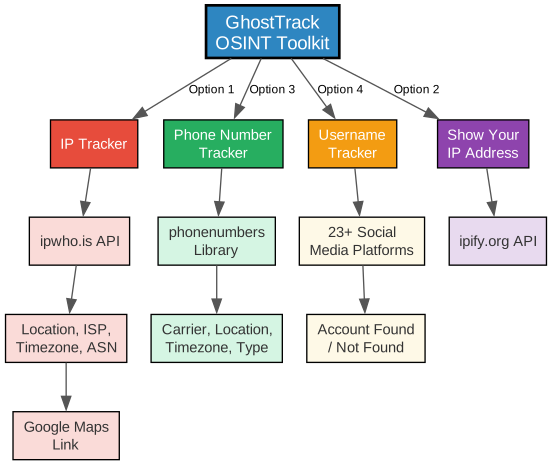
The architecture diagram above illustrates how GhostTrack organizes its four core modules around a central toolkit interface. Let us break down each component:
Central Hub: GhostTrack OSINT Toolkit The main entry point provides a menu-driven interface where users select from four tracking options. Each module operates independently, allowing targeted reconnaissance without unnecessary data collection.
IP Tracker (Option 1) This module queries the ipwho.is API to retrieve comprehensive geolocation data. It returns the target’s country, city, region, latitude, longitude, ISP, ASN, timezone, and even generates a Google Maps link for visual location pinpointing. The API provides rich structured data including connection details and timezone information.
Phone Number Tracker (Option 3) Leveraging the Python phonenumbers library, this module parses international phone numbers and extracts carrier information, geographic location, timezone data, and number type classification (mobile, fixed-line, etc.). It supports E.164 and international formatting standards.
Username Tracker (Option 4) This module performs automated username enumeration across 23+ social media platforms including Facebook, Twitter, Instagram, LinkedIn, GitHub, TikTok, and more. It sends HTTP requests to each platform and reports whether the username exists, making it invaluable for digital footprint analysis.
Show Your IP (Option 2) A quick utility that displays the user’s own public IP address using the ipify.org API, useful for verifying your own network identity before conducting research.
How It Works: Tracking Workflow
Understanding the Tracking Workflow
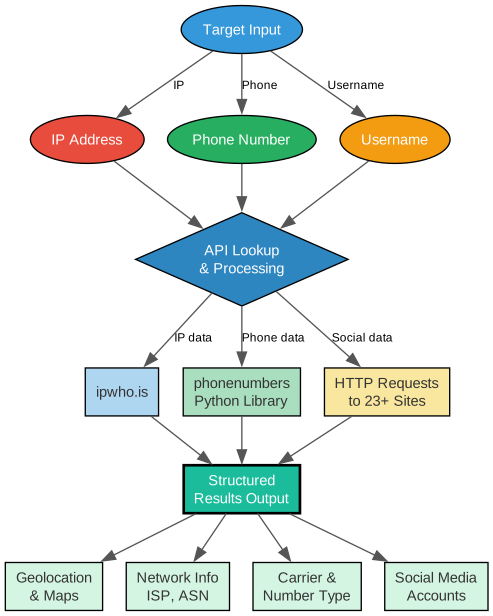
The workflow diagram shows how GhostTrack processes different input types through its pipeline:
Input Stage: Users provide one of three input types – an IP address, a phone number, or a username. Each input type routes to the appropriate processing module.
Processing Stage: The central API Lookup and Processing engine dispatches queries to the appropriate data sources:
- IP addresses are sent to the ipwho.is REST API
- Phone numbers are processed locally using the
phonenumbersPython library - Usernames trigger HTTP requests to 23+ social media platforms
Output Stage: Results are structured into four categories of actionable intelligence:
- Geolocation and Maps – precise coordinates with Google Maps links
- Network Information – ISP, ASN, and connection details
- Carrier and Number Type – mobile carrier identification and number classification
- Social Media Accounts – discovered profiles across platforms
Key Features
Understanding the Features
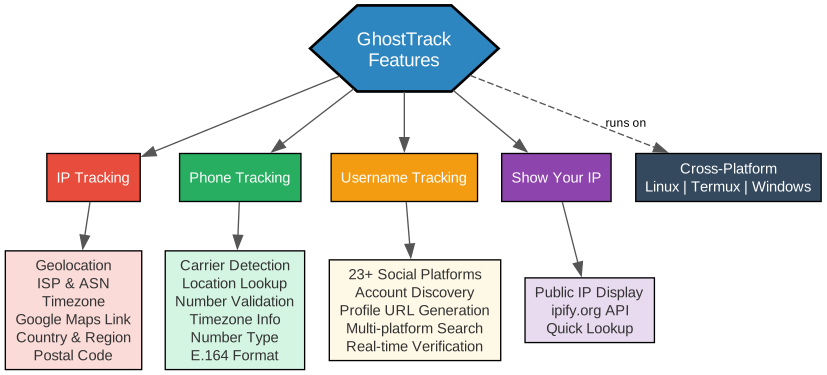
The features diagram highlights GhostTrack’s four primary capabilities and their detailed outputs:
IP Tracking provides deep geolocation intelligence including country, region, city, continent, latitude, longitude, postal code, and a direct Google Maps link. Network details cover ISP, ASN, organization, and domain information. Timezone data includes UTC offset, DST status, and current local time.
Phone Tracking uses the phonenumbers library to validate and classify phone numbers. It identifies the carrier (mobile operator), determines the geographic region, validates whether the number is possible and valid, and classifies the number type (mobile, fixed-line, etc.). It supports multiple international formats including E.164 and mobile dialing formats.
Username Tracking scans 23+ social media platforms in a single pass. It checks Facebook, Twitter, Instagram, LinkedIn, GitHub, Pinterest, Tumblr, YouTube, SoundCloud, Snapchat, TikTok, Behance, Medium, Quora, Flickr, Twitch, Dribbble, Telegram, and more. Each platform returns either the profile URL or a “not found” status.
Cross-Platform Support ensures GhostTrack runs on Linux (Debian-based), Termux (Android), and Windows, making it accessible for security professionals regardless of their operating system.
Installation
Prerequisites
- Python 3.x installed on your system
- Git for cloning the repository
- Internet connection for API queries
Install on Linux (Debian/Ubuntu)
sudo apt-get install git
sudo apt-get install python3
git clone https://github.com/HunxByts/GhostTrack.git
cd GhostTrack
pip3 install -r requirements.txt
python3 GhostTR.py
Install on Termux (Android)
pkg install git
pkg install python3
git clone https://github.com/HunxByts/GhostTrack.git
cd GhostTrack
pip3 install -r requirements.txt
python3 GhostTR.py
Dependencies
The requirements.txt file includes two dependencies:
requests
phonenumbers
- requests – Used for HTTP API calls to ipwho.is, ipify.org, and social media platforms
- phonenumbers – Google’s Python library for parsing, formatting, and validating international phone numbers
Usage Guide
IP Tracker
Select Option 1 from the menu and enter a target IP address. The tool queries ipwho.is and returns:
| Field | Description |
|---|---|
| IP Address | The target IP |
| Country / Region | Geographic location |
| City | City-level location |
| Latitude / Longitude | Precise coordinates |
| Google Maps Link | Direct link to mapped location |
| ISP | Internet Service Provider |
| ASN | Autonomous System Number |
| Organization | Network organization |
| Timezone | Local time information |
Phone Number Tracker
Select Option 3 and enter a phone number in international format (e.g., +6281xxxxxxxxx). The tool returns:
| Field | Description |
|---|---|
| Location | Geographic area of the number |
| Carrier | Mobile network operator |
| Timezone | Associated timezone |
| Number Type | Mobile, fixed-line, etc. |
| Valid Number | Whether the number is valid |
| International Format | E.164 formatted number |
Username Tracker
Select Option 4 and enter a username. The tool checks 23+ social media platforms and reports whether the username is found on each platform, providing direct profile URLs when available.
Show Your IP
Select Option 2 to quickly display your current public IP address using the ipify.org API.
Technical Details
GhostTrack is written in Python and uses a modular architecture with a decorator-based menu system. The @is_option decorator automatically displays the GhostTrack banner before each module execution, providing a consistent user experience.
The tool uses color-coded terminal output (ANSI escape codes) for readability, with different colors for labels, values, and headers. Error handling includes graceful exits for keyboard interrupts and invalid input validation.
Ethical Considerations
GhostTrack is designed for legitimate security research and OSINT purposes. Users should:
- Only track IP addresses and phone numbers they have authorization to investigate
- Respect privacy laws and regulations in their jurisdiction
- Use the tool responsibly for penetration testing and security assessments
- Not use the tool for harassment, stalking, or illegal surveillance
Links
- GitHub Repository: https://github.com/HunxByts/GhostTrack
- ipwho.is API: https://ipwho.is
- ipify.org API: https://api.ipify.org
- phonenumbers Library: https://github.com/daviddrysdale/python-phonenumbers
Conclusion
GhostTrack provides a straightforward, menu-driven interface for OSINT information gathering. Its four modules cover the most common reconnaissance needs – IP geolocation, phone number analysis, username enumeration, and self-IP verification. With minimal dependencies and cross-platform support, it is an accessible entry point for security researchers and penetration testers who need quick intelligence gathering capabilities. The tool’s simplicity makes it ideal for beginners learning OSINT techniques while still providing valuable functionality for experienced professionals. Enjoyed this post? Never miss out on future posts by following us 


