Invidious: Privacy-Focused Open Source YouTube Frontend
Invidious is an open source alternative front-end to YouTube that prioritizes user privacy by eliminating ads, tracking, and JavaScript requirements. With over 19,000 stars on GitHub, it has become the go-to solution for users who want to watch YouTube content without compromising their privacy or dealing with intrusive advertising.
Understanding the Architecture
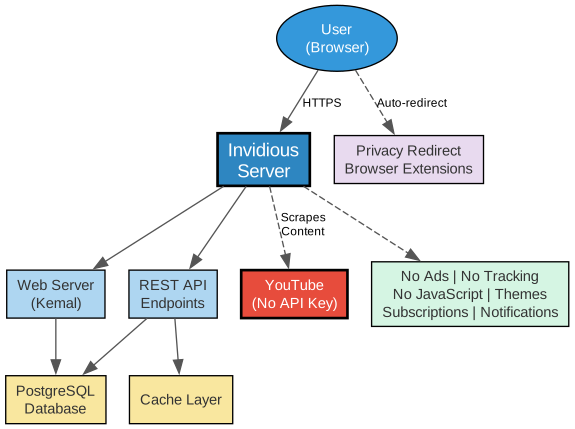
The architecture diagram above illustrates how Invidious mediates between users and YouTube content while preserving privacy at every layer:
User Layer: Users access Invidious through their browser, either via a public instance listed on invidious.io or through a self-hosted instance. The Privacy Redirect browser extension can automatically redirect YouTube URLs to any Invidious instance, making the transition seamless.
Invidious Server: The core server is built with the Kemal web framework (Crystal language) and provides two main interfaces – a full-featured web UI and a comprehensive REST API. All YouTube content is scraped without using official YouTube APIs, meaning no API keys are required and Google cannot track requests back to individual users.
Data Layer: PostgreSQL stores user subscriptions, preferences, and watch history. A cache layer reduces redundant requests to YouTube, improving performance and reducing the fingerprint of Invidious instances.
YouTube Interaction: Invidious scrapes YouTube content directly without using the official YouTube API. This means no Google API key is required, and YouTube cannot track individual users through API usage patterns. The scraping happens server-side, so the user’s IP address never reaches YouTube.
Privacy Features: The combination of no ads, no tracking, no JavaScript requirement, and no Google account means users can watch content with complete privacy. Subscriptions are stored locally on the Invidious server, independent from Google.
Key Features
Understanding the Features
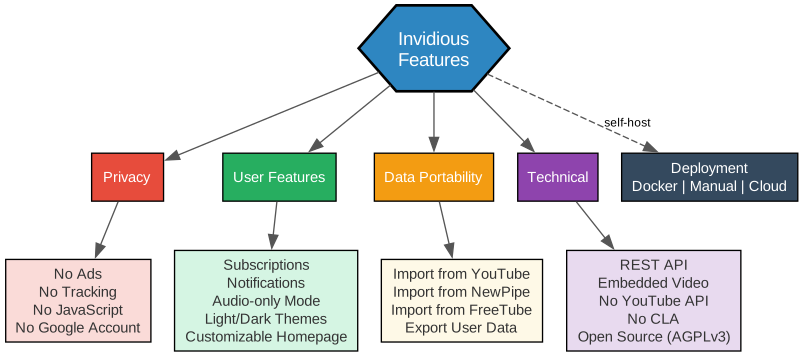
The features diagram highlights Invidious’s four primary feature categories:
Privacy: The core philosophy of Invidious is privacy-first. No ads are served, no tracking scripts are loaded, no JavaScript is required for basic functionality, and no Google account is needed. This means users can watch videos without revealing their identity or viewing habits to Google or advertisers.
User Features: Invidious provides a rich set of user-facing capabilities including subscriptions that are independent from Google, notifications for all subscribed channels, audio-only mode with background play on mobile devices, light and dark themes, and a customizable homepage. Reddit comments can also be displayed alongside YouTube comments.
Data Portability: Users can import subscriptions from YouTube, NewPipe, and FreeTube, import watch history from YouTube and NewPipe, export subscriptions to NewPipe and FreeTube, and fully import/export Invidious user data. This makes switching to and from Invidious frictionless.
Technical: Invidious offers a comprehensive REST API for developers, embedded video support for third-party sites, does not use official YouTube APIs, has no Contributor License Agreement (CLA), and is fully open source under AGPLv3. This makes it ideal for integration into other projects and self-hosted setups.
Deployment Options
Understanding Deployment Options
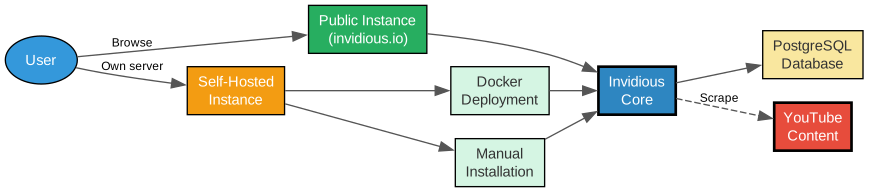
The deployment diagram shows the two primary ways to use Invidious:
Public Instances: The easiest way to get started is to select a public instance from the list at instances.invidious.io. These community-run instances allow you to start watching videos immediately without any setup. Simply browse to any instance URL and start searching for videos.
Self-Hosted Instances: For maximum privacy and control, you can run your own Invidious instance. Two deployment methods are available:
-
Docker Deployment: The recommended approach for most users. Docker Compose files are provided for quick setup with PostgreSQL included. This method handles dependencies automatically and makes updates straightforward.
-
Manual Installation: For advanced users who want more control over their deployment. Requires Crystal, Lucky framework, and PostgreSQL to be installed manually. Detailed instructions are available in the Invidious documentation.
Both deployment methods connect to the same Invidious core, which handles YouTube content scraping and serves the web interface and API.
Installation
Using Docker (Recommended)
# Clone the repository
git clone https://github.com/iv-org/invidious.git
cd invidious

# Start with Docker Compose
docker compose up -d
Manual Installation
# Install dependencies (Ubuntu/Debian)
sudo apt install libssl-dev libxml2-dev libyaml-dev libgmp-dev libreadline-dev libsqlite3-dev
sudo apt install postgresql postgresql-contrib

# Clone and build
git clone https://github.com/iv-org/invidious.git
cd invidious
shards install
crystal build src/invidious.cr --release

# Set up database
sudo -u postgres createdb invidious
sudo -u postgres psql invidious < config/sql/channels.sql
sudo -u postgres psql invidious < config/sql/videos.sql
sudo -u postgres psql invidious < config/sql/channel_videos.sql
sudo -u postgres psql invidious < config/sql/users.sql

# Run
./invidious
Using a Public Instance
No installation required. Visit instances.invidious.io to find a public instance and start watching videos immediately.
REST API
Invidious provides a comprehensive REST API that mirrors most YouTube functionality:
| Endpoint | Description |
|---|---|
/api/v1/videos/:id | Get video details |
/api/v1/channels/:id | Get channel information |
/api/v1/search | Search videos and channels |
/api/v1/playlists/:id | Get playlist details |
/api/v1/comments/:id | Get video comments |
/api/v1/trending | Get trending videos |
/api/v1/popular | Get popular videos |
The API enables developers to build custom frontends, bots, and integrations without requiring YouTube API keys.
Browser Extensions
The Privacy Redirect extension automatically redirects YouTube URLs to your preferred Invidious instance. This provides a seamless experience where clicking any YouTube link automatically opens it in Invidious instead.
Additional recommended extensions are documented at docs.invidious.io/applications.
Comparison with YouTube
| Feature | YouTube | Invidious |
|---|---|---|
| Ads | Yes (unless Premium) | No |
| Tracking | Extensive | None |
| JavaScript Required | Yes | No |
| Account Required | For some features | No |
| API Access | Requires key | Free REST API |
| Self-Hostable | No | Yes |
| Open Source | No | Yes (AGPLv3) |
| Data Export | Limited | Full import/export |
| Audio-only Mode | Premium only | Free |
| Customizable UI | Limited | Full control |
Links
- GitHub Repository: https://github.com/iv-org/invidious
- Official Website: https://invidious.io
- Public Instances: https://instances.invidious.io
- Documentation: https://docs.invidious.io
- Privacy Redirect Extension: https://github.com/SimonBrazell/privacy-redirect
Conclusion
Invidious provides a compelling privacy-focused alternative to YouTube’s official interface. By eliminating ads, tracking, and JavaScript requirements while offering a full-featured experience including subscriptions, notifications, and a comprehensive API, it demonstrates that privacy and functionality are not mutually exclusive. Whether you use a public instance for convenience or self-host for maximum control, Invidious puts you in charge of your video watching experience. The active community, extensive documentation, and Docker-based deployment make it accessible to users of all technical levels. Enjoyed this post? Never miss out on future posts by following us 


