uBlock Origin: The Essential Wide-Spectrum Content Blocker for Privacy
uBlock Origin (uBO) is a free, open-source, CPU and memory-efficient wide-spectrum content blocker for Chromium and Firefox browsers. Created by Raymond Hill (gorhill), uBlock Origin goes far beyond simple ad blocking – it neutralizes trackers, coin miners, popups, anti-blocker scripts, and malware sites by default, while giving users full control over what content enters their browser. With over 50,000 stars on GitHub and millions of active users, it is the gold standard for browser privacy.
How uBlock Origin Filters Web Content
When a web page loads, your browser makes dozens of requests for ads, trackers, analytics scripts, and other third-party content. uBlock Origin intercepts every request and applies its filtering engine to decide what gets through and what gets blocked.
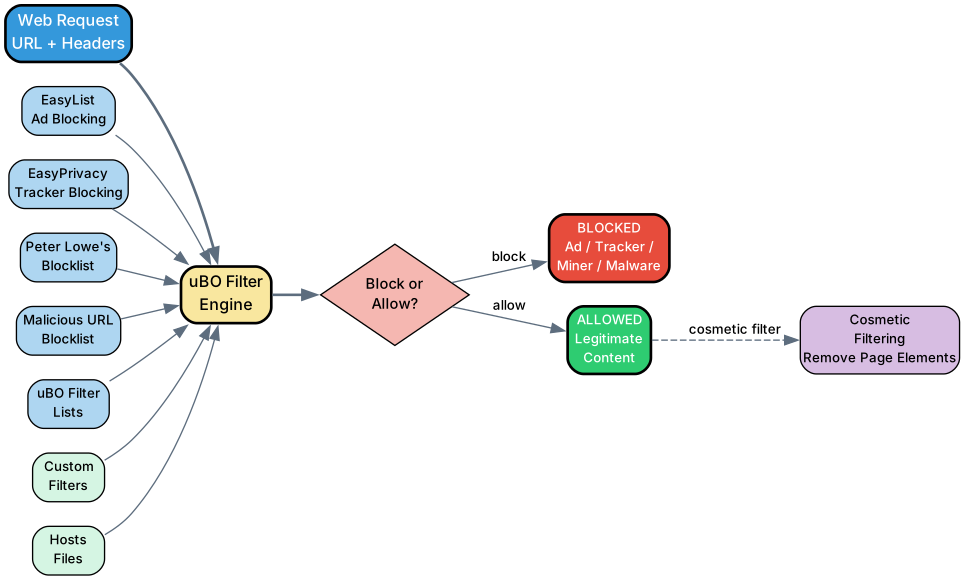
Understanding the Filtering Pipeline
The diagram above shows how uBlock Origin processes every web request through its multi-layer filtering pipeline:
Filter Lists – uBO draws from multiple filter lists that are enabled by default:
- EasyList – The primary ad-blocking filter list, blocking banner ads, popups, and video ads
- EasyPrivacy – Supplemental tracking protection, blocking analytics, tracking pixels, and data collection scripts
- Peter Lowe’s Blocklist – Additional ad and tracking server blocklist
- Online Malicious URL Blocklist – Blocks known malware distribution sites and phishing URLs
- uBO Filters – uBlock Origin’s own filter lists for specific issues and anti-blocker defusing
Beyond the default lists, users can add custom filters, custom filter lists, and hosts files for additional blocking coverage.
Filter Engine – All filter lists are compiled into an efficient data structure that can evaluate thousands of rules against each request in microseconds. The engine supports the EasyList filter syntax plus uBO’s extended syntax for advanced filtering including script injection, redirect-to-resource, and HTML filtering.
Block or Allow Decision – For each request, the engine determines whether to block or allow it. Blocked requests are silently dropped, preventing ads, trackers, and malware from ever loading. Allowed requests proceed normally.
Cosmetic Filtering – Even for allowed content, uBO applies cosmetic filters that remove page elements like ad placeholders, sponsored content labels, and tracking pixels, leaving a clean browsing experience.
Architecture and Components
uBlock Origin is designed as a browser extension with a layered architecture that separates the user interface from the core filtering engine.
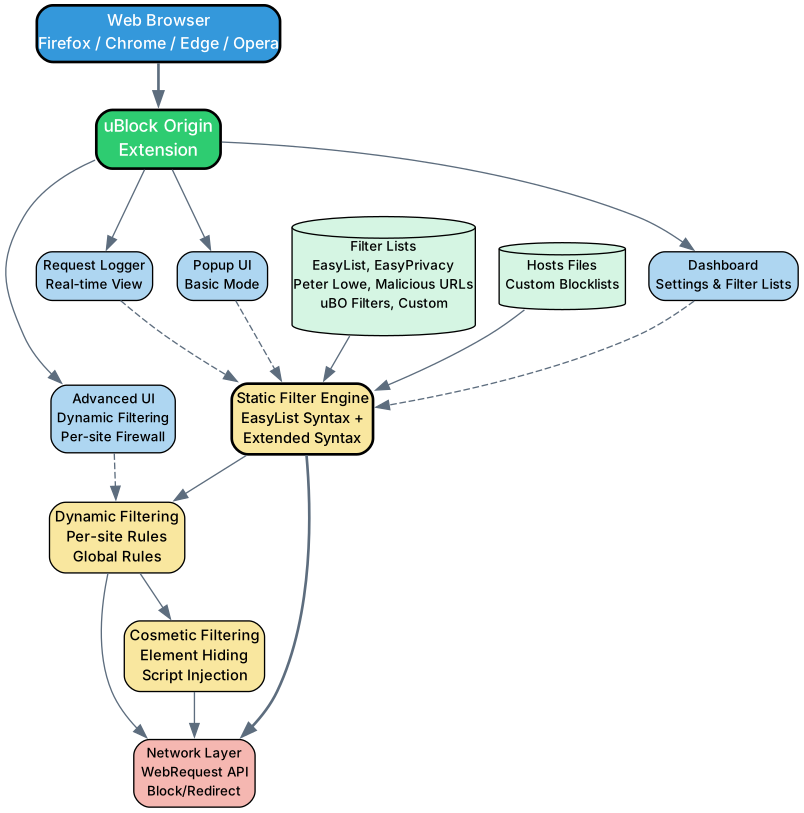
Understanding the Architecture
The architecture diagram shows how uBlock Origin integrates with the browser and processes web content:
Browser Integration – uBO runs as a browser extension in Firefox, Chrome, Edge, and Opera. It works best on Firefox due to the more powerful WebExtensions API available there. On Chrome, Manifest V3 limitations have reduced functionality, and Google has announced end of support for MV2 extensions starting with Chrome 139.
User Interface Layer – Four main UI components give users different levels of control:
- Popup UI (Basic Mode) – The simple popup for install-and-forget usage, configured optimally by default
- Advanced UI (Dynamic Filtering) – A point-and-click firewall configurable on a per-site basis, allowing granular control over what loads on each site
- Dashboard – Settings and filter list management for configuring uBO’s behavior
- Request Logger – Real-time view of all network requests, showing what was blocked and why
Core Engine – Three filtering subsystems work together:
- Static Filter Engine – Processes EasyList syntax and uBO’s extended syntax, compiling filter lists into efficient data structures for fast matching
- Dynamic Filtering – Per-site and global rules that override static filters, giving users point-and-click control over what loads on each domain
- Cosmetic Filtering – Removes page elements (ad containers, sponsored labels, tracking pixels) after the page loads, ensuring a clean visual experience
Filter Sources – uBO loads filter lists from multiple sources, including the built-in default lists, user-added custom lists, and hosts files. All sources are compiled into the same efficient engine.
Network Layer – Uses the browser’s WebRequest API to intercept, block, or redirect network requests before they reach their destination.
Features and Capabilities
uBlock Origin’s feature set is organized into four categories, each addressing a different aspect of browser privacy and content control.

Understanding the Features
Blocking Capabilities:
- Ads and Banners – Blocks all types of advertising including banner ads, video ads, popups, and interstitial ads using EasyList and additional filter lists
- Trackers and Analytics – Prevents tracking scripts, analytics pixels, and data collection from third-party services using EasyPrivacy
- Coin Miners – Blocks cryptocurrency mining scripts that secretly use your CPU resources
- Malware Sites – Blocks access to known malware distribution and phishing URLs
- Popups and Anti-Blockers – Defuses anti-blocker scripts that try to detect and circumvent ad blockers
Privacy Features:
- No Acceptable Ads – Unlike Adblock Plus, uBO does not participate in any “Acceptable Ads” program. The user decides what is acceptable
- Per-site Firewall – Dynamic filtering provides a point-and-click firewall for granular per-site control
- Dynamic Filtering – Override static filter rules on a per-site basis with three levels: block, allow, or noop (inherit)
- Script Injection Blocking – Prevent specific JavaScript from executing on pages
- Element Hiding – Remove specific page elements that slip through network-level blocking
Usability Features:
- Install and Forget – Default configuration is optimal for most users; no setup required
- Multi-Browser Support – Available for Firefox, Chrome, Edge, Opera, and Thunderbird
- Custom Filter Lists – Add any filter list or hosts file for additional blocking coverage
- Request Logger – Real-time view of all network requests for debugging and understanding what loads
- Element Zapper – Click any element on a page to remove it immediately, no filter rule needed
Technical Features:
- CPU Efficient – Minimal performance impact on page load times, outperforming most popular blockers
- Memory Efficient – Low RAM usage compared to other content blockers, using efficient data structures for filter matching
- Extended Filter Syntax – Supports uBO’s extended syntax for script injection, redirect-to-resource, and HTML filtering
- Hosts File Support – Import hosts files as additional blocklists for comprehensive blocking
- Open Source – Fully open source under GPLv3 license, with no donations sought and no commercial interests
Installation
Firefox (Recommended)
uBlock Origin works best on Firefox with full API access:
- Visit Firefox Add-ons
- Click “Add to Firefox”
- The uBO icon appears in your toolbar
Chrome
Available on the Chrome Web Store, but note that Google has announced end of support for MV2 extensions starting with Chrome 139:
- Visit Chrome Web Store
- Click “Add to Chrome”
- For continued support, consider switching to Firefox
Microsoft Edge
- Visit Edge Add-ons
- Click “Get”
Manual Installation
For browsers that do not support extension stores, or for development builds:
- Download from GitHub Releases
- Follow the manual installation guide
Usage Guide
Basic Mode (Default)
After installation, uBO works out of the box with optimal default settings. The popup shows:
- Number of requests blocked on the current page
- A large power button to disable/enable uBO per site
- Quick access to common settings
Advanced Mode (Dynamic Filtering)
Click the gear icon in the popup to enable advanced mode. This reveals a per-site firewall with three columns:
- Global rules (leftmost column) – Apply to all sites
- Local rules (center column) – Apply to the current site only
- Action levels – Block (red), Allow (green), or Noop/inherit (gray)
Common dynamic filtering patterns:
- Block all third-party scripts globally, allow per-site
- Block third-party frames on specific sites
- Block specific domains from loading
Custom Filters
Add custom filter rules in the Dashboard > My Filters tab:
! Block a specific domain
||example-ads.com^

! Block a specific element on a page
example.com##.ad-container

! Redirect a resource
||analytics.example.com^$redirect=noop
Key Features Summary
| Feature | Description |
|---|---|
| Wide-Spectrum Blocking | Ads, trackers, miners, malware, popups, anti-blockers |
| Default Filter Lists | EasyList, EasyPrivacy, Peter Lowe’s, Malicious URLs, uBO Filters |
| No Acceptable Ads | User decides what is acceptable, no paid whitelist |
| Dynamic Filtering | Per-site firewall with point-and-click rules |
| Cosmetic Filtering | Remove page elements after load |
| Extended Syntax | Script injection, redirect-to-resource, HTML filtering |
| CPU Efficient | Minimal performance impact on browsing |
| Memory Efficient | Low RAM usage with efficient data structures |
| Multi-Browser | Firefox, Chrome, Edge, Opera, Thunderbird |
| Open Source | GPLv3 license, no donations, no commercial interests |
| Hosts File Support | Import any hosts file as additional blocklist |
| Request Logger | Real-time view of all network requests |
The uBlock Origin Manifesto
uBlock Origin’s guiding principle is simple and powerful:
“The user decides what web content is acceptable in their browser.”
uBO does not support Adblock Plus’ “Acceptable Ads” program because it is the business plan of a for-profit entity. Users are the best placed to know what is or is not acceptable to them. uBO’s sole purpose is to give users the means to enforce their choices.
This philosophy extends to funding – uBO seeks no donations and has no commercial interests. If you want to contribute, support the filter list maintainers who work hard to keep the blocking lists current and available for free.
Links
- GitHub Repository: https://github.com/gorhill/uBlock
- Firefox Add-ons: https://addons.mozilla.org/addon/ublock-origin/
- Chrome Web Store: https://chromewebstore.google.com/detail/ublock-origin/cjpalhdlnbpafiamejdnhcphjbkeiagm
- Edge Add-ons: https://microsoftedge.microsoft.com/addons/detail/ublock-origin/odfafepnkmbhccpbejgmiehpchacaeak
- Wiki Documentation: https://github.com/gorhill/uBlock/wiki
- Reddit Community: https://www.reddit.com/r/uBlockOrigin/

Enjoyed this post? Never miss out on future posts by following us


