Introduction
Haystack is the open-source AI orchestration framework for production LLM applications that gives developers explicit control over how information is retrieved, ranked, filtered, combined, and routed before reaching the language model. Built by deepset.ai and used by organizations like Apple, Meta, NVIDIA, Airbus, and Netflix, Haystack provides a modular, composable architecture where you design pipelines and agent workflows with transparent, traceable data flow – no hidden prompts, no vendor lock-in.
Unlike higher-level abstractions that obscure what happens between input and output, Haystack exposes every step as a typed, inspectable component. You connect components in a directed graph, define exactly what data flows between them, and can serialize the entire pipeline to JSON for version control, auditing, or deployment. The framework ships with over 100 built-in components covering document conversion, text preprocessing, embedding generation, retrieval strategies, prompt construction, LLM generation, evaluation, and routing. When the built-in components are not enough, you create custom components with a single @component decorator and a run() method.
Haystack also provides a full agent system where LLMs can use tools, maintain state, and interact with humans through confirmation strategies. Agents can be equipped with six different tool types – from simple function wrappers to entire nested pipelines – and support breakpoints for debugging and resuming execution. Whether you are building a simple RAG pipeline or a multi-agent system with dynamic tool selection, Haystack gives you the primitives to compose it transparently.
How It Works
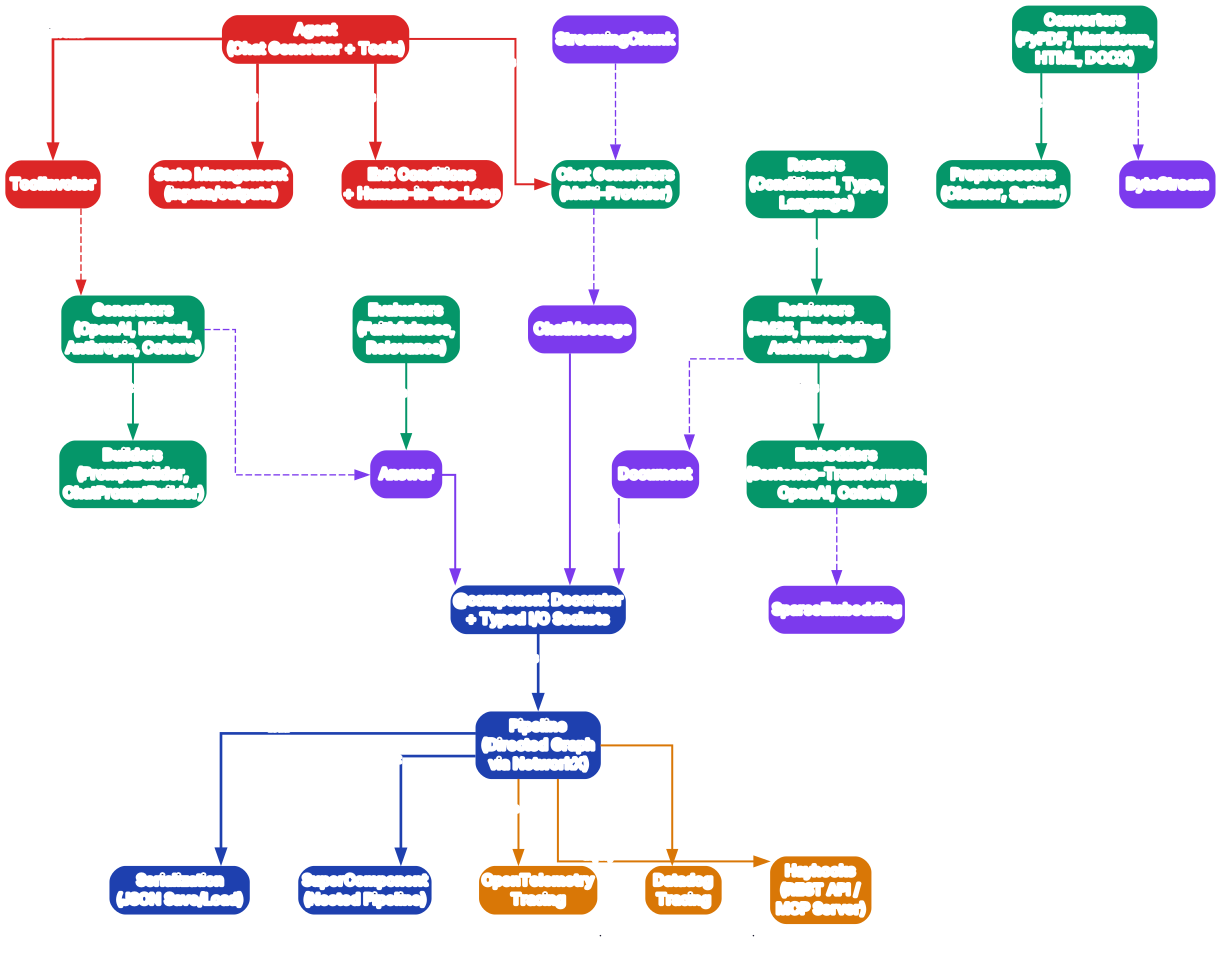
The Haystack framework is organized into five distinct layers, each with a clear responsibility and well-defined interfaces to the layers above and below it. At the very bottom sits the Core Layer, which provides the fundamental building blocks: the @component decorator that registers any Python class as a pipeline-compatible component, the Pipeline class itself (implemented as a directed graph using NetworkX), and the serialization system that allows any pipeline to be saved to and loaded from JSON. The SuperComponent also lives here, enabling you to nest an entire pipeline as a single reusable component within a larger pipeline.
Above the Core Layer sits the Data Layer, which defines the typed data objects that flow between components. The primary types include Document (carrying content, metadata, embeddings, and scores), ChatMessage (for multi-turn conversations with role annotations), Answer (for structured generation outputs), ByteStream (for raw file data before conversion), SparseEmbedding (for BM25-style sparse vectors), and StreamingChunk (for token-by-token streaming responses). These types are not just passive containers – they enforce the typed socket contracts that make pipeline connections safe and predictable.
The Component Layer contains over 100 built-in components organized into functional categories. Generators and Chat Generators wrap LLM providers (OpenAI, Anthropic, Mistral, Cohere, HuggingFace, Azure, AWS Bedrock). Embedders produce vector representations using Sentence-Transformers, OpenAI, or Cohere APIs. Retrievers implement search strategies including BM25 keyword search, embedding similarity, auto-merging retrieval, sentence window retrieval, multi-query expansion, and metadata filtering. Converters handle document ingestion from PyPDF, Markdown, HTML, DOCX, PPTX, XLSX, and CSV formats. Preprocessors clean and split documents. Routers conditionally direct data flow based on content type, language, length, or zero-shot classification. Builders construct prompts using Jinja2 templates.
The Agent Layer sits on top of the Component Layer and provides the Agent class, which combines a Chat Generator with a collection of tools, a state schema, and exit conditions. The ToolInvoker component executes tool calls decided by the LLM, while state management tracks conversation history and intermediate results. Human-in-the-Loop confirmation strategies allow human oversight before tool execution, and exit conditions determine when the agent should stop iterating and return a final answer.
At the top, the Integration Layer connects Haystack pipelines to external observability and deployment systems. OpenTelemetry and Datadog tracing provide visibility into pipeline execution latency and component behavior. Hayhooks serves pipelines as REST APIs or MCP (Model Context Protocol) servers, making any pipeline immediately accessible to other applications and AI agents over HTTP.
Components connect to each other through typed sockets – input sockets declare what type of data a component accepts, and output sockets declare what type it produces. When you call pipe.connect(), Haystack validates that the output socket type is compatible with the input socket type, catching type mismatches at pipeline construction time rather than at runtime. This typed connection system is what makes Haystack pipelines safe to compose and refactor – if you change a component’s output type, the pipeline will immediately flag any broken connections.
Pipeline Execution Model
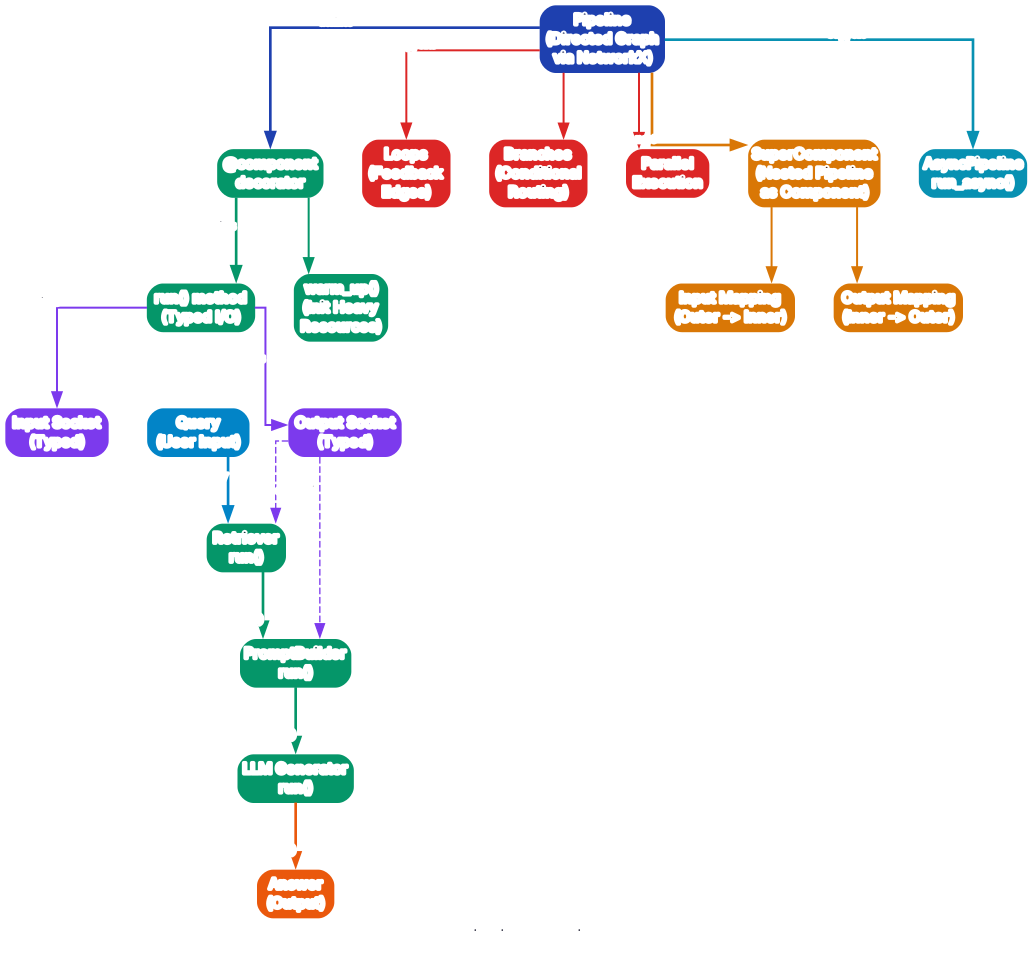
A Haystack pipeline is fundamentally a directed graph where each node is a component and each edge is a typed connection between an output socket and an input socket. The graph is built using NetworkX, which means it benefits from well-tested graph algorithms for topological sorting, cycle detection, and path finding. When you call pipe.run(), Haystack performs a topological sort of the graph, determines the execution order, and then invokes each component’s run() method in sequence, passing the outputs of upstream components to the inputs of downstream components.
The component contract is the foundation of the execution model. Every component must be decorated with @component, which registers the class with Haystack’s type system and inspects the run() method signature to automatically create typed input and output sockets. The run() method receives typed keyword arguments and returns a dictionary whose keys correspond to the component’s output sockets. Components may also implement warm_up() for initializing heavy resources like model downloads – this method is called once before the first run() invocation, ensuring that expensive initialization does not repeat on every pipeline execution.
Consider a concrete RAG pipeline execution flow. The user submits a query, which enters the pipeline at the Retriever component. The Retriever searches the document store and produces a list of ranked Document objects through its output socket. These documents flow through the typed connection to the PromptBuilder’s documents input socket. The PromptBuilder uses a Jinja2 template to construct a prompt that incorporates the retrieved documents and the original query, then outputs the rendered prompt through its output socket. The prompt flows to the LLM Generator, which sends it to the language model API and receives a response. The Generator outputs the reply, which becomes the pipeline’s final Answer.
Beyond simple linear flows, Haystack pipelines support loops (feedback edges where a downstream component’s output feeds back to an upstream input), branches (conditional routing where different paths execute based on data content), and parallel execution (independent components that have no data dependency between them can run concurrently). These features allow you to build sophisticated workflows like self-correcting retrieval (where the generator can loop back to the retriever with a refined query) or multi-path processing (where the same query is routed to different retrieval strategies and results are merged).
The SuperComponent feature allows you to nest an entire pipeline as a single component within a larger pipeline. Input mapping defines how the outer pipeline’s data flows into the nested pipeline’s inputs, and output mapping defines how the nested pipeline’s outputs are exposed to the outer pipeline. This is particularly useful for creating reusable sub-pipelines – for example, a document ingestion pipeline (converter, cleaner, splitter, embedder) can be packaged as a SuperComponent and dropped into any larger pipeline that needs document processing.
For asynchronous workloads, Haystack provides AsyncPipeline with the run_async() method. This enables concurrent execution of independent components in I/O-bound scenarios, such as making parallel API calls to multiple LLM providers or embedding services. The async execution model respects the same typed socket contracts and topological ordering as the synchronous pipeline, so you can switch between sync and async without changing your pipeline definition.
Agent and Tool System
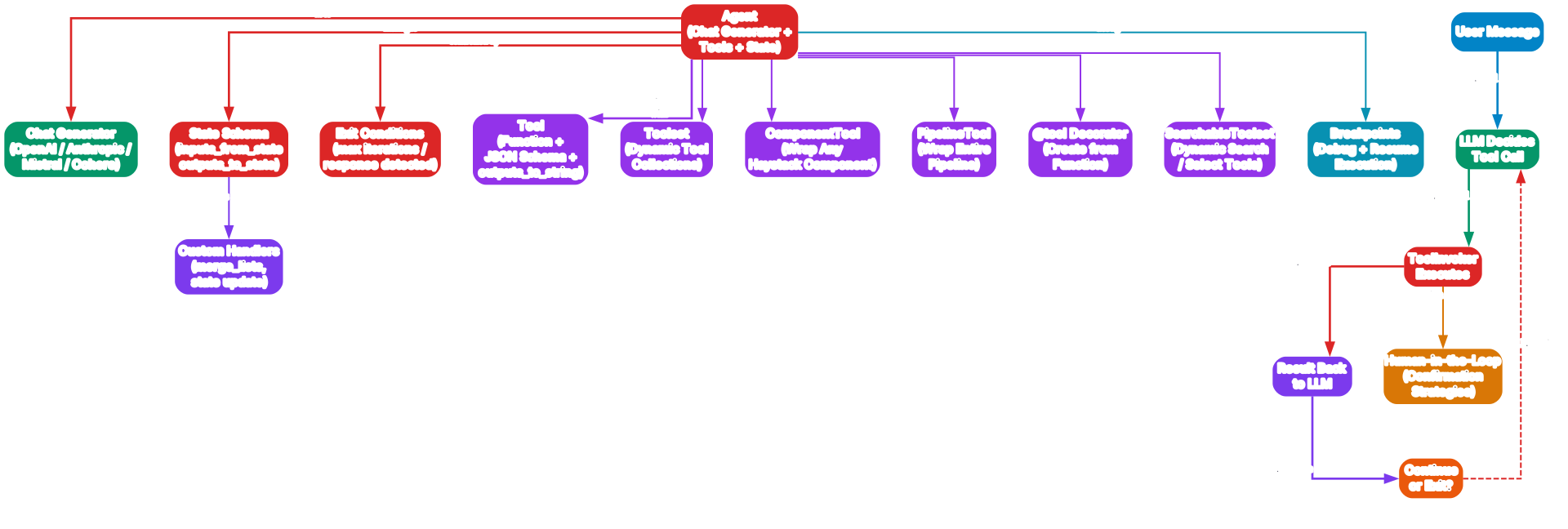
The Haystack Agent is a structured loop that combines a Chat Generator with a collection of tools, a state schema, and exit conditions. The agent’s architecture is deliberately explicit: you define which Chat Generator it uses (OpenAI, Anthropic, Mistral, or Cohere), which tools it has access to, how state is managed across iterations, and what conditions trigger the agent to stop and return a result. There are no hidden system prompts or implicit tool selection – every aspect of the agent’s behavior is configurable and inspectable.
Haystack provides six tool types that cover the full spectrum from simple function wrappers to complex dynamic tool collections. The Tool class wraps any Python function with a JSON schema describing its parameters and an optional outputs_to_string function for formatting results. The Toolset class groups multiple tools into a dynamic collection that can be queried at runtime. The ComponentTool wraps any Haystack component (retriever, generator, embedder, etc.) as a tool, making the entire component ecosystem immediately available to agents. The PipelineTool wraps an entire Haystack pipeline as a single tool, enabling agents to invoke complex multi-step workflows with a single tool call. The @tool decorator provides a convenient shorthand for creating tools from plain Python functions – it automatically infers the JSON schema from the function signature and docstring. Finally, the SearchableToolset enables dynamic tool discovery where the agent can search through a large collection of tools and select only the relevant ones for each query, solving the context window limitation that occurs when an agent has access to hundreds of tools.
The agent loop operates in a clear sequence. First, the user sends a message to the agent. Second, the Chat Generator receives the message (along with conversation history and available tool schemas) and decides whether to make a tool call or respond directly. Third, if a tool call is decided, the ToolInvoker executes the specified tool with the provided arguments. Fourth, the tool result is fed back to the Chat Generator as a new message. Fifth, the agent evaluates whether to continue the loop (making another tool call) or exit (returning a final text response). This loop continues until an exit condition is met – either the LLM produces a response without any tool call, a maximum iteration count is reached, or a specific exit condition is triggered.
Human-in-the-Loop confirmation strategies add a safety layer between the LLM’s tool call decision and the actual execution. When a tool is configured with a confirmation requirement, the ToolInvoker pauses before executing and presents the proposed tool call to a human operator for approval. This is critical for production deployments where tool calls may have side effects – writing to a database, sending an email, or executing code. Haystack supports multiple confirmation strategies, from requiring approval for every tool call to selective confirmation based on tool type or parameter values.
State management in the agent system is handled through the inputs_from_state and outputs_to_state configuration on the Agent. The inputs_from_state parameter defines which state variables are injected into the Chat Generator’s inputs at the start of each iteration, while outputs_to_state defines how tool results and generator outputs are written back to the state. Custom state handlers like merge_lists allow you to accumulate results across iterations – for example, collecting all documents retrieved by multiple tool calls into a single list that grows with each loop iteration.
Breakpoints provide a debug-and-resume mechanism for both pipelines and agents. When a breakpoint is set on a specific component, the pipeline or agent pauses execution at that point and returns the intermediate state. You can inspect the data flowing through each socket, modify it if needed, and then resume execution from the breakpoint. This is invaluable for debugging complex agent behaviors where the LLM’s tool selection logic needs to be inspected step by step.
RAG Pipeline Components
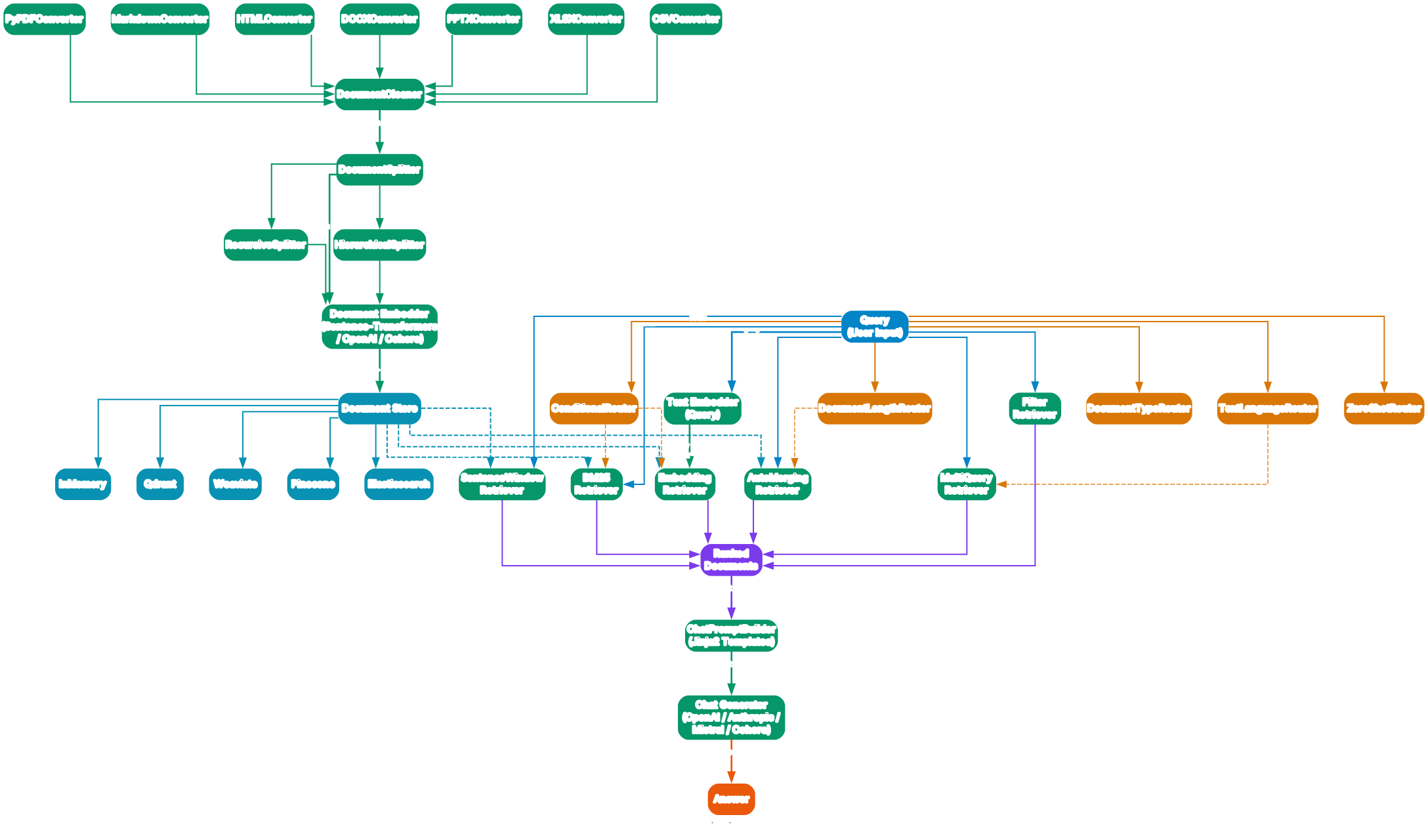
Retrieval-Augmented Generation (RAG) is the most common use case for Haystack, and the framework provides a comprehensive set of components covering every stage of the RAG pipeline – from document ingestion through retrieval to generation. The diagram above illustrates how these components connect to form a complete RAG system, with routing components that enable dynamic pipeline behavior based on query characteristics.
Document ingestion begins with Converters that transform raw files into Haystack Document objects. The framework provides converters for seven major file formats: PyPDFConverter for PDF files, MarkdownConverter for Markdown, HTMLConverter for web pages, DOCXConverter for Word documents, PPTXConverter for PowerPoint presentations, XLSXConverter for Excel spreadsheets, and CSVConverter for tabular data. Each converter extracts text content and metadata (page numbers, headers, table structures) from the source file and produces a ByteStream or Document output. The converters handle encoding detection, table extraction, and metadata preservation automatically.
After conversion, Preprocessors clean and split the raw documents into appropriately sized chunks. The DocumentCleaner removes boilerplate, extra whitespace, and formatting artifacts. The DocumentSplitter divides documents into chunks using several strategies: by word count, by sentence, by paragraph, or by custom regex patterns. For more sophisticated chunking, the RecursiveSplitter applies splitting rules hierarchically (first by paragraph, then by sentence within oversized paragraphs), while the HierarchicalSplitter creates a tree structure where parent chunks maintain references to their child chunks – this is essential for auto-merging retrieval strategies that need to reassemble context from smaller pieces.
The chunked documents then pass through an Embedder that generates vector representations using Sentence-Transformers (for local models), OpenAI embeddings, or Cohere embeddings. These vectors are stored alongside the document content and metadata in a Document Store. Haystack supports five document store backends: InMemoryDocumentStore for development and testing, QdrantDocumentStore for scalable vector search, WeaviateDocumentStore for hybrid search, PineconeDocumentStore for managed vector infrastructure, and ElasticsearchDocumentStore for full-text and vector search at enterprise scale. Each store implements the same interface, so you can switch backends by changing a single line of configuration.
On the retrieval side, Haystack offers six retriever types that implement different search strategies. The InMemoryBM25Retriever performs keyword-based search using the BM25 algorithm, which excels at exact term matching and is computationally efficient. The EmbeddingRetriever performs semantic search using vector similarity, finding documents that are conceptually related even when they do not share exact keywords. The AutoMergingRetriever works with hierarchically split documents, starting with small chunks and automatically merging sibling chunks when enough of them are retrieved, providing better context coherence. The SentenceWindowRetriever retrieves a small chunk around the match and then expands the window to include surrounding sentences for richer context. The MultiQueryRetriever expands the original query into multiple variations using an LLM, retrieves documents for each variation, and deduplicates the results – this improves recall for ambiguous or complex queries. The FilterRetriever applies metadata filters (date ranges, categories, access permissions) to narrow the search space before retrieval.
All retriever outputs converge into a set of Ranked Documents that flow into the generation stage. The ChatPromptBuilder constructs the final prompt using Jinja2 templates, inserting the retrieved documents as context alongside the user’s query. The template system gives you full control over how documents are formatted, how many are included, and how the instruction is phrased. The rendered prompt then passes to a ChatGenerator (OpenAI, Anthropic, Mistral, or Cohere) which produces the final Answer.
Routing components enable dynamic pipeline behavior based on query characteristics. The ConditionalRouter directs data flow based on conditional expressions evaluated at runtime. The DocumentLengthRouter selects different processing paths depending on whether retrieved documents exceed a length threshold. The DocumentTypeRouter routes documents based on their content type (text, table, image). The TextLanguageRouter detects the query language and routes to language-specific processing branches. The ZeroShotRouter uses zero-shot classification to determine the appropriate path without training data. These routers enable you to build a single pipeline that handles diverse query types – short keyword queries go to BM25 retrieval, long semantic queries go to embedding retrieval, and multilingual queries are routed to language-appropriate branches.
Installation
Setting up Haystack is straightforward. The framework requires Python 3.10 or later and is distributed through PyPI as the haystack-ai package.
# Install Haystack
pip install haystack-ai

# Or nightly pre-releases
pip install --pre haystack-ai
For specific integrations, install the corresponding extra packages:
# OpenAI integration
pip install haystack-ai openai

# Qdrant document store
pip install haystack-ai qdrant-haystack

# Weaviate document store
pip install haystack-ai weaviate-haystack
Usage
Simple RAG Pipeline
The following example demonstrates a complete RAG pipeline that retrieves documents using BM25 search and generates an answer using OpenAI:
from haystack import Pipeline
from haystack.components.generators.chat import OpenAIChatGenerator
from haystack.components.retrievers import InMemoryBM25Retriever
from haystack.components.builders import ChatPromptBuilder
from haystack.dataclasses import ChatMessage
from haystack.document_stores.in_memory import InMemoryDocumentStore

# Create document store and index documents
document_store = InMemoryDocumentStore()
document_store.write_documents(documents)

# Build the RAG pipeline
pipe = Pipeline()
pipe.add_component("retriever", InMemoryBM25Retriever(document_store))
pipe.add_component("prompt_builder", ChatPromptBuilder(template))
pipe.add_component("llm", OpenAIChatGenerator())

# Connect components
pipe.connect("retriever.documents", "prompt_builder.documents")
pipe.connect("prompt_builder.prompt", "llm.messages")

# Run the pipeline
result = pipe.run({
    "retriever": {"query": "What is Haystack?"},
    "prompt_builder": {"question": "What is Haystack?"}
})
The pipeline definition is declarative – you add components, connect their typed sockets, and then call run() with the input data. Haystack handles the execution order, data flow, and type checking automatically. You can serialize the pipeline to JSON with pipe.to_dict() and load it back with Pipeline.from_dict(), enabling version control and deployment workflows.
Agent with Tools
The following example shows how to create an agent that uses multiple tools to answer complex queries:
from haystack.components.agents import Agent
from haystack.components.generators.chat import OpenAIChatGenerator
from haystack.tools import Tool
from haystack.dataclasses import ChatMessage

# Define tools
search_tool = Tool(name="search", description="Search documents", ...)
calculator_tool = Tool(name="calculator", description="Perform calculations", ...)

# Create agent
agent = Agent(
    chat_generator=OpenAIChatGenerator(),
    tools=[search_tool, calculator_tool],
    exit_conditions=["text"]
)

# Run agent
result = agent.run(
    messages=[ChatMessage.from_user("Calculate tip for 85 euro meal in France")]
)
The agent automatically decides which tools to call based on the user’s message. In this example, it would first use the calculator tool to compute the tip amount, then potentially use the search tool to look up French tipping customs. The exit_conditions parameter specifies when the agent should stop – "text" means it exits when the LLM produces a text response without any tool call.
Custom Component
Creating custom components is simple with the @component decorator:
from haystack import component

@component
class TextReverser:
    @component.output_types(reversed_text=str)
    def run(self, text: str) -> dict:
        return {"reversed_text": text[::-1]}
The decorator inspects the run() method signature and automatically creates typed input and output sockets. The @component.output_types decorator explicitly declares the output socket names and types, making the component connectable in any pipeline.
Features Summary
| Feature | Description |
|---|---|
| Pipeline Architecture | Directed graph execution with typed I/O components |
| 100+ Components | Generators, Embedders, Retrievers, Converters, Preprocessors, Routers |
| Agent System | Tool-using agents with state, exit conditions, human-in-the-loop |
| 6 Tool Types | Tool, Toolset, ComponentTool, PipelineTool, @tool, SearchableToolset |
| SuperComponent | Nest entire pipelines as reusable components |
| Model-Agnostic | OpenAI, Mistral, Anthropic, Cohere, HuggingFace, Azure, AWS Bedrock |
| Async Support | Full async pipeline execution with AsyncPipeline |
| Serialization | Save/load pipelines as JSON |
| Tracing | OpenTelemetry and Datadog integration |
| Hayhooks | Serve pipelines as REST APIs or MCP servers |
| Human-in-the-Loop | Confirmation strategies for tool execution |
| Breakpoints | Debug and resume pipeline/agent execution |
Conclusion
Haystack stands out in the crowded LLM framework landscape by prioritizing transparency, composability, and production readiness. Its directed graph pipeline architecture gives developers explicit control over every step of data flow, from document ingestion through retrieval to generation. The typed socket system catches errors at pipeline construction time, the serialization system enables version control and deployment, and the agent system provides a structured loop with six tool types, state management, and human oversight.
The framework is model-agnostic, supporting OpenAI, Anthropic, Mistral, Cohere, HuggingFace, Azure, and AWS Bedrock out of the box. It is Python-native, requiring no new DSL or configuration format – you define pipelines in pure Python with full IDE support, type checking, and debugging. And it is production-proven, with organizations like Apple, Meta, NVIDIA, Airbus, and Netflix relying on Haystack for their LLM applications.
- GitHub: https://github.com/deepset-ai/haystack
- PyPI: https://pypi.org/project/haystack-ai/
- Documentation: https://docs.haystack.deepset.ai/
Whether you are building your first RAG pipeline or deploying a multi-agent system at enterprise scale, Haystack provides the primitives, the components, and the architecture to do it transparently and reliably. Enjoyed this post? Never miss out on future posts by following us 


