CLI-Anything: Making ALL Software Agent-Native with Automated CLI Generation
CLI-Anything by HKUDS is a groundbreaking framework that transforms any software with a codebase into agent-native tools through automated CLI generation. With 38.2K stars and growing at 1,038+ per day, it solves a fundamental problem: AI agents are great at reasoning but terrible at using real professional software. CLI-Anything bridges this gap with a fully automated 7-phase pipeline that generates production-ready CLIs for 18+ major applications.
The Agent-Software Gap
Today’s software serves humans through GUIs. Tomorrow’s users will be AI agents. But current solutions for agent-software interaction are fragile:
| Current Pain Point | CLI-Anything’s Fix |
|---|---|
| AI can’t use real tools | Direct integration with actual software backends (Blender, LibreOffice, FFmpeg) |
| UI automation breaks constantly | No screenshots, no clicking, no RPA fragility. Pure command-line reliability |
| Agents need structured data | Built-in JSON output for seamless agent consumption |
| Custom integrations are expensive | One command auto-generates CLIs for ANY codebase |
| Prototype vs Production gap | 2,280+ tests with real software validation |
The 7-Phase Automated Pipeline
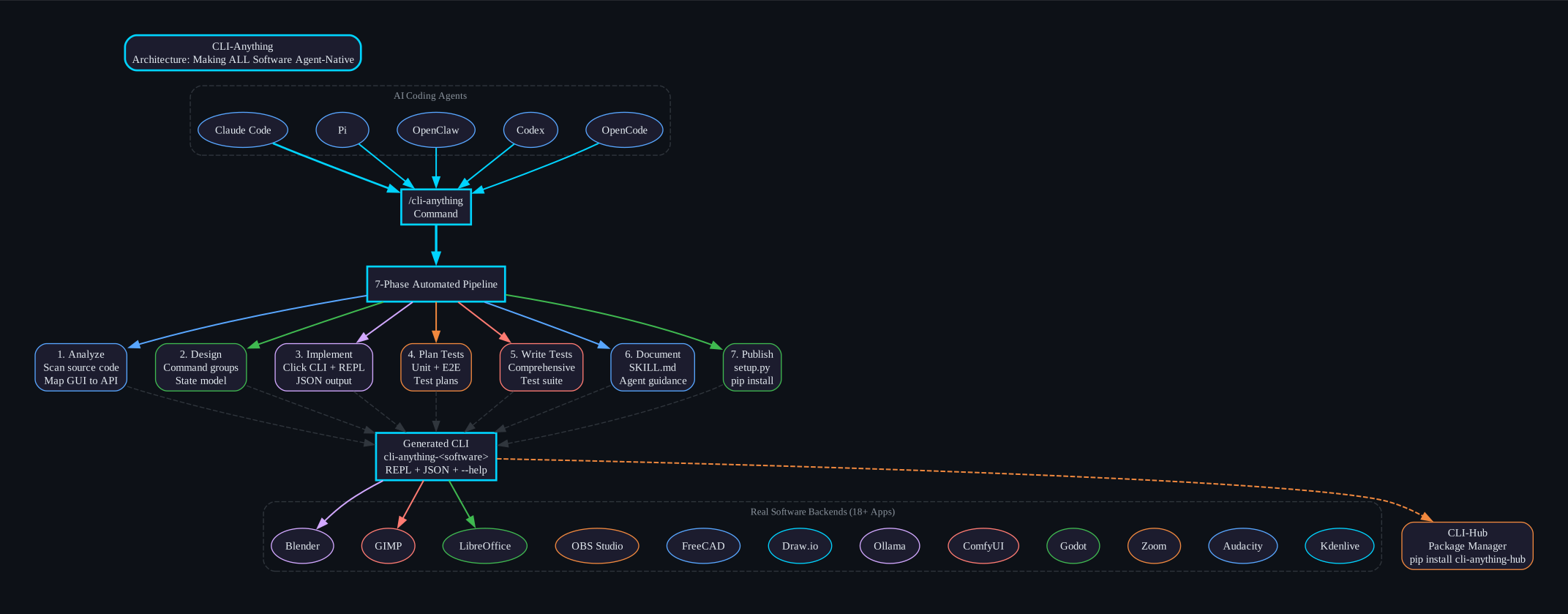
CLI-Anything generates complete, production-ready CLIs through a fully automated 7-phase pipeline:
- Analyze - Scans source code, maps GUI actions to APIs
- Design - Architects command groups, state model, output formats
- Implement - Builds Click CLI with REPL, JSON output, undo/redo
- Plan Tests - Creates TEST.md with unit + E2E test plans
- Write Tests - Implements comprehensive test suite
- Document - Generates SKILL.md for agent discovery
- Publish - Creates
setup.py, installs to PATH
One command triggers the entire pipeline:
# Generate a complete CLI for GIMP (all 7 phases)
/cli-anything ./gimp

# Build from a GitHub repo
/cli-anything https://github.com/blender/blender
Multi-Agent Platform Support
CLI-Anything works across all major AI coding agents:
| Platform | Installation | Status |
|---|---|---|
| Claude Code | /plugin marketplace add HKUDS/CLI-Anything then /plugin install cli-anything | Production |
| Pi Coding Agent | bash .pi-extension/cli-anything/install.sh | Production |
| OpenClaw | Copy SKILL.md to ~/.openclaw/skills/cli-anything/ | Community |
| Codex | bash codex-skill/scripts/install.sh | Experimental |
| OpenCode | Copy commands to ~/.config/opencode/commands/ | Experimental |
| GitHub Copilot CLI | copilot plugin install ./cli-anything-plugin | Community |
Key Features
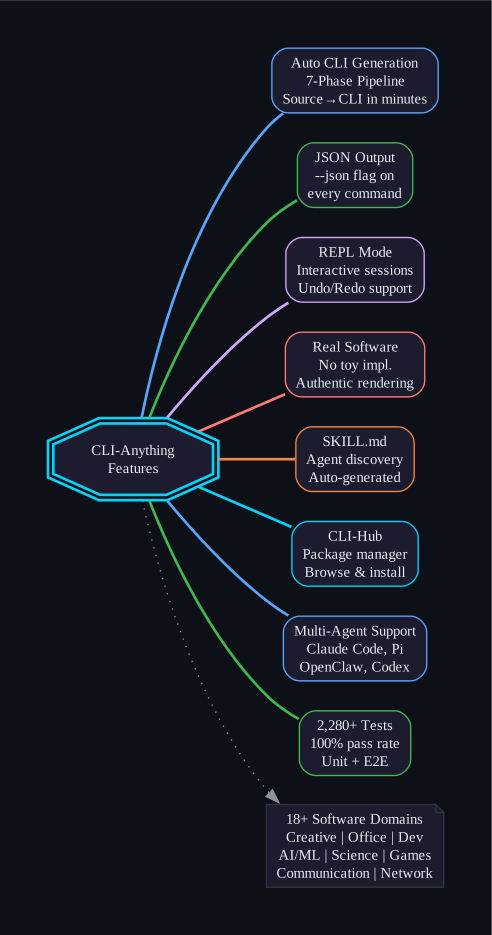
JSON Output for Agent Consumption
Every command supports --json flag for structured data:
$ cli-anything-libreoffice --json document info --project report.json
{
  "name": "Q1 Report",
  "type": "writer",
  "pages": 1,
  "elements": 2,
  "modified": true
}
Interactive REPL Mode
Every generated CLI includes a branded REPL with command history, progress indicators, and undo/redo:
$ cli-anything-blender
+==========================================+
|       cli-anything-blender v1.0.0       |
|     Blender CLI for AI Agents           |
+==========================================+

blender> scene new --name ProductShot
Created scene: ProductShot

blender[ProductShot]> object add-mesh --type cube --location 0 0 1
Added mesh: Cube at (0, 0, 1)

blender[ProductShot]*> render execute --output render.png --engine CYCLES
Rendered: render.png (1920x1080, 2.3 MB) via blender --background
Iterative Refinement
After the initial build, refine the CLI to expand coverage:
# Broad refinement - agent analyzes gaps across all capabilities
/cli-anything:refine ./gimp

# Focused refinement - target a specific functionality area
/cli-anything:refine ./gimp "I want more CLIs on image batch processing and filters"
Each refinement run is incremental and non-destructive.
SKILL.md Generation
Every generated CLI ships with a SKILL.md file for AI agent discovery:
- YAML frontmatter with name and description
- Command groups with all available subcommands
- Usage examples for common workflows
- Agent-specific guidance for JSON output, error handling, and programmatic use
18+ Production-Ready Harnesses
| Software | Domain | CLI Command | Tests |
|---|---|---|---|
| GIMP | Image Editing | cli-anything-gimp | 107 |
| Blender | 3D Modeling & Rendering | cli-anything-blender | 208 |
| Inkscape | Vector Graphics | cli-anything-inkscape | 202 |
| Audacity | Audio Production | cli-anything-audacity | 161 |
| LibreOffice | Office Suite | cli-anything-libreoffice | 158 |
| OBS Studio | Live Streaming | cli-anything-obs-studio | 153 |
| Kdenlive | Video Editing | cli-anything-kdenlive | 155 |
| Shotcut | Video Editing | cli-anything-shotcut | 154 |
| Draw.io | Diagramming | cli-anything-drawio | 138 |
| FreeCAD | CAD | cli-anything-freecad | 258 cmds |
| ComfyUI | AI Image Generation | cli-anything-comfyui | 70 |
| Ollama | Local LLM Inference | cli-anything-ollama | 98 |
| Godot Engine | Game Development | cli-anything-godot | 24 |
| Zoom | Video Conferencing | cli-anything-zoom | 22 |
| MuseScore | Music Notation | cli-anything-musescore | 56 |
| QGIS | GIS & Mapping | cli-anything-qgis | 22 |
| Exa | AI Web Search | cli-anything-exa | 40 |
| Mailchimp | Email Marketing | cli-anything-mailchimp | 303 cmds |
Total: 2,280+ tests with 100% pass rate across 1,682 unit tests + 579 end-to-end tests + 19 Node.js tests.
CLI-Hub: Package Manager for Agent CLIs
CLI-Hub lets agents autonomously discover and install the CLIs they need:
# Install CLI-Hub
pip install cli-anything-hub

# Browse and install CLIs
cli-hub install <name>
The meta-skill enables agents to browse the full catalog, pick the right CLI for the task, and use it - all autonomously:
Find appropriate CLI software in CLI-Hub and complete the task: <your task here>
Core Design Principles
-
Authentic Software Integration - The CLI generates valid project files and delegates to real applications for rendering. No Pillow replacements for GIMP, no custom renderers for Blender.
-
Flexible Interaction Models - Every CLI operates in dual modes: stateful REPL for interactive agent sessions + subcommand interface for scripting/pipelines.
-
Agent-Native Design - Built-in
--jsonflag on every command delivers structured data for machine consumption. Agents discover capabilities via standard--helpandwhichcommands. -
Zero Compromise Dependencies - Real software is a hard requirement. Tests fail (not skip) when backends are missing, ensuring authentic functionality.
-
Consistent User Experience - All generated CLIs share unified REPL interface (
repl_skin.py) with branded banners, styled prompts, and command history.
HARNESS.md: The Methodology SOP
HARNESS.md is the definitive standard operating procedure for making any software agent-accessible. It encodes critical lessons from building 18+ production harnesses:
| Lesson | Description |
|---|---|
| Use the real software | The CLI MUST call the actual application for rendering. Generate valid project files, then invoke the real backend. |
| The Rendering Gap | GUI apps apply effects at render time. If your CLI uses a naive export tool, effects get silently dropped. |
| Filter Translation | When mapping effects between formats, watch for duplicate filter merging, parameter space differences, and unmappable effects. |
| Timecode Precision | Non-integer frame rates (29.97fps) cause cumulative rounding. Use round() not int(). |
| Output Verification | Never trust that export worked because it exited 0. Verify magic bytes, ZIP structure, pixel analysis, audio levels. |
Real-World Demos
AI agents using generated CLIs to produce complete artifacts without any GUI:
- FreeCAD - Agent-built Curiosity-style rover with preview, live preview, and trajectory loops
- Blender - Orbital relay drone assembled through CLI commands with real Blender rendering
- Draw.io - Complete HTTPS handshake sequence diagram built entirely through CLI
- Slay the Spire II - Automated gameplay with strategic decision-making
- VideoCaptioner - AI-powered video captioning with bilingual text rendering
Getting Started
# Step 1: Add the marketplace (Claude Code)
/plugin marketplace add HKUDS/CLI-Anything

# Step 2: Install the plugin
/plugin install cli-anything

# Step 3: Build a CLI for any software
/cli-anything ./path/to/software

# Step 4: Install the generated CLI
cd software/agent-harness && pip install -e .

# Step 5: Use it
cli-anything-software --help
cli-anything-software          # enters REPL
cli-anything-software --json <command>   # JSON output for agents
Key Takeaways
- 7-phase automated pipeline transforms any codebase into a production-ready CLI
- 18+ real software harnesses with 2,280+ passing tests at 100% pass rate
- Multi-agent support for Claude Code, Pi, OpenClaw, Codex, OpenCode, and GitHub Copilot CLI
- JSON output on every command enables seamless agent consumption
- Interactive REPL with undo/redo, command history, and branded experience
- CLI-Hub package manager lets agents autonomously discover and install CLIs
- SKILL.md generation makes every CLI discoverable by AI agents
- HARNESS.md methodology encodes proven patterns from 18+ production harnesses
- Authentic software integration - no toy implementations, no compromises
CLI-Anything represents a paradigm shift: from software that serves humans through GUIs to software that serves both humans and AI agents through structured, reliable command-line interfaces. One command makes any software agent-native.
Links
- Repository: HKUDS/CLI-Anything
- CLI-Hub: hkuds.github.io/CLI-Anything
- Documentation: HARNESS.md
- Contributing: CONTRIBUTING.md

Enjoyed this post? Never miss out on future posts by following us


