Open Design is the open-source Claude Design alternative that transforms any coding agent into a professional design engine. While Anthropic’s Claude Design demonstrated that LLMs can produce high-quality design artifacts, it remains closed-source, paid-only, and cloud-only. Open Design breaks free from these constraints with 19 composable Skills, 71 brand-grade Design Systems, and zero vendor lock-in – you bring your own coding agent, and Open Design wires it into a skill-driven design workflow. Instead of paying per generation or being locked into a single provider, you get a local-first, agent-agnostic framework that runs on your machine, respects your data, and lets you swap coding agents as easily as changing a configuration file.
How It Works
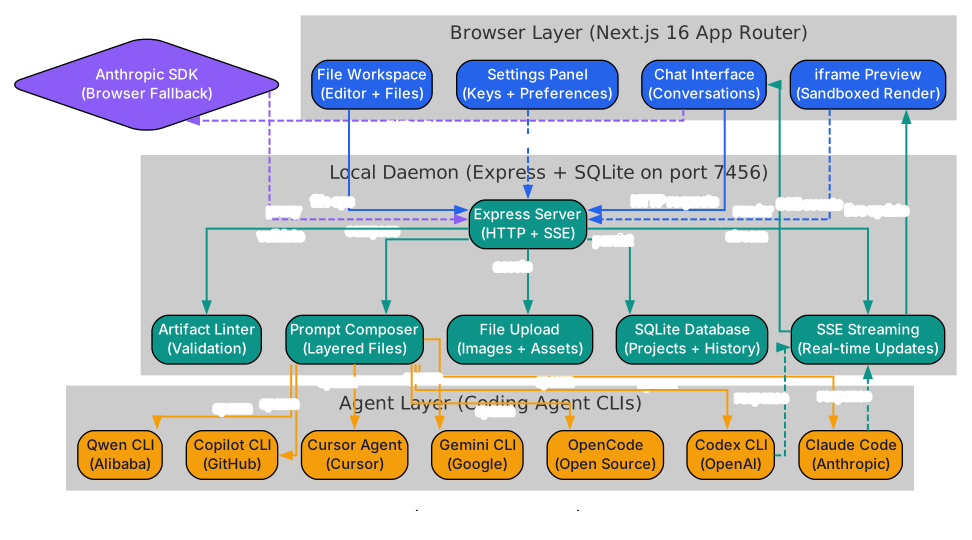
Open Design operates on a three-layer architecture that cleanly separates the browser interface, the coordination daemon, and the agent command-line interfaces. At the top layer sits the Browser, which serves as the user-facing interface. It is built on the Anthropic SDK but includes a critical fallback mechanism: if the Anthropic API key is absent or invalid, the browser gracefully degrades to a local-only mode, routing all requests through the daemon layer instead. This means you can run Open Design entirely offline, with no cloud dependency whatsoever.
The middle layer is the Daemon, a persistent Node.js process that acts as the central coordinator. When a user selects a skill and submits a design request, the daemon receives the prompt, composes the full prompt stack (more on that below), and spawns the appropriate agent CLI as a child process. The daemon manages the lifecycle of these child processes – starting them, piping stdin/stdout, handling errors, and cleaning up when generation completes. Communication between the browser and daemon uses Server-Sent Events (SSE) for real-time streaming, so the user sees the agent’s output appear incrementally, character by character, just as if they were watching the agent work in a terminal.
The bottom layer consists of the Agent CLIs themselves. Open Design ships with seven adapter modules, each one translating the daemon’s standardized protocol into the native format expected by a specific coding agent. Claude Code uses claude-stream-json, Codex uses json-event-stream, Cursor Agent uses copilot-stream-json, and so on. The daemon auto-detects which agent CLIs are available on your PATH at startup and presents only the valid options to the user. This adapter pattern means adding support for a new agent is as simple as writing a thin transport layer – typically under 200 lines of TypeScript.
Persistence is handled by SQLite, which stores project state, generation history, and skill configurations locally on your machine. No data ever leaves your workstation unless you explicitly export it. The SQLite database also tracks which design systems and skills are installed, enabling the daemon to present accurate pickers and metadata to the browser layer without scanning the filesystem on every request.
The Skill System

Skills in Open Design are not code plugins or compiled extensions – they are file-based directories that follow a strict convention. Every skill lives in its own folder under the skills directory, and each folder must contain at minimum a SKILL.md file, an assets/ subdirectory for static resources like images or fonts, and a references/ subdirectory for example outputs and style guides. This structure is intentional: it makes skills human-readable, version-controllable, and trivially auditable. You can open any skill folder in a text editor and understand exactly what it does without running a single line of code.
The drop-in design philosophy means that adding a new skill requires zero configuration. You simply drop a folder into the skills directory, restart the daemon (or let the file watcher detect the change), and the skill appears in the browser’s skill picker automatically. There is no registry, no install command, no dependency resolution. The daemon scans the skills directory at startup, reads each SKILL.md for metadata (name, description, category, required inputs), and builds the picker UI dynamically. Removing a skill is equally simple: delete the folder and restart.
Open Design ships with 19 skills organized into four categories. The Prototype category includes skills like web-prototype, saas-landing, dashboard, and form-builder – these generate interactive HTML prototypes that render in a sandboxed iframe. The Deck category includes pitch-deck, report-deck, and proposal-deck, which produce presentation-ready slide decks exportable as PPTX. The Template category covers email-template, newsletter, and social-graphic, generating assets optimized for specific distribution channels. The Showcase category includes portfolio and case-study, which combine narrative structure with visual polish.
Each SKILL.md file defines the skill’s identity, its discovery question form (the questions the user must answer before generation begins), the output format, and any constraints or anti-patterns the agent should enforce. The skill author has full control over the prompt engineering that drives generation, and because skills are just files, they can be forked, customized, and shared through any version control system.
Prompt Composition Stack
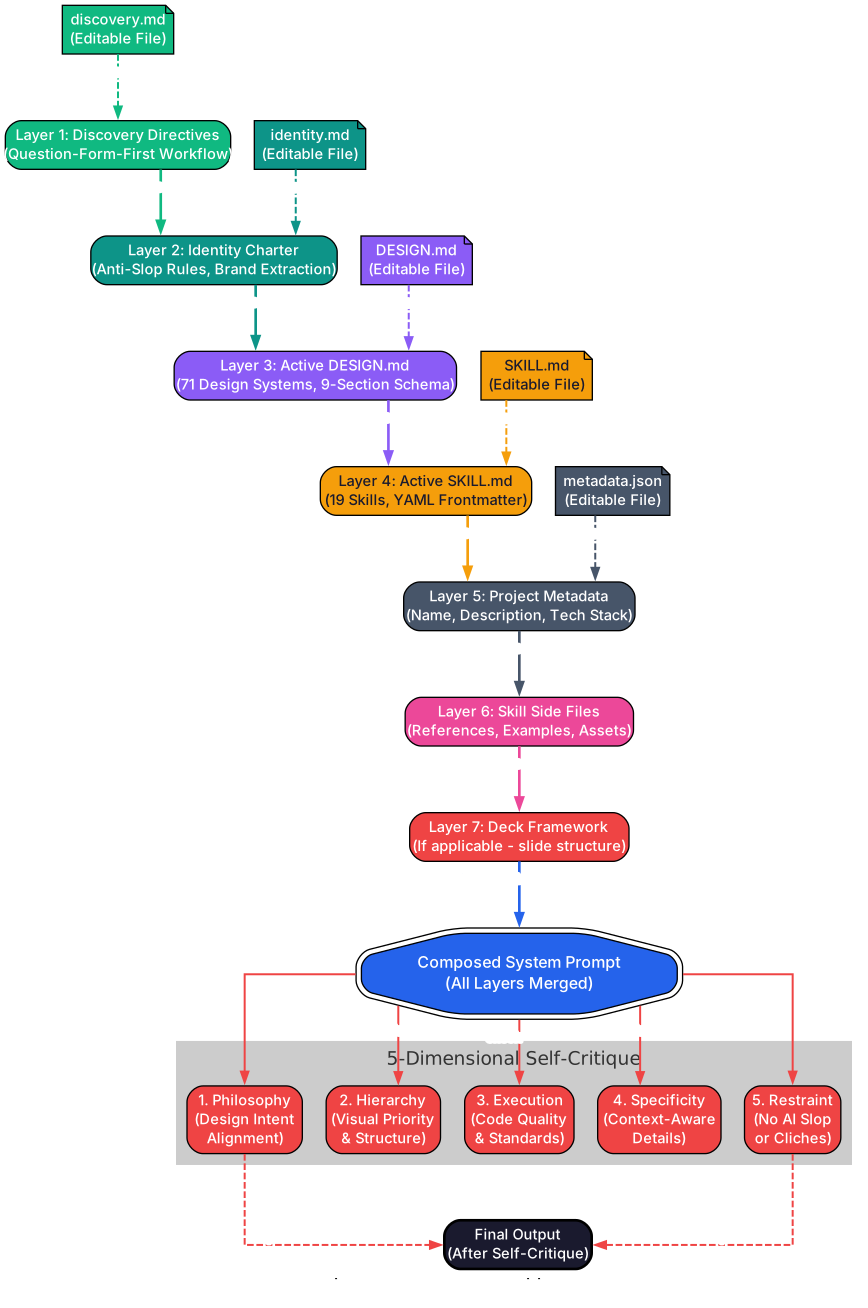
When the daemon composes a prompt before sending it to the agent CLI, it does not simply concatenate the user’s request with a system message. Instead, it builds a seven-layer prompt stack, where each layer serves a distinct purpose and each layer is an editable file that you can inspect, modify, or replace entirely. This transparency is a core design principle: there are no hidden system prompts or opaque fine-tuning tricks. Every token that reaches the agent is visible to you.
The first layer is the Discovery Directives, which encode the user’s answers from the question-form-first workflow. These directives lock down the surface (what is being designed), the audience (who it is for), and the tone (how it should feel) before any generation begins. By front-loading these decisions, Open Design prevents the agent from making assumptions that lead to generic or misaligned output.
The second layer is the Identity Charter, a short document that defines the agent’s role and constraints for the current session. It tells the agent, for example, that it is a senior product designer working within a specific design system, not a general-purpose assistant. The third layer is the DESIGN.md file, which contains the full brand specification – colors, typography, spacing, layout rules, component patterns, motion guidelines, voice and tone, brand values, and anti-patterns. This is the most substantial layer and the one that gives Open Design its visual consistency.
The fourth layer is the SKILL.md file from the selected skill, which provides task-specific instructions, output format requirements, and quality constraints. The fifth layer is Metadata, which includes the project name, creation date, and any tags or categories the user has assigned. The sixth layer is Side Files – supplementary documents like reference screenshots, competitor URLs, or brand guidelines that the user has attached to the project. The seventh and final layer is the Deck Framework, which applies only to presentation skills and defines slide structure, transition rules, and content hierarchy.
After the seven layers are composed, the daemon applies a five-dimensional self-critique to the assembled prompt. The Philosophy dimension checks whether the prompt aligns with the project’s stated purpose. The Hierarchy dimension verifies that the most important instructions are not buried under less relevant content. The Execution dimension ensures that the prompt contains concrete, actionable directives rather than vague aspirations. The Specificity dimension checks that color values, font names, and spacing numbers are explicit, not described in approximate terms. The Restraint dimension verifies that the prompt includes negative constraints – things the agent must not do – to prevent common AI design failures.
71 Design Systems
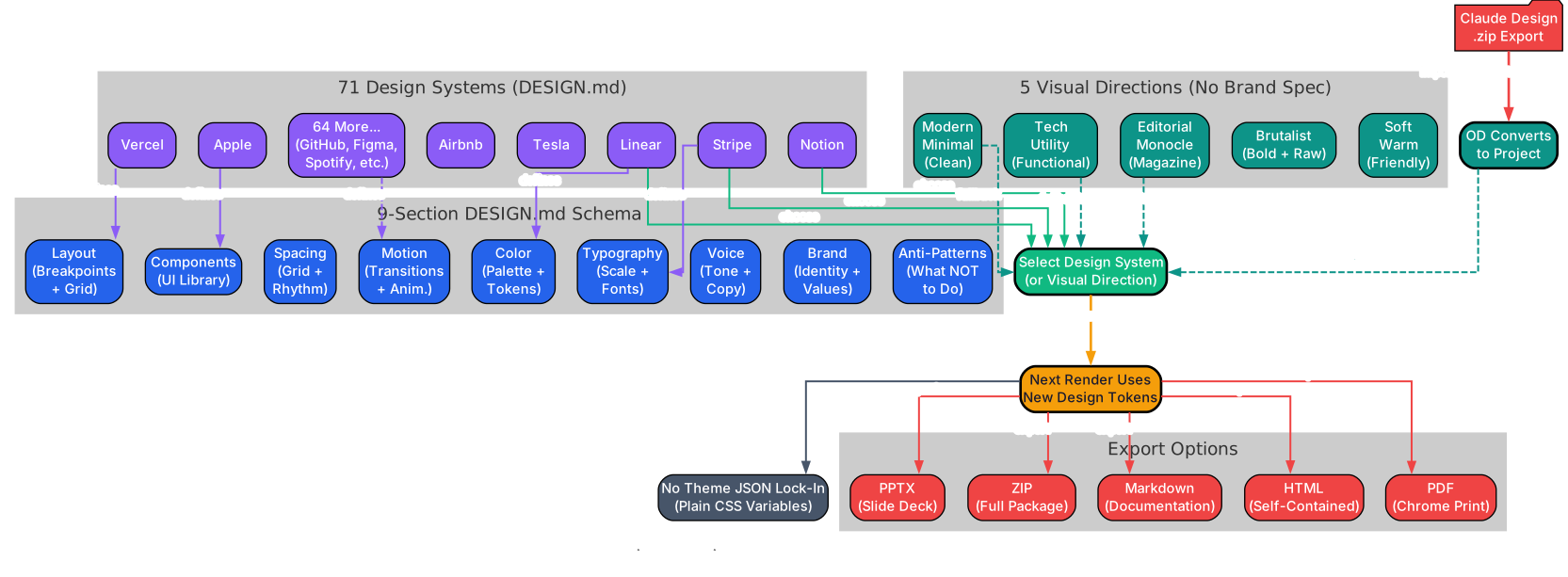
Open Design ships with 71 design systems, each one defined by a single DESIGN.md file that follows a nine-section schema. This schema is not a loose suggestion – it is a strict contract that every design system must fulfill. The nine sections are: Color (primary, secondary, accent, neutral, and semantic palettes with exact hex or oklch values), Typography (font families, weight scale, line heights, and pairing rules), Spacing (a base unit and a scale derived from it), Layout (grid system, breakpoints, and container rules), Components (buttons, cards, inputs, navigation patterns with states and variants), Motion (transition durations, easing curves, and animation principles), Voice (tone, reading level, and vocabulary constraints), Brand (mission statement, personality traits, and positioning), and Anti-patterns (explicit prohibitions that prevent the agent from producing design slop).
When no brand specification exists, Open Design offers five curated Visual Directions as starting points. Editorial Monocle delivers a high-contrast, serif-heavy aesthetic inspired by publications like The Economist and Monocle magazine. Modern Minimal follows the clean, whitespace-driven approach of brands like Linear and Notion. Tech Utility borrows the dense, information-rich style of developer tools like Stripe Dashboard and Vercel. Brutalist embraces raw typography, stark contrasts, and intentionally uncomfortable layouts. Soft Warm uses rounded forms, warm neutrals, and gentle gradients for approachable, consumer-facing products.
Switching between design systems requires no theme JSON lock-in. Because each design system is just a DESIGN.md file, you can switch by selecting a different system from the picker, or you can duplicate an existing system, modify its values, and save it as a custom system. There is no build step, no CSS compilation, and no runtime theme engine. The agent reads the DESIGN.md values and generates output that conforms to them directly.
For users migrating from Claude Design, Open Design includes a .zip import converter. Claude Design exports projects as ZIP archives containing HTML, CSS, and asset files. The import converter extracts these archives, parses the embedded styles to reconstruct color and typography values, and generates a corresponding DESIGN.md file. This means you can take any Claude Design output and continue iterating on it within Open Design, with full access to the skill system and prompt stack.
Export options cover five formats. HTML exports produce self-contained files with all CSS inlined, ready for hosting or sharing. PDF exports use headless Chrome rendering for pixel-perfect output. PPTX exports convert slide-based skills into PowerPoint-compatible files. ZIP exports bundle the entire project – HTML, assets, and the DESIGN.md – for archival or transfer. Markdown exports produce a text-based version suitable for documentation or further editing.
7 Coding Agent Adapters
Open Design supports seven coding agents out of the box, each connected through a dedicated adapter that translates the daemon’s protocol into the agent’s native transport format:
| Agent | Transport | Notes |
|---|---|---|
| Claude Code | claude-stream-json | Primary adapter, most thoroughly tested |
| Codex | json-event-stream | OpenAI’s coding agent |
| Cursor Agent | copilot-stream-json | Cursor IDE agent |
| Gemini CLI | plain | Google’s agent, plain text transport |
| OpenCode | copilot-stream-json | Open-source agent |
| Qwen | plain | Alibaba’s agent |
| Copilot CLI | copilot-stream-json | GitHub’s agent |
Beyond these seven, Open Design also supports Hermes, Kimi, and Pi through the ACP (Agent Communication Protocol) and RPC (Remote Procedure Call) protocols. These experimental adapters enable communication with agents that do not follow the standard CLI pattern, opening the door to future integrations with hosted or embedded agent runtimes. The adapter architecture is designed to be extensible: each adapter implements a simple interface with methods for spawning, streaming, and terminating, making it straightforward to add support for new agents as they emerge.
Anti-AI-Slop Machinery
One of Open Design’s most distinctive features is its systematic approach to preventing AI-generated design slop. Rather than relying on post-hoc filtering or manual review, Open Design bakes quality constraints into the generation pipeline itself.
The question-form-first workflow is the first line of defense. Before any pixel is generated, the user must answer a short form that locks down the surface (what is being designed), the audience (who it serves), and the tone (how it should feel). This takes roughly 30 seconds and prevents the agent from defaulting to the generic, audience-agnostic output that characterizes AI slop.
The brand-spec extraction protocol goes further. When a user provides a reference URL or uploads brand assets, Open Design parses them to extract concrete design values – exact colors, font names, spacing ratios – rather than relying on the agent to “match the vibe.” This ensures that generated output is grounded in real brand data, not the agent’s statistical approximation of what a brand might look like.
P0, P1, and P2 checklists provide tiered quality gates. P0 items are hard blockers: if the output violates a P0 rule (for example, using a prohibited color or failing the accessibility contrast check), it is rejected outright. P1 items are strong recommendations that trigger warnings. P2 items are nice-to-haves that are logged but do not block delivery.
The five-dimensional self-critique (described in the Prompt Composition Stack section) adds a second layer of quality assurance by evaluating the prompt itself before generation begins.
Finally, the slop blacklist provides explicit prohibitions that are appended to every prompt. The blacklist bans: purple gradients (the most overused AI design clich), emoji icons in navigation or headers, rounded cards with left-border accent lines (the default output of every lazy AI design tool), hand-drawn SVG humans (the “corporate diversity” illustration style), Inter as a display face (Inter is a fine UI font but a terrible choice for headlines), and invented metrics or fake statistics (no “98% satisfaction” or “10x productivity” claims in generated content). Honest placeholders are used instead: “Your metric here” or “Add real data” prompts that make it clear the content is a template, not a finished product.
Installation
Setting up Open Design requires Node.js and pnpm. The process is straightforward:
# Clone the repository
git clone https://github.com/nexu-io/open-design.git
cd open-design

# Enable corepack and install dependencies
corepack enable
corepack pnpm --version   # should print 10.33.2
pnpm install

# Start the development server
pnpm tools-dev run web
# Open the URL printed by tools-dev
Requirements: Node.js approximately version 24, pnpm 10.33.x. Optionally, have any supported coding agent CLI installed and available on your PATH for full functionality. The daemon will auto-detect available agents at startup and present them in the agent picker.
Usage
Once the development server is running, the workflow follows six steps:
-
Launch Open Design – The daemon starts and auto-detects which agent CLIs are available on your PATH. Detected agents appear in the agent picker.
-
Select a Skill – Choose from the 19 available skills in the picker. For example, select
web-prototypefor an interactive HTML page orsaas-landingfor a SaaS landing page. -
Choose a Design System – Pick from the 71 design systems (e.g., Linear, Stripe, Vercel) or select one of the five Visual Directions if you have no brand specification.
-
Answer the Discovery Question Form – Fill in the surface, audience, and tone fields. This locks down the design direction before generation begins and prevents generic output.
-
Agent Generates Design Artifact – The selected coding agent generates the design artifact in a sandboxed iframe. Output streams in real-time via SSE, so you can watch the agent work.
-
Edit and Export – Edit the generated output in-place within the browser. When satisfied, download in your preferred format: HTML, PDF, PPTX, ZIP, or Markdown.
Features Summary
| Feature | Description |
|---|---|
| 7 Agent Adapters | Auto-detects Claude Code, Codex, Cursor, Gemini, OpenCode, Qwen, Copilot |
| 19 Skills | File-based composable skills for prototypes, decks, templates, showcases |
| 71 Design Systems | Brand-grade DESIGN.md files with 9-section schema |
| 5 Visual Directions | Curated palettes when no brand spec exists |
| Anti-AI-Slop | Blacklist + self-critique + question-form-first workflow |
| Sandboxed Preview | Iframe rendering with in-place editing |
| 5 Export Formats | HTML, PDF, PPTX, ZIP, Markdown |
| Claude Design Import | Convert .zip exports into editable projects |
| Local-First | BYOK, no cloud dependency, data stays on your machine |
Conclusion
Open Design represents a fundamental shift in how developers approach AI-assisted design. Rather than paying per generation to a closed, cloud-only service, you get a local-first, agent-agnostic framework that runs on your hardware, respects your data, and gives you full control over every layer of the prompt pipeline. The 19 composable skills cover the most common design tasks, the 71 design systems provide brand-grade visual consistency, and the anti-AI-slop machinery ensures that generated output looks professional rather than generic. With support for seven coding agents out of the box and a transparent, file-based architecture that invites customization, Open Design is the practical, open-source alternative for teams that want design quality without vendor lock-in.
Check out the project on GitHub: https://github.com/nexu-io/open-design Enjoyed this post? Never miss out on future posts by following us 


