Introduction
Hue is an open-source meta-skill that learns any brand and produces a complete, opinionated design system from a single input – a URL, screenshot, codebase, or plain-text description. It runs natively inside Claude Code and OpenAI Codex, which means the design system it generates becomes an active constraint on every subsequent AI-generated line of UI code. The core problem Hue solves is simple but costly: without a shared design language, each AI coding session invents its own ad-hoc colors, spacing, and typography, producing UI that looks like it came from five different products. Hue eliminates that drift by extracting brand DNA, encoding it as structured YAML, generating a portable skill, and enforcing consistency through opinionated craft rules. The result is that every AI session – whether building a landing page, a component library, or a full application – speaks the same visual language.
The AI Design Consistency Problem
When developers use AI coding assistants to build user interfaces, each session starts from scratch. Session one might pick a blue-gray palette with 8px radii; session two might choose indigo with rounded-16px cards; session three might default to system fonts while session four loads Inter. There is no shared memory, no constraint file, and no design contract between sessions. The output is visual chaos – a product that looks assembled from spare parts rather than designed as a whole.
Traditional design systems solve this for human teams: a Figma library, a token file, a component storybook. But AI assistants cannot browse Figma or interpret a PDF style guide mid-session. They need a machine-readable contract that is loaded into context before generation begins.
Hue bridges this gap with a four-step loop: extract brand DNA from whatever input the user provides, encode it as a canonical YAML data model, generate a complete skill that wraps that data model with craft rules and output templates, and enforce consistency by making the skill a mandatory context layer. Every time the AI writes UI code, the skill is already loaded, so the generated output respects the same color ramps, spacing scale, typography stack, and component patterns as every other session.
The 16-Phase Pipeline
Hue processes a brand through a rigorous 16-phase pipeline that transforms raw brand input into a fully validated, multi-platform design system. The pipeline is designed so that no output is ever produced from unverified data – every token, every color, every spacing value passes through analysis, validation, and derivation before it reaches a stylesheet or an HTML preview.
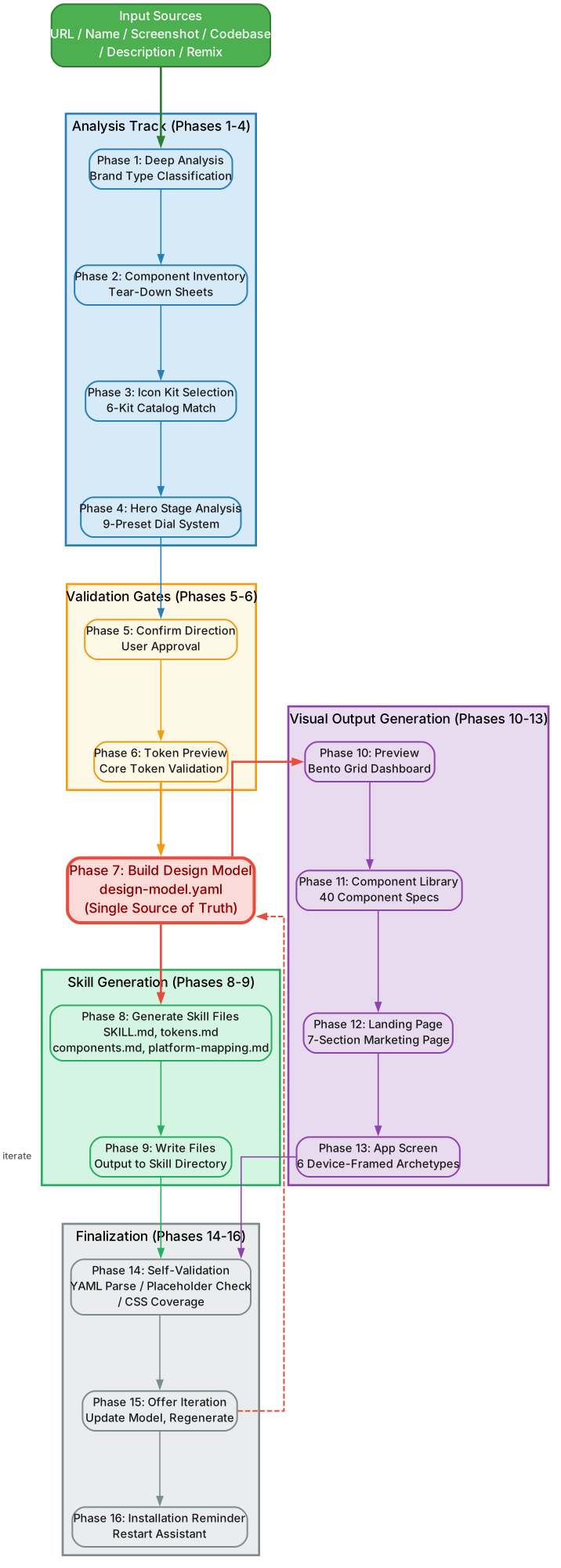
The pipeline is organized into six logical groups. Phases 1-4 (Analysis Track) handle all input ingestion and brand decomposition. Phase 1 accepts one of six input modes – URL, Name, Screenshot, Codebase, Description, or Remix – and normalizes it into a raw brand packet. Phase 2 performs deep visual analysis: color extraction, typography identification, spacing pattern detection, and radii measurement. Phase 3 classifies the brand type as UI-rich or Content-rich, which fundamentally changes downstream treatment. Phase 4 extracts iconography style, hero composition patterns, and component signatures.
Phases 5-6 (Validation Gates) ensure data integrity before any derivation begins. Phase 5 runs a completeness check: are there enough colors for a ramp? Is typography identifiable? Phase 6 runs a consistency check: do extracted colors form a coherent palette, or is there noise from user-uploaded content that should be filtered out?
Phase 7 (Design Model) is the singularity point – all validated data is written into design-model.yaml, the single source of truth from which every downstream output derives.
Phases 8-9 (Skill Generation) transform the design model into a portable skill. Phase 8 generates the SKILL.md frontmatter with triggers and metadata. Phase 9 generates the craft rules – the opinionated constraints that the AI assistant must follow when producing UI code.
Phases 10-13 (Visual Output) produce the four HTML deliverables: preview.html for emotional feel, component-library.html for exact token values, landing-page.html for narrative storytelling, and app-screen.html for real-world usability testing. Each includes a floating Light/Dark mode toggle.
Phases 14-16 (Finalization) validate and package everything. Phase 14 runs the self-validation pipeline (YAML parse, placeholder detection, CSS coverage, token coverage). Phase 15 generates the three token formats: CSS Custom Properties, SwiftUI extensions, and Tailwind config. Phase 16 writes the final skill directory structure and produces a summary report.
Single Source of Truth: design-model.yaml
The design-model.yaml file is the canonical data model at the center of Hue’s architecture. Every token format, every HTML preview, and every craft rule derives from this single file. There are no parallel data paths, no hardcoded values in templates, and no manual overrides that bypass the YAML. If a value needs to change, it changes in the YAML first, and the change propagates outward to all outputs during the next generation cycle.
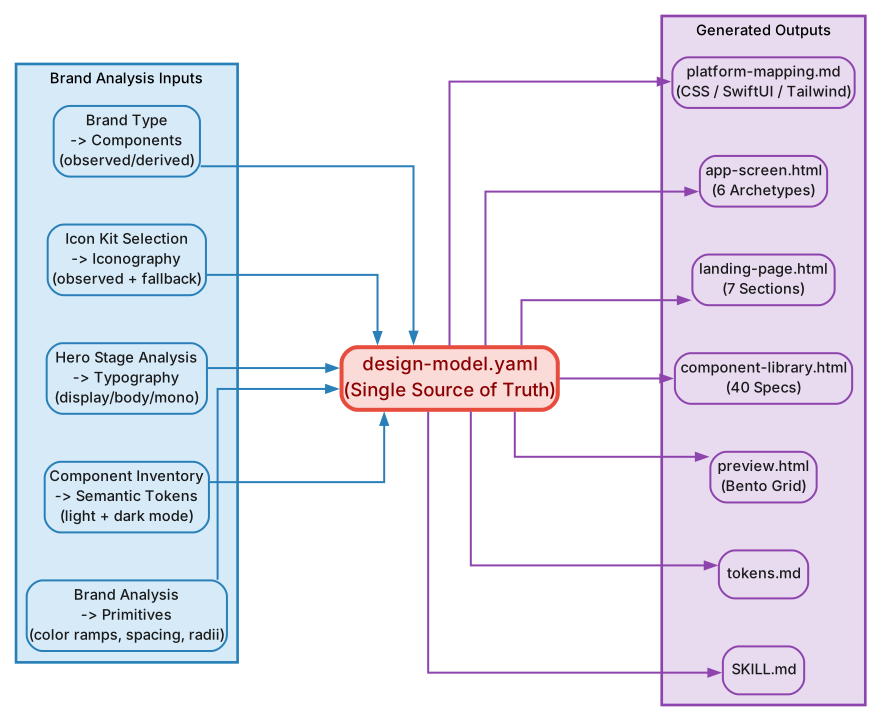
The YAML is organized into six major sections. Primitives define the raw building blocks: color ramps (primary, secondary, neutral, accent, success, warning, error) with light and dark variants, spacing scale (0, 1, 2, 3, 4, 5, 6, 8, 10, 12, 16, 20, 24, 32, 40, 48, 64, 80, 96, 128), and radii scale (none, xs, sm, md, lg, xl, 2xl, full). Semantic Tokens layer meaning on top of primitives: --color-bg-primary, --color-text-muted, --color-border-subtle and their dark-mode counterparts. Typography defines three stacks – display (headings, hero text), body (paragraphs, labels, inputs), and mono (code, data tables) – each with font family, weight ramp, and size ramp. Hero Stage encodes the brand’s hero composition as a set of dial values (background field, hero subject, relation) rather than a single hardcoded layout. Iconography captures the observed icon style and provides a fallback kit with a mandatory disclaimer. Components list every extracted component with its source (observed tear-down or derived from principles), its token bindings, and its composition rules.
The propagation model is strictly unidirectional: YAML » token formats » HTML previews » craft rules. No output ever writes back to the YAML. This guarantees that the YAML remains the single authoritative representation of the brand, and any regeneration from the same YAML produces identical outputs.
# Simplified design-model.yaml structure
brand:
  name: "ExampleCorp"
  type: ui-rich  # or content-rich

primitives:
  colors:
    primary:   [50, 100, 200, 300, 400, 500, 600, 700, 800, 900, 950]
    neutral:   [50, 100, 200, 300, 400, 500, 600, 700, 800, 900, 950]
  spacing: [0, 1, 2, 3, 4, 5, 6, 8, 10, 12, 16, 20, 24, 32, 40, 48, 64]
  radii:
    none: "0px"
    sm: "4px"
    md: "8px"
    lg: "12px"
    xl: "16px"
    2xl: "24px"
    full: "9999px"

semantic-tokens:
  light:
    bg-primary:   "{primitives.colors.primary.50}"
    text-primary: "{primitives.colors.neutral.900}"
  dark:
    bg-primary:   "{primitives.colors.primary.950}"
    text-primary: "{primitives.colors.neutral.50}"

typography:
  display:
    family: "Inter, system-ui, sans-serif"
    weights: [400, 500, 600, 700, 800]
  body:
    family: "Inter, system-ui, sans-serif"
    weights: [400, 500, 600]
  mono:
    family: "JetBrains Mono, monospace"
    weights: [400, 500]

hero-stage:
  preset: "cinematic-fade"
  background: { gradient: true, blur: "md" }
  subject:   { scale: "hero", shadow: "2xl" }
  relation:  { blend: "overlay" }

iconography:
  observed_style: "24px stroke-2 rounded"
  fallback_kit: "lucide"
  disclaimer: true

components:
  - name: button
    source: observed
    tokens: [bg-primary, text-primary, radii-md]
  - name: card
    source: derived
    tokens: [bg-primary, border-subtle, radii-lg, shadow-sm]
The Dual-Track System
Not every brand provides complete visual data. A SaaS product might have a polished website with clear iconography, hero compositions, and component patterns. A personal blog might have a logo and two colors but nothing else. Hue handles this reality through a dual-track system that separates what was actually observed from what was derived or approximated, and it enforces an Honesty Principle: the skill must always disclose which track a value came from.
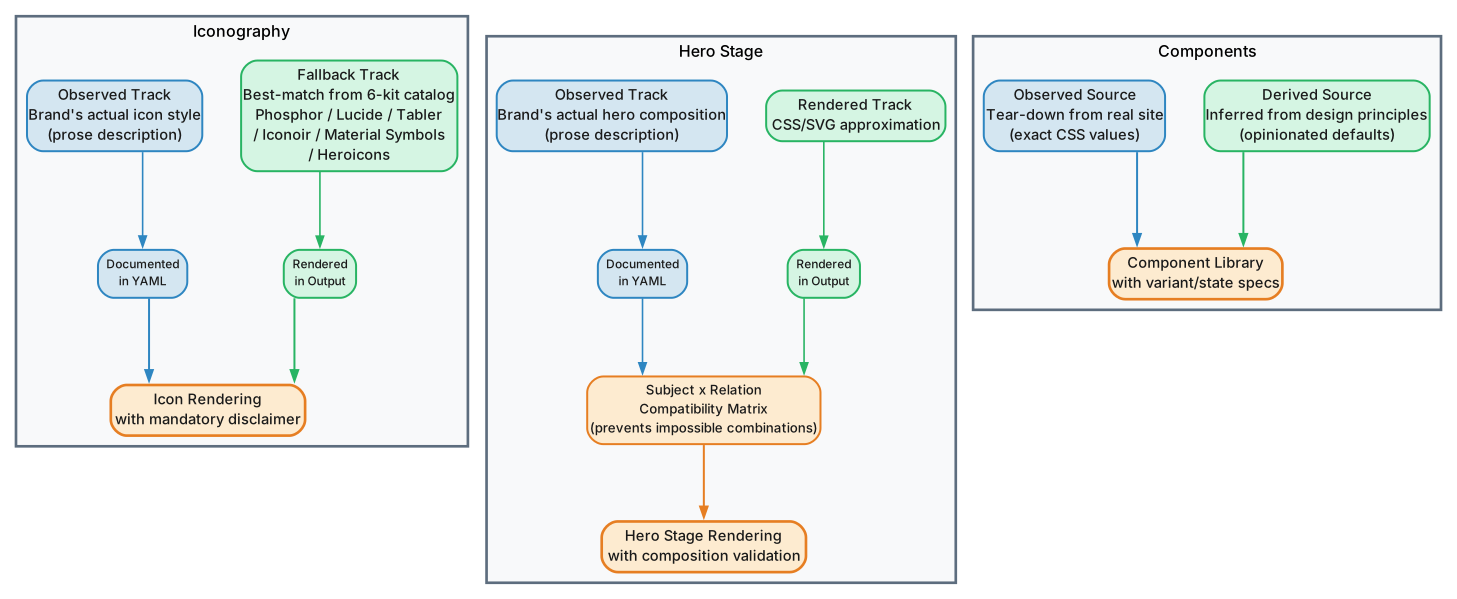
The dual-track operates across three critical domains. Iconography uses an observed_style track when the brand’s icon system can be identified from the input – for example, “24px stroke-2 rounded” for Linear-style icons or “20px filled sharp” for Material-style icons. When no icon system is detectable, the fallback_kit track activates, defaulting to Lucide icons with a mandatory disclaimer in the generated skill: “Icon style was not observed from the brand; using fallback kit. Verify with brand owner.”
Hero Stage uses an observed composition track when the input reveals how the brand constructs its hero sections – gradient direction, image treatment, text placement, overlay technique. When no hero data is available, the derived track uses the brand type classification and color palette to construct a CSS/SVG approximation. A subject x relation compatibility matrix governs which hero subject types can pair with which relation types: a “cinematic-fade” subject cannot use a “hard-cut” relation, and a “minimal-float” subject requires a “soft-shadow” relation. The matrix prevents aesthetically invalid combinations.
Components use an observed source track when the component was reverse-engineered from the brand’s actual markup – its exact token bindings, spacing, and composition are recorded as-is. When a component is not present in the input, the derived from principles source track constructs it from the brand’s primitives and semantic tokens, following the craft rules. The derived component is always marked with source: derived in the YAML so that downstream consumers know it was not directly observed.
The Honesty Principle means that every output – whether a CSS file, an HTML preview, or a craft rule – includes a provenance annotation. Developers can see at a glance which values came from the brand itself and which were synthesized by Hue. This transparency is essential for teams that need to audit and refine the generated design system.
Multi-Platform Output
Hue generates design tokens in three formats and visual previews in four HTML deliverables, ensuring that the design system is usable across web, native, and utility-first CSS workflows. Every output derives from the same design-model.yaml, so consistency is guaranteed regardless of which format a developer consumes.
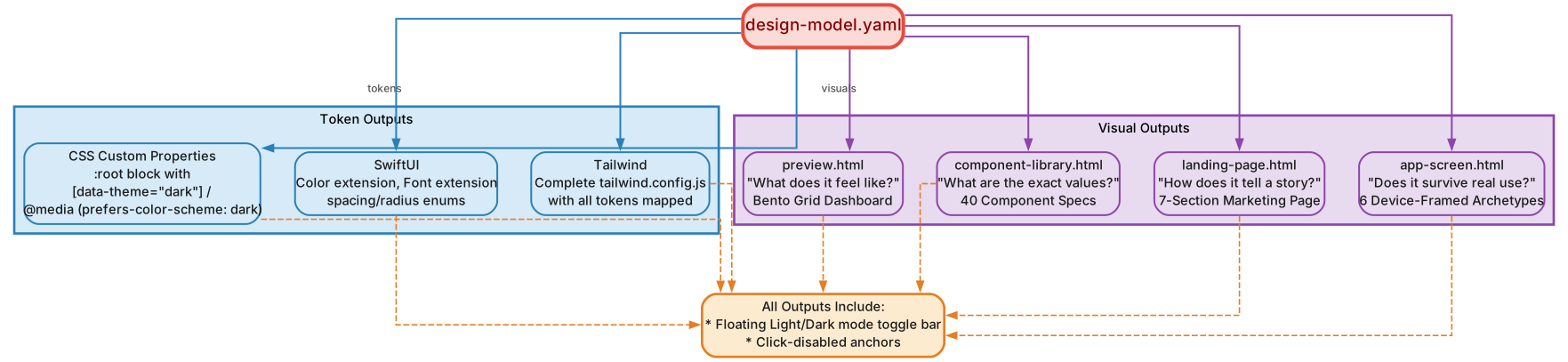
CSS Custom Properties produce a tokens.css file that defines every semantic token as a CSS custom property on :root for light mode and [data-theme="dark"] for dark mode. The file uses the light-dark() function where supported, with fallback declarations for older browsers. Developers can switch themes by toggling a single data-theme attribute on the <html> element.
SwiftUI Extensions produce a DesignTokens.swift file that extends SwiftUI’s Color, Spacing, and Typography types with static properties matching the semantic token names. This allows iOS developers to write Color.bgPrimary or Spacing.scale6 with full type safety and autocomplete.
Tailwind Config produces a tailwind.theme.js file that maps the brand’s primitives and semantic tokens into Tailwind’s configuration object. Developers can use classes like bg-primary, text-muted, rounded-lg with the brand’s exact values, and the dark: variant works automatically.
The four HTML deliverables serve distinct purposes. preview.html answers the question “what does this brand feel like?” – it renders the color palette, typography stacks, and spacing scale in an immersive, full-viewport layout designed to evoke the brand’s emotional character. component-library.html answers “what are the exact values?” – it displays every component with its token bindings, making it a reference document for developers. landing-page.html answers “how does this brand tell a story?” – it assembles a complete landing page using the hero stage, components, and typography to demonstrate narrative flow. app-screen.html answers “does this survive real use?” – it renders a realistic application screen with forms, tables, navigation, and interactive states to stress-test the design system under practical conditions. All four HTML files include a floating Light/Dark mode toggle in the bottom-right corner, allowing instant theme switching without page reload.
The Hero Stage System
Hue’s Hero Stage system provides a structured way to compose hero sections that are consistent with the brand’s visual identity. Rather than hardcoding a single hero layout, the system uses a 9-preset catalog with dial-based composition, giving the AI assistant a vocabulary of hero patterns to choose from while staying within the brand’s design language.
The presets are: cinematic-fade, minimal-float, editorial-center, split-narrative, gradient-immersion, product-showcase, typographic-bold, layered-depth, and organic-flow. Each preset is defined by a set of dial values rather than pixel positions, making them resolution-independent and theme-aware.
The two-layer model separates the hero into a background field and a hero subject + relation. The background field is controlled by 11 dials: gradient-type, gradient-angle, gradient-colors, image-blur, image-overlay, image-opacity, ambient-glow, noise-texture, parallax-depth, vignette-strength, and color-shift. The hero subject is controlled by 5 dials: scale, shadow, border, animation, and z-lift. The relation between subject and background is controlled by 2 dials: blend-mode and overlay-opacity.
A subject x relation compatibility matrix enforces valid combinations. For example, a “cinematic-fade” subject with “overlay” relation is valid, but “cinematic-fade” with “hard-cut” is rejected. A “minimal-float” subject requires “soft-shadow” relation and is incompatible with “overlay.” The matrix prevents the AI from generating hero sections that look visually broken.
The subtle-by-default rule ensures that hero stages default to understated compositions. Gradients default to soft, shadows default to small, and animations default to none. The developer can dial up intensity, but the baseline is always restrained – preventing the common AI tendency to generate over-designed, visually loud hero sections.
Brand Type Classification
Hue classifies brands into two fundamental types, and the classification changes how every downstream phase operates. UI-rich brands – like Linear, Notion, and Vercel – are products where the interface itself is the primary experience. Their design systems emphasize component precision, interaction states, spacing consistency, and micro-interactions. Hue treats UI-rich brands by prioritizing component extraction, generating detailed interaction state maps, and producing component libraries with exhaustive token bindings.
Content-rich brands – like Tesla, Nike, and The Verge – are brands where the message, imagery, and storytelling dominate. Their design systems emphasize hero composition, typography impact, color mood, and visual hierarchy. Hue treats content-rich brands by prioritizing hero stage extraction, generating immersive preview pages, and producing landing-page deliverables that showcase narrative flow.
The classification affects the skill generation phase as well. A UI-rich brand’s craft rules emphasize component composition patterns, spacing consistency, and state management. A content-rich brand’s craft rules emphasize typographic hierarchy, hero composition, and visual storytelling. The same pipeline produces fundamentally different outputs depending on the brand type, ensuring that the generated design system matches the brand’s actual character rather than imposing a one-size-fits-all template.
Self-Validation Pipeline
Phase 14 of the Hue pipeline runs an automated self-validation check before any output is finalized. This ensures that the generated design system is complete, consistent, and free of common errors. The validation pipeline performs four checks:
YAML Parse Verification confirms that design-model.yaml is syntactically valid and can be loaded without errors. Malformed YAML – unclosed brackets, incorrect indentation, missing colons – is caught here before it propagates to token formats or HTML previews.
Placeholder Detection scans all generated files for unresolved template placeholders like {{COLOR_PRIMARY}} or TODO: fill in. Any placeholder that was not replaced with an actual value during generation is flagged as an error, preventing incomplete design tokens from reaching production.
CSS Selector Coverage verifies that every semantic token defined in the YAML has a corresponding CSS custom property in the generated tokens.css file. If a token is defined in the YAML but missing from the CSS, the validation fails and the pipeline reports the gap.
Token Coverage checks that every component in the YAML references only tokens that exist in the primitives and semantic-tokens sections. A component that references a non-existent color or spacing value is flagged, preventing broken references in the final output.
Getting Started
Installing Hue is straightforward. Clone the repository and place the skill directory where your AI assistant can discover it.
# Clone the Hue skill
git clone https://github.com/dominikmartn/hue.git

# For Claude Code
cp -r hue ~/.claude/skills/hue

# For OpenAI Codex
cp -r hue ~/.agents/skills/hue

# Restart your AI assistant to load the skill
# Then activate the skill in your session
Hue supports six input modes. URL mode fetches a website and analyzes its live CSS and markup. Name mode takes a brand name and searches for its public-facing design assets. Screenshot mode accepts an image file and performs visual analysis. Codebase mode scans a local project directory for existing design tokens and patterns. Description mode takes a plain-text description of the desired brand character. Remix mode takes an existing Hue-generated skill and modifies it with new parameters. Each mode follows the same 16-phase pipeline, so the output quality is consistent regardless of how the brand data enters the system.
Conclusion
Hue solves a real and growing problem in AI-assisted development: visual inconsistency across sessions. By extracting brand DNA, encoding it as a canonical YAML data model, and generating a portable skill with opinionated craft rules, Hue ensures that every AI coding session produces UI that speaks the same visual language. The 16-phase pipeline with its validation gates, dual-track honesty system, and self-validation checks guarantees that the output is not just consistent but also accurate and complete. Whether you are building a single landing page or an entire application, Hue gives your AI assistant the design contract it needs to produce work that looks like it came from one team, not five different ones. Enjoyed this post? Never miss out on future posts by following us 


