What is DeepClaude?
DeepClaude is an open-source proxy tool that lets you use Claude Code’s autonomous agent loop with DeepSeek V4 Pro, OpenRouter, or any Anthropic-compatible backend at a fraction of the cost. If you have ever wanted the full Claude Code experience - file editing, bash execution, git operations, subagent spawning, and multi-step autonomous coding loops - but balked at the $200/month price tag, DeepClaude offers a compelling alternative. By swapping the model backend while preserving the entire Claude Code toolchain, DeepClaude delivers the same developer experience at roughly 17x lower cost per output token.
Claude Code is widely regarded as the best autonomous coding agent available today. However, its Anthropic Max subscription costs $200 per month with usage caps, and the per-token pricing of $15 per million output tokens adds up quickly during heavy usage. DeepSeek V4 Pro, on the other hand, scores 96.4% on LiveCodeBench and costs just $0.87 per million output tokens. DeepClaude bridges these two worlds by redirecting Claude Code’s API calls to cheaper backends while keeping every other feature intact.
Key Insight: DeepClaude does not modify Claude Code itself. It works by setting environment variables that tell Claude Code where to send API requests. The tool loop, file editing, bash execution, and all other capabilities remain completely unchanged - only the model that processes your requests is different.
How DeepClaude Works
DeepClaude operates through a simple but effective mechanism. Claude Code reads several environment variables to determine where to send API calls. The key variables are ANTHROPIC_BASE_URL (the API endpoint), ANTHROPIC_AUTH_TOKEN (the API key), and model name variables like ANTHROPIC_DEFAULT_OPUS_MODEL, ANTHROPIC_DEFAULT_SONNET_MODEL, and ANTHROPIC_DEFAULT_HAIKU_MODEL.
When you launch DeepClaude, it sets these environment variables per-session (not permanently), starts Claude Code with the redirected backend, and then restores your original settings on exit. This means your default Anthropic configuration is never modified, and you can switch back and forth between backends at will.
For remote control mode, DeepClaude starts a local proxy server on localhost:3200 that intelligently routes traffic. Model API calls go to your chosen backend (DeepSeek, OpenRouter, or Fireworks), while bridge WebSocket connections for authentication pass through to Anthropic. This split routing is essential because remote control requires Anthropic’s bridge infrastructure for the WebSocket connection.
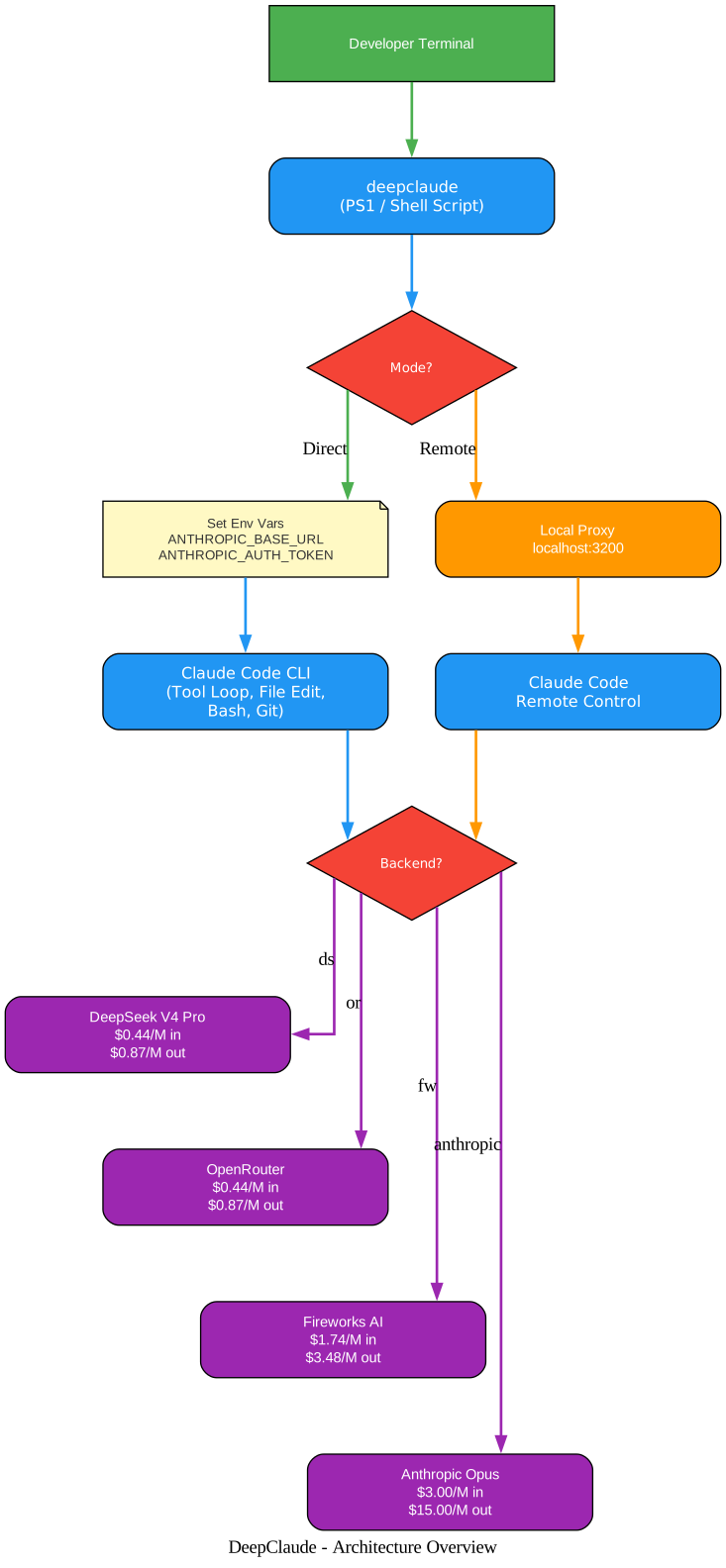
The architecture diagram above illustrates the two primary modes of operation. In Direct Mode, DeepClaude sets the environment variables and launches Claude Code directly, with API calls flowing straight to the selected backend. In Remote Mode, a local proxy intercepts all requests, routing model calls to the alternative backend while passing authentication and bridge traffic through to Anthropic. The four supported backends - DeepSeek, OpenRouter, Fireworks AI, and Anthropic - each offer different pricing, latency, and geographic characteristics.
Supported Backends
DeepClaude supports four backend options, each with distinct characteristics:
| Backend | Flag | Input/M tokens | Output/M tokens | Servers | Notes |
|---|---|---|---|---|---|
| DeepSeek (default) | --backend ds | $0.44 | $0.87 | China | Auto context caching (120x cheaper on repeat turns) |
| OpenRouter | --backend or | $0.44 | $0.87 | US | Cheapest, lowest latency from US/EU |
| Fireworks AI | --backend fw | $1.74 | $3.48 | US | Fastest inference, US-based servers |
| Anthropic | --backend anthropic | $3.00 | $15.00 | US | Original Claude Opus (for hard problems) |
Takeaway: For routine coding tasks that make up roughly 80% of daily work, DeepSeek V4 Pro is comparable to Claude Opus in quality. For the remaining 20% of complex reasoning tasks, you can switch to Anthropic with a single command - no restart required.
Cost Comparison
The cost savings with DeepClaude are substantial, especially for developers who use Claude Code heavily:
| Usage Level | Anthropic Max | DeepClaude (DeepSeek) | Savings |
|---|---|---|---|
| Light (10 days/mo) | $200/mo (capped) | ~$20/mo | 90% |
| Heavy (25 days/mo) | $200/mo (capped) | ~$50/mo | 75% |
| With auto loops | $200/mo (capped) | ~$80/mo | 60% |
DeepSeek’s automatic context caching makes agent loops extremely affordable. After the first request, the system prompt and file context are cached at $0.004/M tokens versus $0.44/M for uncached input. This 120x reduction on repeat turns is particularly valuable for autonomous coding agents that repeatedly reference the same codebase context.
Quick Start Guide
Getting started with DeepClaude takes about two minutes. Here is the complete setup process:
Step 1: Get a DeepSeek API Key
Sign up at platform.deepseek.com, add $5 credit, and copy your API key. The key starts with sk- and is all you need for the default DeepSeek backend.
Step 2: Set Your API Key
Windows (PowerShell):
setx DEEPSEEK_API_KEY "sk-your-key-here"
macOS/Linux:
echo 'export DEEPSEEK_API_KEY="sk-your-key-here"' >> ~/.bashrc
source ~/.bashrc
Step 3: Install DeepClaude
Windows:
# Copy the script to a directory in your PATH
Copy-Item deepclaude.ps1 "$env:USERPROFILE\.local\bin\deepclaude.ps1"

# Or add the repo directory to PATH
setx PATH "$env:PATH;C:\path\to\deepclaude"
macOS/Linux:
chmod +x deepclaude.sh
sudo ln -s "$(pwd)/deepclaude.sh" /usr/local/bin/deepclaude
Step 4: Launch
deepclaude                  # Launch Claude Code with DeepSeek V4 Pro
deepclaude --status         # Show available backends and keys
deepclaude --backend or     # Use OpenRouter (cheapest, $0.44/M input)
deepclaude --backend fw     # Use Fireworks AI (fastest, US servers)
deepclaude --backend anthropic  # Normal Claude Code (when you need Opus)
deepclaude --cost           # Show pricing comparison
deepclaude --benchmark      # Latency test across all providers
Amazing: The entire DeepClaude tool consists of just two shell scripts (PowerShell and Bash) and a Node.js proxy. There are no dependencies to install, no npm packages to manage, and no configuration files to edit. It works by setting environment variables that Claude Code already reads natively.
Key Features and Capabilities
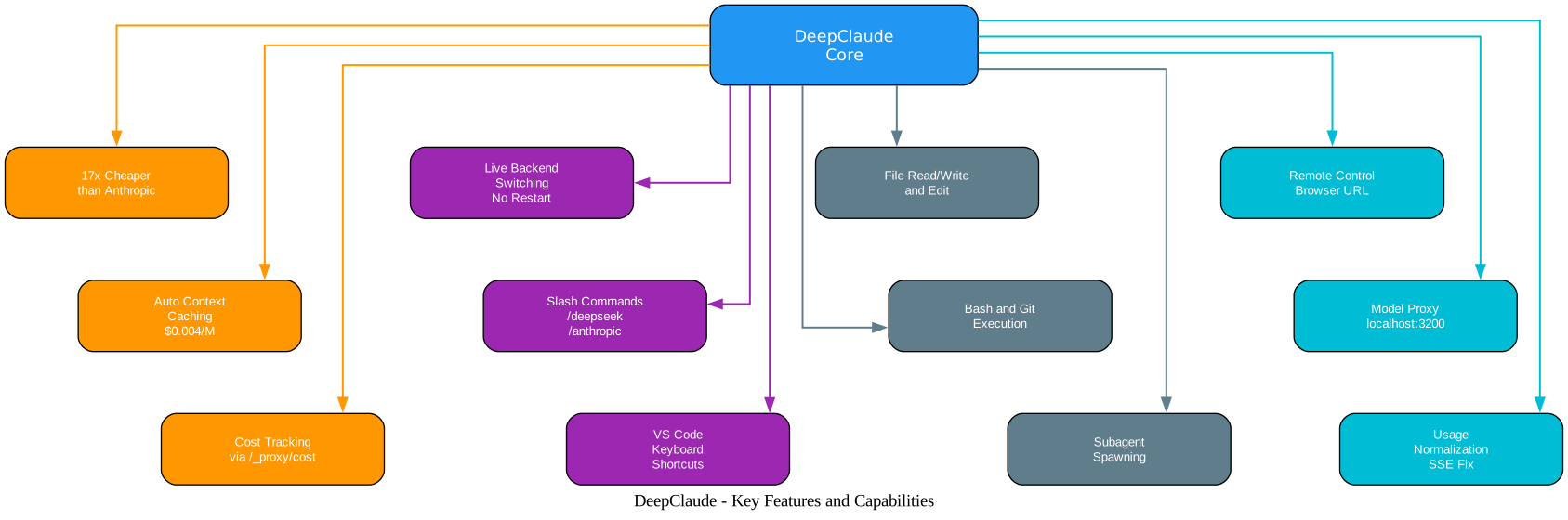
The features diagram above shows the four major capability areas of DeepClaude. The Cost Savings cluster highlights the 17x price reduction, automatic context caching that drops repeat-turn costs to $0.004/M tokens, and the built-in cost tracking endpoint that shows exactly how much you are saving. The Live Switching cluster demonstrates the ability to change backends mid-session without restarting, using slash commands like /deepseek and /anthropic, or VS Code keyboard shortcuts. The Compatibility cluster confirms that all core Claude Code features work with alternative backends: file operations, bash and git execution, and subagent spawning. The Remote Control cluster shows the browser-based access, the local proxy architecture, and the usage normalization that fixes SSE streaming issues from non-Anthropic backends.
What Works
- File reading, writing, and editing (Read/Write/Edit tools)
- Bash and PowerShell execution
- Glob and Grep search
- Multi-step autonomous tool loops
- Subagent spawning
- Git operations
- Project initialization (
/init) - Thinking mode (enabled by default)
What Does Not Work or Is Degraded
| Feature | Reason |
|---|---|
| Image/vision input | DeepSeek’s Anthropic endpoint does not support images |
| Parallel tool use | Supported by DeepSeek (up to 128 per call), but Claude Code sends tools sequentially by default |
| MCP server tools | Not supported through the compatibility layer |
| Prompt caching savings | DeepSeek has its own caching (automatic), but Anthropic’s cache_control is ignored |
Live Backend Switching
One of DeepClaude’s most powerful features is the ability to switch between Anthropic and DeepSeek mid-session, without restarting Claude Code. This means you can start a coding session on DeepSeek for routine tasks, then switch to Anthropic when you encounter a complex reasoning problem - all from within the same terminal.
Option 1: Slash Commands (Recommended)
Add command files to ~/.claude/commands/:
deepseek.md:
Switch the model proxy to DeepSeek. Run this command silently and report the result:
curl -sX POST http://127.0.0.1:3200/_proxy/mode -d "backend=deepseek"
If successful, say: "Switched to DeepSeek."
anthropic.md:
Switch the model proxy back to Anthropic. Run this command silently and report the result:
curl -sX POST http://127.0.0.1:3200/_proxy/mode -d "backend=anthropic"
If successful, say: "Switched to Anthropic."
Then type /deepseek or /anthropic in any Claude Code session to switch instantly.
Option 2: CLI Flag
deepclaude --switch deepseek    # or: ds, or, fw, anthropic
deepclaude -s anthropic
Option 3: VS Code Keyboard Shortcuts
Add to .vscode/tasks.json:
{
  "version": "2.0.0",
  "tasks": [
    {
      "label": "Proxy: Switch to DeepSeek",
      "type": "shell",
      "command": "Invoke-RestMethod -Uri http://127.0.0.1:3200/_proxy/mode -Method Post -Body 'backend=deepseek'",
      "presentation": { "reveal": "always" },
      "problemMatcher": []
    },
    {
      "label": "Proxy: Switch to Anthropic",
      "type": "shell",
      "command": "Invoke-RestMethod -Uri http://127.0.0.1:3200/_proxy/mode -Method Post -Body 'backend=anthropic'",
      "presentation": { "reveal": "always" },
      "problemMatcher": []
    }
  ]
}
Then bind in keybindings.json:
{ "key": "ctrl+alt+d", "command": "workbench.action.tasks.runTask", "args": "Proxy: Switch to DeepSeek" },
{ "key": "ctrl+alt+a", "command": "workbench.action.tasks.runTask", "args": "Proxy: Switch to Anthropic" }
Cost Tracking
The proxy tracks token usage and calculates savings versus Anthropic pricing in real time:
curl -s http://127.0.0.1:3200/_proxy/cost
Returns:
{
  "backends": {
    "deepseek": {
      "input_tokens": 125000,
      "output_tokens": 45000,
      "requests": 12,
      "cost": 0.0941,
      "anthropic_equivalent": 1.05
    }
  },
  "total_cost": 0.0941,
  "anthropic_equivalent": 1.05,
  "savings": 0.9559
}
Important: The cost tracking endpoint shows both your actual spend and the equivalent cost if you had used Anthropic. In the example above, $0.09 actual versus $1.05 Anthropic equivalent represents a 91% savings on just 12 requests. Over a full month of heavy usage, these savings compound dramatically.
Remote Control Mode
DeepClaude supports Claude Code’s remote control feature, which lets you open a coding session in any browser. This is particularly useful for accessing your development environment from a phone, tablet, or another machine.
deepclaude --remote                # Remote control + DeepSeek
deepclaude --remote -b or          # Remote control + OpenRouter
deepclaude --remote -b anthropic   # Remote control + Anthropic (normal)
This prints a https://claude.ai/code/session_... URL you can open on any device. The proxy starts automatically and stops when the session ends.
Prerequisites for Remote Control
- Must be logged into Claude Code:
claude auth login - Must have a claude.ai subscription (the bridge is Anthropic infrastructure)
- Node.js 18+ (for the proxy)
VS Code and Cursor Integration
Add terminal profiles to launch DeepClaude directly from your IDE:
Settings > JSON (Windows):
{
  "terminal.integrated.profiles.windows": {
    "DeepSeek Agent": {
      "path": "powershell.exe",
      "args": ["-ExecutionPolicy", "Bypass", "-NoExit", "-File", "C:\\path\\to\\deepclaude.ps1"]
    }
  }
}
Settings > JSON (macOS/Linux):
{
  "terminal.integrated.profiles.linux": {
    "DeepSeek Agent": {
      "path": "/usr/local/bin/deepclaude"
    }
  }
}
The Model Proxy Under the Hood
The Node.js proxy (model-proxy.js) is the core of DeepClaude’s remote control and live switching capabilities. It handles several critical tasks:
- Request routing: Model API calls (
/v1/messages) go to the active backend, while all other requests pass through to Anthropic - Model name remapping: Claude model names like
claude-opus-4-6are automatically translated to backend-specific names likedeepseek-v4-pro - Usage normalization: DeepSeek and OpenRouter may omit
usagefields in SSE streams, which crashes Claude Code. The proxy injects missing fields via aUsageNormalizertransform stream - Thinking block stripping: Non-Anthropic backends reject thinking blocks they did not generate. The proxy strips these before forwarding
- Cost tracking: Every request’s token usage is recorded and priced against both the actual backend and Anthropic rates
The proxy listens on localhost:3200 by default and provides control endpoints at /_proxy/status, /_proxy/mode, and /_proxy/cost.
Troubleshooting
| Issue | Cause | Solution |
|---|---|---|
| “DEEPSEEK_API_KEY not set” | Environment variable not configured | Run setx DEEPSEEK_API_KEY "sk-..." on Windows or export DEEPSEEK_API_KEY="sk-..." on macOS/Linux |
| Proxy fails to start | Port 3200 already in use | The proxy auto-increments ports up to 3220. Check if another proxy is running |
| Claude Code crashes with “$.input_tokens is undefined” | Backend omits usage fields in SSE | This is fixed by the proxy’s UsageNormalizer. Make sure you are using the latest version |
| “Upstream connection error” (502) | Backend API is unreachable | Check your internet connection and that the backend API is not down. Try deepclaude --benchmark to test connectivity |
| Switch command returns “Proxy not running” | Proxy not started | The proxy only runs in remote mode. For direct mode, use deepclaude -s before launching |
| Image/vision input fails | DeepSeek does not support images | Switch to Anthropic backend for vision tasks: deepclaude --backend anthropic |
| MCP server tools not working | Not supported through compatibility layer | Use Anthropic backend when MCP tools are required |
| Thinking blocks cause 400 errors | Foreign thinking blocks from previous backend | The proxy strips thinking blocks automatically. If issues persist, restart the session |
| High latency from US/EU to DeepSeek | DeepSeek servers are in China | Use OpenRouter (--backend or) for lower latency from US/EU, or Fireworks (--backend fw) for fastest inference |
Conclusion
DeepClaude represents a practical approach to reducing AI coding costs without sacrificing capability. By leveraging the environment variable mechanism that Claude Code already supports natively, it achieves seamless backend switching with zero modifications to the Claude Code client. The automatic context caching on DeepSeek makes autonomous agent loops - which tend to repeat the same system prompt and file context across many turns - dramatically cheaper than on Anthropic.
For developers who spend $200/month on Claude Code and find themselves hitting usage caps, DeepClaude offers a straightforward path to 60-90% cost reduction while keeping the full Claude Code experience. The ability to switch back to Anthropic for complex reasoning tasks means you never have to compromise on quality when it matters most.
The project is open source under the MIT license and available at github.com/aattaran/deepclaude. Enjoyed this post? Never miss out on future posts by following us 


