Hermes Web UI: Open-Source LLM Chat Dashboard for the Hermes Agent
Introduction
Hermes Web UI (often searched as “Hermes webui” or “Hermes web UI”) is an open-source web dashboard that gives the Hermes Agent ecosystem a unified management interface. As AI chat agents proliferate across messaging platforms, the challenge of configuring, monitoring, and interacting with them from a single control point has become increasingly critical. Hermes Web UI addresses this by offering a browser-based dashboard that consolidates chat interactions, channel configuration, usage analytics, scheduled jobs, and model management into one cohesive experience.
The project has garnered over 1,100 stars on GitHub, reflecting strong community adoption and interest. Built with a Vue 3 and TypeScript frontend paired with a Koa 2 Backend-For-Frontend (BFF) server, Hermes Web UI leverages modern web technologies to deliver a responsive, type-safe, and maintainable dashboard. The frontend uses Vite 8 for fast development builds, Naive UI for component rendering, and Pinia 3 for state management – creating a stack that is both performant and developer-friendly.
What sets Hermes Web UI apart is its ability to manage AI chat agents across eight distinct messaging platforms – Telegram, Discord, Slack, WhatsApp, Matrix, Feishu, WeChat, and WeCom – all from a single web interface. Rather than switching between platform-specific configuration tools, administrators can configure credentials, monitor usage, schedule tasks, and chat directly with their AI agents through one dashboard. This unified approach significantly reduces operational overhead and makes multi-platform AI agent deployment practical for teams of any size.
Architecture Overview
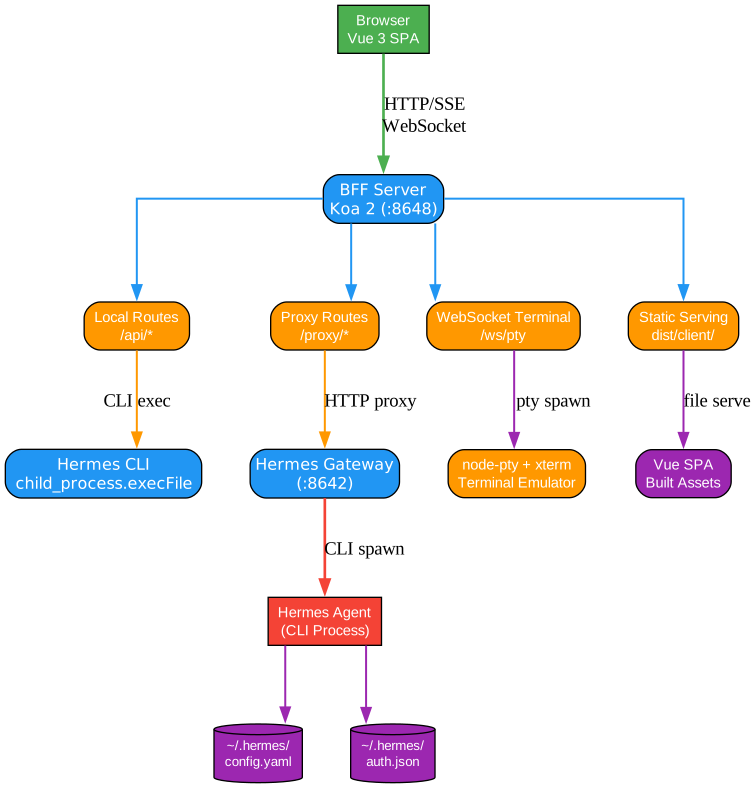
The architecture of Hermes Web UI follows the Backend-For-Frontend (BFF) pattern, where a Koa 2 server sits between the browser-based SPA and the Hermes Agent backend. This design is not accidental – it solves a fundamental problem in AI agent management. The browser cannot directly communicate with the Hermes Agent CLI, nor should it have direct access to filesystem-based configuration files. The BFF layer acts as a controlled middleware that translates browser requests into CLI commands, file operations, and proxy forwarding.
The Koa 2 server handles two distinct categories of routes. Local routes process requests that target the server itself – reading and writing configuration files, executing Hermes CLI commands, managing scheduled jobs, and serving static assets. Proxy routes, on the other hand, forward requests directly to the running Hermes gateway, which in turn communicates with the configured LLM provider. This separation ensures that configuration management and chat communication follow different security and data-flow paths, which is essential for maintaining proper access controls.
A distinctive architectural choice is the CLI-as-Backend pattern. Rather than building a separate REST API server for Hermes Agent, the BFF layer invokes the Hermes CLI directly using Node.js child_process.execFile. When a user requests configuration changes through the web UI, the BFF server executes the appropriate CLI command (for example, hermes config set) and captures the output. This approach leverages the existing CLI infrastructure without duplicating business logic, and it means that any CLI feature is automatically available through the web interface without additional API development.
Static SPA serving is handled by the same Koa 2 server in production mode. The built Vue 3 application is served from the dist directory, with the BFF server handling both API routes and static file delivery on a single port. This simplifies deployment – there is no need for a separate Nginx or CDN layer for basic setups. Configuration file management centers on two key files: ~/.hermes/config.yaml for agent settings, channel configurations, and model preferences, and ~/.hermes/auth.json for encrypted credential storage. The BFF server reads and writes these files on behalf of the browser, ensuring that sensitive credentials never pass through the frontend JavaScript layer.
Multi-Platform Channel Support
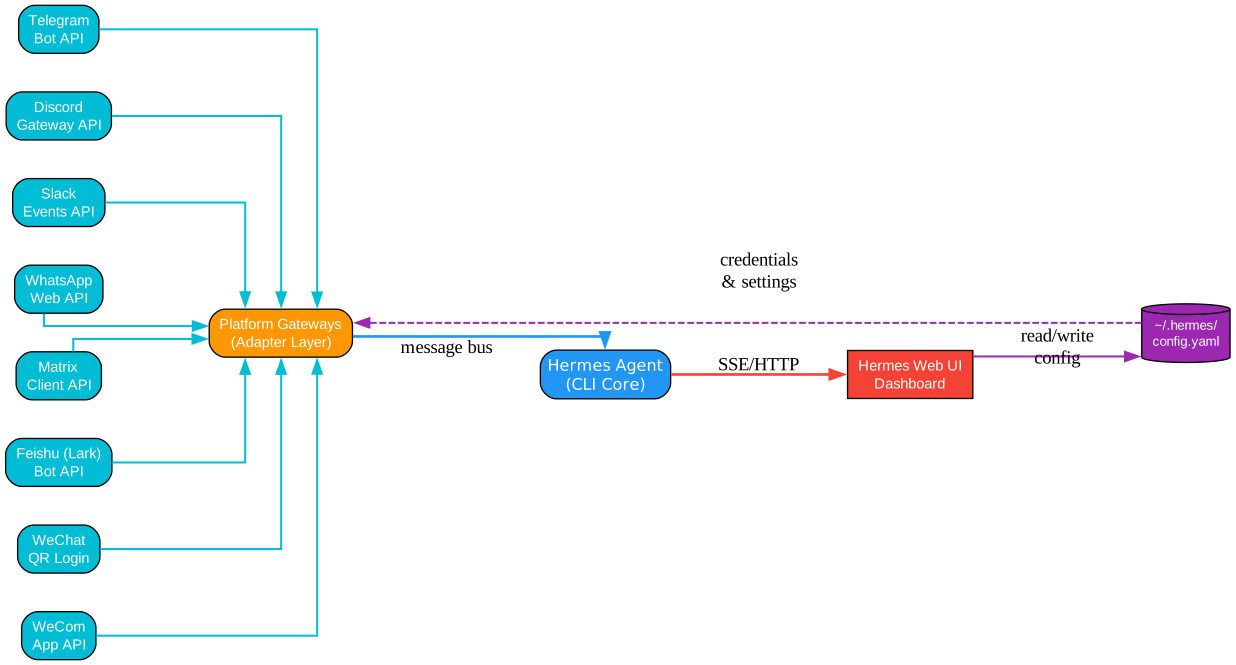
Hermes Web UI provides unified management for eight messaging platform channels, each with its own authentication mechanism and communication protocol. The supported platforms are Telegram, Discord, Slack, WhatsApp, Matrix, Feishu, WeChat, and WeCom. This breadth of coverage means that a single Hermes Agent deployment can simultaneously serve users across all these platforms, and the web UI provides a single point of configuration for every channel.
Telegram integration uses bot tokens obtained from BotFather, allowing the agent to receive and respond to messages in groups and private chats. Discord integration leverages bot tokens and OAuth2 for server-level permissions, enabling the agent to participate in guild channels and direct messages. Slack uses the Bolt framework with signing secrets and bot tokens, integrating the agent into workspace channels and threads. WhatsApp connects through the Baileys library, which implements the WhatsApp Web protocol – this allows the agent to operate without requiring the WhatsApp Business API.
Matrix integration uses the matrix-bot-sdk to connect to any Matrix-compatible homeserver, supporting both encrypted and unencrypted rooms. Feishu (Lark) integration uses the official Feishu Open Platform SDK with app credentials for workspace messaging. WeChat integration is particularly notable because it uses QR code login – the web UI displays a QR code that the administrator scans with the WeChat mobile app to authenticate, after which the agent can respond to contacts and groups. WeCom (Enterprise WeChat) uses corpid and corpsecret credentials for enterprise messaging scenarios.
All channel credentials are managed from a single configuration panel in the web UI. When an administrator enters or updates credentials for any platform, the BFF server writes the changes to ~/.hermes/auth.json and then triggers an automatic gateway restart. This restart applies the new configuration without requiring manual intervention, ensuring that credential changes take effect immediately. The unified configuration approach eliminates the need to manage separate bot dashboards for each platform, reducing the operational complexity that typically grows linearly with the number of supported channels.
Request Routing and Data Flow
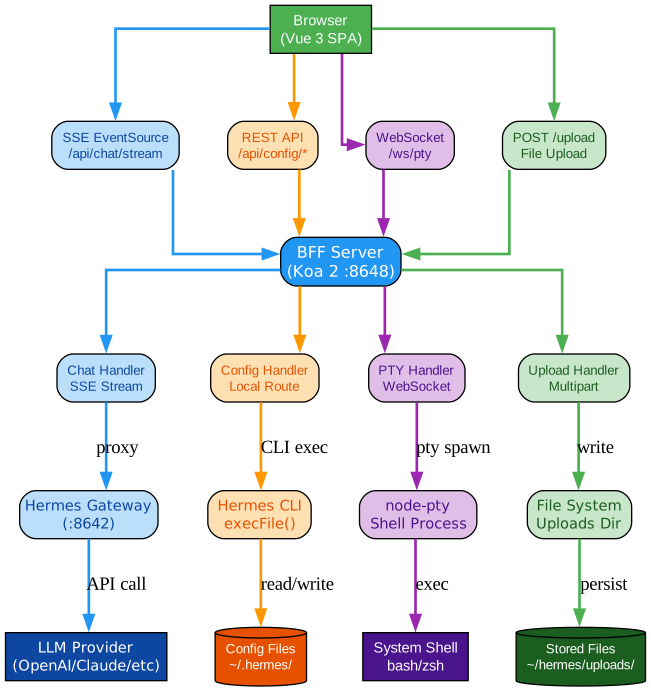
The data flow within Hermes Web UI is organized around four distinct request types, each following a different path through the BFF server. Understanding these paths is essential for debugging, performance tuning, and security configuration. The four request types are chat requests, config requests, terminal requests, and file uploads, and each uses a different transport mechanism and routing strategy.
Chat requests follow the most complex path. When a user sends a message through the AI Chat interface, the browser initiates a Server-Sent Events (SSE) connection to the BFF server. The BFF server proxies this SSE connection to the running Hermes gateway, which forwards the request to the configured LLM provider (such as OpenAI, Anthropic, or a local model). The LLM streams its response back through the gateway to the BFF server, which relays the SSE stream to the browser. This end-to-end streaming architecture means that users see tokens appearing in real time as the LLM generates them, creating a responsive chat experience even for long responses.
Config requests use standard REST API patterns. When a user modifies settings, manages channels, or schedules jobs, the browser sends HTTP requests to local BFF routes. These routes execute Hermes CLI commands using child_process.execFile, read or write configuration files, or interact with the job scheduler. The response is returned as standard JSON. This path is entirely local to the server – no requests are forwarded to the Hermes gateway or external services, which keeps configuration operations fast and secure.
Terminal requests use WebSocket connections through the node-pty library. The web terminal feature spawns a pseudo-terminal on the server and connects it to the browser via WebSocket. Each keystroke in the xterm.js terminal is sent as a WebSocket message to the BFF server, which writes it to the pty. Output from the pty is streamed back through the same WebSocket connection. This creates a fully interactive terminal experience in the browser, allowing administrators to run shell commands without SSH access. Multiple terminal sessions can run concurrently, each with its own pty and WebSocket connection.
File uploads use standard HTTP POST requests through the BFF server. When a user uploads a file through the chat interface (for example, an image or document for the LLM to analyze), the browser sends a multipart POST request to the BFF server. The server saves the file to the local filesystem and returns a URL or path that the chat system can reference. The color-coded paths in the architecture diagram distinguish these four request types visually, making it straightforward to trace the flow of any operation from the browser through the BFF server to its ultimate destination.
Feature Deep Dive

Hermes Web UI organizes its capabilities into eight feature areas, each accessible from the main navigation sidebar. These features work together to provide a comprehensive management experience that goes well beyond simple chat interaction. The following sections examine each feature area in detail.
AI Chat is the primary interaction surface. It supports SSE-based streaming for real-time token delivery, multi-session management for concurrent conversations, full Markdown rendering including code blocks with syntax highlighting, tool call visualization that shows when and how the agent invokes external tools, and file upload capability for sending images and documents to the LLM. The chat interface maintains conversation history per session and allows users to switch between sessions without losing context.
Usage Analytics provides visibility into token consumption and cost. The dashboard tracks token counts per model, per channel, and per time period. Cost estimation uses configurable pricing tables to calculate spending across providers. A 30-day trend chart visualizes usage patterns, helping administrators identify spikes, optimize model selection, and budget for future consumption. The analytics data is sourced from the Hermes gateway’s logging infrastructure and aggregated by the BFF server.
Scheduled Jobs enables automated task execution on cron schedules. The CRUD interface allows administrators to create, read, update, and delete scheduled jobs. Each job definition includes a cron expression for scheduling, a prompt or command to execute, and optional parameters. Cron presets provide common schedules (hourly, daily, weekly) for quick setup. An immediate trigger button allows manual execution of any scheduled job without waiting for its next cron window, which is useful for testing and ad-hoc runs.
Model Management handles LLM provider configuration. The auto-discover feature scans available model providers and lists models that are accessible with the configured credentials. Provider CRUD operations allow administrators to add, modify, and remove LLM providers (OpenAI, Anthropic, Ollama, and others). Codex OAuth support enables authentication with providers that require OAuth flows, handling the redirect and token exchange automatically within the web UI.
Multi-Profile support allows administrators to maintain multiple agent configurations. Profiles can be created from scratch, cloned from existing profiles, imported from external files, and exported for backup or sharing. Switching between profiles is instantaneous, changing the active agent configuration without restarting the gateway. This is particularly useful for managing agents that serve different purposes – for example, a customer support profile and an internal tools profile.
Skills and Memory browsing provides visibility into the agent’s capabilities and knowledge. The skills browser lists available skills with search and filter functionality. The memory viewer shows stored notes and context that the agent has accumulated across conversations. This feature helps administrators understand what the agent knows and can do, facilitating better configuration and troubleshooting.
Web Terminal delivers a full shell experience in the browser. Built on node-pty for the backend pseudo-terminal and @xterm/xterm for the frontend renderer, the web terminal supports multiple concurrent sessions, color output, and interactive programs. Administrators can use it to inspect logs, run diagnostics, manage files, and perform any operation that would normally require SSH access to the server.
Settings provides granular control over the dashboard and agent behavior. Display settings control theme, language, and layout preferences. Agent settings configure the default model, system prompt, and behavior parameters. Memory settings control context window size and retention policies. Session settings manage timeout and concurrency limits. Privacy settings handle data retention and logging preferences. Each settings category is organized in its own tab for easy navigation.
Getting Started
Hermes Web UI offers three installation methods to suit different deployment scenarios. Before installing, ensure that Node.js version 20.0.0 or later is available on the target system.
npm Global Install
The quickest way to get started is through npm global installation:
npm install -g @hermes/web-ui
hermes-web-ui start
This installs the Hermes Web UI package globally and starts the BFF server on the default port. The first launch creates the configuration directory at ~/.hermes/ with default settings.
Docker Compose
For containerized deployments, Docker Compose provides a reproducible environment:
version: "3.8"
services:
  hermes-web-ui:
    image: hermes/web-ui:latest
    ports:
      - "8080:8080"
    volumes:
      - ./hermes-config:/root/.hermes
    environment:
      - NODE_ENV=production
docker compose up -d
The volume mount ensures that configuration and credential data persists across container restarts. The environment variable sets the server to production mode, which serves the pre-built SPA static files.
One-Line Install Script
For quick setup on Linux and macOS:
curl -fsSL https://hermes.dev/install.sh | bash
This script detects the operating system, installs Node.js if needed, installs the Hermes Web UI package, and starts the server. It is intended for development and evaluation purposes rather than production deployments.
Technical Stack
The frontend of Hermes Web UI is built on Vue 3 with the Composition API, written entirely in TypeScript for type safety across the component tree. Vite 8 handles development server and production builds, providing sub-second hot module replacement during development. Naive UI serves as the component library, offering a comprehensive set of accessible and customizable UI components. Pinia 3 manages application state with a modular store architecture that scales well as the number of features grows.
The backend uses Koa 2 with async middleware for the BFF server. The node-pty library provides pseudo-terminal support for the web terminal feature, while WebSocket connections enable real-time bidirectional communication for terminal sessions. The terminal renderer on the frontend is @xterm/xterm version 6, which delivers a performant and feature-rich terminal emulation experience in the browser.
Internationalization support covers English and Chinese through the vue-i18n library, with all UI strings externalized into locale files. The visual design follows the “Pure Ink” monochrome theme – a deliberate design choice that prioritizes readability and reduces visual noise. The monochrome palette uses carefully calibrated shades of black, gray, and white, with accent colors reserved for status indicators and interactive elements. This approach creates a professional, distraction-free environment that is well suited to dashboard and management interfaces where information density matters more than decorative flourish.
Conclusion
Hermes Web UI fills a critical gap in the AI agent ecosystem by providing a unified, browser-based management interface for multi-platform chat agents. Its BFF architecture cleanly separates concerns between the browser, the middleware server, and the Hermes Agent backend, while the CLI-as-Backend pattern ensures that every CLI capability is accessible through the web interface without duplicating logic. The eight feature areas – AI Chat, Usage Analytics, Scheduled Jobs, Model Management, Multi-Profile, Skills and Memory, Web Terminal, and Settings – cover the full lifecycle of AI agent operation from configuration to monitoring to interactive debugging.
For teams deploying AI agents across multiple messaging platforms, Hermes Web UI eliminates the operational complexity of managing separate configuration tools, monitoring dashboards, and terminal access for each platform. The project’s growing community and active development make it a practical choice for anyone running Hermes Agent in production. The full source code, documentation, and installation guides are available at the Hermes Web UI GitHub repository.
Related guides
Hermes Web UI is part of a wider open-source AI-agent stack — these guides cover the adjacent pieces:
- GBrain: Self-Wiring Knowledge Graph Memory Layer for AI Agents — the persistent memory layer that backs Hermes agents, wiring itself as it learns.
- Open CoDesign: Open-Source Claude Design Alternative — turn prompts into polished HTML prototypes, slide decks, and dashboards locally with BYOK multi-model support.
- Free Claude Code: Use Claude Code CLI for Free — route Claude Code’s API calls to NVIDIA NIM, OpenRouter, or local models with no Anthropic API key.

Enjoyed this post? Never miss out on future posts by following us


