Khoj: Your AI Second Brain for Personal Knowledge Management
In an age where information overload is the norm, having a reliable system to manage, search, and interact with your personal knowledge is essential. Khoj emerges as a powerful open-source solution - an AI second brain that seamlessly scales from an on-device personal AI to a cloud-scale enterprise assistant.
What is Khoj?
Khoj is a personal AI application designed to extend your capabilities. It serves as your AI second brain, enabling you to chat with any local or online LLM, get answers from the internet and your documents, and access it from virtually any platform you use - Browser, Obsidian, Emacs, Desktop, Phone, or even WhatsApp.
Understanding the Architecture
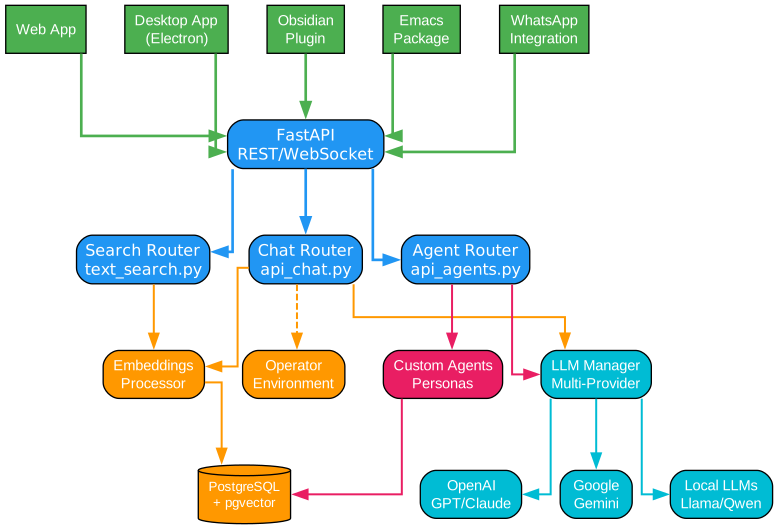
The architecture diagram above illustrates Khoj’s comprehensive multi-layer design that enables seamless interaction between users and their knowledge base. Let’s break down each component:
Client Interface Layer
The client interface layer represents the diverse ways users can interact with Khoj. This multi-platform approach ensures that Khoj meets users where they already work:
-
Web App: The primary interface accessible through any modern browser, providing full functionality without installation requirements. Built with responsive design principles, it adapts seamlessly from desktop monitors to mobile screens.
-
Desktop App (Electron): A native desktop application built on Electron framework, offering offline capabilities and deeper system integration. This is ideal for users who prefer dedicated applications or need reliable offline access to their knowledge base.
-
Obsidian Plugin: Direct integration with Obsidian, the popular note-taking application. This plugin allows users to query their vaults, generate content, and maintain conversations without leaving their note-taking workflow. The tight integration means your markdown notes become instantly searchable and conversable.
-
Emacs Package: For the Emacs community, Khoj provides a comprehensive package that integrates with org-mode and other Emacs workflows. This demonstrates Khoj’s commitment to supporting power users and their existing toolchains.
-
WhatsApp Integration: Perhaps the most accessible entry point, WhatsApp integration allows users to interact with their AI assistant through the messaging app they already use daily. This lowers the barrier to entry significantly.
API Gateway Layer
The FastAPI-based REST and WebSocket API serves as the central communication hub. This layer handles:
- Authentication and authorization for all requests
- Rate limiting to ensure fair resource allocation
- WebSocket connections for real-time streaming responses
- Request routing to appropriate processing modules
The use of FastAPI ensures high performance through asynchronous request handling, automatic OpenAPI documentation, and native WebSocket support. This modern framework choice reflects Khoj’s commitment to using cutting-edge, production-ready technologies.
Core Processing Routers
Three main routers handle different aspects of Khoj’s functionality:
-
Chat Router (api_chat.py): Manages conversational interactions, handling message history, context assembly, and response generation. It coordinates between embeddings, LLM providers, and the operator environment for complex tasks.
-
Agent Router (api_agents.py): Handles the creation, management, and execution of custom agents. Each agent can have its own persona, knowledge base, and tool configurations, enabling specialized AI assistants for different use cases.
-
Search Router (text_search.py): Powers the semantic search functionality, leveraging vector embeddings to find relevant documents regardless of exact keyword matches.
Processing Components
The processing layer contains specialized modules that handle specific tasks:
-
Embeddings Processor: Converts text into dense vector representations using models like GTE (General Text Embeddings) or BERT variants. These embeddings capture semantic meaning, enabling similarity-based search rather than keyword matching.
-
LLM Manager: A sophisticated abstraction layer that manages communication with multiple LLM providers. It handles API calls, retry logic, token counting, and response streaming across different providers while presenting a unified interface to the rest of the system.
-
Operator Environment: An advanced feature that enables Khoj to interact with external environments - browsers, computers, or other systems. This allows Khoj to perform actions beyond text generation, such as web browsing or file manipulation.
LLM Provider Support
Khoj’s multi-provider architecture ensures flexibility and resilience:
-
OpenAI (GPT/Claude): Full support for OpenAI’s models including GPT-4 and GPT-3.5, as well as Anthropic’s Claude models through compatible APIs.
-
Google Gemini: Native integration with Google’s Gemini models, supporting both standard and pro variants with their unique capabilities.
-
Local LLMs (Llama/Qwen): For privacy-conscious users or those with specific requirements, Khoj supports local models like Llama, Qwen, Mistral, and others through compatible inference servers.
Storage Layer
PostgreSQL with the pgvector extension forms the backbone of Khoj’s storage system:
-
Vector Storage: pgvector enables efficient storage and similarity search of high-dimensional vectors directly in PostgreSQL, eliminating the need for separate vector databases.
-
Relational Data: User accounts, conversation history, agent configurations, and document metadata are stored in traditional relational tables.
-
Full-Text Search: PostgreSQL’s built-in full-text search capabilities complement vector search for hybrid retrieval strategies.
Agent System
The agent system represents one of Khoj’s most powerful features. Users can create custom agents with:
- Unique personas and system prompts
- Dedicated knowledge bases from uploaded files
- Specific tool configurations
- Custom output modes
This enables specialized assistants for different domains - a research assistant for academic work, a coding assistant for development, or a writing assistant for content creation.
How Khoj Processes Your Queries

Understanding the Query Processing Pipeline
The data flow diagram illustrates the sophisticated pipeline that transforms your natural language queries into intelligent, context-aware responses. This pipeline represents the heart of Khoj’s ability to understand and assist.
Query Input Stage
The journey begins with user input, which can arrive in multiple formats:
- Text queries: Traditional typed questions or commands
- Voice input: Speech-to-text conversion enables hands-free interaction
- File uploads: Users can attach documents for analysis or incorporation into the knowledge base
The query parser immediately analyzes the input to determine intent. This involves:
- Detecting whether the query requires document search, web search, or general conversation
- Identifying any special commands or tool invocations
- Extracting entities and key terms for search optimization
Embedding Generation
Once the query is parsed, it enters the embedding generation phase. This crucial step converts natural language into mathematical representations:
- The query text is processed through a neural network (typically a transformer-based model)
- The output is a dense vector of floating-point numbers (typically 384-1536 dimensions)
- This vector captures the semantic meaning of the query
The choice of embedding model significantly impacts search quality. Khoj supports various models:
- GTE-small: Fast and efficient for most use cases
- BGE models: Excellent for multilingual support
- OpenAI embeddings: When using OpenAI’s infrastructure
Dual Search Strategy
Khoj employs a hybrid search strategy combining vector similarity and web search:
Vector Search (pgvector): The generated embedding is compared against stored document embeddings using cosine similarity or dot product. This finds semantically related content even when keywords don’t match exactly. For example, a query about “machine learning algorithms” will find documents discussing “ML models” or “neural network architectures.”
Web Search: For current events, real-time information, or topics not covered in the user’s documents, Khoj can search the internet. This ensures responses are comprehensive and up-to-date.
The document database (PostgreSQL with pgvector) stores all indexed content with their embeddings, enabling fast similarity searches even across thousands of documents.
Context Assembly
The context assembly phase is where Khoj’s intelligence truly shines. This phase:
- Collects relevant document chunks from vector search results
- Incorporates web search results if applicable
- Retrieves relevant conversation history for continuity
- Formats everything into a coherent context window
The assembly process must balance several constraints:
- Token limits of the target LLM
- Relevance ranking of retrieved content
- Maintaining conversation coherence
- Including sufficient context without overwhelming the model
LLM Processing
With assembled context, the query moves to the LLM processing stage. Here, the language model:
- Receives the user query with relevant context
- Applies the appropriate persona or agent configuration
- Generates a response using its training and the provided context
- Streams the response back for real-time display
The LLM layer supports multiple providers, allowing users to choose based on their needs:
- Speed vs. Quality: Faster models for quick queries, powerful models for complex analysis
- Privacy vs. Capability: Local models for sensitive data, cloud models for advanced features
- Cost vs. Performance: Balance operational costs against response quality
Response Generation
The final stage transforms the LLM’s output into a user-friendly response:
- Markdown formatting for rich text display
- Code syntax highlighting for technical content
- Citation linking to source documents
- Optional text-to-speech for audio output
Key Features of Khoj

Comprehensive Feature Overview
The features diagram presents Khoj’s six core capability areas, each designed to address specific aspects of personal knowledge management and AI assistance.
Multi-LLM Chat
Khoj’s chat capabilities extend far beyond simple question-answering:
-
Provider Flexibility: Switch between GPT-4, Claude, Gemini, and local models like Llama or Qwen based on your needs. This flexibility ensures you’re never locked into a single provider.
-
Streaming Responses: Real-time response streaming provides immediate feedback, making conversations feel natural and engaging.
-
Conversation Memory: Khoj maintains context across conversations, remembering previous discussions and building upon them naturally.
-
Multi-modal Support: Beyond text, Khoj can process images, generate images, and even handle voice input and output.
Semantic Search
The search functionality represents a paradigm shift from traditional keyword search:
-
Vector-Based Retrieval: Instead of matching exact words, Khoj understands the meaning behind your queries. A search for “project deadlines” will find documents about “milestone dates” or “delivery schedules.”
-
Document Type Support: PDFs, Markdown files, Word documents, Notion pages, org-mode files, and more are all indexed and searchable.
-
Hybrid Search: Combining vector similarity with traditional full-text search ensures comprehensive results.
-
Real-time Indexing: New or modified documents are automatically re-indexed, keeping search results current.
Custom Agents
The agent system enables specialization and personalization:
-
Persona Configuration: Define how your agent should behave - professional, casual, technical, or creative.
-
Knowledge Base Assignment: Upload specific documents to create domain-expert agents. A legal assistant trained on contracts, a coding assistant familiar with your codebase, or a research assistant with academic papers.
-
Tool Integration: Equip agents with specific capabilities - web search, code execution, image generation.
-
Privacy Levels: Control who can access your agents - private, shared with team, or public.
Automation
Khoj’s automation features transform it from a reactive assistant to a proactive partner:
-
Personal Newsletters: Configure Khoj to research topics of interest and deliver curated summaries to your inbox on a schedule.
-
Smart Notifications: Set up alerts for specific triggers - new papers in your field, price changes, news events.
-
Scheduled Research: Automate recurring research tasks, saving hours of manual work.
-
Integration Hooks: Connect Khoj to other tools and services through webhooks and APIs.
Multi-Platform Access
True to its philosophy of meeting users where they are, Khoj offers comprehensive platform support:
- Web Application: Full-featured browser interface accessible anywhere
- Desktop Application: Native apps for Windows, macOS, and Linux
- Mobile Access: Responsive web interface optimized for phones and tablets
- Obsidian Plugin: Seamless integration with your note-taking workflow
- Emacs Package: Full support for the Emacs ecosystem
- WhatsApp: Chat with your AI assistant through a familiar messaging app
Document Support
Khoj’s document handling capabilities ensure your knowledge base is comprehensive:
- Format Support: PDF, Markdown, Word, Notion, org-mode, plain text, and more
- Automatic Processing: Documents are chunked, embedded, and indexed automatically
- Source Attribution: Responses include citations linking back to source documents
- Incremental Updates: Only changed documents need re-indexing, saving time and resources
The Agent System: Creating Specialized AI Assistants
Deep Dive into Agent Architecture
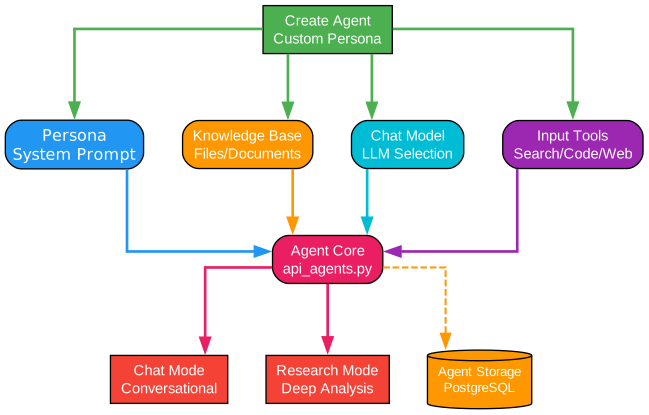
The agent system diagram reveals how Khoj enables users to create specialized AI assistants tailored to their specific needs. This modular architecture allows for infinite customization while maintaining consistency and reliability.
Agent Creation Process
Creating a custom agent in Khoj is a straightforward process that yields powerful results:
-
Define the Persona: Start by describing what your agent should be. This becomes the system prompt that guides all interactions. For example, “You are a technical writing assistant specializing in API documentation.”
-
Configure Knowledge: Upload relevant documents that form the agent’s knowledge base. These could be style guides, reference materials, or domain-specific documentation.
-
Select the Model: Choose the appropriate LLM based on your needs. Complex reasoning tasks might require GPT-4, while simple queries could use faster, cheaper models.
-
Enable Tools: Decide what capabilities your agent should have - web search for current information, code execution for technical tasks, image generation for creative work.
Core Components
Persona (System Prompt)
The persona defines the agent’s character, expertise, and behavior patterns. Khoj’s prompt engineering system allows for:
- Role Definition: What role does the agent play?
- Expertise Areas: What subjects should the agent be knowledgeable about?
- Communication Style: How should the agent communicate - formal, casual, technical?
- Constraints: What should the agent avoid or handle specially?
The persona system uses sophisticated prompt templates that incorporate:
- Current date and time for temporal awareness
- User preferences and history
- Available tools and their usage guidelines
- Output format requirements
Knowledge Base
The knowledge base component enables agents to access specialized information:
- Document Upload: Users can upload files directly to an agent’s knowledge base
- Selective Indexing: Only relevant documents are included, keeping the agent focused
- Citation Support: Agents cite their sources, building trust and enabling verification
- Incremental Updates: Add or remove documents without rebuilding the entire index
Chat Model Selection
Different tasks benefit from different models:
- GPT-4: Complex reasoning, nuanced analysis, creative writing
- GPT-3.5: Fast responses, straightforward queries, high-volume tasks
- Claude: Long-context tasks, detailed analysis, safety-critical applications
- Local Models: Privacy-sensitive data, offline requirements, cost optimization
Khoj abstracts these differences, presenting a unified interface while handling provider-specific requirements behind the scenes.
Input Tools
Tools extend agent capabilities beyond text generation:
- Web Search: Access current information from the internet
- Code Execution: Run code snippets for calculations or data processing
- Image Generation: Create images from text descriptions
- Document Analysis: Process uploaded files for extraction or summarization
Execution Modes
Agents can operate in different modes depending on the task:
Chat Mode: Standard conversational interaction where the agent responds to queries, maintains context, and provides assistance through dialogue. Ideal for most use cases including Q&A, brainstorming, and general assistance.
Research Mode: Deep analysis mode where the agent performs extensive research, gathering information from multiple sources, synthesizing findings, and producing comprehensive reports. Perfect for literature reviews, market research, or technical investigations.
Agent Storage
All agent configurations, knowledge bases, and conversation histories are persisted in PostgreSQL:
- Configuration Storage: Agent definitions, personas, and tool configurations
- Knowledge Index: Vector embeddings for the agent’s document corpus
- Conversation History: Past interactions for context and learning
- Access Control: Privacy settings and sharing configurations
The Embeddings Pipeline: Powering Semantic Search
Understanding Vector Search Technology
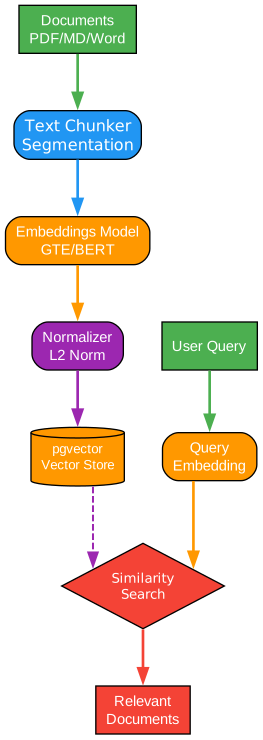
The embeddings pipeline diagram illustrates the sophisticated process that enables Khoj’s semantic search capabilities. This technology represents a fundamental advancement over traditional keyword-based search systems.
Document Processing Flow
Input Documents
The pipeline begins with your documents in various formats:
- PDF Files: Research papers, reports, manuals
- Markdown Files: Notes, documentation, blog posts
- Word Documents: Official documents, templates
- Notion Pages: Wikis, project documentation
- Org-mode Files: Emacs users’ structured notes
Each format requires specific parsing logic to extract text while preserving structure and metadata.
Text Chunking
Documents are rarely small enough to process as single units. The chunking phase:
- Splits documents into manageable segments (typically 500-1000 tokens)
- Preserves context by including overlap between chunks
- Maintains metadata like source file, page number, and section headers
- Respects structure by splitting at natural boundaries (paragraphs, sections)
The chunking strategy significantly impacts search quality. Too large chunks dilute relevance; too small chunks lose context. Khoj uses adaptive chunking that considers document structure.
Embedding Generation
The core of semantic search lies in embedding generation:
- Neural Network Processing: Each text chunk passes through a transformer model
- Vector Output: The model produces a dense vector (typically 384-1536 dimensions)
- Semantic Capture: Similar concepts produce similar vectors, regardless of exact words
For example, these phrases would have similar embeddings:
- “machine learning algorithms”
- “ML models and techniques”
- “artificial intelligence methods”
Normalization
Vectors are normalized to unit length (L2 norm = 1), which:
- Enables efficient dot-product similarity calculation
- Ensures consistent comparison across different documents
- Reduces computational complexity during search
Vector Storage
pgvector stores embeddings efficiently in PostgreSQL:
- Native Integration: No separate vector database needed
- Index Support: IVFFlat and HNSW indexes for fast approximate search
- Hybrid Queries: Combine vector similarity with metadata filters
- Transactional Safety: ACID guarantees for data integrity
Query Processing Flow
User Query
When a user submits a query, it enters the same pipeline:
- The query text is processed through the same embedding model
- This ensures query and document vectors exist in the same semantic space
- Similarity comparisons are meaningful and accurate
Query Embedding
The query embedding process is optimized for speed:
- Batch Processing: Multiple queries can be embedded simultaneously
- Caching: Frequent queries may have cached embeddings
- Model Selection: Different models can be used for different query types
Similarity Search
The search phase finds the most relevant document chunks:
- Cosine Similarity: Measures the angle between query and document vectors
- Top-K Retrieval: Returns the K most similar chunks (typically 5-20)
- Score Threshold: Filters out results below a relevance threshold
- Re-ranking: Optional cross-encoder for improved ranking
Relevant Documents
The final output is a set of relevant document chunks:
- Ranked by Relevance: Most similar results first
- With Metadata: Source file, page, section information
- Ready for Context: Formatted for inclusion in LLM prompts
Installation and Setup
Quick Start with Docker
The fastest way to get started with Khoj is using Docker:
# Pull and run Khoj
docker run -d \
  --name khoj \
  -p 42110:42110 \
  -v ~/.khoj:/root/.khoj \
  ghcr.io/khoj-ai/khoj:latest
Installation via pip
For more control, install Khoj directly:
# Install Khoj
pip install khoj

# Start the server
khoj
Configuration
Khoj can be configured through:
- Environment Variables: Set API keys, database connections, and other settings
- Configuration File: YAML-based configuration for detailed customization
- Web Interface: User-friendly settings panel for common configurations
Key configuration options:
# Example configuration
app:
  host: 0.0.0.0
  port: 42110

database:
  type: postgres
  host: localhost
  port: 5432
  name: khoj

llm:
  provider: openai  # or google, anthropic, local
  model: gpt-4

embedding:
  model: thenlper/gte-small
Usage Examples
Basic Chat
# Using the API
import requests

response = requests.post(
    "http://localhost:42110/api/chat",
    json={"query": "What are the key features of Khoj?"}
)
print(response.json())
Creating a Custom Agent
# Create a specialized agent
agent_config = {
    "name": "Research Assistant",
    "persona": "You are a research assistant specializing in academic papers.",
    "files": ["papers/", "notes/"],
    "chat_model": "gpt-4",
    "input_tools": ["web_search", "code"]
}

response = requests.post(
    "http://localhost:42110/api/agents",
    json=agent_config
)
Semantic Search
# Search your documents
search_query = {
    "query": "machine learning best practices",
    "type": "all",  # or specific document types
    "max_results": 10
}

response = requests.post(
    "http://localhost:42110/api/search",
    json=search_query
)
Self-Hosting Options
Khoj is designed for self-hosting, giving you complete control over your data:
Local Development
# Clone the repository
git clone https://github.com/khoj-ai/khoj.git
cd khoj

# Install dependencies
pip install -e .

# Run development server
khoj --dev
Production Deployment
For production deployments, consider:
- PostgreSQL: Use a managed PostgreSQL instance with pgvector extension
- Docker Compose: Orchestrate Khoj with dependencies
- Kubernetes: Scale horizontally for enterprise use
Enterprise Features
Khoj offers enterprise features for teams and organizations:
- Team Collaboration: Share agents and knowledge bases across teams
- SSO Integration: Connect with existing identity providers
- Audit Logging: Track usage and compliance
- Custom Deployment: On-premises or hybrid cloud options
Visit khoj.dev/teams for enterprise pricing and features.
Comparison with Alternatives
| Feature | Khoj | ChatGPT | Perplexity | Claude |
|---|---|---|---|---|
| Self-hostable | Yes | No | No | No |
| Custom Knowledge Base | Yes | Limited | No | Limited |
| Multi-LLM Support | Yes | No | No | No |
| Open Source | Yes | No | No | No |
| Offline Capable | Yes | No | No | No |
| Custom Agents | Yes | GPTs | No | No |
Community and Support
Khoj has a vibrant community:
- Discord: Join the community at discord.gg/BDgyabRM6e
- Documentation: Comprehensive docs at docs.khoj.dev
- GitHub: Star and contribute at github.com/khoj-ai/khoj
- Blog: Updates and tutorials at blog.khoj.dev
Conclusion
Khoj represents a significant advancement in personal AI assistants. Its open-source nature, combined with powerful features like semantic search, custom agents, and multi-platform support, makes it an invaluable tool for anyone looking to extend their cognitive capabilities.
Whether you’re a researcher managing academic papers, a developer maintaining documentation, or a professional organizing project knowledge, Khoj provides the tools to transform your information into actionable intelligence.
The ability to self-host ensures your data remains private, while the flexible architecture supports scaling from personal use to enterprise deployment. With support for multiple LLM providers and local models, you’re never locked into a single vendor.
Try Khoj today at app.khoj.dev or self-host for complete control over your AI second brain. Enjoyed this post? Never miss out on future posts by following us 


