Voicebox: Open-Source Voice Synthesis Studio
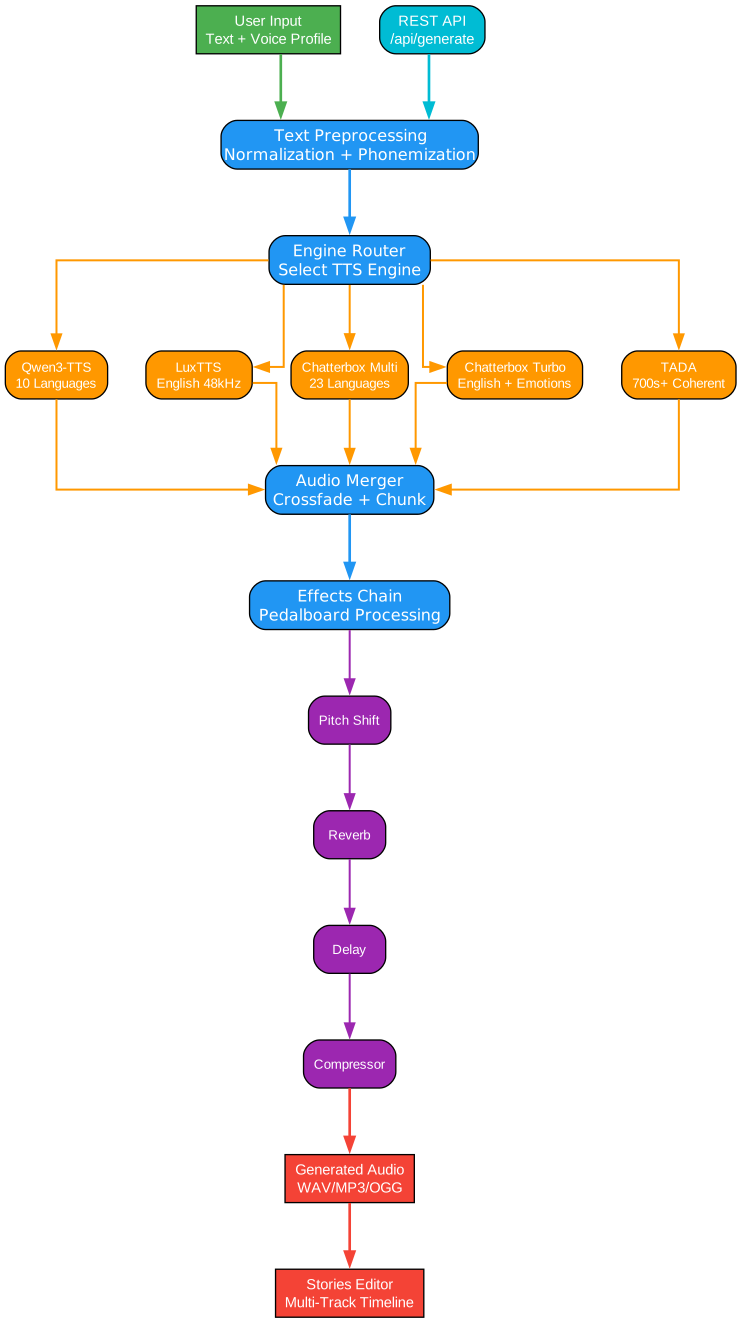
Voicebox is a local-first voice cloning studio — a free and open-source alternative to ElevenLabs. Clone voices from a few seconds of audio, generate speech in 23 languages across 5 TTS engines, apply post-processing effects, and compose multi-voice projects with a timeline editor.
Key Features
| Feature | Description |
|---|---|
| Complete Privacy | Models and voice data stay on your machine |
| 5 TTS Engines | Qwen3-TTS, LuxTTS, Chatterbox Multilingual, Chatterbox Turbo, HumeAI TADA |
| 23 Languages | English, Arabic, Japanese, Hindi, Swahili, and more |
| Post-Processing Effects | Pitch shift, reverb, delay, chorus, compression, filters |
| Expressive Speech | Paralinguistic tags like [laugh], [sigh], [gasp] |
| Unlimited Length | Auto-chunking with crossfade for long scripts |
| Stories Editor | Multi-track timeline for conversations and podcasts |
| API-First | REST API for integration into your projects |
| Native Performance | Built with Tauri (Rust), not Electron |
| Cross-Platform | macOS (MLX/Metal), Windows (CUDA), Linux, AMD ROCm, Intel Arc, Docker |
Multi-Engine Voice Cloning
Voicebox supports five TTS engines with different strengths, switchable per-generation:
Understanding the TTS Engine Architecture
The multi-engine architecture in Voicebox represents a sophisticated approach to voice synthesis that prioritizes flexibility and quality. Each engine is optimized for specific use cases, allowing users to choose the best tool for their particular needs.
Qwen3-TTS (0.6B / 1.7B)
The Qwen3-TTS engine offers high-quality multilingual voice cloning with delivery instructions. This engine supports 10 languages and allows users to specify how the speech should be delivered — “speak slowly”, “whisper”, or other delivery modifiers. The model comes in two sizes: 0.6B parameters for faster inference and 1.7B parameters for higher quality output.
The architecture uses a transformer-based approach with attention mechanisms that align text tokens with acoustic features. The delivery instructions are encoded as special tokens that guide the generation process, enabling expressive and contextually appropriate speech synthesis.
LuxTTS
LuxTTS is optimized for English voice cloning with exceptional efficiency. The lightweight architecture requires only ~1GB VRAM, making it accessible on systems with limited GPU memory. It outputs at 48kHz sample rate, providing studio-quality audio, and achieves 150x realtime speed on CPU — meaning a 10-second clip generates in just 0.067 seconds.
This engine uses a compact neural vocoder architecture that separates the voice cloning (speaker encoder) from the speech generation (synthesizer). The speaker encoder creates a fixed-dimensional embedding from reference audio, which conditions the synthesizer to produce speech in that voice.
Chatterbox Multilingual
Chatterbox Multilingual provides the broadest language coverage with support for 23 languages including Arabic, Danish, Finnish, Greek, Hebrew, Hindi, Malay, Norwegian, Polish, Swahili, Swedish, Turkish and more. This makes it ideal for international content creators who need voice synthesis in multiple languages.
The multilingual capability comes from a shared multilingual text encoder that maps all supported languages into a common phonetic space. This allows the model to leverage cross-lingual transfer learning, where knowledge from high-resource languages improves quality in lower-resource languages.
Chatterbox Turbo
Chatterbox Turbo is a fast 350M parameter model specifically designed for English with paralinguistic emotion and sound tags. This engine excels at expressive speech synthesis, supporting tags like [laugh], [chuckle], [gasp], [cough], [sigh], [groan], [sniff], [shush], and [clear throat].
The paralinguistic tags are processed through a specialized embedding layer that injects non-speech sounds at appropriate positions in the audio. This enables natural-sounding conversations where the synthesized voice can laugh, sigh, or express other emotions inline with the speech.
TADA (1B / 3B)
TADA (Text-Acoustic Dual Alignment) from HumeAI represents the cutting edge of speech-language models. Available in 1B and 3B parameter sizes, it can generate 700+ seconds of coherent audio with text-acoustic dual alignment.
The dual alignment architecture ensures that both the textual content and acoustic properties are properly synchronized throughout long-form generation. This prevents the quality degradation that typically occurs in extended TTS outputs, making TADA suitable for audiobooks, long-form content, and extended narration.
| Engine | Languages | Strengths |
|---|---|---|
| Qwen3-TTS (0.6B / 1.7B) | 10 | High-quality multilingual cloning, delivery instructions |
| LuxTTS | English | Lightweight (~1GB VRAM), 48kHz output, 150x realtime on CPU |
| Chatterbox Multilingual | 23 | Broadest language coverage |
| Chatterbox Turbo | English | Fast 350M model with paralinguistic emotion/sound tags |
| TADA (1B / 3B) | 10 | HumeAI speech-language model, 700s+ coherent audio |
Post-Processing Effects
Voicebox includes 8 audio effects powered by Spotify’s pedalboard library. Apply after generation, preview in real time, and build reusable presets.
Understanding the Audio Effects Pipeline
The post-processing effects in Voicebox are implemented through a modular audio processing pipeline that operates on the generated audio after synthesis. Each effect can be applied independently or chained together to create complex audio transformations.
Pitch Shift
The pitch shift effect allows you to raise or lower the voice by up to 12 semitones. This is useful for creating character voices, matching the pitch of existing audio, or correcting pitch issues in cloned voices. The implementation uses high-quality time-stretching algorithms that preserve formant structure, preventing the “chipmunk” or “demon” effect that simple pitch shifting produces.
Reverb
Reverb adds spatial ambiance to the audio, simulating different room environments. The configurable parameters include room size (from small closet to large hall), damping (how quickly high frequencies decay), and wet/dry mix (balance between processed and original signal). This is essential for making synthesized voices sound natural in different acoustic contexts.
Delay
The delay effect creates echo patterns with adjustable time (delay length), feedback (number of repeats), and mix (volume of echoes). This can be used for creative effects, simulating large spaces, or adding depth to voice recordings.
Chorus / Flanger
Chorus and flanger effects use modulated delays to create metallic or lush textures. Chorus adds thickness and width to the voice by creating multiple slightly-detuned copies, while flanger creates a sweeping, metallic sound. These are particularly useful for creative voice design and special effects.
Compressor
Dynamic range compression reduces the difference between loud and quiet parts of the audio. This is essential for professional-sounding voice output, ensuring consistent volume levels and preventing clipping. The compressor automatically adjusts gain based on the input signal level.
Gain
Simple volume adjustment from -40 to +40 dB. This provides fine-grained control over output levels, allowing you to match the volume of different voice profiles or normalize audio for specific platforms.
High-Pass Filter
Removes low frequencies below a cutoff point. This is useful for removing rumble, hum, or other low-frequency noise that can muddy the voice. High-pass filtering is a standard step in professional audio production.
Low-Pass Filter
Removes high frequencies above a cutoff point. This can be used to simulate telephone effects, reduce harshness, or create muffled sounds. Combined with high-pass, you can create band-pass filters for specific frequency ranges.
| Effect | Description |
|---|---|
| Pitch Shift | Up or down by up to 12 semitones |
| Reverb | Configurable room size, damping, wet/dry mix |
| Delay | Echo with adjustable time, feedback, and mix |
| Chorus / Flanger | Modulated delay for metallic or lush textures |
| Compressor | Dynamic range compression |
| Gain | Volume adjustment (-40 to +40 dB) |
| High-Pass Filter | Remove low frequencies |
| Low-Pass Filter | Remove high frequencies |
Installation
Download Pre-Built Binaries
| Platform | Download |
|---|---|
| macOS (Apple Silicon) | Download DMG |
| macOS (Intel) | Download DMG |
| Windows | Download MSI |
| Docker | docker compose up |
Build from Source
# Clone the repository
git clone https://github.com/jamiepine/voicebox.git
cd voicebox

# Setup (creates Python venv, installs all deps)
just setup

# Start development environment
just dev
Prerequisites:
- Bun
- Rust
- Python 3.11+
- Tauri Prerequisites
- Xcode on macOS
API Usage
Voicebox exposes a full REST API for integrating voice synthesis into your own applications.
Generate Speech
curl -X POST http://localhost:17493/generate \
  -H "Content-Type: application/json" \
  -d '{"text": "Hello world", "profile_id": "abc123", "language": "en"}'
List Voice Profiles
curl http://localhost:17493/profiles
Create a Profile
curl -X POST http://localhost:17493/profiles \
  -H "Content-Type: application/json" \
  -d '{"name": "My Voice", "language": "en"}'
Understanding the API Architecture
The REST API architecture follows a client-server model where the Voicebox desktop application runs a local FastAPI server on port 17493. This design enables seamless integration with external applications while maintaining the privacy-first approach of running everything locally.
Generation Endpoint
The /generate endpoint accepts text, a voice profile ID, and language code. The server queues the generation request and returns a generation ID that can be used to track progress. The actual synthesis happens asynchronously, allowing multiple generations to be queued without blocking.
Profile Management
Voice profiles are stored locally in SQLite and contain the speaker embeddings extracted from reference audio. The profile creation endpoint accepts audio data (either uploaded or recorded in-app) and creates a reusable voice identity that can be applied to any text generation.
Use Cases
The API enables a wide range of applications:
- Game Dialogue: Generate dynamic NPC voices in real-time
- Podcast Production: Automate voice-over work for podcasts
- Accessibility Tools: Provide text-to-speech for visually impaired users
- Voice Assistants: Create custom voices for AI assistants
- Content Automation: Batch process text content to audio
Full API documentation is available at http://localhost:17493/docs when Voicebox is running.
Tech Stack
| Layer | Technology |
|---|---|
| Desktop App | Tauri (Rust) |
| Frontend | React, TypeScript, Tailwind CSS |
| State | Zustand, React Query |
| Backend | FastAPI (Python) |
| TTS Engines | Qwen3-TTS, LuxTTS, Chatterbox, Chatterbox Turbo, TADA |
| Effects | Pedalboard (Spotify) |
| Transcription | Whisper / Whisper Turbo (PyTorch or MLX) |
| Inference | MLX (Apple Silicon) / PyTorch (CUDA/ROCm/XPU/CPU) |
| Database | SQLite |
| Audio | WaveSurfer.js, librosa |
Understanding the Architecture
The Voicebox architecture is designed for performance, privacy, and extensibility. Let’s examine each layer and how they work together.
Desktop Application Layer
The desktop app is built with Tauri, a Rust-based framework that produces native binaries significantly smaller and faster than Electron-based applications. Tauri uses the operating system’s webview instead of bundling Chromium, resulting in binaries that are typically 10-20x smaller.
The Rust backend handles file system operations, native dialogs, and inter-process communication with the Python backend. This separation allows the UI to remain responsive while heavy audio processing happens in the background.
Frontend Layer
The React frontend uses TypeScript for type safety and Tailwind CSS for styling. State management is handled by Zustand for local state and React Query for server state (API calls to the backend). This combination provides optimistic updates, automatic caching, and background refetching.
WaveSurfer.js provides the waveform visualization and audio playback controls. This library renders waveforms using WebAudio and Canvas, enabling real-time visualization of audio during recording and playback.
Backend Layer
The Python backend uses FastAPI for its REST API. FastAPI was chosen for its async support, automatic OpenAPI documentation, and type hints integration. The server runs on Uvicorn and handles:
- Voice profile management (creation, import, export)
- TTS generation requests (queuing, execution, status)
- Audio file operations (encoding, decoding, effects)
- Model management (download, load, unload)
TTS Engine Integration
Each TTS engine is wrapped in a common interface that standardizes:
- Text preprocessing (normalization, phonemization)
- Speaker encoding (creating voice embeddings)
- Audio generation (inference)
- Post-processing (normalization, format conversion)
This abstraction allows new engines to be added without modifying the frontend. The engine selection happens at generation time, allowing users to switch between engines for different use cases.
GPU Acceleration
Voicebox supports multiple GPU backends:
- MLX (Apple Silicon): Uses the Neural Engine for 4-5x faster inference
- PyTorch CUDA: NVIDIA GPU acceleration with automatic binary download
- PyTorch ROCm: AMD GPU support with automatic configuration
- DirectML: Universal Windows GPU support
- IPEX/XPU: Intel Arc GPU acceleration
- CPU: Fallback for systems without GPU support
The backend automatically detects available hardware and selects the optimal backend. Users can override this selection in settings.
GPU Support
| Platform | Backend | Notes |
|---|---|---|
| macOS (Apple Silicon) | MLX (Metal) | 4-5x faster via Neural Engine |
| Windows / Linux (NVIDIA) | PyTorch (CUDA) | Auto-downloads CUDA binary |
| Linux (AMD) | PyTorch (ROCm) | Auto-configures HSA_OVERRIDE_GFX_VERSION |
| Windows (any GPU) | DirectML | Universal Windows GPU support |
| Intel Arc | IPEX/XPU | Intel discrete GPU acceleration |
| Any | CPU | Works everywhere, just slower |
Stories Editor
The Stories Editor is a multi-voice timeline editor for conversations, podcasts, and narratives.
Understanding the Stories Editor
The Stories Editor provides a professional-grade timeline interface for composing multi-voice audio projects. This feature transforms Voicebox from a simple TTS tool into a full audio production environment.
Multi-Track Composition
The timeline supports multiple simultaneous tracks, each representing a different voice or audio source. Tracks can be layered, muted, soloed, and reordered. The drag-and-drop interface allows clips to be moved between tracks and repositioned on the timeline.
Inline Audio Editing
Each clip can be trimmed and split directly on the timeline without opening a separate editor. This streamlines the workflow for removing unwanted sections or splitting long clips into smaller segments.
Version Pinning
Each track clip can be pinned to a specific generation version. This allows you to:
- Keep a specific take while regenerating others
- Compare different versions side-by-side
- Maintain consistent voice quality across clips
Auto-Playback
The synchronized playhead shows exactly where playback is in the timeline. This visual feedback is essential for editing conversations and ensuring proper timing between speakers.
Roadmap
| Feature | Description |
|---|---|
| Real-time Streaming | Stream audio as it generates, word by word |
| Voice Design | Create new voices from text descriptions |
| More Models | XTTS, Bark, and other open-source voice models |
| Plugin Architecture | Extend with custom models and effects |
| Mobile Companion | Control Voicebox from your phone |
Conclusion
Voicebox represents a significant advancement in open-source voice synthesis. By combining multiple state-of-the-art TTS engines with professional audio effects and a native desktop application, it provides a compelling alternative to commercial services like ElevenLabs — with the added benefit of complete privacy through local processing.
The API-first architecture makes it easy to integrate into existing workflows, while the Stories Editor enables complex multi-voice productions. Whether you’re creating podcasts, game dialogue, accessibility tools, or content automation, Voicebox provides the tools you need with the flexibility of open-source software. Enjoyed this post? Never miss out on future posts by following us 


