LangChain is the most popular open-source framework for building agents and LLM-powered applications, with over 134,000 stars on GitHub. It provides a comprehensive toolkit that helps developers chain together interoperable components and third-party integrations to simplify AI application development. Whether you are building simple chatbots or complex multi-agent systems, LangChain offers the abstractions and utilities needed to future-proof your AI applications as the underlying technology evolves.
In this post, we explore LangChain’s monorepo architecture, key features, agent workflow patterns, and the broader ecosystem that makes it the foundation of modern agent engineering.
Understanding the LangChain Monorepo Architecture
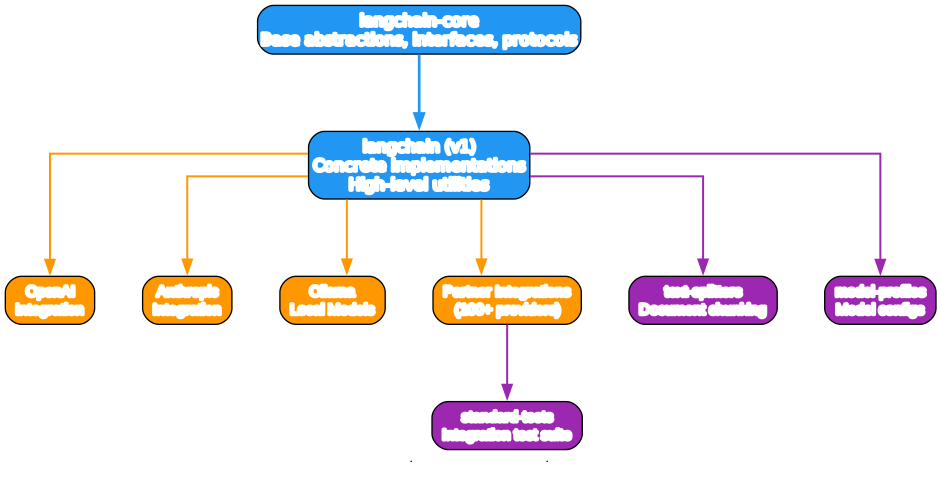
The LangChain project is organized as a Python monorepo with multiple independently versioned packages. This structure allows the team to maintain clear separation between core abstractions, concrete implementations, third-party integrations, and testing utilities while keeping everything in a single repository for coordinated development.
Core Layer: langchain-core
At the foundation sits langchain-core, which defines the base abstractions, interfaces, and protocols that the entire ecosystem builds upon. This layer includes primitives for chat models, embeddings, vector stores, retrievers, and document loaders. Users typically do not interact with this layer directly, but it provides the contracts that ensure interoperability across all LangChain components.
Implementation Layer: langchain (v1)
Built on top of langchain-core, the langchain package contains concrete implementations and high-level public utilities. This is the layer that most developers interact with when building applications. It includes pre-built chains, agent implementations, memory systems, and the LangChain Expression Language (LCEL) for composing components into pipelines.
Integration Layer: Partners
The partners/ directory houses third-party integrations maintained by the LangChain team. This includes official packages for OpenAI, Anthropic, Ollama, and over 100 other providers. Each partner package implements the core interfaces for its respective service, ensuring consistent APIs regardless of which model provider or tool you choose.
Testing and Utilities
The monorepo also includes standard-tests for integration testing, text-splitters for document chunking, and model-profiles for model configuration management. These utilities ensure that partner integrations meet quality standards and that common tasks like document preprocessing are handled consistently.
Key Features of LangChain
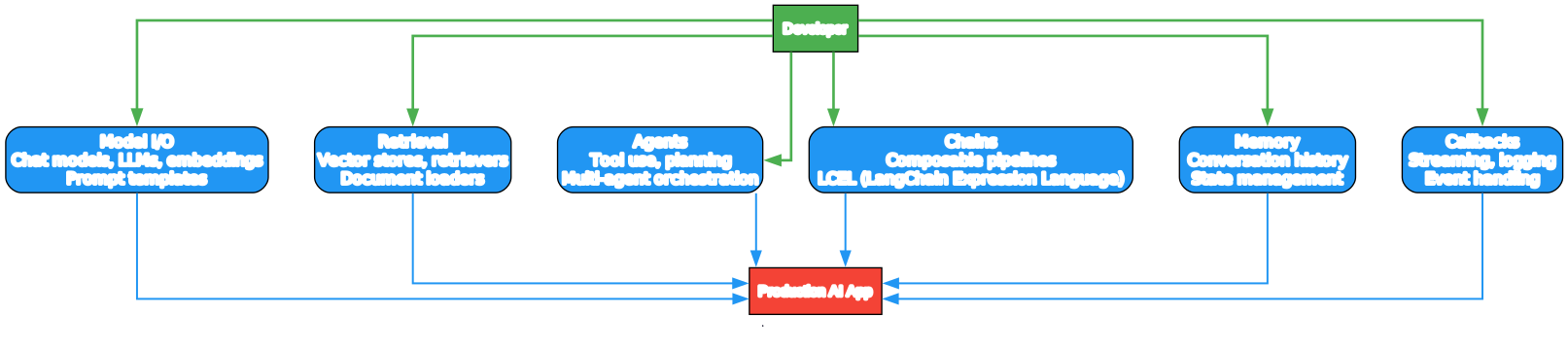
LangChain organizes its capabilities into six major feature categories that cover the full lifecycle of building LLM applications.
Model I/O
The Model I/O module provides unified interfaces for chat models, LLMs, and embeddings. It includes prompt templates that help you construct dynamic prompts with variable substitution, output parsers that transform raw model outputs into structured data, and model initialization utilities that make it easy to switch between providers.
Retrieval
Retrieval is the backbone of RAG (Retrieval-Augmented Generation) applications. LangChain provides document loaders for dozens of file formats, text splitters for chunking documents optimally, vector store integrations for semantic search, and retriever implementations that combine multiple retrieval strategies.
Agents
The agents module enables LLMs to make decisions and take actions. Agents can use tools, plan multi-step strategies, and coordinate with other agents. LangChain supports various agent types including ReAct, Plan-and-Execute, and custom agent implementations.
Chains
Chains are composable pipelines built with the LangChain Expression Language (LCEL). LCEL provides a declarative way to compose components using the pipe operator, enabling streaming, parallel execution, and retry logic out of the box.
Memory
Memory systems manage conversation history and state across interactions. LangChain offers several memory implementations including buffer memory, summary memory, and vector store-backed memory for long-context conversations.
Callbacks
The callbacks system enables streaming, logging, and event handling throughout the application lifecycle. You can attach custom handlers to monitor token usage, latency, and intermediate steps.
LangChain Agent Workflow
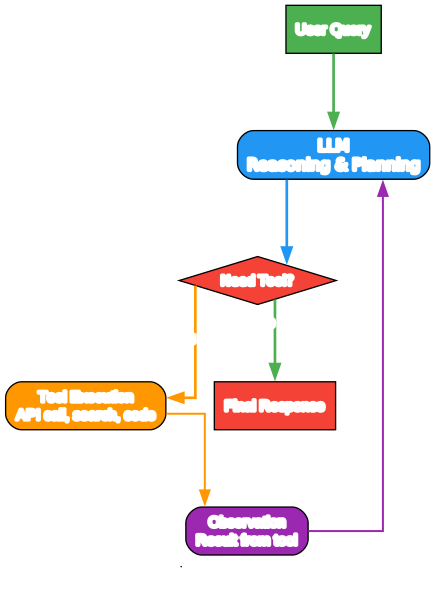
The agent workflow diagram illustrates the typical execution pattern of a LangChain agent. Understanding this loop is essential for building effective agent applications.
User Query
The workflow begins when a user submits a query or task to the agent. This could be a simple question, a complex multi-step request, or a directive to use specific tools.
LLM Reasoning and Planning
The agent passes the user input to an LLM along with a system prompt that defines the agent’s behavior and available tools. The LLM reasons about what needs to be done and decides whether it can answer directly or needs to invoke tools.
Tool Decision
The LLM outputs a decision: either provide a final answer or call a tool. If tool execution is needed, the LLM generates the tool name and arguments. LangChain parses this output and routes to the appropriate tool.
Tool Execution
The selected tool executes with the provided arguments. Tools can be API calls, database queries, code execution, web searches, or any custom function. LangChain handles the invocation and captures the result.
Observation
The tool returns an observation, which is fed back to the LLM as additional context. The LLM then reasons again, potentially invoking more tools or generating the final response.
Final Response
Once the LLM determines that no further tools are needed, it generates the final response to the user. This iterative loop continues until the task is complete or a maximum iteration limit is reached.
The LangChain Ecosystem
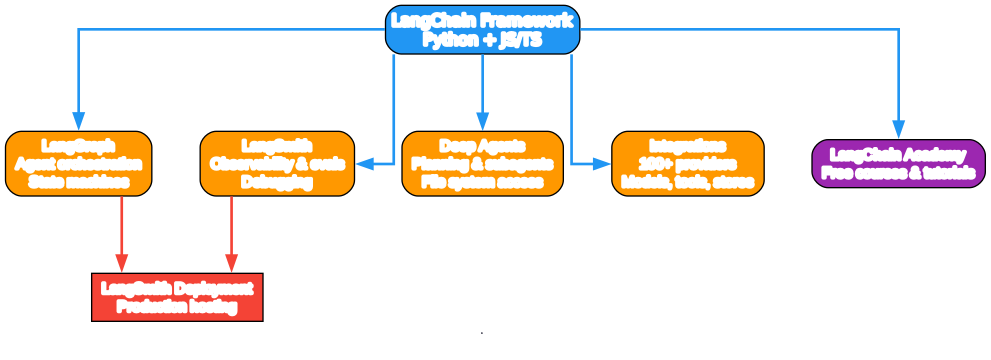
While LangChain can be used standalone, it integrates seamlessly with other LangChain products to provide a full suite of tools for building, evaluating, and deploying LLM applications.
LangGraph
LangGraph is a low-level framework for building controllable agent workflows using state machines and graph structures. It enables complex multi-agent orchestration with explicit control flow, making it ideal for applications that require deterministic behavior.
LangSmith
LangSmith provides observability, evaluation, and debugging for LLM applications. It offers tracing, prompt versioning, dataset management, and automated evaluation metrics. LangSmith helps teams move from prototype to production with confidence.
Deep Agents
Deep Agents extend LangChain with advanced capabilities for planning, subagent delegation, and file system access. These agents can handle complex tasks that require multiple steps of reasoning and interaction with external systems.
Integrations
With over 100 official integrations, LangChain connects to virtually every major model provider, vector database, and tool. The integration ecosystem is continuously growing, ensuring that you can use LangChain with your preferred services.
LangChain Academy
The LangChain Academy offers free comprehensive courses on LangChain libraries and products. Created by the LangChain team, these courses cover everything from basic concepts to advanced agent design patterns.
LangSmith Deployment
For production deployments, LangSmith Deployment provides a purpose-built platform for hosting long-running, stateful agent workflows with scaling and monitoring built in.
Installation
Getting started with LangChain is straightforward. The framework is available on PyPI and can be installed with pip or uv.
pip install langchain
Or using uv for faster resolution:
uv add langchain
For specific integrations, install the corresponding partner package:
pip install langchain-openai
pip install langchain-anthropic
pip install langchain-ollama
Quick Start Example
Here is a minimal example that demonstrates how to initialize a chat model and invoke it:
from langchain.chat_models import init_chat_model

model = init_chat_model("openai:gpt-5.4")
result = model.invoke("Hello, world!")
print(result.content)
For more advanced customization and agent orchestration, explore the LangGraph framework:
from langgraph.graph import StateGraph

# Define a simple agent workflow
builder = StateGraph(dict)
builder.add_node("agent", agent_node)
builder.add_node("tool", tool_node)
builder.add_edge("agent", "tool")
builder.add_edge("tool", "agent")
graph = builder.compile()
Why Use LangChain?
LangChain offers several compelling advantages for developers building LLM applications:
- Real-time data augmentation: Connect LLMs to diverse data sources and external systems through a vast library of integrations.
- Model interoperability: Swap models in and out as your team experiments, without rewriting application logic.
- Rapid prototyping: Build and iterate quickly with modular, component-based architecture.
- Production-ready features: Deploy reliable applications with built-in support for monitoring, evaluation, and debugging.
- Vibrant community: Benefit from continuous improvements and stay up-to-date with the latest AI developments.
- Flexible abstraction layers: Work at the level of abstraction that suits your needs, from high-level chains to low-level components.
Conclusion
LangChain has established itself as the foundational framework for agent engineering, with 134,000+ stars reflecting its widespread adoption and active community. Its modular architecture, extensive integration ecosystem, and companion products like LangGraph and LangSmith provide a complete platform for building AI applications at any scale.
Whether you are prototyping a simple RAG pipeline or deploying a complex multi-agent system, LangChain provides the abstractions and tools to move fast without sacrificing control. The framework continues to evolve alongside the LLM landscape, ensuring that your applications remain future-proof.
Links
- GitHub Repository
- Official Documentation
- LangGraph Documentation
- LangSmith Platform
- LangChain Academy
- PyPI Package

Enjoyed this post? Never miss out on future posts by following us


