Hugging Face ML Intern: An Open-Source Autonomous ML Engineer That Reads Papers, Trains Models, and Ships Code
Hugging Face ML Intern is an open-source autonomous ML engineer that researches papers, trains models, and ships production-quality code using the Hugging Face ecosystem. Built on top of the smolagents framework, ML Intern provides deep access to Hugging Face documentation, repositories, datasets, papers, and cloud compute resources. With 5,640+ stars and growing rapidly, this project represents a significant step toward fully autonomous machine learning engineering agents that can handle end-to-end ML workflows without human intervention.
Understanding the ML Intern Architecture
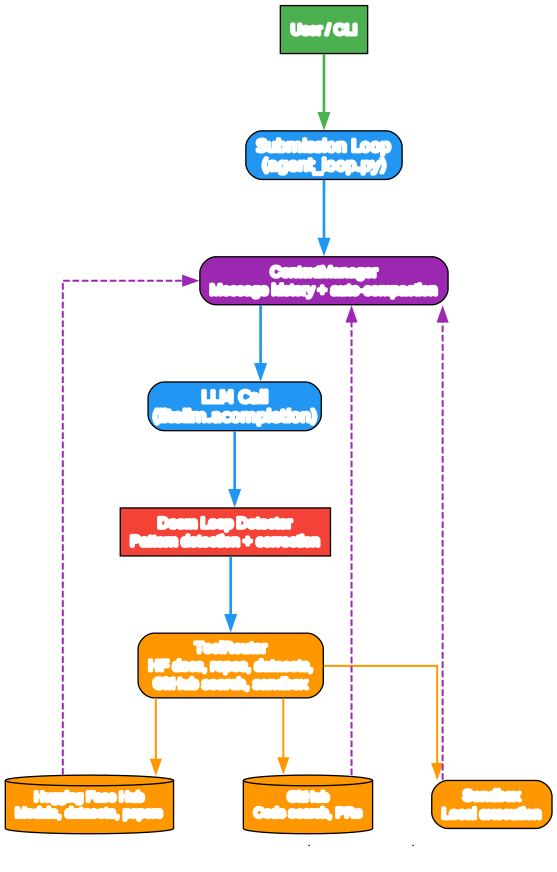
The architecture diagram above illustrates the core components of ML Intern and their interactions. Let’s break down each component:
Component 1: User / CLI Interface ML Intern operates through a command-line interface where users can start interactive chat sessions or submit single headless prompts. The CLI accepts natural language instructions like “fine-tune llama on my dataset” and translates them into actionable ML engineering tasks.
Component 2: Submission Loop (agent_loop.py) The submission loop serves as the central orchestrator, receiving operations from the user input queue and routing them to appropriate handlers. It manages the agentic execution flow, handling operations like run_agent, compact (context compaction), and interrupt requests. This loop ensures that user requests are processed in order while maintaining system stability.
Component 3: ContextManager The ContextManager maintains message history using litellm.Message arrays and implements auto-compaction at 170,000 tokens to prevent context overflow. It also handles session upload to Hugging Face Hub, enabling persistent conversation state across sessions. This component is critical for long-running ML tasks that may require hundreds of iterations.
Component 4: ToolRouter The ToolRouter provides access to the full Hugging Face ecosystem including documentation and research tools, repositories and datasets, GitHub code search, sandbox execution environments, planning capabilities, and MCP server integrations. This modular tool system allows ML Intern to perform complex multi-step operations across different platforms.
Component 5: Doom Loop Detector The Doom Loop Detector monitors for repeated tool call patterns that indicate the agent is stuck in a loop. When detected, it injects corrective prompts to help the agent break out of cyclic behavior and make progress on the task. This safety mechanism prevents infinite loops during autonomous execution.
Data Flow: When a user submits a request, the submission loop routes it to the agentic execution handler. The agent retrieves context from the ContextManager, makes an LLM call via litellm, parses any tool calls, checks for doom loops, and executes tools through the ToolRouter. Results are added back to the context, and the loop continues until the task is complete or the maximum iteration count (300) is reached.
The Agentic Loop: How ML Intern Thinks and Acts
Step-by-Step Execution Flow
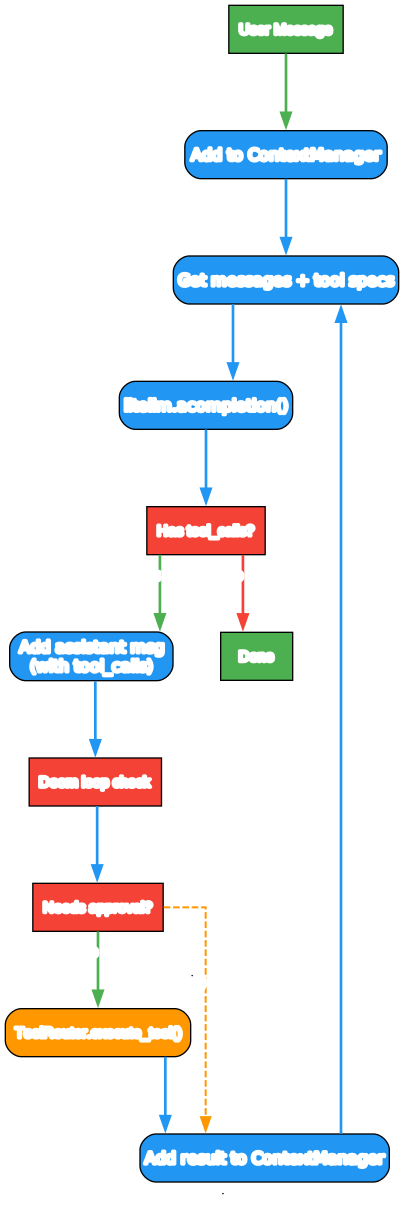
The agentic loop follows a structured decision-making process:
-
User Message Processing: The user’s natural language request is added to the ContextManager, which maintains the full conversation history and tool specifications.
-
LLM Completion: ML Intern calls litellm.acompletion() with the current context and available tool definitions. This supports multiple model providers including Anthropic Claude, OpenAI, and open-source models through the LiteLLM abstraction layer.
-
Tool Call Detection: The LLM response is parsed for tool_calls. If no tools are requested, the agent returns the final answer to the user.
-
Doom Loop Prevention: Before executing tools, the Doom Loop Detector checks for repeated patterns. If the same tool is being called with similar arguments multiple times, a corrective prompt is injected.
-
Approval Gate: For sensitive operations like job submissions, sandbox execution, or destructive operations, ML Intern requests user approval before proceeding. This safety mechanism prevents unintended actions.
-
Tool Execution: Approved tools are executed through the ToolRouter, which dispatches to Hugging Face Hub, GitHub, local sandbox, or MCP servers as appropriate.
-
Result Integration: Tool execution results are added back to the ContextManager, and the loop repeats until the task is complete.
Deep Hugging Face Ecosystem Integration

Tool Categories
ML Intern provides access to eight major tool categories:
Hugging Face Documentation and Research ML Intern can search and retrieve information from Hugging Face documentation, including model cards, dataset descriptions, and API references. This enables the agent to understand how to use specific models and datasets without requiring the user to manually look up documentation.
Hugging Face Repositories and Datasets The agent can browse, download, and upload models and datasets to Hugging Face Hub. It understands model versioning, dataset splits, and repository structures, enabling automated model selection and dataset preparation.
Hugging Face Papers Integration with the Hugging Face papers database allows ML Intern to search academic papers, understand methodologies, and implement research findings. This bridges the gap between published research and practical implementation.
Hugging Face Jobs and Cloud Compute ML Intern can submit training jobs to Hugging Face’s cloud compute infrastructure, monitor job progress, and retrieve results. This enables large-scale model training without requiring local GPU resources.
GitHub Code Search The GitHub integration allows ML Intern to search for existing implementations, reference code patterns, and understand how similar problems have been solved in the open-source community.
Sandbox and Local Execution For code validation and testing, ML Intern can execute Python code in a sandboxed environment. This enables safe experimentation before deploying to production systems.
Planning and Task Decomposition The planning tool helps ML Intern break complex ML engineering tasks into manageable subtasks. For example, “fine-tune llama on my dataset” might be decomposed into data preprocessing, model selection, training configuration, execution, and evaluation steps.
MCP Server Integration Model Context Protocol (MCP) servers extend ML Intern’s capabilities with external tools and services. Users can configure custom MCP servers in configs/main_agent_config.json to add domain-specific functionality.
Event-Driven Architecture

Real-Time Communication
ML Intern uses an event-driven architecture to communicate status and progress to users:
Processing Events
processing: Indicates the agent has started processing user inputready: Signals the agent is ready for new inputassistant_chunk: Streaming token chunks for real-time response displayassistant_message: Complete LLM response textassistant_stream_end: Token stream has finished
Tool Execution Events
tool_call: A tool is being invoked with specific argumentstool_output: Tool execution has completed with resultstool_log: Informational messages from tool executiontool_state_change: Tool execution state has transitioned
Lifecycle Events
approval_required: User confirmation needed for sensitive operationsturn_complete: Agent has finished processing the current requesterror: An error occurred during processinginterrupted: Agent execution was interrupted by usercompacted: Context was automatically compacted to prevent overflowundo_complete: Undo operation finished successfullyshutdown: Agent is shutting down
These events enable rich user interfaces that show real-time progress, tool execution status, and agent decision-making.
Installation and Setup
Prerequisites
ML Intern requires Python and the uv package manager. You’ll also need API keys for:
- Anthropic API (if using Claude models)
- Hugging Face token (for Hub access)
- GitHub personal access token (for code search)
Quick Install
# Clone the repository
git clone https://github.com/huggingface/ml-intern.git
cd ml-intern

# Install dependencies
uv sync
uv tool install -e .
Configuration
Create a .env file in the project root:
ANTHROPIC_API_KEY=your-anthropic-api-key
HF_TOKEN=your-hugging-face-token
GITHUB_TOKEN=your-github-personal-access-token
If no HF_TOKEN is set, the CLI will prompt you to paste one on first launch.
Usage Modes
Interactive Mode
Start a chat session for back-and-forth collaboration:
ml-intern
Headless Mode
Submit a single prompt with auto-approval:
ml-intern "fine-tune llama on my dataset"
Advanced Options
# Use a specific model
ml-intern --model anthropic/claude-opus-4-6 "your prompt"

# Increase maximum iterations
ml-intern --max-iterations 100 "your prompt"

# Disable streaming output
ml-intern --no-stream "your prompt"
Extending ML Intern
Adding Built-in Tools
Edit agent/core/tools.py to add custom tools:
def create_builtin_tools() -> list[ToolSpec]:
    return [
        ToolSpec(
            name="your_tool",
            description="What your tool does",
            parameters={
                "type": "object",
                "properties": {
                    "param": {"type": "string", "description": "Parameter description"}
                },
                "required": ["param"]
            },
            handler=your_async_handler
        ),
        # ... existing tools
    ]
Adding MCP Servers
Edit configs/main_agent_config.json:
{
  "model_name": "anthropic/claude-sonnet-4-5-20250929",
  "mcpServers": {
    "your-server-name": {
      "transport": "http",
      "url": "https://example.com/mcp",
      "headers": {
        "Authorization": "Bearer ${YOUR_TOKEN}"
      }
    }
  }
}
Environment variables like ${YOUR_TOKEN} are automatically substituted from .env.
Use Cases
Automated Model Fine-Tuning ML Intern can handle the entire fine-tuning pipeline: selecting appropriate base models, preparing datasets, configuring training hyperparameters, executing training jobs, and evaluating results.
Research Implementation Given a paper title or arXiv ID, ML Intern can search for the paper, understand the methodology, find existing implementations, and adapt the approach to your specific use case.
Dataset Exploration and Preparation The agent can search Hugging Face datasets, analyze their structure, handle preprocessing steps like tokenization and splitting, and prepare them for training.
Code Generation and Review ML Intern can generate ML pipeline code, search for best practices on GitHub, and review existing code for potential improvements or bugs.
Experiment Tracking Through Hugging Face Hub integration, ML Intern can automatically log experiments, save model checkpoints, and maintain reproducible training configurations.
Comparison with Other AI Coding Agents
| Feature | ML Intern | AutoGPT | OpenHands |
|---|---|---|---|
| ML Ecosystem Focus | Deep HF integration | General purpose | General purpose |
| Model Training | Native support | Limited | Limited |
| Paper Research | Built-in | Plugin-based | Not available |
| Cloud Compute | HF Jobs | Self-hosted | Self-hosted |
| Context Management | Auto-compaction at 170k | Manual | Manual |
| Doom Loop Detection | Built-in | Limited | Not available |
| MCP Support | Yes | Limited | Yes |
Limitations and Considerations
Context Window Management While ML Intern implements auto-compaction at 170,000 tokens, very long-running tasks may still lose early context. For complex multi-day projects, consider breaking tasks into smaller sessions.
Approval Requirements Sensitive operations require user approval, which means ML Intern is not fully autonomous for all tasks. This is a safety feature but may slow down workflows that require many destructive operations.
API Costs Running ML Intern with commercial LLM APIs (Claude, GPT-4) can incur significant costs for long-running tasks. Consider using local models or monitoring token usage carefully.
Error Recovery While the Doom Loop Detector helps with repetitive patterns, complex errors may still require human intervention. The agent’s ability to recover from unexpected failures depends on the quality of error messages from underlying tools.
Conclusion
Hugging Face ML Intern represents a significant advancement in autonomous ML engineering. By combining deep Hugging Face ecosystem integration with robust agentic loop architecture, doom loop detection, and event-driven communication, it provides a powerful platform for automating machine learning workflows. Whether you’re fine-tuning models, implementing research papers, or exploring datasets, ML Intern can handle the heavy lifting while keeping you informed through its rich event system.
As the project continues to evolve, expect expanded tool integrations, improved context management, and enhanced autonomous capabilities. For ML practitioners looking to accelerate their workflows, ML Intern offers a compelling open-source alternative to manual pipeline construction.
Links
- ML Intern GitHub Repository
- Hugging Face Hub
- smolagents Framework
- LiteLLM Documentation
- GitHub Personal Access Tokens

Enjoyed this post? Never miss out on future posts by following us


