SUMO-RL: Reinforcement Learning for Traffic Signal Control with OpenAI Gym
SUMO-RL reinforcement learning traffic simulation brings the power of modern RL algorithms to urban traffic signal control by wrapping the SUMO (Simulation of Urban MObility) simulator into standard Gymnasium and PettingZoo environments. Created by Lucas N. Alegre and released under the MIT license, SUMO-RL eliminates the friction between traffic simulation research and reinforcement learning practice. Instead of wrestling with low-level TraCI socket communication, researchers can instantiate a traffic environment with a single call to gym.make('sumo-rl-v0') and immediately start training agents with Stable Baselines3, Ray RLlib, or custom algorithms. The library supports both single-agent Gymnasium environments and multi-agent PettingZoo environments, making it straightforward to scale from controlling one intersection to orchestrating an entire city grid. Published as part of the RESCO benchmarks paper at NeurIPS 2021, SUMO-RL has been cited in over a dozen peer-reviewed publications and continues to serve as a foundational tool for RL-based traffic signal control research.
Architecture
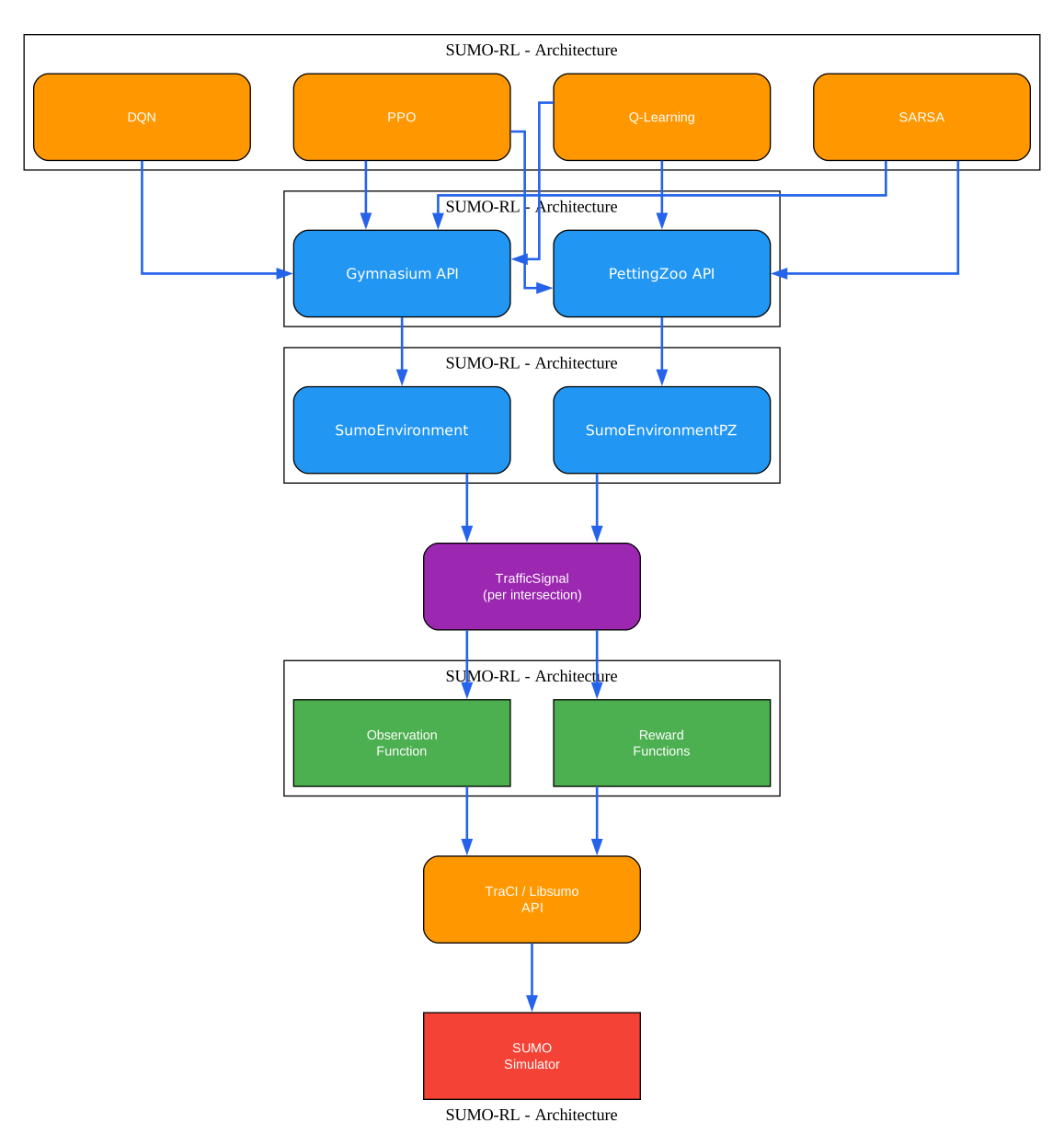
Understanding the SUMO-RL Architecture
The architecture diagram above illustrates the layered design of SUMO-RL, showing how high-level RL algorithm interfaces connect down through abstraction layers to the underlying SUMO traffic simulator. Each layer has a distinct responsibility, and the clean separation of concerns is what makes the library both extensible and easy to use.
Top Layer: RL Algorithms
At the top of the stack sit the reinforcement learning algorithms. These include Stable Baselines3 implementations like DQN and PPO, Ray RLlib multi-agent algorithms, and custom agents such as the built-in QLAgent for tabular Q-learning. These algorithms interact with the environment through standardized APIs and never need to communicate directly with SUMO.
Second Layer: Gymnasium and PettingZoo APIs
The next layer provides the standard interfaces that RL libraries expect. For single-agent scenarios, SUMO-RL implements the gymnasium.Env interface through the SumoEnvironment class, exposing the familiar reset(), step(), observation_space, and action_space attributes. For multi-agent scenarios, the SumoEnvironmentPZ class implements the PettingZoo AEC (Agent-Environment-Cycle) interface, and a parallel variant is generated automatically via parallel_wrapper_fn. This dual-API design means the same underlying environment logic serves both paradigms without duplication.
Third Layer: Environment Classes
The SumoEnvironment class is the core orchestrator. It manages the SUMO simulation lifecycle, coordinates traffic signals, computes observations and rewards, and handles episode reset and termination logic. The SumoEnvironmentPZ class wraps SumoEnvironment and adapts its multi-agent step semantics to the PettingZoo AEC protocol, managing agent selection order, cumulative rewards, and termination tracking.
Fourth Layer: TrafficSignal and Observation/Reward Functions
Each controlled intersection is represented by a TrafficSignal object. This class is responsible for reading the current traffic state through the TraCI API, computing observations via a pluggable ObservationFunction, calculating rewards using configurable reward functions, and managing phase transitions including automatic yellow phase insertion. The DefaultObservationFunction provides the standard observation vector, while custom observation classes can be created by inheriting from ObservationFunction.
Bottom Layer: TraCI/Libsumo and SUMO
At the lowest level, SUMO-RL communicates with the SUMO simulator through either TraCI (socket-based communication) or Libsumo (in-process shared memory). Libsumo provides approximately 8x performance improvement by eliminating socket overhead, though it disables the GUI and parallel simulation support. The SUMO simulator handles all the microscopic traffic simulation, including vehicle movement, lane changing, route following, and traffic light state management.
Key Insight: SUMO-RL’s dual API design means the same environment codebase serves both single-agent Gymnasium and multi-agent PettingZoo workflows, eliminating the need to rewrite environments when scaling from one intersection to city-wide traffic networks.
Training Workflow

Understanding the Training Workflow
The workflow diagram above shows the step-by-step process of setting up and running a reinforcement learning training session with SUMO-RL. Each stage builds on the previous one, and the library provides sensible defaults at every step so that a minimal configuration can produce a working training loop.
Step 1: Load Network
The first step is to provide a SUMO network file (.net.xml) that defines the road topology, lanes, intersections, and traffic light programs. These files can be created using SUMO’s netconvert tool from OpenStreetMap data or designed manually using SUMO’s network editor. The network file determines how many traffic signals exist and what phase configurations are available.
Step 2: Load Routes
The route file (.rou.xml) specifies the vehicle demand: when vehicles depart, their origin and destination, and the routes they follow through the network. Realistic route files can be generated from real-world traffic data or created synthetically for controlled experiments. The route file directly affects the difficulty and realism of the learning problem.
Step 3: Create Environment
With the network and route files, you instantiate the SumoEnvironment (single-agent) or sumo_rl.env / sumo_rl.parallel_env (multi-agent PettingZoo). Key parameters include delta_time (seconds between actions, default 5), yellow_time (duration of yellow phase, default 2 seconds), min_green and max_green (minimum and maximum green phase durations), and num_seconds (total simulation duration).
Step 4: Configure Observation
By default, SUMO-RL uses the DefaultObservationFunction, which produces a vector of [phase_one_hot, min_green, lane_densities, lane_queues]. For custom state representations, you create a subclass of ObservationFunction that implements __call__() to compute the observation and observation_space() to define the Box space.
Step 5: Select Reward
The reward function is specified via the reward_fn parameter. Built-in options include "diff-waiting-time" (default), "average-speed", "queue", "pressure", and "co2". You can also pass a custom callable, a list of reward functions for multi-objective RL, or a dictionary mapping traffic signal IDs to different reward functions for per-agent customization.
Step 6: Initialize Agent
Depending on your algorithm choice, you initialize the agent. For tabular methods, the built-in QLAgent class provides a complete Q-learning implementation with epsilon-greedy exploration. For deep RL, you pass the environment directly to Stable Baselines3’s DQN or PPO constructors, or register it with Ray RLlib.
Step 7: Training Loop
The training loop follows the standard Gymnasium/PettingZoo pattern: reset the environment, observe the state, select an action (via the agent’s policy), step the environment, receive the observation-reward-done tuple, and update the agent. SUMO-RL handles all the complexity of SUMO simulation stepping, phase management, and metric computation internally.
Step 8: Evaluate
After training, you can evaluate the learned policy by running the environment with use_gui=True to visualize the traffic behavior in sumo-gui. Metrics are automatically saved to CSV files via the out_csv_name parameter, and the included outputs/plot.py script generates performance plots.
Takeaway: With just
pip install sumo-rland a SUMO network file, you can start training RL agents on traffic signal control in minutes - the library handles all TraCI communication, phase management, and observation computation automatically.
Multi-Agent Architecture
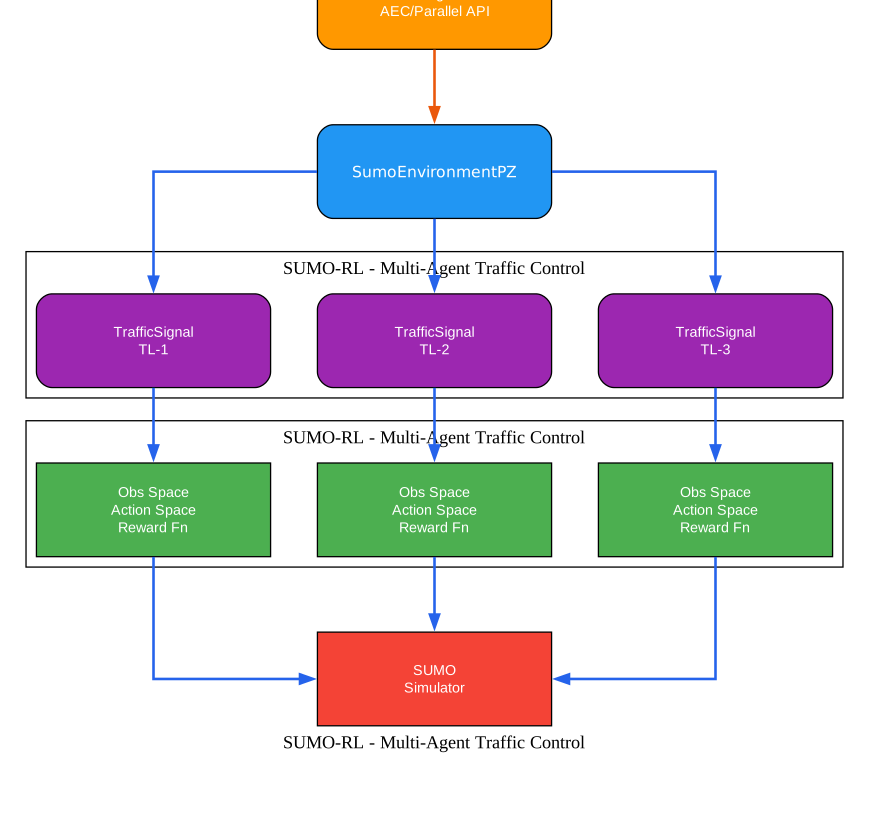
Understanding Multi-Agent Traffic Control
The multi-agent diagram above illustrates how SUMO-RL models a traffic network as a multi-agent system, where each traffic signal operates as an independent agent with its own observation, action, and reward. This decomposition is natural for traffic signal control because each intersection faces local traffic conditions that may differ significantly from its neighbors, yet the agents are coupled through the flow of vehicles between adjacent intersections.
Each Traffic Signal Is an Agent
In SUMO-RL’s multi-agent mode, every traffic light in the network becomes an independent decision-making entity. Each TrafficSignal object maintains its own state, including the current green phase, time since the last phase change, and whether it is currently in a yellow transition. When the simulation reaches a decision point (determined by next_action_time), the traffic signal signals that it is ready to act via the time_to_act property.
Three API Modes
SUMO-RL provides three distinct API modes for multi-agent interaction:
-
Gymnasium single-agent (
SumoEnvironmentwithsingle_agent=True): Treats the entire network as having one controller. The observation, reward, and action correspond to the first traffic signal only. This mode is useful for simple single-intersection problems or for using standard single-agent RL libraries. -
PettingZoo AEC (
sumo_rl.env): Implements the Agent-Environment-Cycle API where agents take turns acting in a defined order. TheSumoEnvironmentPZclass manages the agent selection sequence usingAgentSelector. This mode is required for algorithms that process one agent at a time, such as the built-in QLAgent. -
PettingZoo Parallel (
sumo_rl.parallel_env): Implements the parallel API where all agents submit actions simultaneously and receive observations and rewards together. This mode is ideal for algorithms like Ray RLlib’s PPO that process all agents in parallel.
Per-Agent Customization
One of the most powerful features of SUMO-RL’s multi-agent design is the ability to customize reward functions per agent. By passing a dictionary to the reward_fn parameter, you can assign different reward functions to different traffic signals. For example, intersections on a major arterial road might use the "pressure" reward to optimize throughput, while intersections in a residential area might use "co2" to minimize emissions. This flexibility enables domain-specific optimization strategies that a one-size-fits-all approach cannot achieve.
RESCO Benchmark Environments
SUMO-RL ships with eight pre-configured benchmark environments from the RESCO (Reinforcement Learning Benchmarks for Traffic Signal Control) project. These environments use real-world traffic networks from Cologne and Ingolstadt, Germany, with varying numbers of agents from 1 to 21. The RESCO benchmarks provide standardized scenarios for comparing RL algorithms, and results were published at NeurIPS 2021.
Amazing: The RESCO benchmark suite includes real-world traffic networks from Cologne and Ingolstadt with up to 21 simultaneous agents, enabling direct comparison of RL algorithms on realistic urban traffic scenarios published at NeurIPS 2021.
Observation and Action Spaces
Default Observation
The default observation for each traffic signal agent is a vector computed by the DefaultObservationFunction:
obs = [phase_one_hot, min_green, lane_1_density, ..., lane_n_density,
       lane_1_queue, ..., lane_n_queue]
Each component serves a specific purpose:
-
phase_one_hot: A one-hot encoded vector of length
num_green_phasesindicating which green phase is currently active. This tells the agent the current signal configuration without requiring it to infer it from traffic patterns. -
min_green: A binary variable (0 or 1) indicating whether the minimum green time has elapsed since the last phase change. When this value is 0, the agent knows that changing phases would violate the minimum green constraint, so it should maintain the current phase.
-
lane_i_density: The number of vehicles on incoming lane i divided by the maximum capacity of that lane, producing a normalized value between 0 and 1. Capacity is computed as
lane_length / (MIN_GAP + last_step_length), whereMIN_GAPis 2.5 meters (SUMO’s default minimum gap between vehicles). -
lane_i_queue: The number of queued (halting) vehicles on incoming lane i divided by the lane capacity, also normalized to [0, 1]. A vehicle is considered halting if its speed is below 0.1 m/s.
The observation space is a gymnasium.spaces.Box with low=np.zeros(...) and high=np.ones(...), meaning all values fall in the range [0, 1]. The total observation dimension is num_green_phases + 1 + 2 * num_lanes.
Action Space
The action space is gymnasium.spaces.Discrete(num_green_phases), where num_green_phases is the number of green phase configurations defined in the network file. Each action corresponds to selecting which green phase to activate for the next delta_time seconds. For example, a typical two-way intersection has 4 green phases (one for each approach direction), yielding Discrete(4).
When a phase change is requested, SUMO-RL automatically inserts a yellow transition phase lasting yellow_time seconds (default 2) before activating the new green phase. This ensures realistic signal behavior and prevents dangerous conflicts between conflicting traffic movements.
Custom Observation Functions
To define a custom observation, create a subclass of ObservationFunction:
from sumo_rl.environment.observations import ObservationFunction

class CustomObservation(ObservationFunction):
    def __init__(self, ts):
        super().__init__(ts)

    def __call__(self):
        # Compute your custom observation vector
        density = self.ts.get_lanes_density()
        queue = self.ts.get_lanes_queue()
        out_density = self.ts.get_out_lanes_density()
        return np.array(density + queue + out_density, dtype=np.float32)

    def observation_space(self):
        dim = len(self.ts.lanes) * 2 + len(self.ts.out_lanes)
        return spaces.Box(low=np.zeros(dim), high=np.ones(dim), dtype=np.float32)
Then pass it to the environment:
env = SumoEnvironment(
    net_file="network.net.xml",
    route_file="routes.rou.xml",
    observation_class=CustomObservation,
)
State Encoding for Tabular Methods
For tabular methods like Q-learning, the continuous observation space must be discretized. SUMO-RL provides the encode() method on SumoEnvironment that converts the observation vector into a hashable tuple:
state = env.encode(observation, ts_id)
# Returns: (phase, min_green, density_discrete_1, ..., density_discrete_n)
The density values are discretized into 10 bins (0-9) using min(int(density * 10), 9), and the phase and min_green values are extracted directly from the one-hot encoding. This encoded state can be used as a dictionary key for Q-table lookups.
Reward Functions
SUMO-RL provides five built-in reward functions, each optimizing a different aspect of traffic performance. The choice of reward function significantly impacts the learning dynamics and the resulting traffic behavior.
Built-in Reward Functions
| Reward Function | Formula | Optimization Goal |
|---|---|---|
diff-waiting-time (default) | prev_total_wait - current_total_wait | Reduce cumulative vehicle delay |
average-speed | avg(vehicle_speed / max_speed) | Maximize traffic throughput |
queue | -total_halting_vehicles | Minimize queue lengths |
pressure | vehicles_leaving - vehicles_approaching | Balance network flow |
co2 | -total_co2_emissions | Minimize environmental impact |
diff-waiting-time: The default reward computes the change in cumulative vehicle delay between consecutive steps. It sums the accumulated waiting time across all incoming lanes (divided by 100 for scaling) and returns the difference from the previous step. A positive reward means the total waiting time decreased, indicating improved traffic flow. This reward naturally encourages the agent to reduce congestion.
average-speed: Returns the average normalized speed of all vehicles in the intersection. Speed is normalized by dividing by the maximum allowed speed, producing values in [0, 1]. When no vehicles are present, it returns 1.0. This reward encourages the agent to keep traffic moving at or near the speed limit.
queue: Returns the negative total number of halting vehicles across all incoming lanes. This is a simple and intuitive reward that directly penalizes congestion. The negative sign ensures that minimizing queues (a negative quantity) produces increasing rewards.
pressure: Computes the difference between the number of vehicles leaving and approaching the intersection. Positive pressure indicates more vehicles are exiting than entering, which suggests the intersection is clearing. This reward is inspired by the back-pressure algorithm from network routing theory and has been shown to produce good network-level throughput.
co2: Returns the negative total CO2 emissions (in mg/s) across all incoming lanes. This reward is particularly relevant for environmental optimization and has been explored in the EcoLight reward shaping research.
Multi-Objective Rewards
SUMO-RL supports multi-objective reinforcement learning by accepting a list of reward functions:
env = SumoEnvironment(
    net_file="network.net.xml",
    route_file="routes.rou.xml",
    reward_fn=["diff-waiting-time", "average-speed", "co2"],
)
When multiple reward functions are provided, the reward returned is a numpy.ndarray with dimension equal to the number of reward functions. If reward_weights is specified, the rewards are linearly combined into a scalar:
env = SumoEnvironment(
    net_file="network.net.xml",
    route_file="routes.rou.xml",
    reward_fn=["diff-waiting-time", "co2"],
    reward_weights=[0.7, 0.3],  # 70% waiting time, 30% emissions
)
Custom Reward Functions
You can define custom reward functions as Python callables that accept a TrafficSignal object:
def my_reward_fn(traffic_signal):
    queue = traffic_signal.get_total_queued()
    speed = traffic_signal.get_average_speed()
    return speed - 0.5 * queue

env = SumoEnvironment(
    net_file="network.net.xml",
    route_file="routes.rou.xml",
    reward_fn=my_reward_fn,
)
Per-Agent Reward Functions
For multi-agent environments, you can assign different reward functions to different traffic signals using a dictionary:
env = sumo_rl.parallel_env(
    net_file="grid4x4.net.xml",
    route_file="grid4x4.rou.xml",
    reward_fn={
        "tl_0": "pressure",
        "tl_1": "diff-waiting-time",
        "tl_2": "co2",
        # ... assign per intersection
    },
)
This enables heterogeneous optimization strategies where different intersections prioritize different objectives based on their location and role in the network.
Integration Ecosystem
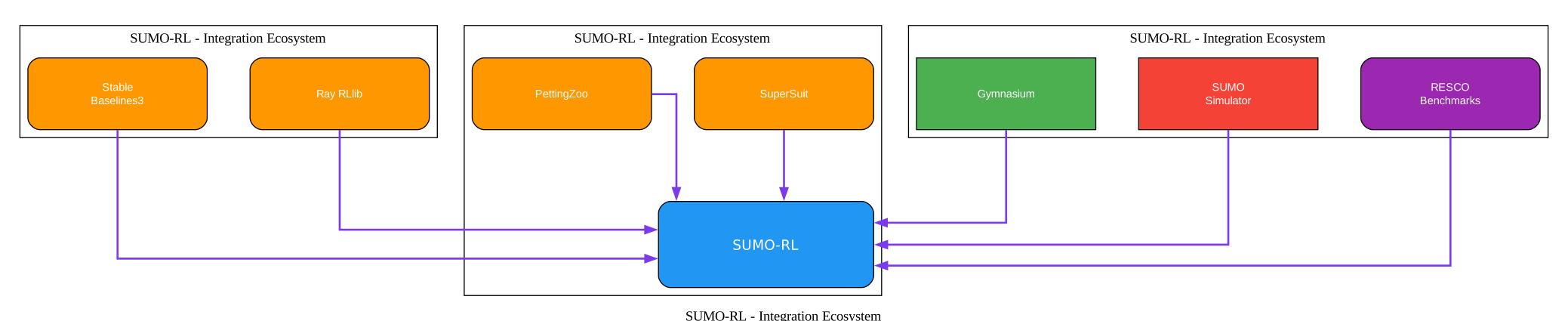
Understanding the Integration Ecosystem
The ecosystem diagram above shows how SUMO-RL connects to the broader reinforcement learning and traffic simulation ecosystem. Each integration point serves a specific purpose and enables different research workflows.
Gymnasium (Single-Agent)
SUMO-RL implements the gymnasium.Env interface through the SumoEnvironment class, making it compatible with any library that accepts Gymnasium environments. The environment can be registered with gym.make('sumo-rl-v0') for seamless integration. This is the simplest entry point for researchers who want to apply standard single-agent algorithms to a single intersection.
PettingZoo (Multi-Agent AEC and Parallel)
For multi-agent scenarios, SUMO-RL provides PettingZoo environments in both AEC and Parallel variants. The AEC API (sumo_rl.env) processes agents one at a time in a round-robin fashion, which is natural for tabular methods and algorithms that require sequential agent updates. The Parallel API (sumo_rl.parallel_env) collects actions from all agents simultaneously, which is more efficient for deep RL algorithms that process batches of experiences.
Stable Baselines3
Stable Baselines3 provides production-ready implementations of DQN, PPO, A2C, and other algorithms. SUMO-RL environments work directly with SB3 when using single_agent=True. The DQN experiment in the repository demonstrates training a deep Q-network on a two-way single intersection with minimal configuration.
Ray RLlib
Ray RLlib supports distributed multi-agent training and is the recommended framework for scaling to large traffic networks. SUMO-RL’s PettingZoo Parallel environment can be wrapped with ParallelPettingZooEnv and registered with RLlib. The PPO experiment shows how to train a multi-agent PPO policy on a 4x4 grid network with 16 agents using 4 rollout workers.
SuperSuit
SuperSuit provides environment wrappers for PettingZoo, including multi-agent to vectorized environment conversion, observation flattening, and action masking. These wrappers are useful when preparing PettingZoo environments for batch processing with deep RL algorithms.
RESCO Benchmarks
The RESCO (Reinforcement Learning Benchmarks for Traffic Signal Control) project provides standardized benchmark environments for comparing RL algorithms. SUMO-RL includes all eight RESCO environments as pre-configured factory functions, making it easy to reproduce and extend published results.
Important: Setting
export LIBSUMO_AS_TRACI=1provides approximately 8x performance boost by using Libsumo instead of TraCI socket communication, though this disables the GUI and parallel simulation support.
Installation and Quick Start
Install SUMO
First, install the SUMO traffic simulator. On Ubuntu/Debian:
sudo add-apt-repository ppa:sumo/stable
sudo apt-get update
sudo apt-get install sumo sumo-tools sumo-doc
Set the SUMO_HOME environment variable:
echo 'export SUMO_HOME="/usr/share/sumo"' >> ~/.bashrc
source ~/.bashrc
For a significant performance boost (~8x), enable Libsumo:
export LIBSUMO_AS_TRACI=1
Note that Libsumo mode disables the GUI and prevents running multiple simulations in parallel.
Install SUMO-RL
Install the stable release from PyPI:
pip install sumo-rl
Or install the latest development version:
git clone https://github.com/LucasAlegre/sumo-rl
cd sumo-rl
pip install -e .
Single-Agent Example with Gymnasium
import gymnasium as gym
import sumo_rl

env = gym.make(
    'sumo-rl-v0',
    net_file='path/to/network.net.xml',
    route_file='path/to/routes.rou.xml',
    out_csv_name='outputs/single_agent',
    use_gui=True,
    num_seconds=100000,
)

obs, info = env.reset()
done = False
while not done:
    next_obs, reward, terminated, truncated, info = env.step(env.action_space.sample())
    done = terminated or truncated

env.close()
Multi-Agent Example with PettingZoo
import sumo_rl

env = sumo_rl.parallel_env(
    net_file='nets/RESCO/grid4x4/grid4x4.net.xml',
    route_file='nets/RESCO/grid4x4/grid4x4_1.rou.xml',
    use_gui=True,
    num_seconds=3600,
)

observations = env.reset()
while env.agents:
    actions = {agent: env.action_space(agent).sample() for agent in env.agents}
    observations, rewards, terminations, truncations, infos = env.step(actions)

env.close()
Stable Baselines3 DQN Example
from stable_baselines3.dqn import DQN
from sumo_rl import SumoEnvironment

env = SumoEnvironment(
    net_file='sumo_rl/nets/2way-single-intersection/single-intersection.net.xml',
    route_file='sumo_rl/nets/2way-single-intersection/single-intersection-vhvh.rou.xml',
    out_csv_name='outputs/dqn',
    single_agent=True,
    use_gui=True,
    num_seconds=100000,
)

model = DQN(
    env=env,
    policy="MlpPolicy",
    learning_rate=0.001,
    learning_starts=0,
    train_freq=1,
    target_update_interval=500,
    exploration_initial_eps=0.05,
    exploration_final_eps=0.01,
    verbose=1,
)

model.learn(total_timesteps=100000)
Ray RLlib PPO Multi-Agent Example
import ray
from ray import tune
from ray.rllib.algorithms.ppo import PPOConfig
from ray.rllib.env.wrappers.pettingzoo_env import ParallelPettingZooEnv
from ray.tune.registry import register_env
import sumo_rl

ray.init()

register_env(
    "4x4grid",
    lambda _: ParallelPettingZooEnv(
        sumo_rl.parallel_env(
            net_file="sumo_rl/nets/4x4-Lucas/4x4.net.xml",
            route_file="sumo_rl/nets/4x4-Lucas/4x4c1c2c1c2.rou.xml",
            out_csv_name="outputs/4x4grid/ppo",
            use_gui=False,
            num_seconds=80000,
        )
    ),
)

config = (
    PPOConfig()
    .environment(env="4x4grid", disable_env_checking=True)
    .rollouts(num_rollout_workers=4, rollout_fragment_length=128)
    .training(
        train_batch_size=512,
        lr=2e-5,
        gamma=0.95,
        lambda_=0.9,
        use_gae=True,
        clip_param=0.4,
        entropy_coeff=0.1,
        vf_loss_coeff=0.25,
        sgd_minibatch_size=64,
        num_sgd_iter=10,
    )
    .framework(framework="torch")
)

tune.run("PPO", name="PPO", stop={"timesteps_total": 100000}, config=config.to_dict())
Q-Learning with PettingZoo AEC API
import sumo_rl
from sumo_rl.agents import QLAgent
from sumo_rl.exploration import EpsilonGreedy

env = sumo_rl.env(
    net_file="sumo_rl/nets/4x4-Lucas/4x4.net.xml",
    route_file="sumo_rl/nets/4x4-Lucas/4x4c1c2c1c2.rou.xml",
    use_gui=False,
    min_green=8,
    delta_time=5,
    num_seconds=80000,
)

env.reset()
initial_states = {ts: env.observe(ts) for ts in env.agents}
ql_agents = {
    ts: QLAgent(
        starting_state=env.unwrapped.env.encode(initial_states[ts], ts),
        state_space=env.observation_space(ts),
        action_space=env.action_space(ts),
        alpha=0.1,
        gamma=0.99,
        exploration_strategy=EpsilonGreedy(
            initial_epsilon=0.05, min_epsilon=0.005, decay=1
        ),
    )
    for ts in env.agents
}

for agent in env.agent_iter():
    s, r, terminated, truncated, info = env.last()
    done = terminated or truncated
    if ql_agents[agent].action is not None:
        ql_agents[agent].learn(
            next_state=env.unwrapped.env.encode(s, agent), reward=r
        )
    action = ql_agents[agent].act() if not done else None
    env.step(action)

env.close()
RESCO Benchmarks
SUMO-RL includes eight pre-configured benchmark environments from the RESCO project. These environments use real-world traffic networks and provide standardized scenarios for comparing RL algorithms.
| Environment | Agents | Actions | Network Type | Simulation Period |
|---|---|---|---|---|
cologne1 | 1 | 4 | Real (Cologne) | 25200-28800s |
cologne3 | 3 | 2x4, 1x3 | Real (Cologne) | 25200-28800s |
cologne8 | 8 | Variable | Real (Cologne) | 25200-28800s |
ingolstadt1 | 1 | 3 | Real (Ingolstadt) | 57600-61200s |
ingolstadt7 | 7 | Variable | Real (Ingolstadt) | 57600-61200s |
ingolstadt21 | 21 | Variable | Real (Ingolstadt) | 57600-61200s |
grid4x4 | 16 | 4 | Synthetic grid | 3600s |
arterial4x4 | 16 | 5 | Synthetic arterial | 3600s |
The Cologne environments simulate morning rush hour traffic (7:00-8:00 AM) in the city of Cologne, Germany. The Ingolstadt environments simulate evening traffic (4:00-5:00 PM) in Ingolstadt, Germany. The synthetic grid and arterial environments provide controlled scenarios with uniform intersection geometry, making them useful for ablation studies and algorithm development.
To use a RESCO benchmark:
from sumo_rl.environment.resco_envs import grid4x4, cologne8, ingolstadt21

# Grid 4x4 with 16 agents (parallel API)
env = grid4x4(parallel=True, use_gui=True)

# Cologne 8 with 8 agents (AEC API)
env = cologne8(parallel=False, use_gui=True)

# Ingolstadt 21 with 21 agents
env = ingolstadt21(parallel=True, use_gui=False, num_seconds=3600)
Performance Tips
Use Libsumo for Training Speed
The single most impactful performance optimization is enabling Libsumo by setting the environment variable LIBSUMO_AS_TRACI=1 before running your training script. Libsumo loads the SUMO simulation as a shared library instead of communicating through TCP sockets, providing approximately 8x speedup. The trade-off is that you cannot use the SUMO GUI or run multiple simulations in parallel in the same process.
export LIBSUMO_AS_TRACI=1
python train.py
CSV Metrics Output
SUMO-RL automatically records detailed metrics to CSV files when you specify the out_csv_name parameter. These metrics include system-level statistics (total running vehicles, total stopped, mean waiting time, mean speed) and per-agent statistics (accumulated waiting time, average speed, queue length). The CSV files are saved per episode, making it easy to track learning progress over time.
env = SumoEnvironment(
    net_file="network.net.xml",
    route_file="routes.rou.xml",
    out_csv_name="outputs/my_experiment",
    add_system_info=True,
    add_per_agent_info=True,
)
Visualization with sumo-gui
During evaluation, set use_gui=True to launch the SUMO GUI and watch your trained policy control traffic signals in real time. The GUI shows vehicle positions, queue lengths, and signal states, providing intuitive feedback on policy quality. For headless rendering, use render_mode="rgb_array" with a virtual display.
env = SumoEnvironment(
    net_file="network.net.xml",
    route_file="routes.rou.xml",
    use_gui=True,  # Visual evaluation
    num_seconds=3600,
)
Plotting Results
The repository includes a plotting utility for visualizing training metrics:
python outputs/plot.py -f outputs/4x4grid/ppo_conn0_ep2
This generates plots of system metrics over time, allowing you to compare different algorithms and hyperparameter configurations visually.
Conclusion
SUMO-RL provides a well-designed bridge between the SUMO traffic simulator and the modern reinforcement learning ecosystem. Its layered architecture cleanly separates concerns: the SumoEnvironment and SumoEnvironmentPZ classes handle simulation orchestration, the TrafficSignal class manages per-intersection state and phase logic, and pluggable observation and reward functions enable extensive customization without modifying core code. The dual Gymnasium/PettingZoo API support means researchers can start with a simple single-agent setup and scale to multi-agent networks without rewriting their environment code. With built-in RESCO benchmarks, integration with Stable Baselines3 and Ray RLlib, and the option for 8x speedup via Libsumo, SUMO-RL is a practical and research-ready tool for anyone working on RL-based traffic signal control.
The project is actively maintained, MIT-licensed, and has been used in over a dozen peer-reviewed publications. Whether you are exploring basic Q-learning on a single intersection or training distributed PPO on a 21-agent city network, SUMO-RL provides the abstractions and integrations to get started quickly.
Links:
- GitHub Repository: https://github.com/LucasAlegre/sumo-rl
- Zenodo DOI: https://zenodo.org/doi/10.5281/zenodo.10869789
- RESCO Paper (NeurIPS 2021): https://people.engr.tamu.edu/guni/Papers/NeurIPS-signals.pdf

Enjoyed this post? Never miss out on future posts by following us


