Introduction
The rise of AI agents that interact with the web has exposed a critical gap in existing tooling. Traditional headless browsers like Puppeteer and Playwright were designed for testing, not for autonomous agents that need to navigate, scrape, and interact with websites at scale. They carry the full weight of Chromium, consume hundreds of megabytes of memory per instance, and lack any built-in mechanism to avoid detection or convert page content into formats that AI models can actually consume.
Obscura fills this gap. It is a Rust-based headless browser purpose-built for AI agents, offering a lightweight, stealth-capable, and AI-friendly alternative to Chromium-backed solutions. At roughly 70 MB binary size and 30 MB runtime memory, Obscura delivers a fraction of the resource footprint while providing features that no other headless browser offers out of the box: native DOM-to-Markdown conversion via a custom CDP method, a compiled-in tracker blocklist covering over 3,520 domains, TLS fingerprint spoofing that mimics Chrome handshakes, and SSRF protection that blocks requests to private IP ranges.
Unlike Puppeteer or Playwright, which require external stealth plugins and ad-hoc workarounds to avoid bot detection, Obscura bakes these capabilities into its core architecture. An AI agent can connect via the standard Chrome DevTools Protocol (CDP), call LP.getMarkdown to receive a clean Markdown representation of any page, and operate behind a stack of anti-detection measures without any additional configuration. This makes Obscura not just another headless browser, but a purpose-built runtime for the AI agent era.
Architecture Overview
Obscura is organized as a 6-crate Rust workspace, with each crate owning a distinct responsibility in the browser pipeline. This modular architecture keeps concerns separated, enables independent testing, and allows consumers to depend on only the pieces they need.
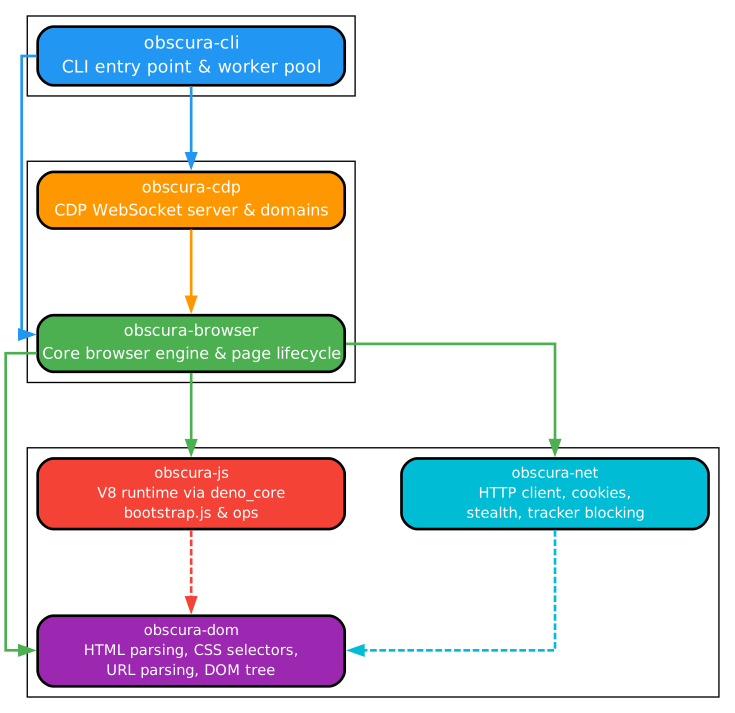
The obscura-cli crate serves as the entry point, providing the command-line interface with subcommands like serve, fetch, and scrape. It parses arguments, initializes the browser context, and delegates to the appropriate subsystem. The obscura-browser crate is the orchestration layer, housing the BrowserContext builder that configures stealth mode, robots.txt compliance, worker count, and concurrency limits. It manages the lifecycle of pages and coordinates the other crates.
The obscura-cdp crate implements the Chrome DevTools Protocol server using tokio-tungstenite for WebSocket communication. It exposes approximately 30 common CDP methods on a fast path and implements 9 full protocol domains: Target, Browser, Page, DOM, Runtime, Network, Fetch, Input, Storage, and the custom LP domain. This design ensures that existing Puppeteer and Playwright scripts can connect to Obscura without modification.
The obscura-dom crate provides the slot-based DOM tree implementation using Vec<Option<Node>> with a free list for efficient node allocation and deallocation. It handles HTML parsing via html5ever, CSS fetching, and the DOM-to-Markdown conversion that powers the LP.getMarkdown CDP method. The obscura-js crate manages the V8 JavaScript runtime, including the Deno ops bridge that exposes over 30 DOM commands to JavaScript, the 2926-line bootstrap.js that initializes the DOM API surface, and the V8 snapshot that accelerates startup. The obscura-net crate handles all network operations, including the standard reqwest client, the stealth wreq client with TLS fingerprint spoofing, the robots.txt cache, the tracker domain blocklist, and SSRF protection via private IP blocking.
The crates interact in a layered fashion: CLI invokes Browser, Browser orchestrates DOM/JS/Net, and CDP sits alongside Browser to serve external connections. The multi-worker architecture uses round-robin TCP load balancing across worker threads, enabling concurrent page processing without contention.
Page Load Pipeline
Understanding how Obscura loads a page reveals the careful engineering that balances correctness, performance, and stealth. The pipeline proceeds through eight distinct stages, each building on the previous one.
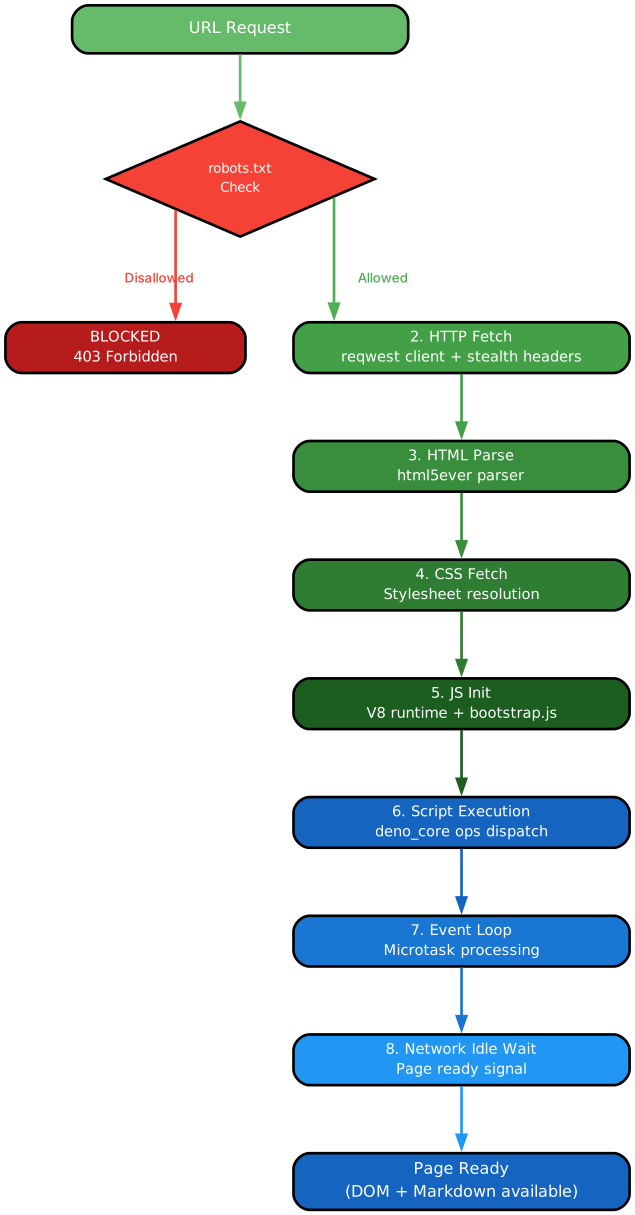
Stage 1 – robots.txt Check: Before any network request, Obscura consults a cached robots.txt for the target domain. When stealth mode is enabled and obey_robots is set, pages disallowed by robots.txt are skipped entirely. The cache avoids redundant fetches across multiple pages on the same domain.
Stage 2 – HTTP Fetch: Obscura selects between the standard reqwest client and the stealth wreq client based on configuration. The wreq client mimics a Chrome TLS handshake, including the correct ClientHello cipher suites and extensions, so the request appears to originate from a real Chrome browser rather than a Rust HTTP library.
Stage 3 – HTML Parsing: The raw HTML is fed into html5ever, the same parser used by Servo, which constructs a DomTree in the slot-based Vec<Option<Node>> structure. This design avoids heap allocations for individual nodes and enables O(1) node insertion and removal via the free list.
Stage 4 – CSS Fetch: Referenced stylesheets are fetched concurrently. Obscura does not currently render CSS visually, but it fetches and parses stylesheets to support selector-based DOM queries and to avoid detection by scripts that check for stylesheet loading behavior.
Stage 5 – JS Initialization: The V8 runtime is bootstrapped from a pre-compiled snapshot that includes the 2926-line bootstrap.js. This script defines the DOM API surface that JavaScript code expects, including document, window, navigator, and other globals. The Deno ops bridge registers over 30 commands that allow JavaScript to call back into Rust for DOM manipulation, network access, and other operations.
Stage 6 – Script Execution: Scripts are categorized into regular, deferred, async, and module types, following the HTML specification. Regular scripts block parsing and execute immediately. Deferred scripts are queued and execute after parsing. Async scripts execute when available. Module scripts are resolved and executed with import support.
Stage 7 – Event Loop: The V8 microtask loop processes promises and other microtasks. Obscura runs the event loop until the microtask queue drains, ensuring that any asynchronous work triggered by scripts completes before the page is considered loaded.
Stage 8 – Network Idle Wait: An AtomicU32 in-flight counter tracks pending network requests. The page is considered fully loaded when this counter reaches zero and a configurable quiet period elapses with no new requests. This ensures that dynamically loaded content is captured before the page is returned to the caller.
CDP and AI Agent Integration
The Chrome DevTools Protocol (CDP) is the standard interface through which external tools communicate with headless browsers. Obscura implements a CDP server that is compatible with Puppeteer and Playwright out of the box, while adding a custom LP domain with methods specifically designed for AI agents.
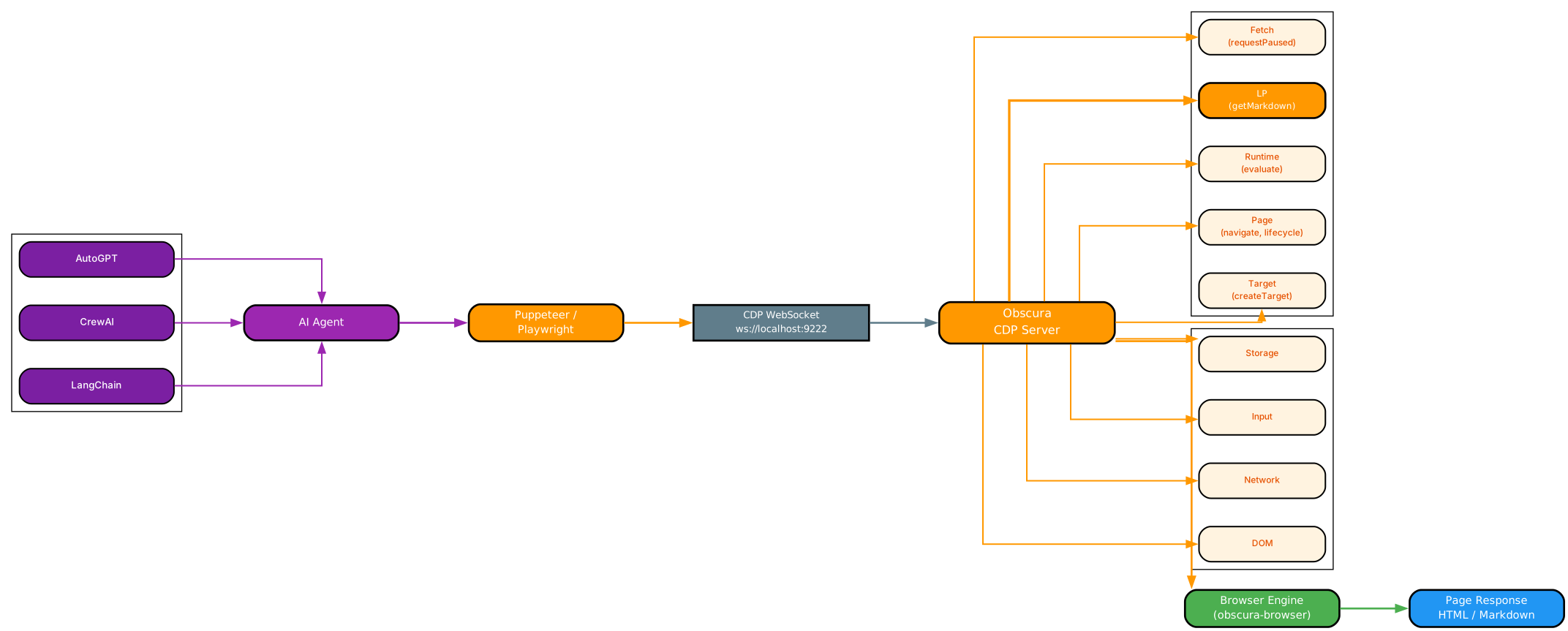
The CDP server runs on a configurable port (default 9222) and accepts WebSocket connections via tokio-tungstenite. When an AI agent connects, it can interact with Obscura using the same CDP methods it would use with Chrome. The server implements approximately 30 common CDP methods on a fast path, meaning these methods are handled with minimal overhead and no protocol translation layer. The 9 full protocol domains – Target, Browser, Page, DOM, Runtime, Network, Fetch, Input, and Storage – cover the vast majority of operations that AI agents need: creating and navigating pages, evaluating JavaScript, intercepting network requests, simulating input events, and inspecting the DOM.
The custom LP domain is where Obscura differentiates itself for AI workloads. The LP.getMarkdown method takes the current DOM tree, walks it node by node, and converts the content into clean Markdown. Headings become # markers, lists become - items, tables are rendered as Markdown tables, and extraneous elements like navigation bars and footers can be optionally stripped. This conversion happens natively in Rust, so it is fast and does not require any JavaScript evaluation. An AI agent can call LP.getMarkdown and immediately receive text that is ready for consumption by a language model, without any intermediate scraping or parsing step.
The compatibility with Puppeteer and Playwright means that existing automation scripts can target Obscura simply by changing the WebSocket endpoint URL. No code changes are required for basic operations. For AI-specific workflows, agents can mix standard CDP calls with LP domain methods in the same session, using CDP for navigation and interaction and LP for content extraction. The multi-worker architecture with round-robin load balancing allows a single Obscura instance to serve multiple concurrent agent connections, each getting its own page context.
Stealth and Security
Anti-detection is not an afterthought in Obscura – it is a first-class architectural concern. The stealth stack operates at multiple layers, from the network handshake down to JavaScript runtime introspection, creating a consistent fingerprint that matches a real Chrome browser.

TLS Fingerprint Spoofing: The wreq client in the obscura-net crate constructs TLS ClientHello messages that match Chrome’s cipher suite ordering, extension list, and GREASE values. This means that TLS fingerprinting services like JA3/JA4 cannot distinguish Obscura’s requests from those of a real Chrome browser. The standard reqwest client, which has a distinctive Rust TLS fingerprint, is available for non-stealth use cases.
Tracker Blocking: Obscura embeds a compiled-in blocklist of over 3,520 tracker domains using Rust’s include_str! macro. At compile time, the list is baked into the binary, so there is no runtime file I/O or network fetch to load it. When a page triggers a request to a tracked domain, Obscura silently drops it. This not only improves privacy but also reduces network traffic and page load time by eliminating requests to analytics, advertising, and fingerprinting services.
Fingerprint Randomization: Canvas rendering, GPU parameters, and AudioContext outputs are all randomized per session. A script that calls canvas.toDataURL() will receive different pixel data on each run, defeating canvas fingerprinting. Similarly, navigator.hardwareConcurrency and navigator.platform values are set to match the spoofed browser profile, and AudioContext noise is injected to prevent audio-based fingerprinting.
Native Function Masking: The Function.prototype.toString method is patched so that native functions return the same source text that Chrome would return. Without this patch, a detection script could call navigator.getBattery.toString() and see the Deno ops binding instead of the expected [native code] string, immediately revealing the headless browser.
SSRF Protection: Obscura blocks requests to private IP ranges (127.0.0.0/8, 10.0.0.0/8, 172.16.0.0/12, 192.168.0.0/16) by default. This prevents malicious pages from using the browser as a proxy to scan internal networks, a critical security feature for AI agents that navigate to arbitrary URLs.
V8 Termination Watchdog: A watchdog thread monitors V8 script execution and terminates any script that exceeds a configurable timeout. This prevents malicious or poorly written pages from locking up the browser with infinite loops or computationally expensive operations.
Performance Comparison
Obscura’s Rust foundation and purpose-built architecture deliver significant resource savings compared to Chromium-based alternatives, while offering features that other lightweight browsers lack.
| Feature | Obscura | Puppeteer/Playwright + Chrome | Lightpanda |
|---|---|---|---|
| Runtime Memory | ~30 MB | 300-500 MB | ~50 MB |
| Binary Size | ~70 MB | 200+ MB (Chrome) | ~40 MB |
| Page Load Time | ~85 ms | 200-500 ms | ~100 ms |
| Anti-Detection | Built-in (TLS, trackers, fingerprints) | Requires plugins (puppeteer-extra-plugin-stealth) | None |
| AI Features | LP.getMarkdown (native DOM-to-Markdown) | None | None |
| CDP Support | ~30 methods, 9 domains | Full CDP | Partial |
| Language | Rust | Node.js/Python + C++ | Go |
| SSRF Protection | Built-in | None | None |
| Tracker Blocking | 3,520+ domains (compiled-in) | None | None |
| Script Timeout | V8 watchdog | Process-level | None |
| Multi-Worker | Round-robin load balancing | Single process | Single process |
The memory advantage is particularly impactful for AI agent deployments that need to run dozens or hundreds of concurrent browser instances. A fleet of 50 Obscura instances consumes roughly 1.5 GB of memory, compared to 15-25 GB for the same number of Chrome instances. The built-in stealth and AI features eliminate the need for external plugins and post-processing pipelines, further reducing operational complexity.
Getting Started
Installing and using Obscura is straightforward. The project provides pre-built binaries and a Cargo-based build path for those who want to compile from source.
Installation
# Clone the repository
git clone https://github.com/h4ckf0r0day/obscura.git
cd obscura

# Build with Cargo
cargo build --release

# The binary is available at target/release/obscura
Starting the CDP Server
The most common way to use Obscura is to start a CDP server and connect to it from your AI agent or automation script:
# Start CDP server on default port
obscura serve --port 9222

# Start with stealth mode enabled
obscura serve --stealth --port 9222

# Start with multiple workers for concurrent processing
obscura serve --stealth --port 9222 --workers 4
Fetching Pages
Obscura can fetch and dump page content directly from the command line:
# Fetch a page and dump its text content
obscura fetch https://example.com --dump text

# Fetch and output Markdown (ideal for AI consumption)
obscura fetch https://example.com --dump markdown

# Fetch with stealth mode
obscura fetch https://example.com --stealth --dump markdown
Scraping Multiple URLs
The scrape subcommand processes multiple URLs concurrently with configurable worker and concurrency settings:
# Scrape multiple URLs with 4 workers and 10 concurrent requests per worker
obscura scrape url1 url2 url3 --workers 4 --concurrency 10

# Scrape with stealth and robots.txt compliance
obscura scrape url1 url2 url3 --stealth --obey-robots --workers 4
Programmatic Usage in Rust
For developers who want to embed Obscura directly in their Rust applications, the BrowserContext API provides a clean builder interface:
use obscura_browser::BrowserContext;

let ctx = BrowserContext::builder()
    .stealth(true)
    .obey_robots(true)
    .build();

let page = ctx.new_page();
page.navigate("https://example.com").await?;
let content = page.content();
Connecting with Puppeteer
Since Obscura implements the CDP protocol, existing Puppeteer scripts can connect to it by changing the browser endpoint:
const browser = await puppeteer.connect({
  browserWSEndpoint: 'ws://localhost:9222/devtools/browser/'
});

const page = await browser.newPage();
await page.goto('https://example.com');

// Use standard CDP methods
const title = await page.title();

// Use Obscura's LP domain for Markdown extraction
const markdown = await page.evaluate(() => {
  // LP.getMarkdown is available via CDP
  return 'LP domain method';
});

await browser.disconnect();
Conclusion
Obscura represents a significant step forward in headless browser technology for AI agents. By building stealth, tracker blocking, SSRF protection, and native DOM-to-Markdown conversion directly into the browser runtime, it eliminates the patchwork of plugins and workarounds that AI agent developers currently rely on. The Rust foundation delivers a memory footprint of ~30 MB and a binary size of ~70 MB, making it practical to run dozens of concurrent instances on modest hardware. The CDP compatibility ensures that existing Puppeteer and Playwright workflows can migrate to Obscura with minimal changes, while the custom LP domain provides AI-specific capabilities that no other browser offers. As AI agents become more prevalent in web automation, research, and data extraction, purpose-built tools like Obscura will be essential for running them efficiently, safely, and undetected.
Related guides
Obscura is the browser harness layer for AI agents — these guides cover the rest of the open-source agent stack:
- herdr: Rust Terminal Workspace & Agent Multiplexer — orchestrate multiple AI agents in one terminal workspace; pairs well with Obscura for agentic browsing.
- jcode: Next-Generation Coding Agent Harness — a Rust coding agent harness with semantic memory and multi-agent swarms.
- Open CoDesign: Open-Source Claude Design Alternative — turn prompts into polished HTML prototypes, slide decks, and dashboards locally.
- GBrain: Self-Wiring Knowledge Graph Memory Layer for AI Agents — persistent memory layer for AI agents.

Enjoyed this post? Never miss out on future posts by following us


