OpenHuman: Personal AI Super Intelligence with Rust
If you have ever wanted a personal AI that truly knows you – your emails, your calendar, your code, your conversations – and keeps all that data private on your own machine, learning how to use OpenHuman is the answer. OpenHuman is an open-source agentic assistant built in Rust that combines 118+ third-party integrations, a hierarchical Memory Tree, and smart token compression into a desktop experience that goes from install to a working agent in minutes, not weeks. With over 7,200 GitHub stars and explosive growth, it represents a fundamentally different approach to personal AI: one where the agent builds persistent knowledge about you rather than starting cold every time.
What Makes OpenHuman Different
Most AI agents fall into two camps: terminal-first tools that require extensive configuration, or cloud services that hoard your data. OpenHuman takes a third path. It ships as a polished desktop application built with Tauri and a React/TypeScript frontend, backed by a Rust core that handles everything from encryption to scheduling to real-time voice processing. The result is an agent that feels like a native app, not a developer tool.
Key Insight: OpenHuman skips the “cold start” problem entirely. Connect your accounts, let auto-fetch pull data locally on a 20-minute loop, and the Memory Tree compresses everything into Markdown files stored in an Obsidian-compatible vault. In one sync pass, the agent has full compressed context of your inbox, calendar, repos, docs, and messages.
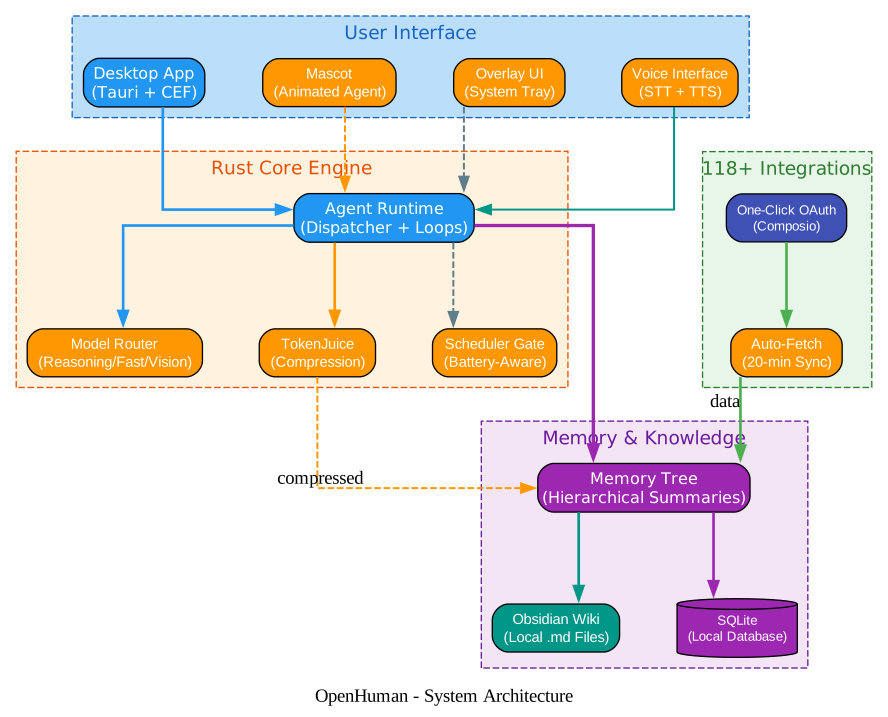
The architecture diagram above shows the layered design. At the top, the desktop UI layer includes the Tauri+CEF shell, an animated mascot that reacts to context, a system tray overlay, and a native voice interface powered by Whisper for speech-to-text and ElevenLabs for text-to-speech. Below that sits the Rust core engine, which orchestrates the agent runtime, routes tasks to the right LLM via model routing, compresses tokens through TokenJuice, and manages battery-aware scheduling. The memory layer stores hierarchical summaries in the Memory Tree, syncs them to an Obsidian wiki and SQLite, and the integration layer connects to 118+ services through one-click OAuth.
The Memory Tree: Context in Minutes, Not Weeks
The Memory Tree is OpenHuman’s most distinctive feature. Inspired by Andrej Karpathy’s Obsidian wiki workflow, it solves the fundamental problem of giving an agent persistent, useful knowledge about you without requiring weeks of training data.
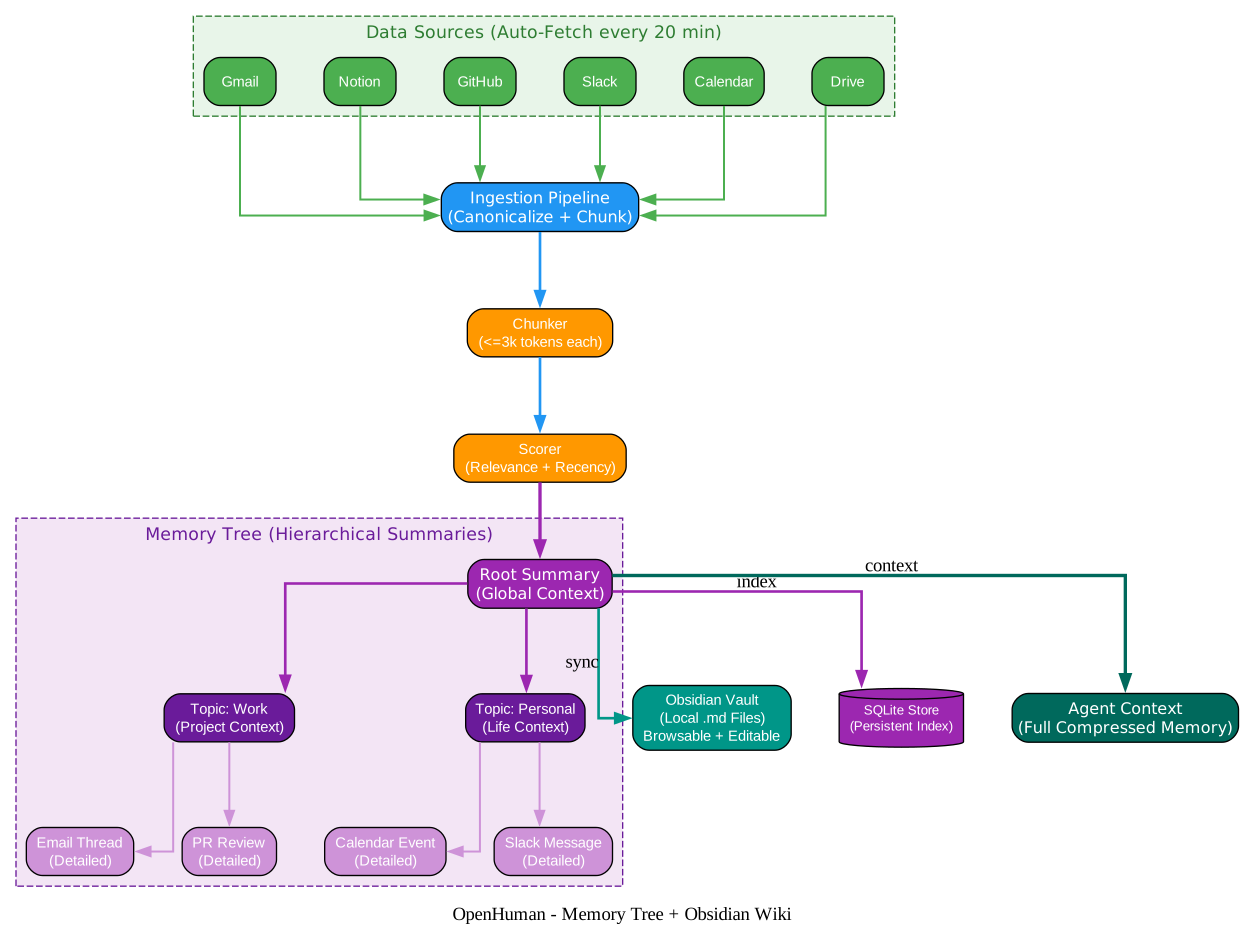
Here is how the Memory Tree works in detail:
-
Data Sources: Auto-fetch connects to Gmail, Notion, GitHub, Slack, Calendar, Drive, and 112+ other services through one-click OAuth. Every 20 minutes, it walks each active connection and pulls fresh data locally.
-
Ingestion Pipeline: Raw data from every source is canonicalized into a uniform format. HTML emails are converted to Markdown, attachments are extracted, and non-ASCII characters are normalized. Each chunk is limited to 3,000 tokens maximum.
-
Scoring: Every chunk is scored on relevance, recency, interaction frequency, and source weight. This scoring determines where the chunk lands in the tree hierarchy and how prominently it surfaces in agent context.
-
Hierarchical Summaries: The tree builds from leaf nodes (detailed chunks) up through topic nodes (project context, personal context) to a root summary that provides global context. The agent can drill down from the root to any leaf when it needs specifics.
-
Dual Output: The same data flows to both an Obsidian-compatible vault of
.mdfiles you can browse and edit, and a SQLite database that provides fast indexed queries. The Obsidian vault means your knowledge base is never locked in – it is just Markdown files on your disk. -
Agent Context: When the agent needs information, it queries the Memory Tree and receives compressed, relevant context rather than raw data dumps. This is what enables the “context in minutes” promise.
The Rust implementation in src/openhuman/memory/ is substantial, with dedicated modules for chunking, ingestion, scoring, tree construction, retrieval, and synchronization. The tree/ subdirectory alone contains over 40 source files handling everything from canonicalization of different content types (chat, email, documents) to topic curation and hotness scoring.
118+ Integrations with One-Click OAuth
OpenHuman connects to your entire digital life through Composio-powered OAuth integrations. Unlike other agent frameworks where you manually configure API keys for each service, OpenHuman uses one-click authentication that exposes every connection as a typed tool the agent can call directly.
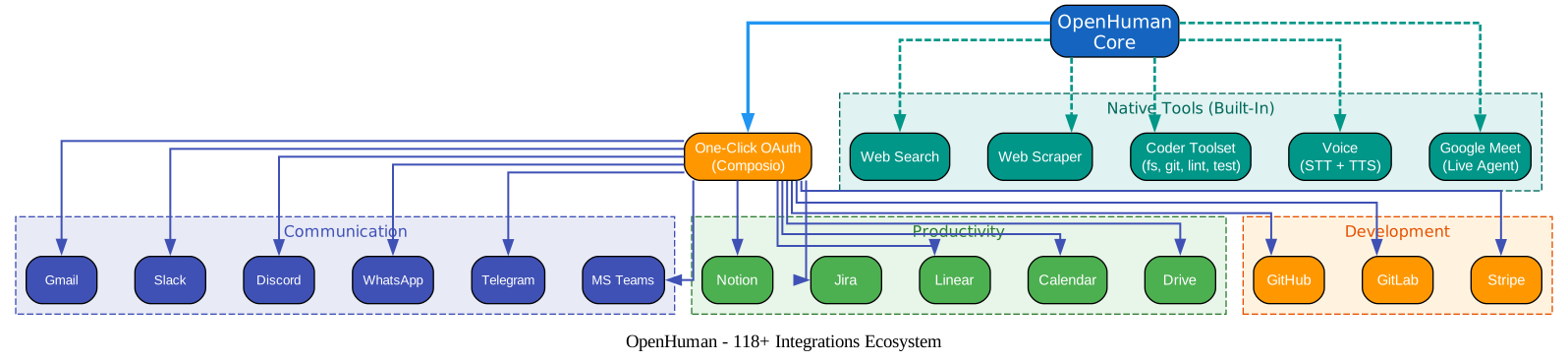
The integration categories cover:
- Communication: Gmail, Slack, Discord, WhatsApp, Telegram, Microsoft Teams – all your messaging platforms with full read and send capabilities
- Productivity: Notion, Jira, Linear, Google Calendar, Google Drive – project management and document tools
- Development: GitHub, GitLab, Stripe – code repositories and payment processing
- Native Tools: Web search, web scraper, full coder toolset (filesystem, git, lint, test, grep), voice processing, and a live Google Meet agent that joins meetings as a real participant
The src/openhuman/integrations/ module handles the Composio client, parallel execution of integration calls, and typed tool definitions. The src/openhuman/composio/ module manages OAuth flows and credential storage. Every integration is wired as a tool the agent can invoke without any manual configuration from you.
Amazing: The Google Meet integration is not just a bot that records audio. The mascot joins as a real participant with lip-sync animation, can speak using ElevenLabs TTS, and processes the meeting in real time. This is implemented in
src/openhuman/meet/andsrc/openhuman/meet_agent/with dedicated Rust modules for audio capture, speech processing, and agent behavior during meetings.
TokenJuice: Smart Compression That Cuts Costs by 80%
Every tool call, scrape result, email body, and search payload passes through TokenJuice before it reaches any LLM. This compression layer is what makes running a personal AI agent affordable, and it is built directly into the Rust core.
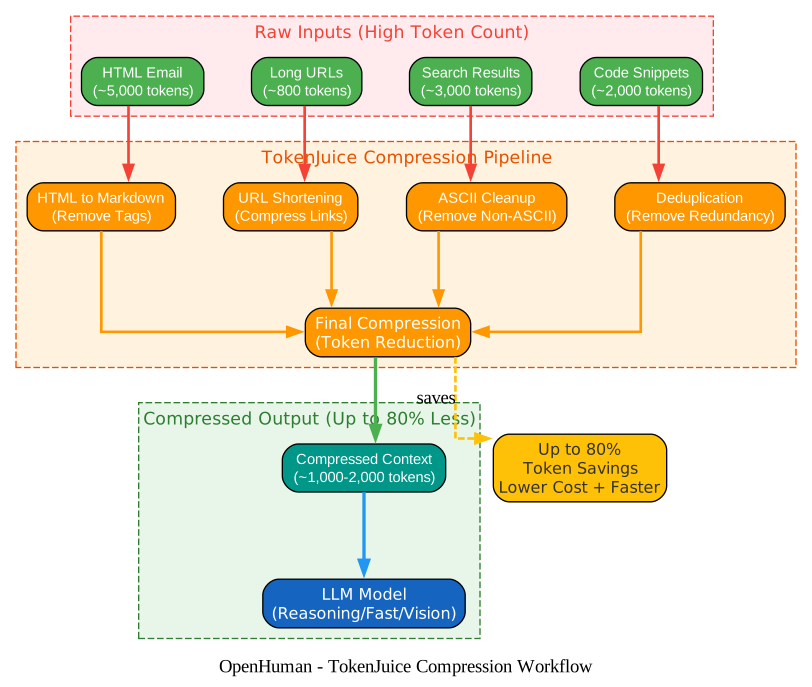
The TokenJuice pipeline processes data through several stages:
-
HTML to Markdown: Strips HTML tags, removes layout tables, and converts structured content to clean Markdown. The Rust implementation in
src/openhuman/tokenjuice/replaced the originalhtml2mdcrate after profiling showed it allocated 894 MB of peak heap on a 10 KB HTML input from Otter.ai-style emails with deeply nested table layouts. -
URL Shortening: Compresses long URLs to their essential components, removing tracking parameters and redundant path segments.
-
ASCII Cleanup: Removes non-ASCII characters that inflate token counts without adding semantic value.
-
Deduplication: Identifies and removes redundant information across different data sources, so the agent does not see the same meeting details three times from Calendar, Slack, and Gmail.
-
Final Compression: Applies additional token reduction strategies to produce the smallest possible context that preserves all essential information.
The result is up to 80% token reduction, which directly translates to lower API costs and faster response times. When you are processing thousands of emails, Slack messages, and documents daily, this compression is the difference between an agent that costs dollars per day versus cents.
Built with Rust: Performance Where It Matters
OpenHuman’s core is written in Rust (version 1.93.0, specified in rust-toolchain.toml), and the choice is deliberate. The Cargo.toml reveals a sophisticated dependency stack:
- Tokio for async runtime with full feature support
- Axum for the internal RPC server with WebSocket support
- Rusqlite with bundled SQLite for the local database
- AES-GCM and Argon2 for encryption at rest
- Whisper-rs for on-device speech-to-text
- CPAL and Hound for audio capture and processing
- Socket.IO for real-time communication with the frontend
- Sentry for error monitoring with custom before-send filters that scrub sensitive data
The Rust core handles everything from the agent dispatch loop and tool execution to encryption, scheduling, and real-time voice processing. The frontend is a React 19 + TypeScript application using Redux Toolkit for state management, Tailwind CSS for styling, and Remotion for the mascot animation system.
Important: OpenHuman uses a Tauri + CEF (Chromium Embedded Framework) architecture for the desktop shell, not Electron. This means lower memory usage, better performance, and native OS integration. The
app/src-tauri/directory contains the Tauri configuration, and the build system supports macOS (DMG), Windows (EXE), and Linux packages.
Agent System: Specialized Sub-Agents
The src/openhuman/agent/ directory reveals a multi-agent architecture with specialized sub-agents, each defined by a TOML configuration and a Markdown prompt:
- Orchestrator: Routes tasks to the right sub-agent and manages the overall conversation flow
- Planner: Breaks complex tasks into executable steps
- Researcher: Gathers information from integrations and the web
- Coder: Executes code with filesystem, git, lint, and test tools
- Summarizer: Compresses long outputs into concise summaries
- Archivist: Manages the Memory Tree and knowledge retrieval
- Critic: Evaluates outputs and suggests improvements
- Tool Maker: Dynamically creates new tools when needed
- Integrations Agent: Handles OAuth flows and data fetching
- Morning Briefing: Generates daily summaries from your data
- Trigger Reactor / Trigger Triage: Responds to real-time events and prioritizes them
- Welcome: Onboards new users
Each agent has its own prompt file (prompt.md), configuration (agent.toml), and Rust module (mod.rs). The harness system in src/openhuman/agent/harness/ manages session lifecycle, tool loops, sub-agent delegation, and self-healing when agents encounter errors.
Getting Started with OpenHuman
Installation
The fastest way to get OpenHuman running is through the install scripts:
# For macOS or Linux x64
curl -fsSL https://raw.githubusercontent.com/tinyhumansai/openhuman/main/scripts/install.sh | bash

# For Windows
irm https://raw.githubusercontent.com/tinyhumansai/openhuman/main/scripts/install.ps1 | iex
Alternatively, download the DMG (macOS) or EXE (Windows) directly from tinyhumans.ai/openhuman.
Building from Source
For contributors who want to work on the codebase:
-
Install Git, Node.js 24+, pnpm 10.10.0, Rust 1.93.0 (with
rustfmtandclippy), CMake, and platform-specific desktop build prerequisites. -
Fork and clone the repository, then initialize submodules:
git clone https://github.com/tinyhumansai/openhuman.git
cd openhuman
git submodule update --init --recursive
pnpm install
- Run development commands:
# Web-only UI development
pnpm dev

# Full desktop application
pnpm --filter openhuman-app dev:app

# Type checking
pnpm typecheck

# Rust core checks
cargo check -p openhuman --lib
The project uses Husky for pre-commit hooks and enforces formatting through Prettier (frontend) and rustfmt (backend). The CONTRIBUTING.md file provides detailed setup instructions for macOS, Linux, and Windows, including the specific Visual Studio C++ Build Tools and LLVM/Clang requirements on Windows.
Connecting Your Accounts
Once OpenHuman is running, the onboarding flow walks you through connecting your accounts with one-click OAuth. Each integration is exposed as a typed tool the agent can use directly. After connecting, auto-fetch begins pulling data on a 20-minute cycle, and the Memory Tree starts building your personal knowledge base.
Privacy and Security Architecture
OpenHuman is designed around a local-first philosophy. Your data stays on your device, encrypted locally with AES-GCM and Argon2 key derivation. The src/openhuman/encryption/ module handles all cryptographic operations, and the src/openhuman/security/ module provides sandboxing capabilities including Landlock support on Linux and Bubblewrap containerization.
The src/openhuman/prompt_injection/ module implements guardrails against prompt injection attacks, and the Sentry integration uses a custom before_send filter that scrubs sensitive information from error reports before they leave your machine.
Takeaway: OpenHuman’s privacy model is not an afterthought – it is architectural. Workflow data stays on device, encrypted locally, treated as yours. The agent processes everything locally and only sends the minimum necessary context to LLM providers, compressed through TokenJuice to reduce both cost and data exposure.
Model Routing: The Right LLM for Each Task
OpenHuman’s model routing system sends each task to the appropriate LLM based on the task type:
- Reasoning model: For complex analysis, planning, and multi-step tasks
- Fast model: For quick responses, simple lookups, and real-time interactions
- Vision model: For image understanding, screenshot analysis, and visual tasks
All of this happens under a single subscription – you do not need to manage separate API keys for different providers. The routing logic in src/openhuman/providers/ includes a reliable fallback system and thread context management. For users who want complete local control, optional Ollama support enables on-device inference for all workloads.
The Subconscious: Background Processing
One of OpenHuman’s most innovative features is the subconscious system (src/openhuman/subconscious/). Even when you are not actively chatting with the agent, it continues processing in the background – indexing new data, updating the Memory Tree, preparing morning briefings, and responding to trigger events. The scheduler gate (src/openhuman/scheduler_gate/) is battery-aware, throttling background LLM work on laptops to preserve battery life.
Comparison with Other Agent Frameworks
| Feature | Claude Cowork | OpenClaw | Hermes Agent | OpenHuman |
|---|---|---|---|---|
| Open Source | Proprietary | MIT | MIT | GNU |
| Simple to Start | Desktop + CLI | Terminal-first | Terminal-first | Clean UI, minutes |
| Cost | Sub + add-ons | BYO models | BYO models | One sub + TokenJuice |
| Memory | Chat-scoped | Plugin-reliant | Self-learning | Memory Tree + Obsidian vault |
| Integrations | Few connectors | BYO | BYO | 118+ via OAuth |
| Auto-fetch | None | None | None | 20-min sync into memory |
| Model Routing | Single model | Manual | Manual | Built-in |
| Native Tools | Code-only | Code-only | Code-only | Code + search + scraper + voice |
OpenHuman’s advantage is clear: it combines the simplicity of a desktop app with the depth of a terminal-first tool, while providing persistent memory that no other agent framework matches out of the box.
Conclusion
OpenHuman represents a significant step forward in personal AI. By combining Rust performance, 118+ integrations with one-click OAuth, hierarchical Memory Trees, TokenJuice compression, and a polished desktop experience, it delivers on the promise of an AI agent that truly knows you – without requiring weeks of training or surrendering your data to the cloud. Whether you are a developer looking to contribute to an ambitious open-source project or a user who wants a personal AI that actually works, OpenHuman is worth your attention.
The project is in early beta with active development, so expect rapid improvements. Star the repository on GitHub, join the Discord community, and start building your personal AI super intelligence today. Enjoyed this post? Never miss out on future posts by following us 


