Open Agents: Open Source Template for Building Cloud Agents
Open Agents is an open-source reference application from Vercel Labs for building and running background coding agents on Vercel. It provides a complete three-layer architecture that separates the web interface, agent workflow, and sandbox execution environment, enabling production-ready AI agents that can work autonomously on coding tasks.
What is Open Agents?
Open Agents is designed to be forked and adapted rather than treated as a black box. It includes everything you need to build a cloud-based coding agent:
- A web application handling authentication, sessions, chat, and streaming UI
- A durable agent workflow running on Vercel’s infrastructure
- Isolated sandbox environments for safe code execution
- GitHub integration for repository access, commits, and pull requests
The key innovation is the separation between the agent and the sandbox - the agent runs outside the VM and interacts with it through tools, enabling independent lifecycle management and model flexibility.
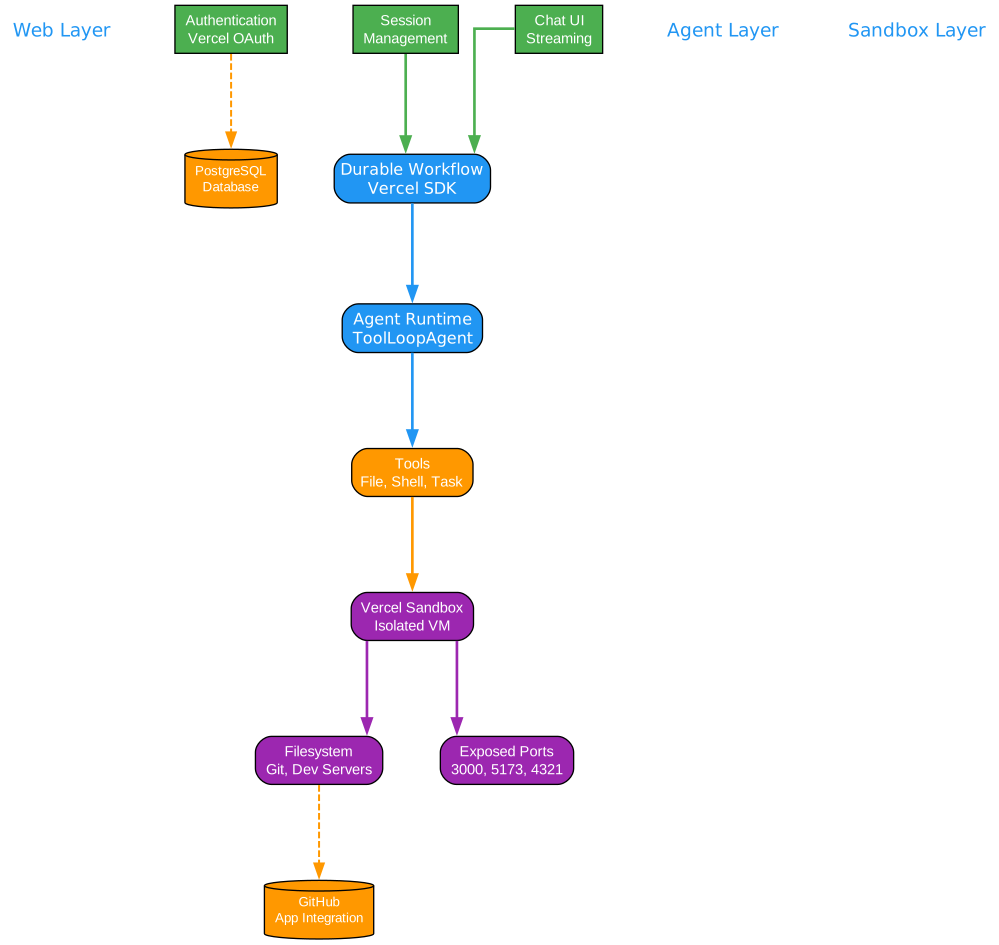
Understanding the Three-Layer Architecture
The architecture diagram above illustrates the core three-layer system that powers Open Agents. Let’s break down each layer and understand how they work together:
Web Layer: User Interface and Session Management
The web layer serves as the primary interface between users and the agent system. It handles several critical responsibilities:
-
Authentication via Vercel OAuth: Users sign in through Vercel’s OAuth integration, providing secure access without managing separate credentials. This integration also enables seamless deployment tracking and project association.
-
Session Management: Each conversation with the agent is tracked as a session, allowing users to resume work across multiple interactions. Sessions persist in PostgreSQL, enabling long-running projects that span days or weeks.
-
Chat UI with Streaming: The chat interface streams responses in real-time, showing the agent’s progress as it works through tasks. This provides immediate feedback and allows users to intervene when needed.
The web layer communicates with the agent layer through durable workflow runs, ensuring that requests are processed reliably even under load.
Agent Layer: Durable Workflow Execution
The agent layer is where the intelligence lives. Built on Vercel’s Workflow SDK, it provides:
-
Durable Execution: Agent runs are persisted and can survive infrastructure failures. If a workflow is interrupted, it resumes from the last checkpoint rather than restarting from scratch.
-
ToolLoopAgent Pattern: The core agent implementation uses a tool-loop pattern where the model repeatedly calls tools until the task is complete. This enables complex multi-step reasoning and execution.
-
Tool Orchestration: The agent has access to a comprehensive toolkit including file operations (read, write, edit), shell commands (bash), search tools (grep, glob), task delegation, skill execution, and web fetching.
The agent layer maintains context across multiple turns, allowing it to work on complex tasks that require iterative refinement.
Sandbox Layer: Isolated Execution Environment
The sandbox layer provides a secure, isolated environment for code execution:
-
Vercel Sandbox Integration: Each agent session can spawn isolated VMs that are completely separate from the host infrastructure. This prevents malicious or buggy code from affecting other users or the underlying system.
-
Filesystem and Git Operations: The sandbox has its own filesystem where repositories can be cloned, modified, and tested. Git operations happen in isolation, preventing conflicts between concurrent sessions.
-
Exposed Development Ports: Sandboxes expose common development ports (3000, 5173, 4321, 8000) allowing the agent to run dev servers and preview applications. This enables the agent to test its own changes before committing.
-
Snapshot-Based Resume: Sandboxes can hibernate and resume from snapshots, enabling efficient resource usage. When an agent needs to continue work on a previous session, it can restore the exact state from a snapshot.
External Integrations
The architecture connects to external services:
-
GitHub App Integration: Enables repository cloning, branch creation, commits, and pull request creation. The agent can work on both public and private repositories with proper authorization.
-
PostgreSQL Database: Stores session data, user preferences, and workflow state. This persistence layer enables long-running projects and session recovery.
The Key Architectural Decision: Agent-Sandbox Separation
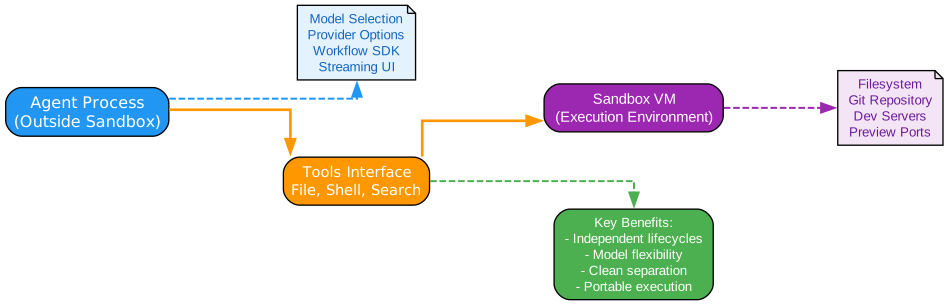
Understanding the Separation Model
The separation between the agent process and the sandbox VM is the defining architectural choice of Open Agents. This design has profound implications for how the system operates and scales:
Independent Lifecycles
The agent process and sandbox VM have completely independent lifecycles:
- The agent can continue running even when the sandbox hibernates
- The sandbox can be snapshotted and restored without affecting the agent
- Multiple agents can potentially interact with the same sandbox
- The sandbox can outlive a single agent session
This independence enables sophisticated resource management. Sandboxes can hibernate during inactivity, saving compute costs while the agent workflow remains ready to resume work.
Model and Provider Flexibility
Because the agent runs outside the sandbox, it can use any LLM provider or model:
- Switch between Claude, GPT-4, or other models without sandbox changes
- Use different models for different tasks (e.g., a planning model and an execution model)
- Update model configurations without redeploying the sandbox infrastructure
- Support multiple providers for redundancy and cost optimization
The agent layer abstracts away model-specific details through a gateway pattern, making it easy to add new providers or adjust model selection.
Clean Execution Environment
The sandbox remains a plain execution environment:
- No agent-specific dependencies installed in the VM
- Standard development tools and runtimes only
- Predictable and reproducible environment state
- Easy to debug issues in isolation
This cleanliness makes the sandbox more reliable and easier to reason about. When something goes wrong, you know it’s in the code being executed, not in the agent infrastructure.
Portable Implementation
The separation enables different sandbox implementations:
- Vercel Sandbox for cloud deployment
- Docker containers for local development
- Custom execution environments for specialized needs
- Future support for other cloud providers
The agent code doesn’t need to change when switching sandbox implementations, as long as the interface contract is maintained.
Agent Workflow Execution
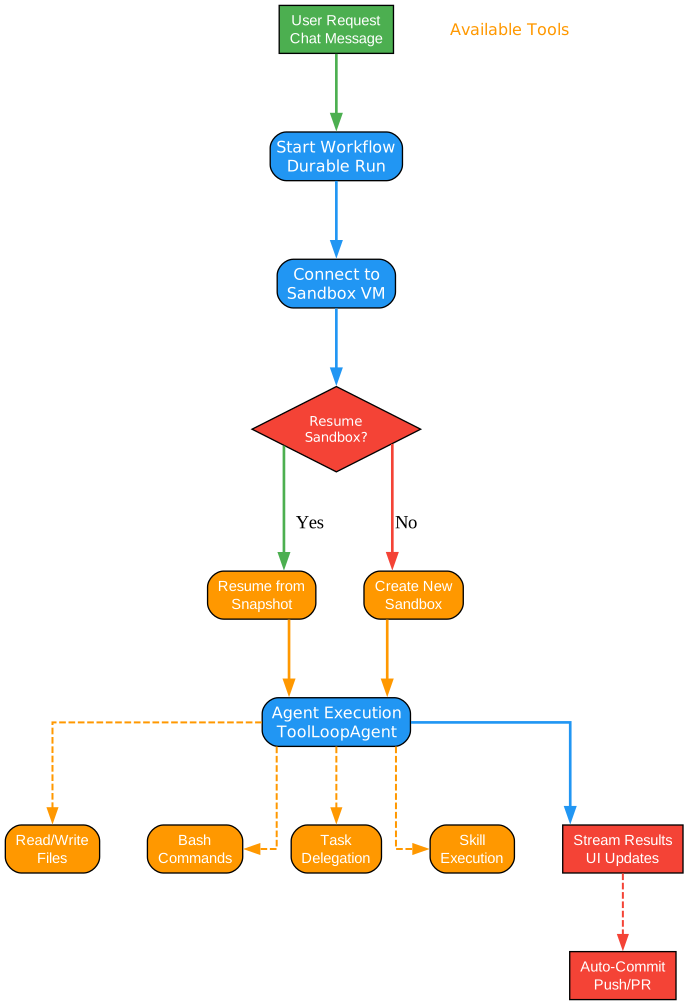
Understanding the Workflow Execution
The workflow diagram shows how agent requests are processed from start to finish. Let’s trace through each step:
Step 1: User Request Initiation
When a user sends a chat message, it doesn’t execute the agent inline. Instead, it starts a durable workflow run. This is a critical design decision:
- The workflow is persisted immediately, ensuring it survives infrastructure failures
- The user receives a workflow ID that can be used to reconnect if disconnected
- Multiple workflow runs can be active simultaneously for the same user
- Long-running tasks don’t block the web server
Step 2: Sandbox Connection
The workflow first establishes a connection to a sandbox VM:
- If a previous sandbox exists for the session, it attempts to resume from a snapshot
- If no sandbox exists or resumption fails, a new sandbox is created
- The sandbox is configured with the appropriate repository, branch, and environment
Step 3: Resume Decision
The system checks whether to resume an existing sandbox or create a new one:
-
Resume Path: If a snapshot exists, the sandbox is restored to its previous state. This includes filesystem changes, installed dependencies, and running processes. Resume is faster and preserves context.
-
Create Path: If no snapshot exists or the snapshot is stale, a fresh sandbox is created from a base image. The repository is cloned fresh, and any required setup is performed.
Step 4: Agent Execution
The ToolLoopAgent begins its execution cycle:
- The model receives the current context (files, conversation history, task state)
- The model decides which tools to call (read files, run commands, etc.)
- Tools are executed in the sandbox
- Results are streamed back to the user
- The model evaluates progress and decides next steps
- The cycle repeats until the task is complete or the model requests user input
Step 5: Result Streaming
As the agent works, results are streamed to the web UI:
- File changes appear in real-time
- Command outputs are shown as they execute
- The agent’s reasoning is visible to the user
- Users can intervene or provide additional guidance
Step 6: Auto-Commit and PR Creation
After successful completion, the agent can optionally:
- Commit changes to a branch
- Push the branch to GitHub
- Create a pull request with a description of changes
- Link the PR back to the original conversation
This automation is preference-driven and can be configured per-user or per-project.
Tools and Subagents
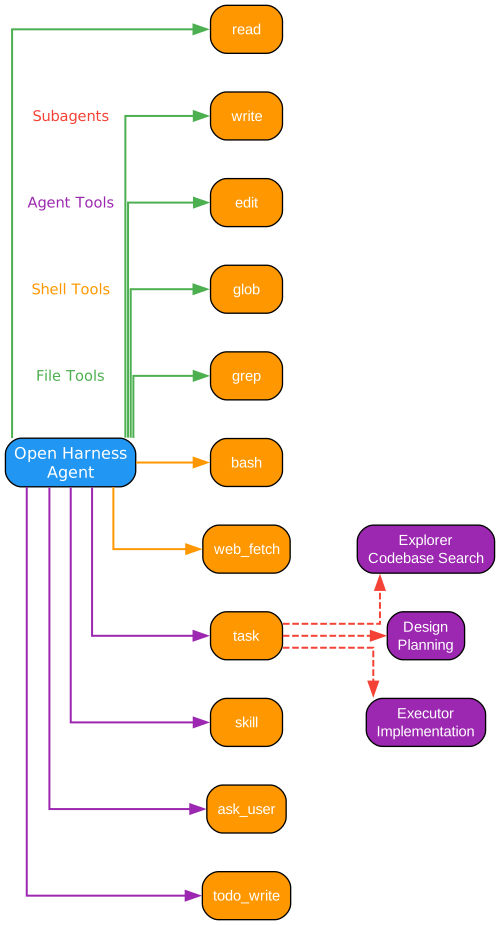
Understanding the Tool System
The Open Harness Agent has access to a comprehensive toolkit organized into categories:
File Tools
These tools enable the agent to interact with the filesystem in the sandbox:
- read: Read file contents with support for encoding detection and large file handling
- write: Create new files or overwrite existing ones
- edit: Make surgical edits to existing files using diff-like operations
- glob: Find files matching patterns (e.g.,
**/*.tsfor all TypeScript files) - grep: Search file contents using regular expressions
These tools are designed to work efficiently with large codebases, using caching and optimization to minimize redundant operations.
Shell Tools
For operations that require shell access:
- bash: Execute arbitrary shell commands in the sandbox. Commands run with timeout protection and output truncation for safety.
- web_fetch: Fetch content from URLs for research or API access. This enables the agent to access documentation, APIs, and external resources.
Agent Tools
Tools for meta-level operations:
- task: Delegate subtasks to specialized subagents. This enables hierarchical task decomposition where complex tasks are broken into manageable pieces.
- skill: Execute predefined skills for common operations. Skills are reusable workflows that can be shared across projects.
- ask_user: Request clarification or input from the user. This keeps the human in the loop for critical decisions.
- todo_write: Update the task list to track progress. This helps the agent maintain context across long-running operations.
Subagents
The task tool can delegate to specialized subagents:
-
Explorer: Searches the codebase to understand structure, find relevant files, and gather context. Uses semantic search and file analysis to navigate large projects efficiently.
-
Design: Plans the implementation approach before coding. Analyzes requirements, considers alternatives, and produces a detailed implementation plan.
-
Executor: Implements the planned changes. Focuses on making the actual code modifications while following the design specifications.
This subagent architecture enables separation of concerns - each subagent is optimized for its specific task, and the main agent orchestrates their collaboration.
Current Capabilities
Open Agents provides a comprehensive feature set for building production coding agents:
Chat-Driven Development
- Natural language interaction with the agent
- Streaming responses showing progress in real-time
- Context preservation across multiple turns
- Ability to ask clarifying questions
Durable Execution
- Workflow SDK-backed runs that survive failures
- Automatic checkpoint and resume
- Cancellation support for user control
- Reconnection to active runs
Sandbox Isolation
- Isolated Vercel sandboxes for each session
- Snapshot-based resume for efficiency
- Exposed ports for dev server access
- Git operations within the sandbox
GitHub Integration
- Clone repositories (public and private)
- Create and switch branches
- Commit changes with meaningful messages
- Create pull requests with descriptions
- Session sharing via read-only links
Optional Features
- Voice input via ElevenLabs transcription
- Redis/KV caching for skills metadata
- Custom sandbox snapshots
- Production URL configuration
Installation
Prerequisites
- Node.js 18+ or Bun
- A PostgreSQL database (Neon, Supabase, or self-hosted)
- A Vercel account for deployment
- GitHub App credentials (optional, for GitHub integration)
Quick Start
- Clone the repository:
git clone https://github.com/vercel-labs/open-agents.git
cd open-agents
- Install dependencies:
bun install
- Set up environment variables:
cp apps/web/.env.example apps/web/.env
- Configure required environment variables:
# Minimum required for local development
POSTGRES_URL=your_postgres_connection_string
JWE_SECRET=$(openssl rand -base64 32 | tr '+/' '-_' | tr -d '=\n')
ENCRYPTION_KEY=$(openssl rand -hex 32)
- Start the development server:
bun run web
Deployment on Vercel
- Fork the repository to your GitHub account
- Import the project in Vercel
- Configure environment variables in Vercel project settings
- Deploy to get a stable production URL
- Set up Vercel OAuth with callback URL:
https://YOUR_DOMAIN/api/auth/vercel/callback - (Optional) Create a GitHub App for repository access
Usage
Basic Agent Interaction
Once deployed, you can interact with the agent through the web interface:
- Sign in using Vercel OAuth
- Create a session for your project
- Connect a GitHub repository (optional but recommended)
- Start chatting with the agent about your coding task
Example Prompts
Here are some example prompts to get started:
"Add a new API endpoint for user authentication with JWT tokens"
"Refactor the database layer to use connection pooling"
"Write unit tests for the payment processing module"
"Fix the bug in the user registration flow where emails aren't being sent"
Working with Repositories
The agent can work with GitHub repositories:
- Install the GitHub App on your repositories
- Authorize the app to access your repos
- Select a repository in the session settings
- Specify a branch or let the agent create one
The agent will clone the repository in the sandbox, make changes, and can optionally create pull requests.
Session Management
Sessions are persistent and can be resumed:
- Resume a session by navigating to its URL
- Share sessions via read-only links
- View history of all agent interactions
- Download artifacts created during the session
Features
| Feature | Description |
|---|---|
| Durable Workflows | Agent runs persist and can resume after failures |
| Sandbox Isolation | Each session runs in an isolated VM |
| GitHub Integration | Clone, commit, and create PRs automatically |
| Streaming UI | Real-time progress updates in the chat interface |
| Voice Input | Optional voice transcription via ElevenLabs |
| Session Sharing | Share sessions via read-only links |
| Multi-Model Support | Switch between Claude, GPT-4, and other models |
| Skill System | Reusable workflows for common operations |
Troubleshooting
Common Issues
Sandbox Timeout
Sandboxes have a default timeout. If your agent task takes longer:
- The sandbox will hibernate automatically
- Resume the session to continue work
- Consider breaking tasks into smaller pieces
Authentication Errors
If Vercel OAuth fails:
- Verify the callback URL matches your domain
- Check that client ID and secret are correct
- Ensure the OAuth app is properly configured
GitHub Integration Issues
If repository access fails:
- Verify the GitHub App is installed on the repository
- Check that the app has the required permissions
- Ensure the user has authorized the app
Database Connection Errors
If PostgreSQL connection fails:
- Verify the connection string format
- Check that the database allows connections from your Vercel deployment
- Ensure SSL is configured correctly for production databases
Debug Mode
For local development, you can enable debug logging:
DEBUG=open-harness:* bun run web
This provides detailed logs of agent operations, tool calls, and sandbox interactions.
Conclusion
Open Agents represents a significant step forward in building production-ready AI coding agents. Its three-layer architecture - separating web, agent, and sandbox - provides the flexibility and reliability needed for real-world applications.
The key innovation of separating the agent from the sandbox enables independent scaling, model flexibility, and clean execution environments. Combined with Vercel’s infrastructure, it provides a solid foundation for building sophisticated AI-powered development tools.
Whether you’re building a coding assistant, an automated code review system, or a continuous integration agent, Open Agents provides the building blocks you need to get started quickly while maintaining the flexibility to customize for your specific use case.
Links

Enjoyed this post? Never miss out on future posts by following us


