Introduction
Managing a household is a full-time job that most parents juggle alongside their actual full-time jobs. Between school deadlines, meal planning, homework tracking, home maintenance, and the endless stream of messages from teachers and PTA groups, the cognitive load on modern parents is staggering. What if an AI agent could shoulder that burden – not as a generic chatbot, but as a household-aware system that understands your family’s rhythms, priorities, and boundaries?
Tradclaw, built by ChatPRD on top of the OpenClaw personal AI agent framework, answers exactly that question. It is an AI household manager designed for what its creators call “agentic parenting” – a philosophy where an AI agent proactively handles family coordination tasks while respecting strict privacy boundaries around children’s data. The entire system is 100% Markdown: no code, no dependencies, no build step. Every configuration file, every skill definition, every memory log is a plain Markdown file that you can read, edit, and version-control with git.
This approach is deliberately radical. Instead of building a complex application with databases and APIs, tradclaw treats Markdown files as the single source of truth for your household’s operational state. The result is a system that is transparent by default, auditable by design, and simple enough for any technically-inclined parent to understand and customize.
In this post, we will explore tradclaw’s architecture, its agentic workflow, its parenting-specific modules, and its integration ecosystem. By the end, you will understand why this project represents a compelling new pattern for AI-assisted family management.
Architecture Overview

The architecture diagram above illustrates tradclaw’s four major layers, each housed in its own directory and serving a distinct purpose in the system’s operation. These layers form a clear separation of concerns that makes the system both understandable and maintainable.
The Setup Layer (tradclaw/) is where new users begin. It contains four critical files that guide the onboarding process. BOOTSTRAP.md is the entry point that walks you through initial setup. The onboarding-interview.md file contains a structured 7-batch interview that collects essential information about your family – names, ages, school schedules, dietary needs, and communication preferences. The module-selection-guide.md helps you choose which of the 8 skill modules are relevant to your household. Finally, apply-interview-results.md takes the interview responses and generates the 5 concrete deliverables that form your output contract: SOUL.md, IDENTITY.md, USER.md, TOOLS.md, and AGENTS.md.
The Workspace (workspace/) is the live operational directory. These 7 files are the beating heart of your tradclaw instance. SOUL.md defines the agent’s core values and non-negotiable rules (including child privacy). IDENTITY.md specifies the agent’s personality and communication style. USER.md contains everything the agent knows about your family members. TOOLS.md lists the approved communication channels – this is the trust boundary. HEARTBEAT.md defines the periodic check-in schedule. MEMORY.md is the durable long-term memory store. AGENTS.md configures any sub-agents or specialized routing.
The Skills (skills/) directory contains 8 modular skill definitions: calendar-briefs, school-triage, meal-planner, homework-log, book-inventory, home-maintenance, helper-payments, and custom-stories. Each skill is a self-contained Markdown file that defines its workflow, inputs, outputs, and resource dependencies. Skills are activated by the workspace configuration – you only enable what you need.
The Cron (cron/) directory provides 9 job templates that trigger skills on a schedule: morning-brief, afternoon-pickup-check, weekend-preview, meal-plan-prompt, school-deadline-sweep, helper-payment-reminder, home-maintenance-monthly, homework-review, and storytime-prompt. These time-based triggers ensure the agent is proactive without being intrusive.
The connections between layers are deliberate. The Setup Layer tailors the Workspace to your specific family. The Skills are activated by the Workspace configuration. The Cron jobs trigger the Skills at appropriate times. This creates a clean dependency chain: setup -> workspace -> skills -> cron.
The Agentic Workflow
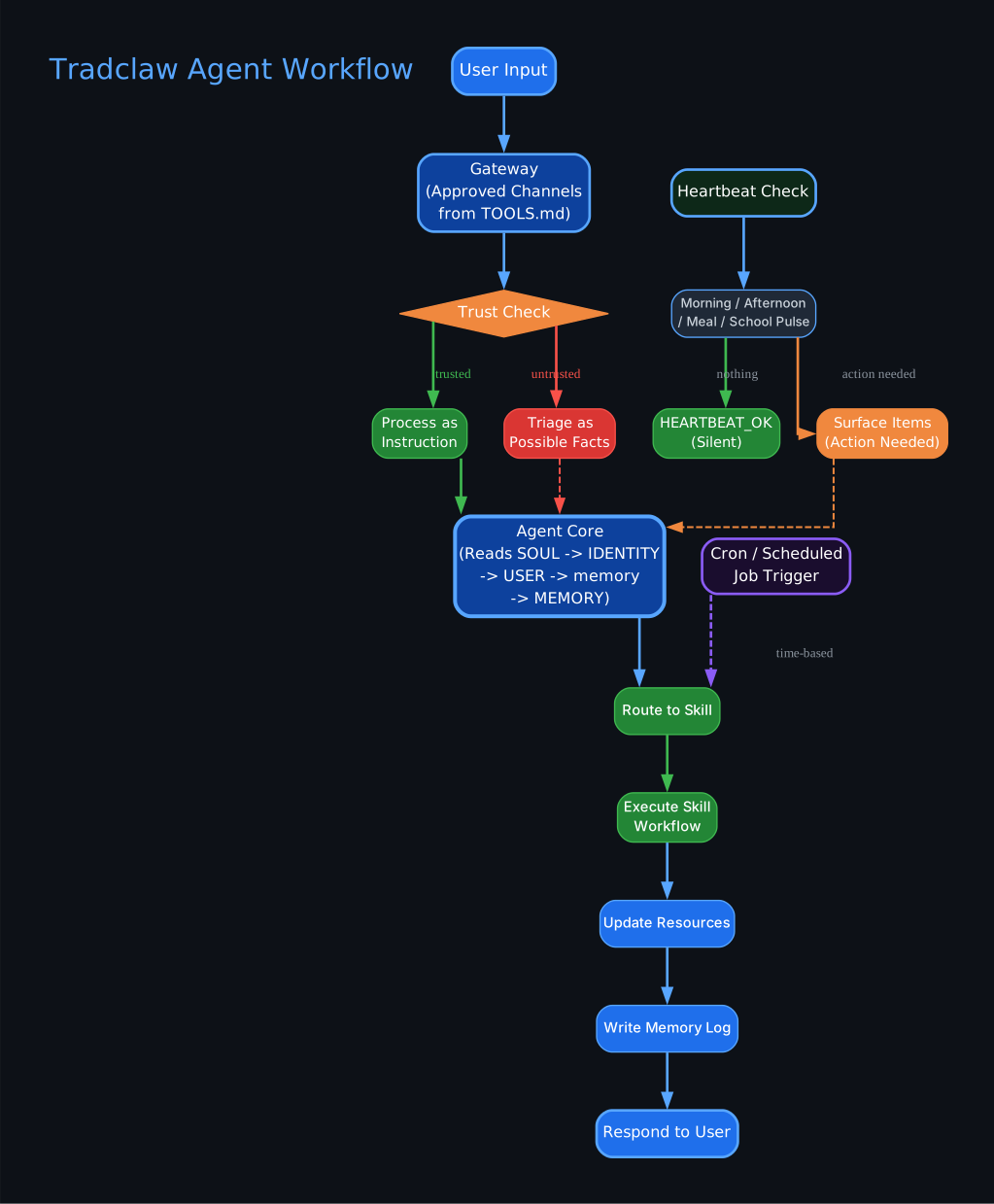
The workflow diagram above reveals how tradclaw processes every interaction through a carefully designed pipeline that prioritizes security and appropriate action. This is not a simple request-response chatbot; it is an agent with a trust model, a memory system, and a skill routing engine.
The flow begins with User Input, which arrives through the Gateway – the approved communication channels defined in TOOLS.md. This is a critical design decision: tradclaw only accepts input from channels you have explicitly approved. If you have approved WhatsApp and iMessage, then only messages from those platforms are processed. Everything else is rejected at the gateway level.
Once a message passes the gateway, it hits the Trust Check. This is where tradclaw distinguishes between two fundamentally different types of input. Trusted input comes from you and your approved family members – these are processed as direct instructions. Untrusted input comes from external sources like school emails, PTA app notifications, or community messages – these are triaged as possible facts rather than commands. This distinction is essential for security: you do not want a random school newsletter to be interpreted as an instruction to change your family’s schedule.
Both trusted and untrusted paths converge at the Agent Core, which reads the full context stack: SOUL.md for values, IDENTITY.md for personality, USER.md for family knowledge, and MEMORY.md for historical context. This context loading ensures every response is grounded in your family’s specific situation.
The Agent Core then Routes to the appropriate Skill, which Executes the Skill Workflow defined in that skill’s Markdown file. After execution, the agent Updates Resources (writing to the appropriate files in the resources/ directory), Writes a Memory Log (for future context), and finally Responds to the User.
The HEARTBEAT system operates on a parallel track. Periodic checks (morning, afternoon, meal, school pulses) evaluate whether anything needs attention. If nothing requires action, the agent returns HEARTBEAT_OK and stays silent. This is the “anti-nag” philosophy in action: the agent is proactive but not bossy. If something does need attention – a school deadline approaching, a meal plan not yet created – the agent surfaces those items without being asked.
The Cron trigger path provides time-based activation independent of user input. When a scheduled job fires, it routes directly to the skill routing step, bypassing the trust check since the trigger is internal and trusted.
Parenting Modules
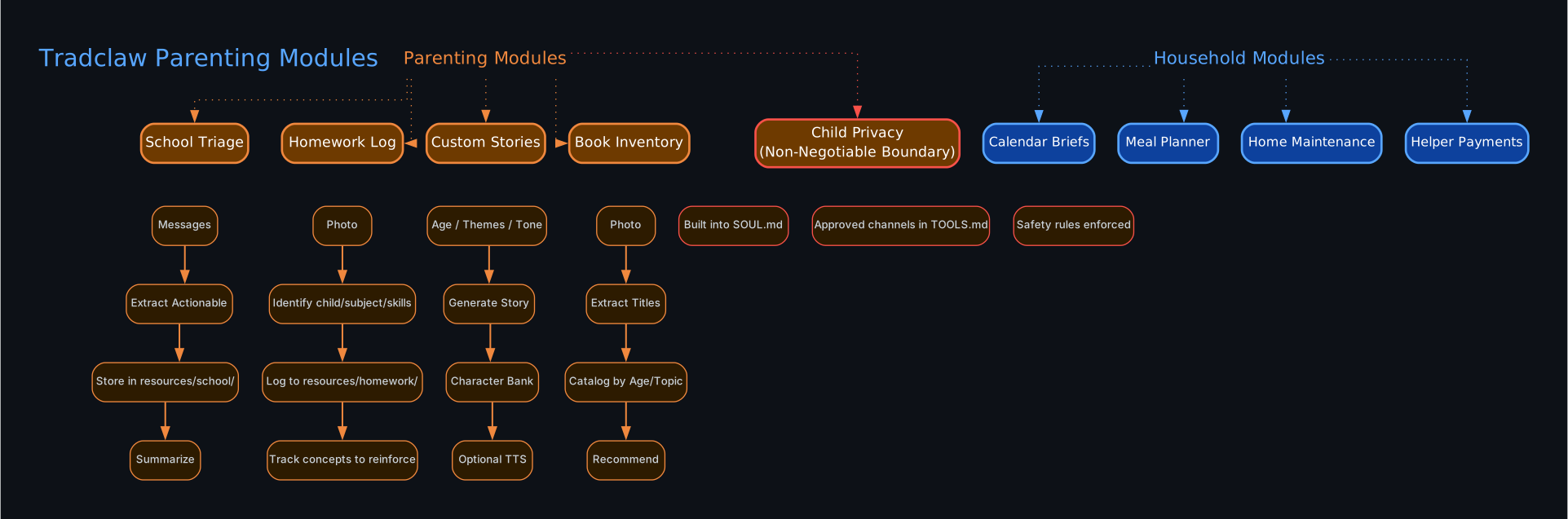
The parenting modules diagram above showcases the five parenting-focused modules and three household management modules that form tradclaw’s feature set. Each parenting module follows a clear input-to-output workflow, and the warm amber/orange color coding distinguishes them from the cooler blue/teal household modules.
School Triage is perhaps the most immediately useful module for any parent drowning in school communications. The workflow is straightforward: Messages from school channels (email, PTA apps, teacher communications) flow in, the agent Extracts Actionable items from the noise, Stores them in resources/school/ as structured Markdown, and produces a Summarize output that highlights only what needs your attention. Instead of reading 47 emails about the bake sale, you get a concise summary of the three things that actually require action.
Homework Log turns the chaotic process of tracking homework into a structured record. You send a Photo of a homework assignment or test, the agent Identifies the child, subject, and skills demonstrated, Logs it to resources/homework/, and Tracks concepts to reinforce over time. Over a semester, this builds a rich picture of each child’s academic progress and areas that need attention.
Custom Stories is the most delightful module. You provide Age, Themes, and Tone preferences, and the agent Generates a Story tailored to your child. The Character Bank maintains consistency across stories, and Optional TTS can produce an audio version for bedtime. This module turns the AI from a task manager into a creative companion for your children.
Book Inventory helps you manage your home library. Take a Photo of a bookshelf, the agent Extracts Titles from the image, Catalogs them by Age and Topic, and can Recommend books based on your children’s reading levels and interests. This is particularly useful for parents building age-appropriate libraries.
Child Privacy is not a module in the traditional sense – it is a non-negotiable boundary built into the architecture. It manifests in three places: SOUL.md contains explicit rules about what data can and cannot be shared, TOOLS.md restricts which channels can access child-related information, and safety rules are enforced at the system level. This is privacy by architecture, not by policy.
The three Household Modules – Calendar Briefs, Meal Planner, and Home Maintenance – handle the non-parenting aspects of household coordination. Calendar Briefs synthesizes multiple calendars into a daily summary. Meal Planner generates weekly meal plans based on dietary preferences and constraints. Home Maintenance tracks recurring maintenance tasks and seasonal reminders.
Integration Ecosystem
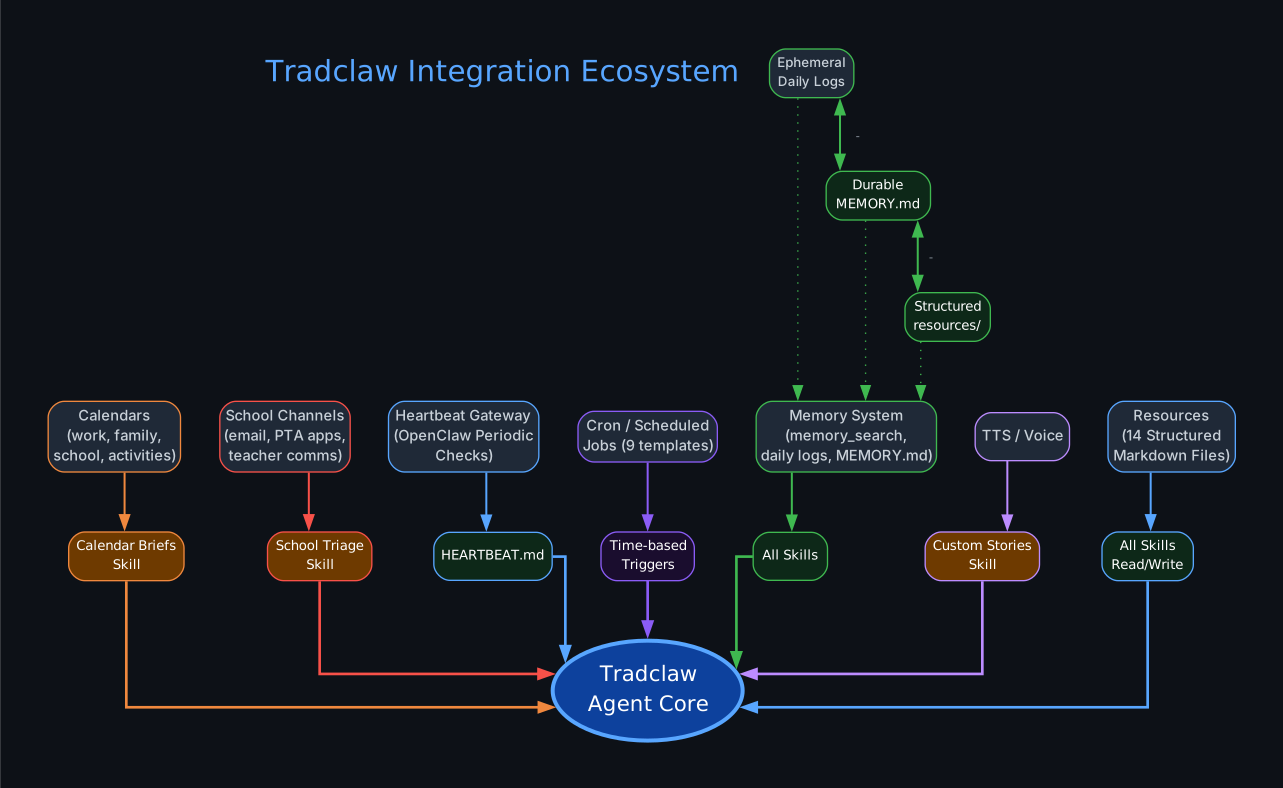
The integration ecosystem diagram above shows how tradclaw connects to the various systems that already exist in a modern family’s life. Rather than replacing your existing tools, tradclaw sits at the center and orchestrates information flow between them.
Calendars from work, family, school, and activities feed into the Calendar Briefs skill. The agent reads events from all your calendars and produces a unified daily brief that highlights conflicts, upcoming deadlines, and schedule changes. This eliminates the need to manually cross-reference multiple calendar apps every morning.
School Channels including email, PTA apps, and teacher communications feed into the School Triage skill. The agent processes these unstructured communications and extracts the actionable items, storing them as structured data in resources/school/. This transforms a flood of notifications into a manageable action list.
The Heartbeat Gateway connects to OpenClaw’s periodic check system, feeding into HEARTBEAT.md. This is the mechanism that enables the agent to be proactive without being prompted. The heartbeat checks run on a schedule defined in your workspace configuration, and each check evaluates whether any of the monitored conditions require attention.
Cron/Scheduled Jobs provide the 9 time-based triggers that activate skills at appropriate moments. Morning briefs fire at 6:30 AM, school deadline sweeps run on Sunday evenings, and storytime prompts activate at bedtime. These triggers ensure the agent is always working in the background.
The Memory System is the connective tissue that links all skills together. It operates on three tiers. Ephemeral daily logs capture transient information that is useful for today but not worth preserving long-term. Durable MEMORY.md stores important facts and patterns that should persist across sessions. Structured resources/ directories hold organized data like school deadlines, homework records, and meal plans. The bidirectional arrows between these tiers indicate that information flows both ways: daily observations can be promoted to durable memory, and durable memory provides context for interpreting daily events.
TTS/Voice integration connects to the Custom Stories skill, enabling the agent to produce audio versions of generated stories. This is particularly valuable for bedtime routines where reading aloud is a cherished family activity.
Resources – the 14 structured Markdown files – are the read/write data layer that all skills depend on. Every skill reads from and writes to these files, creating a shared knowledge base that grows richer over time. Because these are plain Markdown files, you can inspect them, edit them, and even version-control them with git.
Getting Started
Getting started with tradclaw is straightforward because the entire system is Markdown-based. There is no installation wizard, no database to configure, and no API keys to manage (beyond your OpenClaw setup).
# Clone the tradclaw repository
git clone https://github.com/ChatPRD/tradclaw.git
cd tradclaw

# Review the bootstrap guide
cat tradclaw/BOOTSTRAP.md

# Start the onboarding interview
# This is a 7-batch structured interview that collects
# your family information, preferences, and boundaries
The onboarding interview is the most important step. It collects information in 7 batches:
- Family members (names, ages, roles)
- School information (schools, grades, teachers)
- Communication channels (which apps you use)
- Dietary preferences and restrictions
- Home maintenance schedule
- Daily routines and schedules
- Privacy boundaries and safety rules
After the interview, the system generates your output contract – the 5 core workspace files:
# After completing the interview, your workspace is generated
ls workspace/
# SOUL.md        - Agent values and non-negotiable rules
# IDENTITY.md   - Agent personality and communication style
# USER.md       - Family member profiles and preferences
# TOOLS.md      - Approved communication channels
# AGENTS.md     - Sub-agent configuration

# Enable the skills you need
# Edit workspace/AGENTS.md to activate specific skills
Setting up cron jobs for proactive monitoring:
# Review available cron templates
ls cron/
# morning-brief.md
# afternoon-pickup-check.md
# weekend-preview.md
# meal-plan-prompt.md
# school-deadline-sweep.md
# helper-payment-reminder.md
# home-maintenance-monthly.md
# homework-review.md
# storytime-prompt.md

# Configure your OpenClaw cron schedule
# Each template defines when and how the skill triggers
Customizing the heartbeat schedule:
# Example HEARTBEAT.md configuration
## Pulse Schedule
- Morning: 6:30 AM - daily brief, school check
- Afternoon: 3:00 PM - pickup reminders, activity check
- Meal: 4:30 PM - meal plan prompt if not yet created
- School: 7:00 PM - deadline sweep for next day

## Anti-Nag Rules
- If nothing needs attention, respond with HEARTBEAT_OK
- Never repeat the same reminder within 4 hours
- Never escalate to notification unless deadline is within 24 hours
Key Design Patterns
Tradclaw implements several design patterns that are worth studying, whether you are building your own AI agent system or simply looking for inspiration on how to structure AI-human collaboration.
Interview-Driven Setup: Rather than providing a blank configuration file and expecting users to fill it in, tradclaw uses a structured 7-batch onboarding interview. This pattern ensures completeness (every required piece of information is collected) and reduces cognitive load (users answer questions one batch at a time instead of facing a daunting form). The interview produces a concrete output contract, so users can verify exactly what the system learned.
Output Contract: The 5 deliverables from the interview (SOUL.md, IDENTITY.md, USER.md, TOOLS.md, AGENTS.md) form an explicit contract between the user and the agent. This pattern makes the agent’s behavior predictable and auditable. If the agent does something unexpected, you can trace it back to a specific file and a specific interview response.
Prompt Injection Defense: The trust boundary between approved gateway channels and untrusted external content is a first-class architectural concept. By separating trusted instructions from untrusted facts at the gateway level, tradclaw defends against a class of prompt injection attacks where external content could be interpreted as instructions. School emails are facts, not commands.
HEARTBEAT_OK Protocol: The silent-when-nothing-needs-attention pattern is deceptively powerful. Most notification systems err on the side of over-notifying, creating alert fatigue. By explicitly defining a HEARTBEAT_OK response that produces no output, tradclaw ensures users only hear from the agent when something genuinely requires attention. This is the “anti-nag” philosophy made architectural.
Anti-Nag Philosophy: Beyond the HEARTBEAT_OK protocol, the anti-nag philosophy manifests in several rules: never repeat the same reminder within a cooldown period, never escalate unless a deadline is imminent, and always prefer silence over noise. This is a user experience decision that respects the parent’s attention as a scarce resource.
Memory Tiering: The three-tier memory system (ephemeral daily logs, durable MEMORY.md, structured resources/) solves the context window problem that plagues all LLM-based agents. Not everything needs to be in context all the time. Ephemeral logs are useful for today’s decisions but can be discarded. Durable memory holds the important patterns. Structured resources provide queryable data for specific skills. This tiering keeps the context window focused and relevant.
Child Privacy as Architecture: Rather than treating privacy as a policy that can be changed, tradclaw bakes child privacy into the file structure itself. SOUL.md contains non-negotiable rules. TOOLS.md restricts data access by channel. The approved channels list is the enforcement mechanism. This means privacy cannot be accidentally disabled by a configuration change – it is part of the system’s identity.
Conclusion
Tradclaw represents a thoughtful approach to AI-assisted family management that prioritizes transparency, privacy, and practical utility over flashiness. Its 100% Markdown architecture means there are no hidden databases, no opaque API calls, and no inscrutable configuration files. Everything the agent knows, does, and plans is visible in plain text files that any parent can read and edit.
The project’s most significant contribution may be its design patterns rather than its features. The interview-driven setup, output contract, trust boundary, HEARTBEAT_OK protocol, anti-nag philosophy, memory tiering, and child-privacy-as-architecture patterns are all reusable ideas that apply far beyond household management. Any AI agent that interacts with humans in a trusted capacity can benefit from these patterns.
For parents who are already overwhelmed by the cognitive load of household coordination, tradclaw offers a compelling vision: an AI agent that handles the routine, surfaces the important, and stays silent when there is nothing to say. That is not just good technology – it is good design.
If you are interested in exploring tradclaw or contributing to its development, the repository is available at github.com/ChatPRD/tradclaw. Enjoyed this post? Never miss out on future posts by following us 


