What Is RuView? WiFi Spatial Intelligence Without Cameras
RuView is an open-source WiFi sensing platform that turns ordinary radio signals into spatial intelligence – detecting people, measuring breathing and heart rate, tracking movement, and monitoring rooms entirely through walls, in the dark, with no cameras or wearables. Built in Rust with 1,463 tests passing, RuView captures Channel State Information (CSI) from low-cost ESP32-S3 sensors and transforms those signal disturbances into actionable data: who is present, what they are doing, and whether they are okay.
Every WiFi router already fills your space with radio waves. When people move, breathe, or even sit still, they disturb those waves in measurable ways. RuView captures these disturbances and processes them through a multi-stage pipeline that includes multi-band fusion, coherence gating, signal processing, and a custom AI backbone called RuVector. The result is real-time pose estimation with 17 COCO keypoints, vital signs monitoring, presence detection, and environment mapping – all without a single camera.
Key Insight: RuView achieves camera-free pose estimation using 10 sensor signals trained entirely without labels, a technique pioneered from the original DensePose From WiFi research at Carnegie Mellon University. The self-learning system bootstraps from raw WiFi data alone, adapting to new environments in under 30 seconds.
How RuView Works: The Signal Processing Pipeline
The core innovation in RuView is its ability to extract spatial intelligence from WiFi CSI data. Here is how the pipeline transforms raw radio signals into human-readable outputs:
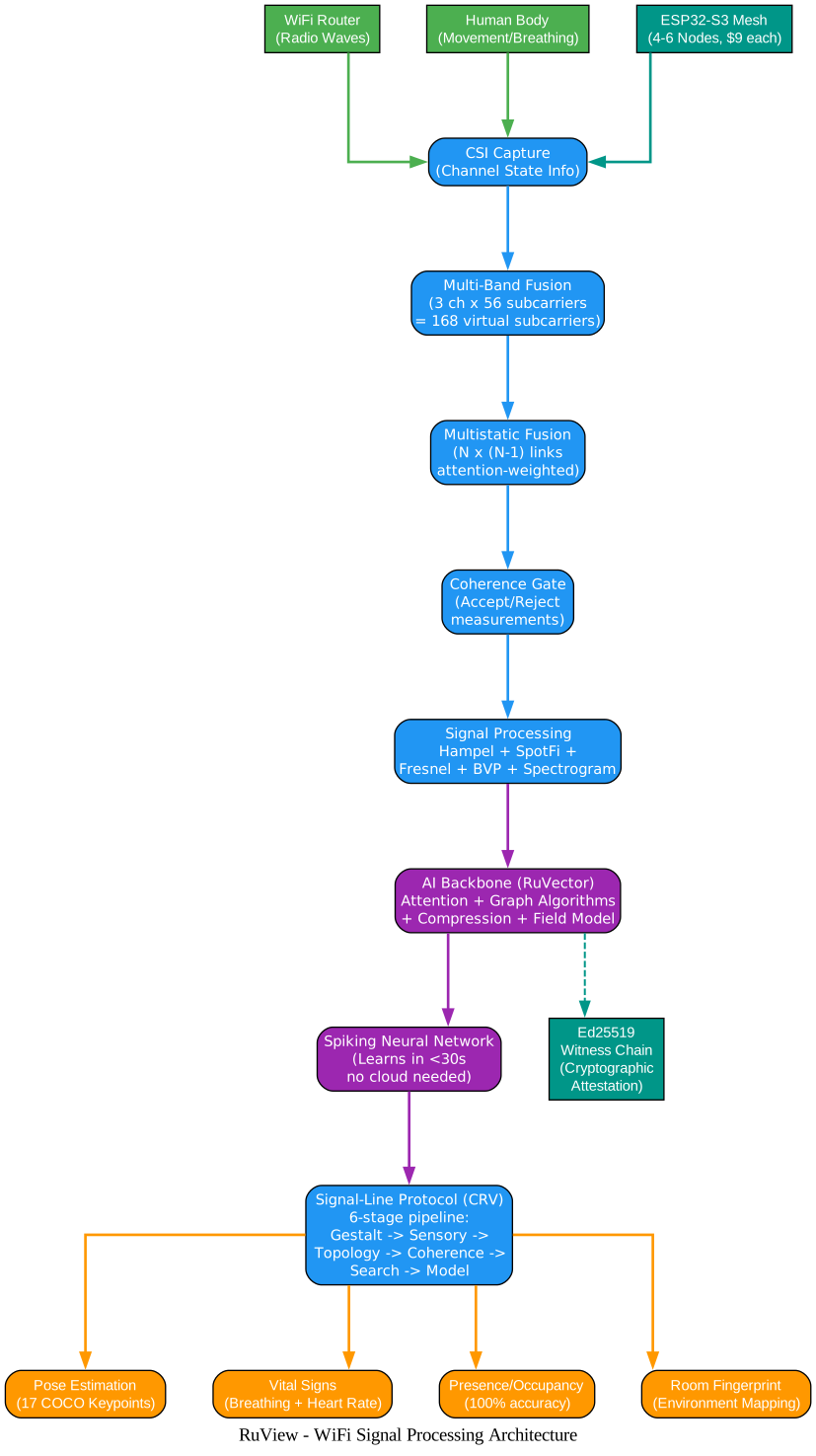
The architecture diagram above illustrates the complete signal processing pipeline. WiFi routers emit radio waves that pass through rooms and scatter when they encounter human bodies. An ESP32-S3 mesh of 4-6 nodes captures CSI on channels 1, 6, and 11 via a TDM protocol. Multi-Band Fusion combines 3 channels multiplied by 56 subcarriers to produce 168 virtual subcarriers per link. Multistatic Fusion then processes N times (N-1) links through attention-weighted cross-viewpoint embedding. A Coherence Gate accepts or rejects measurements to ensure stability for days without tuning. The signal processing stage applies Hampel filtering, SpotFi, Fresnel zone geometry, BVP computation, and spectrogram analysis to produce clean features. These features flow into the RuVector AI backbone, which applies attention mechanisms, graph algorithms, compression, and field modeling. The Signal-Line Protocol (CRV) then runs a 6-stage pipeline from gestalt through sensory, topology, coherence, search, and model stages to produce real-time outputs including pose, vital signs, room fingerprints, and drift alerts.
Important: The Coherence Gate is critical for system stability. It accepts or rejects measurements based on signal quality, ensuring the system remains stable for days without manual tuning. This is what makes RuView practical for real-world deployment rather than just a research prototype.
Key Features and Capabilities
RuView provides a comprehensive set of sensing capabilities, all running on edge hardware without cloud dependencies:

The features diagram above shows the breadth of RuView’s capabilities radiating from the central WiFi spatial intelligence platform. On the sensing side, pose estimation delivers 17 COCO keypoints without any camera, vital signs monitoring covers breathing rate (6-30 BPM) and heart rate (40-120 BPM), presence detection achieves 100% accuracy with just 0.012ms latency, and through-wall sensing reaches up to 5 meters depth using Fresnel zone geometry. On the privacy side, RuView requires no camera, no video, and no wearables by design, making it GDPR and HIPAA compliant for imaging rules, and all processing happens locally without cloud or internet requirements. The edge intelligence layer includes 65 WASM modules across 13 categories with 609 tests passing, running on ESP32 hardware for as little as $9 per node with a 55KB model size, and the self-learning AI adapts to new rooms in under 30 seconds using MicroLoRA per-room adapters. Deployment options range from Docker with simulated data requiring no hardware, to ESP32 mesh networks with multi-frequency scanning, to the full Cognitum Seed system with persistent vector store and cryptographic attestation. The AI capabilities include contrastive self-supervised learning producing 128-dimensional fingerprints, MERIDIAN cross-environment domain generalization, and Ed25519 witness chain cryptographic attestation.
| Feature | Capability | Metric |
|---|---|---|
| Pose Estimation | 17 COCO keypoints from CSI subcarrier amplitude/phase | 171K embeddings/sec (M4 Pro) |
| Breathing Detection | Bandpass 0.1-0.5 Hz with zero-crossing BPM | 6-30 BPM range |
| Heart Rate | Bandpass 0.8-2.0 Hz with zero-crossing BPM | 40-120 BPM range |
| Presence Sensing | Trained model + PIR fusion | 100% accuracy, 0.012ms latency |
| Through-Wall | Fresnel zone geometry + multipath modeling | Up to 5m depth |
| Edge Intelligence | 8-dim feature vectors + RVF store on Cognitum Seed | $140 total BOM |
| Camera-Free Training | 10 sensor signals, no labels needed | 84s training on M4 Pro |
| Multi-Frequency Mesh | Channel hopping across 6 bands, neighbor APs as illuminators | 3x sensing bandwidth |
| 3D Point Cloud | Camera depth (MiDaS) + WiFi CSI + mmWave radar fusion | 22ms pipeline, 19K+ points/frame |
From WiFi Signals to Spatial Data: The Workflow
Understanding how RuView transforms raw WiFi signals into spatial intelligence requires following the complete workflow from signal emission to actionable output:
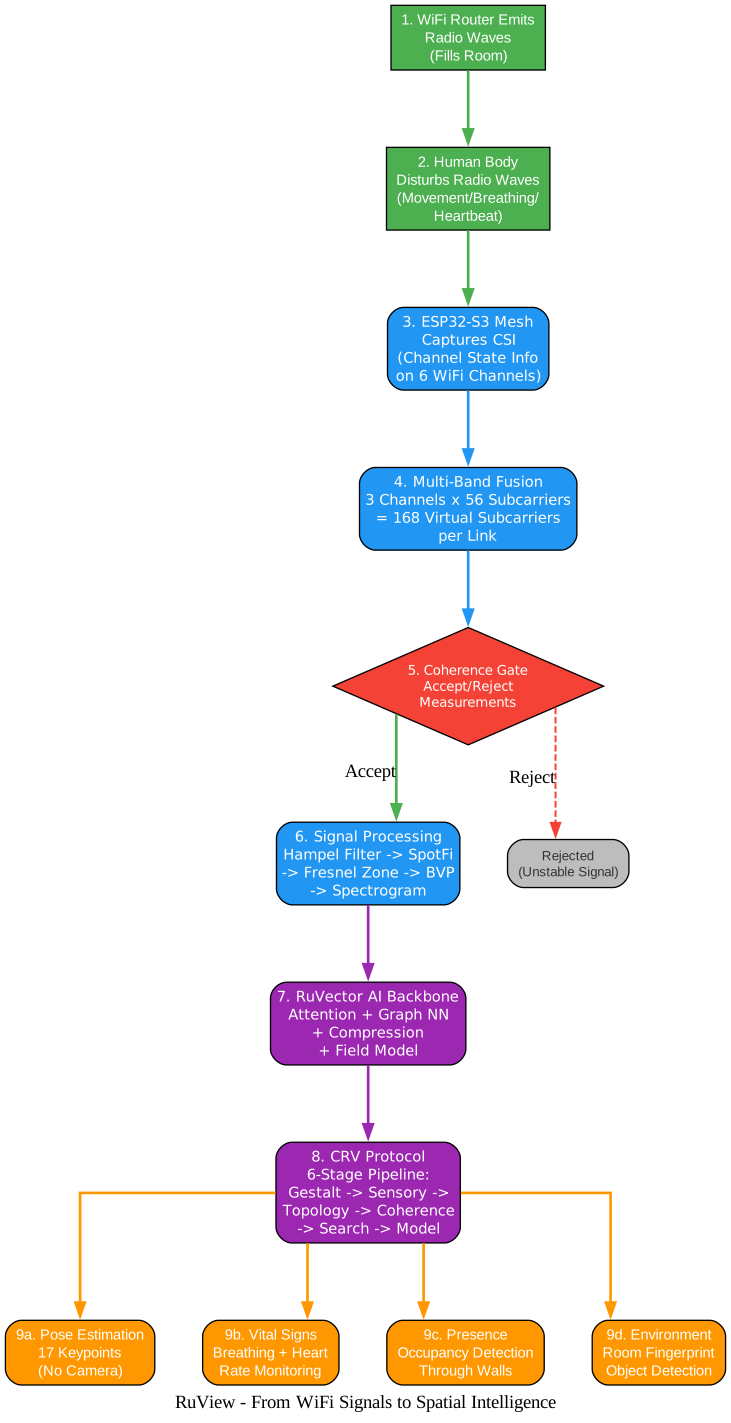
The workflow diagram above traces the nine-step process that converts WiFi radio waves into spatial intelligence. Step 1 begins with a WiFi router emitting radio waves that fill the room. Step 2 shows how human bodies disturb these waves through movement, breathing, and even heartbeat. Step 3 captures these disturbances using an ESP32-S3 mesh that records Channel State Information across 6 WiFi channels. Step 4 applies Multi-Band Fusion, combining 3 channels multiplied by 56 subcarriers to produce 168 virtual subcarriers per link. Step 5 is the Coherence Gate, a critical decision point that accepts stable measurements and rejects unstable ones, ensuring downstream processing only works with quality data. Step 6 applies the full signal processing pipeline: Hampel filtering for outlier removal, SpotFi for multipath resolution, Fresnel zone geometry for spatial mapping, BVP computation, and spectrogram analysis. Step 7 feeds the processed signals into the RuVector AI backbone, which applies attention mechanisms, graph neural networks, compression, and field modeling. Step 8 runs the CRV Protocol, a 6-stage pipeline progressing from gestalt through sensory, topology, coherence, search, and model stages. Step 9 produces four categories of output: pose estimation with 17 keypoints, vital signs including breathing and heart rate, presence and occupancy detection through walls, and environment mapping with room fingerprints.
Takeaway: The Coherence Gate at Step 5 is what separates RuView from naive WiFi sensing approaches. By rejecting unstable measurements before they enter the AI pipeline, the system maintains accuracy over days of continuous operation without manual recalibration – a critical requirement for production deployments in healthcare, security, and building automation.
Edge Intelligence: 65 WASM Modules on a $9 Chip
One of RuView’s most impressive features is its edge intelligence system. Instead of sending all data to the cloud, RuView runs 65 WASM modules directly on the ESP32-S3 sensor node. Each module is a tiny program (5-30 KB) that reads WiFi signal data and makes decisions locally in under 10 milliseconds.

The edge modules diagram above shows how 65 WASM modules across 8 categories connect to the central ESP32-S3 edge device. Medical and Health modules (5 modules) handle sleep apnea detection, cardiac arrhythmia monitoring, respiratory distress alerting, gait analysis, and seizure detection. Security and Safety modules (5 modules) cover perimeter breach detection, weapon detection via CSI amplitude shifts, tailgating detection at access points, loitering alerts, and panic motion detection. Smart Building modules (5 modules) manage HVAC presence-based control, automatic lighting zones, elevator occupancy counting, meeting room lifecycle tracking, and energy auditing. Retail and Hospitality modules (5 modules) provide queue length estimation, dwell heatmaps, customer flow tracking, table turnover monitoring, and shelf engagement analysis. Industrial modules (5 modules) handle forklift proximity warnings, confined space monitoring, clean room compliance, livestock monitoring, and structural vibration detection. Signal Intelligence modules (6 modules) perform flash attention over subcarrier groups, coherence gating with hysteresis, temporal compression with adaptive quantization, sparse recovery for dropped subcarriers, person matching via bipartite assignment, and optimal transport distance computation. Adaptive Learning modules (4 modules) enable DTW gesture learning with 3-rehearsal protocol, anomaly detection via dynamical system attractors, hill-climbing self-optimization, and elastic weight consolidation for lifelong learning. Spatial Reasoning modules (3 modules) implement PageRank influence mapping, micro HNSW nearest-neighbor search, and spiking neural network tracking with STDP learning.
Amazing: The entire self-learning model fits in just 55 KB of memory on the ESP32. The transformer backbone uses approximately 28,000 parameters (28 KB), the embedding projection head uses approximately 25,000 parameters (25 KB), and each per-room MicroLoRA adapter uses only approximately 1,800 parameters (2 KB). This means you can deploy room-specific AI models for less than the size of a typical webpage.
Installation and Quick Start
RuView offers three deployment options depending on your hardware and use case:
Option 1: Docker (Simulated Data, No Hardware Needed)
# Pull and run the Docker image with simulated CSI data
docker pull ruvnet/wifi-densepose:latest
docker run -p 3000:3000 ruvnet/wifi-densepose:latest
# Open http://localhost:3000 to access the observatory dashboard
This option is ideal for evaluation and development. The Docker image runs with simulated CSI data, so no physical ESP32 hardware is required.
Option 2: Live Sensing with ESP32-S3 Hardware ($9)
# Flash firmware to ESP32-S3
python -m esptool --chip esp32s3 --port COM9 --baud 460800 \
  write_flash 0x0 bootloader.bin 0x8000 partition-table.bin \
  0xf000 ota_data_initial.bin 0x20000 esp32-csi-node.bin

# Provision WiFi credentials
python firmware/esp32-csi-node/provision.py --port COM9 \
  --ssid "YourWiFi" --password "secret" --target-ip 192.168.1.20
This option requires an ESP32-S3 ($9) and provides full CSI capture for pose estimation, vital signs, through-wall sensing, and all advanced capabilities.
Option 3: Full System with Cognitum Seed ($140)
# ESP32 streams CSI to bridge, which forwards to Seed for
# persistent storage + kNN + witness chain

# Live RF room scan
node scripts/rf-scan.js --port 5006

# SNN real-time learning
node scripts/snn-csi-processor.js --port 5006

# Correct person counting
node scripts/mincut-person-counter.js --port 5006
The Cognitum Seed adds persistent vector storage, kNN search, witness chain cryptographic attestation, and MCP proxy capabilities.
Building from Source (Rust)
# Clone the repository
git clone https://github.com/ruvnet/RuView.git
cd RuView

# Build the Rust workspace
cd v2
cargo build --release

# Run the sensing server
cargo run -p wifi-densepose-sensing-server

# Run tests (1463 tests)
cargo test --workspace
Self-Supervised Learning
# Step 1: Learn from raw WiFi data (no labels needed)
cargo run -p wifi-densepose-sensing-server -- \
  --pretrain --dataset data/csi/ --pretrain-epochs 50

# Step 2: Fine-tune with pose labels for full capability
cargo run -p wifi-densepose-sensing-server -- \
  --train --dataset data/mmfi/ --epochs 100 --save-rvf model.rvf

# Step 3: Extract fingerprints from live WiFi
cargo run -p wifi-densepose-sensing-server -- \
  --model model.rvf --embed

# Step 4: Search for similar environments or detect anomalies
cargo run -p wifi-densepose-sensing-server -- \
  --model model.rvf --build-index env
Hardware Options
| Option | Hardware | Cost | Full CSI | Capabilities |
|---|---|---|---|---|
| ESP32 + Cognitum Seed (recommended) | ESP32-S3 + Cognitum Seed | ~$140 | Yes | Pose, breathing, heartbeat, motion, presence + persistent vector store, kNN search, witness chain, MCP proxy |
| ESP32 Mesh | 3-6x ESP32-S3 + WiFi router | ~$54 | Yes | Pose, breathing, heartbeat, motion, presence |
| Research NIC | Intel 5300 / Atheros AR9580 | ~$50-100 | Yes | Full CSI with 3x3 MIMO |
| Any WiFi | Windows, macOS, or Linux laptop | $0 | No | RSSI-only: coarse presence and motion |
Use Cases: From Healthcare to Search and Rescue
RuView’s camera-free approach opens up applications where cameras cannot operate:
Healthcare: Fall detection for elderly care with alerts in under 2 seconds, continuous breathing and heart rate monitoring for non-critical hospital beds, and sleep apnea screening – all without wearable compliance issues.
Smart Buildings: Room-level presence triggers for HVAC and lighting that work through walls with no dead zones, meeting room no-show detection, and energy savings of 15-30% on empty rooms.
Security: Perimeter breach detection through concrete walls, loitering alerts, and panic motion detection – all without the privacy concerns of camera surveillance.
Search and Rescue: The WiFi-Mat disaster module can detect survivors through rubble and debris via breathing signature, with START triage color classification and 3D localization through 30cm of concrete.
Retail: Real-time foot traffic, dwell time by zone, and queue length tracking without cameras, making it fully GDPR-friendly.
The Rust Architecture: 20 Crates and Counting
RuView is built as a Rust workspace with 20+ crates, each handling a specific domain:
| Crate | Purpose |
|---|---|
wifi-densepose-core | Core data types and shared abstractions |
wifi-densepose-signal | CSI signal processing (Hampel, SpotFi, Fresnel, BVP, spectrogram) |
wifi-densepose-nn | Neural network inference (RuVector backbone) |
wifi-densepose-api | HTTP/WebSocket API server (Axum-based) |
wifi-densepose-db | Database layer (SQLite + Redis) |
wifi-densepose-config | Configuration management |
wifi-densepose-hardware | ESP32 hardware abstraction and CSI capture |
wifi-densepose-wasm | WASM bindings for web dashboard |
wifi-densepose-cli | Command-line interface |
wifi-densepose-mat | WiFi-Mat disaster module |
wifi-densepose-train | Model training pipeline |
wifi-densepose-sensing-server | Main sensing server binary |
wifi-densepose-wifiscan | WiFi scanning and channel management |
wifi-densepose-vitals | Vital signs extraction (breathing, heart rate) |
wifi-densepose-ruvector | RuVector AI backbone integration |
wifi-densepose-desktop | Tauri v2 desktop app (WIP) |
wifi-densepose-pointcloud | 3D point cloud fusion |
wifi-densepose-geo | Geospatial and room mapping |
wifi-densepose-wasm-edge | 65 WASM edge modules (no_std, wasm32-unknown-unknown) |
nvsim / nvsim-server | NVS simulation and server |
The project uses Rust edition 2021 with LTO enabled in release mode, producing optimized binaries suitable for edge deployment. The WASM edge modules compile to wasm32-unknown-unknown and run on ESP32-S3 via WASM3, sharing a common utility library for consistent behavior across all 65 modules.
Self-Learning WiFi AI
RuView’s self-learning system (ADR-024) is a breakthrough in WiFi sensing. It turns any WiFi signal into a 128-number fingerprint that uniquely describes what is happening in a room, learns entirely on its own from raw WiFi data without cameras or human labeling, and runs on an $8 ESP32 chip with the entire model fitting in 55 KB of memory.
The architecture is elegantly simple:
WiFi Signal [56 channels] -> Transformer + Graph Neural Network
                                      |-> 128-dim environment fingerprint (search + identification)
                                      |-> 17-joint body pose (human tracking)
| Training Mode | What You Need | What You Get |
|---|---|---|
| Self-Supervised | Just raw WiFi data | A model that understands WiFi signal structure |
| Supervised | WiFi data + body pose labels | Full pose tracking + environment fingerprints |
| Cross-Modal | WiFi data + camera footage | Fingerprints aligned with visual understanding |
The MERIDIAN system (ADR-027) ensures cross-environment domain generalization, meaning a model trained in one room works in any room – not just the one it was trained in.
Troubleshooting
ESP32-C3 or original ESP32 not supported: These single-core chips have insufficient processing power for CSI DSP. You must use an ESP32-S3 or later.
Limited spatial resolution with single ESP32: A single ESP32 node provides limited spatial resolution. Use 2 or more nodes, or add a Cognitum Seed for best results.
Camera-free pose accuracy: The current proxy-supervised baseline achieves approximately 2.5% PCK@20. Camera ground-truth training (ADR-079) targets 35%+ PCK@20, but the data collection and evaluation phases are still pending.
Docker image not starting: Ensure port 3000 is not already in use. Run docker logs <container_id> to check for error messages.
ESP32 not connecting to WiFi: Verify your WiFi credentials in the provision command. The ESP32-S3 only supports 2.4 GHz networks. Check that the target IP is reachable from the ESP32’s network.
Low signal quality: The Coherence Gate may reject measurements if signal quality is poor. Ensure ESP32 nodes are within range of the WiFi router and not obstructed by metal objects. Use channel hopping across 6 bands for 3x sensing bandwidth.
Model training too slow: Use GPU acceleration with --cuda flag. The self-supervised training completes in 84 seconds on M4 Pro. For full supervised training, expect approximately 19 minutes on a laptop.
Technical Specifications
| Specification | Value |
|---|---|
| Language | Rust (edition 2021) |
| Minimum Rust Version | 1.85+ |
| Tests | 1,463 passing |
| WASM Edge Modules | 65 across 13 categories |
| Edge Module Tests | 609 passing |
| Model Size (ESP32) | 55 KB (of 520 KB available) |
| Docker | Multi-arch (amd64 + arm64) |
| License | MIT OR Apache-2.0 |
| Crates.io | wifi-densepose-ruvector |
| Pose Keypoints | 17 COCO keypoints |
| Breathing Range | 6-30 BPM |
| Heart Rate Range | 40-120 BPM |
| Presence Latency | 0.012 ms |
| Through-Wall Range | Up to 5m |
| Self-Learning Time | Under 30 seconds |
| Camera-Free Training | 84s on M4 Pro |
Conclusion
RuView represents a paradigm shift in spatial computing. Instead of relying on cameras with all their privacy concerns, line-of-sight requirements, and cost, RuView extracts rich spatial intelligence from WiFi signals that already permeate every indoor space. With 55,000+ GitHub stars, 1,463 passing tests, 65 edge modules, and a complete Rust codebase, RuView is production-ready for healthcare monitoring, building automation, security, and search and rescue applications. The self-learning AI that adapts in under 30 seconds to any room, combined with cryptographic attestation via Ed25519 witness chains, makes RuView a compelling platform for privacy-first spatial intelligence at the edge.
The project is actively developed with 96 Architecture Decision Records (ADRs) documenting every technical choice, 8 Domain-Driven Design models defining bounded contexts, and a comprehensive edge module ecosystem that runs entirely on $9 ESP32 hardware. Whether you are monitoring elderly patients, securing a perimeter, or searching for survivors through rubble, RuView provides the spatial awareness you need – without a single camera. Enjoyed this post? Never miss out on future posts by following us 


