Web scraping has always been a cat-and-mouse game. Websites change their structure, deploy anti-bot systems, and block automated requests – while scrapers scramble to keep up. Scrapling, an AI-powered adaptive web scraping framework with over 38,000 stars on GitHub, fundamentally changes this dynamic. Built by Karim Shoair and battle-tested by hundreds of web scrapers daily, Scrapling combines intelligent element tracking, stealth browser automation, and MCP server integration into a single Python library that handles everything from a single request to a full-scale crawl.
What Makes Scrapling Different
Traditional scraping tools break the moment a website updates its HTML structure. You wake up to broken selectors, missing data, and hours of debugging. Scrapling solves this with its adaptive engine – a system that learns element signatures and automatically relocates them when pages change. Combined with built-in Cloudflare bypass, a Scrapy-like spider framework, and an MCP server for AI integration, Scrapling is a complete scraping toolkit that eliminates the most painful parts of web data extraction.
Architecture Overview
Scrapling is organized into five major subsystems that work together seamlessly: the Parser Engine for element selection, the Fetcher Layer for making requests, the Adaptive Engine for surviving website changes, the Spider Framework for large-scale crawling, and the MCP Server for AI-assisted extraction.
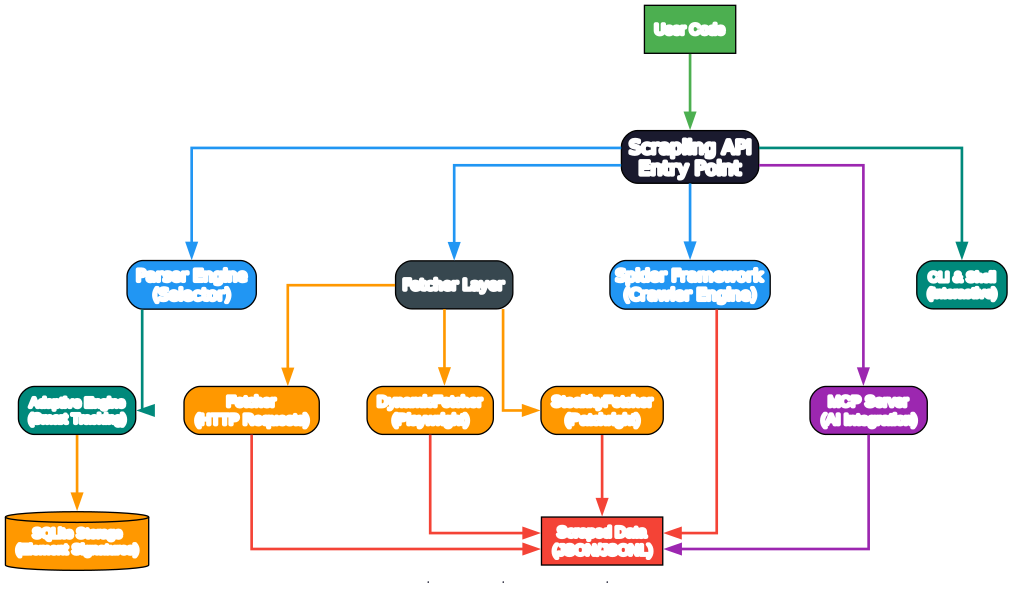
The diagram above shows how user code interacts with the Scrapling API entry point, which then routes to the appropriate subsystem. The Parser Engine handles all element selection using CSS selectors, XPath, text search, and similarity matching. The Fetcher Layer provides three distinct fetcher types – the lightweight HTTP-based Fetcher, the Playwright-powered DynamicFetcher for JavaScript-heavy sites, and the Patchright-based StealthyFetcher for bypassing anti-bot protection. The Spider Framework orchestrates concurrent crawling with pause/resume support, while the MCP Server enables AI tools like Claude and Cursor to leverage Scrapling’s capabilities directly.
The Adaptive Scraping Engine
The crown jewel of Scrapling is its adaptive element tracking system. This is what sets it apart from every other Python scraping library. Here is how it works:
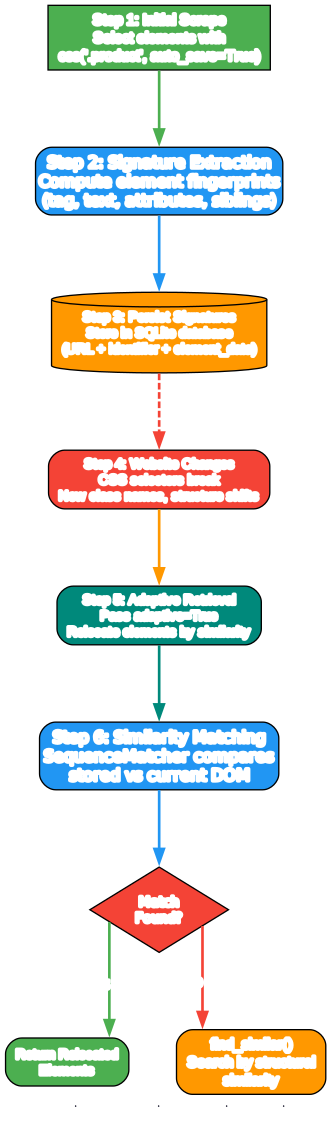
The adaptive engine operates in a multi-step process. First, you scrape a page and select elements using auto_save=True, which tells Scrapling to compute and store element fingerprints. These fingerprints capture structural properties like tag name, text content, attributes, sibling relationships, and parent-child hierarchies. The data is persisted in an SQLite database, keyed by URL and identifier.
When the website changes – and it always does – your original CSS selectors break. Instead of rewriting your scraper, you simply pass adaptive=True to the selection method. Scrapling then retrieves the stored signatures from its database and uses Python’s SequenceMatcher to compare them against every element in the current DOM. Elements that score above a similarity threshold are returned as matches, even if their class names, IDs, or structural positions have shifted.
If the primary similarity match fails, Scrapling falls back to find_similar(), which searches for structurally similar elements based on tag type, attribute patterns, and text content. This two-tier approach means your scrapers survive redesigns, A/B tests, and framework migrations without any code changes.
Here is a practical example:
from scrapling.fetchers import StealthyFetcher

# First run: save element signatures
StealthyFetcher.adaptive = True
page = StealthyFetcher.fetch('https://example.com', headless=True)
products = page.css('.product', auto_save=True)

# Later, after the website redesigns:
page = StealthyFetcher.fetch('https://example.com', headless=True)
# adaptive=True finds the products even if selectors changed
products = page.css('.product', adaptive=True)
The storage system uses SQLite with WAL (Write-Ahead Logging) mode for thread-safe concurrent access, making it safe to use in multi-threaded frameworks like Scrapy. Each element signature is hashed using SHA-256 with length-appended collision resistance, and the database is organized by base domain so signatures from one site do not interfere with another.
Stealth and Anti-Detection
Scrapling provides three tiers of fetching power, each designed for a different level of anti-bot protection:
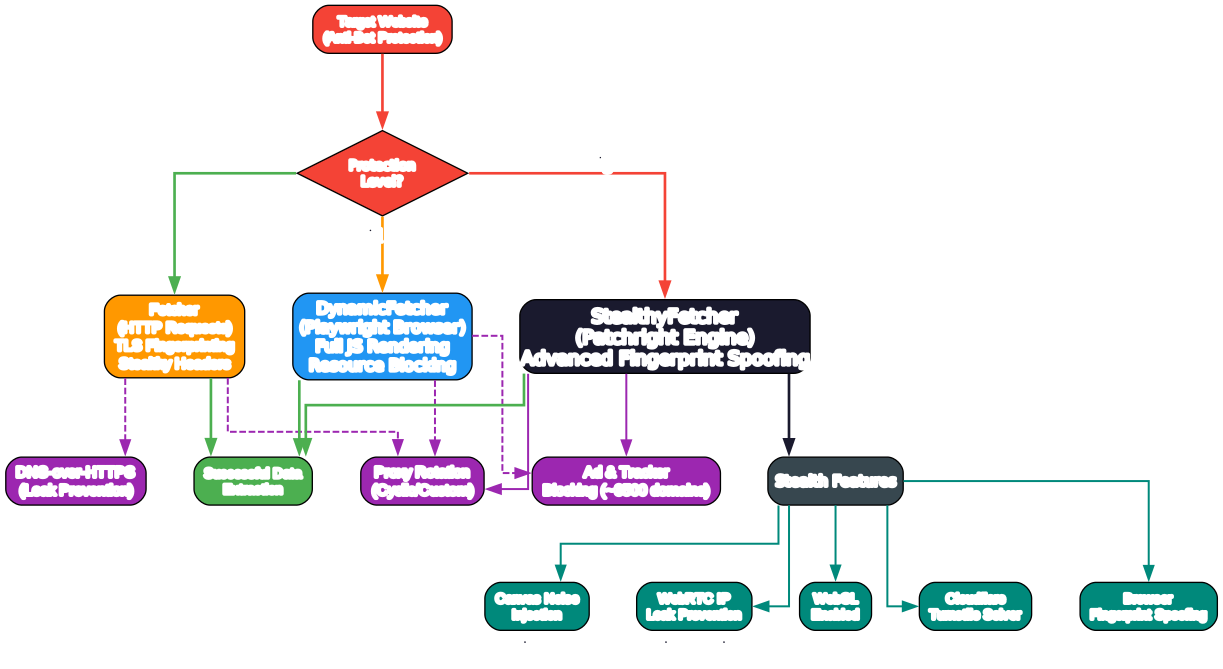
Fetcher (Low Protection) – For simple HTTP requests, the Fetcher class uses curl_cffi to impersonate browser TLS fingerprints. It generates realistic browser headers automatically and supports HTTP/3. This is sufficient for sites with minimal protection.
DynamicFetcher (Medium Protection) – For JavaScript-heavy sites, DynamicFetcher launches a full Playwright browser instance. It renders pages completely, waits for network idle, and can block unnecessary resources like fonts, images, and stylesheets for faster loading. It supports both Chromium and real Chrome via CDP.
StealthyFetcher (High Protection) – For sites behind Cloudflare Turnstile, DataDome, and other aggressive anti-bot systems, StealthyFetcher uses Patchright (a patched Playwright fork) with comprehensive fingerprint spoofing. It includes:
- Canvas noise injection – Adds random noise to canvas operations to prevent canvas fingerprinting
- WebRTC IP leak prevention – Forces WebRTC to respect proxy settings, preventing your real IP from leaking
- WebGL enabled by default – Many WAFs now check if WebGL is enabled; disabling it is a red flag
- Browser fingerprint spoofing – Generates realistic browser fingerprints using the
browserforgelibrary - Cloudflare Turnstile solver – Automatically detects and solves all types of Cloudflare challenges including non-interactive, interactive, and embedded Turnstile widgets
All three fetchers support proxy rotation through the built-in ProxyRotator class, DNS-over-HTTPS to prevent DNS leaks when using proxies, and ad/tracker blocking with a curated list of approximately 3,500 known advertising and tracking domains.
Session management is available across all fetcher types. FetcherSession, StealthySession, and DynamicSession keep cookies and browser state alive across multiple requests, dramatically reducing the overhead of launching new browser instances for each page.
from scrapling.fetchers import StealthyFetcher, StealthySession

# Session-based stealth scraping
with StealthySession(headless=True, solve_cloudflare=True) as session:
    page = session.fetch('https://protected-site.com')
    data = page.css('#content').getall()
MCP Server Integration
One of Scrapling’s most innovative features is its built-in MCP (Model Context Protocol) server, which allows AI assistants like Claude and Cursor to directly use Scrapling for web scraping tasks. This is not just a wrapper – the MCP server provides structured tools that leverage Scrapling’s full fetching and extraction capabilities.
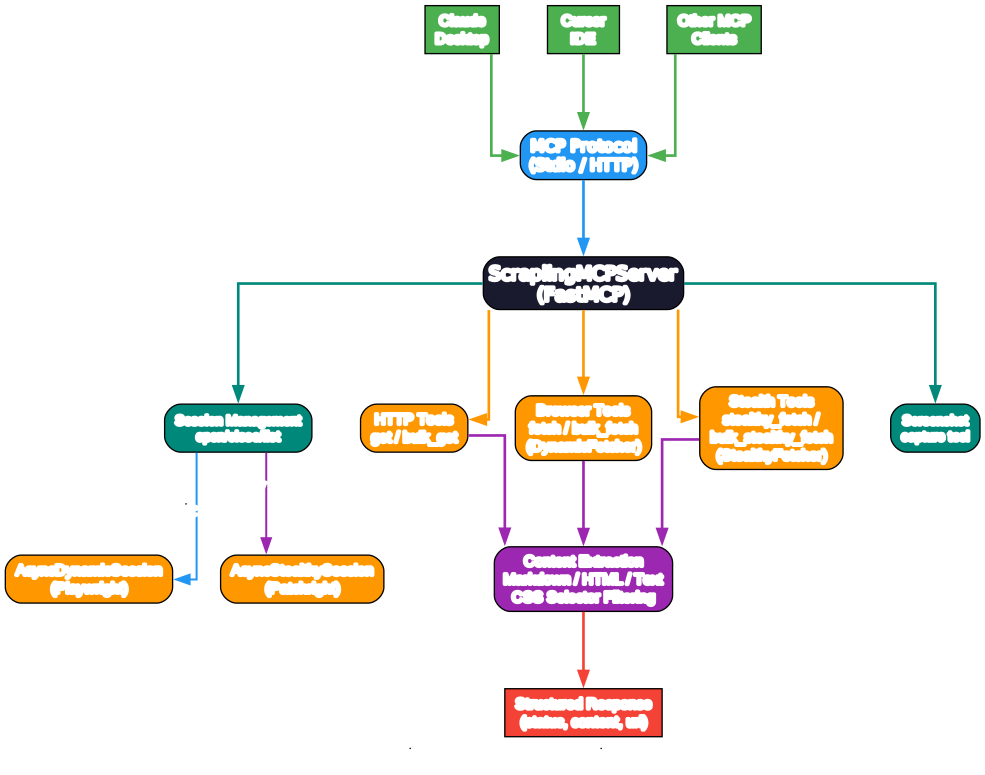
The MCP server, built on FastMCP, exposes seven tools to AI clients:
get– Make a single HTTP GET request and return structured content (Markdown, HTML, or text)bulk_get– Fetch multiple URLs concurrently via HTTPfetch– Open a browser to fetch a single URL with full renderingbulk_fetch– Fetch multiple URLs concurrently in a browser sessionstealthy_fetch– Use the stealth fetcher for high-protection sitesbulk_stealthy_fetch– Concurrent stealth fetchingscreenshot– Capture a screenshot of a web page
Additionally, three session management tools (open_session, close_session, list_sessions) allow AI assistants to maintain persistent browser sessions across multiple requests, avoiding the overhead of launching new browsers each time.
The content extraction pipeline is particularly clever. Before passing data to the AI, Scrapling can filter content using CSS selectors and extract only the relevant portions. This reduces token usage and cost significantly – instead of sending an entire page’s HTML to Claude, you can extract just the main content or specific sections.
To install the MCP server feature:
pip install "scrapling[ai]"
Then configure it in your Claude Desktop or Cursor settings by pointing to the Scrapling MCP server. The server supports both stdio and streamable-http transports.
Spider Framework
For large-scale crawling, Scrapling provides a Scrapy-like Spider framework with features that go beyond simple request-response patterns:
from scrapling.spiders import Spider, Request, Response

class ProductSpider(Spider):
    name = "products"
    start_urls = ["https://example.com/products/"]
    concurrent_requests = 10

    async def parse(self, response: Response):
        for product in response.css('.product'):
            yield {
                "title": product.css('h2::text').get(),
                "price": product.css('.price::text').get(),
            }

        next_page = response.css('.next a')
        if next_page:
            yield response.follow(next_page[0].attrib['href'])

result = ProductSpider().start()
print(f"Scraped {len(result.items)} products")
result.items.to_json("products.json")
Key spider features include:
- Concurrent crawling with configurable limits and per-domain throttling
- Multi-session support – mix HTTP, dynamic, and stealthy sessions in a single spider
- Pause and resume – checkpoint-based crawl persistence with graceful Ctrl+C shutdown
- Streaming mode –
async for item in spider.stream()for real-time processing - Blocked request detection – automatic retry with customizable logic
- Robots.txt compliance – optional respect for Disallow, Crawl-delay, and Request-rate directives
- Development mode – cache responses to disk on first run, replay on subsequent runs
- Built-in export – JSON and JSONL output with
result.items.to_json()/result.items.to_jsonl()
Performance Benchmarks
Scrapling is not just feature-rich – it is also fast. The parser engine, built on lxml with optimized data structures, outperforms most Python scraping libraries:
| Library | Text Extraction (ms) | vs Scrapling |
|---|---|---|
| Scrapling | 2.02 | 1.0x |
| Parsel/Scrapy | 2.04 | 1.01x |
| Raw Lxml | 2.54 | 1.26x |
| PyQuery | 24.17 | ~12x |
| Selectolax | 82.63 | ~41x |
| MechanicalSoup | 1549.71 | ~767x |
| BS4 with Lxml | 1584.31 | ~784x |
For adaptive element finding, Scrapling’s similarity algorithms are approximately 5x faster than AutoScraper while producing more accurate results.
Installation
Scrapling requires Python 3.10 or higher. The base installation includes only the parser engine:
pip install scrapling
For the full feature set including fetchers and browser automation:
pip install "scrapling[fetchers]"
scrapling install
The scrapling install command downloads all required browsers and their dependencies. You can also install from Python:
from scrapling.cli import install
install([], standalone_mode=False)          # normal install
install(["--force"], standalone_mode=False)  # force reinstall
Additional optional dependencies:
# MCP server for AI integration
pip install "scrapling[ai]"

# Interactive shell and CLI extract command
pip install "scrapling[shell]"

# Everything at once
pip install "scrapling[all]"
Docker images are also available:
# From DockerHub
docker pull pyd4vinci/scrapling

# From GitHub Container Registry
docker pull ghcr.io/d4vinci/scrapling:latest
CLI and Interactive Shell
Scrapling includes a powerful command-line interface for quick scraping tasks without writing code:
# Launch interactive scraping shell
scrapling shell

# Extract page content to Markdown
scrapling extract get 'https://example.com' content.md

# Extract with CSS selector and browser impersonation
scrapling extract get 'https://example.com' content.txt \
  --css-selector '#fromSkipToProducts' --impersonate 'chrome'

# Stealth fetch with Cloudflare bypass
scrapling extract stealthy-fetch 'https://protected-site.com' data.html \
  --css-selector '#content' --solve-cloudflare
The interactive shell provides IPython integration with Scrapling-specific shortcuts, including the ability to convert curl commands to Scrapling requests and view results directly in your browser.
Features Comparison
| Feature | Scrapling | Scrapy | BeautifulSoup | Selenium |
|---|---|---|---|---|
| Adaptive element tracking | Yes | No | No | No |
| Anti-bot bypass (Cloudflare) | Yes | No | No | No |
| MCP server for AI | Yes | No | No | No |
| Spider framework | Yes | Yes | No | No |
| Pause/resume crawls | Yes | Yes (via extension) | No | No |
| Multi-session support | Yes | No | No | No |
| Proxy rotation (built-in) | Yes | No | No | No |
| DNS-over-HTTPS | Yes | No | No | No |
| Ad blocking (built-in) | Yes | No | No | No |
| Async support | Yes | Yes | No | Limited |
| CSS + XPath selectors | Yes | Yes | CSS only | XPath only |
| find_similar() | Yes | No | No | No |
| Auto selector generation | Yes | No | No | No |
| CLI extract command | Yes | No | No | No |
| Interactive shell | Yes | No | No | No |
| Parser speed (relative) | 1.0x | 1.01x | ~784x | N/A |
| Python type hints | Full | Partial | No | No |
| Docker image | Yes | No | No | No |
Troubleshooting
Browser installation fails: Run scrapling install --force to reinstall browsers. Make sure you have sufficient disk space (approximately 500MB for all browsers).
Cloudflare challenges not solved: Ensure you are using StealthyFetcher with solve_cloudflare=True and headless=True. Some challenges require network idle wait – add network_idle=True to your fetch call.
Adaptive mode not finding elements: The adaptive engine relies on structural similarity. If a website completely restructures its layout (e.g., moving from a table to a card layout), the similarity threshold may not match. Try using find_similar() as a fallback, which searches by tag type and attribute patterns.
Memory usage with large crawls: Use disable_resources=True in browser-based fetchers to block fonts, images, and stylesheets. Set concurrent_requests to a reasonable number (the default is 4). Enable checkpointing with crawldir to persist progress.
Proxy rotation not working: Make sure you are using session-based fetchers (StealthySession, DynamicSession, or FetcherSession) with the ProxyRotator class. One-off fetch calls create new sessions each time, which prevents effective rotation.
MCP server not connecting: Verify that scrapling[ai] is installed and that your MCP client configuration points to the correct Python environment. The server supports both stdio and streamable-http transports.
Getting Started
Here is a complete example to get you started with Scrapling:
from scrapling.fetchers import Fetcher, StealthyFetcher

# Simple HTTP request with browser impersonation
page = Fetcher.get('https://quotes.toscrape.com/')
quotes = page.css('.quote .text::text').getall()
print(f"Found {len(quotes)} quotes")

# Stealth mode with Cloudflare bypass
StealthyFetcher.adaptive = True
page = StealthyFetcher.fetch('https://example.com', headless=True, solve_cloudflare=True)
products = page.css('.product', auto_save=True)

# Later, after website changes
page = StealthyFetcher.fetch('https://example.com', headless=True)
products = page.css('.product', adaptive=True)
for product in products:
    print(product.css('h2::text').get())
Scrapling represents a significant leap forward in web scraping technology. By combining adaptive element tracking, stealth browser automation, a full spider framework, and MCP server integration, it eliminates the most frustrating aspects of web data extraction. Whether you are scraping a single page or running a production crawl, Scrapling has the tools to make your scraper resilient, fast, and maintainable.
Check out the Scrapling repository on GitHub and the official documentation to get started. Enjoyed this post? Never miss out on future posts by following us 


