What is Mastra?
Mastra is a TypeScript AI agent framework built by the team behind Gatsby, the popular React-based static site generator. With over 23,000 stars on GitHub and backing from Y Combinator (W25 batch), Mastra provides everything TypeScript developers need to build, tune, and scale production-ready AI applications. It integrates seamlessly with React, Next.js, and Node.js, or can be deployed as a standalone server.
The framework takes a batteries-included approach: agents, workflows, evals, MCP servers, memory management, and observability are all available out of the box. Instead of stitching together dozens of libraries, you get a cohesive, type-safe TypeScript stack designed around established AI patterns.
Architecture Overview
Mastra is organized as a monorepo with a core package (@mastra/core) that serves as the central hub, surrounded by specialized packages for agents, workflows, MCP, evals, memory, RAG, and more. The architecture supports multiple storage backends and deployment targets.
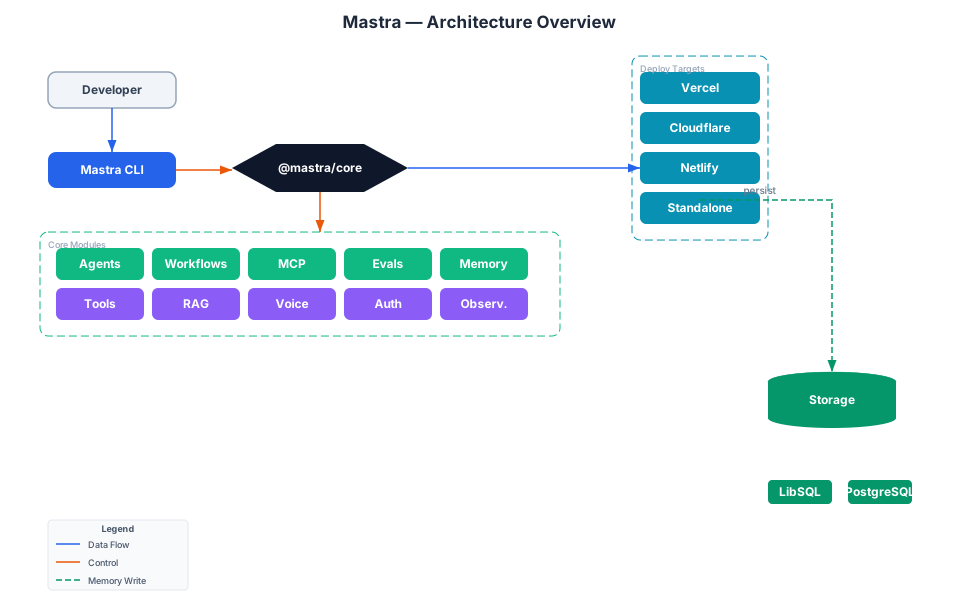
The diagram above illustrates the full architecture. At the top, developers enter through the CLI (npm create mastra@latest). The core framework (@mastra/core) connects to six primary packages: Agents for autonomous reasoning, Workflows for step-based orchestration, MCP for protocol servers, Evals for quality scoring, Memory for context management, and Tools for function binding. Supporting packages include RAG for retrieval, Voice for TTS/STT, Observability for traces and metrics, and Auth for RBAC security. Storage backends range from LibSQL and PostgreSQL to DuckDB and Redis. Deployment targets include Vercel, Cloudflare, Netlify, and standalone Node.js servers.
Core Packages
| Package | Purpose |
|---|---|
@mastra/core | Central framework hub with Agent, Workflow, Tool, and Mastra classes |
@mastra/mcp | Model Context Protocol server and client implementation |
@mastra/evals | Evaluation scorers for answer relevance, tool accuracy, and more |
@mastra/memory | Conversation history, working memory, and semantic recall |
@mastra/rag | Retrieval-augmented generation utilities |
@mastra/observability | OpenTelemetry-based tracing and metrics |
Storage Backends
Mastra supports 20+ storage backends through a pluggable architecture:
- LibSQL / Turso - Lightweight embedded SQL
- PostgreSQL - Production relational database
- DuckDB - Columnar analytics storage for observability
- Redis - Fast key-value caching
- MongoDB, DynamoDB, ClickHouse, Chroma, Pinecone, Qdrant - Specialized stores for vectors, documents, and more
The MastraCompositeStore class lets you route different domains to different backends. For example, you can store agent state in LibSQL while routing observability data to DuckDB:
const storage = new MastraCompositeStore({
  id: 'composite-storage',
  default: libsqlStore,
  domains: {
    observability: duckdbStore.observability,
  },
});
Agent System
The Agent is the central abstraction in Mastra. An agent combines an LLM model, tools, memory, and optional processors into a single cohesive unit that can reason about goals, decide which tools to use, and iterate until it produces a final answer.
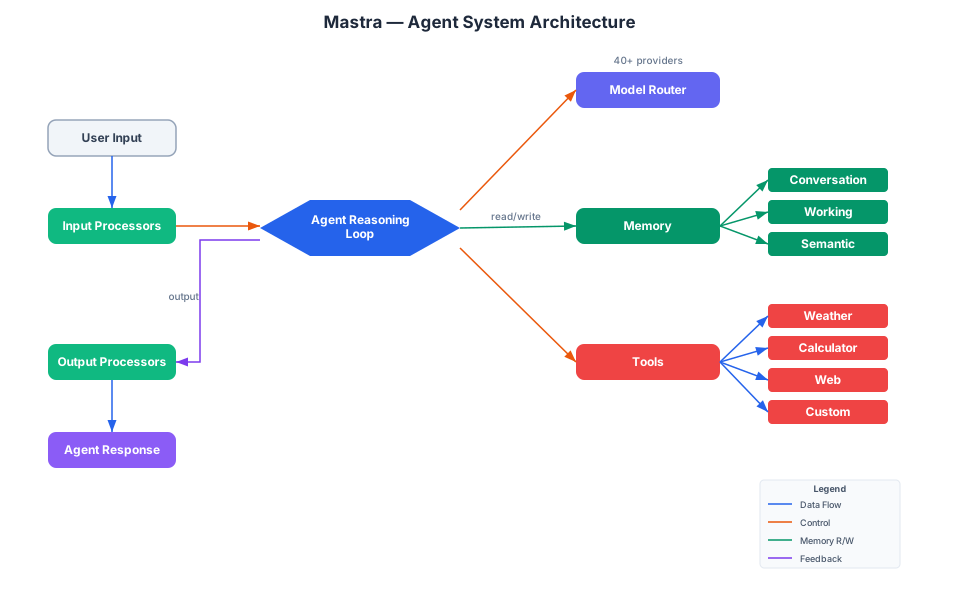
The agent system diagram shows the full request lifecycle. User input enters through Input Processors (PII detection, language detection, prompt injection blocking, content moderation) before reaching the Agent Reasoning Loop. The agent communicates with a Model Router that supports 40+ providers including OpenAI, Anthropic, Google Gemini, and more. Memory is managed through three layers: Conversation History for message persistence, Working Memory for short-term state, and Semantic Recall for long-term context retrieval. Tools are invoked dynamically based on agent reasoning. Output Processors filter the response before it reaches the user. Scorers evaluate answer relevance and accuracy in parallel.
Creating an Agent
Here is a minimal agent definition using the Mastra framework:
import { Agent } from '@mastra/core/agent';
import { Memory } from '@mastra/memory';
import { openai } from '@ai-sdk/openai';

const memory = new Memory();

export const chefAgent = new Agent({
  id: 'chef-agent',
  name: 'Chef Agent',
  description: 'A chef agent that helps you cook great meals with available ingredients.',
  instructions: `
    You are Michel, a practical and experienced home chef who helps people
    cook great meals with whatever ingredients they have available.
  `,
  model: openai('gpt-4o-mini'),
  tools: { weatherTool, cookingTool },
  memory,
});
Model Routing
Mastra supports 40+ LLM providers through a unified interface. You can specify models as strings or use dynamic model selection based on request context:
export const dynamicAgent = new Agent({
  id: 'dynamic-agent',
  name: 'Dynamic Agent',
  instructions: ({ requestContext }) => {
    if (requestContext.get('foo')) {
      return 'You are a dynamic agent';
    }
    return 'You are a static agent';
  },
  model: ({ requestContext }) => {
    if (requestContext.get('foo')) {
      return 'openai/gpt-4o' as const;
    }
    return 'openai/gpt-4o-mini' as const;
  },
  tools: ({ requestContext }) => {
    const tools: Record<string, any> = { cookingTool };
    if (requestContext.get('foo')) {
      tools['web_search_preview'] = openai.tools.webSearchPreview();
    }
    return tools;
  },
});
Input and Output Processors
Processors are middleware-like functions that transform agent input and output. They enable PII detection, language translation, prompt injection blocking, and content moderation:
import { PIIDetector, LanguageDetector, PromptInjectionDetector, ModerationProcessor } from '@mastra/core/processors';

const piiDetector = new PIIDetector({
  model: 'openai/gpt-4o',
  redactionMethod: 'mask',
  preserveFormat: true,
  includeDetections: true,
});

const languageDetector = new LanguageDetector({
  model: 'google/gemini-2.0-flash-001',
  targetLanguages: ['en'],
  strategy: 'translate',
});

export const safeAgent = new Agent({
  id: 'safe-agent',
  name: 'Safe Agent',
  instructions: 'You are a helpful assistant.',
  model: 'openai/gpt-4o',
  inputProcessors: [piiDetector, languageDetector],
  outputProcessors: [new ModerationProcessor({ model: 'google/gemini-2.0-flash-001', strategy: 'block' })],
});
Tools
Tools are the functions agents can invoke. Mastra provides a createTool function with Zod schema validation:
import { createTool } from '@mastra/core/tools';
import { z } from 'zod';
export const weatherTool = createTool({
id: 'get-weather',
description: 'Get current weather for a location',
inputSchema: z.object({
location: z.string().describe('City name'),
}),
outputSchema: z.object({
temperature: z.number(),
feelsLike: z.number(),
humidity: z.number(),
conditions: z.string(),
location: z.string(),
}),
execute: async ({ location }) => {
const response = await fetch(
`https://api.open-meteo.com/v1/forecast?latitude=...&longitude=...¤t=temperature_2m,...`
);
const data = await response.json();
return {
temperature: data.current.temperature_2m,
feelsLike: data.current.apparent_temperature,
humidity: data.current.relative_humidity_2m,
conditions: getWeatherCondition(data.current.weather_code),
location,
};
},
});
Memory
Mastra provides three types of memory for agents:
- Conversation History - Persists message threads across sessions
- Working Memory - Short-term state that the agent can read and write during execution
- Semantic Recall - Long-term context retrieval using vector similarity search
import { Memory } from '@mastra/memory';

const memory = new Memory({
  options: {
    workingMemory: {
      enabled: true,
    },
  },
});
Workflow Engine
When you need explicit control over execution flow rather than autonomous agent reasoning, Mastra’s workflow engine provides a graph-based orchestration system with an intuitive chaining syntax.
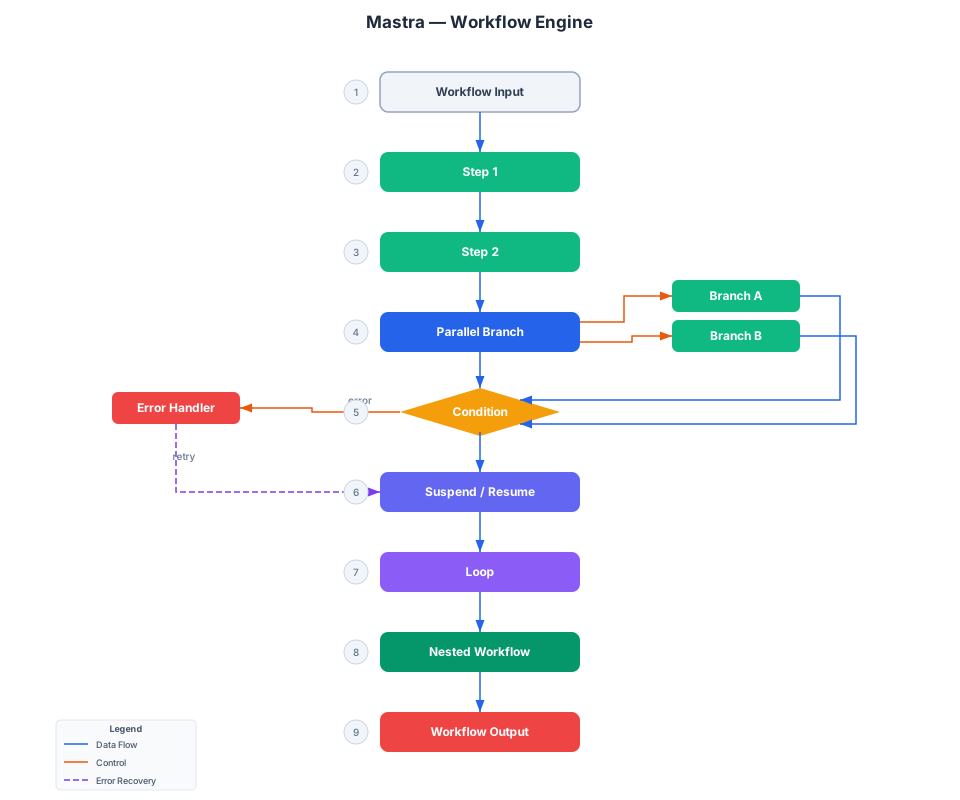
The workflow engine diagram illustrates the key execution patterns. Input enters a validated schema, flows through sequential steps via .then(), branches into parallel execution with .parallel(), makes conditional decisions with .branch(), suspends for human input via suspend(), loops with .doUntil(), and can nest sub-workflows. Error handling is built in with .catch() and retry mechanisms. Each step has typed input and output schemas enforced by Zod.
Creating a Workflow
Workflows are defined using createWorkflow and createStep with full TypeScript type inference:
import { createStep, createWorkflow } from '@mastra/core/workflows';
import { z } from 'zod';

const step = createStep({
  id: 'my-step',
  description: 'Process the ingredient',
  inputSchema: z.object({
    ingredient: z.string(),
  }),
  outputSchema: z.object({
    result: z.string(),
  }),
  execute: async ({ inputData }) => {
    return { result: `Processed: ${inputData.ingredient}` };
  },
});

const myWorkflow = createWorkflow({
  id: 'recipe-maker',
  description: 'Returns a recipe based on an ingredient',
  inputSchema: z.object({
    ingredient: z.string(),
  }),
  outputSchema: z.object({
    result: z.string(),
  }),
});

myWorkflow.then(step).commit();
Parallel Execution and Branching
Workflows support parallel execution and conditional branching:
const workflow = createWorkflow({
  id: 'complex-workflow',
  inputSchema: z.object({ text: z.string() }),
  outputSchema: z.object({ text: z.string() }),
})
  .then(addLetterStep)
  .parallel([addLetterBStep, addLetterCStep])
  .map(async ({ inputData }) => {
    const { 'add-letter-b': stepB, 'add-letter-c': stepC } = inputData;
    return { text: stepB.text + stepC.text };
  })
  .branch([
    [async ({ inputData: { text } }) => text.length <= 10, shortTextStep],
    [async ({ inputData: { text } }) => text.length > 10, longTextStep],
  ])
  .then(nestedTextProcessor)
  .dountil(addLetterWithCountStep, async ({ inputData: { text } }) => text.length >= 20)
  .then(suspendResumeStep)
  .then(finalStep)
  .commit();
Suspend and Resume (Human-in-the-Loop)
Workflows can pause execution and wait for human input before continuing:
const suspendResumeStep = createStep({
  id: 'suspend-resume',
  inputSchema: z.object({ text: z.string() }),
  outputSchema: z.object({ text: z.string() }),
  suspendSchema: z.object({ reason: z.string() }),
  resumeSchema: z.object({ userInput: z.string() }),
  execute: async ({ inputData, resumeData, suspend }) => {
    if (!resumeData?.userInput) {
      return await suspend({
        reason: 'Please provide user input to continue',
      });
    }
    return { text: inputData.text + resumeData.userInput };
  },
});
MCP Integration
The Model Context Protocol (MCP) is a standardized way for AI systems to expose tools, resources, and agents. Mastra provides first-class support for both authoring MCP servers and consuming MCP clients.
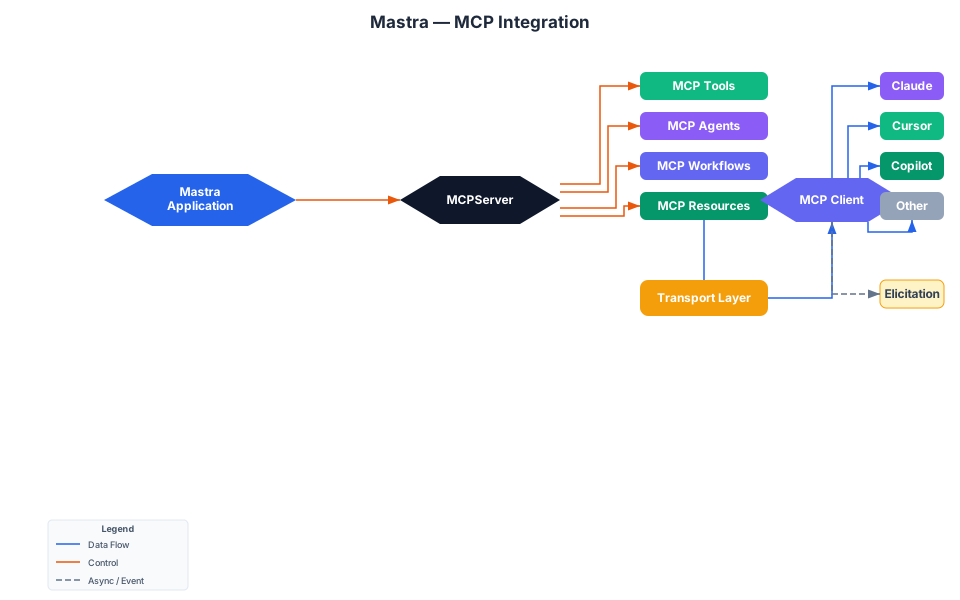
The MCP integration diagram shows how a Mastra application registers MCP servers that expose tools, agents, workflows, and resources through a standardized protocol. The transport layer supports stdio, SSE, and StreamableHTTP. External MCP clients like Claude Desktop, Cursor IDE, and GitHub Copilot can discover and invoke these capabilities. Elicitation allows MCP servers to request user input during execution, enabling interactive workflows.
Creating an MCP Server
import { MCPServer } from '@mastra/mcp';
import { createTool } from '@mastra/core/tools';
import { z } from 'zod';

export const myMcpServer = new MCPServer({
  id: 'my-calculation-server',
  name: 'My Calculation Server',
  version: '1.0.0',
  tools: {
    calculator: createTool({
      id: 'calculator',
      description: 'Performs basic arithmetic operations',
      inputSchema: z.object({
        num1: z.number(),
        num2: z.number(),
        operation: z.enum(['add', 'subtract']),
      }),
      execute: async ({ num1, num2, operation }) => {
        if (operation === 'add') return num1 + num2;
        if (operation === 'subtract') return num1 - num2;
        throw new Error('Invalid operation');
      },
    }),
  },
});
Exposing Agents and Workflows via MCP
MCP servers can also expose agents and workflows, making them accessible to any MCP-compatible client:
export const myMcpServer = new MCPServer({
  name: 'My Utility MCP Server',
  id: 'my-utility-server',
  version: '1.0.0',
  agents: { chefAgent },
  workflows: { myWorkflow },
  resources: weatherResources,
  tools: { stringUtils, greetUser },
});
Registering MCP Servers in Mastra
import { Mastra } from '@mastra/core/mastra';

export const mastra = new Mastra({
  agents: { chefAgent },
  workflows: { myWorkflow },
  mcpServers: {
    myMcpServer,
    myMcpServerTwo,
  },
  storage,
});
Elicitation
MCP servers can request user input during tool execution using the elicitation API:
const result = await context.mcp.elicitation.sendRequest({
  message: 'Please provide your contact information',
  requestedSchema: {
    type: 'object',
    properties: {
      name: { type: 'string', title: 'Full Name' },
      email: { type: 'string', title: 'Email Address', format: 'email' },
    },
    required: ['name', 'email'],
  },
});
Evaluation and Observability
Scorers
Mastra includes built-in evaluation scorers that measure agent quality:
import { createAnswerRelevancyScorer } from '@mastra/evals/scorers/prebuilt';

const answerRelevance = createAnswerRelevancyScorer({
  model: 'openai/gpt-4o',
});

export const evalAgent = new Agent({
  id: 'eval-agent',
  name: 'Eval Agent',
  instructions: 'You are a helpful assistant with a weather tool.',
  model: 'openai/gpt-4o',
  tools: { weatherInfo },
  scorers: {
    answerRelevance: { scorer: answerRelevance },
  },
});
Observability
Mastra integrates OpenTelemetry-based observability for tracing, metrics, and span output processing:
import { Observability, DefaultExporter, SensitiveDataFilter } from '@mastra/observability';

const observability = new Observability({
  configs: {
    default: {
      serviceName: 'mastra',
      exporters: [new DefaultExporter()],
      spanOutputProcessors: [new SensitiveDataFilter()],
    },
  },
});
The Mastra Class: Bringing It All Together
The Mastra class is the central registry that wires together agents, workflows, tools, MCP servers, storage, and observability:
import { Mastra } from '@mastra/core/mastra';
import { LibSQLStore } from '@mastra/libsql';
import { DuckDBStore } from '@mastra/duckdb';
import { MastraCompositeStore } from '@mastra/core/storage';

const storage = new MastraCompositeStore({
  id: 'composite-storage',
  default: new LibSQLStore({ id: 'mastra-storage', url: 'file:./mastra.db' }),
  domains: {
    observability: new DuckDBStore({ path: './mastra-observability.duckdb' }).observability,
  },
});

export const mastra = new Mastra({
  agents: { chefAgent, dynamicAgent, evalAgent },
  workflows: { myWorkflow },
  mcpServers: { myMcpServer },
  storage,
  observability,
  backgroundTasks: {
    enabled: true,
    globalConcurrency: 10,
    perAgentConcurrency: 5,
  },
});
Getting Started
Installation
The recommended way to get started is through the Mastra CLI:
npm create mastra@latest
This sets up a new project with all dependencies pre-configured. For manual installation in an existing project:
npm install @mastra/core @mastra/memory @mastra/mcp
Project Structure
A typical Mastra project follows this structure:
src/
  mastra/
    index.ts          # Mastra instance configuration
    agents/
      index.ts        # Agent definitions
    tools/
      weather-tool.ts # Tool definitions
    workflows/
      index.ts        # Workflow definitions
    mcp/
      server.ts       # MCP server definitions
Running the Development Server
npx mastra dev
This starts the Mastra Playground UI where you can interact with your agents, test workflows, and debug in real time.
Features Comparison
| Feature | Mastra | LangChain | CrewAI | AutoGen |
|---|---|---|---|---|
| Language | TypeScript | Python/TS | Python | Python |
| Agent System | Built-in | LCEL Chains | Role-based | Conversation |
| Workflow Engine | Graph-based .then()/.branch()/.parallel() | LCEL Chains | Sequential/Process | Chat patterns |
| MCP Support | First-class server + client | Via integration | None | None |
| Evals | Built-in scorers | LangSmith | None | None |
| Memory | Conversation + Working + Semantic | Buffer/window | Short-term | Conversation |
| Human-in-the-Loop | Suspend/Resume | Via callbacks | Via input | Via replies |
| Model Routing | 40+ providers unified | 50+ providers | Via LiteLLM | OpenAI primarily |
| Observability | OpenTelemetry built-in | LangSmith | Basic | None |
| Deployment | Vercel/CF/Netlify/Standalone | Various | Various | Various |
| License | Apache 2.0 (core) + Enterprise | MIT | MIT | MIT |
| Stars | 23K+ | 100K+ | 30K+ | 45K+ |
Troubleshooting
Common Issues
Issue: FileNotFoundError: "dot" not found
Graphviz must be installed separately. On macOS: brew install graphviz. On Ubuntu: sudo apt-get install graphviz. On Windows, download from graphviz.org and add the bin directory to your PATH.
Issue: Agent not calling tools
Ensure your agent instructions explicitly mention tool usage. Mastra agents follow instructions closely, so if you want a tool to be used, state it in the instructions: YOU MUST USE THE TOOL cooking-tool.
Issue: Memory not persisting across sessions
Verify that you have configured a storage backend. By default, Mastra uses in-memory storage which resets on restart. Configure LibSQL or PostgreSQL for persistent storage:
import { LibSQLStore } from '@mastra/libsql';

const storage = new LibSQLStore({
  url: 'file:./mastra.db',
});
Issue: Workflow suspend not working
Make sure you have defined both suspendSchema and resumeSchema in your step configuration. The suspend() function returns a promise that must be awaited:
execute: async ({ inputData, resumeData, suspend }) => {
  if (!resumeData?.userInput) {
    return await suspend({ reason: 'Waiting for input' });
  }
  // Process with resumeData
}
Issue: MCP server not connecting
Check that your transport configuration matches between server and client. Mastra supports stdio, SSE, and StreamableHTTP transports. Ensure the server is running before the client attempts to connect.
Issue: TypeScript type errors with tools
Make sure you are using createTool from @mastra/core/tools (not @mastra/core). The createTool function provides full type inference for input and output schemas.
Key Takeaways
- Mastra is a TypeScript AI agent framework from the Gatsby team with 23K+ GitHub stars and Y Combinator backing
- It provides agents, workflows, evals, MCP, memory, and observability as a cohesive, type-safe stack
- The workflow engine supports sequential, parallel, conditional, and human-in-the-loop execution patterns
- MCP integration lets you expose agents, tools, and workflows to any MCP-compatible client (Claude Desktop, Cursor, Copilot)
- 40+ LLM providers are supported through a unified model routing interface
- 20+ storage backends including LibSQL, PostgreSQL, DuckDB, Redis, MongoDB, and more
- The framework is Apache 2.0 licensed for the core, with enterprise features available under a separate license
Links
- GitHub Repository: https://github.com/mastra-ai/mastra
- Official Documentation: https://mastra.ai/docs
- NPM Package: @mastra/core
- Discord Community: https://discord.gg/BTYqqHKUrf
- Mastra Course: https://mastra.ai/course

Enjoyed this post? Never miss out on future posts by following us


