In a world where internet censorship continues to evolve, finding a reliable and lightning-fast censorship-resistant proxy solution is more critical than ever. Hysteria, an open-source project by Aperture Internet Laboratory, answers this call by building a powerful proxy on top of the QUIC protocol – delivering speeds that leave traditional proxy protocols behind while masquerading as standard HTTP/3 traffic to evade detection. With over 20,000 GitHub stars and growing at nearly 700 stars per week, Hysteria has rapidly become one of the most popular proxy solutions in the open-source ecosystem.
What is Hysteria?
Hysteria is a feature-rich, cross-platform proxy built in Go that leverages a customized QUIC protocol to achieve exceptional performance over unreliable and lossy networks. Unlike traditional proxy protocols that rely on TCP, Hysteria uses QUIC’s built-in multiplexing and UDP-first design to deliver significantly faster throughput, especially on high-latency or packet-loss-prone connections.
The project is organized as a Go workspace with three modules: core (the protocol implementation), app (the CLI application), and extras (authentication, obfuscation, outbound handlers, and more). This modular architecture makes it straightforward to embed Hysteria’s core into custom applications or extend it with new features.
Key Insight: Hysteria’s core innovation is its dual congestion control strategy. The “Brutal” algorithm lets users set explicit upload/download rates for predictable bandwidth, while BBR provides adaptive congestion control when bandwidth is unknown. This flexibility is what makes Hysteria uniquely fast compared to other proxy solutions.
Architecture Overview
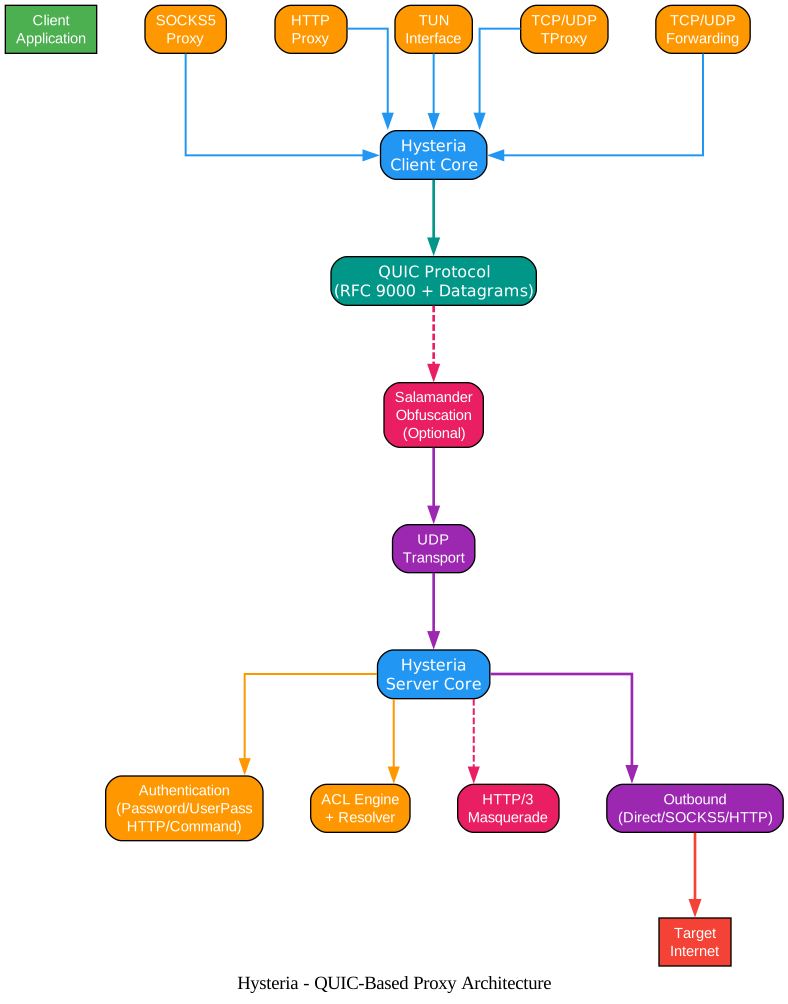
The architecture diagram above illustrates the complete Hysteria proxy system from client to server. On the client side, Hysteria supports five distinct proxy modes – SOCKS5, HTTP Proxy, TUN Interface, Linux TProxy, and TCP/UDP Forwarding – all feeding into the Hysteria Client Core. The client core communicates over the QUIC protocol, with an optional Salamander obfuscation layer that wraps QUIC packets before they hit the UDP transport.
On the server side, the Hysteria Server Core receives connections and routes them through several subsystems: the Authentication module validates client credentials (supporting password, user-pass, HTTP, and command-based auth), the ACL Engine with Resolver applies access control rules and DNS resolution, the HTTP/3 Masquerade module makes the server appear as a normal web server to unauthorized probers, and the Outbound module forwards traffic to the target internet via direct, SOCKS5, or HTTP connections. This layered design ensures that each component can be configured independently while maintaining a clean separation of concerns.
Key Features and Components

The features diagram above breaks down Hysteria’s capabilities into four major categories. The Blazing Fast Performance category includes Brutal congestion control for fixed-rate bandwidth, BBR for adaptive congestion control, configurable up/down bandwidth rates, and QUIC multiplexing with 0-RTT support. The Censorship Resistance category covers HTTP/3 traffic masquerading, Salamander obfuscation using BLAKE2b-256 hashing, SNI Guard with dns-san and strict modes, and UDP port hopping to evade port-based blocking. The Jack of All Trades category showcases the five proxy modes: SOCKS5, HTTP Proxy, TUN Interface, Linux TProxy, and TCP/UDP Forwarding. Finally, the Easy Integration category includes multiple authentication types, traffic statistics with access control, protocol sniffing, and Realm for NAT traversal.
| Feature | Description | Benefit |
|---|---|---|
| QUIC Protocol | Built on RFC 9000 with Unreliable Datagram Extension (RFC 9221) | Multiplexed streams without head-of-line blocking |
| Brutal Congestion Control | Fixed-rate bandwidth transmission | Predictable speeds on known-bandwidth links |
| BBR Congestion Control | Adaptive bandwidth detection | Optimal performance when bandwidth is unknown |
| HTTP/3 Masquerading | Server behaves as standard HTTP/3 web server | Extremely difficult for censors to detect |
| Salamander Obfuscation | BLAKE2b-256 XOR-based packet obfuscation | Additional layer of traffic obfuscation |
| UDP Port Hopping | Client hops across multiple UDP ports | Evades port-based blocking strategies |
| SNI Guard | dns-san or strict SNI validation modes | Prevents SNI-based detection |
| Realm | NAT traversal with STUN-based hole punching | Works behind NAT without port forwarding |
| Multiple Auth Types | Password, UserPass, HTTP, Command | Flexible integration into existing infrastructure |
| ACL Engine | Rule-based access control with GeoIP/GeoSite | Fine-grained traffic routing and filtering |
| Protocol Sniffing | Detects protocol from initial packets | Domain-based routing without SNI leaks |
| Traffic Stats | Real-time traffic monitoring API | Usage tracking and bandwidth management |
Amazing: Hysteria’s HTTP/3 masquerading is so effective that to any third party without proper authentication credentials – whether a middleman or an active prober – a Hysteria server behaves identically to a standard HTTP/3 web server. The encrypted traffic between client and server is indistinguishable from normal HTTP/3 traffic, making detection without widespread collateral damage virtually impossible.
Connection Establishment Workflow
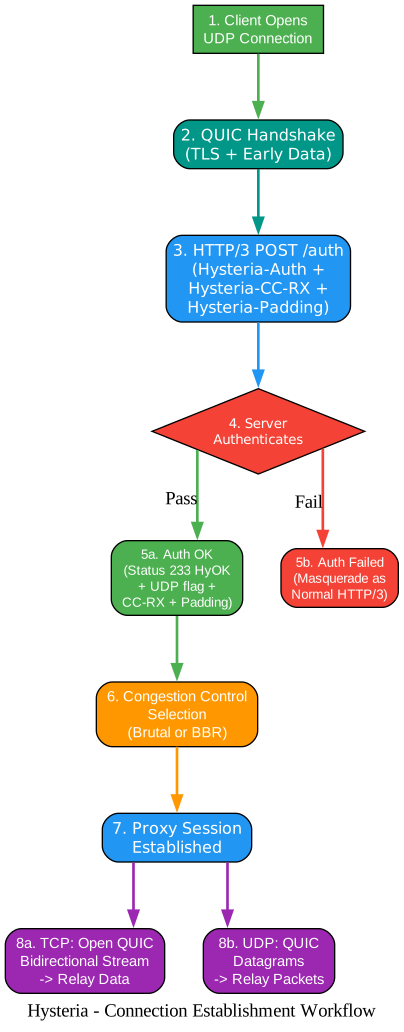
The workflow diagram above details the step-by-step process of establishing a Hysteria proxy connection. Step 1 begins with the client opening a UDP connection to the server. Step 2 performs the QUIC handshake, which includes TLS negotiation and optional early data (0-RTT). Step 3 is the critical authentication phase: the client sends an HTTP/3 POST request to the /auth endpoint with three custom headers – Hysteria-Auth (authentication credentials), Hysteria-CC-RX (the client’s maximum receive rate in bytes per second), and Hysteria-Padding (random padding to obfuscate request patterns).
Step 4 is the server’s authentication decision point. If authentication passes (Step 5a), the server responds with HTTP status code 233 (HyOK), along with headers indicating whether UDP relay is enabled, the server’s receive rate, and padding. If authentication fails (Step 5b), the server does not reveal itself as a Hysteria server – instead, it masquerades as a normal HTTP/3 web server, either serving actual content or acting as a reverse proxy. This is a crucial design decision: failed authentication attempts look identical to regular HTTP/3 traffic, preventing active probers from identifying Hysteria servers.
After successful authentication, Step 6 selects the congestion control algorithm based on the negotiated bandwidth values. If both client and server specify bandwidth rates, Brutal mode is used for fixed-rate transmission. If either side sends 0 or “auto”, BBR takes over for adaptive congestion control. Step 7 marks the proxy session as established, and Step 8 shows the two data relay paths: TCP connections use QUIC bidirectional streams (8a), while UDP packets use QUIC unreliable datagrams with session IDs and optional fragmentation (8b).
Protocol and Security Layers
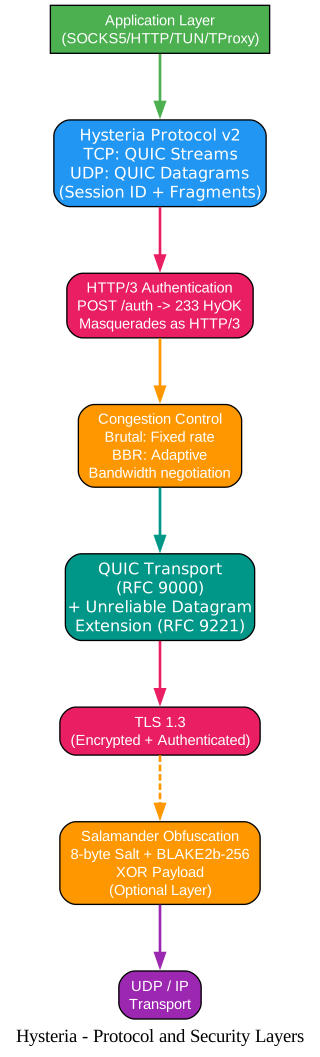
The protocol diagram above shows the complete protocol stack from application layer down to the UDP transport. At the top, the Application Layer handles SOCKS5, HTTP, TUN, and TProxy interfaces. Below that, the Hysteria Protocol v2 manages TCP relay via QUIC bidirectional streams and UDP relay via QUIC datagrams with session IDs and fragmentation support. The HTTP/3 Authentication layer handles the initial POST /auth handshake that masquerades as standard HTTP/3 traffic. The Congestion Control layer provides the bandwidth negotiation and rate control that makes Hysteria uniquely fast. The QUIC Transport layer implements RFC 9000 with the Unreliable Datagram Extension from RFC 9221. TLS 1.3 provides encryption and authentication for all QUIC connections. The optional Salamander Obfuscation layer adds an additional XOR-based obfuscation using BLAKE2b-256 hashing with random 8-byte salts. Finally, the UDP/IP transport carries all traffic.
Important: The Salamander obfuscation layer is optional and sits between TLS and UDP. When enabled, it calculates
BLAKE2b-256(key + salt)for each QUIC packet, then XORs the payload with the resulting hash. This makes the traffic pattern appear random even to deep packet inspection systems that might otherwise identify QUIC’s characteristic packet structures.
Installation
Hysteria provides pre-built binaries for all major platforms. Choose the method that best fits your environment.
Download Pre-built Binary
The fastest way to get started is to download the latest release from the GitHub Releases page:
# Linux/macOS - use the official install script
bash <(curl -fsSL https://get.hy2.sh/)

# Or manually download for your platform
# Linux amd64
curl -Lo hysteria https://github.com/apernet/hysteria/releases/latest/download/hysteria-linux-amd64
chmod +x hysteria

# macOS arm64
curl -Lo hysteria https://github.com/apernet/hysteria/releases/latest/download/hysteria-darwin-arm64
chmod +x hysteria
Build from Source
To build from source, you need Go 1.24 or later:
git clone https://github.com/apernet/hysteria.git
cd hysteria/app
go build -o hysteria .
Docker
Hysteria also provides an official Docker image:
docker pull tobyxdd/hysteria
Server Configuration
Create a YAML configuration file for the server. Below is a comprehensive example with the most commonly used options:
listen: :443

tls:
  cert: /path/to/your/cert.pem
  key: /path/to/your/key.pem

auth:
  type: password
  password: your-secure-password

masquerade:
  type: proxy
  proxy:
    url: https://news.ycombinator.com
    rewriteHost: true

bandwidth:
  up: 100 mbps
  down: 100 mbps
For automatic TLS certificate management with ACME (Let’s Encrypt or ZeroSSL):
listen: :443

acme:
  domains:
    - your-domain.com
  email: your-email@example.com

auth:
  type: password
  password: your-secure-password

masquerade:
  type: proxy
  proxy:
    url: https://news.ycombinator.com
    rewriteHost: true
Start the server:
./hysteria server -c config.yaml
Takeaway: The
masqueradeconfiguration is critical for censorship resistance. When an unauthenticated client or active prober connects, the server responds as a normal web server. Setting it toproxymode with a real website URL means the server will actually serve that website’s content to unauthorized visitors, making it indistinguishable from a legitimate web server. This is far more effective than simply returning a 404 error.
Client Configuration
Create a YAML configuration file for the client:
server: your-server.com:443

auth: your-secure-password

tls:
  sni: your-server.com

bandwidth:
  up: 50 mbps
  down: 100 mbps

socks5:
  listen: 127.0.0.1:1080

http:
  listen: 127.0.0.1:8080
Start the client:
./hysteria client -c config.yaml
Using URI Format
Hysteria supports a convenient URI format for sharing configuration:
hysteria2://your-secure-password@your-server.com:443?sni=your-server.com
If using Salamander obfuscation:
hysteria2://your-secure-password@your-server.com:443?obfs=salamander&obfs-password=obfs-secret&sni=your-server.com
TUN Mode (System-wide Proxy)
For system-wide proxying, use TUN mode (supported on Linux, macOS, Windows, and Android):
server: your-server.com:443

auth: your-secure-password

tls:
  sni: your-server.com

bandwidth:
  up: 50 mbps
  down: 100 mbps

tun:
  name: hysteria-tun
  mtu: 1500
  address:
    ipv4: 100.100.100.101/30
    ipv6: 2001::ffff:ffff:ffff:fff1/126
  route:
    strict: true
    ipv4:
      - 0.0.0.0/0
    ipv6:
      - ::/0
TCP/UDP Forwarding
For port forwarding without a local proxy server:
server: your-server.com:443

auth: your-secure-password

tls:
  sni: your-server.com

tcpForwarding:
  - listen: 127.0.0.1:8080
    remote: internal-service.local:80

udpForwarding:
  - listen: 127.0.0.1:5353
    remote: dns-server.local:53
    timeout: 60s
Salamander Obfuscation
To enable the optional Salamander obfuscation layer, add the obfs section to both server and client configurations:
Server:
listen: :443

obfs:
  type: salamander
  salamander:
    password: your-obfs-secret

# ... rest of server config
Client:
server: your-server.com:443

obfs:
  type: salamander
  salamander:
    password: your-obfs-secret

# ... rest of client config
The obfuscation password must match on both sides. Salamander uses BLAKE2b-256 hashing with random 8-byte salts per packet, making the obfuscated traffic appear as random data to network inspection systems.
Authentication Types
Hysteria supports four authentication methods, providing flexibility for different deployment scenarios:
| Type | Configuration | Use Case |
|---|---|---|
password | Single shared password | Simple personal use |
userpass | Username-password pairs | Multi-user deployments |
http | HTTP API endpoint | Integration with external auth systems |
command | Shell command execution | Custom authentication logic |
UserPass example:
auth:
  type: userpass
  userpass:
    user1: pass1
    user2: pass2
HTTP auth example:
auth:
  type: http
  http:
    url: https://auth.example.com/check
    insecure: false
Command auth example:
auth:
  type: command
  command: "/path/to/auth-script $AUTH"
Access Control Lists (ACL)
Hysteria includes a powerful ACL engine that supports both inline rules and external rule files, with GeoIP and GeoSite database integration:
acl:
  file: /path/to/acl.rules
  geoip: /path/to/geoip.dat
  geosite: /path/to/geosite.dat
  geoUpdateInterval: 168h
Example inline ACL rules:
acl:
  inline:
    - direct(all, udp/443)     # Direct for QUIC
    - proxy(geosite:google)     # Proxy Google
    - block(geoip:cn)           # Block China IPs
Troubleshooting
Connection Refused or Timeout
- Verify the server is running and listening on the correct port (default: 443)
- Check firewall rules allow UDP traffic on the configured port
- Ensure the server address in the client config matches the server’s actual address
- If using ACME, verify DNS records point to the server
Authentication Failed
- Confirm the password or credentials match between client and server
- Check the auth type is correctly configured (password vs userpass vs http vs command)
- For HTTP auth, verify the external auth endpoint is reachable from the server
Slow Speeds
- Verify bandwidth settings are appropriate for your actual connection
- Try switching congestion control: set
ignoreClientBandwidth: trueon the server to force BBR - Check for packet loss on the network path – Hysteria’s Brutal mode assumes stable bandwidth
- Consider using UDP port hopping if your ISP throttles single-port UDP traffic
Certificate Errors
- For self-signed certificates, add
insecure: trueto the client TLS config (not recommended for production) - For ACME, ensure port 80 or 443 is accessible for the challenge
- Verify the SNI matches the certificate’s domain
Salamander Obfuscation Not Working
- Ensure the obfuscation password matches exactly on both client and server
- Verify
obfs.typeis set tosalamanderon both sides - Check that no intermediate network device is stripping or modifying UDP packets
UDP Relay Not Working
- By default, UDP relay is enabled. If disabled, check
disableUDP: truein server config - Some networks block UDP traffic entirely – try a different network to confirm
- UDP packets exceeding QUIC’s maximum datagram size are automatically fragmented by Hysteria
Conclusion
Hysteria represents a significant leap forward in proxy technology. By building on QUIC instead of TCP, it eliminates head-of-line blocking and enables true multiplexing of concurrent streams. Its unique Brutal congestion control algorithm allows users to saturate their available bandwidth without the slow ramp-up of traditional congestion controllers. The HTTP/3 masquerading and optional Salamander obfuscation make it exceptionally resistant to detection and blocking by censorship systems. With support for five proxy modes, four authentication types, ACL-based access control, and Realm for NAT traversal, Hysteria is not just fast – it is a complete, production-ready proxy solution.
The project’s modular Go workspace architecture (core, app, extras) makes it easy to extend and integrate into larger systems. Whether you need a simple SOCKS5 proxy for personal use or a full-featured censorship-resistant tunnel with traffic management, Hysteria delivers. With 20,000+ stars and active development by Aperture Internet Laboratory, it is one of the most promising open-source networking tools available today.
For complete documentation, visit the official Hysteria documentation. The source code is available on GitHub. Enjoyed this post? Never miss out on future posts by following us 


