Solar Map: Interactive Sunshine Intensity Map and Solar Panel Optimizer
The Solar Map is an interactive web application available on PyShine that combines real-time sun position tracking with solar panel energy estimation. Built with Leaflet.js and SunCalc, it provides a comprehensive tool for anyone interested in solar energy - from homeowners considering rooftop panels to solar professionals optimizing large-scale installations. Access it live at https://pyshine.com/solar-map/.
What Is the Solar Map?
The Solar Map is a browser-based application that overlays solar irradiance data on an interactive map. Users can click any location on the globe to instantly see sun altitude, azimuth, irradiance values, and optimal solar panel configurations. The app calculates real-time energy output estimates based on panel specifications, tilt angles, and azimuth orientations.
Key Insight: The Solar Map uses the SunCalc library for astronomical sun position calculations combined with the Kasten-Young air mass model for atmospheric transmittance, providing irradiance estimates accurate to within 5-10% of measured values at clear-sky conditions.
Architecture and Technology Stack
The application is built as a single-page web app with no backend server required. All calculations run client-side in the browser, making it fast, private, and available offline once loaded.
Core Technologies
| Technology | Version | Purpose |
|---|---|---|
| Leaflet.js | 1.9.4 | Interactive map rendering |
| SunCalc | 1.9.0 | Sun position and solar event calculations |
| Bootstrap | 5.3.0 | Responsive UI framework |
| Font Awesome | 6.4.0 | Icon library |
| OpenStreetMap | - | Map tile provider |
Data Flow Architecture
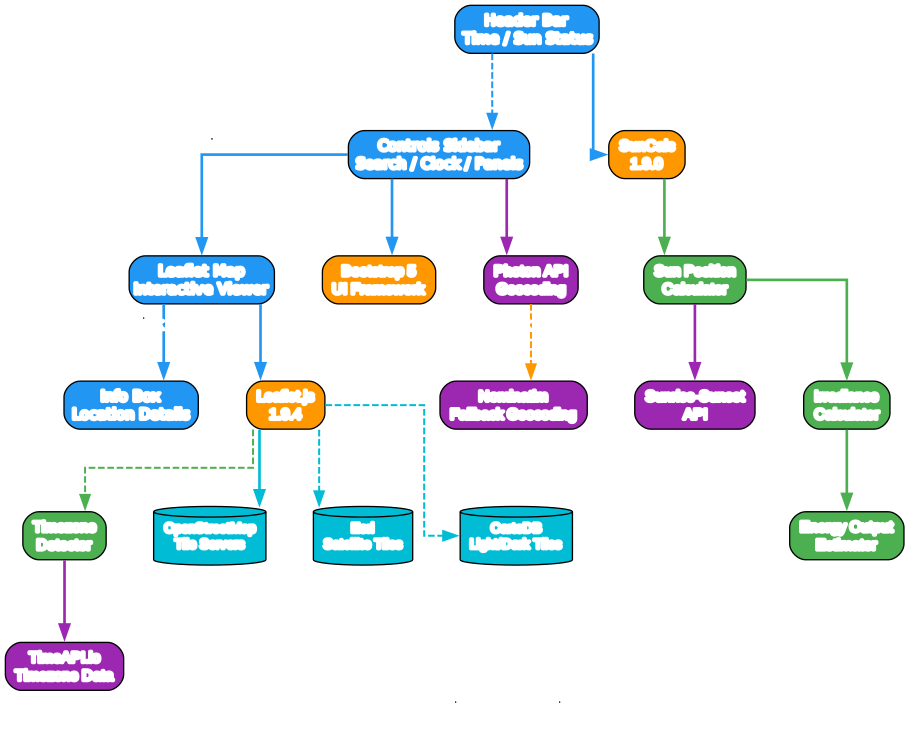
The architecture diagram above illustrates how the application layers interact. The UI layer consists of four main components: the header bar showing current time and sun status, the controls sidebar with all configuration options, the Leaflet map viewer, and the info box overlay.
The library layer bridges the UI to the calculation engine. Leaflet.js handles all map interactions including tile loading, markers, and polygon overlays. SunCalc provides astronomical calculations for sun position at any given time and location. Bootstrap provides the responsive grid layout and form controls.
The calculation engine is the heart of the application. It processes sun position data through the irradiance calculator and then feeds results into the energy output estimator. The timezone detector ensures all calculations use local time, with fallback support for over 20 timezone regions including special cases like Nepal (UTC+5:45) and Myanmar (UTC+6:30).
API Integration
The app uses several external APIs with automatic fallback chains:
- Photon API (primary) - Geocoding search with excellent CORS support
- Nominatim (fallback) - OpenStreetMap geocoding when Photon is unavailable
- Sunrise-Sunset API - Precise sunrise/sunset times for any location
- TimeAPI.io (primary) - Timezone detection from coordinates
- WorldTimeAPI (fallback) - Alternative timezone resolution
Takeaway: The multi-API fallback design ensures the app remains functional even when individual services experience downtime. If all APIs fail, a comprehensive manual timezone detection algorithm covers major regions worldwide.
Key Features

Understanding the Feature Categories
The Solar Map organizes its capabilities into five major feature categories, each addressing a different aspect of solar energy planning.
Map Visualization provides six tile providers with automatic fallback. The primary OpenStreetMap HOT tiles offer humanitarian-style mapping, while alternatives include standard OSM, CartoDB Light and Dark themes, Esri Satellite imagery, and Esri Topographic maps. If the primary tile provider fails, the app automatically switches to the next available provider after detecting 5 consecutive tile errors.
Sun Tracking delivers real-time sun position data including altitude (elevation angle above horizon), azimuth (compass direction), and irradiance (W/m2). The sun path overlay draws the complete daily arc of the sun across the sky, and daylight hours are calculated for any date and location.
Solar Panel Optimizer allows users to configure panel dimensions, grid layout (up to 80x80), wattage, and system efficiency. The tilt and azimuth sliders provide intuitive control with automatic optimal angle calculation based on latitude. The panel grid visualization draws actual panel rectangles on the map, rotated to match the configured azimuth angle.
Energy Estimation calculates current power output in kW, daily energy in kWh, monthly estimates, and annual energy production. These calculations use the full solar irradiance model accounting for air mass, atmospheric transmittance, panel tilt, and azimuth orientation.
Location Services supports three input methods: text search with geocoding, GPS geolocation via browser API, and direct coordinate input. The search uses Photon API with Nominatim fallback for maximum reliability.
How to Use the Solar Map
Step 1: Open the Application
Navigate to https://pyshine.com/solar-map/ in any modern web browser. The app loads with a default view of San Francisco and automatically attempts to detect your location via GPS.
Step 2: Select a Location
You have three ways to select a location:
-
Click on the map - With “Precise Location Mode” enabled (default), click anywhere on the map to place a marker and see detailed solar data for that point.
-
Search by name - Type a city, address, or landmark in the search box and select from the results. The map will zoom to that location.
-
Use GPS - Click the crosshairs button to use your device’s GPS to automatically center the map on your current location.
Step 3: Configure Time and Date
Use the circular clock slider to set the time of day, or use the quick action buttons:
- Solar Noon - Jump to when the sun is highest
- Sunrise - Jump to sunrise time for the selected date
- Sunset - Jump to sunset time for the selected date
- Current Time - Set to right now
The date picker allows you to select any date to see how solar conditions change throughout the year.
Step 4: Configure Solar Panels
In the “Solar Panel Setup” section, configure your panel array:
Panel Width:    1.7 m (typical residential panel)
Panel Height:   1.0 m
Grid Rows:      4
Grid Columns:   5
Wattage:        400 Wp (watt-peak per panel)
Efficiency:     85% (accounts for inverter and wiring losses)
Tilt Angle:     Auto-calculated based on latitude
Azimuth:        180 degrees (South-facing in Northern Hemisphere)
The tilt angle auto-adjusts to match your latitude when you click a new location. The azimuth defaults to 180 degrees (South) for Northern Hemisphere locations and 0 degrees (North) for Southern Hemisphere.
Step 5: Review Energy Estimates
The “Energy Output” section displays:
- Current Power - Real-time power output in kW based on current sun position
- Today’s Energy - Estimated daily energy production in kWh
- Monthly Estimate - Average monthly energy production
- Annual Estimate - Total yearly energy production
Important: The energy calculation uses the formula: Power = Rated Wattage x (Irradiance / 1000) x System Efficiency, where Irradiance is derived from the solar constant (1367 W/m2) adjusted for atmospheric transmittance using the Kasten-Young air mass model.
User Interaction Workflow
Understanding the Workflow
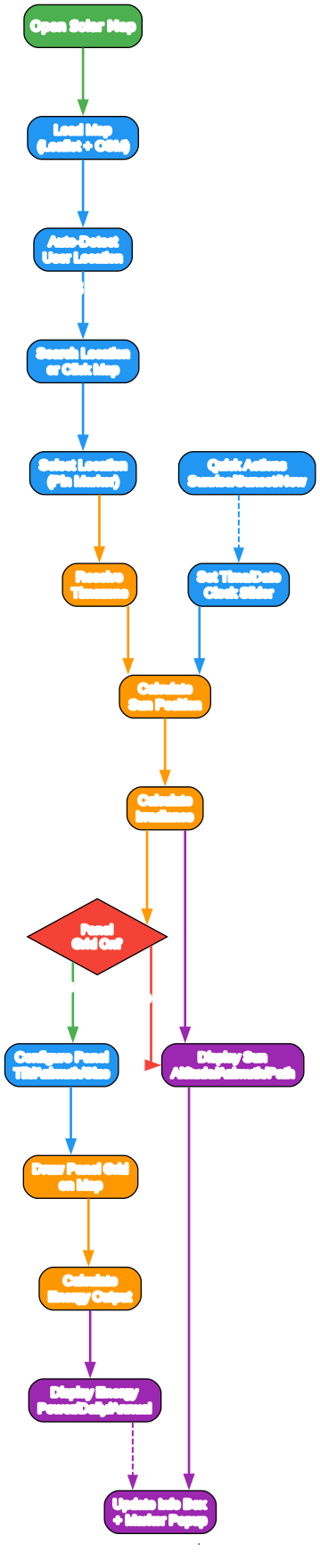
The workflow diagram above shows the complete user interaction flow from opening the app to viewing results.
Starting Up: When you open the Solar Map, it loads the Leaflet map with OpenStreetMap tiles and automatically attempts to detect your location via the browser’s Geolocation API. If location permission is granted, the map centers on your position and immediately begins calculating solar data.
Location Selection: You can search for a location by name, enter coordinates directly, or click on the map. Each method places a marker and triggers the timezone detection and solar calculation pipeline. The Photon geocoding service is tried first, with Nominatim as a fallback.
Time Configuration: The circular clock slider provides an intuitive way to set the time of day. Quick action buttons let you jump to sunrise, sunset, solar noon, or the current time. The date picker allows selecting any date for seasonal analysis.
Calculation Pipeline: When a location and time are set, the app resolves the timezone (using API calls with manual fallback), calculates the sun position using SunCalc, computes irradiance based on altitude and air mass, and then - if the panel grid is enabled - draws the panel visualization and calculates energy output.
Output Display: Results appear in multiple places: the sidebar shows numerical values, the info box overlay shows detailed location data, the map displays the sun direction line and panel grid, and marker popups show a summary at the selected point.
Solar Irradiance Calculation Model
The app uses a well-established clear-sky irradiance model:
Solar Constant: 1367 W/m2 (at top of atmosphere)
Air Mass: AM = 1 / (sin(altitude) + 0.50572 x (96.07995 - altitude)^-1.6364)
Atmospheric Transmittance: T = 0.7^(AM^0.678)
Direct Normal Irradiance: DNI = 1367 x T x sin(altitude)
Diffuse Irradiance: Diffuse = DNI x 0.1
Total Irradiance: GHI = DNI + Diffuse
This model accounts for the path length of sunlight through the atmosphere (air mass) and the resulting attenuation. At solar noon with clear skies, typical irradiance values range from 800-1000 W/m2 depending on latitude and season.
Panel Configuration and Energy Estimation
The energy estimation model considers several factors:
Effective Irradiance = GHI x cos(angle_of_incidence)
Power = Total_Rated_W x (Effective_Irradiance / 1000) x System_Efficiency
Daily Energy = Sum of Power x time_interval over daylight hours
Annual Energy = Sum of Daily Energy over 365 days
The angle of incidence calculation accounts for both panel tilt and azimuth orientation relative to the sun’s position. This means the app correctly handles panels facing any direction, not just south-facing installations.
Amazing: The annual energy calculation iterates through all 365 days of the year with 15-minute intervals during daylight hours, computing over 17,000 individual sun position calculations to produce a single annual estimate.
Mobile Responsive Design
The Solar Map is fully responsive and works on mobile devices:
- Sidebar collapses into a slide-out drawer on screens narrower than 768px
- Floating toggle button appears at the bottom-left for easy access
- Touch-friendly controls including the clock slider which supports both mouse and touch drag
- Adaptive text with light-colored text and backdrop blur for readability on small screens
- Info box hides on mobile to maximize map viewing area
Technical Implementation Details
Timezone Handling
The app implements a sophisticated timezone detection system with three layers:
- TimeAPI.io - Primary API for timezone lookup from coordinates
- WorldTimeAPI - Fallback API when TimeAPI.io is unavailable
- Manual Detection - Comprehensive algorithm covering 20+ regions including special UTC offsets like Nepal (+5:45), Myanmar (+6:30), and Afghanistan (+4:30)
The manual fallback handles DST transitions for the US, Canada, Europe, and Australia, ensuring accurate local time calculations even when APIs are unreachable.
Map Tile Fallback Chain
The tile loading system implements automatic fallback with error counting:
// Tile providers in priority order
const tileProviders = [
    { name: 'OpenStreetMap HOT', url: '...' },    // Primary
    { name: 'OpenStreetMap', url: '...' },         // Fallback 1
    { name: 'CartoDB Light', url: '...' },          // Fallback 2
    { name: 'Esri Satellite', url: '...' }          // Fallback 3
];

// Auto-switch after 5 consecutive tile errors
layer.on('tileerror', function(error) {
    tileErrorCount++;
    if (tileErrorCount >= MAX_TILE_ERRORS) {
        switchToFallback(currentProviderIndex + 1);
    }
});
Panel Grid Visualization
The solar panel grid is drawn as rotated rectangles on the map using Leaflet polygons. Each panel’s position is calculated using geographic coordinate math:
// Convert panel dimensions from meters to degrees
const metersPerDegreeLat = 111320;
const metersPerDegreeLon = 111320 * Math.cos(lat * Math.PI / 180);

// Apply azimuth rotation to panel positions
const rotatedOffsetEW = offsetEW * Math.cos(azimuthRad) - offsetNS * Math.sin(azimuthRad);
const rotatedOffsetNS = offsetEW * Math.sin(azimuthRad) + offsetNS * Math.cos(azimuthRad);
This ensures panels are correctly positioned and oriented on the map regardless of the viewing latitude.
Try It Yourself
The Solar Map is available right now at no cost:
Live App: https://pyshine.com/solar-map/
No installation, signup, or API keys required. Simply open the URL in your browser and start exploring solar potential anywhere in the world.
Links
- Solar Map App: https://pyshine.com/solar-map/
- PyShine Website: https://pyshine.com/
- Leaflet.js: https://leafletjs.com/
- SunCalc: https://github.com/mourner/suncalc
- OpenStreetMap: https://www.openstreetmap.org/

Enjoyed this post? Never miss out on future posts by following us