Bun: The Fast JavaScript Runtime, Bundler, Test Runner, and Package Manager
Bun is an all-in-one JavaScript and TypeScript toolkit that ships as a single executable, designed as a drop-in replacement for Node.js. Built in Zig and powered by JavaScriptCore (the engine behind Safari), Bun delivers dramatically faster startup times, lower memory usage, and a unified developer experience that replaces the fragmented Node.js toolchain of runtime, bundler, test runner, and package manager with one cohesive tool.
Key Insight: Bun’s runtime is written in Zig and powered by JavaScriptCore, the same engine that drives Safari. This combination delivers approximately 4x faster startup times compared to Node.js’s V8-based architecture, while maintaining full Node.js API compatibility.
What is Bun?
Bun is not just another JavaScript runtime. It is a complete toolkit that consolidates four essential development tools into a single binary:
| Tool | Bun Command | Replaces |
|---|---|---|
| Runtime | bun run index.ts | node index.js |
| Package Manager | bun install | npm install / yarn / pnpm |
| Test Runner | bun test | jest / vitest |
| Bundler | Bun.build() | esbuild / webpack / rollup |
Instead of managing 1,000+ node_modules for development tooling, you only need bun. The built-in tools are significantly faster than existing options and usable in existing Node.js projects with little to no changes.
Understanding the Architecture
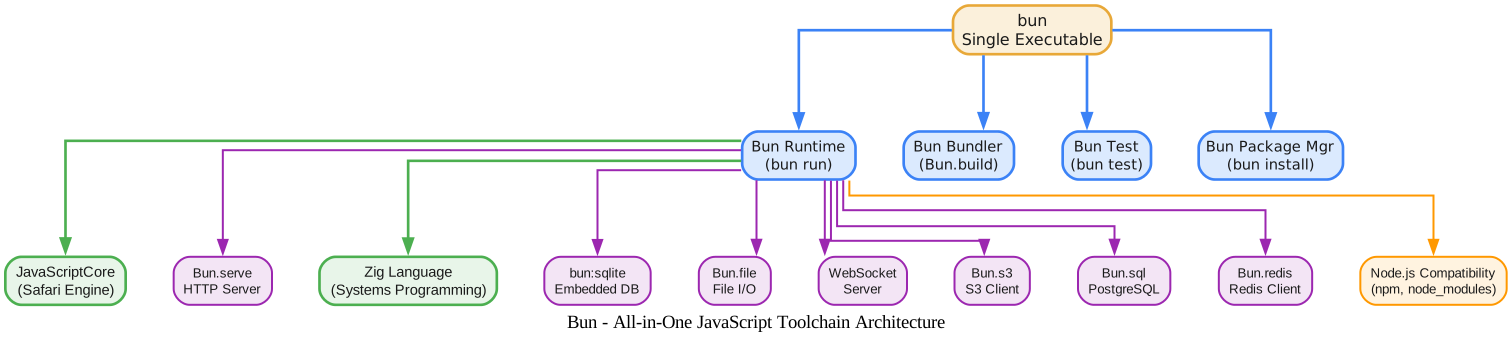
The architecture diagram above illustrates Bun’s all-in-one toolchain design. Let’s break down each layer:
Core: Single Executable
At the center is the bun binary itself. Unlike Node.js which requires separate tools for each concern (node for runtime, npm for packages, jest for testing, webpack for bundling), Bun consolidates everything into one executable. This eliminates version conflicts between tools and reduces installation complexity.
Tool Layer: Four-in-One
The four primary tools - Runtime, Bundler, Test Runner, and Package Manager - all share the same underlying infrastructure. This means the package manager understands the bundler’s module resolution, the test runner uses the same transpiler as the runtime, and the bundler leverages the same resolver as the package manager. This deep integration is impossible when tools are developed independently.
Engine Layer: Zig + JavaScriptCore
Bun’s runtime is written in Zig, a systems programming language that provides low-level control similar to C but with modern safety features. The JavaScript engine is JavaScriptCore (JSC), Apple’s production-grade engine that powers Safari. JSC was chosen over V8 for two key reasons: it has a faster startup time, and its bytecode compilation pipeline is more memory-efficient.
Built-in APIs
Bun ships with a rich set of built-in APIs that eliminate the need for many third-party packages: Bun.serve for HTTP servers, bun:sqlite for embedded database access, Bun.file for file I/O, WebSocket support, Bun.s3 for S3 client operations, Bun.sql for PostgreSQL, and Bun.redis for Redis. These APIs are implemented natively in Zig, making them significantly faster than their JavaScript-based counterparts.
Node.js Compatibility
Bun maintains extensive Node.js compatibility, supporting npm packages, node_modules, and the vast majority of Node.js APIs. This means most existing Node.js projects can switch to Bun with zero code changes.
Performance: Why Bun is Fast
Understanding the Performance Comparison
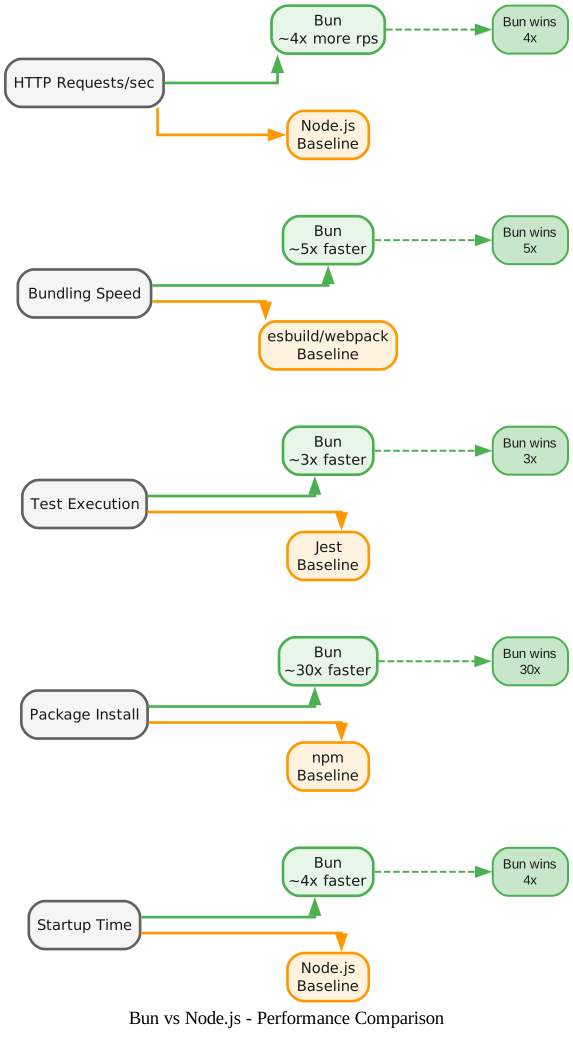
The performance diagram above shows Bun’s speed advantages across five critical dimensions. Here is a detailed breakdown:
Startup Time: ~4x Faster
Bun starts approximately 4x faster than Node.js. This is primarily due to JavaScriptCore’s faster initialization and Zig’s minimal runtime overhead. For serverless functions and CLI tools where cold start matters, this translates to noticeably snappier responses. The difference comes from JSC’s optimized bytecode cache and Bun’s lazy initialization strategy - it only loads what you actually use.
Package Install: ~30x Faster
Bun’s package manager (bun install) is roughly 30x faster than npm install. This dramatic speedup comes from three architectural decisions: a global module cache that avoids re-downloading packages already installed elsewhere on the system, hardlinking instead of copying files from the cache to node_modules, and a lockfile format (bun.lockb) that uses a binary format for faster parsing. The package manager also uses a multi-threaded resolver that can resolve dependencies in parallel.
Test Execution: ~3x Faster
bun test runs approximately 3x faster than Jest. The speedup comes from Bun’s built-in transpiler (no need for Babel or ts-jest), JavaScriptCore’s faster execution for test code, and Bun’s ability to run tests in parallel using Workers. The test runner also supports Jest-compatible APIs, making migration straightforward.
Bundling Speed: ~5x Faster
Bun’s bundler (Bun.build()) is approximately 5x faster than webpack and competitive with esbuild. The speed advantage comes from using the same parser and resolver as the runtime, avoiding serialization/deserialization overhead between tools. The bundler supports code splitting, tree shaking, minification, and can produce single-file executables.
HTTP Requests/sec: ~4x More
Bun’s HTTP server (Bun.serve) handles approximately 4x more requests per second than Node.js’s http module. This comes from using uWebSockets.js as the underlying HTTP server, which is written in C++ and uses efficient event-driven I/O. Bun also supports HTTP/2 and automatic compression.
Amazing: Bun’s package manager installs dependencies approximately 30x faster than npm by using a global module cache with hardlinking, a binary lockfile format, and multi-threaded dependency resolution. A typical React project that takes 30 seconds with npm installs in under 1 second with Bun.
Installation
Bun supports Linux (x64 and arm64), macOS (x64 and Apple Silicon), and Windows (x64 and arm64).
Linux and macOS:
# With install script (recommended)
curl -fsSL https://bun.com/install | bash
Windows:
powershell -c "irm bun.sh/install.ps1 | iex"
Alternative methods:
# With npm
npm install -g bun

# With Homebrew (macOS)
brew tap oven-sh/bun
brew install bun

# With Docker
docker pull oven/bun
docker run --rm --init --ulimit memlock=-1:-1 oven/bun
Upgrade to the latest version:
bun upgrade
Bun also releases a canary build on every commit to main, which you can install with:
bun upgrade --canary
Getting Started
Initialize a New Project
bun init
This creates a package.json and tsconfig.json with sensible defaults. TypeScript is supported out of the box - no configuration needed.
Run TypeScript Directly
bun run index.tsx
Bun transpiles TypeScript and JSX on the fly. There is no separate build step, no tsc invocation, and no Babel configuration. It just works.
Install Dependencies
bun install
This reads your package.json and installs dependencies into node_modules, creating a bun.lockb binary lockfile. The install process uses a global cache, so packages are only downloaded once across all your projects.
Run Tests
bun test
Bun’s test runner uses Jest-compatible APIs (describe, test, expect), making migration from Jest straightforward. It supports lifecycle hooks, mocks, snapshots, DOM testing with happy-dom, and code coverage.
Build for Production
const result = await Bun.build({
  entrypoints: ['./src/index.tsx'],
  outdir: './dist',
  minify: true,
  splitting: true,
});
The bundler produces optimized bundles with tree shaking, code splitting, and minification. It can also generate single-file executables that bundle your application and the Bun runtime together.
Built-in APIs
Bun includes a comprehensive set of built-in APIs that replace many common npm packages:
| API | Description | Replaces |
|---|---|---|
Bun.serve() | HTTP server with routing | express, fastify |
bun:sqlite | Embedded SQLite database | better-sqlite3 |
Bun.file() | File I/O with lazy reading | fs promisified |
Bun.s3 | S3 client | @aws-sdk/client-s3 |
Bun.sql | PostgreSQL client | pg, postgres |
Bun.redis | Redis client | ioredis |
Bun.cron() | Cron job scheduler | node-cron |
Bun.Glob | File glob matching | glob, fast-glob |
Bun.color | Color parsing and conversion | color |
Bun.hash | Hashing algorithms | crypto subset |
Bun.Cookie | Cookie parsing | cookie |
Bun.YAML | YAML parsing | yaml, js-yaml |
Bun.TOML | TOML parsing | smol-toml |
Bun.semver | Semantic versioning | semver |
Takeaway: With built-in APIs for HTTP serving, SQLite, PostgreSQL, Redis, S3, file I/O, cron scheduling, and more, Bun eliminates the need for dozens of common npm packages. This reduces
node_modulessize, improves security by reducing the attack surface, and simplifies dependency management.
HTTP Server Example
const server = Bun.serve({
  port: 3000,
  fetch(req) {
    const url = new URL(req.url);
    if (url.pathname === "/") {
      return new Response("Hello from Bun!");
    }
    if (url.pathname === "/json") {
      return Response.json({ message: "Hello", timestamp: Date.now() });
    }
    return new Response("Not Found", { status: 404 });
  },
});

console.log(`Server running at http://localhost:${server.port}`);
SQLite Example
import { Database } from "bun:sqlite";

const db = new Database(":memory:");
db.run("CREATE TABLE users (id INTEGER PRIMARY KEY, name TEXT)");
db.run("INSERT INTO users (name) VALUES (?)", "Alice");

const users = db.query("SELECT * FROM users").all();
console.log(users); // [{ id: 1, name: "Alice" }]
File I/O Example
const file = Bun.file("./data.json");
const content = await file.json();
console.log(content);
Developer Workflow

Understanding the Developer Workflow
The workflow diagram above shows the typical development cycle with Bun. Let’s walk through each step:
1. Initialize Project
Running bun init creates a new project with package.json and tsconfig.json. Bun provides sensible defaults for TypeScript configuration, so you can start writing .ts files immediately without any setup.
2. Install Dependencies
bun install reads your package.json and installs packages using the global module cache. The first install downloads packages; subsequent installs across different projects hardlink from the cache, making them nearly instantaneous. The binary lockfile (bun.lockb) ensures deterministic installs.
3. Develop Code
bun run --watch dev.ts starts your development server with hot module replacement. Bun’s watch mode monitors file changes and automatically reloads affected modules without restarting the entire process. TypeScript and JSX are transpiled on the fly.
4. Run Tests
bun test discovers and runs test files matching *.test.* or *_test.* patterns. The test runner uses Jest-compatible APIs, so existing test suites often work without modification. If tests fail, the feedback loop sends you back to step 3 to fix code.
5. Build for Production
Bun.build() produces optimized bundles with tree shaking, code splitting, and minification. You can also create single-file executables that bundle your application with the Bun runtime, making deployment as simple as copying a single binary.
6. Deploy
Deploy with bun run server.ts for a production HTTP server, or use the Docker image oven/bun for containerized deployments. Bun supports deployment to Vercel, Railway, Render, AWS Lambda, DigitalOcean, and Google Cloud Run.
Important: Bun’s watch mode (
bun run --watch) provides hot module replacement that only reloads the changed modules, not the entire process. Combined with Bun’s 4x faster startup, this means development iteration cycles are dramatically faster than the traditional Node.js workflow.
Node.js Compatibility
Bun is designed as a drop-in replacement for Node.js. It supports:
- npm packages - Install and use any npm package
- node_modules - Standard Node.js module resolution
- Node.js APIs -
fs,path,http,crypto,stream,buffer,child_process,net,os,util, and many more - Node-API - Native C++ addons that use the Node-API interface
- CommonJS and ESM - Both module systems are supported simultaneously
Most existing Node.js projects can switch to Bun by simply replacing node with bun in their scripts. The package manager is compatible with package.json, and the test runner supports Jest-compatible APIs.
Bun’s Technology Stack
Bun’s architecture is built on a hybrid Zig + Rust foundation:
| Component | Language | Purpose |
|---|---|---|
| Runtime core | Zig | JavaScript execution, event loop, built-in APIs |
| JavaScript engine | C++ (JavaScriptCore) | JS parsing, bytecode compilation, execution |
| Package manager | Zig | Dependency resolution, installation, lockfile |
| Bundler | Zig | Module bundling, tree shaking, code splitting |
| Test runner | Zig | Test discovery, execution, reporting |
| Transpiler | Zig | TypeScript/JSX transformation |
| Various sys crates | Rust | Low-level system bindings (SSL, DNS, HTTP parsing) |
The Cargo.toml workspace contains over 80 Rust crates that provide system-level bindings for components like BoringSSL (TLS), c-ares (DNS), picohttp (HTTP parsing), libarchive, and more. The core runtime and developer-facing tools are written in Zig, while Rust handles the lower-level system integration.
Features Summary
| Feature | Description |
|---|---|
| TypeScript support | Run .ts and .tsx files directly, no build step |
| JSX support | React JSX transpiled on the fly |
| Hot module replacement | Watch mode with incremental reloading |
| Single-file executables | Bundle app + runtime into one binary |
| Global module cache | Packages installed once, hardlinked everywhere |
| Binary lockfile | bun.lockb for fast, deterministic installs |
| Jest-compatible testing | describe, test, expect APIs |
| Built-in bundler | Bun.build() with tree shaking and minification |
| Built-in HTTP server | Bun.serve() with routing and WebSocket support |
| Embedded SQLite | bun:sqlite for local database operations |
| PostgreSQL client | Bun.sql for PostgreSQL connections |
| Redis client | Bun.redis for Redis operations |
| S3 client | Bun.s3 for Amazon S3 operations |
| Cron scheduler | Bun.cron() for scheduled tasks |
| Shell scripting | $ template literal for shell commands |
| Web APIs | fetch, WebSocket, ReadableStream, Blob |
| Node.js APIs | fs, path, http, crypto, stream, etc. |
| Plugins | Extend Bun with custom loaders and resolvers |
| Debugger | Chrome DevTools Protocol support |
| REPL | Interactive JavaScript/TypeScript REPL |
Troubleshooting
“Illegal instruction” error on x64:
This typically means your CPU does not support AVX2 instructions. Check Bun’s CPU requirements and try the baseline build.
Linux kernel version:
Kernel version 5.6 or higher is strongly recommended. The minimum supported version is 5.1.
Package compatibility issues:
Some npm packages that rely on V8-specific APIs may not work with Bun’s JavaScriptCore engine. Check the compatibility list in Bun’s documentation.
Windows support:
Bun supports Windows x64 and arm64. If you encounter issues, make sure you are using the latest version (bun upgrade).
Conclusion
Bun represents a fundamental shift in JavaScript development tooling. By consolidating runtime, package manager, test runner, and bundler into a single executable built with Zig and JavaScriptCore, it delivers dramatic performance improvements while maintaining Node.js compatibility. With 90,000+ GitHub stars and rapid growth, Bun is becoming the go-to choice for developers who want faster builds, quicker tests, and a simpler toolchain. Whether you are starting a new project or migrating an existing Node.js application, Bun’s drop-in compatibility and all-in-one design make the transition straightforward.
Links
- GitHub Repository: https://github.com/oven-sh/bun
- Official Documentation: https://bun.com/docs
- Installation Guide: https://bun.com/docs/installation
- Quickstart: https://bun.com/docs/quickstart

Enjoyed this post? Never miss out on future posts by following us


