Symphony: OpenAI’s Coding Agent Orchestrator for Autonomous Work
OpenAI’s Symphony is a specification-first, language-agnostic orchestration service that turns project work into isolated, autonomous implementation runs for coding agents. Rather than having engineers supervise individual coding agent sessions, Symphony manages the entire lifecycle from issue detection through workspace creation, agent execution, and result verification. Built on the principles of harness engineering, it shifts the operational model from managing agents to managing work that needs to get done, enabling teams to operate at a higher level of abstraction while coding agents handle the implementation details.
The project has garnered over 22,000 stars on GitHub and provides both a detailed specification (SPEC.md) and a reference Elixir/OTP implementation. The specification defines every component, state transition, and contract needed to build a conforming orchestrator in any language, while the Elixir implementation demonstrates these concepts with production-quality code including hot code reloading, process supervision, and a Phoenix LiveView dashboard.
The Harness Engineering Paradigm
Symphony builds on OpenAI’s concept of harness engineering, which advocates for preparing codebases and environments so that coding agents can work effectively without constant human supervision. The key insight is that most operational friction comes not from the agents themselves, but from the surrounding infrastructure: how work is identified, how workspaces are prepared, how prompts are constructed, and how results are verified.
Key Insight: Symphony shifts the operational model from “managing coding agents” to “managing work that needs to get done.” This means engineers define what needs to happen through WORKFLOW.md configuration, and the orchestrator handles the rest: polling for new issues, creating isolated workspaces, launching agents, and recovering from failures.
In a traditional workflow, an engineer manually identifies a task, opens a coding agent session, provides context, reviews the output, and iterates. With Symphony, the engineer defines the workflow policy once in WORKFLOW.md, and the service continuously polls the issue tracker, dispatches agents for eligible work, and manages the entire execution lifecycle including retries, reconciliation, and cleanup.
6-Layer Architecture
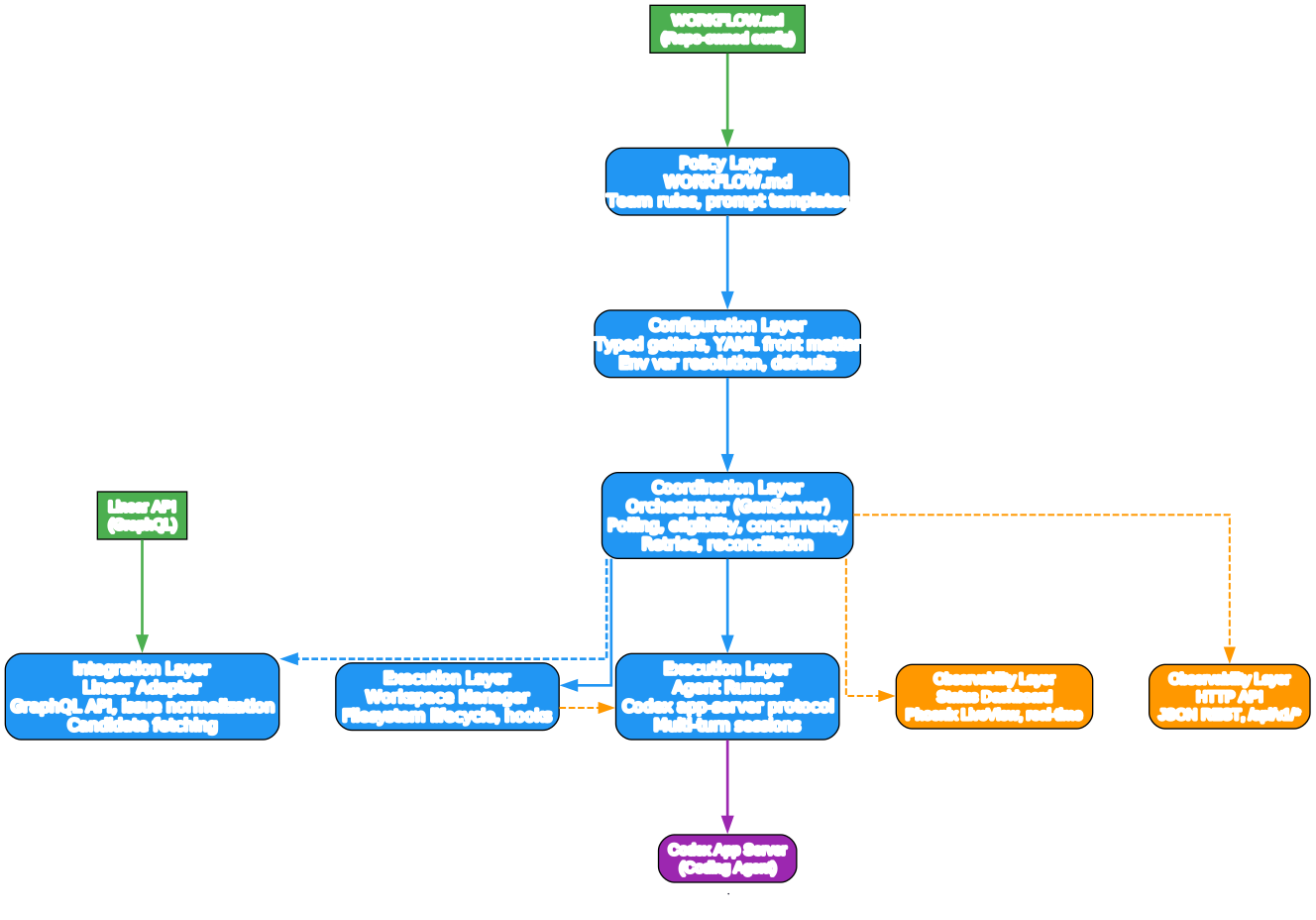
Understanding the Symphony Architecture
The architecture diagram above illustrates Symphony’s six distinct layers, each with clearly defined responsibilities and contracts. This layered design enables portability across programming languages and runtime environments while maintaining a consistent orchestration model.
Layer 1: Policy Layer (WORKFLOW.md)
The Policy Layer is the repository-owned configuration that defines how Symphony should behave for a specific project. It consists of a WORKFLOW.md file that combines YAML front matter for runtime settings with a Markdown body that serves as the prompt template for coding agents. This layer is version-controlled alongside the code it operates on, ensuring that agent behavior evolves with the codebase. The YAML front matter specifies tracker configuration (Linear project, API keys, active and terminal states), polling intervals, workspace paths, agent concurrency limits, and Codex runtime settings. The Markdown body uses Liquid-compatible template syntax with variables like and to construct per-issue prompts dynamically.
Layer 2: Configuration Layer
The Configuration Layer parses the WORKFLOW.md front matter into typed runtime settings. It applies built-in defaults for optional fields, resolves environment variable indirection (using $VAR_NAME syntax), performs path normalization (expanding ~ and resolving relative paths), and validates the configuration before dispatch. A critical feature is dynamic reload: when WORKFLOW.md changes on disk, the service detects the change and re-applies the configuration without requiring a restart. Invalid reloads do not crash the service; instead, the last known good configuration remains active while an operator-visible error is logged.
Layer 3: Coordination Layer (Orchestrator)
The Orchestrator is the single authority for all scheduling state. It owns the poll tick, maintains the in-memory runtime state (running sessions, claimed issues, retry queues, completed sets), and decides which issues to dispatch, retry, stop, or release. The orchestrator serializes all state mutations through one process, preventing duplicate dispatch. On each tick, it reconciles running issues against the tracker, validates configuration, fetches candidate issues, sorts by priority, and dispatches eligible work while respecting concurrency limits.
Layer 4: Execution Layer (Workspace + AgentRunner)
The Execution Layer handles the filesystem lifecycle and coding-agent protocol. The Workspace Manager creates deterministic per-issue workspace directories, runs lifecycle hooks (after_create, before_run, after_run, before_remove), and enforces safety invariants: the agent only runs inside the per-issue workspace path, and workspace paths must stay inside the configured root. The Agent Runner launches the Codex app-server subprocess, builds prompts from the workflow template, streams agent updates back to the orchestrator, and manages multi-turn sessions where the agent continues working across multiple turns on the same thread.
Layer 5: Integration Layer (Linear Adapter)
The Integration Layer provides a normalized interface to the issue tracker. Currently supporting Linear, it fetches candidate issues in active states, retrieves current states for reconciliation, and performs startup terminal cleanup. The adapter normalizes tracker payloads into a stable issue model with fields for identifiers, titles, descriptions, priorities, labels, and blocker relationships. This layer is designed to be extensible: other tracker implementations can be added by conforming to the same adapter contract.
Layer 6: Observability Layer (Dashboard + API)
The Observability Layer provides operator visibility into orchestrator and agent behavior. It includes structured logging with required context fields (issue_id, issue_identifier, session_id), an optional Phoenix LiveView dashboard showing running sessions, retry queues, token consumption, and rate limits, and a JSON REST API at /api/v1/* for programmatic access. The dashboard and API are optional extensions that do not affect orchestrator correctness.
State Machine: 5-State Orchestration Model
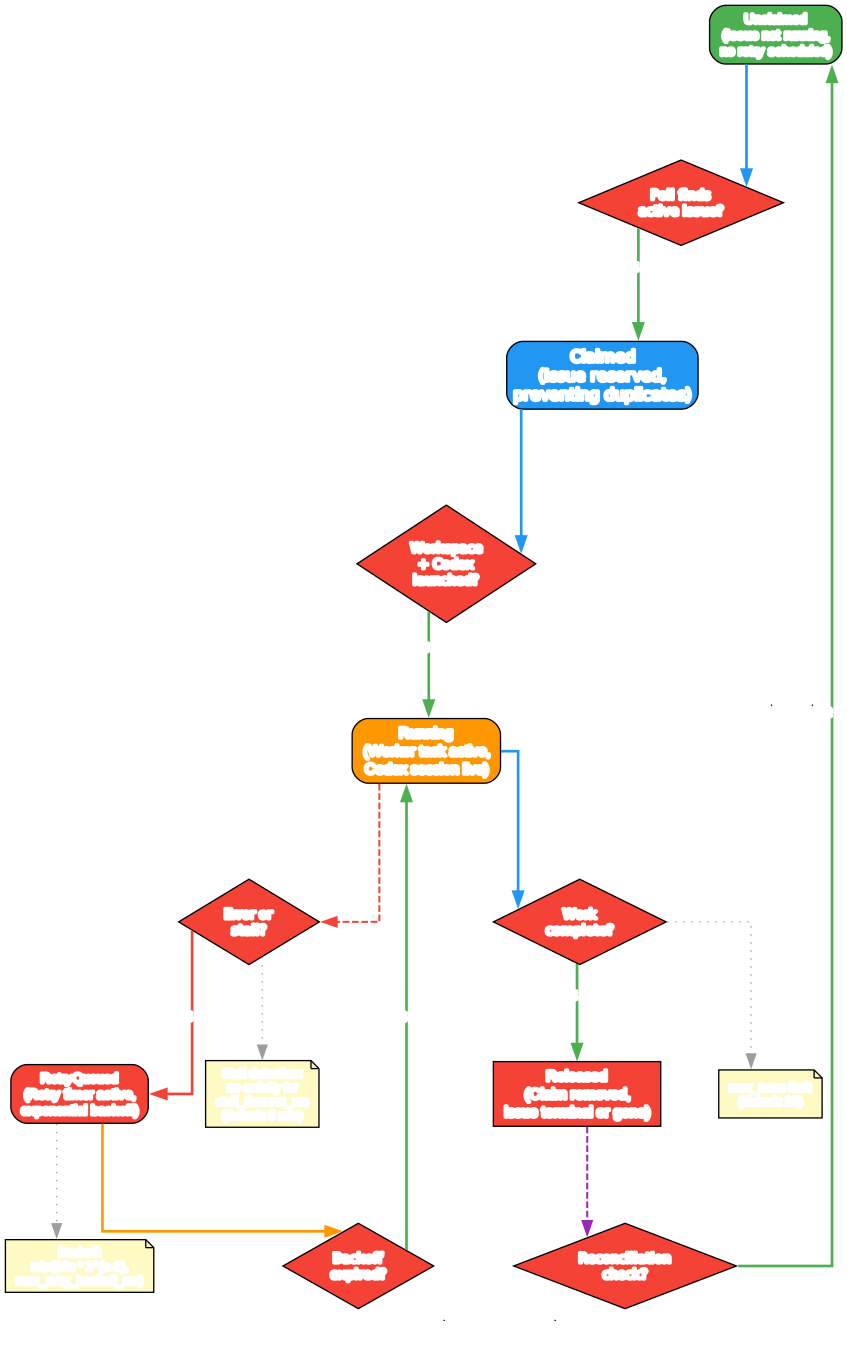
Understanding the Orchestration State Machine
The state machine diagram above shows the five orchestration states that Symphony uses to manage the lifecycle of each issue. These states are internal to the service and distinct from the tracker states (like “Todo” or “In Progress” in Linear). Understanding these states is essential for debugging, monitoring, and extending the orchestrator.
State 1: Unclaimed
An issue enters the Unclaimed state when it is not currently running and has no retry scheduled. This is the default state for any eligible issue that has not yet been picked up by the orchestrator. On each poll tick, the orchestrator evaluates unclaimed issues against dispatch eligibility rules: the issue must have required fields (id, identifier, title, state), its state must be in the configured active states and not in terminal states, it must not already be running or claimed, global and per-state concurrency slots must be available, and if the issue is in “Todo” state, it must not have any non-terminal blockers.
State 2: Claimed
When the orchestrator decides to dispatch an issue, it transitions the issue to Claimed. This reservation prevents duplicate dispatch, ensuring that only one agent session works on an issue at a time. In practice, claimed issues are either Running or RetryQueued, since the claim is held until the issue reaches a terminal state or is explicitly released.
State 3: Running
The Running state indicates that a worker task exists and the issue is tracked in the running map. The orchestrator monitors the agent session, tracking token consumption, turn counts, and the last Codex event timestamp. A key feature of the Running state is multi-turn continuation: when a coding-agent turn completes normally, the worker checks whether the issue is still in an active state. If so, it starts another turn on the same live thread, sending continuation guidance rather than resending the original task prompt. This allows the agent to work on complex issues across multiple turns without losing context.
State 4: RetryQueued
When a worker exits abnormally or a stall is detected, the issue transitions to RetryQueued. The orchestrator schedules a retry with exponential backoff: normal continuation retries use a short fixed delay of 1 second, while failure-driven retries use delay = min(10000 * 2^(attempt-1), max_retry_backoff_ms). The default maximum backoff is 5 minutes (300,000 ms). This ensures that transient failures are handled gracefully without overwhelming the system.
State 5: Released
An issue is Released when its claim is removed because the tracker state is terminal, no longer active, missing, or the retry path completed without re-dispatch. Released issues are no longer tracked by the orchestrator, and their workspaces may be cleaned up depending on the reason for release.
Takeaway: The 5-state model ensures that no issue is ever worked on by multiple agents simultaneously, that transient failures are handled with exponential backoff, and that terminal issues are cleaned up promptly. The orchestrator is the single authority for all state transitions, preventing race conditions and duplicate work.
End-to-End Workflow
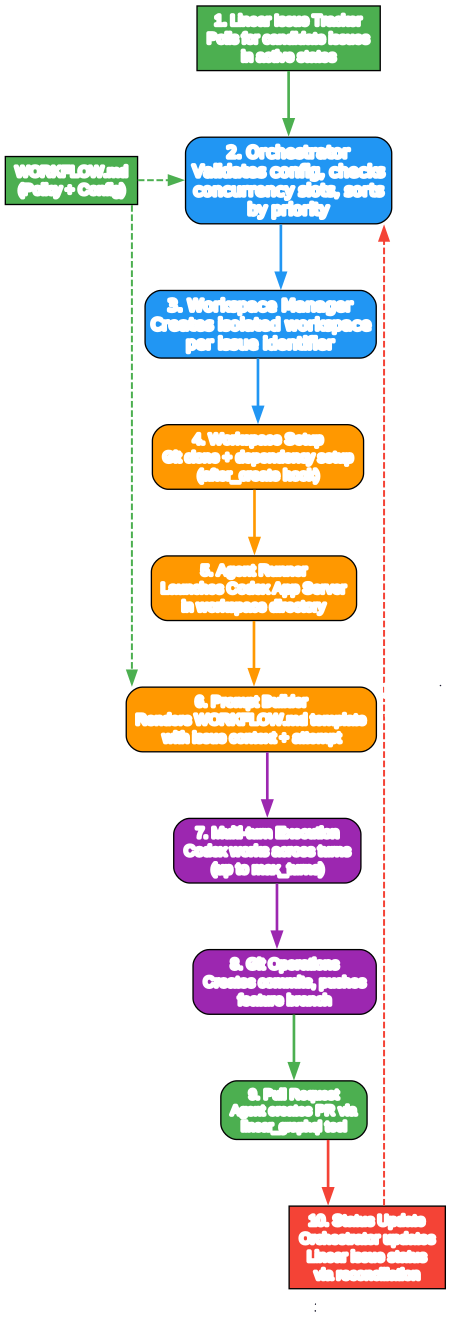
Understanding the End-to-End Workflow
The workflow diagram above illustrates the complete journey of an issue through Symphony, from initial detection in the tracker to final workspace cleanup. This end-to-end view shows how all the components work together to deliver autonomous coding agent orchestration.
Step 1: Issue Detection and Polling
The orchestrator begins each tick by polling the Linear API for candidate issues in configured active states (default: “Todo” and “In Progress”). The Linear adapter normalizes the raw GraphQL response into a stable issue model, extracting identifiers, titles, descriptions, priorities, labels, and blocker relationships. Issues are sorted by priority (ascending, with lower numbers being higher priority), then by creation date (oldest first), and finally by identifier as a tie-breaker.
Step 2: Dispatch Eligibility and Concurrency Control
Before dispatching, the orchestrator checks multiple eligibility conditions. The issue must have all required fields, its state must be in the active states list, it must not already be running or claimed, and both global and per-state concurrency slots must be available. A special rule applies to “Todo” state issues: they are not dispatched if any of their blockers are in a non-terminal state. This prevents agents from starting work on issues that depend on unfinished prerequisites.
Step 3: Workspace Creation and Hook Execution
Once an issue is eligible, the Workspace Manager creates a deterministic per-issue workspace directory under the configured root path. The workspace key is derived from the issue identifier by sanitizing characters (only [A-Za-z0-9._-] are allowed). If the workspace is newly created, the after_create hook runs, which typically clones the repository and sets up dependencies. Before each agent run, the before_run hook executes for additional preparation. These hooks are defined in WORKFLOW.md and run in the workspace directory with a configurable timeout (default: 60 seconds).
Step 4: Prompt Construction and Agent Launch
The Agent Runner builds the prompt from the workflow template, substituting issue-specific variables like ,, and ``. The prompt template supports Liquid-compatible semantics with strict variable checking: unknown variables or filters cause rendering to fail rather than silently producing incorrect output. The agent is launched as a Codex app-server subprocess in the workspace directory, with the rendered prompt sent as the first turn.
Step 5: Multi-Turn Execution and Reconciliation
During execution, the orchestrator continuously monitors the agent session. After each turn completes normally, the worker checks whether the issue is still in an active state. If so, it starts another turn on the same thread with continuation guidance, up to the configured max_turns limit (default: 20). This multi-turn approach allows the agent to work on complex issues that require multiple steps, such as writing code, running tests, fixing failures, and updating the tracker. Meanwhile, the reconciliation process runs on every tick, checking whether running issues have transitioned to terminal states in the tracker and terminating agents for issues that are no longer active.
Step 6: Completion, Retry, or Release
When a worker exits normally, the orchestrator schedules a short continuation retry (1 second) to re-check whether the issue remains active and needs another worker session. When a worker exits abnormally, exponential backoff is applied. If the tracker state becomes terminal, the agent is terminated and the workspace is cleaned up. If the tracker state becomes non-active but not terminal, the agent is terminated without workspace cleanup, preserving the work for potential future resumption.
Amazing: Symphony’s multi-turn Codex session management keeps the agent working across up to 20 consecutive turns on the same thread, maintaining full context throughout. This means complex tasks like “implement this feature, write tests, fix failures, and update the PR” can be completed autonomously without human intervention.
WORKFLOW.md Configuration
The WORKFLOW.md file is the central configuration point for Symphony. It combines YAML front matter for runtime settings with a Markdown body for the agent prompt template. Here is a minimal example:
---
tracker:
  kind: linear
  project_slug: "my-team/my-project"
  api_key: $LINEAR_API_KEY
  active_states:
    - Todo
    - In Progress
  terminal_states:
    - Done
    - Closed
    - Cancelled
polling:
  interval_ms: 30000
workspace:
  root: ~/code/workspaces
hooks:
  after_create: |
    git clone git@github.com:my-org/my-repo.git .
    cd my-repo && npm install
  before_run: |
    git pull origin main
agent:
  max_concurrent_agents: 10
  max_turns: 20
  max_retry_backoff_ms: 300000
codex:
  command: codex app-server
  turn_timeout_ms: 3600000
  stall_timeout_ms: 300000
---

You are working on a Linear issue .

Title:
Description:

Please implement the required changes, write tests, and update the PR.
The YAML front matter supports environment variable indirection using $VAR_NAME syntax, path expansion with ~, and dynamic reload without restart. When WORKFLOW.md changes on disk, the service detects the change and re-applies the configuration for future dispatches, retries, and agent launches. Invalid reloads do not crash the service; the last known good configuration remains active.
The Markdown body uses Liquid-compatible template syntax with strict variable checking. Available variables include issue (with all normalized fields) and attempt (null for first run, integer for retries). This allows the prompt to provide different instructions for first attempts versus retries:
You are working on a new issue. Please implement the required changes.
Installation and Setup
Prerequisites
Symphony works best in codebases that have adopted harness engineering practices. Before setting up Symphony, ensure your repository has:
- Clear project structure and dependency management
- Automated test suites that agents can run
- Linting and formatting configurations
- A Linear project with well-defined workflow states
Option 1: Build Your Own Implementation
The SPEC.md is language-agnostic and designed for portability. You can implement Symphony in any programming language:
# Clone the repository to access the specification
git clone https://github.com/openai/symphony
cd symphony

# Read the specification
cat SPEC.md
Then point your preferred coding agent at the specification:
Implement Symphony according to the following spec:
https://github.com/openai/symphony/blob/main/SPEC.md
Option 2: Use the Elixir Reference Implementation
The Elixir/OTP reference implementation provides a working orchestrator out of the box:
# Clone the repository
git clone https://github.com/openai/symphony
cd symphony/elixir

# Install mise for Elixir/Erlang version management
# See https://mise.jdx.dev/ for installation instructions

# Trust the mise configuration and install dependencies
mise trust
mise install

# Set up and build the project
mise exec -- mix setup
mise exec -- mix build

# Configure your Linear API key
export LINEAR_API_KEY="your-linear-api-key"

# Start Symphony with your WORKFLOW.md
mise exec -- ./bin/symphony ./WORKFLOW.md
Optional: Enable the Dashboard
To enable the Phoenix LiveView dashboard and JSON API:
# Start with the --port flag
mise exec -- ./bin/symphony ./WORKFLOW.md --port 4040
Or add server.port to your WORKFLOW.md front matter:
server:
  port: 4040
The dashboard provides real-time visibility into running sessions, retry queues, token consumption, and rate limits. The JSON API is available at /api/v1/state, /api/v1/<issue_identifier>, and /api/v1/refresh.
Key Features
| Feature | Description |
|---|---|
| Specification-first design | Language-agnostic SPEC.md defines every component, state, and contract |
| WORKFLOW.md hot-reload | Configuration changes detected and applied without restart |
| Multi-turn Codex sessions | Agents continue working across up to 20 turns on the same thread |
| 5-state orchestration | Unclaimed, Claimed, Running, RetryQueued, Released lifecycle |
| Exponential backoff retries | Failure-driven retries with configurable max backoff (default: 5 min) |
| Per-issue workspace isolation | Each issue gets its own workspace directory with safety invariants |
| Linear issue tracker integration | Polls Linear for candidate work, normalizes into stable issue model |
| Concurrency control | Global and per-state limits prevent resource exhaustion |
| Lifecycle hooks | after_create, before_run, after_run, before_remove for workspace customization |
| Phoenix LiveView dashboard | Real-time observability into sessions, retries, and token usage |
| JSON REST API | Programmatic access to orchestrator state at /api/v1/* |
| SSH worker extension | Remote execution over SSH with per-host concurrency caps |
| Elixir/OTP implementation | Hot code reloading, process supervision, fault tolerance |
| Apache License 2.0 | Fully open source for commercial and non-commercial use |
SSH Worker Extension
The Elixir reference implementation includes an SSH worker extension that allows agent execution on remote hosts. This enables distributed orchestration where the Symphony service runs on one machine while coding agents execute on remote workers over SSH connections. Each SSH host can have its own concurrency cap, and the extension handles connection management, authentication, and workspace synchronization across the SSH transport.
The SSH worker configuration is specified in WORKFLOW.md:
ssh:
  hosts:
    - host: worker1.example.com
      max_concurrent: 5
    - host: worker2.example.com
      max_concurrent: 3
This feature is particularly useful for teams that need to run agents on machines with specific hardware configurations, network access, or security boundaries.
Safety and Security
Symphony enforces several safety invariants to prevent agents from operating outside their designated scope:
Workspace Containment: The coding agent can only run inside the per-issue workspace path. Before launching, the system validates that the current working directory matches the workspace path and that the workspace path stays inside the configured root directory.
Workspace Key Sanitization: Only alphanumeric characters, dots, underscores, and hyphens are allowed in workspace directory names. All other characters are replaced with underscores to prevent path traversal attacks.
Hook Timeout Enforcement: All workspace hooks (after_create, before_run, after_run, before_remove) have a configurable timeout (default: 60 seconds). Hooks that exceed the timeout are terminated to prevent the orchestrator from hanging.
Secret Handling: Configuration values support $VAR_NAME indirection for environment variables. The system validates the presence of secrets without logging their values, and API tokens are never included in log output.
Important: Symphony is designed for trusted environments and explicitly documents its trust boundary. Implementations are expected to state whether they target trusted environments, restrictive environments, or both. The specification does not mandate a single approval, sandbox, or operator-confirmation policy, allowing teams to choose the security posture that matches their risk profile.
Failure Model and Recovery
Symphony defines a comprehensive failure model with clear recovery strategies for each failure class:
| Failure Class | Recovery Strategy |
|---|---|
| Workflow/Config failures | Skip dispatch, keep service alive, log errors |
| Workspace failures | Abort current attempt, schedule retry with backoff |
| Agent session failures | Exponential backoff retry, preserve workspace for continuation |
| Tracker API failures | Skip this tick, retry on next poll interval |
| Observability failures | Do not crash the orchestrator, continue processing |
On restart, the service recovers by performing terminal workspace cleanup, polling for active issues, and re-dispatching eligible work. No persistent database is required; the orchestrator rebuilds its state from the tracker and filesystem.
Conclusion
OpenAI’s Symphony represents a significant step forward in coding agent orchestration. By providing a detailed, language-agnostic specification alongside a working Elixir/OTP reference implementation, it enables teams to adopt autonomous coding workflows without being locked into a specific runtime. The specification-first approach means you can implement Symphony in Rust, Go, Python, or any language that supports long-running processes and subprocess management.
The 6-layer architecture cleanly separates concerns from policy (WORKFLOW.md) through configuration, coordination, execution, integration, and observability. The 5-state machine ensures that no issue is worked on by multiple agents simultaneously, that failures are handled with exponential backoff, and that terminal issues are cleaned up promptly. Multi-turn Codex sessions allow agents to work on complex tasks across up to 20 consecutive turns without losing context.
Whether you are a team looking to automate your Linear workflow, a platform engineer building agent orchestration infrastructure, or a researcher exploring autonomous coding systems, Symphony provides a solid foundation built on well-defined contracts and proven operational patterns.
Links:
- GitHub Repository: https://github.com/openai/symphony
- Specification: https://github.com/openai/symphony/blob/main/SPEC.md
- Elixir Implementation: https://github.com/openai/symphony/tree/main/elixir
- Harness Engineering Blog Post: https://openai.com/index/harness-engineering/
- Codex App Server Documentation: https://developers.openai.com/codex/app-server/

Enjoyed this post? Never miss out on future posts by following us


