Anthropic Knowledge Work Plugins: Open Source Plugins for Claude Cowork
Anthropic has open-sourced knowledge-work-plugins, a collection of 11 role-specific plugins that transform Claude from a general-purpose assistant into a specialist for your job function. Built for Claude Cowork, Anthropic’s agentic desktop application, these plugins also work in Claude Code, the terminal-based coding environment. With over 17,000 stars on GitHub and growing at more than 4,000 stars per week, this repository represents one of the most significant open-source contributions to AI-powered knowledge work to date.
What Are Knowledge Work Plugins?
Knowledge work plugins are structured bundles of domain expertise, tool integrations, and workflow automations that give Claude deep knowledge about specific job functions. Instead of prompting Claude from scratch every time, you install a plugin that encodes the best practices, terminology, and workflows of your role – whether you are a sales representative, financial analyst, product manager, or any other knowledge worker.
Each plugin follows a consistent structure:
plugin-name/
  .claude-plugin/plugin.json   # Manifest
  .mcp.json                    # Tool connections
  commands/                    # Slash commands you invoke explicitly
  skills/                      # Domain knowledge Claude draws on automatically
The key insight is that every component is file-based – markdown and JSON, no code, no infrastructure, no build steps. This makes plugins easy to understand, customize, and contribute to.
Architecture Overview
The plugin system operates on three layers that work together to deliver specialized AI assistance:
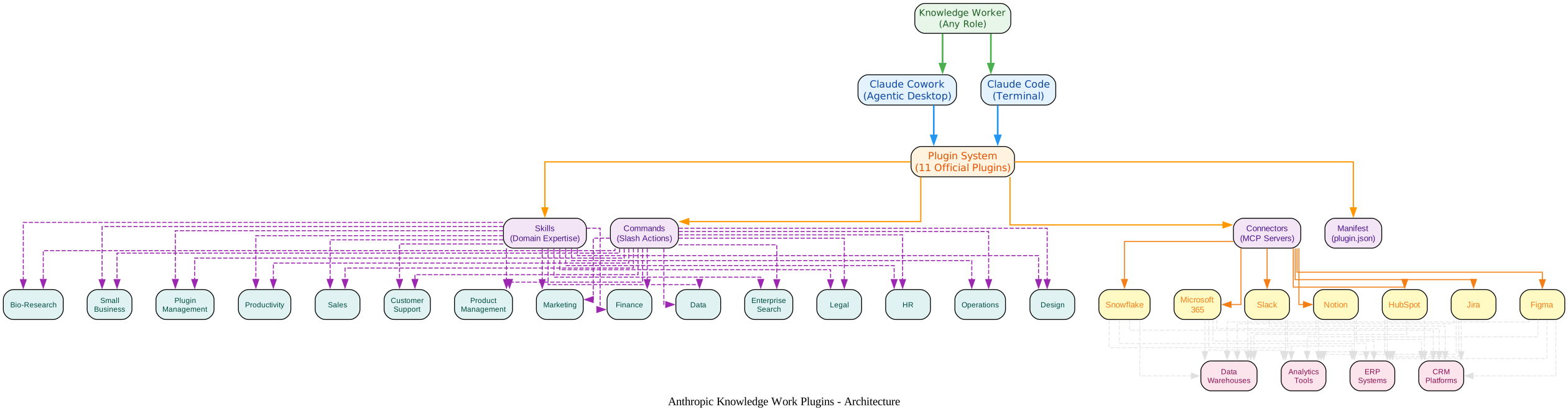
The architecture diagram illustrates how knowledge workers interact with Claude through two platforms – Cowork (the agentic desktop) and Claude Code (the terminal). Both platforms connect to the Plugin System, which manages 11 official plugins organized into four component types:
- Manifest (
plugin.json): Declares the plugin’s identity, version, and configuration - Skills: Markdown files encoding domain expertise that Claude draws on automatically when relevant
- Commands: Slash commands you invoke explicitly (e.g.,
/finance:reconciliation,/sales:pipeline-review) - Connectors: MCP (Model Context Protocol) server configurations that wire Claude to external tools like Slack, HubSpot, Snowflake, and Jira
Each plugin connects through MCP servers to real business tools. The Productivity plugin, for example, connects to Slack, Notion, Asana, Linear, Jira, Monday, ClickUp, and Microsoft 365. The Finance plugin connects to Snowflake, Databricks, and BigQuery for data warehouse access. This is not just chat – it is Claude acting on your behalf across your entire tool stack.
The 11 Official Plugins

The features diagram shows how the 11 plugins are organized into four categories, each with its core capabilities. Here is a detailed breakdown of every plugin:
Productivity
The Productivity plugin gives Claude a persistent understanding of your work. It includes:
- Task management: A markdown-based task list (
TASKS.md) that Claude reads, writes, and executes against - Workplace memory: A two-tier memory system that teaches Claude your shorthand, people, projects, and terminology
- Visual dashboard: A local HTML file providing a board view of tasks and a live view of what Claude knows about your workplace
Commands include /start (initialize tasks and memory), /update (triage stale items and check memory gaps), and /update --comprehensive (deep scan email, calendar, and chat for missed items).
Sales
The Sales plugin covers prospecting, outreach, pipeline management, call preparation, and deal strategy. It works standalone with web search and your input, and gets supercharged when you connect your CRM, email, and other tools.
Key commands: /call-summary (process call notes), /forecast (weighted sales forecast), /pipeline-review (pipeline health analysis).
Skills include account research, call preparation, daily briefings, outreach drafting, competitive intelligence, and custom asset generation.
Customer Support
The Customer Support plugin provides ticket triage, escalation management, response drafting, customer research, and knowledge base authoring. It connects to Intercom, HubSpot, Guru, Jira, Notion, and Microsoft 365.
Commands: /triage (categorize and prioritize tickets), /research (multi-source research), /draft-response (customer-facing responses), /escalate (package escalations for engineering), /kb-article (draft KB articles from resolved issues).
Product Management
The Product Management plugin covers the full PM workflow: writing feature specs, managing roadmaps, communicating with stakeholders, synthesizing user research, analyzing competitors, and tracking product metrics.
Commands: /write-spec, /roadmap-update, /stakeholder-update, /synthesize-research, /competitive-brief, /metrics-review, /brainstorm.
Marketing
The Marketing plugin handles content creation, campaign planning, brand voice management, competitive analysis, and performance reporting. It connects to Slack, Canva, Figma, HubSpot, Amplitude, Notion, Ahrefs, SimilarWeb, and Klaviyo.
Commands: /draft-content, /campaign-plan, /brand-review, /competitive-brief, /performance-report, /seo-audit, /email-sequence.
Legal
The Legal plugin automates contract review, NDA triage, compliance workflows, legal briefings, and templated responses. It is configurable to your organization’s specific playbook and risk tolerances.
Commands: /review-contract, /triage-nda, /vendor-check, /brief, /respond.
“Plugins are just markdown files. Fork the repo, make your changes, and submit a PR.” – Anthropic’s knowledge-work-plugins README
Finance
The Finance plugin supports month-end close, journal entry preparation, account reconciliation, financial statement generation, variance analysis, and SOX audit support. It connects to Snowflake, Databricks, BigQuery, Slack, and Microsoft 365.
Commands: /journal-entry, /reconciliation, /income-statement, /variance-analysis, /sox-testing.
Data Analyst
The Data Analyst plugin transforms Claude into a data analyst collaborator. It helps you explore datasets, write optimized SQL, build visualizations, create interactive dashboards, and validate analyses before sharing with stakeholders.
Commands: /analyze, /explore-data, /write-query, /create-viz, /build-dashboard, /validate.
Enterprise Search
Enterprise Search lets you search across all your company’s tools in one place – email, chat, documents, and wikis – without switching between apps. One query searches all connected sources simultaneously, and Claude synthesizes the results into a single coherent answer with source attribution.
Commands: /search (cross-source search), /digest (daily or weekly activity digest).
Bio-Research
The Bio-Research plugin consolidates 11 MCP server integrations and 5 analysis skills for life science researchers. It connects to PubMed, bioRxiv, ClinicalTrials.gov, ChEMBL, Open Targets, Benchling, and more.
Skills include single-cell RNA QC, scvi-tools analysis, Nextflow pipelines, instrument data conversion, and scientific problem selection.
Small Business
The Small Business plugin provides 15 building-block skills and 15 ready-to-use workflows with a natural language router. You do not need to memorize commands – just tell Claude what you need and it figures out the right workflow.
Commands cover money and finance (/plan-payroll, /month-heads-up, /close-month, /price-check, /tax-prep), sales and marketing (/call-list, /run-campaign, /sales-brief), customers and operations (/customer-pulse-check, /handle-complaint, /crm-cleanup, /review-contract), and business intelligence (/monday-brief, /friday-brief, /quarterly-review).
Additional Plugins and Partner Integrations
Beyond the 11 official plugins, the repository includes:
- Engineering: Skills for tech debt management and testing strategy
- Design: Design critique, design system management, UX writing, accessibility review, and developer handoff
- Human Resources: Offer letters, onboarding, performance reviews, policy lookup, compensation analysis, and people reporting
- Operations: Vendor review, process documentation, change management, capacity planning, status reports, and runbooks
- PDF Viewer: For working with PDF documents
- Partner-built plugins: Slack integration and Zoom plugin with full MCP support
- Cowork Plugin Management: Create new plugins or customize existing ones for your organization
Installation
Claude Cowork
Install plugins directly from the plugin marketplace:
Visit claude.com/plugins
Browse the collection and install the plugins relevant to your role.
Claude Code
Add the marketplace first, then install a specific plugin:
# Add the marketplace
claude plugin marketplace add anthropics/knowledge-work-plugins

# Install a specific plugin
claude plugin install sales@knowledge-work-plugins
Once installed, plugins activate automatically. Skills fire when relevant, and slash commands are available in your session (e.g., /sales:call-prep, /data:write-query).
How Plugins Work Under the Hood
Skills
Skills are markdown files that encode domain expertise. Claude draws on them automatically when relevant – you do not need to invoke them explicitly. For example, the Finance plugin’s reconciliation skill contains detailed methodology for GL-to-subledger reconciliation, bank reconciliation, and intercompany reconciliation, including categorization frameworks, aging analysis, and escalation thresholds.
Commands
Commands are explicit actions you trigger with a slash prefix. They chain multiple skills together into multi-step workflows. For example, /finance:reconciliation invokes the reconciliation skill with the appropriate context and guides you through the entire reconciliation process.
Connectors
Connectors wire Claude to external tools via MCP (Model Context Protocol) servers. Each plugin includes a .mcp.json file that specifies which tools it can connect to. The Productivity plugin, for instance, includes pre-configured connections to Slack, Notion, Asana, Linear, Atlassian (Jira/Confluence), Microsoft 365, Monday, and ClickUp.
“Every component is file-based – markdown and JSON, no code, no infrastructure, no build steps.” – Anthropic’s knowledge-work-plugins README
Customization and Extension
These plugins are generic starting points. They become much more useful when you customize them for how your company actually works:
- Swap connectors: Edit
.mcp.jsonto point at your specific tool stack - Add company context: Drop your terminology, org structure, and processes into skill files so Claude understands your world
- Adjust workflows: Modify skill instructions to match how your team actually does things
- Build new plugins: Use the
cowork-plugin-managementplugin or follow the standard structure to create plugins for roles and workflows not yet covered
The cowork-plugin-management plugin includes two skills: create-cowork-plugin (for building new plugins from scratch) and cowork-plugin-customizer (for customizing existing plugins). It also provides reference documentation for MCP servers, search strategies, component schemas, and example plugins.
Plugin Comparison Table
| Plugin | Primary Role | Key Commands | MCP Connectors |
|---|---|---|---|
| Productivity | Task and memory management | /start, /update | Slack, Notion, Asana, Linear, Jira, Monday, ClickUp, Microsoft 365 |
| Sales | Prospecting and pipeline | /call-summary, /forecast, /pipeline-review | Slack, HubSpot, Close, Clay, ZoomInfo, Notion, Jira, Fireflies, Microsoft 365 |
| Customer Support | Ticket triage and response | /triage, /research, /draft-response, /escalate, /kb-article | Slack, Intercom, HubSpot, Guru, Jira, Notion, Microsoft 365 |
| Product Management | Specs and roadmaps | /write-spec, /roadmap-update, /stakeholder-update, /synthesize-research, /competitive-brief, /metrics-review, /brainstorm | Slack, Linear, Asana, Monday, ClickUp, Jira, Notion, Figma, Amplitude, Pendo, Intercom, Fireflies |
| Marketing | Content and campaigns | /draft-content, /campaign-plan, /brand-review, /competitive-brief, /performance-report, /seo-audit, /email-sequence | Slack, Canva, Figma, HubSpot, Amplitude, Notion, Ahrefs, SimilarWeb, Klaviyo |
| Legal | Contract review and compliance | /review-contract, /triage-nda, /vendor-check, /brief, /respond | Slack, Box, Egnyte, Jira, Microsoft 365 |
| Finance | Close and reconciliation | /journal-entry, /reconciliation, /income-statement, /variance-analysis, /sox-testing | Snowflake, Databricks, BigQuery, Slack, Microsoft 365 |
| Data Analyst | SQL and dashboards | /analyze, /explore-data, /write-query, /create-viz, /build-dashboard, /validate | Snowflake, Databricks, BigQuery, Definite, Hex, Amplitude, Jira |
| Enterprise Search | Cross-tool search | /search, /digest | Slack, Notion, Guru, Jira, Asana, Microsoft 365 |
| Bio-Research | Life sciences R&D | /start | PubMed, bioRxiv, ChEMBL, Open Targets, Benchling, and 6 more |
| Small Business | 15 integrated workflows | /plan-payroll, /call-list, /handle-complaint, /monday-brief, and 11 more | QuickBooks, PayPal, HubSpot, Canva, Gmail, Slack, Stripe, Square, DocuSign |
Real-World Example: Productivity Plugin
The Productivity plugin demonstrates the power of the plugin system. When you run /start, Claude:
- Checks for existing
TASKS.md,CLAUDE.md,memory/directory, anddashboard.html - Creates any missing files from templates
- Opens the visual dashboard in your browser
- If memory has not been bootstrapped, begins an interactive process of learning your workplace shorthand
The memory system is particularly clever. It uses a two-tier approach:
- Working memory (
CLAUDE.md): A concise file with your name, role, key people, terms, and projects - Deep memory (
memory/directory): Individual files for people, projects, and company context
Once memory is populated, you can say things like “ask Todd to do the PSR for Oracle” and Claude knows exactly who Todd is, what a PSR is, and which Oracle deal you are referring to – no clarifying questions needed.
Standalone vs. Supercharged
Every plugin works without any integrations. You can paste data, upload files, or describe your situation manually. But when you connect your tools via MCP, the plugins become significantly more powerful:
| What You Can Do | Standalone | Supercharged With |
|---|---|---|
| Process call notes | Paste notes/transcript | Transcripts MCP (Gong, Fireflies) |
| Forecast pipeline | Upload CSV, paste deals | CRM MCP (HubSpot, Close) |
| Review contracts | Upload PDF or paste text | Cloud storage MCP (Box, Egnyte) |
| Search across tools | Describe what you need | All connected sources simultaneously |
| Build dashboards | Upload CSV/Excel | Data warehouse MCP (Snowflake, BigQuery) |
Getting Started
- Choose your plugin: Browse the repository on GitHub and pick the plugin(s) relevant to your role
- Install: Use
claude plugin marketplace add anthropics/knowledge-work-pluginsin Claude Code, or browse the marketplace in Cowork - Connect your tools: Edit
.mcp.jsonto add your MCP server connections - Customize: Add your company context, terminology, and processes to skill files
- Start working: Use slash commands or just talk naturally – Claude will draw on the right skills automatically
Why This Matters
The knowledge-work-plugins repository represents a fundamental shift in how we interact with AI. Instead of prompting an AI assistant from scratch every time, plugins encode domain expertise persistently. The result is an AI that understands your role, speaks your language, and knows your tools.
With 11 plugins covering roles from sales to bio-research, MCP integrations with dozens of business tools, and a file-based architecture that makes customization trivial, Anthropic has created a framework that any knowledge worker can adopt immediately and any organization can tailor to their specific workflows.
The repository is open source under Apache 2.0, meaning you can fork, modify, and contribute back. Whether you are a solo knowledge worker looking to boost productivity or an enterprise team wanting to standardize AI-assisted workflows, knowledge-work-plugins provides the foundation.
Repository: github.com/anthropics/knowledge-work-plugins
| Stars: 17,000+ | License: Apache 2.0 | Language: Markdown/JSON (no runtime code) |

Enjoyed this post? Never miss out on future posts by following us


